Miele Scout RX3 Home Vision - Manuals
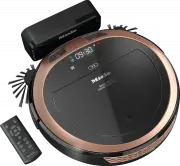
User Manual Miele Scout RX3 Home Vision
Summary
en-US - IMPORTANT SAFETY INSTRUCTIONS 5 READ ALL INSTRUCTIONS BEFORE USING THIS APPLI-ANCE This robot vacuum cleaner complies with all current local and na-tional safety requirements. Improper use can lead to personal in-jury and damage to property. Please read the operating instructions before usin...
en-US - IMPORTANT SAFETY INSTRUCTIONS 6 The robot vacuum cleaner must only be used for domestic house- hold purposes to vacuum dry floor surfaces. Any other usage, modi-fication or alteration is not supported by the manufacturer and couldbe dangerous. The packaging material protects the robot va...
en-US - IMPORTANT SAFETY INSTRUCTIONS 7 To reduce the risk of electric shock, this appliance has a polarized plug (one blade is wider than the other.) This plug will fit in a polar-ized outlet only one way. If the plug does not fit fully in the outlet, re-verse the plug. If it still does not fit, ...
en-US - IMPORTANT SAFETY INSTRUCTIONS 9 Do not allow the robot vacuum cleaner to move any movable items, e.g., rugs, doormats, etc. Secure any movable items. Do not use the robot vacuum cleaner to vacuum up anything which has been burning or is still glowing e.g., cigarettes, ashes, orcoal, whet...
en-US - IMPORTANT SAFETY INSTRUCTIONS 11 Stop using the rechargeable battery immediately if you notice an unusual smell from it, if liquid is leaking from it, if it is significantlyoverheating, or if it is discolored or deformed. Dispose of the batteryimmediately (see safety note “Disposing of the...
en-US - IMPORTANT SAFETY INSTRUCTIONS 12 Disposing of the batteries and the rechargeable battery: remove the rechargeable battery from the robot vacuum cleaner and the bat-teries from the remote control. Insulate the metal contacts with ad-hesive tape to prevent short circuits. Dispose of the batt...
en-US - Appliance overview 14 Illustrations A, B and C for this section are on the pull-out pages in the back ofthese operating instructions. A – Robot vacuum cleaner top and bottom a Display b WiFi display c Video function indicator (for Scout RX3 Home Vision HD) d Clock mode display (am/pm) e Came...
en-US 16 Functions and features of therobot vacuum cleaner The robot vacuum cleaner is suitable forthe daily cleaning of hard floors, wall-to-wall carpets, and short-pile rugs andcan also be used on deep-pile rugs. Please observe the flooring manufac-turer’s cleaning and care instructions. The robot...
en-US 19 Adhesive strips are supplied for perma-nent fixing. Additional magnetic stripsare available to order from the Mielewebstore. Use Always observe the robot vacuumcleaner during the first cleaning ses-sion in a new environment and aftermaking changes in your home. Re-move any problematic obsta...
en-US 27 Maintenance Risk of injury caused by rotating roller brush.The robot vacuum cleaner may startwithout warning while maintenancework is being carried out.Switch the robot vacuum cleaner offbefore doing any maintenance work.To switch it off, slide the I / 0 switch on the side of the robot va...
en-US 33 Scout RX3 Runner and Scout RX3Home Vision HD (YCR-MT12 or AP30) Carefully remove the rechargeablebattery using the tab until the plugconnection is exposed. Press the latch on the plug connec-tion in order to release the electricalplug. Insert the electrical plug of the newrechargeable...
en-US 34 Damage due to unsuitable clean- ing agents.All surfaces are susceptible toscratching. Contact with unsuitablecleaning agents can alter or discolorthe external surfaces.Do not use abrasive cleaning agents,glass cleaning agents, all-purposecleaners, or oil-based care products. Storage/facto...
en-US 35 Frequently asked questions Many malfunctions and faults that can occur in daily operation can be easily reme-died. You can save time and money in many cases, as you do not need to contactMiele Customer Service. Information to help you rectify faults yourself can be found at www.miele.com/se...
en-US 38 Fault messages Risk of injury caused by rotating roller brush. The robot vacuum cleaner may start without warning while errors are beingdealt with.Switch the robot vacuum cleaner off before dealing with any faults. To switch itoff, slide the I / 0 switch on the side of the robot vacuum cl...
en-US 39 Problem Possible cause and solution F 7 Internal system error or fault “Robot vacuum cleaneroutside of its permitted ambient operating tempera-ture” Switch the robot vacuum cleaner off and on again( I / 0 switch). F 8 “Front wheel dirty” fault Check if the front wheel, the cover, or the...
en-US 40 Copyright and licenses For the purpose of operating and controlling the robot vacuum cleaner, Miele usesproprietary or third-party software that is not covered by open-source licensingterms. This software/these software components are protected by copyright. Thecopyrights held by Miele and ...
en-CA - Warning and Safety instructions 46 WARNINGTo reduce the risk of fire, electric shock or injury: Check the voltage rating of the vacuum cleaner before connecting the power cord to an electrical outlet. Your power source shouldcorrespond with the voltage rating plate located on the underside...
en-CA - Warning and Safety instructions 47 Compare the connection data on the data plate of the robot vacuum cleaner and the power supply unit (mains voltage andfrequency) with that of the domestic electrical supply. This data mustmatch exactly. Store the robot vacuum cleaner at an ambient tempe...
en-CA - Caring for the environment 52 Disposing of sales packaging The packaging material protects therobot vacuum cleaner from transportdamage. The packaging materials usedare selected from materials which areenvironmentally friendly for disposaland can therefore be recycled.Recycling the packaging...
en-CA - Caring for the environment 53 Disposal of old batteries Many electrical and electronicappliances contain batteries whichmust not be disposed of withhousehold waste after use. You arelegally obliged to remove any oldbatteries which are not securelyenclosed by the appliance and takethem to a s...
en-CA 73 Scout RX3 (YCR-M05 or AP20) Carefully pull the power supplycables so that the plug connection ispulled out of the slot. Press the latch on the plugconnection in order to release theplug. Remove the rechargeable battery. Insert the plug of the newrechargeable battery into thecounterp...
en-CA 74 Maintenance Risk of injury caused by rotating roller brush.The robot vacuum cleaner may startwithout warning while maintenancework is being carried out.Switch the robot vacuum cleaner offbefore doing any maintenance work.To switch it off, press the I / 0 switch on the side of the robot ...
en-CA 75 Factory default settings The robot vacuum cleaner can be resetto its factory default settings. Have theremote control to hand. Press and hold the Spot and Turbo sensors in the control field at the same time for at least 5 seconds. r:St will appear in the display. Within the next 2 seco...
en-CA 76 Problem solving guide Many malfunctions and errors that can occur in daily operation can be easilyremedied. You can save time and money in many cases, as you do not need tocontact Miele Customer Service. Information to help you rectify malfunctions yourself can be found atwww.miele.com/serv...
fr-CA - CONSIGNES DE SÉCURITÉ IMPORTANTES 86 LISEZ ATTENTIVEMENT TOUTES LES INSTRUCTIONSAVANT D'UTILISER L'APPAREIL Cet aspirateur robot est conforme à l’ensemble des exigences ré-glementaires locales et nationales en vigueur en matière de sécu-rité. Une utilisation inappropriée de l’appareil peut e...
fr-CA - CONSIGNES DE SÉCURITÉ IMPORTANTES 87 Le robot aspirateur ne doit être utilisé que pour des applications domestiques pour aspirer les planchers secs. Ne l'utilisez pas pouraspirer sur les personnes ou les animaux. Toute autre utilisation oumodification n'est pas recommandée par le fabricant...
fr-CA - CONSIGNES DE SÉCURITÉ IMPORTANTES 88 AVERTISSEMENTPour diminuer le risque d'incendie, de décharge électriqueou de blessure, respectez les instructions ci-après : Vérifiez la tension nominale de l’aspirateur avant de brancher le cordon d’alimentation dans une prise électrique. Votre source ...
fr-CA - CONSIGNES DE SÉCURITÉ IMPORTANTES 90 Nettoyage N'immergez pas l'aspirateur robot ou les pièces fournies dans de l'eau. Nettoyez toutes les pièces uniquement avec un chiffon sec oulégèrement humide. Utilisation correcte N'utilisez pas l'aspirateur-robot sans le bac à poussière, le pré- fi...
fr-CA - CONSIGNES DE SÉCURITÉ IMPORTANTES 91 N’utilisez pas l’aspirateur robot pour aspirer de liquides ou de gaz inflammables ou combustibles, et ne le passez pas dans les zonesoù ces substances sont stockées. Ne vous asseyez pas ou ne vous couchez pas sur la surface à nettoyer pendant le fonct...
fr-CA - CONSIGNES DE SÉCURITÉ IMPORTANTES 93 Les batteries et les piles rechargeables s’épuisent au fil du temps. Le liquide corrosif qui s’y trouve est alors susceptible de fuir. Éviteztout contact de ce liquide avec les yeux et la peau. En cas decontact avec les yeux, rincez immédiatement à gran...
fr-CA - Protection de l’environnement 94 Élimination de l’emballage L’emballage protège l’aspirateur robotcontre d’éventuels dégâts pendant letransport. Les matériaux d’emballageutilisés sont sélectionnés en fonction decritères écologiques pour en faciliter lerecyclage.Le recyclage de l’emballage pe...
fr-CA 101 L’aspirateur robot ne franchira pas cettebande magnétique. Pour délimiter une zone de façon per-manente, utilisez les rubans adhésifsfournis. Vous pouvez aussi vous procu-rer des bandes magnétiques auprès dela boutique en ligne Miele. Utilisation Observez toujours votre aspirateurrobot la ...
fr-CA 109 La caméra de droite située à l’avant del’aspirateur robot envoie des imageschiffrées en temps réel au terminal mo-bile sélectionné. La qualité de la trans-mission dépend du débit de votreconnexion Internet domestique et de larapidité de votre terminal mobile.Le témoin de la fonction vidéo ...
fr-CA 115 Remplacement des piles de la télé-commande 2 piles (AAA, 1,5 V) sont requises. Respectez les instructions concernantla manipulation et l’élimination despiles qui se trouvent dans les sections« Consignes de sécurité et mises engarde » et « Protection de l’environne-ment » au début de ce mod...
fr-CA 116 Scout RX3 (YCR-M05 ou AP20) Retirez les câbles d’alimentation avecprécaution afin que le connecteursorte de la fente. Appuyez sur la languette du connec-teur pour détacher la fiche. Sortez la batterie rechargeable. Insérez la fiche de la nouvelle batterierechargeable dans la prise,...
fr-CA 117 Nettoyage et entretien Risque de blessures dues à la rotation de la brosse cylindrique.L’aspirateur robot peut se mettre enmarche sans prévenir pendant quedes opérations d’entretien sont ef-fectuées.Mettez l’aspirateur robot hors tensionavant d’effectuer tout travail d’entre-tien. Pour c...
fr-CA 118 Réglages d’usine Tous les réglages par défaut peuventêtre rétablis sur l’aspirateur robot. Mu-nissez-vous de la télécommande. Appuyez et maintenez simultanémentpendant au moins 5 secondes lestouches sensitives Spot et Turbo du panneau de commande. r:St s’affiche à l’écran. Dans les 2 s...
fr-CA 119 Guide de dépannage De nombreux dysfonctionnements et erreurs pouvant survenir au quotidienpeuvent être résolus facilement. Dans bon nombre de cas, cela vous permetd’économiser du temps et de l’argent, car vous n’avez pas besoin de faire appelau service à la clientèle Miele. Vous pouvez tro...
fr-CA 122 Messages d’erreur Risque de blessures dues à la rotation de la brosse cylindrique. L’aspirateur robot peut se mettre en marche sans prévenir pendant que les er-reurs sont traités.Mettez l’aspirateur robot hors tension avant de résoudre une erreur quelconque.Pour cela, glissez le bouton I...
fr-CA 123 Problème Cause et solution possibles F 7 Erreur système interne ou erreur « Aspirateur roboten dehors de la température ambiante de fonctionne-ment autorisée » Éteignez l’aspirateur robot, puis rallumez-le (bou-ton I / 0 ). F 8 Erreur « Roue avant sale » Vérifiez si la roue avant, le c...
fr-CA 124 Droit d'auteur et licences Miele utilise son propre logiciel ou un logiciel tiers non couvert par une licenceopen source, pour faire fonctionner et contrôler l’aspirateur robot. Ce logiciel/Cescomposants logiciels sont soumis à des droits d’auteur. Les droits d’auteur déte-nus par Miele et...
fr-CA - Garantie restreinte – Aspirateurs Canada 12 5 Les conditions de la garantie suivante sont valides au Canada seulement. Miele Limitée, (ci-après nommée "Miele") garantit à l’acheteur original que ce produit, y compris tous ses accessoires et pièces autorisés par Miele, est libre de to...
ImportateurMiele limitée Siège social au Canada et Centre Miele 161 Four Valley DriveVaughan, ON L4K 4V8www.miele.ca Service à la clientèle Téléphone : 1-800-565-6435[email protected] Canada Veuillez indiquer le modèle et le numéro de série de votre appareil lorsque vous contactez le service à la cl...
9 Independence WayPrinceton, NJ 08540www.mieleusa.com U.S.A. Miele, Inc. National Headquarters Please have the model and serial numberof your appliance available whencontacting Customer Service. Canada ImporterMiele Limited Headquarters and Miele Centre Customer Support Phone: 888-99-MIELE (64353)[e...
Miele Manuals
-
Miele APCL 043
User Manual
-
Miele APWM 065
Installation Manual
-
Miele APWM 070
Installation Manual
-
Miele SC
Installation Manual
-
Miele PR
Installation Manual
-
Miele APCL 047
User Manual
-
Miele PLW 8505
Installation Manual
-
Miele PT 7186 Vario [EL]
User Manual
-
Miele CM/1
User Manual
-
Miele PLW 8617 [EL/S TH]
Installation Manual
-
Miele PWM 908 [EL DP MAR 3 AC 400-480V 50-60Hz]
User Manual
-
Miele PWM 906 [EL DP MAR 3 AC 400-480V 50-60Hz]
Installation Manual
-
Miele PWM 906 [EL DP MAR 2N AC 400V 50-60Hz]
User Manual
-
Miele PLW 8617 [EL TH]
User Manual
-
Miele PDR 908 [EL MAR 3N AC 400V 50-60Hz]
Installation Manual
-
Miele PLW 8615 [EL CT]
Installation Manual
-
Miele PLW 8616 [EL/S]
Installation Manual
-
Miele PWM 916 [EL DV DD SOM]
Manual
-
Miele PFD 104 SCVi XXL [120V]
Installation Manual
-
Miele PDR 507 HP [MAR]
User Manual