Page 3 - Contents
Contents 3 PRECAUTIONS TO AVOID POSSIBLE EXPOSURE TO EXCESSIVEMICROWAVE ENERGY ............................................................................................... 2 IMPORTANT SAFETY INSTRUCTIONS ................................................................... 6 Before using for the fi...
Page 4 - Settings; Language; Operation
Contents 4 Settings ........................................................................................................................... 34 Settings overview ........................................................................................................... 34 Accessing the “Settings”...
Page 5 - Additional applications
Contents 5 Recipes ............................................................................................................................ 47 Potatoes in a curry sauce ........................................................................................ 48 Chicken breast in mustard sauce ......
Page 6 - IMPORTANT SAFETY INSTRUCTIONS; Appropriate use
IMPORTANT SAFETY INSTRUCTIONS 6 When using the appliance, follow basic safety precautions, including thefollowing:Read all instructions before installation and use of the oven to preventaccidents and machine damage.WARNING - To reduce the risk of burns, electric shock, fire, injury to persons,or exp...
Page 7 - Safety with children
IMPORTANT SAFETY INSTRUCTIONS 7 This microwave oven can only be used by people with reduced physical, sensory, or mental capabilities or lack of experience andknowledge if they are supervised while using it.They may only use it unsupervised if they have been shown how todo so in a safe manner. The...
Page 10 - Correct use
IMPORTANT SAFETY INSTRUCTIONS 10 If the microwave oven is built in behind a cabinet door front, do not close the cabinet door while the microwave oven is in use. Heat andmoisture can build up behind the cabinet door when closed. This canresult in damage to the microwave oven, cabinet niche, and fl...
Page 12 - This is
IMPORTANT SAFETY INSTRUCTIONS 12 Risk of injury caused by hot food. When you heat food up, the heat is created directly in the food itself. For this reason, the dishware willremain cooler than the food (except when you use ovenproofstoneware). The dishware is only warmed by the heat of the food.Be...
Page 13 - The following applies to stainless steel surfaces:
IMPORTANT SAFETY INSTRUCTIONS 13 Moisture can collect in the hollow spaces on dishware and lids with hollow handles or knobs. When the moisture evaporates,pressure can build up and the item can explode. If the hollow recessis sufficiently ventilated, the item can be used.Do not use dishware with h...
Page 14 - Cleaning and care
IMPORTANT SAFETY INSTRUCTIONS 14 Magnets can cause scratches. Do not use the stainless steel surface as a magnetic notice board. Cleaning and care Risk of injury due to electric shock. The steam from a steam cleaning appliance could reach live electrical components and causea short circuit. Neve...
Page 15 - Before using for the first time; Risk of suffocation from; Never; remove the cover from the
Before using for the first time 15 It is important to allow thetemperatures of the microwave ovenand the room to equalize. Otherwise,the appliance electronics may notfunction correctly.After transportation, let the unpackedmicrowave oven stand for approx.2 hours at room temperature beforeusing it. ...
Page 16 - Installation; Installation dimensions; Installation in a tall or base cabinet
Installation *INSTALLATION* 16 When installing the microwave oven, ensure that there is unhindered ventilationat the front of the appliance.Do not block the ventilation slots with any objects. Installation dimensions Installation in a tall or base cabinet Miele microwave ovens can be installed flush...
Page 17 - Side view
Installation *INSTALLATION* 17 Side view A M 72xx: 1 7/8" (47 mm)
Page 18 - Connections and ventilation; Electrical connection
Installation *INSTALLATION* 18 Connections and ventilation The outlet for the electrical connection should be accessible, e.g., in anadjacent kitchen cabinet. If the electrical connection is behind the microwaveoven, the kitchen cabinet needs to be deeper than specified. E Electrical connection
Page 19 - Installing the microwave oven
Installation *INSTALLATION* 19 Installing the microwave oven For safety reasons, only use themicrowave oven when it has beenfully installed. Securing the microwave oven in thecabinet niche Connect the microwave oven to thepower supply. Do not carry the microwave oven bythe door handle. This could ...
Page 20 - Risk of injury due to electric
Installation *INSTALLATION* 20 Electrical connection Risk of injury due to electric shock.During installation, maintenance, andrepair work, the microwave ovenmust be completely disconnectedfrom the power supply:Disconnect the microwave oven fromthe power supply by tripping thebreakers, or unpluggi...
Page 21 - Risk of injury caused by a
Installation *INSTALLATION* 21 Risk of injury caused by a damaged microwave oven.Damage to the microwave oven cancompromise your safety.Check the microwave oven for visiblesigns of damage. Do not use adamaged microwave oven. The microwave oven is supplied with aplug for connection to a dedicated l...
Page 22 - Caring for the environment; Disposal of the packing material
Caring for the environment 22 Disposal of the packing material The cardboard box and packingmaterials protect the appliance duringshipping. They have been designed tobe biodegradable and recyclable.Ensure that any plastic wrappings, bags,etc. are disposed of safely and kept outof the reach of childr...
Page 23 - Overview; Microwave oven; Controls
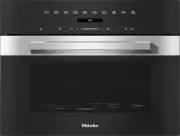
Overview 23 Microwave oven a Controls b Front frame and data plate with model identifier and serial numberConnection data (voltage/frequency/max. rated load): see back of the appliance c Turntable d Door
Page 24 - Control panel; OK
Control panel 24 a Recessed On/Off button For turning the microwave oven onand off b sensor button For starting the Quick MW function c DisplayFor displaying the time of day andinformation on operation d sensor button For going back a step and forcanceling a cooking program e Navigation are...
Page 25 - The; Display; will appear in the main; Sensor buttons; Sensor controls above the display; For starting the Popcorn function
Control panel 25 On/Off button The On/Off button is recessed and reacts to touch.Use this button to turn the microwaveoven on and off. Display The display is used for showing the timeof day or information about operatingmodes, cooking durations, automaticprograms, and settings.After turning the m...
Page 26 - Sensor buttons under the display; Symbols; Symbol
Control panel 26 Sensor buttons under the display Sensor button Function Use this sensor button to start the Quick MW function. The cooking process runs with maximum power level (900 W) and a cooking duration of 1 minute (see section “Quick MW”).Touching the sensor button repeatedly increases t...
Page 27 - Using the appliance; Selecting a menu option; Changing a setting in a list
Using the appliance 27 Use the and arrow buttons or the area between them in the navigation area to use the microwaveoven.As soon as you reach a confirmablevalue, message, or setting, the OK sensor button will light up orange. Selecting a menu option Touch the or arrow b...
Page 28 - Changing the operating mode; Entering numbers
Using the appliance 28 Selecting an operating mode orfunction The sensor controls for the operatingmodes and functions (e.g., More ) are located above the display (see“Operation” and “Settings”). Touch the sensor control for thedesired operating mode or function. The sensor control on the cont...
Page 29 - Microwave operation; How it works; Advantages of the microwave oven; - Food can generally be cooked with; Suitable dishware; Danger of injury from increased
Microwave operation 29 How it works The microwave oven contains amagnetron that converts electricalenergy into electromagnetic waves(microwaves). These microwaves aredistributed evenly throughout the ovencompartment and are also reflected bythe metal walls inside the oven. The microwaves penetrate t...
Page 31 - Unsuitable dishware
Microwave operation 31 Tip: Metallic dishes are not very suitable for use in the microwave oven. Metalreflects microwaves and obstructs thecooking process. Using aluminum foil trays andaluminum foil can cause cracklingand sparks.Place aluminum foil trays on theturntable.Aluminum foil and aluminum fo...
Page 32 - Testing dishware
Microwave operation 32 Testing dishware Unsuitable dishware can cause sparksor crackling noises during microwaveoperation. If you are not sure whetherglass, porcelain, or stoneware dishwareis suitable, test it. This test cannot be used to checkwhether items with hollow grips orhandles are suitable f...
Page 33 - Before first use; Basic settings; Danger of injury caused by hot; Setting the language; Select the desired language.; Setting the location; Select the required location.; Setting the time; Confirm with
Before first use 33 Basic settings You must make the following settingsbefore starting up for the first time. Youcan change these settings again at alater time (see “Settings”). Danger of injury caused by hot surfacesThe microwave oven gets hot duringoperation.For safety reasons, the microwaveoven...
Page 34 - Settings overview; Menu option
Settings 34 Settings overview Menu option Available settings Language ... | deutsch | english | ... Location Time Display Clock display Off * | Clock display On | Night dimming Time 12 h * | 24 h Set Volume Buzzer tones Keypad tone Display brightness ...
Page 35 - Accessing the “Settings” menu; Volume; Buzzer tones; Display brightness
Settings 35 Accessing the “Settings” menu The More | Settings menu allows you to personalize your microwave ovenby adapting the factory default settingsto suit your requirements. You cannot change settings while acooking process is in progress. Select More . Select Settings . Sele...
Page 36 - Units; Weight; Keeping Warm
Settings 36 Units Weight When using automatic programs andother modes, you can set the weight offood in grams ( g ), pounds/ounces ( lb/ oz ), or pounds ( lb ). Keeping Warm At the end of a cooking process atmicrowave power level (450 W) or higher and a cooking duration of10 minutes or more, the ...
Page 37 - Safety; Sensor lock; System lock; Showroom program; Demo mode; Factory default
Settings 37 Safety Sensor lock The sensor lock prevents the cookingprocess from being switched off bymistake or settings from being changed.When activated, the sensor lock takeseffect a few seconds after a cookingprocess has been started, therebydisabling all sensor controls and fieldson the display...
Page 38 - Using the turntable; Always
Operation 38 Tips for cooking with themicrowave - You can choose from 7 different microwave power levels. The higherthe power level, the more microwavesreach the food. - When heating up foods that cannot be stirred or turned during cooking, orfoods with very differentconsistencies, it is best to use...
Page 39 - Changing the microwave power level
Operation 39 With microwave power level (900 W), the cooking duration islimited to 15 minutes.The other microwave power levelsallow you to set a cooking duration ofup to 90 minutes.Operating the microwave continuouslyat full power may result in the powerlevel being reduced by the overheatingprote...
Page 40 - Changing set cooking durations; Deleting the set cooking durations
Operation 40 - Duration Enter the required cooking durationfor the food. The cooking process willstop automatically once this durationhas elapsed. The maximum cookingduration that can be set depends onthe operating mode that you haveselected. - Finish at Specify when you want the cookingprocess to f...
Page 41 - . If you do not close the; Canceling a cooking process; will appear on the display.
Operation 41 Interrupting and resuming acooking process You can interrupt a cooking process(and resume it) at any time. Open the door during the cookingprocess. The cooking process is interrupted andthe cooking duration is paused.The following message is displayed: Close the door . If you do not c...
Page 42 - Timer; Using the Timer function
Timer 42 Using the Timer function The timer can be used to time other activities in the kitchen, e.g., boilingeggs.The timer can also be used at the sametime as a cooking process for whichautomatic start and finish times havebeen set (e.g., as a reminder to stir thefood or add seasoning, etc.). ...
Page 43 - Quick MW and Popcorn; Popcorn; centrally
Quick MW and Popcorn 43 These functions can only be usedwhen no other cooking processes arein use. Quick MW If you select the sensor control, the microwave starts with a set microwavepower level and cooking duration, e.g.,to reheat a drink.The maximum microwave power levelof (900 W) and a cook...
Page 45 - Automatic Programs; Using automatic programs; Using the Bacon automatic program
Automatic Programs 45 With the wide range of automaticprograms, you can achieve excellentresults with ease.The automatic programs are weight-dependent.The More | Settings | Weight menu allows you to set the required unit ofweight ( g , lb/oz , lb ). Overview of automaticprograms There are 13...
Page 46 - Using the Potatoes automatic program; Tips
Automatic Programs 46 Using the Potatoes automatic program This program can be used to cookpeeled, new, and bouillon potatoes. Select the Potatoes automatic program. Follow the instructions on the display. About halfway through the cookingduration, an audible signal will sound toprompt you to t...
Page 47 - Using the Rice automatic program; Select the; Enter the weight of the dry rice.; Recipes
Automatic Programs 47 Using the Rice automatic program Use this program to cook rice in themicrowave oven. Select the Rice automatic program. Enter the weight of the dry rice. Add boiling water to the rice using aratio of 1 part rice to 2 parts water. Place the food on the turntable,ensurin...
Page 48 - Potatoes in a curry sauce; Serves 3; Serves 4; Try using wholegrain mustard instead.
Automatic Programs 48 Potatoes in a curry sauce Serves 3 Ingredients 1 onion | diced1 tbsp butter1 lb (500 g) potatoes, waxy | diced1–2 tbsp curry powder1 cup (250 ml) vegetable stock1/4 cup (50 ml) heavy cream1/4 lb (125 g) peas, frozenSaltPepper Accessories Bowl, microwave-safeTotal time required:...
Page 49 - Salmon in white wine sauce; Minestrone
Automatic Programs 49 Salmon in white wine sauce Serves 4 Ingredients 1.5 lb (700 g) salmon fillet | cut into fourfillets and ready to cook1 lemon | juiced and sliced3 garlic cloves | minced2 oz (50 g) butter | cubed1 cup (200 ml) white wine1 bunch dill | chopped coarsely1 bunch parsley | chopped co...
Page 50 - Carrots in a chervil cream sauce; Serves 2; Red berry fruit compote; Serve with vanilla ice cream or custard.
Automatic Programs 50 Carrots in a chervil cream sauce Serves 2 Ingredients 3/4 lb (350 g) carrots | sliced1 tsp butter1/4 cup (50 ml) vegetable stock1/4 lb (75 g) crème fraîche1 tbsp white wine½ tsp sugar½ tsp salt1 tbsp cornstarch½ tsp mustard1–2 tbsp chervil, fresh | choppedPepper Accessories Bow...
Page 51 - Meatballs; White cabbage stew
Automatic Programs 51 Meatballs Serves 4 For the meatballs 1/3 cup (40 g) breadcrumbs1/2 cup (110 ml) water1 onion | finely diced1/2 lb (250 g) ground meat, pork1/2 lb (250 g) ground meat, beef1 egg, medium1 tsp saltPepper For the sauce 1.5 oz (40 g) butter | softened1.5 oz (40 g) plain white flour2...
Page 52 - Defrost; Tips for defrosting
Additional applications 52 This section provides information on thefollowing applications: - Defrost- Reheat- Cooking- Canning Defrost Gentle defrosting of frozen food meansthat the vitamins and minerals aregenerally retained. Use the More | Defrost mode or the following microwave power level...
Page 53 - Using the Defrost mode
Additional applications 53 Tips for combining the Defrostfunction with subsequent reheating /cooking Frozen food can be defrosted and thenreheated or cooked in the microwaveas well.The time required depends on thenature of the food, its initialtemperature, and the amount to becooked. - Take the food...
Page 54 - Reheat
Additional applications 54 Reheat It is essential that the information in“IMPORTANT SAFETYINSTRUCTIONS – Correct use” isobserved. Always observe USDA/CFIA foodsafety guidelines. Danger of injury caused by hot food.If food for babies and children isheated at too high a temperature,they can burn the...
Page 55 - Tips on reheating
Additional applications 55 Danger of burning due to hot surfaces.The microwave oven gets hot duringoperation. There is a risk of burningyourself on the hot ovencompartment, dishware, or food.Spots of condensation may form onthe bottom of the dishware.Wear oven gloves when reaching intothe hot oven...
Page 56 - Examples of heating food
Additional applications 56 Examples of heating food The information provided in this chart is intended as a guide only. Food Quantity [min] Comment Melting butter/margarine 1/4 lb (100 g) 1:00–1:10 Do not cover Meltingchocolate 1/4 lb (100 g) 3:00–3:30 Do not cover, stir halfway through melt...
Page 57 - Cooking; Risk of infection due to; Tips for cooking; - Only use dishware that is microwave
Additional applications 57 Cooking It is essential that the information in“IMPORTANT SAFETYINSTRUCTIONS – Correct use” isobserved. Risk of infection due to insufficient cookingHighly perishable foods – e.g., fish –must be cooked thoroughly.Otherwise, they can pose a healthrisk.It is essential to c...
Page 58 - - The purpose of the standing time is to; Canning; Risk of infection from bacteria.; always
Additional applications 58 - The purpose of the standing time is to allow the food to develop a more eventemperature. - After cooking, allow the food to stand at room temperature for a fewminutes to enable the heat to spreadmore evenly throughout the food. - If possible, use the automatic programs f...
Page 59 - Preparing fruit and vegetables
Additional applications 59 Preparing fruit and vegetables The instructions are for a maximum of4 jars with a capacity of 0.5 L each. Only use jars that are specificallydesigned for canning (microwave-safecanning jars with glass lids, sealed withclear adhesive tape). Only use undamaged jars. Rins...
Page 60 - not; be used again until it has
Cleaning and care 60 Danger of injury caused by hot surfacesThe microwave oven gets hot duringoperation. There is a risk of burningyourself on the hot ovencompartment or accessories.Allow the oven compartment andaccessories to cool before manualcleaning. Risk of injury due to electric shockThe s...
Page 61 - Unsuitable cleaning agents
Cleaning and care 61 Unsuitable cleaning agents To avoid damaging the surfaces of yourappliance, do not use: - Cleaning agents containing soda, ammonia, acids, or chlorides - Cleaning agents containing descaling agents on the front - Abrasive cleaning agents (e.g., powder cleaners and cream cleaners...
Page 62 - Cleaning the oven compartment
Cleaning and care 62 Cleaning the oven compartment There is a cover protecting themicrowave outlet on the ceiling of theoven, which is susceptible todamage. Never remove the cover from the microwave outlet.Do not use the abrasive side of thedishwashing sponge to clean theceiling of the oven. To re...
Page 63 - Frequently asked questions; Problem
Frequently asked questions 63 Many malfunctions and faults that can occur in daily operation can be easilyremedied. You can save time and money in many cases, as you do not need tocontact Miele Customer Service.Information to help you rectify faults yourself can be found at www.miele.com/service.The...
Page 64 - appears on
Frequently asked questions 64 Problem Possible cause and solution Press OK for 6 seconds appears on the displaywhen the oven isswitched on. The system lock is activated. You can deactivate the system lock for a cookingprocess by touching the OK sensor control for at least 6 seconds. If you w...
Page 65 - There is insufficient air circulation.
Frequently asked questions 65 Problem Possible cause and solution The microwave oven hasswitched itself off. There is insufficient air circulation. Check whether the vents are blocked.Remove the obstructions, if applicable. For safety reasons, the microwave oven is designed toswitch off if it over...
Page 66 - Customer Service; Contact in the event of a fault
Customer Service 66 Information to help you rectify faultsyourself and about Miele spare partscan be found at www.miele.com/service. Contact in the event of a fault You can book a Miele Service Callonline at www.miele.com/service.Contact information for MieleCustomer Service can be found at theend o...
Page 67 - National Headquarters; Canada; Headquarters and Miele Centre; International Headquarters
9 Independence WayPrinceton, NJ 08540www.mieleusa.com U.S.A. Miele, Inc. National Headquarters Please have the model and serial numberof your appliance available whencontacting Customer Service. Canada ImporterMiele Limited Headquarters and Miele Centre Customer Support Phone: 888-99-MIELE (64353)[e...


 Miele APCL 043
User Manual
Miele APCL 043
User Manual
 Miele APWM 065
Installation Manual
Miele APWM 065
Installation Manual
 Miele APWM 070
Installation Manual
Miele APWM 070
Installation Manual
 Miele SC
Installation Manual
Miele SC
Installation Manual
 Miele PR
Installation Manual
Miele PR
Installation Manual
 Miele APCL 047
User Manual
Miele APCL 047
User Manual
 Miele PLW 8505
Installation Manual
Miele PLW 8505
Installation Manual
![Miele PT 7186 Vario [EL]](https://manualsarea.com/img/product/thumbs/180/69/3e/693e1219f5c0d53fde982888bd54a3ec.webp) Miele PT 7186 Vario [EL]
User Manual
Miele PT 7186 Vario [EL]
User Manual
 Miele CM/1
User Manual
Miele CM/1
User Manual
![Miele PLW 8617 [EL/S TH]](https://manualsarea.com/img/product/thumbs/180/fe/90/fe9010c5f8c3c4aada5d83b417c78507.webp) Miele PLW 8617 [EL/S TH]
Installation Manual
Miele PLW 8617 [EL/S TH]
Installation Manual
![Miele PWM 908 [EL DP MAR 3 AC 400-480V 50-60Hz]](https://manualsarea.com/img/product/thumbs/180/20/e5/20e5e929bcb336fc6b2f128d9c857a3d.webp) Miele PWM 908 [EL DP MAR 3 AC 400-480V 50-60Hz]
User Manual
Miele PWM 908 [EL DP MAR 3 AC 400-480V 50-60Hz]
User Manual
![Miele PWM 906 [EL DP MAR 3 AC 400-480V 50-60Hz]](https://manualsarea.com/img/product/thumbs/180/57/c8/57c81dd8d0abe05852b709a3fa9b80db.webp) Miele PWM 906 [EL DP MAR 3 AC 400-480V 50-60Hz]
Installation Manual
Miele PWM 906 [EL DP MAR 3 AC 400-480V 50-60Hz]
Installation Manual
![Miele PWM 906 [EL DP MAR 2N AC 400V 50-60Hz]](https://manualsarea.com/img/product/thumbs/180/ce/23/ce232ceeda728532882a2a2f56bf2abc.webp) Miele PWM 906 [EL DP MAR 2N AC 400V 50-60Hz]
User Manual
Miele PWM 906 [EL DP MAR 2N AC 400V 50-60Hz]
User Manual
![Miele PLW 8617 [EL TH]](https://manualsarea.com/img/product/thumbs/180/e8/4a/e84a63b24dca64279b26bca714985678.webp) Miele PLW 8617 [EL TH]
User Manual
Miele PLW 8617 [EL TH]
User Manual
![Miele PDR 908 [EL MAR 3N AC 400V 50-60Hz]](https://manualsarea.com/img/product/thumbs/180/05/b7/05b705998b251f92b271e908423e1ecb.webp) Miele PDR 908 [EL MAR 3N AC 400V 50-60Hz]
Installation Manual
Miele PDR 908 [EL MAR 3N AC 400V 50-60Hz]
Installation Manual
![Miele PLW 8615 [EL CT]](https://manualsarea.com/img/product/thumbs/180/70/ff/70ff37b9174e78db8d00ddce8cf08ee3.webp) Miele PLW 8615 [EL CT]
Installation Manual
Miele PLW 8615 [EL CT]
Installation Manual
![Miele PLW 8616 [EL/S]](https://manualsarea.com/img/product/thumbs/180/37/f4/37f4255dee3c9942a13241f3ccd5fe93.webp) Miele PLW 8616 [EL/S]
Installation Manual
Miele PLW 8616 [EL/S]
Installation Manual
![Miele PWM 916 [EL DV DD SOM]](https://manualsarea.com/img/product/thumbs/180/21/65/21657a907bb735f3acf5a7bdbbc78c8a.webp) Miele PWM 916 [EL DV DD SOM]
Manual
Miele PWM 916 [EL DV DD SOM]
Manual
![Miele PFD 104 SCVi XXL [120V]](https://manualsarea.com/img/product/thumbs/180/0a/20/0a20c04430aaa9be6a985688f5bb5580.webp) Miele PFD 104 SCVi XXL [120V]
Installation Manual
Miele PFD 104 SCVi XXL [120V]
Installation Manual
![Miele PDR 507 HP [MAR]](https://manualsarea.com/img/product/thumbs/180/58/9e/589e9ba94b88174fa0cdb27b4bbaac5b.webp) Miele PDR 507 HP [MAR]
User Manual
Miele PDR 507 HP [MAR]
User Manual