Page 2 - Contents; Warnings and safety notes
Contents 2 Warnings and safety notes ......................................................................................... 5 Sustainability and environmental protection .......................................................... 14 Caring for the environment .........................................
Page 3 - Operation
Contents 3 Operation ........................................................................................................................ 27 Setting the temperature ................................................................................................ 27 Temperature range ................
Page 4 - Optional accessories
Contents 4 Warranty .......................................................................................................................... 45 Optional accessories .................................................................................................... 46 Installation ...................
Page 5 - Correct application; This wine conditioning unit is intended for use in the home and in
Warnings and safety notes 5 This wine conditioning unit complies with all current local and na-tional safety requirements. Inappropriate use can, however, lead topersonal injury and material damage. Read the operating and installation instructions carefully before us-ing the wine conditioning unit. ...
Page 6 - Safety with children
Warnings and safety notes 6 This wine conditioning unit may only be used by people (including children) with reduced physical, sensory or mental capabilities or lackof experience and knowledge if they are supervised whilst using it.The wine conditioning unit may only be used by these people withou...
Page 7 - Technical safety
Warnings and safety notes 7 Technical safety The refrigerant circuit has been checked for leaks. The wine condi- tioning unit complies with statutory safety requirements and the ap-propriate EU directives. Warning: fire hazard/flammable materials. This symbol is on the compressor and indicates f...
Page 9 - Faulty components must only be replaced with genuine Miele ori-
Warnings and safety notes 9 Unauthorised installation, maintenance and repairs can cause con- siderable danger for the user.Installation, maintenance and repairs must only be carried out by aMiele authorised technician. While the wine conditioning unit is under warranty, repairs should only be u...
Page 10 - Proper installation
Warnings and safety notes 10 Proper installation Change the door hinging (if necessary) as described in the installa- tion instructions supplied with the appliance. Always wear protective gloves when transporting and installing the wine unit. Two people are required to install the wine unit. C...
Page 11 - Cleaning and care
Warnings and safety notes 11 Cleaning and care Do not use any oils or grease on the door seals, as these will cause the seals to deteriorate and become porous with time. Do not use a steam cleaning appliance to clean this wine condi- tioning unit. The steam could reach electrical components and ...
Page 12 - Disposal of your old appliance; Symbol on the compressor (depending on model)
Warnings and safety notes 12 Disposal of your old appliance Children playing could become trapped in the wine unit and could suffocate. - Remove the appliance door.- Leave the wooden/metal shelves in the wine unit so children can- not climb inside. - If the wine unit has a door lock, make sure tha...
Page 13 - The oil in the compressor can be fatal if swallowed or if it penet-
Warnings and safety notes 13 The oil in the compressor can be fatal if swallowed or if it penet- rates the airways.
Page 14 - Sustainability and environmental protection; Caring for the environment; Disposing of the packaging material
Sustainability and environmental protection 14 Caring for the environment Disposing of the packaging material The packaging material is used for hand-ling and protects the appliance fromtransport damage. The packaging ma-terial used is selected from materialswhich are environmentally friendly fordis...
Page 15 - Installation site
Sustainability and environmental protection 15 How to save energy ... Installation site The wine unit has to cool more often at higher ambient temperat-ures and consumes more energy in the process. Therefore: - Install the wine unit in a well-ventilated room. - Do not install the wine unit near to a...
Page 16 - Familiarisation; Appliance description; Appliance overview
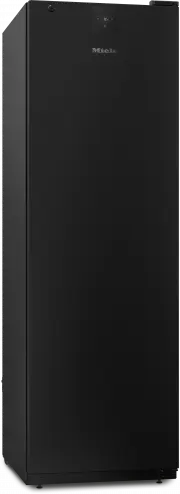
Familiarisation 16 Appliance description Appliance overview
Page 17 - Display; OK
Familiarisation 17 a Door lock b Outer display on appliance door c Interior lighting d Metal shelves e Charcoal filter (Active AirClean filter) Display The display can be scratched by pointed or sharp objects, e.g. pens.Only touch the display with your fingertips. It is possible that the display wil...
Page 18 - Settings mode; Lock function; - Interior lighting when the door is; Information on Sabbath mode
Familiarisation 18 Settings mode Lock function / When the lock function is switched on,it protects the wine unit from beingswitched off unintentionally and beingadjusted unintentionally by unauthor-ised persons, e.g. children.If you just want to quickly adjust thetemperature, for example, you...
Page 19 - Time before door alarm; a user account via the Miele app.; Availability of the WiFi connection
Familiarisation 19 Time before door alarm is triggered You can set the time before the appli-ance door alarm is triggered here (see“Adjusting settings”). Miele@home Your wine unit is equipped with an in-tegrated WiFi module.Networking is deactivated at the fact-ory. Here you can set up the M...
Page 20 - or from the Google Play StoreTM.
Familiarisation 20 Miele App The Miele App is available to downloadfree of charge from the Apple AppStore ® or from the Google Play Store™. Keypad tone / You can switch the keypad tone on oroff here (see “Adjusting settings”). Alarms and buzzers / You can change the volume of thealarms...
Page 21 - Information on the wine unit; - For integrating the wine unit into your; Active AirClean filter display; The Active AirClean filter display; Accessories supplied
Familiarisation 21 Information on the wine unit You can call up the model identifier andserial number of your wine unit here.Keep this appliance data to hand: - For integrating the wine unit into your WiFi network (see “Adjusting settings– Setting up Miele@home for the firsttime”) - When reportin...
Page 22 - Safety; Temperature alarm; will light up in the dis-
Familiarisation 22 Safety Temperature alarm The wine unit is equipped with a tem-perature alarm so that the temperaturecannot rise or fall unnoticed and there-fore damage the wine. If the temperature becomes too warmor too cold, will light up in the dis- play. An alarm will also sound until the...
Page 23 - Door alarm; Using the door lock
Familiarisation 23 Door alarm The wine unit is fitted with a dooralarm to avoid increased energy con-sumption if the door is left open andprevent the stored wine bottles beingaffected by temperature fluctuations. If the appliance door is left open for alonger period of time, will appear in the d...
Page 24 - Adjusting the interior fittings; Moving the metal shelves; Risk of injury from falling wine; Empty; the metal shelves before; Maximum capacity
Familiarisation 24 Adjusting the interior fittings Moving the metal shelves The metal shelves are not fixed in placeand can therefore be moved easily. Pull the metal shelf forwards to re-move it. Reinsert the metal shelf at the re-quired position. Risk of injury from falling wine bottles.Wine ...
Page 25 - Risk of damage due to overload.
Familiarisation 25 E D C B A A B C D E 260 300 300 300 240 The maximum capacity is only achieved ifthe indicated distances (in mm) between themetal shelves are observed. Arrangement of the wine bottles onthe metal shelves Arrangement of the wine bottles on the topmetal shelf and on the base of the a...
Page 26 - Commissioning; Before using for the first time; Connecting the wine unit; Switching the wine unit on; Switching the wine unit off
Commissioning 26 Before using for the first time Remove all packaging material andprotective film. Clean the inside of the appliance andthe accessories (see “Cleaning andcare”). Connecting the wine unit Connect the wine unit to the electri-city supply as described in “Installa-tion – Electrica...
Page 27 - Setting the temperature; Temperature range
Operation 27 Setting the temperature A temperature of between 12 and14 °C is recommended to store wineover the long term. Tap OK . will appear in the display. Tap OK . Use the and sensor controls to change the temperature. Tap OK . The temperature display will thenchange back to the c...
Page 28 - Humidity range
Operation 28 Humidity range You can set the humidity to 3 levels andtherefore adapt it to your individualneeds. - : Low humidity - : Medium humidity - : High humidity Please bear in mind that energy con-sumption will increase slightly as theset humidity level is increased. If you would like to...
Page 29 - Adjusting settings
Adjusting settings 29 Explanation of the different set-tings The door alarm and other warnings areautomatically disabled when the appli-ance is in Settings mode . Switching the lock function / on Tap OK . will appear in the display. Use the or sensor control to scroll to the ...
Page 31 - is triggered
Adjusting settings 31 Changing the time before the dooralarm is triggered Tap OK . will appear in the display. Use the or sensor control to scroll to the symbol. Tap OK . Use the or sensor control to scroll to the symbol. Tap OK . Use the and sensor controls...
Page 33 - Switching off the keypad tone
Adjusting settings 33 Switching off the keypad tone Tap OK . will appear in the display. Use the or sensor control to scroll to the symbol. Tap OK . Use the or sensor control to scroll to the symbol. Tap OK . If the keypad tone is switched off, will appear. ...
Page 34 - Adjusting the display brightness
Adjusting settings 34 Adjusting the display brightness Tap OK . will appear in the display. Use the or sensor control to scroll to the symbol. Tap OK . Use the or sensor control to scroll to the symbol. Tap OK . Use the and sensor controls to select the display ...
Page 35 - To leave Settings mode
Adjusting settings 35 Resetting the settings to their factorydefaults Tap OK . will appear in the display. Use the or sensor control to scroll to the symbol. Tap OK . Use the or sensor control to scroll to the symbol. Tap OK . Use the sensor control to scroll to t...
Page 36 - Cleaning agents; do not use the following:
Cleaning and care 36 The data plate located inside the wineunit must not be removed. It containsinformation which is required in theevent of a fault. Do not let water get into the elec-tronic unit or the lighting. Risk of damage due to moisture ingress.The steam from a steam cleaner candamage plas...
Page 37 - The; wooden; shelves should only be; not; be allowed to
Cleaning and care 37 Cleaning the inside of the appli-ance Clean the wine unit at least once amonth. If soiling is left on for any length oftime, it may become impossible toremove under certain circumstances.Surfaces may suffer discolouration ordamage.It is therefore best to remove anysoiling immedi...
Page 38 - Cleaning the door seal
Cleaning and care 38 Replace the cover. Confirming that the Active AirClean fil-ter has been changed Tap OK . The symbol will go out on the display and the counter will be reset. Cleaning the front of the appli-ance and the side panels If soiling is left on for any length oftime, it may becom...
Page 39 - Troubleshooting; Problem
Troubleshooting 39 Many malfunctions and faults can be easily remedied. You can save time andmoney in many cases, as you do not need to contact Customer Service. More information to help you remedy faults yourself can be found atwww.miele.co.uk/support/customer-assistance . To prevent cold from esca...
Page 40 - General problems with the wine conditioning unit
Troubleshooting 40 General problems with the wine conditioning unit Problem Cause and remedy The humidity inside thewine unit cannot be setto the required level. The ambient temperature is too high or too low. Ensure an ambient temperature of 19 to 28 °C. The temperature in the wine unit is set to...
Page 41 - Display warnings; Message
Troubleshooting 41 Display warnings Message Cause and remedy lights up in thedisplay and thewine unit is notgetting cold.However, the ap-pliance and theinterior lightingare working fine. Demo mode has been activated. Tap OK . Miele will then appear on the appliance display, fol- lowed by the tem...
Page 44 - Interior lighting
Troubleshooting 44 Interior lighting Problem Cause and remedy Risk of electric shock due to exposed, live electrical components. When removing the lighting cover, there is a risk of coming into contact withlive electrical components.Do not remove the lighting cover. The LED lighting may only be re...
Page 45 - Customer Service Department; Contact in the event of a fault; Warranty
Customer Service Department 45 Information to help you rectify faultsyourself and about Miele spare partscan be found at www.miele.com/ser-vice. Contact in the event of a fault In the event of a fault which you cannotremedy yourself, please contact yourMiele dealer or Miele Customer Service. You can...
Page 46 - Multi-purpose microfibre cloth
Optional accessories 46 Multi-purpose microfibre cloth The microfibre cloth is suitable for re-moving fingerprints and light soilingfrom surfaces such as stainless steel,glass, plastic and chrome without theuse of chemicals. MicroCloth Kit The MicroCloth Kit contains a universalcloth, a glass cloth ...
Page 47 - Installation
Installation 47 Installation site Risk of damage due to high hu- midity.In environments with high humidity,condensation can build up on the ex-ternal wine unit panels. This condensation can cause corro-sion on external appliance panels.Install the wine unit with sufficientventilation in a dry and/...
Page 48 - Climate range; SN; Ventilation requirements; Fire risk and risk of damage due
Installation 48 Climate range This wine unit is designed for use withinspecific ambient temperatures (climaterange). Do not use in ambient temperat-ures for which it is not designed. The cli-mate range is stated on the data plateinside the wine unit. Climate range Ambient temper- ature SN 10 to 32 °...
Page 49 - Changing the door hinging
Installation 49 Installing several wine units/re-frigeration appliances Risk of damage due to condensa- tion on external appliance panels.In environments with high humidity,condensation can build up betweenthe external wine unit panels, whichcan cause corrosion.Do not place different wine units/re...
Page 50 - Aligning the wine unit; Risk of damage caused by floor
Installation 50 Aligning the wine unit Risk of damage caused by floor unevenness.If you do not adjust the appliancefeet to compensate for any uneven-ness in the floor, this can cause de-formation to the appliance casing.The appliance door may not closecorrectly as a result.Use the adjustable feet ...
Page 51 - Appliance dimensions; Installation dimensions/View from above; All dimensions are given in mm.
Installation *INSTALLATION* 51 Appliance dimensions Installation dimensions/View from above All dimensions are given in mm. The wine unit will function correctly if the specified ventilation gaps are kept clear.
Page 52 - Connections
Installation *INSTALLATION* 52 Connections All dimensions are given in mm. 1 2 237 2 12 a View from the front b Mains connection cable, length = 2000 mm A longer mains connection cable is available to order from the Miele CustomerService Department.
Page 53 - Electrical connection; Risk of fire from overheating.
Installation *INSTALLATION* 53 Electrical connection The wine unit must only be connectedto an earthed socket using the mainsconnection cable supplied.The socket must be easily accessibleafter the wine unit has been installed. Ifthe socket is not easily accessible, en-sure that a suitable means of d...
Page 54 - Connection dimensions
Installation *INSTALLATION* 54 Connection dimensions a b c d Back of the refrigeration appliance/wine unit Appliance plug connector Power plug a b c d 1800 mm 1400 mm 2100 mm 200 mm Connecting the wine unit Plug the appliance plug connectorinto the socket. Make sure that the appliance plug c...
Page 55 - EU Conformity declaration
EU Conformity declaration 55 Miele hereby declares that this wineunit complies with Directive 2014/53/EU. The complete text of the EU declarationof conformity is available from one ofthe following internet addresses: - Products, Download from www.miele.ie - For service, information, operating in- st...
Page 56 - UK Conformity declaration; manuals and enter the name of the product or the serial number; Statement of Compliance; Paul Wright
UK Conformity declaration 56 Miele hereby declares that this wine unit complies with UK Radio Equipment Regu-lations 2017, as amended. The complete text of the UK declaration of conformity is available from one of thefollowing internet addresses: - Products, Download from www.miele.co.uk- For servic...
Page 57 - Copyrights and licences
Copyrights and licences 57 For the purpose of operating and controlling the communication module, Mieleuses proprietary or third-party software that is not covered by open source licens-ing terms. This software/these software components are protected by copyright.The copyrights held by Miele and thi...
Page 59 - United Kingdom
United Kingdom Miele Co. Ltd., Fairacres, Marcham Road, Abingdon, Oxon, OX14 1TWTel: 0330 160 6600, Internet: www.miele.co.uk, E-mail: [email protected] Australia Miele Australia Pty. Ltd.ACN 005 635 398ABN 96 005 635 398Level 4, 141 Camberwell RoadHawthorn East, VIC 3123Tel: 1300 464 353E-mail: [em...


 Miele APCL 043
User Manual
Miele APCL 043
User Manual
 Miele APWM 065
Installation Manual
Miele APWM 065
Installation Manual
 Miele APWM 070
Installation Manual
Miele APWM 070
Installation Manual
 Miele SC
Installation Manual
Miele SC
Installation Manual
 Miele PR
Installation Manual
Miele PR
Installation Manual
 Miele APCL 047
User Manual
Miele APCL 047
User Manual
 Miele PLW 8505
Installation Manual
Miele PLW 8505
Installation Manual
![Miele PT 7186 Vario [EL]](https://manualsarea.com/img/product/thumbs/180/69/3e/693e1219f5c0d53fde982888bd54a3ec.webp) Miele PT 7186 Vario [EL]
User Manual
Miele PT 7186 Vario [EL]
User Manual
 Miele CM/1
User Manual
Miele CM/1
User Manual
![Miele PLW 8617 [EL/S TH]](https://manualsarea.com/img/product/thumbs/180/fe/90/fe9010c5f8c3c4aada5d83b417c78507.webp) Miele PLW 8617 [EL/S TH]
Installation Manual
Miele PLW 8617 [EL/S TH]
Installation Manual
![Miele PWM 908 [EL DP MAR 3 AC 400-480V 50-60Hz]](https://manualsarea.com/img/product/thumbs/180/20/e5/20e5e929bcb336fc6b2f128d9c857a3d.webp) Miele PWM 908 [EL DP MAR 3 AC 400-480V 50-60Hz]
User Manual
Miele PWM 908 [EL DP MAR 3 AC 400-480V 50-60Hz]
User Manual
![Miele PWM 906 [EL DP MAR 3 AC 400-480V 50-60Hz]](https://manualsarea.com/img/product/thumbs/180/57/c8/57c81dd8d0abe05852b709a3fa9b80db.webp) Miele PWM 906 [EL DP MAR 3 AC 400-480V 50-60Hz]
Installation Manual
Miele PWM 906 [EL DP MAR 3 AC 400-480V 50-60Hz]
Installation Manual
![Miele PWM 906 [EL DP MAR 2N AC 400V 50-60Hz]](https://manualsarea.com/img/product/thumbs/180/ce/23/ce232ceeda728532882a2a2f56bf2abc.webp) Miele PWM 906 [EL DP MAR 2N AC 400V 50-60Hz]
User Manual
Miele PWM 906 [EL DP MAR 2N AC 400V 50-60Hz]
User Manual
![Miele PLW 8617 [EL TH]](https://manualsarea.com/img/product/thumbs/180/e8/4a/e84a63b24dca64279b26bca714985678.webp) Miele PLW 8617 [EL TH]
User Manual
Miele PLW 8617 [EL TH]
User Manual
![Miele PDR 908 [EL MAR 3N AC 400V 50-60Hz]](https://manualsarea.com/img/product/thumbs/180/05/b7/05b705998b251f92b271e908423e1ecb.webp) Miele PDR 908 [EL MAR 3N AC 400V 50-60Hz]
Installation Manual
Miele PDR 908 [EL MAR 3N AC 400V 50-60Hz]
Installation Manual
![Miele PLW 8615 [EL CT]](https://manualsarea.com/img/product/thumbs/180/70/ff/70ff37b9174e78db8d00ddce8cf08ee3.webp) Miele PLW 8615 [EL CT]
Installation Manual
Miele PLW 8615 [EL CT]
Installation Manual
![Miele PLW 8616 [EL/S]](https://manualsarea.com/img/product/thumbs/180/37/f4/37f4255dee3c9942a13241f3ccd5fe93.webp) Miele PLW 8616 [EL/S]
Installation Manual
Miele PLW 8616 [EL/S]
Installation Manual
![Miele PWM 916 [EL DV DD SOM]](https://manualsarea.com/img/product/thumbs/180/21/65/21657a907bb735f3acf5a7bdbbc78c8a.webp) Miele PWM 916 [EL DV DD SOM]
Manual
Miele PWM 916 [EL DV DD SOM]
Manual
![Miele PFD 104 SCVi XXL [120V]](https://manualsarea.com/img/product/thumbs/180/0a/20/0a20c04430aaa9be6a985688f5bb5580.webp) Miele PFD 104 SCVi XXL [120V]
Installation Manual
Miele PFD 104 SCVi XXL [120V]
Installation Manual
![Miele PDR 507 HP [MAR]](https://manualsarea.com/img/product/thumbs/180/58/9e/589e9ba94b88174fa0cdb27b4bbaac5b.webp) Miele PDR 507 HP [MAR]
User Manual
Miele PDR 507 HP [MAR]
User Manual