Page 2 - Contents; Settings mode
Contents 2 Warning and Safety instructions ............................................................................... 5 Caring for the environment ......................................................................................... 14 Installation .............................................
Page 4 - Cleaning and care
Contents 4 Using accessories .......................................................................................................... 55 Making ice cubes ...................................................................................................... 55 Cleaning and care .......................
Page 5 - Warning and Safety instructions
Warning and Safety instructions 5 This refrigeration appliance complies with current safety require-ments. Inappropriate use can, however, lead to personal injury andmaterial damage. Please read the operating and installation instructions carefully be-fore using the refrigeration appliance for the f...
Page 6 - Correct application
Warning and Safety instructions 6 Correct application This refrigeration appliance is intended for use in the home and in similar environments, for example– in shops, offices and similar work settings – by the guests in hotels, motels, bed & breakfasts and other typicalhome settings.This refri...
Page 7 - Technical safety; The coolant circuit has been checked for leaks. The refrigeration
Warning and Safety instructions 7 Technical safety The coolant circuit has been checked for leaks. The refrigeration appliance complies with statutory safety requirements and the ap-propriate EU directives. Warning: fire hazard/flammable materials. This symbol is on the compressor and indicates ...
Page 9 - Proper installation
Warning and Safety instructions 9 For safety reasons, this appliance may only be used after it has been built in. The appliance must be isolated from the electricity supply during installation, maintenance and repair work. Unauthorised installation, maintenance and repairs can cause con- sider...
Page 10 - Correct use
Warning and Safety instructions 10 Correct use This refrigeration appliance is designed for use within specific am- bient temperatures (climate range). Do not use in ambient temperat-ures for which it is not designed. The climate range is stated on thedata plate in the interior cabinet of the refr...
Page 11 - Accessories and spare parts
Warning and Safety instructions 11 Observe the manufacturer's “use-by” dates and storage instruc- tions given on food to avoid the risk of food poisoning. Storage timeswill depend on several factors, including the freshness and quality ofthe food, as well as the temperature at which it is stored. ...
Page 12 - Disposal of your old appliance
Warning and Safety instructions 12 Disposal of your old appliance Children playing could become trapped in the appliance and could suffocate. - Remove the appliance doors.- Remove the drawers.- Leave the adjustable shelves in the refrigeration appliance so chil- dren cannot climb inside. - If your...
Page 13 - Symbol on the compressor (depending on model); The oil in the compressor can be fatal if swallowed or if it penet-
Warning and Safety instructions 13 Symbol on the compressor (depending on model) This information is only relevant for recycling. There is no risk during normal opera-tion. The oil in the compressor can be fatal if swallowed or if it penet- rates the airways.
Page 14 - Caring for the environment; Disposing of your old appliance
Caring for the environment 14 Disposing of the packaging ma-terial The packaging material is used for hand-ling and protects the appliance fromtransport damage. The packaging ma-terial used is selected from materialswhich are environmentally friendly fordisposal and can generally be recycled.Recycli...
Page 15 - Installation; Installation site
Installation *INSTALLATION* 15 Installation site Risk of damage and danger of in- jury due to the refrigeration appliancetipping over.This refrigeration appliance is veryheavy and can tip forwards when theappliance door is open.Keep the appliance door(s) closeduntil the refrigeration appliance has...
Page 16 - - When installing the refrigeration appli-; Climate range; SN
Installation *INSTALLATION* 16 - When installing the refrigeration appli- ance, make sure that the mains con-nection cable does not get trapped ordamaged. - Do not position or operate multi- socket adapters, distributor strips orother electronic devices (e.g. halogentransformers) at the rear of the ...
Page 17 - Ventilation; Risk of fire and damage due to in-; Changing the door hinging; Danger of injury and damage to; Furniture door panel; Horizontal and vertical gaps
Installation *INSTALLATION* 17 Ventilation Risk of fire and damage due to in- sufficient ventilation.If the refrigeration appliance is notventilated sufficiently, the com-pressor will run more frequently andfor longer periods. This will result inincreased energy consumption and ahigher operating t...
Page 18 - Gap; Fit a spacer between the housing; Weight of the furniture door; If the furniture door panel is too
Installation *INSTALLATION* 18 Appliancefurnituredoorthickness A [mm] Gap X [mm] for different edge radii B R0 R1.2 R2 R3 ≥ 16–19 min. 3 20 5 4 4 3.5 21 5.5 5 4.5 4 22 6.5 6 5.5 5 Adjoining kitchen furniture front A = Furniture front thicknessB = Edge radiusX = Gap Adjoining side wall A = Furniture ...
Page 20 - Building-in dimensions; Installation in a tall unit/side view; All dimensions are given in mm.; Niche height
Installation *INSTALLATION* 20 Building-in dimensions Installation in a tall unit/side view All dimensions are given in mm. * The declared energy consumption was calculated in a 560 mm deep niche. Therefrigeration appliance is fully functional in a 550 mm niche but the energy con-sumption will be sl...
Page 21 - Connections and ventilation
Installation *INSTALLATION* 21 Connections and ventilation All dimensions are given in mm. The specified ventilation cross-sections must be adhered to in order to ensure thecorrect functioning of the refrigeration appliance. a View from the front b Mains connection cable, length = 2200 mm c Ventilat...
Page 22 - Electrical connection; Risk of fire from overheating.; Connecting the refrigeration appliance
Installation *INSTALLATION* 22 Electrical connection The refrigeration appliance must only beconnected to an earthed socket usingthe mains connection cable supplied.The socket must be easily accessibleafter the refrigeration appliance hasbeen installed. If the socket is not easilyaccessible, ensure ...
Page 23 - Saving energy
Saving energy 23 How to save energy: Installation site The refrigeration appliance has to cool more often at higher am-bient temperatures and consumes more energy in the process.Therefore, you should: - Install the refrigeration appliance in a well-ventilated room. - Do not install the refrigeration...
Page 24 - Guide to the appliance
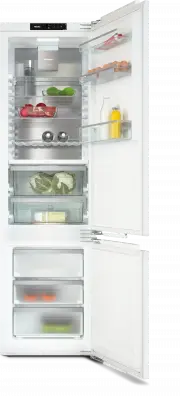
Guide to the appliance 24 This drawing is for illustration purposes only.
Page 26 - Control panel with start display; OK
Guide to the appliance 26 Control panel with start display OK < > °C 5 -18 °C 1 2 3 4 5 a Temperature display for fridge zone b Temperature display for freezer section c Sensor controls for selecting a setting d OK sensor control for confirming a selection and entering Settings mode e Di...
Page 28 - Selecting the desired function in Settings mode
Guide to the appliance 28 Selecting the desired function in Settings mode Touch the OK sensor control on the control panel. will appear in the display (refrigerator section is selected). Use the or sensor control to scroll to the symbol. Touch OK . Select the function you want...
Page 29 - Adjusting the interior fittings; Moving the door shelf/bottle shelf; pull the bottle holder up to remove it.; Moving the adjustable shelves
Guide to the appliance 29 Adjusting the interior fittings Moving the door shelf/bottle shelf Only move the door/bottle shelves inthe appliance door when they areempty. Push the door/bottle shelves up-wards, then remove them by pullingthem forwards. Replace the door/bottle shelves atthe required ...
Page 30 - Moving the bottle rack; If the bottles hang over the edge of
Guide to the appliance 30 Take both sections of the glass shelfout of the appliance. Attach the two adapters to the sup-port ribs on the left and right at thedesired height. The section of the glass shelf with theraised edge must be fitted at the back. Moving the bottle rack The bottle rack can ...
Page 31 - Let the baking tray cool down to; Moving the charcoal filters; - Place the holder with the charcoal fil-
Guide to the appliance 31 Inserting the adapters for the bakingtray The supplied adapters enable you to in-sert a baking tray in your refrigeratorsection with ease. The baking tray canbe no more than 466 mm wide,386 mm deep and 50 mm high. Snap the adapters into place on thelowermost shelf support...
Page 32 - Accessories supplied
Guide to the appliance 32 Refit the holder on the protectivestrip. Accessories supplied Adapters for the baking tray Egg tray Bottle holder Flexible bottle rack Ice cube tray Door opening limiting pins Installation parts Optional accessories A range of useful Miele accessories andcare products are...
Page 33 - Bottle rack
Guide to the appliance 33 KKF-RF replacement charcoal filters(Active AirClean) Replacement filters to the fit the holderare available. We recommend replacingthe charcoal filters every 6 months. Bottle rack For a description, see “Guide to the ap-pliance – Adjusting the interior fittings”. Adjustable...
Page 34 - Switching on and off; Before using for the first time
Switching on and off 34 Before using for the first time Remove all packaging material andprotective film. Clean the inside of the appliance andthe accessories (see “Cleaning andcare”). Connecting the refrigeration appliance Connect the refrigeration appliance tothe electricity supply as descri...
Page 36 - The correct temperature; Temperature display; frigerator section temperature; Possible temperature settings
The correct temperature 36 It is very important to set the correcttemperature to ensure the shelf life offood. Reducing the temperature reducesthe growth rate of microorganisms.Food does not spoil as quickly.The temperature in the refrigeration ap-pliance will rise: - The more often the appliance do...
Page 38 - Using Super cool and Super freeze; SuperCool
Using Super cool and Super freeze 38 SuperCool When switched on, the SuperCoolfunction can be used to rapidly re- duce the temperature in the fridge zone to its lowest setting (depending on the ambient temperature). The refri-geration appliance will work at fullpower and lower the temperature....
Page 39 - SuperFreeze
Using Super cool and Super freeze 39 SuperFreeze When switched on, the SuperFreezefunction can be used to rapidly re- duce the temperature in the freezer section to its lowest setting (depend- ing on the ambient temperature). Therefrigeration appliance will work at fullpower and lower the temp...
Page 40 - Selecting further settings; Party mode
Selecting further settings 40 Explanation of the different set-tings Only the settings that require further ex-planation are described below. The door alarm and other warnings areautomatically suppressed when youare in Settings mode . Party mode The Party mode function is recom- mended if y...
Page 42 - Switching Sabbath mode
Selecting further settings 42 Health risk caused by decompos- ing food.As power failures are not indicatedwhile Sabbath mode is active, food may be exposed to increased tem-peratures for a certain period of time.This will reduce the storage life of thefood.If there is a power failure during Sab...
Page 43 - Availability of the WiFi connection
Selecting further settings 43 Make sure that the signal of yourWiFi network is sufficiently strong inthe place where you want to set upyour refrigeration appliance. Availability of the WiFi connection The WiFi connection shares a frequencyrange with other appliances (includingmicrowave ovens and rem...
Page 44 - Adjusting the display brightness
Selecting further settings 44 All entered settings and values forMiele@home are reset to the defaultsettings. The WiFi connection has been deactiv-ated, goes out in the start display. Reset the network configuration ifyou are disposing of or selling yourrefrigeration appliance, or if you areputti...
Page 45 - Information
Selecting further settings 45 Touch OK . The refrigeration appliance switches offand must be switched on again. Information Appliance data (model identifier andserial number) is shown on the display. Keep this appliance data to hand: - For integrating the refrigeration appli- ance into your WiF...
Page 46 - Temperature and door alarm; Temperature alarm
Temperature and door alarm 46 Health risk caused by decompos- ing food.If the temperature in the freezer re-mains above -18 °C for a long time,the frozen food can start to defrost.This will reduce the storage life of thefood.Check whether the frozen food hasstarted to defrost. If it has, check tha...
Page 47 - Door alarm; will appear on; Switching the door alarm off early; Tap
Temperature and door alarm 47 Door alarm The refrigeration appliance is fittedwith a door alarm to avoid increasedenergy consumption and food becom-ing warm if the door is left open. If an appliance door is left open for alonger period of time, will appear on the relevant temperature display. A...
Page 48 - Storing food in the fridge zone; Risk of explosion due to flam-; Different storage zones; Warmest area; eggs or cream
Storing food in the fridge zone 48 Risk of explosion due to flam- mable mixes of gases.Electrical components can causeflammable mixes of gases to ignite.Do not store explosive materials inthe refrigeration appliance or anyproducts containing propellants (e.g.spray cans). The spray cans in ques-tio...
Page 49 - - Raw milk cheese and other raw milk; Notes on buying food
Storing food in the fridge zone 49 - Raw milk cheese and other raw milk products - Hummus, vegetable spreads, plant- based cream cheese substitutes - Pre-packed vegetables- Other fresh food (with a label stating it should be kept at a temperature of ap-prox. 4 °C) Food which is not suitable forstora...
Page 50 - Storing food in the PerfectFresh Pro zone; PerfectFresh Pro zone; The upper; partment; has a temperature of; Humidity level not increased; When the; Increased humidity
Storing food in the PerfectFresh Pro zone 50 PerfectFresh Pro zone The PerfectFresh Pro zone satisfiesthe requirements of a chill compart-ment to DIN EN 62552:2020. The PerfectFresh Pro zone providesideal storage conditions for fruit, veget-ables, fish, meat and dairy products.Food stays fresh consi...
Page 51 - Selecting increased humidity; Dry compartment; The; dry compartment; - Any type of food can in fact be stored; covered or wrapped
Storing food in the PerfectFresh Pro zone 51 Selecting increased humidity Open the drawer of the humidity-con-trolled compartment. Slide the compartment cover back-wards as far as it will go. The compartment cover is closed andthe humidity remains in the compart-ment . Selecting low humidi...
Page 53 - Freezing and storing food; Freezing fresh food; Maximum freezing capacity; Storing frozen food; Before placing food in the freezer
Freezing and storing food 53 Freezing fresh food Health risk caused by decompos- ing food.If the temperature in the freezer re-mains above -18 °C for a long time,the frozen food can start to defrost.This will reduce the storage life of thefood.Check whether the frozen food hasstarted to defrost. I...
Page 54 - Placing frozen food in the freezer; If the food is too heavy, this can; – Freezing small amounts of food; freezer drawers so that it
Freezing and storing food 54 Expel as much air as possible fromthe packaging and close it tightly. Make a note of the contents and thedate of freezing on the packaging. Placing frozen food in the freezer If the food is too heavy, this can cause damage.Loading food which is too heavy cancause d...
Page 55 - Storage time for frozen food; Food group; Ice cream; Cooling drinks quickly; in Settings mode; more than one hour; Using accessories; Making ice cubes; Ice cubes can be removed easily
Freezing and storing food 55 Storage time for frozen food Food group Storage time(Months) Ice cream 2 to 6 Bread, baked goods 2 to 6 Cheese 2 to 4 Fish, oily 1 to 2 Fish, lean 1 to 5 Sausage, ham 1 to 3 Game, pork 1 to 12 Poultry, beef 2 to 10 Vegetables, fruit 6 to 18 Herbs 6 to 10 The storage time...
Page 56 - Risk of damage due to moisture; Defrosting; Fridge zone and PerfectFresh Pro zone; Cleaning agents; do not use the following:; monia, acids or chlorides
Cleaning and care 56 The data plate located inside the in-terior cabinet of the refrigeration appli-ance must not be removed. It containsinformation which is required in theevent of a fault. Do not let water get into the elec-tronic unit or the lighting. Risk of damage due to moisture ingress.The ...
Page 57 - Cleaning the fridge zone only:; interior
Cleaning and care 57 Preparing the refrigeration ap-pliance for cleaning Cleaning the fridge zone only: Switch Cleaning mode on. The cool- ing system in the fridge zone is switchedoff, but the interior lighting remainsswitched on. In Settings mode , use the or sensor control to scroll ...
Page 58 - - The plastic parts of the adjustable; Dismantling the door shelf/bottle shelf
Cleaning and care 58 - The plastic parts of the adjustable shelf with pivotable glass shelf (avail-able as optional accessory) - Organisation box (available as an op- tional accessory) The following components are dish- washer-safe : Risk of damage due to high dish- washer temperatures.Parts of th...
Page 59 - Fitting the drawers
Cleaning and care 59 Pull the trim off the shelf, beginning atone side. Pull the two adapters off the supportribs on the left and right. After cleaning, attach the two ad-apters to the support ribs on the leftand right at the desired height. Reattach the trim to the shelf. Removing the drawe...
Page 60 - Cleaning the door seal
Cleaning and care 60 Pull the glass shelf forwards a littleand out. Inserting the glass shelves and draw-ers into the freezer section Place the glass shelf on the guide railsat an angle. Push in and lower the glass shelf. Place the drawer on the guide rails atan angle. Push in and lower th...
Page 61 - After cleaning
Cleaning and care 61 The ventilation gaps should becleaned on a regular basis with abrush or vacuum cleaner (you coulduse a Miele vacuum cleaner dustingbrush, for example). After cleaning Replace all shelves and accessories inthe refrigeration appliance. Switch the refrigeration applianceback ...
Page 62 - Problem solving guide; Problem
Problem solving guide 62 Many malfunctions and faults that can occur in daily operation can be easilyremedied. You can save time and money in many cases, as you do not need to callthe Miele Customer Service Department.Information to help you rectify faults yourself can be found at www.miele.com/ser-...
Page 64 - Other problems
Problem solving guide 64 Problem Cause and remedy The compressor comeson less and less oftenand for shorter periodsof time. The temperaturein the refrigeration appli-ance rises. This is not a fault. The temperature setting is too high. Correct the temperature setting. Check the temperature again...
Page 65 - Display warnings; Message
Problem solving guide 65 Problem Cause and remedy There is no audible alarmeven though the doorhas been open for a longtime. This is not a fault. The alarm has been switched off inSettings mode. If you want to switch the audible alarmback on again: Tap OK . will appear in the display. Use the ...
Page 68 - Touch
Problem solving guide 68 Message Cause and remedy lights up in the dis- play and an alarm alsosounds. Indication of an interruption to the power supply: thetemperature in the freezer section over the last fewdays or hours has risen too high because of a powercut or interruption to the power sup...
Page 69 - Interior lighting
Problem solving guide 69 Message Cause and remedy lights up in the dis- play and a fault code Fwith numbers may ap-pear. An alarm will alsosound. There is a fault. Switch the alarm off by tapping OK . Contact the Miele Customer Service Department. To report the fault, you need the fault cod...
Page 71 - Noises
Noises 71 The refrigeration appliance is producing various noises during operation. If the cooling performance is low, the refrigeration appliance will conserve energybut operate for longer. The volume will be lower. Food will be chilled faster if the cooling performance is high. The volume will be ...
Page 73 - Service; Contact in the event of a fault; Warranty
Service 73 Information to help you rectify faultsyourself and about Miele spare partscan be found at www.miele.com/ser-vice. Contact in the event of a fault In the event of a fault which you cannotremedy yourself, please contact yourMiele dealer or Miele Customer Service. You can book a Miele Custom...
Page 74 - EU Conformity declaration; UK Conformity declaration; manuals and enter the name of the product or the serial number
Information 74 EU Conformity declaration Miele hereby declares that this fridge-freezer complies with Directive 2014/53/EU. The complete text of the EU declaration of conformity is available from one of thefollowing internet addresses: - Products, Download from www.miele.ie- For service, information...
Page 75 - Statement of Compliance; Paul Wright; Copyrights and licences
Information 75 This Statement of Compliance confirms this Miele product fully complies with the Product Security and Telecommunications Infrastructure (Security Requirementsfor Relevant Connectable Products) Regulations 2023. 1) Household Appliance – 2) Manufactured by: Miele & Cie KG, Carl Miel...
Page 79 - United Kingdom
United Kingdom Miele Co. Ltd., Fairacres, Marcham Road, Abingdon, Oxon, OX14 1TWTel: 0330 160 6600, Internet: www.miele.co.uk, E-mail: [email protected] Australia Miele Australia Pty. Ltd.ACN 005 635 398ABN 96 005 635 398Level 4, 141 Camberwell RoadHawthorn East, VIC 3123Tel: 1300 464 353E-mail: [em...


 Miele APCL 043
User Manual
Miele APCL 043
User Manual
 Miele APWM 065
Installation Manual
Miele APWM 065
Installation Manual
 Miele APWM 070
Installation Manual
Miele APWM 070
Installation Manual
 Miele SC
Installation Manual
Miele SC
Installation Manual
 Miele PR
Installation Manual
Miele PR
Installation Manual
 Miele APCL 047
User Manual
Miele APCL 047
User Manual
 Miele PLW 8505
Installation Manual
Miele PLW 8505
Installation Manual
![Miele PT 7186 Vario [EL]](https://manualsarea.com/img/product/thumbs/180/69/3e/693e1219f5c0d53fde982888bd54a3ec.webp) Miele PT 7186 Vario [EL]
User Manual
Miele PT 7186 Vario [EL]
User Manual
 Miele CM/1
User Manual
Miele CM/1
User Manual
![Miele PLW 8617 [EL/S TH]](https://manualsarea.com/img/product/thumbs/180/fe/90/fe9010c5f8c3c4aada5d83b417c78507.webp) Miele PLW 8617 [EL/S TH]
Installation Manual
Miele PLW 8617 [EL/S TH]
Installation Manual
![Miele PWM 908 [EL DP MAR 3 AC 400-480V 50-60Hz]](https://manualsarea.com/img/product/thumbs/180/20/e5/20e5e929bcb336fc6b2f128d9c857a3d.webp) Miele PWM 908 [EL DP MAR 3 AC 400-480V 50-60Hz]
User Manual
Miele PWM 908 [EL DP MAR 3 AC 400-480V 50-60Hz]
User Manual
![Miele PWM 906 [EL DP MAR 3 AC 400-480V 50-60Hz]](https://manualsarea.com/img/product/thumbs/180/57/c8/57c81dd8d0abe05852b709a3fa9b80db.webp) Miele PWM 906 [EL DP MAR 3 AC 400-480V 50-60Hz]
Installation Manual
Miele PWM 906 [EL DP MAR 3 AC 400-480V 50-60Hz]
Installation Manual
![Miele PWM 906 [EL DP MAR 2N AC 400V 50-60Hz]](https://manualsarea.com/img/product/thumbs/180/ce/23/ce232ceeda728532882a2a2f56bf2abc.webp) Miele PWM 906 [EL DP MAR 2N AC 400V 50-60Hz]
User Manual
Miele PWM 906 [EL DP MAR 2N AC 400V 50-60Hz]
User Manual
![Miele PLW 8617 [EL TH]](https://manualsarea.com/img/product/thumbs/180/e8/4a/e84a63b24dca64279b26bca714985678.webp) Miele PLW 8617 [EL TH]
User Manual
Miele PLW 8617 [EL TH]
User Manual
![Miele PDR 908 [EL MAR 3N AC 400V 50-60Hz]](https://manualsarea.com/img/product/thumbs/180/05/b7/05b705998b251f92b271e908423e1ecb.webp) Miele PDR 908 [EL MAR 3N AC 400V 50-60Hz]
Installation Manual
Miele PDR 908 [EL MAR 3N AC 400V 50-60Hz]
Installation Manual
![Miele PLW 8615 [EL CT]](https://manualsarea.com/img/product/thumbs/180/70/ff/70ff37b9174e78db8d00ddce8cf08ee3.webp) Miele PLW 8615 [EL CT]
Installation Manual
Miele PLW 8615 [EL CT]
Installation Manual
![Miele PLW 8616 [EL/S]](https://manualsarea.com/img/product/thumbs/180/37/f4/37f4255dee3c9942a13241f3ccd5fe93.webp) Miele PLW 8616 [EL/S]
Installation Manual
Miele PLW 8616 [EL/S]
Installation Manual
![Miele PWM 916 [EL DV DD SOM]](https://manualsarea.com/img/product/thumbs/180/21/65/21657a907bb735f3acf5a7bdbbc78c8a.webp) Miele PWM 916 [EL DV DD SOM]
Manual
Miele PWM 916 [EL DV DD SOM]
Manual
![Miele PFD 104 SCVi XXL [120V]](https://manualsarea.com/img/product/thumbs/180/0a/20/0a20c04430aaa9be6a985688f5bb5580.webp) Miele PFD 104 SCVi XXL [120V]
Installation Manual
Miele PFD 104 SCVi XXL [120V]
Installation Manual
![Miele PDR 507 HP [MAR]](https://manualsarea.com/img/product/thumbs/180/58/9e/589e9ba94b88174fa0cdb27b4bbaac5b.webp) Miele PDR 507 HP [MAR]
User Manual
Miele PDR 507 HP [MAR]
User Manual