Page 2 - Contents; Settings mode
Contents 2 Warning and Safety instructions ............................................................................... 5 Caring for the environment ......................................................................................... 14 Installation .............................................
Page 5 - Warning and Safety instructions; Correct application; This appliance is intended for domestic use only for cooling and
Warning and Safety instructions 5 This refrigeration appliance complies with current safetyrequirements. Inappropriate use can, however, lead to personalinjury and material damage. Please read the operating and installation instructions carefullybefore using the refrigeration appliance for the first...
Page 6 - Safety with children
Warning and Safety instructions 6 This refrigeration appliance is not suitable for storing and keeping cool medicines, blood plasma, laboratory preparations or similarsubstances or products that are subject to the Medical DeviceDirective. Incorrect use of the refrigeration appliance for suchpurpos...
Page 7 - Technical safety; The coolant circuit has been checked for leaks. The refrigeration
Warning and Safety instructions 7 Technical safety The coolant circuit has been checked for leaks. The refrigeration appliance complies with statutory safety requirements and theappropriate EU directives. Warning: fire hazard/flammable materials. This symbol is on the compressor and indicates fl...
Page 9 - Proper installation
Warning and Safety instructions 9 This refrigeration appliance is not intended for use as a built-in appliance. The appliance must be isolated from the electricity supply during installation, maintenance and repair work. Unauthorised installation, maintenance and repairs can cause considerable...
Page 11 - Stainless steel appliances; Accessories and spare parts
Warning and Safety instructions 11 Stainless steel appliances Adhesives will damage the stainless steel surface and cause it to lose its dirt-repellent protective coating. Do not use sticky notes,transparent adhesive tape, masking tape or other types of adhesiveon the stainless steel surface. Th...
Page 12 - Transport
Warning and Safety instructions 12 Transport Always transport the appliance in an upright position and in its original transport packaging to avoid damage in transit. Danger of injury and damage to the appliance. The refrigeration appliance is very heavy and must be transported by two people. Di...
Page 13 - Symbol on the compressor (depending on model); The oil in the compressor can be fatal if swallowed or if it
Warning and Safety instructions 13 Symbol on the compressor (depending on model) This information is only relevant for recycling. There is no risk during normaloperation. The oil in the compressor can be fatal if swallowed or if it penetrates the airways.
Page 14 - Caring for the environment; Disposing of your old appliance
Caring for the environment 14 Disposing of the packagingmaterial The packaging material is used forhandling and protects the appliancefrom transport damage. The packagingmaterial used is selected from materialswhich are environmentally friendly fordisposal and can generally be recycled.Recycling the...
Page 15 - Installation; Installation site; Climate range
Installation *INSTALLATION* 15 Installation site Risk of damage due to high humidity.In environments with high humidity,condensation can build up onexternal refrigeration appliancepanels. This condensate can cause corrosionon external appliance panels.Install the refrigeration appliance in adry an...
Page 16 - Ventilation requirements; not; Changing the door hinging
Installation *INSTALLATION* 16 it is not designed. The climate range isstated on the data plate in the interiorcabinet of the refrigeration appliance. Climate range Ambient temperature SN 10 to 32 °C N 16 to 32 °C ST 16 to 38 °C T 16 to 43 °C SN-ST 10 to 38 °C SN-T 10 to 43 °C A lower ambient temper...
Page 17 - Fitting supplied wall spacers; Risk of injury and damage due to
Installation *INSTALLATION* 17 Fitting supplied wall spacers The wall spacers supplied must beused in order to achieve declaredenergy consumption values and toprevent the build-up of condensationat high ambient temperatures. Therefrigeration appliance depth isincreased by approx. 15 mm forappliances...
Page 18 - Aligning the refrigeration appliance; Risk of damage and injury caused
Installation *INSTALLATION* 18 Aligning the refrigeration appliance Risk of damage and injury caused by the appliance door falling out orthe refrigeration appliance tippingover.If the additional adjustable foot onthe hinge plate at the bottom is notresting firmly on the floor, theappliance door ca...
Page 19 - Risk of fire and damage due to
Installation *INSTALLATION* 19 K(S)/FN(S)/KFN 4xxx X edst/cs, ws, bst, el Top box Refrigeration appliance, door depth = 75 mm Kitchen unit Wall A = 25 mm (with recessed grip)/60 mm (with handle) * The appliance depth is increased byapprox. 15 mm for refrigerationappliances with wall spac...
Page 21 - Appliance dimensions; Installation dimensions/View from above; All dimensions are given in mm.
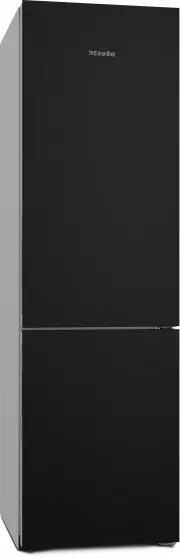
Installation *INSTALLATION* 21 Appliance dimensions Installation dimensions/View from above KFN 4795 ... bb All dimensions are given in mm. The refrigeration appliance will function correctly if the specified ventilation cross-sections are kept clear. * Dimensions without wall spacers fitted. Applia...
Page 22 - Connections
Installation *INSTALLATION* 22 Connections KFN 4795 ... bb All dimensions are given in mm. a View from the front b Mains connection cable, length = 2000 mm A longer mains connection cable is available to order from the Miele CustomerService Department. Installation dimensions/View from above KFN 479...
Page 25 - Electrical connection; Risk of fire from overheating.; Connecting the refrigeration appliance
Installation *INSTALLATION* 25 Electrical connection The refrigeration appliance must only beconnected to an earthed socket usingthe mains connection cable supplied.The socket must be easily accessibleafter the refrigeration appliance hasbeen installed. If the socket is not easilyaccessible, ensure ...
Page 26 - Saving energy
Saving energy 26 How to save energy: Installation site The refrigeration appliance has to cool more often at higherambient temperatures and consumes more energy in theprocess. Therefore, you should: - Install the refrigeration appliance in a well-ventilated room. - Do not install the refrigeration a...
Page 27 - - Use the wall spacers. The wall spacers on the back of your
Saving energy 27 - Use the wall spacers. The wall spacers on the back of your refrigeration appliance are designed to ensure that thedeclared energy consumption is achieved.
Page 28 - Guide to the appliance; Appliance overview
Page 30 - Control panel with start display; OK
Guide to the appliance 30 Control panel with start display OK < > °C 5 -18 °C 1 2 3 4 5 a Temperature display for fridge zone b Temperature display for freezer section c Sensor controls for selecting a setting d OK sensor control for confirming a selection and entering Settings mode e Di...
Page 32 - Selecting the desired function in Settings mode
Guide to the appliance 32 Selecting the desired function in Settings mode Touch the OK sensor control on the control panel. will appear in the display (refrigerator section is selected). Use the or sensor control to scroll to the symbol. Touch OK . Select the function you want...
Page 33 - Adjusting the interior fittings; Moving the door shelf/bottle shelf; pull the bottle holder up to remove it.; Moving the adjustable shelves
Guide to the appliance 33 Adjusting the interior fittings Moving the door shelf/bottle shelf Only move the door/bottle shelves inthe appliance door when they areempty. Push the door/bottle shelvesupwards, then remove them by pullingthem forwards. Replace the door/bottle shelves atthe required he...
Page 34 - Moving a split shelf; Let the baking tray cool down to; Moving the charcoal filters; - Place the holder with the charcoal
Guide to the appliance 34 Lift up the front section of the glassshelf slightly at the front and slide itcarefully underneath the rear section. Moving a split shelf The split shelf can be moved to adifferent location inside the appliance. Take both sections of the glass shelfout of the appliance....
Page 35 - Before writing on the surface for
Guide to the appliance 35 Refit the holder on the protectivestrip. Blackboard edition: writing onthe appliance doors The appliance door is made from safetyglass with a satin finish which is printedon the back. This allows you to write onthe surface, for example, to leave a notefor other members of...
Page 36 - Accessories supplied; depending on model; Optional accessories
Guide to the appliance 36 Accessories supplied Egg tray Bottle holder Ice cube tray Door opening limiter The door hinges are set ex works toenable the door to be opened up to115°. If the appliance door hits anadjacent wall when opened, forexample, the opening angle can belimited to approx. 90°.Carry...
Page 37 - Organisation box
Guide to the appliance 37 Bottles can be stored horizontally usingthe bottle rack to save space.The bottle rack can be placed atdifferent positions in the appliance. Adjustable shelf with pivotable glassshelf (FlexiTray) The pivotable glass shelf can be turned180° clockwise, improving access to thef...
Page 38 - Switching on and off; Before using for the first time
Switching on and off 38 Before using for the first time Remove all packaging material andprotective film. Clean the inside of the appliance andthe accessories (see “Cleaning andcare”). Connecting the refrigeration appliance Connect the refrigeration appliance tothe electricity supply as descri...
Page 40 - The correct temperature; Temperature display; current average; Possible temperature settings
The correct temperature 40 It is very important to set the correcttemperature to ensure the shelf life offood. Reducing the temperature reducesthe growth rate of microorganisms.Food does not spoil as quickly.The temperature in the refrigerationappliance will rise: - The more often the appliance door...
Page 41 - Using Super cool, Super freeze and Dynamic cooling; SuperCool; SuperFreeze
Using Super cool, Super freeze and Dynamic cooling 41 SuperCool When switched on, the SuperCoolfunction can be used to rapidly reduce the temperature in the fridge zone to its lowest setting (depending on the ambient temperature). Therefrigeration appliance will work at fullpower and lower the...
Page 42 - Switching SuperFreeze; switched on; DynaCool
Using Super cool, Super freeze and Dynamic cooling 42 You do not need to switch on theSuperFreeze function: - If you are placing food that is already frozen in the freezer - If you only freeze up to 2 kg of fresh food daily Switching SuperFreeze on and off Touch the OK sensor control on the co...
Page 43 - Switching DynaCool
Using Super cool, Super freeze and Dynamic cooling 43 Switching DynaCool on and off Touch the OK sensor control on the control panel. will appear in the display (refrigerator section is selected). Touch OK . Use the sensor control to scroll to the symbol. Touch OK . When the Dyn...
Page 44 - Selecting further settings; Party mode
Selecting further settings 44 Explanation of the differentsettings Only the settings that require furtherexplanation are described below. The door alarm and other warnings areautomatically suppressed when youare in Settings mode . Party mode The Party mode function is recommended if you wis...
Page 46 - Switching Sabbath mode
Selecting further settings 46 Health risk caused by decomposing food.As power failures are not indicatedwhile Sabbath mode is active, food may be exposed to increasedtemperatures for a certain period oftime. This will reduce the storage lifeof the food.If there is a power failure duringSabbath ...
Page 47 - Availability of the WiFi connection
Selecting further settings 47 Make sure that the signal of yourWiFi network is sufficiently strong inthe place where you want to set upyour refrigeration appliance. Availability of the WiFi connection The WiFi connection shares a frequencyrange with other appliances (includingmicrowave ovens and rem...
Page 48 - Adjusting the display brightness
Selecting further settings 48 All entered settings and values forMiele@home are reset to the defaultsettings. The WiFi connection has beendeactivated, goes out in the start display. Reset the network configuration ifyou are disposing of or selling yourrefrigeration appliance, or if you areputting...
Page 49 - Information
Selecting further settings 49 Touch OK . The refrigeration appliance switches offand must be switched on again. Information Appliance data (model identifier andserial number) is shown on the display. Keep this appliance data to hand: - For integrating the refrigeration appliance into your WiFi ...
Page 50 - Temperature and door alarm; Temperature alarm
Temperature and door alarm 50 Health risk caused by decomposing food.If the temperature in the freezerremains above -18 °C for a long time,the frozen food can start to defrost.This will reduce the storage life of thefood.Check whether the frozen food hasstarted to defrost. If it has, check thatthe...
Page 51 - Door alarm; will appear on; Switching the door alarm off early; Tap
Temperature and door alarm 51 Door alarm The refrigeration appliance is fittedwith a door alarm to avoid increasedenergy consumption and foodbecoming warm if the door is leftopen. If an appliance door is left open for alonger period of time, will appear on the relevant temperature display. Anal...
Page 52 - Storing food in the fridge zone; Different storage zones; Warmest area
Storing food in the fridge zone 52 Risk of explosion due to flammable mixes of gases.Electrical components can causeflammable mixes of gases to ignite.Do not store explosive materials inthe refrigeration appliance or anyproducts containing propellants (e.g.spray cans). The spray cans inquestion ca...
Page 53 - - Other fresh food (with a label stating it; Notes on buying food
Storing food in the fridge zone 53 - Other fresh food (with a label stating it should be kept at a temperature ofapprox. 4 °C) Tip: Store food in such a way that it does not touch the rear wall of thefridge zone. Otherwise it could freeze tothe rear wall. Food which is not suitable forstorage in the...
Page 54 - Storing food in the DailyFresh drawer; If you are only storing a small; Selecting low humidity; Selecting increased humidity; Open the DailyFresh drawer.
Storing food in the DailyFresh drawer 54 The DailyFresh drawer provides goodstorage conditions for fruit andvegetables.The humidity level in the DailyFreshdrawer can also be regulated to suit thefood being stored. Food retains its ownmoisture if stored at a higher humidityand so does not dry out as ...
Page 56 - Freezing and storing food; Freezing fresh food; Maximum freezing capacity; Storing frozen food; Before placing food in the freezer
Freezing and storing food 56 Freezing fresh food Health risk caused by decomposing food.If the temperature in the freezerremains above -18 °C for a long time,the frozen food can start to defrost.This will reduce the storage life of thefood.Check whether the frozen food hasstarted to defrost. If it...
Page 57 - Placing frozen food in the freezer; Risk of damage caused by; – Freezing small amounts of food; freezer drawers so that it
Freezing and storing food 57 Expel as much air as possible fromthe packaging and close it tightly. Make a note of the contents and thedate of freezing on the packaging. Placing frozen food in the freezer Risk of damage caused by loading too much food.Loading food which is too heavy cancause da...
Page 58 - Storage time for frozen food; Food group; Ice cream; Cooling drinks quickly; in Settings mode; more than one hour; Using accessories; Making ice cubes; Ice cubes can be removed easily
Freezing and storing food 58 Storage time for frozen food Food group Storage time(Months) Ice cream 2 to 6 Bread, baked goods 2 to 6 Cheese 2 to 4 Fish, oily 1 to 2 Fish, lean 1 to 5 Sausage, ham 1 to 3 Game, pork 1 to 12 Poultry, beef 2 to 10 Vegetables, fruit 6 to 18 Herbs 6 to 10 The storage time...
Page 59 - Defrosting; Freezer zone
Defrosting 59 Refrigerator section andDailyFresh drawer The refrigerator section and theDailyFresh drawer defrost automatically.Condensate and frost can build up onthe back wall of the refrigerator sectionwhilst the compressor is running. Youdo not need to remove this.The condensate drains through a...
Page 60 - Cleaning and care; Cleaning agents; do not use the following:
Cleaning and care 60 The data plate located inside theinterior cabinet of the refrigerationappliance must not be removed. Itcontains information which is requiredin the event of a fault. Do not let water get into theelectronic unit or the lighting. Risk of damage due to moisture ingress.The steam ...
Page 61 - interior
Cleaning and care 61 Cleaning the freezer section/the entirerefrigeration appliance: Switch the refrigeration appliance off. appears in the display and the cooling system is switched off. Take any food out of the freezersection/refrigeration appliance andstore it in a cool place. Take out a...
Page 62 - - The holder for the charcoal filter; Dismantling the door shelf/bottle shelf; Then pull the protective strip off.; Dismantling a split shelf
Cleaning and care 62 - The glass shelves (without protective trims) - The holder for the charcoal filter (available as an optional accessory) Removing and dismantlingaccessories for cleaning Dismantling the door shelf/bottle shelf Remove the stainless steel trim beforecleaning the door shelf/bottle ...
Page 63 - Pull the drawer halfway out.; Fitting the drawers; Push in and lower the glass shelf.
Cleaning and care 63 Removing the drawers from the fridgezone Pull the drawer halfway out. 1 2 3 1 Push the drawer down at the frontuntil the drawer lifts up at the back.Keep pushing the drawer down. Now carefully insert the left and thenthe right rail by approx. 2 cm. Using both hands, pull...
Page 64 - symbol on the start display; Do not use a stainless steel cleaner
Cleaning and care 64 Replacing the charcoal filters (optionalaccessories) Replace the charcoal filters in the holderevery 6 months.The symbol on the start display reminds you that the charcoal filterneeds to be changed. Replacement KKF-RF charcoal filterscan be obtained from the MieleCustomer Ser...
Page 65 - Cleaning the door seal; Risk of damage as a result of; Cleaning the ventilation gaps
Cleaning and care 65 The appliance front has a high quality,special finish. This finish is resistant tosoiling and is very easy to clean. Blackboard (bb) – appliance front Risk of damage as a result of incorrect cleaning.The glass front can alter or discolourif you spot-clean it or remove soilingw...
Page 66 - After cleaning
Cleaning and care 66 After cleaning Replace all shelves and accessories inthe refrigeration appliance. Switch the refrigeration applianceback on, if necessary. If you have activated the refrigeratorsection’s Cleaning mode : Touch the OK sensor control on the control panel. will appear i...
Page 67 - Problem solving guide; Problem
Problem solving guide 67 Many malfunctions and faults that can occur in daily operation can be easilyremedied. You can save time and money in many cases, as you do not need to callthe Miele Customer Service Department.Information to help you rectify faults yourself can be found at www.miele.com/serv...
Page 69 - Other problems
Problem solving guide 69 Problem Cause and remedy The compressor comeson less and less oftenand for shorter periodsof time. The temperaturein the refrigeration appli-ance rises. This is not a fault. The temperature setting is too high. Correct the temperature setting. Check the temperature again...
Page 70 - Display warnings; Message
Problem solving guide 70 Problem Cause and remedy There is no audible alarmeven though the doorhas been open for a longtime. This is not a fault. The alarm has been switched off inSettings mode. If you want to switch the audible alarmback on again: Tap OK . will appear in the display. Use the ...
Page 73 - Touch
Problem solving guide 73 Message Cause and remedy lights up in the dis- play and an alarm alsosounds. Indication of an interruption to the power supply: thetemperature in the freezer section over the last fewdays or hours has risen too high because of a powercut or interruption to the power sup...
Page 74 - Interior lighting
Problem solving guide 74 Message Cause and remedy lights up in the dis- play and a fault code Fwith numbers may ap-pear. An alarm will alsosound. There is a fault. Switch the alarm off by tapping OK . Contact the Miele Customer Service Department. To report the fault, you need the fault cod...
Page 76 - Noises; What is causing them?; Bottles or containers are touching. Separate them.
Noises 76 The refrigeration appliance is producing various noises during operation. If the cooling performance is low, the refrigeration appliance will conserve energybut operate for longer. The volume will be lower. Food will be chilled faster if the cooling performance is high. The volume will be ...
Page 77 - Service; Contact in the event of a fault; Warranty
Service 77 Information to help you rectify faultsyourself and about Miele spare partscan be found at www.miele.com/service. Contact in the event of a fault In the event of a fault which you cannotremedy yourself, please contact yourMiele dealer or Miele Customer Service. You can book a Miele Custome...
Page 78 - EU Conformity declaration
EU Conformity declaration 78 Miele hereby declares that this fridge-freezer complies with Directive2014/53/EU. The complete text of the EU declarationof conformity is available from one ofthe following internet addresses: - Products, Download from www.miele.ie - For service, information, operating i...
Page 79 - UK Conformity declaration; manuals and enter the name of the product or the serial number; Statement of Compliance; Paul Wright
UK Conformity declaration 79 Miele hereby declares that this fridge-freezer complies with UK Radio EquipmentRegulations 2017, as amended. The complete text of the UK declaration of conformity is available from one of thefollowing internet addresses: - Products, Download from www.miele.co.uk- For ser...
Page 80 - Copyrights and licences
Copyrights and licences 80 For the purpose of operating and controlling the communication module, Mieleuses proprietary or third-party software that is not covered by open sourcelicensing terms. This software/these software components are protected bycopyright. The copyrights held by Miele and third...
Page 83 - United Kingdom
United Kingdom Miele Co. Ltd., Fairacres, Marcham Road, Abingdon, Oxon, OX14 1TWTel: 0330 160 6600, Internet: www.miele.co.uk, E-mail: [email protected] Australia Miele Australia Pty. Ltd.ACN 005 635 398ABN 96 005 635 398Level 4, 141 Camberwell RoadHawthorn East, VIC 3123Tel: 1300 464 353E-mail: [em...


 Miele APCL 043
User Manual
Miele APCL 043
User Manual
 Miele APWM 065
Installation Manual
Miele APWM 065
Installation Manual
 Miele APWM 070
Installation Manual
Miele APWM 070
Installation Manual
 Miele SC
Installation Manual
Miele SC
Installation Manual
 Miele PR
Installation Manual
Miele PR
Installation Manual
 Miele APCL 047
User Manual
Miele APCL 047
User Manual
 Miele PLW 8505
Installation Manual
Miele PLW 8505
Installation Manual
![Miele PT 7186 Vario [EL]](https://manualsarea.com/img/product/thumbs/180/69/3e/693e1219f5c0d53fde982888bd54a3ec.webp) Miele PT 7186 Vario [EL]
User Manual
Miele PT 7186 Vario [EL]
User Manual
 Miele CM/1
User Manual
Miele CM/1
User Manual
![Miele PLW 8617 [EL/S TH]](https://manualsarea.com/img/product/thumbs/180/fe/90/fe9010c5f8c3c4aada5d83b417c78507.webp) Miele PLW 8617 [EL/S TH]
Installation Manual
Miele PLW 8617 [EL/S TH]
Installation Manual
![Miele PWM 908 [EL DP MAR 3 AC 400-480V 50-60Hz]](https://manualsarea.com/img/product/thumbs/180/20/e5/20e5e929bcb336fc6b2f128d9c857a3d.webp) Miele PWM 908 [EL DP MAR 3 AC 400-480V 50-60Hz]
User Manual
Miele PWM 908 [EL DP MAR 3 AC 400-480V 50-60Hz]
User Manual
![Miele PWM 906 [EL DP MAR 3 AC 400-480V 50-60Hz]](https://manualsarea.com/img/product/thumbs/180/57/c8/57c81dd8d0abe05852b709a3fa9b80db.webp) Miele PWM 906 [EL DP MAR 3 AC 400-480V 50-60Hz]
Installation Manual
Miele PWM 906 [EL DP MAR 3 AC 400-480V 50-60Hz]
Installation Manual
![Miele PWM 906 [EL DP MAR 2N AC 400V 50-60Hz]](https://manualsarea.com/img/product/thumbs/180/ce/23/ce232ceeda728532882a2a2f56bf2abc.webp) Miele PWM 906 [EL DP MAR 2N AC 400V 50-60Hz]
User Manual
Miele PWM 906 [EL DP MAR 2N AC 400V 50-60Hz]
User Manual
![Miele PLW 8617 [EL TH]](https://manualsarea.com/img/product/thumbs/180/e8/4a/e84a63b24dca64279b26bca714985678.webp) Miele PLW 8617 [EL TH]
User Manual
Miele PLW 8617 [EL TH]
User Manual
![Miele PDR 908 [EL MAR 3N AC 400V 50-60Hz]](https://manualsarea.com/img/product/thumbs/180/05/b7/05b705998b251f92b271e908423e1ecb.webp) Miele PDR 908 [EL MAR 3N AC 400V 50-60Hz]
Installation Manual
Miele PDR 908 [EL MAR 3N AC 400V 50-60Hz]
Installation Manual
![Miele PLW 8615 [EL CT]](https://manualsarea.com/img/product/thumbs/180/70/ff/70ff37b9174e78db8d00ddce8cf08ee3.webp) Miele PLW 8615 [EL CT]
Installation Manual
Miele PLW 8615 [EL CT]
Installation Manual
![Miele PLW 8616 [EL/S]](https://manualsarea.com/img/product/thumbs/180/37/f4/37f4255dee3c9942a13241f3ccd5fe93.webp) Miele PLW 8616 [EL/S]
Installation Manual
Miele PLW 8616 [EL/S]
Installation Manual
![Miele PWM 916 [EL DV DD SOM]](https://manualsarea.com/img/product/thumbs/180/21/65/21657a907bb735f3acf5a7bdbbc78c8a.webp) Miele PWM 916 [EL DV DD SOM]
Manual
Miele PWM 916 [EL DV DD SOM]
Manual
![Miele PFD 104 SCVi XXL [120V]](https://manualsarea.com/img/product/thumbs/180/0a/20/0a20c04430aaa9be6a985688f5bb5580.webp) Miele PFD 104 SCVi XXL [120V]
Installation Manual
Miele PFD 104 SCVi XXL [120V]
Installation Manual
![Miele PDR 507 HP [MAR]](https://manualsarea.com/img/product/thumbs/180/58/9e/589e9ba94b88174fa0cdb27b4bbaac5b.webp) Miele PDR 507 HP [MAR]
User Manual
Miele PDR 507 HP [MAR]
User Manual