Page 2 - Contents; Settings mode
Contents 2 IMPORTANT SAFETY INSTRUCTIONS ................................................................... 5 Caring for the environment ......................................................................................... 14 Installation ...........................................................
Page 4 - Frequently asked questions
Contents 4 Inserting the glass shelves and drawers into the freezer zone .......................... 63 Cleaning the machine front and the side panels ....................................................... 63 Cleaning the door seal .......................................................................
Page 5 - IMPORTANT SAFETY INSTRUCTIONS; Appropriate use; This appliance is intended for use in domestic households and
IMPORTANT SAFETY INSTRUCTIONS 5 This refrigeration appliance complies with current safety require-ments. Inappropriate use can, however, lead to personal injury andmaterial damage. Please read the operating and installation instructions carefully be-fore using the refrigeration appliance for the fir...
Page 6 - Safety with children; Children should be supervised in the vicinity of the appliance.
IMPORTANT SAFETY INSTRUCTIONS 6 This refrigeration appliance is not suitable for storing and keeping cool medicines, blood plasma, laboratory preparations, or other simi-lar substances or products that are subject to the Medical Device Di-rective. Incorrect use of the refrigeration appliance for s...
Page 7 - Technical safety; The coolant circuit has been checked for leaks. The refrigeration
IMPORTANT SAFETY INSTRUCTIONS 7 Technical safety The coolant circuit has been checked for leaks. The refrigeration appliance complies with statutory and regulatory requirements. If the cooling circuit is damaged, refrigerant and oil can escape and ignite. Warning: fire hazard/flammable materials...
Page 8 - Temporary or permanent operation on an autonomous power sup-
IMPORTANT SAFETY INSTRUCTIONS 8 The electrical safety of the appliance can only be guaranteed when correctly grounded. It is essential that this standard safety require-ment is met. If in any doubt please have the electrical installationtested by a qualified electrician. Temporary or permanent o...
Page 9 - Proper installation
IMPORTANT SAFETY INSTRUCTIONS 9 During installation, side-by-side heater installation, maintenance and repair work, the appliance must be disconnected from the elec-trical power supply. It is only completely isolated from the electricitysupply when: - the circuit breaker has been tripped, or- the ...
Page 10 - Correct use
IMPORTANT SAFETY INSTRUCTIONS 10 Correct use This refrigeration appliance is designed for use within specific am- bient temperatures (climate range). Do not use in ambient tempera-tures for which it is not designed. The climate range is stated on thedata plate in the interior cabinet of the refrig...
Page 11 - Stainless steel machines:; Accessories and parts
IMPORTANT SAFETY INSTRUCTIONS 11 When eating stored food, there is a danger of food poisoning. Storage times will depend on several factors, including the freshnessand quality of the food, as well as the temperature at which it isstored. Observe the manufacturer's “use-by” dates and storage in-str...
Page 12 - Transport
IMPORTANT SAFETY INSTRUCTIONS 12 Transport To avoid damage to the appliance, always transport it upright and in its packaging. Risk of injury and damage. The refrigeration appliance is very heavy and must be transported by two people. Disposal of your old appliance DANGER! Risk of child entrap...
Page 13 - Splashes of coolant can cause damage to the eyes. Be careful not; Symbol on the compressor (depending on model); The oil in the compressor can be fatal if swallowed or if it pene-; Symbol on the rear of the appliance (depending on model); This information refers to the foamed-in panels in the door and/or
IMPORTANT SAFETY INSTRUCTIONS 13 Splashes of coolant can cause damage to the eyes. Be careful not to damage any part of the pipework while awaiting disposal, e.g. by - puncturing the coolant channels in the evaporator,- kinking any pipework,- scratching the surface coating. Symbol on the compresso...
Page 14 - Caring for the environment; Disposal of packaging material
Caring for the environment 14 Disposal of packaging material The packaging is designed to protectthe appliance from damage duringtransportation. The packaging materialsused are selected from materials whichare environmentally friendly for disposaland should be recycled.Ensure that any plastic wrappi...
Page 15 - Installation; Installation site
Installation *INSTALLATION* 15 Installation site Risk of damage due to high hu- midity.In environments with high humidity,condensation can build up on exter-nal refrigeration appliance panels. This condensate can cause corrosionon external appliance panels.Install the refrigeration appliance in ad...
Page 16 - Climate range; SN; Ventilation requirements; WARNING! Fire hazard and risk
Installation *INSTALLATION* 16 Climate range This refrigeration appliance is designedfor use within specific ambient temper-atures (climate range). Do not use inambient temperatures for which it is notdesigned. The climate range is stated onthe data plate in the interior cabinet ofthe refrigeration ...
Page 17 - Risk of damage due to condensa-; not; place different refrigeration; directly; Changing the door hinges; Risk of injury and damage when
Installation *INSTALLATION* 17 Installing several refrigerationappliances Risk of damage due to condensa- tion on external appliance panels.In environments with high humidity,condensation can build up betweenthe external refrigeration appliancepanels, which can cause corrosion.Do not place differe...
Page 18 - Risk of injury and damage due to
Installation *INSTALLATION* 18 Installing the refrigeration appli-ance Risk of injury and damage due to the refrigeration appliance tippingover.There is an increased risk of injuryand damage if the refrigeration appli-ance is installed by a single person.Two people are required for installingthe r...
Page 19 - Aligning the refrigeration appliance; Risk of damage and injury caused
Installation *INSTALLATION* 19 Aligning the refrigeration appliance Risk of damage and injury caused by the appliance door falling out orthe refrigeration appliance tippingover.If the additional adjustable foot onthe hinge plate at the bottom is notresting firmly on the floor, the appli-ance door ...
Page 21 - Appliance dimensions; Installation dimensions/View from above
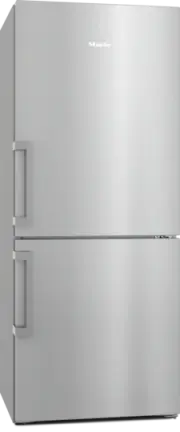
Installation *INSTALLATION* 21 Appliance dimensions Installation dimensions/View from above KFN 4776 ... All dimensions are given in inches (mm). The refrigeration appliance will function correctly if the specified ventilation gapsare kept clear. 26 19/32"* ( 675 * ) 72 27/32" ( 185 5 ) 14 1...
Page 22 - Connections; Front view
Installation *INSTALLATION* 22 Connections KFN 4776 ... All dimensions are given in inches (mm). 9 5/8 (245) (148) 5 13/16 a Front view b Power cord, length = 78" (2,000 mm)
Page 23 - Electrical connection; Risk of electric shock!
Installation *INSTALLATION* 23 Electrical connection Risk of electric shock! The appliance must only be switchedon when it has been installed in ac-cordance with the installation in-structions.Ground the appliance.The appliance must not be groundedvia a gas pipe.If in doubt, have a suitably qualif...
Page 24 - Connecting the refrigeration appliance
Installation *INSTALLATION* 24 If the outlet is no longer accessible afterinstallation, an additional means of dis-connection must be provided for allpoles. Suitable means of disconnectioninclude switches with an all-pole dis-connect device with a contact openingof at least 1/8" (3 mm). These ca...
Page 25 - Saving energy; Use
Saving energy 25 How to save energy: Installation lo-cation The refrigeration appliance has to cool more often at higher am-bient temperatures and consumes more energy in the process.Therefore, you should: - Install the refrigeration appliance in a well-ventilated room. - Do not install the refriger...
Page 26 - Guide to the appliance; Appliance overview
Guide to the appliance 26 Appliance overview
Page 28 - Control panel with status display; OK
Guide to the appliance 28 Control panel with status display OK < > °F 40 0 °F 1 2 3 4 5 a Temperature display for the refrigerator section b Temperature display for freezer section c Sensor controls for selecting a setting d OK sensor control for confirming a selection e Display for Miele@h...
Page 30 - Selecting the desired function in Settings mode
Guide to the appliance 30 Selecting the desired function in Settings mode Touch the OK sensor control on the control panel. will appear in the display (refrigerator section is selected). Use the or sensor control to scroll to the symbol. Touch OK . Select the function you want...
Page 31 - Adjusting the interior fittings; Moving the door shelf/bottle shelf; Pull the bottle holder up to remove it.; Moving the adjustable shelves
Guide to the appliance 31 Adjusting the interior fittings Moving the door shelf/bottle shelf Only move the door/bottle shelves inthe appliance door when they areempty. Push the door/bottle shelves upward,then remove them by pulling themforward. Replace the door/bottle shelves atthe required heig...
Page 32 - Sliding back the split shelf; Let the baking tray cool down to
Guide to the appliance 32 Sliding back the split shelf To accommodate tall items such as bot-tles or large containers, the front sectionof the split shelf slides underneath therear section. Lift up the front section of the glassshelf slightly at the front and slide itcarefully underneath the rear ...
Page 33 - Moving the carbon filter; - Change the carbon filters sooner if; Accessories supplied; Egg tray
Guide to the appliance 33 Moving the carbon filter KKF-FS2 carbon filters with holder(Active AirClean) are available as op-tional accessories (see “Optional ac-cessories”). When you are storing very strong-smelling food (e.g., cheese): - Place the holder with the carbon fil- ters on the adjustable s...
Page 34 - Optional accessories; MicroCloth Kit
Guide to the appliance 34 Optional accessories A range of useful Miele accessories andcare products are available for your ap-pliance. MicroCloth Kit The MicroCloth Kit contains an all-pur-pose cloth, a glass cloth, and a polishingcloth. These cloths are extremely resistant totearing and very robust...
Page 35 - Switching on and off; Before using for the first time; Connecting the appliance; Switching on the appliance
Switching on and off 35 Before using for the first time Remove all packaging material andprotective film. Clean the inside of the appliance andthe accessories (see “Cleaning andcare”). Connecting the appliance Connect the refrigeration appliance tothe electricity supply as described in“Electri...
Page 37 - The correct temperature
The correct temperature 37 It is very important to set the correcttemperature to ensure the shelf life offood. Reducing the temperature reducesthe growth rate of microorganisms.Food does not spoil as quickly.The temperature in the appliance willrise: - the more often the appliance door is opened and...
Page 38 - Temperature display
The correct temperature 38 Temperature display In normal operation, the refrigerationappliance temperature display showsthe current average fridge zone tem- perature and the maximum freezer zone temperature . Depending on the ambient temperatureand the temperature setting, it can takethe appliance a...
Page 39 - Using Automatic SuperCool, SuperFrost, and DynaCool; Automatic SuperCool; fridge zone; switched on
Using Automatic SuperCool, SuperFrost, and DynaCool 39 Automatic SuperCool When switched on, the Automatic Su-perCool function can be used to rapidly reduce the temperature in the fridge zone to its lowest setting (de- pending on the ambient temperature).The refrigeration appliance will work a...
Page 40 - SuperFreeze
Using Automatic SuperCool, SuperFrost, and DynaCool 40 SuperFreeze When switched on, the SuperFreezefunction can be used to rapidly re- duce the temperature in the freezer section to its lowest setting (depend- ing on the ambient temperature). Therefrigeration appliance will work at fullpower ...
Page 41 - DynaCool; Switching DynaCool
Using Automatic SuperCool, SuperFrost, and DynaCool 41 DynaCool When the DynaCool function is not switched on, the natural circulation ofair in the appliance will cause differenttemperature zones in the refrigeratorsection, as the cold, heavy air will sinkto the lowest section of the appliance...
Page 42 - Selecting additional settings; Party mode
Selecting additional settings 42 Explanation of the different set-tings Only the settings that require further ex-planation are described below. The door alarm and other warnings areautomatically suppressed when youare in Settings mode . Party mode The Party-mode function is recom- mended i...
Page 43 - Switching the safety-lock function
Selecting additional settings 43 Switching the safety-lock function / on When the safety-lock function is switched on, it protects the refrigerationappliance from being switched off unin-tentionally and being adjusted uninten-tionally by unauthorized persons, e.g.,children. In Settings mod...
Page 45 - user account via the Miele app.; Availability of the Wi-Fi connection; or from the Google Play StoreTM.
Selecting additional settings 45 Miele@home Your refrigeration appliance isequipped with an integrated WiFimodule.Networking is deactivated at the fac-tory. To use this feature, you will need: - a WiFi network- the Miele app- a Miele user account You can create a user account via the Miele app. The ...
Page 46 - Resetting the network configuration
Selecting additional settings 46 Setting up Miele@home for the firsttime In Settings mode , use the or sensor control to scroll to the symbol. Touch OK . Use the and sensor controls to select the connection method youwish to use (app or WPS). Touch OK . After you have succe...
Page 47 - Adjusting the display brightness
Selecting additional settings 47 Changing the volume of the alarmsand audible signals / You can change the volume of thealarms and audible signals (e.g., in theevent of a door alarm or a fault mes-sage). Alternatively, you can switch thealarms and audible signals off if you findthem annoying. ...
Page 48 - Information
Selecting additional settings 48 Resetting the settings to their factorydefault settings All settings made on the refrigerationappliance will be reset to the factory de-fault settings (for settings, see “Guideto the appliance”). In Settings mode , use the or sensor control to scroll to...
Page 49 - Temperature and door alarm; Temperature alarm
Temperature and door alarm 49 Health risk caused by contami- nated food.If the temperature in the freezer re-mains above 0°F (-18°C) for a longtime, the frozen food may start to de-frost. This will reduce the storage lifeof the food.Check whether the frozen food hasstarted to defrost. If it has, u...
Page 50 - Door alarm; will appear on; Turning the door alarm off early; Touch
Temperature and door alarm 50 Door alarm The refrigeration appliance is suppliedwith a door alarm to avoid increasedenergy consumption and food becom-ing warm if the door is left open. If an appliance door is left open for alonger period of time, will appear on the relevant temperature display....
Page 51 - Storing food in the fridge zone; Risk of fire from electrical appli-
Storing food in the fridge zone 51 Do not load more than a maximum of35 lb (16 kg) of food in the appliancedoor. Risk of fire from electrical appli- ances.Operating electrical devices in theappliance can cause sparks to form.Do not operate any electrical devicesinside the appliance. Risk of expl...
Page 52 - Different storage zones; Warmest area; eggs or cream
Storing food in the fridge zone 52 Different storage zones Due to natural air circulation, there aredifferent temperature zones in the re-frigerator section.Cold, heavy air sinks to the lowest sec-tion of the refrigeration section. Makeuse of the different zones when placingfood in the appliance. Th...
Page 53 - Storing food correctly
Storing food in the fridge zone 53 Storing food correctly Ensure that food stored in the fridgezone is in packaging or covered properly(some exceptions apply in the Dai-lyFresh drawer). This will prevent food odors from affect-ing other food, stop food from dryingout, and also prevent any cross-cont...
Page 54 - Storing food in the DailyFresh drawer; If you are only storing a small; Selecting low humidity; Selecting increased humidity; Open the DailyFresh drawer.
Storing food in the DailyFresh drawer 54 The DailyFresh drawer provides goodstorage conditions for fruit and vegeta-bles.The humidity level in the DailyFreshdrawer can also be regulated to suit thefood being stored. Food retains its ownmoisture if stored at a higher humidityand so does not dry out a...
Page 56 - Freezing and storing food; Health risk caused by decompos-; Maximum freezing capacity; Storing frozen food
Freezing and storing food 56 What happens when you freezefresh food? Health risk caused by decompos- ing food.If the temperature in the freezer re-mains above 0°F (-18°C) for a longtime, the frozen food may start to de-frost. This will reduce the storage lifeof the food.Check whether the frozen fo...
Page 57 - Home freezing; Before placing food in the freezer
Freezing and storing food 57 Home freezing Before placing food in the freezer When freezing more than 4.4 lb (2 kg)of fresh food, switch on the Super-Freeze function for 6 hours before placing the food in the freezer. When freezing even larger amounts offood, switch on the SuperFreeze func-ti...
Page 58 - upper; Cooling drinks quickly; more than one hour; Using accessories; Making ice cubes
Freezing and storing food 58 Place the food flat in the bottom ofthe upper freezer drawers so that it freezes through to the core as quicklyas possible. – VarioRoom: freezing the maximumamount of food (see data plate) If the ventilation slots are obstructed,the cooling performance will de-crease a...
Page 59 - Defrosting; WARNING! DANGER of injury; Freezer section
Defrosting 59 WARNING! DANGER of injury and damage!Do not use any mechanical or othertypes of aids which are not recom-mended by the manufacturer to ac-celerate the defrosting process. Refrigerator section and DailyFresh drawer The refrigerator section and the DailyFresh drawer defrost automatical...
Page 60 - Cleaning and care; Cleaning agents; do not
Cleaning and care 60 The data plate located inside the inte-rior cabinet of the refrigeration appli-ance must not be removed. It containsinformation which is required in theevent of a service call. Do not let water get into the elec-tronic or the lighting. Risk of damage due to moisture penetratio...
Page 61 - interior
Cleaning and care 61 Cleaning the freezer section/the entirerefrigeration appliance: Turn the appliance off. appears in the display and the cooling system is switched off. Take any food out of the freezer sec-tion/refrigeration appliance and storeit in a cool place. Take out any removable a...
Page 62 - Dismantling the door shelf/bottle shelf; Reattach the trim to the shelf.; Removing the compartment lid; Lift the lid at the front and pull it out.
Cleaning and care 62 Removing, dismantling, andcleaning accessories Dismantling the door shelf/bottle shelf Remove the stainless-steel trim beforecleaning the door shelf/bottle shelf inthe dishwasher. To remove the stainless-steel trim, pro-ceed as follows: Place the door shelf/bottle shelf onthe ...
Page 64 - Do not use a stainless steel cleaner; Cleaning the door seal
Cleaning and care 64 Clean the surfaces with a cleansponge and a solution of warm waterand liquid dish soap. A clean, dampmicrofiber cloth without cleaningagent can also be used for cleaning. After cleaning, wipe with clean waterand dry with a soft cloth. Clean Touch Steel (edt/cs) – appli-ance ...
Page 65 - Problem; The ventilation gaps are obstructed or dusty.
Frequently asked questions 65 Many malfunctions and faults that can occur in daily operation can be easily reme-died. You can save time and money in many cases, as you do not need to contactMiele Customer Service.Information to help you rectify faults yourself can be found at www.miele.com/ser-vice....
Page 67 - Other problems; Messages in the display; Message
Frequently asked questions 67 Other problems Problem Possible cause and solution An alarm does not soundeven though the appli-ance door has beenopen for a long time. This is not a fault. The alarm has been switched off inSettings mode. If you want to switch the acousticalarm back on again: In Sett...
Page 72 - Interior lighting
Frequently asked questions 72 Interior lighting Problem Possible cause and solution Risk of electric shock due to exposed, live electrical components. When removing the lighting cover, there is a risk of coming into contact withlive electrical components.Do not remove the lighting cover. The LED l...
Page 73 - Customer Service; Contact in the event of a fault
Customer Service 73 Information to help you rectify faultsyourself and about Miele spare partscan be found at www.miele.com/ser-vice. Contact in the event of a fault In the event of a fault which you cannotremedy yourself, please contact yourMiele dealer or Miele Customer Service. You can book a Mie...
Page 74 - Copyrights and licenses
Copyrights and licenses 74 For the purpose of operating and controlling the communication module, Mieleuses proprietary or third-party software that is not covered by open source licens-ing terms. This software/these software components are protected by copyright.The copyrights held by Miele and thi...
Page 75 - National Headquarters; Canada; Headquarters and Miele Centre; International Headquarters
9 Independence WayPrinceton, NJ 08540www.mieleusa.com U.S.A. Miele, Inc. National Headquarters Please have the model and serial numberof your appliance available whencontacting Customer Service. Canada ImporterMiele Limited Headquarters and Miele Centre Customer Support Phone: 888-99-MIELE (64353)[e...


 Miele APCL 043
User Manual
Miele APCL 043
User Manual
 Miele APWM 065
Installation Manual
Miele APWM 065
Installation Manual
 Miele APWM 070
Installation Manual
Miele APWM 070
Installation Manual
 Miele SC
Installation Manual
Miele SC
Installation Manual
 Miele PR
Installation Manual
Miele PR
Installation Manual
 Miele APCL 047
User Manual
Miele APCL 047
User Manual
 Miele PLW 8505
Installation Manual
Miele PLW 8505
Installation Manual
![Miele PT 7186 Vario [EL]](https://manualsarea.com/img/product/thumbs/180/69/3e/693e1219f5c0d53fde982888bd54a3ec.webp) Miele PT 7186 Vario [EL]
User Manual
Miele PT 7186 Vario [EL]
User Manual
 Miele CM/1
User Manual
Miele CM/1
User Manual
![Miele PLW 8617 [EL/S TH]](https://manualsarea.com/img/product/thumbs/180/fe/90/fe9010c5f8c3c4aada5d83b417c78507.webp) Miele PLW 8617 [EL/S TH]
Installation Manual
Miele PLW 8617 [EL/S TH]
Installation Manual
![Miele PWM 908 [EL DP MAR 3 AC 400-480V 50-60Hz]](https://manualsarea.com/img/product/thumbs/180/20/e5/20e5e929bcb336fc6b2f128d9c857a3d.webp) Miele PWM 908 [EL DP MAR 3 AC 400-480V 50-60Hz]
User Manual
Miele PWM 908 [EL DP MAR 3 AC 400-480V 50-60Hz]
User Manual
![Miele PWM 906 [EL DP MAR 3 AC 400-480V 50-60Hz]](https://manualsarea.com/img/product/thumbs/180/57/c8/57c81dd8d0abe05852b709a3fa9b80db.webp) Miele PWM 906 [EL DP MAR 3 AC 400-480V 50-60Hz]
Installation Manual
Miele PWM 906 [EL DP MAR 3 AC 400-480V 50-60Hz]
Installation Manual
![Miele PWM 906 [EL DP MAR 2N AC 400V 50-60Hz]](https://manualsarea.com/img/product/thumbs/180/ce/23/ce232ceeda728532882a2a2f56bf2abc.webp) Miele PWM 906 [EL DP MAR 2N AC 400V 50-60Hz]
User Manual
Miele PWM 906 [EL DP MAR 2N AC 400V 50-60Hz]
User Manual
![Miele PLW 8617 [EL TH]](https://manualsarea.com/img/product/thumbs/180/e8/4a/e84a63b24dca64279b26bca714985678.webp) Miele PLW 8617 [EL TH]
User Manual
Miele PLW 8617 [EL TH]
User Manual
![Miele PDR 908 [EL MAR 3N AC 400V 50-60Hz]](https://manualsarea.com/img/product/thumbs/180/05/b7/05b705998b251f92b271e908423e1ecb.webp) Miele PDR 908 [EL MAR 3N AC 400V 50-60Hz]
Installation Manual
Miele PDR 908 [EL MAR 3N AC 400V 50-60Hz]
Installation Manual
![Miele PLW 8615 [EL CT]](https://manualsarea.com/img/product/thumbs/180/70/ff/70ff37b9174e78db8d00ddce8cf08ee3.webp) Miele PLW 8615 [EL CT]
Installation Manual
Miele PLW 8615 [EL CT]
Installation Manual
![Miele PLW 8616 [EL/S]](https://manualsarea.com/img/product/thumbs/180/37/f4/37f4255dee3c9942a13241f3ccd5fe93.webp) Miele PLW 8616 [EL/S]
Installation Manual
Miele PLW 8616 [EL/S]
Installation Manual
![Miele PWM 916 [EL DV DD SOM]](https://manualsarea.com/img/product/thumbs/180/21/65/21657a907bb735f3acf5a7bdbbc78c8a.webp) Miele PWM 916 [EL DV DD SOM]
Manual
Miele PWM 916 [EL DV DD SOM]
Manual
![Miele PFD 104 SCVi XXL [120V]](https://manualsarea.com/img/product/thumbs/180/0a/20/0a20c04430aaa9be6a985688f5bb5580.webp) Miele PFD 104 SCVi XXL [120V]
Installation Manual
Miele PFD 104 SCVi XXL [120V]
Installation Manual
![Miele PDR 507 HP [MAR]](https://manualsarea.com/img/product/thumbs/180/58/9e/589e9ba94b88174fa0cdb27b4bbaac5b.webp) Miele PDR 507 HP [MAR]
User Manual
Miele PDR 507 HP [MAR]
User Manual