Page 2 - Contents; Warnings and safety notes
Contents 2 Warnings and safety notes ......................................................................................... 5 Sustainability and environmental protection .......................................................... 14 Caring for the environment .........................................
Page 3 - Adjusting settings
Contents 3 Freezing and storing food .............................................................................................. 24 Maximum freezing capacity .................................................................................... 24 Storing frozen food ..................................
Page 4 - Installation
Contents 4 Installation ...................................................................................................................... 42 Installation site ............................................................................................................... 42 Climate range ..........
Page 5 - Correct application
Warnings and safety notes 5 This refrigeration appliance complies with current safetyrequirements. Inappropriate use can, however, lead to personalinjury and material damage. Please read the operating and installation instructions carefullybefore using the refrigeration appliance for the first time....
Page 6 - Safety with children
Warnings and safety notes 6 This refrigeration appliance is not suitable for storing and keeping cool medicines, blood plasma, laboratory preparations or similarsubstances or products that are subject to the Medical DeviceDirective. Incorrect use of the refrigeration appliance for suchpurposes may...
Page 7 - Warning: fire hazard/flammable materials. This symbol is on the
Warnings and safety notes 7 Warning: fire hazard/flammable materials. This symbol is on the compressor and indicates flammable materials. Do not remove thissticker.The refrigerant inside the appliance (details on the data plate) isenvironmentally friendly but flammable.The use of this refrigerant ...
Page 9 - Proper installation
Warnings and safety notes 9 While the appliance is under warranty, repairs should only be undertaken by a Miele authorised service technician. Otherwise thewarranty is invalidated. Faulty components must only be replaced with genuine Miele original spare parts. Miele can only guarantee the safet...
Page 10 - Accessories and spare parts
Warnings and safety notes 10 Risk of fire and explosion. Do not store explosive materials in the refrigeration appliance or any products containing propellants (e.g.spray cans). Electrical components can cause flammable mixes ofgases to ignite. Danger of explosion. Do not operate any electrical ...
Page 11 - Transport
Warnings and safety notes 11 Do not use a steam cleaning appliance to clean or defrost this appliance. Steam could reach electrical components and cause a short circuit. WARNING! DANGER of injury and damage! Do not use any mechanical or other types of aids which are not recommended by themanufac...
Page 12 - Disposal of your old appliance; Symbol on the compressor (depending on model)
Warnings and safety notes 12 Disposal of your old appliance Children playing could become trapped in the appliance and could suffocate. - Remove the appliance doors.- Remove the drawers.- Leave the adjustable shelves in the refrigeration appliance so children cannot climb inside. - If your old ref...
Page 13 - The oil in the compressor can be fatal if swallowed or if it
Warnings and safety notes 13 The oil in the compressor can be fatal if swallowed or if it penetrates the airways.
Page 14 - Sustainability and environmental protection; Caring for the environment; Disposing of the packaging material
Sustainability and environmental protection 14 Caring for the environment Disposing of the packaging material The packaging material is used forhandling and protects the appliancefrom transport damage. The packagingmaterial used is selected from materialswhich are environmentally friendly fordisposa...
Page 15 - Installation site
Sustainability and environmental protection 15 How to save energy ... Installation site The refrigeration appliance has to cool more often at higherambient temperatures and consumes more energy in the process.Therefore: - Install the refrigeration appliance in a well-ventilated room. - Do not instal...
Page 16 - Familiarisation; Guide to the appliance; Display
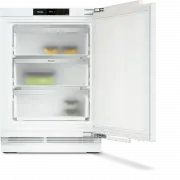
Familiarisation 16 Guide to the appliance a Display b Freezer drawer c Soft-close mechanism (SoftClose) d Ventilation grille
Page 17 - Start display; OK
Familiarisation 17 Start display The display can be scratched by pointed or sharp objects, e.g. pens.Only touch the display with your fingertips. It is possible that the display will not react to finger contact if your fingers arecold. -18 °C 1 2 3 4 a Temperature display for freezer section b...
Page 18 - Settings mode; Lock function
Familiarisation 18 Settings mode Lock function / When the lock function is switched on,it protects the refrigeration appliancefrom being switched off unintentionallyand being adjusted unintentionally byunauthorised persons, e.g. children.If you just want to quickly adjust thetemperature, for ...
Page 19 - or from the Google Play StoreTM.
Familiarisation 19 Make sure that the signal of yourWiFi network is sufficiently strong inthe place where you want to set upyour refrigeration appliance. Availability of the WiFi connection The WiFi connection shares a frequencyrange with other appliances (includingmicrowave ovens and remote control...
Page 20 - Safety; Temperature alarm
Familiarisation 20 Information on the refrigerationappliance You can call up the model identifier andserial number of your refrigerationappliance here.Keep this appliance data to hand: - For integrating the refrigeration appliance into your WiFi network (see“Adjusting settings – Setting upMiele@h...
Page 21 - Appliance functions
Familiarisation 21 The start screen appears in the display:the warmest temperature recorded inthe freezer section will flash for about1 minute in the display. Then thetemperature display will change to thecurrent temperature in the freezersection. Door alarm The refrigeration appliance is fittedwith...
Page 22 - Commissioning; Before using for the first time; Connecting the refrigeration appliance
Commissioning 22 Before using for the first time Remove all packaging material andprotective film. Clean the inside of the appliance andthe accessories (see “Cleaning andcare”). Connecting the refrigeration appliance Connect the refrigeration appliance tothe electricity supply as described in“...
Page 23 - Operation; Setting the temperature
Operation 23 Setting the temperature Health risk caused by decomposing food.To freeze fresh food, a temperature of -18 °C is required. Please note that, if the temperature is any warmer, thefood will have a shorter shelf life. When freezing food and storing itover the long term, set a minimumtempe...
Page 24 - Switching SuperFreeze; Maximum freezing capacity
Operation 24 Switching SuperFreeze off The SuperFreeze function will switch itself off automatically after amaximum of 72 hours.To save energy, you can switch off theSuperFreeze function early yourselfonce food and drinks are sufficientlychilled. Touch the temperature display for thefreezer ...
Page 25 - Cooling drinks quickly
Operation 25 Placing food in the freezer Risk of damage caused by loading too much food.Loading food which is too heavy cancause damage to the freezer drawers.Do not exceed the relevant maximumload size: Bottom freezer drawer = 10 kgAll other freezer drawers = 15 kg. Unfrozen food should not touch...
Page 27 - is triggered
Adjusting settings 27 Changing the time before the dooralarm is triggered Tap . Swipe left or right until is shown in the middle. Tap . Swipe left or right until the time youwant between 30 seconds and3 minutes 30 seconds is shown in themiddle. Tap to confirm the setting. ...
Page 28 - Switching off the keypad tone
Adjusting settings 28 Switching off the keypad tone Tap . Swipe left or right until is shown in the middle. Tap . If the keypad tone is switched off, will light up white. To leave this Settings level, tap . Switching on the keypad tone Tap . Swipe left or ...
Page 29 - Tap
Adjusting settings 29 Tap . The refrigeration appliance shuts downand must be switched on again.
Page 30 - Cleaning and care; Cleaning agents; do not use the following:
Cleaning and care 30 The data plate located inside theinterior cabinet of the refrigerationappliance must not be removed. Itcontains information which is requiredin the event of a fault. Do not let water get into theelectronic unit or the lighting. Risk of damage due to moisture ingress.The steam ...
Page 31 - by hand; The following components are; Taking out the freezer drawers; Cleaning the door seal; Risk of damage as a result of; Cleaning the ventilation gaps; Close the appliance door.
Cleaning and care 31 Cleaning accessories by handor in the dishwasher The following components must becleaned by hand only: - All drawers The following components are dishwasher-safe : Risk of damage due to high dishwasher temperatures.Parts of the refrigeration appliancemay become unusable, e.g. ...
Page 32 - Defrosting
Cleaning and care 32 Defrosting The appliance is equipped with a“NoFrost” system. The refrigerationappliance defrosts automatically.The moisture generated in the appliancecollects on the condenser and isautomatically defrosted and dissipatedfrom time to time.This automatic defrosting systemenables t...
Page 33 - Troubleshooting; Problem; Do not block the ventilation gaps.
Troubleshooting 33 Many malfunctions and faults can be easily remedied. You can save time andmoney in many cases, as you do not need to contact Customer Service. More information to help you remedy faults yourself can be found atwww.miele.co.uk/support/customer-assistance . To prevent unnecessary lo...
Page 34 - Other problems; orange
Troubleshooting 34 Problem Cause and remedy Install the refrigeration appliance in the niche asdescribed in the installation instructions suppliedwith it. The temperature setting in the refrigeration applianceis too low. Correct the temperature setting. A large amount of food is being frozen at ...
Page 35 - Display warnings; Message
Troubleshooting 35 Display warnings Message Cause and remedy lights up on thestart display, therefrigeration ap-pliance does notget cold eventhough the con-trols and the in-terior lighting areworking. Demo mode has been activated. Tap . Tap . Swipe left or right until is shown in t...
Page 38 - Interior lighting
Troubleshooting 38 Message Cause and remedy lights up red inthe display and afault code F withnumbers may ap-pear. An alarm isalso sounding. There is a fault. Tap on the display to switch the alarm off. Contact the Miele Customer Service Department. To report the fault, you need the fault co...
Page 40 - Customer Service Department; Contact in the event of a fault; Warranty
Customer Service Department 40 Information to help you rectify faultsyourself and about Miele spare partscan be found at www.miele.com/service. Contact in the event of a fault In the event of a fault which you cannotremedy yourself, please contact yourMiele dealer or Miele Customer Service. You can ...
Page 41 - Optional accessories; Multi-purpose microfibre cloth
Optional accessories 41 Multi-purpose microfibre cloth The microfibre cloth is suitable forremoving fingerprints and light soilingfrom surfaces such as stainless steel,glass, plastic and chrome without theuse of chemicals. MicroCloth Kit The MicroCloth Kit contains a universalcloth, a glass cloth an...
Page 43 - Climate range; Ventilation
Installation 43 - Other appliances must also not be plugged into a socket located directlybehind the refrigeration appliance. - When installing the refrigeration appliance, make sure that the mainsconnection cable does not gettrapped or damaged. - Do not position or operate multi- socket adapters, d...
Page 44 - Risk of damage due to; Changing the door hinging; Danger of injury and damage to; Furniture door panel; – Gap; This must be taken into
Installation 44 Side-by-side installation Risk of damage due to condensation on external appliancepanels.In environments with high humidity,condensation can build up onexternal appliance panels, which cancause corrosion.Do not place different refrigerationappliance models directly next to oron top...
Page 45 - Gap; Fit a spacer between the housing; Weight of the furniture door; If the furniture door panel is too
Installation 45 Appliancefurnituredoorthickness A [mm] Gap X [mm] for different edge radii B R0 R1.2 R2 R3 ≥ 16–19 min. 3 20 5 4 4 3.5 21 5.5 5 4.5 4 22 6.5 6 5.5 5 Adjoining kitchen furniture front A = Furniture front thicknessB = Edge radiusX = Gap Adjoining side wall A = Furniture front thickness...
Page 46 - Building-in dimensions; All dimensions are given in mm.
Installation *INSTALLATION* 46 Building-in dimensions Niche/side view All dimensions are given in mm. The refrigeration appliance will function correctly if the specified ventilationopenings are kept clear. FNUS 7040 +4 ≤10kg 560 ≥150cm² 560 ≤ 18 60 55 +54 21
Page 48 - Connections
Installation *INSTALLATION* 48 Connections All dimensions are given in mm. 3 +60 ≥150cm² a View from the front b Mains connection cable, length = 2200 mm A longer mains connection cable is available to order from the Miele CustomerService Department. c No connection sockets in this area
Page 49 - Installing the appliance; Store the enclosed metal rod in a; Preparing the refrigeration appliance
Installation *INSTALLATION* 49 Installing the appliance To install the refrigeration appliance,you will need the following tools: Tip: Store the enclosed metal rod in a safe place. It is required for adjustingthe rear appliance feet. Preparing the refrigeration appliance Position the refrigeration...
Page 50 - Positioning the refrigeration appliance; Risk of damaging the mains
Installation *INSTALLATION* 50 2. Secured at the side Both ends of the bracket must bebent. Fit the bracket in the opening in theappliance lid. Bend the bracket at the perforatedposition. Remove the bracket from the openingand insert the straight end of thebracket. Now bend this end of the b...
Page 51 - Aligning the refrigeration appliance
Installation *INSTALLATION* 51 If the refrigeration appliance ispushed too far into the niche, theappliance door may not closeproperly once the furniture panel hasbeen fitted. This can cause ice tobuild up, condensate to accumulateand lead to faults in the appliance.These can all lead to increaseden...
Page 52 - , but do not fix it in; Without a continuous plinth facing:; Pull the plinth panel; With a continuous plinth facing:; right up against
Installation *INSTALLATION* 52 Replace the plinth panel with theventilation grille , but do not fix it in place yet. Without a continuous plinth facing: Pull the plinth panel forwards until the ventilation slots are in alignmentwith adjacent cabinet plinth panels. Hold the plinth panel s...
Page 53 - Fitting the furniture door; Push the fitting aids
Installation *INSTALLATION* 53 2. Secured at the side Screw the refrigeration appliance intothe niche on the right and left withone screw in each case. Fitting the furniture door If fitted in a run of units make sure thatthe top edge of the furniture door is atthe same height as neighbouring unitd...
Page 54 - inside
Installation *INSTALLATION* 54 Tip: Push up the fitting aids with the furniture front until they are the sameheight as the doors of adjacent kitchenunits. Undo the nuts and take the fixing bracket off together with the fitting aids . Using a pencil, lightly mark a linedown the centre of ...
Page 57 - Electrical connection; Risk of fire from overheating.
Installation *INSTALLATION* 57 Electrical connection The refrigeration appliance must only beconnected to an earthed socket usingthe mains connection cable supplied.The socket must be easily accessibleafter the refrigeration appliance hasbeen installed. If the socket is not easilyaccessible, ensure ...
Page 58 - EU Conformity declaration
EU Conformity declaration 58 Miele hereby declares that this freezercomplies with Directive 2014/53/EU. The complete text of the EU declarationof conformity is available from one ofthe following internet addresses: - Products, Download from www.miele.ie - For service, information, operating instruct...
Page 59 - UK Conformity declaration; manuals and enter the name of the product or the serial number; Statement of Compliance; Paul Wright
UK Conformity declaration 59 Miele hereby declares that this freezer complies with UK Radio EquipmentRegulations 2017, as amended. The complete text of the UK declaration of conformity is available from one of thefollowing internet addresses: - Products, Download from www.miele.co.uk- For service, i...
Page 60 - Copyrights and licences
Copyrights and licences 60 For the purpose of operating and controlling the communication module, Mieleuses proprietary or third-party software that is not covered by open sourcelicensing terms. This software/these software components are protected bycopyright. The copyrights held by Miele and third...
Page 63 - United Kingdom
United Kingdom Miele Co. Ltd., Fairacres, Marcham Road, Abingdon, Oxon, OX14 1TWTel: 0330 160 6600, Internet: www.miele.co.uk, E-mail: [email protected] Australia Miele Australia Pty. Ltd.ACN 005 635 398ABN 96 005 635 398Level 4, 141 Camberwell RoadHawthorn East, VIC 3123Tel: 1300 464 353E-mail: [em...


 Miele APCL 043
User Manual
Miele APCL 043
User Manual
 Miele APWM 065
Installation Manual
Miele APWM 065
Installation Manual
 Miele APWM 070
Installation Manual
Miele APWM 070
Installation Manual
 Miele SC
Installation Manual
Miele SC
Installation Manual
 Miele PR
Installation Manual
Miele PR
Installation Manual
 Miele APCL 047
User Manual
Miele APCL 047
User Manual
 Miele PLW 8505
Installation Manual
Miele PLW 8505
Installation Manual
![Miele PT 7186 Vario [EL]](https://manualsarea.com/img/product/thumbs/180/69/3e/693e1219f5c0d53fde982888bd54a3ec.webp) Miele PT 7186 Vario [EL]
User Manual
Miele PT 7186 Vario [EL]
User Manual
 Miele CM/1
User Manual
Miele CM/1
User Manual
![Miele PLW 8617 [EL/S TH]](https://manualsarea.com/img/product/thumbs/180/fe/90/fe9010c5f8c3c4aada5d83b417c78507.webp) Miele PLW 8617 [EL/S TH]
Installation Manual
Miele PLW 8617 [EL/S TH]
Installation Manual
![Miele PWM 908 [EL DP MAR 3 AC 400-480V 50-60Hz]](https://manualsarea.com/img/product/thumbs/180/20/e5/20e5e929bcb336fc6b2f128d9c857a3d.webp) Miele PWM 908 [EL DP MAR 3 AC 400-480V 50-60Hz]
User Manual
Miele PWM 908 [EL DP MAR 3 AC 400-480V 50-60Hz]
User Manual
![Miele PWM 906 [EL DP MAR 3 AC 400-480V 50-60Hz]](https://manualsarea.com/img/product/thumbs/180/57/c8/57c81dd8d0abe05852b709a3fa9b80db.webp) Miele PWM 906 [EL DP MAR 3 AC 400-480V 50-60Hz]
Installation Manual
Miele PWM 906 [EL DP MAR 3 AC 400-480V 50-60Hz]
Installation Manual
![Miele PWM 906 [EL DP MAR 2N AC 400V 50-60Hz]](https://manualsarea.com/img/product/thumbs/180/ce/23/ce232ceeda728532882a2a2f56bf2abc.webp) Miele PWM 906 [EL DP MAR 2N AC 400V 50-60Hz]
User Manual
Miele PWM 906 [EL DP MAR 2N AC 400V 50-60Hz]
User Manual
![Miele PLW 8617 [EL TH]](https://manualsarea.com/img/product/thumbs/180/e8/4a/e84a63b24dca64279b26bca714985678.webp) Miele PLW 8617 [EL TH]
User Manual
Miele PLW 8617 [EL TH]
User Manual
![Miele PDR 908 [EL MAR 3N AC 400V 50-60Hz]](https://manualsarea.com/img/product/thumbs/180/05/b7/05b705998b251f92b271e908423e1ecb.webp) Miele PDR 908 [EL MAR 3N AC 400V 50-60Hz]
Installation Manual
Miele PDR 908 [EL MAR 3N AC 400V 50-60Hz]
Installation Manual
![Miele PLW 8615 [EL CT]](https://manualsarea.com/img/product/thumbs/180/70/ff/70ff37b9174e78db8d00ddce8cf08ee3.webp) Miele PLW 8615 [EL CT]
Installation Manual
Miele PLW 8615 [EL CT]
Installation Manual
![Miele PLW 8616 [EL/S]](https://manualsarea.com/img/product/thumbs/180/37/f4/37f4255dee3c9942a13241f3ccd5fe93.webp) Miele PLW 8616 [EL/S]
Installation Manual
Miele PLW 8616 [EL/S]
Installation Manual
![Miele PWM 916 [EL DV DD SOM]](https://manualsarea.com/img/product/thumbs/180/21/65/21657a907bb735f3acf5a7bdbbc78c8a.webp) Miele PWM 916 [EL DV DD SOM]
Manual
Miele PWM 916 [EL DV DD SOM]
Manual
![Miele PFD 104 SCVi XXL [120V]](https://manualsarea.com/img/product/thumbs/180/0a/20/0a20c04430aaa9be6a985688f5bb5580.webp) Miele PFD 104 SCVi XXL [120V]
Installation Manual
Miele PFD 104 SCVi XXL [120V]
Installation Manual
![Miele PDR 507 HP [MAR]](https://manualsarea.com/img/product/thumbs/180/58/9e/589e9ba94b88174fa0cdb27b4bbaac5b.webp) Miele PDR 507 HP [MAR]
User Manual
Miele PDR 507 HP [MAR]
User Manual