Page 2 - Ελληνικά; English
English 1. Check phone compatibility . . . . . . . . . . . . . . . . . . . . . . . . . . . . . . . . . . . . . . . . . . . 4 2. Charge JABRA ® BT200 . . . . . . . . . . . . . . . . . . . . . . . . . . . . . . . . . . . . . . . . . . . . . . . . . 4 3. Read the glossary . . . . . . . . . . . . . . . ...
Page 3 - Check phone compatibility; Read the glossary
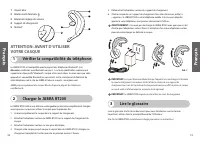
4 5 1 Blue Indicator Light 2 Multi-Function Button 3 Volume Control Button 4 Charging Cradle 5 MiniGel ™ 4 5 3 2 1 4 5. Unplug the AC adaptor from the charging cradle. 6. Remove the headset from the charging cradle. You are now ready to “pair” JABRA BT200 to your mobile phone. If the headset has alr...
Page 4 - Turning headset on/off; “Pair” to your Bluetooth phone
6 7 IMPORTANT: If pairing was successful, the blue indicator light will briefly flash rapidlybefore going back to flashing every 3 seconds. If unsuccessful, the light remains solid,and you’ll need to reattempt pairing (see steps 3–5 above). * If you have a Bluetooth phone that supports the hands-fre...
Page 5 - Answering a call; Resetting the headset
8 9 Ending a call 8 Call-waiting* 10 Making a call 7 JABRA BT200 is ready to wear onthe right ear. If you prefer the left,gently rotate the MiniGel 180°. For optimal performance, wearJABRA BT200 and your Bluetoothphone on the same side of yourbody. In general, you will getbetter performance when the...
Page 6 - Tips for Nokia Bluetooth phones
13 3. Set your Bluetooth phone to “discover” the headset by following your phone’sinstruction guide. Typically, the stepsinvolve going to a “setup”,“connect”, or“Bluetooth” menu on your phone andthen selecting the option to “discover”a Bluetooth device*. 4. Your phone will find the “JABRA BT200” hea...
Page 7 - Frequently asked questions; Storage of headset; Certification and safety approvals
13 12 Frequently asked questions 14 1. How far away from my phone will my JABRA BT200 work? The operating range is typically up to 30 feet (10 metres). 2. Will JABRA BT200 work with my cordless phone at home? JABRA BT200 is not designed for use with cordless phones. 3. Will JABRA BT200 work with lap...
Page 8 - Warranty and parts replacement
14 15 Warranty and parts replacement JABRA (GN Netcom) warrants this product against all defects in material andworkmanship for a period of two years from the date of original purchase. Theconditions of this warranty and our responsibilities under this warranty are as follows: • The warranty is limi...
Page 9 - Français; rançais
Français 1. Vérifier la compatibilité du téléphone . . . . . . . . . . . . . . . . . . . . . . . . . . . . . . . . . 18 2. Charger le JABRA ® BT200 . . . . . . . . . . . . . . . . . . . . . . . . . . . . . . . . . . . . . . . . . . . . . 18 3. Lire le glossaire . . . . . . . . . . . . . . . . . . . ...
Page 10 - Lire le glossaire; Vérifier la compatibilité du téléphone; Charger le JABRA BT200
18 19 5. Débranchez l’adaptateur secteur du support de chargement. 6. Ôtez le casque de son support de chargement. Vous êtes désormais prêt(e) à « appairer » le JABRA BT200 à votre téléphone mobile. Si le casque a déjà étéappairé à votre téléphone, vous pouvez commencer à l’utiliser. AVERTISSEMENT :...
Page 11 - « Appairer » avec votre téléphone Bluetooth
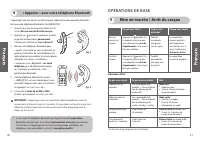
20 21 Mise en marche / Arrêt du casque 5 OPÉRATIONS DE BASE Ce que vous entendez Une série rapide de 2tonalités — basse à élevée(lors du démarrage dumode actif ) Une série rapide de 2tonalités — basse à élevée(lors du démarrage dumode « standby » (veille)) 3 bips toutes les 30 secondes 3 bips toutes...
Page 12 - Mettre fin à un appel.; Choisissez votre mode de port du casque; Répondre à un appel
22 23 Mise en attente* 10 • (Recommandé) Utilisez le mode de mise en attente standard du clavier de votretéléphone, ce qui suppose, généralement, d'appuyer sur la touche « envoyer » ; OU • Appuyez et relâchez une fois pour répondre à l’appel entrant et passer d’une ligne à une autre (certains appare...
Page 13 - Astuces pour les téléphones Nokia Bluetooth; Réinitialisation du casque.
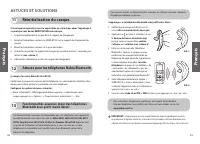
« Appairage » à un téléphone Bluetooth avec profil mains libres : 1. Vérifiez que le casque est éteint (voir la section Mise en marche/Arrêt du casque ). 2. Appuyez sur (environ 8 secondes) et sur le bouton de hausse du volume (up)jusqu’à ce qu’un voyant bleu continus’allume, puis relâchez (voir sch...
Page 14 - Questions fréquemment posées
26 27 Besoin d’aide ? 15 1. Sur le Web: www.jabra.com/fscs (pour obtenir les dernières infos techniques et les manuels d'utilisateur en ligne) 2. E-mail: Assistance technique: [email protected] Information: [email protected] Questions fréquemment posées 14 1. Jusqu’à quelle distance de mon téléphone...
Page 15 - Garantie et Remplacement des pièces; Rangement du casque; Certification et exigences de sécurité
28 29 Garantie et Remplacement des pièces 18 JABRA (GN Netcom) garantit ce produit contre tous les défauts, pièce et main d’œuvre,pendant deux ans à compter de la date de l'achat original. Les conditions de cettegarantie et nos responsabilités en vertu de cette garantie sont les suivantes : • La gar...
Page 16 - Deutsch
30 31 Deutsch 1. Telefonkompatibilität überprüfen . . . . . . . . . . . . . . . . . . . . . . . . . . . . . . . . . . . . . 32 2. JABRA ® BT200 aufladen . . . . . . . . . . . . . . . . . . . . . . . . . . . . . . . . . . . . . . . . . . . . . . 32 3. Glossar lesen . . . . . . . . . . . . . . . . . ....
Page 17 - Glossar lesen; Telefonkompatibilität überprüfen
32 33 5. Ziehen Sie den Wechselspannungsadapter aus der Ladeschale. 6. Entfernen Sie das Headset aus der Ladeschale. Jetzt können Sie Ihr JABRA BT200 mit Ihrem Mobiltelefon „paaren”. Wenn das Headset bereits mit Ihrem Telefon gepaartwurde, können Sie sofort anfangen, es zu benutzen. WARNUNG: JABRA B...
Page 18 - Ihr Bluetooth-Telefon „paaren”
34 35 Headset ein- und ausschalten 5 GRUNDLEGENDE BEDIENUNGSSCHRITTE Was Sie tun Drücken und halten Sie 3 bis 5 Sekunden lang, bis Siedie blaue Anzeige häufigaufblinken sehen, lassen Siedann los. Drücken und halten Sie 3 bis 5 Sekunden lang, bis Siedie blaue Anzeige häufigaufblinken sehen, lassen Si...
Page 19 - Gespräch beenden; Gespräch annehmen; Anruf tätigen
36 37 Anklopfen* 10 • (Empfohlene) Standardmethode über die Tastatur Ihres Telefon, bei dernormalerweise die Taste „senden” gedrückt werden muss. ODER • Einmaliges Drücken und Loslassen der Taste zum Annehmen eines eingehenden Anrufs und zum Hin- und Herschalten zwischen den Anrufen (einige Telefone...
Page 20 - Tipps für Nokia Bluetooth-Telefone; Headset zurücksetzen
38 39 * Telefonspezifische Paarungsanweisungen und die aktuellste Liste der Telefone mit Freisprechprofilen sind im Internet unter www.jabra.com/fscs zu finden WICHTIG: Wenn der Vorgang erfolgreich abgeschlossen ist, blinkt die blaue Anzeigekurz auf und blinkt dann wieder alle 3 Sekunden. Wenn der V...
Page 21 - Häufig gestellte Fragen; Wird mehr Hilfe benötigt?
40 41 14 1. In welcher Entfernung von meinem Mobiltelefon funktioniert das JABRA BT200?Die Betriebsreichweite liegt normalerweise bei bis zu 10 Metern. 2. Funktioniert das JABRA BT200 auch mit meinem schnurlosen Telefon zu Hause?Zur Verwendung mit schnurlosen Telefonen ist das JABRA BT200 nicht geei...
Page 22 - Garantie und Ersatzteile; Zulassungs- und Sicherheitsbescheinigungen
42 43 Garantie und Ersatzteile 18 Dieses Gerät trägt die CE-Kennzeichnung entsprechend den Bestimmungen derDirektive R & TTE (99/5/EC). GN Netcom erklärt hiermit, dass dieses Gerät die wesentlichen Anforderungen undandere einschlägige Bestimmungen der Direktive 1999/5/EC erfüllt. Weitere Informa...
Page 23 - Italiano; Glossar
44 45 Italiano 1. Verificare la compatibilità del telefono . . . . . . . . . . . . . . . . . . . . . . . . . . . . . . . . 46 2. Caricare JABRA ® BT200 . . . . . . . . . . . . . . . . . . . . . . . . . . . . . . . . . . . . . . . . . . . . . . . 46 3. Leggere il glossario . . . . . . . . . . . . . ....
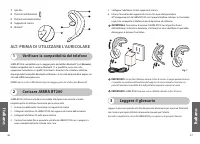
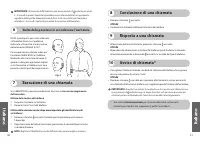
Page 24 - Leggere il glossario; Verificare la compatibilità del telefono; ALT: PRIMA DI UTILIZZARE L’AURICOLARE
46 47 5. Scollegare l’adattatore CA dal supporto di ricarica. 6. Estrarre l’auricolare dal supporto di ricarica. Ora è possibile procedere all’“accoppiamento” del JABRA BT200 con il proprio telefono cellulare. Se l’auricolareè già stato accoppiato al telefono, è possibile iniziare ad utilizzarlo. AV...
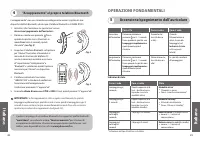
Page 25 - Accensione/spegnimento dell’auricolare; OPERAZIONI FONDAMENTALI; “Accoppiamento” al proprio telefono Bluetooth
48 49 Accensione/spegnimento dell’auricolare 5 OPERAZIONI FONDAMENTALI Cosa si sente Rapida sequenza di 2toni - da alto a basso(quando si avvia lamodalità attiva) Rapida sequenza di 2toni - da alto a basso(quando si avvia lamodalità standby) 3 bip ogni 30 secondi 3 bip ogni 5 minuti Stato Modalità a...
Page 26 - Scelta della posizione in cui indossare l’auricolare; Risposta a una chiamata
50 51 Conclusione di una chiamata 8 Esecuzione di una chiamata 7 BT200 è predisposto per essere indossatosull'orecchio destro. Se si preferisceindossarlo sull’orecchio sinistro, ruotaredelicatamente il MiniGel di 180°. Per una prestazione ottimale, indossarel’auricolare JABRA BT200 e il telefonoBlue...
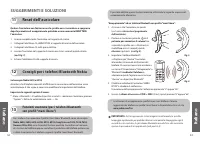
Page 27 - Consigli per i telefoni Bluetooth Nokia; Reset dell’auricolare
52 53 Consigli per i telefoni Bluetooth Nokia 12 Funzioni avanzate (per i telefoni Bluetoothcon profili “mani libere”) 13 (ad esempio Nokia 6310 e 8910) Accertarsi che il telefono consenta di effettuare la connessione dell’auricolare senzaautorizzazione. A tale scopo, è necessario modificare le impo...
Page 28 - Le domande più frequenti
54 55 Le domande più frequenti 14 1. Fino a quale distanza dal telefono è in grado di funzionare JABRA BT200? Di norma, la portata massima di funzionamento è di 10 metri. 2. JABRA BT200 può essere utilizzato con il cordless di casa? JABRA BT200 non è stato concepito per essere utilizzato con i telef...
Page 29 - Garanzia e sostituzione di componenti; Conservazione dell’auricolare; Norme di certificazione e sicurezza
56 57 Garanzia e sostituzione di componenti 18 JABRA (GN Netcom) garantisce che questo prodotto non presenta difetti di materiale e dilavorazione per un periodo di due anni dalla data di acquisto originale. Le condizioni dellapresente garanzia e le nostre responsabilità in merito ad essa sono descri...
Page 30 - Nederlands
58 59 Nederlands 1. Geschiktheid van toestel controleren . . . . . . . . . . . . . . . . . . . . . . . . . . . . . . . . . 60 2. JABRA ® BT200 opladen . . . . . . . . . . . . . . . . . . . . . . . . . . . . . . . . . . . . . . . . . . . . . . . 60 3. Verklarende woordenlijst doorlezen . . . . . . . ...
Page 31 - Verklarende woordenlijst doorlezen; Geschiktheid van toestel controleren
60 61 5. Haal de AC adapter uit het oplaadstation. 6. Haal de headset uit het oplaadstation. U kunt nu de JABRA BT200 verbinden met uw mobiele toestel. Als de headset al is verbonden met uw toestel, kunt u dezegaan gebruiken. WAARSCHUWING: U mag de JABRA BT200 uitsluitend opladen met debijgeleverde ...
Page 32 - BASISHANDELINGEN
62 63 Headset in-/uitschakelen 5 BASISHANDELINGEN Wat u hoort Serie van 2 snelle tonen– van laag naar hoog (alsde Actieve Modus start) Serie van 2 snelle tonen– van hoog naar laag alsde Standby-modus start) 3 piepsignalen om de 30 seconden 3 piepsignalen om de 5 minuten Status Actieve modus 5 • Gesp...
Page 33 - Een gesprek beëindigen; Een gesprek beantwoorden
64 65 Telefoneren 7 De gewenste draagstand kiezen 6 Als de JABRA BT200 is uitgeschakeld, moet u deze nu inschakelen (zie Headset in-/uitschakelen ). Toetsenset van de telefoon gebruiken 1. Kies een nummer op de toetsenset. 2. Druk op de “Send”-toets van de telefoon. Stemgestuurd nummerkiezen (nadat ...
Page 34 - Tips voor Nokia Bluetooth-toestellen; De headset resetten
Verbinden met een Bluetooth-toestel met een handsfree profiel: 1. Schakel de headset uit (zie Headset in- /uitschakelen ). 2. Houd plus de volumeknop ingedrukt totdat het blauwe lampje onafgebrokenblijft branden (ongeveer 8 seconden), enlaat dan de knoppen los (zie Fig. 5) . 3. Laat uw Bluetooth-toe...
Page 35 - Meest gestelde vragen; Hebt u meer hulp nodig?
68 69 Meest gestelde vragen 14 1. Wat is de werkingsafstand tussen mijn telefoon en mijn JABRA BT200? Het bereik van de JABRA BT200 is maximaal 10 meter. 2. Kan ik de JABRA BT200 thuis gebruiken met mijn draadloze telefoon? De JABRA BT200 is niet bedoeld voor gebruik met een draadloze telefoon. 3. W...
Page 36 - Garantie & Vervanging van onderdelen; De headset bewaren; Certificering en veiligheidsgoedkeuring
70 71 Garantie & Vervanging van onderdelen 18 JABRA (GN Netcom) garandeert dat dit product vrij is van alle gebreken in materiaal enafwerking voor een periode tot twee jaar vanaf de datum van aankoop. De voorwaardenvan deze garantie en onze verplichtingen krachtens deze garantie zijn als volgt: ...
Page 37 - Verklarende woordenlijst; Español
Verklarende woordenlijst 19 1 Bluetooth is een radiotechnologie die is ontwikkeld om apparaten, zoals mobieletelefoons en headsets, draadloos te verbinden over een korte afstand (binnen eenbereik van ongeveer 10 meter). Meer informatie is verkrijgbaar op www.bluetooth.com 2 Bluetooth-profielen zijn ...
Page 38 - Lea el glosario; Compruebe la compatibilidad del teléfono; ESPERE: ANTES DE USAR SU AURICULAR; Cargue el JABRA BT200
74 75 5. Desenchufe el adaptador de corriente del cargador/soporte. 6. Retire el auricular del cargador/soporte. Ahora puede “emparejar” el JABRA BT200 con su teléfono móvil. Si el auricular ya ha sido “emparejado” con su teléfono, puedeempezar a utilizarlo. ADVERTENCIA: No intente cargar el JABRA B...
Page 40 - Cómo terminar una llamada; Cómo contestar una llamada
78 79 Llamada en espera* 10 • (Recomendado) Utilice el método estándar desde el teclado de su teléfono,típicamente pulsando el botón “enviar” del teléfono O • Pulse y suelte una vez el botón para contestar a la llamada entrante y cambiar entre llamadas (algunos teléfonos no soportan esta función del...
Page 41 - Consejos para teléfonos Bluetooth Nokia; Cómo reiniciar el auricular
Consejos para teléfonos Bluetooth Nokia 12 Funciones avanzadas (para teléfonosBluetooth con perfil manos libres) 13 (tales como las series Nokia 6310 y 8910) Asegúrese de que el teléfono permite que el auricular se conecte sin autorización. Parahacer esto, debe ajustar la configuración de su teléfon...
Page 42 - Preguntas frecuentes
82 83 Preguntas frecuentes 14 1. ¿A qué distancia de mi teléfono funcionará mi JABRA BT200? El alcance operativo es típicamente de hasta 10 metros. 2. ¿Funcionará el JABRA BT200 con el teléfono inalámbrico que tengo en casa?El JABRA BT200 no está diseñado para funcionar con teléfonos inalámbricos. 3...
Page 43 - Garantía y sustitución de piezas; Cómo almacenar el auricular; Certificaciones y homologaciones de seguridad
84 85 Garantía y sustitución de piezas 18 JABRA (GN Netcom) garantiza este producto respecto a cualquier defecto de materiales y mano de obra por un periodo de dos años a partir de la fecha de la compra original. Las condiciones de esta garantía y nuestras responsabilidades bajo esta garantía se det...
Page 44 - Dansk
86 87 Dansk 1. Kontrollér telefonens kompatibilitet . . . . . . . . . . . . . . . . . . . . . . . . . . . . . . . . . . 88 2. Oplad JABRA ® BT200 . . . . . . . . . . . . . . . . . . . . . . . . . . . . . . . . . . . . . . . . . . . . . . . . . 88 3. Læs ordlisten . . . . . . . . . . . . . . . . . . ...
Page 45 - Læs ordlisten; Kontrollér telefonens kompatibilitet
88 89 5. Tag derefter vekselstrømsadapterens stik ud af opladningsholderen. 6. Fjern hovedtelefonen fra opladningsholderen. Du er nu parat til at “parre” JABRA BT200 med din mobiltelefon. Hvis hovedtelefonen allerede er parret med dintelefon, kan du begynde at bruge den med det samme. ADVARSEL: Fors...
Page 46 - “Par” din Bluetooth
90 91 Tænd/sluk for hovedtelefonen 5 GENEREL BETJENING Hvad du hører Hurtig serie med 2 toner– fra lav til høj tonehøjde(når aktiv tilstand starter) Hurtig serie med 2 toner– fra høj til lav tonehøjde(når standbytilstandstarter) 3 bip hvert halve minut 3 bip hvert 5. minut Status Aktiv tilstand 5 • ...
Page 47 - Afslut et opkald; Vælg, hvordan du vil bære hovedtelefonen; Besvar et opkald
92 93 Banke på* 10 • (Anbefalet) Benyt standardmetoden fra din telefons tastatur, hvilket typisk er at trykke på “send”-knappen ELLER • Tryk på én gang, og slip igen for at besvare det indgående opkald og skifte mellem opkald (nogle telefoner understøtter ikke denne hovedtelefonfunktion). VIGTIGT: H...
Page 48 - Tip til Nokia Bluetooth-telefoner; Nulstilling af hovedtelefonen
“Parring” med en Bluetooth-telefon med håndfri profil: 1. Sørg for, at der er slukket for hovedtelefonen (se afsnittet Tænd/sluk for hovedtelefonen ). 2. Tryk på sammen med lydstyrke op- knappen, og hold dem nede, indtil du seret konstant blåt lys (ca. 8 sekunder), ogslip så knapperne (se Fig. 5) . ...
Page 49 - Ofte stillede spørgsmål; Opbevaring af hovedtelefon
96 97 Ofte stillede spørgsmål 14 1. Hvor langt væk fra min telefon fungerer min JABRA BT200? Rækkevidden er typisk på op til 10 meter. 2. Fungerer JABRA BT200 sammen med min trådløse telefon derhjemme? JABRA BT200 er ikke beregnet til brug sammen med trådløse telefoner. 3. Fungerer JABRA BT200 samme...
Page 50 - Garanti og udskiftning af dele; Certificering og sikkerhedsgodkendelser; Ordliste
98 99 Garanti og udskiftning af dele 18 JABRA (GN Netcom) yder garanti på dette produkt for alle defekter vedrørendematerialer og kvalitet i en periode på to år fra den oprindelige købsdato. Vilkårene i denforeliggende garanti og vores ansvar i henhold til denne garanti er som følger: • Garantien er...
Page 51 - Suomi
100 101 Suomi 1. Tarkasta puhelimen yhteensopivuus . . . . . . . . . . . . . . . . . . . . . . . . . . . . . . . . . 102 2. Lataa JABRA ® BT200 -kuuloke . . . . . . . . . . . . . . . . . . . . . . . . . . . . . . . . . . . . . . . . 102 3. Lue sanasto . . . . . . . . . . . . . . . . . . . . . . . . ...
Page 52 - Lue sanasto; Tarkasta puhelimen yhteensopivuus; Lataa JABRA BT200 -kuuloke
102 103 5. Irrota verkkomuuntaja lataustelineestä. 6. Poista kuuloke lataustelineestä. JABRA BT200 voidaan nyt liittää matkapuhelimeen. Jos kuuloke on jo liitetty puhelimeen, sitä voidaan alkaa käyttää. VAROITUS: Älä yritä ladata JABRA BT200 -kuuloketta muun kuin mukanatoimitetun verkkomuuntajan avu...
Page 53 - Kuulokkeen virran kytkeminen/katkaiseminen; PERUSTOIMINNOT; Liitä kuuloke Bluetooth-puhelimeen
104 105 Kuulokkeen virran kytkeminen/katkaiseminen 5 PERUSTOIMINNOT Merkkiäänet Nopea 2 äänen sarja —matalista korkeisiin(toimintatilan alkaessa). Nopea 2 äänen sarja —korkeista mataliin(valmiustilan alkaessa). 3 merkkiääntä 30sekunnin välein. 3 merkkiääntä 5.minuutin välein. Tila Toimintatila 5 • P...
Page 54 - Puhelun lopettaminen; Puheluun vastaaminen
106 107 Koputus* 10 • (Suositus) Käytä puhelimen näppäimistöä tavalliseen tapaan (tähän liittyy yleensä“lähetä”-painikkeen painaminen) TAI • Vastaa tulevaan puheluun painamalla kerran ja vaihda puhelujen välillä (kaikki puhelimet eivät tue tätä kuulokkeen toimintoa). TÄRKEÄÄ: Älä paina -painiketta l...
Page 55 - Vinkkejä Nokian Bluetooth-puhelinten käyttäjille; Kuulokkeen nollaus
Vinkkejä Nokian Bluetooth-puhelinten käyttäjille 12 Lisätoiminnot (handsfree-profiilillavarustettuihin Bluetooth-puhelimiin) 13 (Esim. Nokia 6310 tai -8910) Varmista, että puhelin antaa kuulokkeen muodostaa yhteyden ilman käyttöoikeuksienvahvistamista (authorization). Tätä varten puhelimen asetuksia...
Page 56 - Usein kysytyt kysymykset; Lisäohjeita; Sertifikaatit ja turvahyväksynnät
110 111 Usein kysytyt kysymykset 14 1. Kuinka kaukana puhelimesta JABRA BT200 toimii? Käyttöalue on tavallisesti enintään 10 metriä. 2. Toimiiko JABRA BT200 kotona langattoman puhelimen kanssa? JABRA BT200 ei ole tarkoitettu käytettäväksi langattomien puhelimien kanssa. 3. Toimiiko JABRA BT200 kanne...
Page 57 - Takuu ja osien vaihtaminen
112 113 Takuu ja osien vaihtaminen 18 JABRA (GN Netcom) myöntää tälle tuotteelle takuun kaikkien materiaali- javalmistusvirheiden osalta kahdeksi vuodeksi alkuperäisestä ostopäivästä lukien. Takuunehdot ja valmistajan vastuut takuuseen liittyen ovat seuraavat: • Takuu koskee vain alkuperäistä ostaja...
Page 58 - Svenska; enska
114 115 Svenska 1. Kontrollera att telefonen är kompatibel . . . . . . . . . . . . . . . . . . . . . . . . . . . . . . 116 2. Ladda JABRA ® BT200 . . . . . . . . . . . . . . . . . . . . . . . . . . . . . . . . . . . . . . . . . . . . . . . . 116 3. Läs ordlistan . . . . . . . . . . . . . . . . . . ....
Page 59 - Läs ordlistan; Kontrollera att telefonen är kompatibel
116 117 5. Koppla ur AC-adaptern från laddningsklykan. 6. Ta bort headsetet från laddningsklykan. JABRA BT200 kan nu “paras ihop” med din mobiltelefon. Om headsetet redan har parats ihop med din telefon, kan du börjaanvända den. VARNING: Försök inte ladda JABRA BT200 med något annan enhet än denmedf...
Page 60 - “Para ihop” med din Bluetooth
118 119 Sätta på/stänga av headsetet 5 GRUNDLÄGGANDE FUNKTIONER Ljudsignal Snabb serie av 2 toner— låg till hög tonhöjd(när aktivt läge startar) Snabb serie av 2 toner— hög till låg tonhöjd(när viloläget startar) Piper 3 gånger var 30:e sekund Piper 3 gånger var 5:e minut Status Aktivt läge 5 • Samt...
Page 61 - Avsluta ett samtal; Besvara ett samtal; Ringa upp
120 121 Samtal väntar* 10 • (Rekommenderas) Använd standardmetoden med hjälp av telefonens knappsats,vanligtvis med uppringningsknappen (SEND). ELLER • Tryck på en gång och släpp, för att besvara det inkommande samtalet och för att växla mellan samtal (vissa telefoner stödjer inte denna headset-funk...
Page 62 - Tips för Nokia Bluetooth-telefoner; Återställa headsetet
122 123 * Se www.jabra.com/fscs , för telefonspecifika online-instruktioner för funktionen “Para ihop”. VIKTIGT: Om “Para ihop”-funktionen lyckas, kommer den blå indikatorlampan attblinka kort och fortsätter sedan att blinka var 3:e sekund. Om den inte lyckas, fortsätterlampan att lysa med fast sken...
Page 63 - Vanliga frågor; Behöver du mer hjälp?; Förvara headsetet
124 125 Vanliga frågor 14 1. På hur stort avstånd ifrån telefonen kommer min JABRA BT200 att fungera?Det normala driftsområdet är upp till 10 meter. 2. Kommer jag att kunna använda JABRA BT200 tillsammans med min trådlösa telefon i hemmet?JABRA BT200 är inte avsedd att användas tillsammans med trådl...
Page 64 - Garanti och utbyte av komponenter; Ordlista; Certifiering och säkerhetsgodkännanden
126 127 Garanti och utbyte av komponenter 18 JABRA (GN Netcom) lämnar garanti på alla materialfel och tillverkningsfel på den härprodukten under en tvåårsperiod från det ursprungliga inköpsdatumet. Villkoren igarantin och våra skyldigheter enligt garantin framgår av följande punkter: • Garantin är b...
Page 65 - Norsk
128 129 Norsk 1. Sjekke kompatibilitet med telefon . . . . . . . . . . . . . . . . . . . . . . . . . . . . . . . . . . . 130 2. Lade JABRA ® BT200 . . . . . . . . . . . . . . . . . . . . . . . . . . . . . . . . . . . . . . . . . . . . . . . . . 130 3. Lese ordliste . . . . . . . . . . . . . . . . . ...
Page 66 - Lese ordliste; Sjekke kompatibilitet med telefon
130 131 5. Koble vekselstrømsadapteren fra ladestativet. 6. Fjerne headsettet fra ladestativet. Du er nå klar til å “pare” JABRA BT200 til mobiltelefonen. Hvis headsettet allerede har blitt paret med telefonen, kan dubegynne å bruke det. ADVARSEL: Ikke prøv å lade opp JABRA BT200 med noe annet ennve...
Page 67 - GRUNNLEGGENDE FUNKSJONER; “Pare” med Bluetooth
132 133 Slå på/av headsettet 5 GRUNNLEGGENDE FUNKSJONER Hva du hører Rask serie på 2 toner –lavt til høyt toneleie (nåraktiv modus starter) Rask serie på 2 toner –høyt til lavt toneleie (nårstandbymodus starter) Piper 3 ganger hvert 30. sekund Piper 3 ganger hvert 5. minutt Status Aktiv modus 5 • Sa...
Page 68 - Avslutte en samtale; Besvare en samtale
134 135 Samtale venter* 10 • (Anbefales) Bruk standardmetoden fra telefontastaturet, som vanligvis er å trykke på“send“-tasten. ELLER • Trykk på én gang og slipp for å besvare det innkommende anropet og skiftemellom samtaler (noen telefoner støtter ikke denne funksjonen på headsettet). VIKTIG: Ikke ...
Page 69 - Tips for Nokia Bluetooth-telefoner; Tilbakestille headsettet
“Pare” med en Bluetooth-telefon med håndfriprofil: 1. Pass på at headsettet er slått av (se avsnittet Slå på/av headsettet ). 2. Trykk og hold inne i tillegg til tasten for økt volum til du ser et konstantblått lys (ca. åtte sekunder), slipp såtasten (se Fig. 5) . 3. Still Bluetooth-telefonen til å ...
Page 70 - Vanlige spørsmål; Trenger du mer hjelp?
138 139 Vanlige spørsmål 14 1. Hvor langt borte fra telefonen virker JABRA BT200? Driftsavstanden er normalt inntil 10 meter. 2. Vil JABRA BT200 fungere med den trådløse telefonen jeg har hjemme? JABRA BT200 er ikke utformet for å brukes med en trådløs telefon. 3. Vil JABRA BT200 fungere med bærbare...
Page 71 - Garanti og erstatning av deler; Sertifisering og sikkerhetsgodkjennelse
140 141 Garanti og erstatning av deler 18 JABRA (GN Netcom) gir garanti for dette produktet for alle material- ellerproduksjonsdefekter for to år fra opprinnelig kjøpsdato. Betingelsene for dennegarantien og vårt ansvar iht. denne garantien er som følger: • Garantien gjelder kun for opprinnelig kjøp...
Page 72 - Português
142 143 Português 1. Verificar a compatibilidade do telefone . . . . . . . . . . . . . . . . . . . . . . . . . . . . . . 144 2. Carregar o JABRA ® BT200 . . . . . . . . . . . . . . . . . . . . . . . . . . . . . . . . . . . . . . . . . . . . 144 3. Ler o glossário . . . . . . . . . . . . . . . . . . ...
Page 73 - Ler o glossário; Verificar a compatibilidade do telefone; Carregar o JABRA BT200; rtuguês
144 145 5. Desligue o transformador de CA do suporte de carga. 6. Retire os auscultadores do suporte de carga. Pode agora "unir" o JABRA BT200 ao seu telefone móvel. Depois de unir os auscultadores ao seu telefone, pode começara utilizá-los. AVISO: Não tente carregar o JABRA BT200 com outro ...
Page 74 - “Unir” ao seu telefone Bluetooth
146 147 Ligar/desligar os auscultadores 5 OPERAÇÕES BÁSICAS O que se ouve Série rápida de 2 tons —de baixo a alto (quandose inicia o modo activo) Série rápida de 2 tons —de alto a baixo (quandose inicia o modo deespera) 3 sinais sonoros de 30 em30 segundos 3 sinais sonoros de 5 em5 minutos Estado Mo...
Page 75 - Terminar uma chamada; Atender uma chamada
Chamada em espera* 10 • (Recomendado) Utilize o método standard a partir do teclado do telefone;normalmente, isso implica carregar no botão "enviar" OU • Carregue uma vez e solte o botão para atender a chamada e alternar entre chamadas (alguns telefones não aceitam esta função dos auscultado...
Page 76 - Reinicializar os auscultadores; Sugestões para telefones Nokia Bluetooth
“Unir” a um telefone Bluetooth com perfil mãos-livres: 1. Verifique se os auscultadores estão desligados (consulte a secção Ligar/desligar os auscultadores ). 2. Carregue sem soltar o botão além do botão de aumento do volume, atéaparecer uma luz azul fixa (cerca de 8segundos) e depois solte o botão ...
Page 77 - Perguntas mais frequentes; Precisa de mais ajuda?; Como guardar os auscultadores
152 153 Perguntas mais frequentes 14 1. A que distância do telemóvel funciona o JABRA BT200? Normalmente, o raio de acção é no máximo de 10 metros. 2. O JABRA BT200 funciona com o meu telefone sem fios? O JABRA BT200 não é para utilizar com telefones sem fios. 3. O JABRA BT200 funciona com laptops, ...
Page 78 - Garantia e substituição de peças; Aprovações de segurança e certificação
154 155 Garantia e substituição de peças 18 A JABRA (GN Netcom) garante este produto contra todos os defeitos de fabrico e materialdurante o período de dois anos a contar da data de aquisição original. Seguem-se ascondições desta garantia e as nossas responsabilidades ao abrigo desta mesma garantia:...
Page 80 - Μελέτη του γλωσσαριού; Έλεγχοσ συμβατÞτητασ με το τηλέφωνÞ σασ
158 159 5. Αποσυνδέστε το τροφοδοτικÞ απÞ τη βάση φÞρτισησ. 6. Αποµακρύνετε το ακουστικÞ απÞ τη βάση φÞρτισησ. Είστε πλέον έτοιµοι να κάνετε ζευγοποίηση του JABRA BT200 µε το κινητÞ σασ τηλέφωνο.Εάν το ακουστικÞ είναι ήδη ζευγοποιηµένο µε το τηλέφωνÞ σασ,µπορείτε να αρχίσετε να το χρησιµοποιείτε. ΠΡ...
Page 81 - Βασικέσ Λειτουργίεσ; Ενεργοποίηση/ απενεργοποίηση του ακουστικού
160 161 Βασικέσ Λειτουργίεσ ΣΗΜΑΝΤΙΚΟ: Εάν η ζευγοποίηση είναι επιτυχήσ, η µπλε ενδεικτική λυχνία θα αρχίσει να αναβοσβήνει γρήγορα και µετά απÞ λίγο θα αρχίσει νααναβοσβήνει µε ρυθµÞ µία φορά κάθε 3 δευτ. Εάν η ζευγοποίηση δεν είναιεπιτυχήσ, η ενδεικτική λυχνία θα παραµείνει σταθερά αναµµένη, οπÞτε...
Page 82 - ΤερματισμÞσ κλήσησ; Πραγματοποίηση εξερχÞμενησ κλήσησ; Προσαρμογή στο αυτί που προτιμάτε; Απάντηση εισερχÞμενησ κλήσησ
162 163 Αναµονή κλήσησ* 10 • (Συνιστώµενη διαδικασία) ΕφαρµÞστε την τυπική µέθοδο απÞ τοπληκτρολÞγιο του τηλεφώνου, σύµφωνα µε την οποία θα πρέπει ναπατήσετε το κουµπί “Send” Ή • Πατήστε και αφήστε το κουµπί µία φορά για να απαντήσετε την εισερχÞµενη κλήση και για εναλλαγή µεταξύ των κλήσεων (µερικά...
Page 83 - Επαναφορά του ακουστικού
∆ιαδικασία ζευγοποίησησ µε τηλέφωνο Bluetooth που διαθέτει προφίλανοικτήσ συνοµιλίασ: 1. Βεβαιωθείτε Þτι το ακουστικÞ είναι εκτÞσ λειτουργίασ ( βλ. ενÞτητα Ενεργοποίηση/ απενεργοποίηση του ακουστικού ). 2. Πατήστε και κρατήστε πατηµένο το κουµπί µαζί µε το κουµπί αύξησησ τησ έντασησ του ήχου µέχρισ ...
Page 85 - Εγγύηση και αντικατάσταση παρελκομένων; Πιστοποίηση, εγκρίσεισ ασφαλείασ και; Φύλαξη του ακουστικού
168 169 Εγγύηση και αντικατάσταση παρελκοµένων 18 Η JABRA (GN Netcom) καλύπτει τη συσκευή αυτή µε εγγύηση για οποιοδήποτεελάττωµα στο υλικÞ και στην εργασία για µια περίοδο δύο ετών απÞ τηνηµεροµηνία πρώτησ αγοράσ. Οι Þροι τησ εγγύησησ και οι ευθύνεσ τησ εταιρείασστα πλαίσια τησ εγγύησησ αυτήσ είναι...














 Jabra 250
User Manual
Jabra 250
User Manual
 Jabra 5700
User Manual
Jabra 5700
User Manual
 Jabra Active
User Manual
Jabra Active
User Manual
 Jabra BIZ 2300 headset USB
User Manual
Jabra BIZ 2300 headset USB
User Manual
 Jabra BIZ 2400
User Manual
Jabra BIZ 2400
User Manual
 Jabra Biz 2400 II USB Duo CC
User Manual
Jabra Biz 2400 II USB Duo CC
User Manual
 Jabra BIZ 2400 USB
User Manual
Jabra BIZ 2400 USB
User Manual
 Jabra Bluetooth Headset
User Manual
Jabra Bluetooth Headset
User Manual
 Jabra BT 125
Manual
Jabra BT 125
Manual
 Jabra BT100
Manual
Jabra BT100
Manual
 Jabra BOOST
User Manual
Jabra BOOST
User Manual
 Jabra BT2070
User Manual
Jabra BT2070
User Manual
 Jabra BT3030
User Manual
Jabra BT3030
User Manual
 Jabra BT2080
User Manual
Jabra BT2080
User Manual