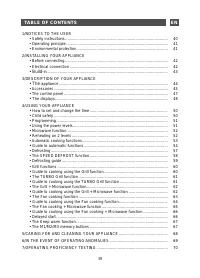
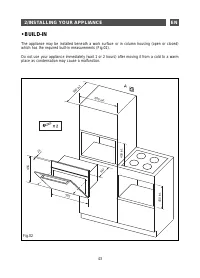
Page 3 - TABLE OF CONTENTS; /NOTICES TO THE USER; • The; /USING YOUR APPLIANCE
39 TABLE OF CONTENTS EN 1/NOTICES TO THE USER • Safety instructions ............................................................................................ 40• Operating principle ........................................................................................... 41• Environmental prote...
Page 4 - Keep this user guide with your; • SAFETY INSTRUCTIONS
EN 1/NOTICES TO THE USER 40 Warning: Keep this user guide with your appliance. If the appliance is ever sold or transferred to another person, ensure that the new owner receives the user guide. Please become familiar with these recommendations before installing and using your oven. They were written...
Page 5 - • OPERATING PRINCIPLE; They are reflected by metals.; • ENVIRONMENTAL
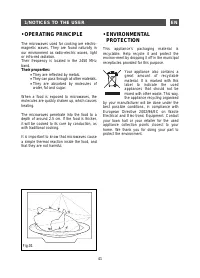
EN 41 • OPERATING PRINCIPLE The microwaves used for cooking are electro-magnetic waves. They are found naturally in our environment as radio-electric waves, light or infra-red radiation.Their frequency is located in the 2450 MHz band. Their properties: • They are reflected by metals. • They can pass...
Page 6 - /INSTALLING YOUR APPLIANCE; • BEFORE CONNECTING; Check that your appliance has not; • ELECTRICAL CONNECTION; installation requirements.
EN 2/INSTALLING YOUR APPLIANCE 42 • BEFORE CONNECTING Warning: Check that your appliance has not been damaged during transport (damage to door or seal, etc.). If you notice any damage, contact your retailer before using the appliance. In order to easily locate the reference information for your appl...
Page 8 - /DESCRIPTION OF YOUR APPLIANCE; • THE APPLIANCE; Control panel
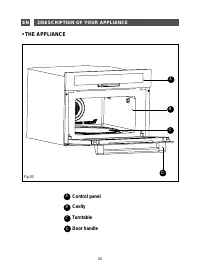
EN 44 3/DESCRIPTION OF YOUR APPLIANCE • THE APPLIANCE Control panel Cavity Turntable Door handle A B C D A B C D Fig.03
Page 9 - • The grill; • ACCESSORIES
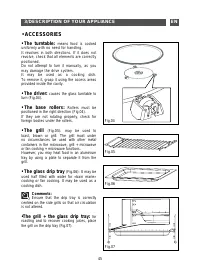
EN 3/DESCRIPTION OF YOUR APPLIANCE 45 • The turntable: means food is cooked uniformly with no need for handling.It revolves in both directions. If it does not revolve, check that all elements are correctly positioned.Do not attempt to turn it manually, as you may damage the drive system.It may be us...
Page 10 - The side grills; shelves; level for thick foods such as
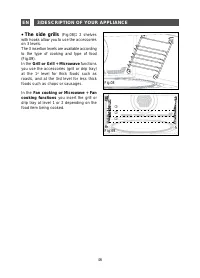
• The side grills (Fig.08) : 2 shelves with hooks allow you to use the accessories on 3 levels.The 3 insertion levels are available according to the type of cooking and type of food (Fig.09) . In the Grill or Grill + Microwave functions you use the accessories (grill or drip tray) at the 1 st level ...
Page 11 - The displays; weight programmed, the clock and the food category.; The STOP button lets; you erase or cancel a programme in progress.; The MODE button; allows you to change temperatures and microwave power.; The CLOCK button; allows you to set the time.; The OK button; allows you to access the keyboard, to confirm an operation.; • THE CONTROL PANEL
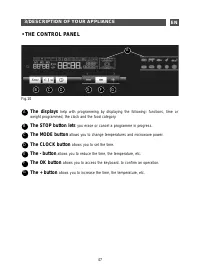
Fig.10 The displays help with programming by displaying the following: functions, time or weight programmed, the clock and the food category. The STOP button lets you erase or cancel a programme in progress. The MODE button allows you to change temperatures and microwave power. The CLOCK button allo...
Page 12 - • THE DISPLAYS
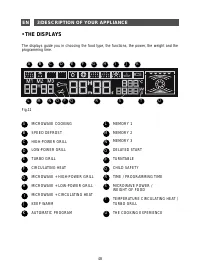
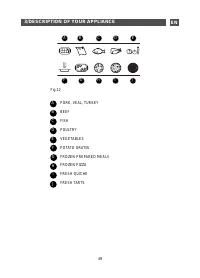
48 EN 3/DESCRIPTION OF YOUR APPLIANCE The displays guide you in choosing the food type, the functions, the power, the weight and the programming time. MICROWAVE COOKING SPEED DEFROST HIGH-POWER GRILL LOW-POWER GRILL TURBO GRILL CIRCULATING HEAT MICROWAVE + HIGH-POWER GRILL MICROWAVE + LOW-POWER GRIL...
Page 14 - • HOW TO SET AND CHANGE THE TIME; To set the clock; • CHILD SAFETY; “CHILD SAFETY”
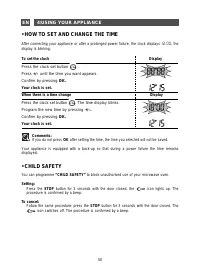
EN 4/USING YOUR APPLIANCE 50 • HOW TO SET AND CHANGE THE TIME After connecting your appliance or after a prolonged power failure, the clock displays 1 2 : 0 0 , the display is blinking. To set the clock Display Press the clock set button . Press +/– until the time you want appears. Confirm by pressi...
Page 15 - • PROGRAMMING; MICROWAVE POWER RESTORED: 1000 W
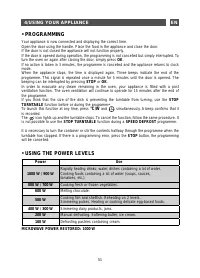
EN 4/USING YOUR APPLIANCE 51 • PROGRAMMING Your appliance is now connected and displaying the correct time.Open the door using the handle. Place the food in the appliance and close the door.If the door is not closed the appliance will not function properly.If the door is opened during operation, the...
Page 16 - • MICROWAVE FUNCTION; Programming by power; • REHEATING ON 2 LEVELS
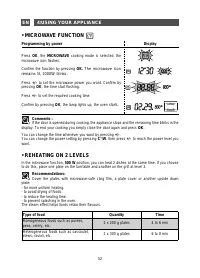
EN 52 4/USING YOUR APPLIANCE • MICROWAVE FUNCTION Programming by power Display Press OK , the MICROWAVE cooking mode is selected, the microwave icon flashes. Confirm the function by pressing OK. The microwave icon remains lit, 1000W blinks. Press +/– to set the microwave power you want. Confirm by p...
Page 17 - • AUTOMATIC COOKING FUNCTIONS; Display; OK; and
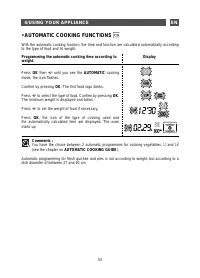
EN 4/USING YOUR APPLIANCE 53 • AUTOMATIC COOKING FUNCTIONS With the automatic cooking function, the time and function are calculated automatically according to the type of food and its weight. Programming the automatic cooking time according to weight. Display Press OK then +/- until you see the AUT...
Page 18 - • GUIDE TO AUTOMATIC FUNCTIONS; Beef; is used for cooking tougher, more fibrous vegetables:
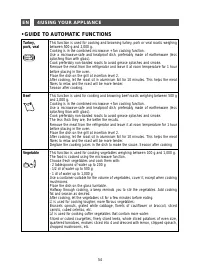
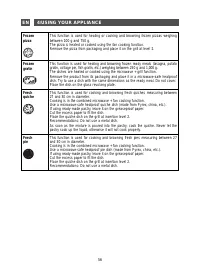
EN 4/USING YOUR APPLIANCE 54 • GUIDE TO AUTOMATIC FUNCTIONS Turkey,pork, veal This function is used for cooking and browning turkey, pork or veal roasts weighing between 500 g and 2,000 g.Cooking is in the combined microwave + fan cooking function.Use a microwave-safe and heatproof dish, preferably ...
Page 19 - yes yes yes yes yes
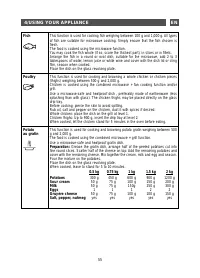
EN 4/USING YOUR APPLIANCE 55 Fish This function is used for cooking fish weighing between 100 g and 1,000 g. All types of fish are suitable for microwave cooking. Simply ensure that the fish chosen is fresh.The food is cooked using the microwave function.You may cook the fish whole (if so, score the...
Page 21 - • DEFROSTING; SPEED DEFROST; function or the; MICROWAVE; function power; What you need to know:; Remember to remove metal fasteners from packaging.
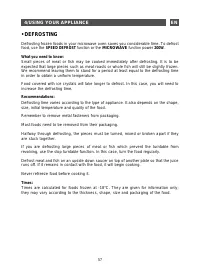
EN 4/USING YOUR APPLIANCE • DEFROSTING Defrosting frozen foods in your microwave oven saves you considerable time. To defrost food, use the SPEED DEFROST function or the MICROWAVE function power 200W . What you need to know: Small pieces of meat or fish may be cooked immediately after defrosting. It...
Page 22 - • THE SPEED DEFROST FUNCTION; Defrosting using SPEED DEFROST
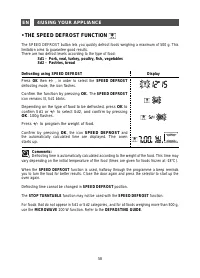
EN 4/USING YOUR APPLIANCE 58 • THE SPEED DEFROST FUNCTION The SPEED DEFROST button lets you quickly defrost foods weighing a maximum of 500 g. This limitation aims to guarantee good results.There are two defrost levels according to the type of food: Sd1 - Pork, veal, turkey, poultry, fish, vegetable...
Page 23 - • DEFROSTING GUIDE; Defrosting pastry
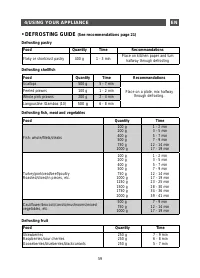
EN 4/USING YOUR APPLIANCE 59 • DEFROSTING GUIDE (See recommendations page 21) Defrosting pastry Food Quantity Time Recommandations Flaky or shortcrust pastry 400 g 1 - 3 min Place on kitchen paper and turn halfway through defrosting Defrosting shellfish Food Quantity Time Recommandations Scallops 50...
Page 24 - • GRILL FUNCTIONS; Programming the GRILL function; • GUIDE TO COOKING USING THE GRILL FUNCTION
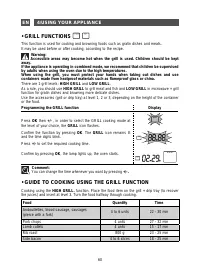
4/USING YOUR APPLIANCE • GRILL FUNCTIONS This function is used for cooking and browning foods such as gratin dishes and meats.It may be used before or after cooking, according to the recipe. Warning: Accessible areas may become hot when the grill is used. Children should be kept away.If the applianc...
Page 25 - • THE TURBO GRILL FUNCTION; Programming a TURBO grill function; • GUIDE TO COOKING USING THE TURBO GRILL FUNCTION
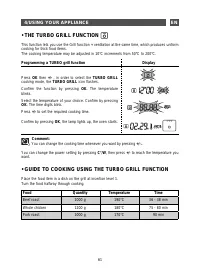
4/USING YOUR APPLIANCE • THE TURBO GRILL FUNCTION This function lets you use the Grill function + ventilation at the same time, which produces uniform cooking for thick food items.The cooking temperature may be adjusted in 10°C increments from 50°C to 200°C. Programming a TURBO grill function Displa...
Page 26 - • THE GRILL + MICROWAVE FUNCTION; Programming a grill + microwave function; • GUIDE TO COOKING USING THE GRILL + MICROWAVE FUNCTION
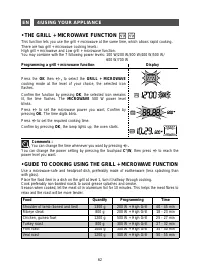
4/USING YOUR APPLIANCE 62 EN • THE GRILL + MICROWAVE FUNCTION This function lets you use the grill + microwave at the same time, which allows rapid cooking.There are two grill + microwave cooking levels:High grill + microwave and Low grill + microwave function.You may combine with the 7 following po...
Page 27 - • THE FAN COOKING FUNCTION; Programming the fan cooking function
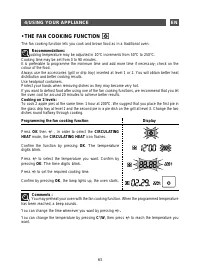
4/USING YOUR APPLIANCE 63 EN • THE FAN COOKING FUNCTION The fan cooking function lets you cook and brown food as in a traditional oven. Recommendations: The cooking temperature may be adjusted in 10°C increments from 50°C to 250°C.Cooking time may be set from 0 to 90 minutes.It is preferable to prog...
Page 28 - • GUIDE TO COOKING USING THE FAN COOKING FUNCTION
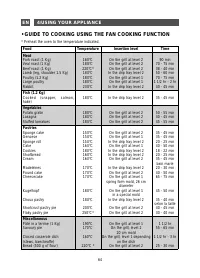
4/USING YOUR APPLIANCE 64 EN • GUIDE TO COOKING USING THE FAN COOKING FUNCTION * Preheat the oven to the temperature indicated. Food Temperature Insertion level Time Meat Pork roast (1 Kg)Veal roast (1 Kg)Beef roast (1 Kg)Lamb (leg, shoulder 1.5 Kg)Poultry (1.2 Kg)Large poultryRabbit 160°C180°C 220°...
Page 29 - • THE FAN COOKING + MICROWAVE FUNCTION; Programming the fan cooking + microwave function
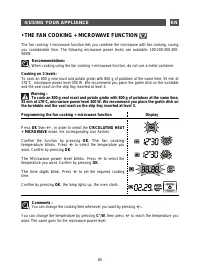
4/USING YOUR APPLIANCE • THE FAN COOKING + MICROWAVE FUNCTION The fan cooking + microwave function lets you combine the microwave with fan cooking, saving you considerable time. The following microwave power levels are available: 100-200-300-400-500W. Recommendations: When cooking using the fan cook...
Page 30 - • DELAYED START; Programming delayed start
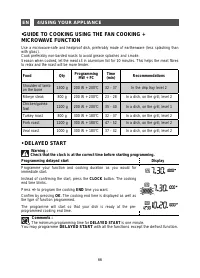
4/USING YOUR APPLIANCE •GUIDE TO COOKING USING THE FAN COOKING + MICROWAVE FUNCTION Use a microwave-safe and heatproof dish, preferably made of earthenware (less splashing than with glass).Cook preferably non-barded roasts to avoid grease splashes and smoke. Season when cooked, let the meat sit in a...
Page 31 - • THE KEEP WARM FUNCTION; The maximum programming time for KEEP WARM is 30 minutes.
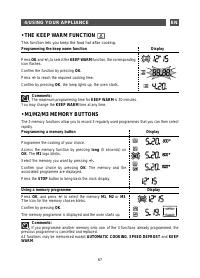
4/USING YOUR APPLIANCE 67 EN • THE KEEP WARM FUNCTION This function lets you keep the food hot after cooking. Programming the keep warm function Display Press OK and +/-, to select the KEEP WARM function, the corresponding icon flashes. Confirm the function by pressing OK . Press +/- to reach the re...
Page 32 - P r o f e s s i o n a l e x p e r t i s e; Clearit; offers you professional products and; /CARING FOR AND CLEANING YOUR APPLIANCE
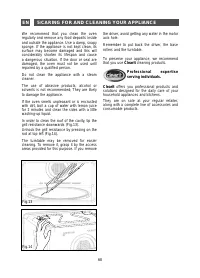
We recommend that you clean the oven regularly and remove any food deposits inside and outside the appliance. Use a damp, soapy sponge. If the appliance is not kept clean, its surface may become damaged and this will considerably shorten its lifespan and cause a dangerous situation. If the door or s...
Page 33 - /IN THE EVENT OF OPERATING ANOMALIES; You notice that; The appliance does not switch on.
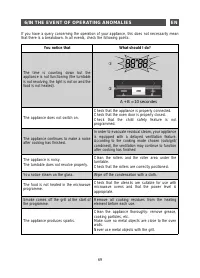
6/IN THE EVENT OF OPERATING ANOMALIES If you have a query concerning the operation of your appliance, this does not necessarily mean that there is a breakdown. In all events, check the following points: You notice that What should I do? The time is counting down but the appliance is not functioning ...
Page 34 - /OPERATING PROFICIENCY TESTING
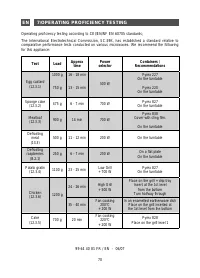
Operating proficiency testing according to CEI/EN/NF EN 60705 standards; The International Electrotechnical Commission, SC.59K, has established a standard relative to comparative performance tests conducted on various microwaves. We recommend the following for this appliance: Test Load Approx time P...