Bosch GLM BAT - Manual

Bosch GLM BAT – Manual, read for free online in PDF format. We hope this helps you resolve any issues you may have. If you have further questions, please contact us through the contact form.
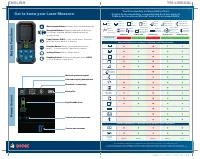
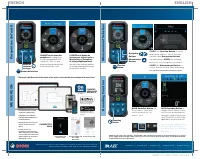
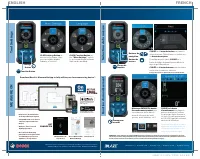
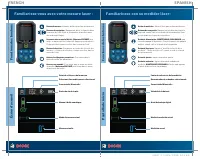

Table of Contents:
- Page 2 – Get to know your Laser Measure:; Button Functions; Tool Functionality & Compatibility Chart; ENGLISH
- Page 3 – Measurement Selection; Rounding Function; Paramètres de l’outil; MEASURE ON; FRENCH
- Page 4 – FREE; Sélection de la mesure; Fonction d’arrondissement
- Page 5 – Familiarisez-vous avec votre mesure laser :; Fonctions des boutons; Familiarícese con su medidor láser:; Funciones de los botones
- Page 6 – Selección de la medición; Función de redondeo; Ajustes de la herramienta; SPANISH
Laser Measure
Quick Start Guide
Medidor láser
Guía de inicio rápido
Mesure laser
Guide de démarrage
rapide
GLM165-27CGL
GLM165-27C
GLM165-25G
GLM165-22
GLM165-27CG
2610054125
SHEET: 11 x 8.5 / PAGE: 5.5 x 8.5
"Loading the manual" means you need to wait until the file loads and becomes available for online reading. Some manuals are very large, and the time they take to appear depends on your internet speed.
Other Manuals for Bosch GLM BAT
Summary
Get to know your Laser Measure: Button Functions Home Screen Measurement Button: Activate laser for measurements. Navigation Buttons: Navigate right and left when in tool menus. Add and subtract measurements cin specific modes. Power Button: HOLD to turn on/off device. Press for previous screen when...
CLICK the Function Button to open measuring options. Scroll through options with Navigation Buttons . On any option, CLICK the settings button to see a step-by-step how-to. CLICK the Measurement Button to select a function and start measuring. See page 11 for measuring options per model. Measurement...
MEASURE ON • Easy on-site documentation of measurements/floorplans • Compatible with your devices camera to import and storeimages • Ability to enter notes all drawings/pictures • Store all your measuring information in one place withcloud based project accessanywhere, on any device! Enable Bluetoot...


