BISSELL 2225F - User Manual
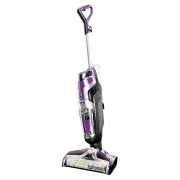
BISSELL 2225F Vacuum – User Manual, read for free online in PDF format. We hope this helps you resolve any issues you may have. If you have further questions, please contact us through the contact form.


Table of Contents:
- Page 2 – IMPORTANT SAFETY INSTRUCTIONS
- Page 4 – Getting to Know Your CrossWave® Pet
- Page 5 – Assembly; Cleaning Formulas; WARNING
- Page 6 – Filling the Clean Water Tank
- Page 7 – Cleaning Hard Floors
- Page 8 – Cleaning Area Rugs; ATTENTION
- Page 9 – Using the Rinse and Storage Tray
- Page 11 – Empty Dirty Water Tank
- Page 13 – Clean Brush Roll and Chamber
- Page 14 – Troubleshooting
- Page 15 – Consumer Guarantee; Consumer Care
CROSSWAVE
®
PET
_______________
USER GUIDE
2225F SERIES
"Loading the manual" means you need to wait until the file loads and becomes available for online reading. Some manuals are very large, and the time they take to appear depends on your internet speed.
Was this manual helpful?
About this manual
- Brand
- BISSELL
- Model
- 2225F
- Document type
- User Manual
- Category
- Vacuum
- Language(s)
- English
- Pages
- 16
- File size
- 8.7 MB
- Format
Summary
www.BISSELL.com 2 IMPORTANT SAFETY INSTRUCTIONS » Unplug from electrical socket when not in use and before cleaning, maintaining or servicing the appliance. » This appliance can be used by children aged from 8 years and above and persons with reduced physical, sensory or mental capabilities, or lack...
www.BISSELL.com 4 Getting to Know Your CrossWave® Pet Your BISSELL CrossWave ® Pet machine comes in three easy to assemble components and does not require any tools to assemble. The unit also comes with a three-piece Rinse and Storage Tray. • Handle• Body• Clean Water Tank• Rinse and Storage Tray• B...
www.BISSELL.com 5 Assembly Insert Handle into body of unit until you hear a click. Wrap the cable around the Quick Release Cable Wrap and the Lower Cable Wrap. click NOTE: To easily unwrap the cable for use, just turn the Quick Release Cable Wrap downward to remove the cable from the cable wrap. The...
Ask a question
Related manuals
Popular BISSELL Vacuums


More BISSELL Vacuums models
 BISSELL 2024F User Manual
 BISSELL 2035M User Manual
 BISSELL 2066F User Manual
 BISSELL 2110F User Manual
 BISSELL 2229F User Manual
 BISSELL 2256 User Manual
 BISSELL 2390 User Manual
 BISSELL 2454F User Manual
 BISSELL 2582N CrossWave Cordless User Manual
 BISSELL 2790 User Manual
 BISSELL 2907F User Manual
 BISSELL 3676 User Manual
 BISSELL 20193 User Manual
 BISSELL 36984 User Manual
 BISSELL BG1000 User Manual
 BISSELL BGC3000 User Manual
 BISSELL BGU1937T User Manual