be quiet! SFX-L - User Manual
be quiet! SFX-L Power Supply – User Manual, read for free online in PDF format. We hope this helps you resolve any issues you may have. If you have further questions, please contact us through the contact form.
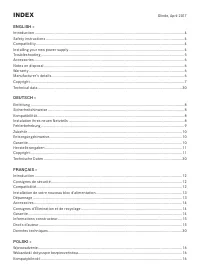
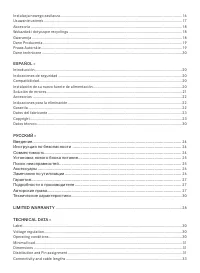
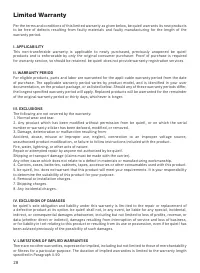
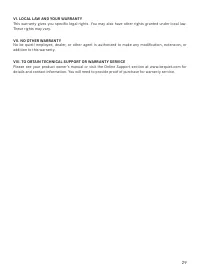
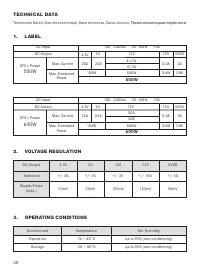
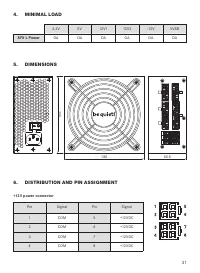
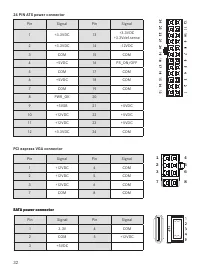
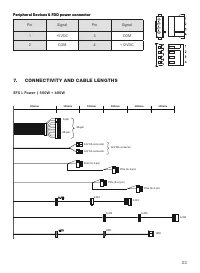


Table of Contents:
- Page 2 – INDEX; Technical data �������������������������������������������������������������������������������������������������������������������������������������������� 30
- Page 4 – SAFETY INSTRUCTIONS; Opening the device voids your warranty.; motherboard specifications such as:
- Page 5 – Note; the power supply because they have the correct thread�; First remove your old power supply. To do so, proceed as follows:; is connected correctly�; Caution; sources of error first:
- Page 7 – excerpts of it, without the prior written consent of Listan�
- Page 8 – Durch das Öffnen des Gerätes erlischt die Garantie.; INSTALLATION IHRES NEUEN NETZTEILS
- Page 9 – aufweisen können�; Gerätes führt zum Garantieverlust.
- Page 12 – CONSIGNES DE SÉCURITÉ
- Page 13 – INSTALLATION DE VOTRE NOUVEAU BLOC D’ALIMENTATION; Remarque; cet effet sur la carte mère.; Attention
- Page 15 – Listan GmbH & Co. KG – Biedenkamp 3a – 21509 Glinde – Allemagne; modifications de la présente documentation, ou à son retrait.
- Page 16 – WSK AZÓWKI DOTYCZĄCE BEZPIECZEŃSTWA; Otworzenie urządzenia powoduje wygaśnięcie gwarancji.; Nie należy włączać urządzenia mokrymi lub wilgotnymi rękami.
- Page 17 – dodatkowe piny na bok�; Uwaga
- Page 21 – Observación; los tornillos suministrados ya que disponen de la rosca correcta�; Montaje del nuevo fuente de alimentación be quiet! SFX L Power:; SOLUCIÓN DE ERRORES; Atención
- Page 24 – Открытие корпуса устройства лишает гарантии.
- Page 25 – УСТАНОВК А НОВОГО БЛОК А ПИТАНИЯ; Для установки нового блока питания be quiet!:; ПОИСК НЕИСПРАВНОСТЕЙ
- Page 26 – с момента отк лючения�; ЗАМЕЧАНИЯ ПО УТИЛИЗАЦИИ; электрические
- Page 27 – ПОДРОБНОСТИ О ПРОИЗВОДИТЕЛЕ
- Page 28 – Limited Warranty; The following are not covered by the warranty:; IV. EXCLUSION OF DAMAGES
- Page 29 – VI. LOCAL LAW AND YOUR WARRANTY; These rights may vary�; VII. NO OTHER WARRANTY; addition to this warranty�; VIII. TO OBTAIN TECHNICAL SUPPORT OR WARRANTY SERVICE
- Page 30 – TECHNICAL DATA; Технические характеристики; OPERATING CONDITIONS
- Page 31 – SFX L Power; DISTRIBUTION AND PIN ASSIGNMENT; E P S + 1 2 V P O W E R C O N N E C T O R
- Page 33 – CONNECTIVITY AND CABLE LENGTHS
- Page 34 – Notes
USER MANUAL
500W
600W
"Loading the manual" means you need to wait until the file loads and becomes available for online reading. Some manuals are very large, and the time they take to appear depends on your internet speed.
Summary
ENGLISH » DEUTSCH » INDEX Technical data �������������������������������������������������������������������������������������������������������������������������������������������� 30 Technische Daten ��������������������������������������������������������������������������������������������������...
1. INTRODUCTION We are delighted that you have chosen to use a be quiet! power supply in your PC� Please read and follow all the information contained in these instructions carefully prior to installation� Should you have any further question, please contact our customer ser vice� See contact inform...
Note : You will need a screwdriver to fit the power supply in your PC. Only use the screws provided with the power supply because they have the correct thread� Caution: Only use the supplied cable set� Using cables that were not included (e�g� cables of older power supply unit series) may lead to de...


