AVerMedia PW515 - User Manual
AVerMedia PW515

AVerMedia PW515 Web Camera – User Manual, read for free online in PDF format. We hope this helps you resolve any issues you may have. If you have further questions, please contact us through the contact form.
1 Page 1
2 Page 2
3 Page 3
4 Page 4
5 Page 5
6 Page 6
7 Page 7
8 Page 8
9 Page 9
10 Page 10
11 Page 11
12 Page 12
13 Page 13
14 Page 14
15 Page 15
16 Page 16
17 Page 17
Page: / 17

Table of Contents:

  • Page 2 – Introduction
  • Page 3 – Key Features; HDR and 3DNR adjust well for various lighting conditions.
  • Page 5 – Product Overview
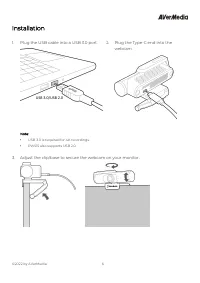
  • Page 6 – Installation; Adjust the clip/base to secure the webcam on your monitor.
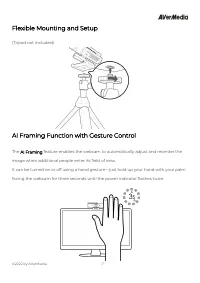
  • Page 7 – image when additional people enter its field of view.
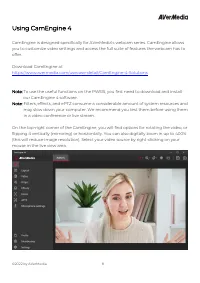
  • Page 8 – Using CamEngine 4; our CamEngine 4 software.
  • Page 12 – CamEngine System Requirements
  • Page 13 – The DSP Bandwidth Limitation:
  • Page 14 – Contact Us; Please contact us; About AVerMedia
Loading the manual

© 2022 by AVerMedia

1


Webcam PW515

User Guide

Table of Contents

Introduction

................................................................................................................................................... 2

Webcam PW515

........................................................................................................................................... 3

Key Features

.................................................................................................................................................. 3

System Requirements

............................................................................................................................... 4

Technical Specifications

............................................................................................................................ 4

Product Overview

........................................................................................................................................ 5

Installation

...................................................................................................................................................... 6

Flexible Mounting and Setup

.................................................................................................................. 7

AI Framing Function with Gesture Control

........................................................................................ 7

Using CamEngine 4

.................................................................................................................................... 8

CamEngine System Requirements

..................................................................................................... 12

Contact Us

.................................................................................................................................................... 14

About AVerMedia

...................................................................................................................................... 14

Appendix – F.A.Q.

....................................................................................................................................... 15

"Loading the manual" means you need to wait until the file loads and becomes available for online reading. Some manuals are very large, and the time they take to appear depends on your internet speed.

Summary

Page 2 - Introduction

© 2022 by AVerMedia 2 Introduction This document is your User Guide for the Webcam PW515. We have written this guide to provide you with the information you need to quickly and smoothly use the webcam. After a quick introduction of the webcam and who this product is intended for, we will dive into i...

Page 3 - Key Features; HDR and 3DNR adjust well for various lighting conditions.

© 2022 by AVerMedia 3 Webcam PW515 The World’s Most Intelligent 4K Webcam The Webcam PW515 boasts a large 4K sensor, and captures more light than the average webcam, while the inclusion of HDR and 3DNR makes for impressive color, and clever technology adjusts well for challenging lighting conditions...

Page 5 - Product Overview

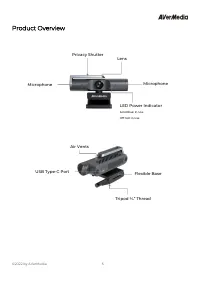
© 2022 by AVerMedia 5 Product Overview Microphone LED Power Indicator Solid Blue: In Use Off: Not in Use Privacy Shutter Microphone Lens Flexible Base Tripod ¼” Thread USB Type-C Port Air Vents