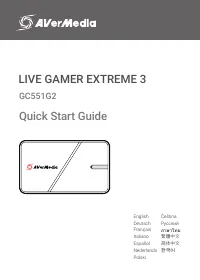
Page 2 - Disclaimer; Copyright and Trademark Information
2 Disclaimer All pictures contained in this documentation are example images only. The images may vary depending on the product and software version. Information presented in this documentation has been carefully checked for reliability; however, no responsibility is assumed for inaccuracies. The in...
Page 3 - Important Safety Instructions; 重要安全說明
3 Important Safety Instructions 1. Read these instructions. 2. Keep these instructions. 3. Follow all instructions. 4. Heed all warnings. 5. Do not use the apparatus on uneven or unstable surfaces. 6. Do not use this apparatus in a wet environment or near water. 7. Unplug the apparatus before cleani...
Page 4 - 重要安全说明
4 重要安全说明 1. 仔细阅读这些说明。2. 妥善保存这些说明。3. 遵守所有的指示。4. 注意所有的警告。5. 请勿将本产品安装于不平稳的表面。6. 请勿在潮湿或靠近水的地方使用本产品。7. 清洁前请拔除电源。仅使用干布清洁。8. 请于通风的环境使用本产品。请勿堵住通风口。9. 请于规格温度范围 32–104°F (0–40°C) 使用本产品。10. 请使用额定电压范围内的电源。11. 请勿放置重物于本产品上。12. 请勿安装于热源附近如暖器或火炉旁。13. 请勿破坏极性或接地插头的安全防护设计。14. 请保护电源线,勿使其被踩踏或碾压,特别是与插头或变压器的连接处。15. 仅使用制造商指...
Page 5 - Inside the Box; Quick Start Guide; Assist Central
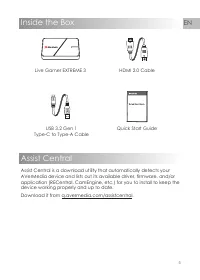
5 EN Inside the Box Quick Start Guide Live Gamer EXTREME 3 USB 3.2 Gen 1 Type-C to Type-A Cable HDMI 2.0 Cable Assist Central Assist Central is a download utility that automatically detects your AVerMedia device and lists out its available driver, firmware, and/or application (RECentral, CamEngine, ...
Page 6 - Overview; Installing Driver / Opening or Closing App /; LED Status Indicator
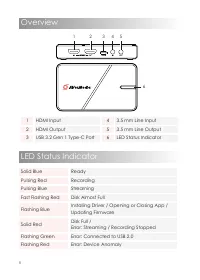
6 Overview 1 HDMI Input 4 3.5 mm Line Input 2 HDMI Output 5 3.5 mm Line Output 3 USB 3.2 Gen 1 Type-C Port 6 LED Status Indicator 1 2 3 6 5 4 Solid Blue Ready Pulsing Red Recording Pulsing Blue Streaming Fast Flashing Red Disk Almost Full Flashing Blue Installing Driver / Opening or Closing App / Up...
Page 7 - More Info; For more information, visit our webpage at; Installation; HDMI OUT
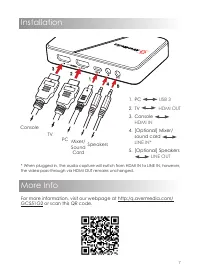
7 More Info For more information, visit our webpage at http:/q.avermedia.com/ GC551G2 or scan this QR code. Installation 2 3 1 4 5 Console PC TV Mixer/ Sound Card Speakers 1. PC USB 3 2. TV HDMI OUT 3. Console HDMI IN 4. [Optional] Mixer/ sound card LINE IN* 5. [Optional] Speakers LINE OUT * When pl...
Page 8 - Specifications
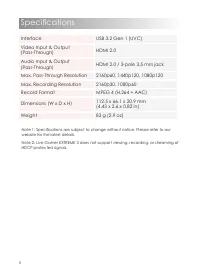
8 Specifications N ote 1: Specifications are subject to change without notice. Please refer to our website for the latest details.Note 2: Live Gamer EXTREME 3 does not support viewing, recording, or streaming of HDCP protected signals. Interface USB 3.2 Gen 1 (UVC) Video Input & Output (Pass-Thr...
Page 9 - Deutsch; Firmware und/oder Anwendung; HDMI EN; Français; micrologiciels et/ou applications
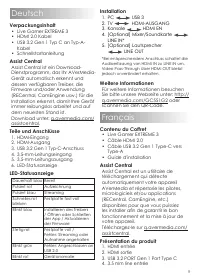
9 Deutsch Verpackungsinhalt • Live Gamer EXTREME 3 • HDMI 2.0 Kabel • USB 3.2 Gen 1 Typ C an Typ-A- Kabel • Schnellstartanleitung Assist Central Assist Central ist ein Download- Dienstprogramm, das Ihr AVerMedia- Gerät automatisch erkennt und dessen verfügbaren Treiber, die Firmware und/oder Anwendu...
Page 10 - Italiano
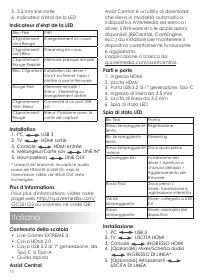
10 5. 3.5 mm line sortie 6. Indicateur d'état de la LED Indicateur d'état de la LED Bleu Fixe Prêt Clignotement Lent Rouge Enregistrement en cours Clignotement Lent Bleu Streaming en cours Clignotement Rouge Rapide Mémoire presque remplie Bleu Clignotant Installation du driver / Ouvrir ou fermer l'a...
Page 11 - Español; SALIDA HDMI; Nederlands; detecteert en een lijst maakt met
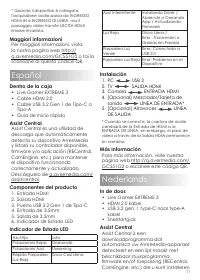
11 * Quando il dispositivo è collegato, l'acquisizione audio passa da INGRESSO HDMI IN a INGRESSO DI LINEA, ma il passaggio video tramite USCITA HDMI rimane invariato. Maggiori informazioni Per maggiori informazioni, visita la nostra pagina web http:// q.avermedia.com/GC551G2 o fai la scansione di q...
Page 12 - HDMI UIT; Meer informatie; Polski; W pudełku
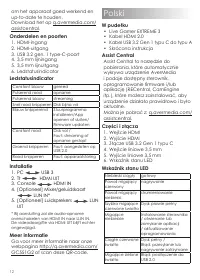
12 om het apparaat goed werkend en up-to-date te houden. Download het op q.avermedia.com/ assistcentral. Onderdelen en poorten 1. HDMI-ingang 2. HDMI-uitgang 3. USB 3.2 gen. 1 type-C-poort 4. 3,5 mm lijningang 5. 3,5 mm lijnuitgang 6. Ledstatusindicator Ledstatusindicator Constant blauw gereed Pulse...
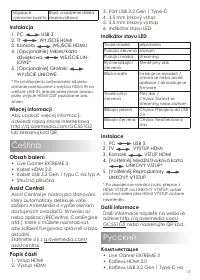
Page 13 - Instalacja; WYJŚCIE HDMI; Więcej informacji; Čeština; Obsah balení; Indikátor stavu LED; VÝSTUP HDMI; Další informace; adrese; Pусский; Комплектация; Live Gamer EXTREME 3
13 Migające czerwone światło Błąd: urządzenie działa nieprawidłowo Instalacja 1. PC USB 3 2. Tt WYJŚCIE HDMI 3. Konsola WEJŚCIE HDMU 4. [Opcjonalnie] Mikser/Karta dźwiękowa WEJŚCIE LIN - IOWE* 5. [Opcjonalnie] Głośniki WYJŚCIE LINIOWE * Po podłączeniu odtwarzanie dźwięku zostanie przełączone z wejśc...
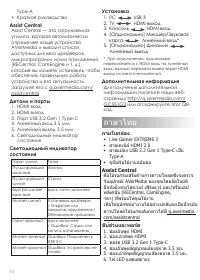
Page 14 - HDMI выход; Дополнительная информация; ภาษาไทย; ภายในกล่อง
14 Type-A • Краткое руководство Assist Central Assist Central — это загружаемая утилита, которая автоматически определяет ваше устройство AVerMedia и выводит список доступных для него драйверов, микропрограмм и/или приложений (RECentral, CamEngine и т. д.), которые вы можете установить, чтобы обеспе...
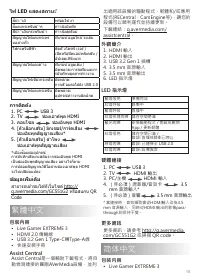
Page 15 - ช่องเอาต์พุต HDMI; ข้อมูลเพื ่; สามารถเข ้าชมได ้ที ่; 繁體中文; 包裝內容; Assist Central是一個輔助下載程式,將自; 外觀簡介; HDMI 輸出; 更多資訊; 简体中文; 包装内容; • Live Gamer EXTREME 3
15 ไฟ LED แสดงสถานะ์ สีน ้า ำาเงิ พร ้อมใช ้งา สีแดงกระพริบช ้าๆ กำาาลังบันทึก สีน ้า ำาเงินกระพริบช ้า กำาาลังสตรีมม สัญญาณไฟแดงกระพร ิบอย่างเร็ว ทีเก่ ็บข ้อมูลใกล ้จะเต็ม ไฟกะพริบสีฟ้า ติดตั ้งไดรฟ์ เวอร์ / เปิดหรือปิดแอปพลิเคชัน / อัปเดตเฟิร์มแวร สัญญาณไฟแดงค ้าง ทีเก่ ็บข ้อมูลเต็ม / ผิดพลาด:กา...
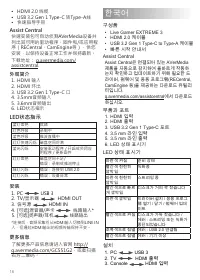
Page 16 - • 快速指导手册; 快速安装包可自动侦测AVerMedia设备并; 外观简介; LED状态指示; 安装; 更多信息; 右方二维码。; 한국어; 구성품; HDMI 출력
16 • HDMI 2.0 线缆 • USB 3.2 Gen 1 Type-C 转Type-A线 • 快速指导手册 Assist Central 快速安装包可自动侦测AVerMedia设备并 列出其可用的驱动程序、固件和/或应用程 序(RECentral、CamEngine等),供您 安装,以保持设备正常工作并保持最新。下载地址: q.avermedia.com/ assistcentral. 外观简介 1. HDMI 输入 2. HDMI 环出 3. USB 3.2 Gen 1 Type-C 口 4. 3.5mm音频输入 5. 3.6mm音频输出 6. LED状态指示 LED状态指示 蓝灯常...
Page 17 - 라인 출력; 추가 정보
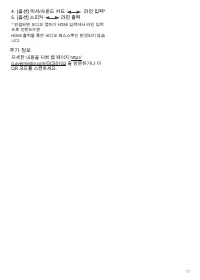
17 4. [옵션] 믹서/사운드 카드 라인 입력* 5. [옵션] 스피커 라인 출력 * 연결되면 오디오 캡처가 HDMI 입력에서 라인 입력 으로 전환되지만 HDMI 출력을 통한 비디오 패스스루는 변경되지 않습 니다. 추가 정보 자세한 내용을 저희 웹 페이지 http:// q.avermedia.com/GC551G2 을 방문하거나 이 QR 코드를 스캔하세요.
Page 18 - Waste Electrical and Electronic Equipment Directive; Technical Regulations of the Customs Union
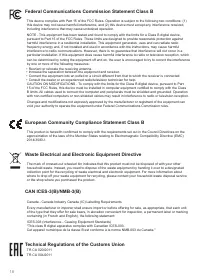
18 European Community Compliance Statement Class B This product is herewith confirmed to comply with the requirements set out in the Council Directives on the approximation of the laws of the Member States relating to Electromagnetic Compatibility Directive (EMC) 2014/30/EU. Federal Communications C...
Page 19 - Regulatory Compliance Mark; China RoHS; MSIP Class B Statement
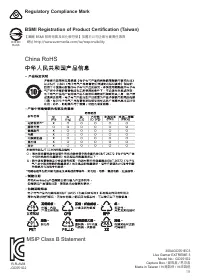
19 300AGC551EC3 Live Gamer EXTREME 3 Model No.: GC551G2 Capture Box / 擷取盒 / 易录盒 Made in Taiwan / 台灣製造 / 台湾製造 Regulatory Compliance Mark BSMI Registration of Product Certification (Taiwan) 【圓剛 BSMI 限用物質及其化學符號】放置於公司企業社會責任專頁 網址 http://www.avermedia.com/tw/responsibility D33183 RoHS China RoHS R-R-AVM -...