Page 2 - AUSTRALIA ONLY; International call charges apply)
AUSTRALIA ONLY Our goods come with guarantees that cannot be excluded under the Australian Consumer Law. You are entitled to a replacement or refund for a major failure and compensation for any other reasonably foreseeable loss or damage caused by our goods. You are also entitled to have the goods r...
Page 3 - English; Motherboard Layout
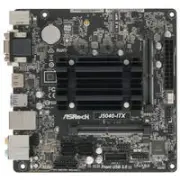
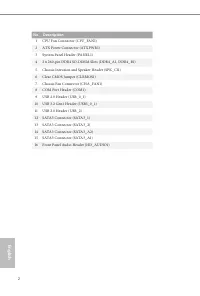
English 1 J5040-ITX J4125-ITX Motherboard Layout P C I E 1 AT XPWR1 A U D I O C O D E C 2 DDR4_A1 DDR4_B1 C P U _ FA N 1 C O M 1 1 R o H S 1 H D _ A U D I O 1 1 4 5 1 1 B I O S R O M L A N C L R M O S 1 1 U S B 3 _ 0 _ 1 1 4 1 5 1 6 1 U S B _ 0 _ 1 1 0 S ATA 3 _ 1 S ATA 3 _ A 1 7 9 R J-4 5 LA N U S ...
Page 5 - Optical SPDIF Out Port
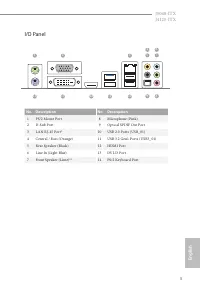
English 3 J5040-ITX J4125-ITX I/O Panel No. Description No. Description 1 PS/2 Mouse Port 8 Microphone (Pink) 2 D-Sub Port 9 Optical SPDIF Out Port 3 LAN RJ-45 Port* 10 USB 2.0 Ports (USB_01) 4 Central / Bass (Orange) 11 USB 3.2 Gen1 Ports (USB3_01) 5 Rear Speaker (Black) 12 HDMI Port 6 Line In (Lig...
Page 6 - Chapter 1 Introduction; Package Contents
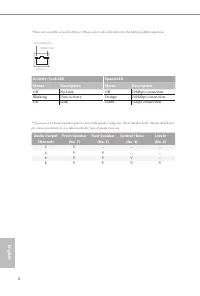
English 4 * There are two LEDs on each LAN port. Please refer to the table below for the LAN port LED indications. Activity / Link LED Speed LED Status Description Status Description Off No Link Off 10Mbps connection Blinking Data Activity Orange 100Mbps connection On Link Green 1Gbps connection ** ...
Page 8 - Platform; Solid Capacitor design; CPU; Dual Channel DDR4 Memory Technology; Graphics; Supports Triple Monitor
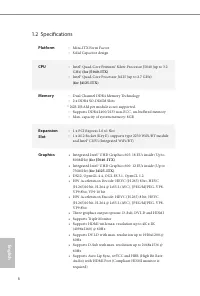
English 6 1.2 Specifications Platform • Mini-ITX Form Factor • Solid Capacitor design CPU • Intel® Quad-Core Pentium® Silver Processor J5040 (up to 3.2 GHz) (for J5040-ITX) • Intel® Quad-Core Processor J4125 (up to 2.7 GHz) (for J4125-ITX) Memory • Dual Channel DDR4 Memory Technology • 2 x DDR4 SO-D...
Page 9 - Audio
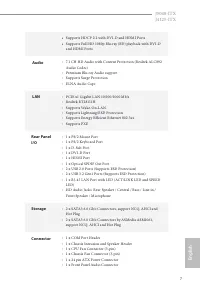
English 7 J5040-ITX J4125-ITX • Supports HDCP 2.2 with DVI-D and HDMI Ports • Supports Full HD 1080p Blu-ray (BD) playback with DVI-D and HDMI Ports Audio • 7.1 CH HD Audio with Content Protection (Realtek ALC892 Audio Codec) • Premium Blu-ray Audio support • Supports Surge Protection • ELNA Audio C...
Page 10 - OS
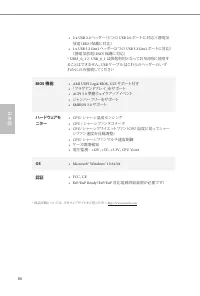
English 8 • 2 x USB 2.0 Headers (Support 3 USB 2.0 ports) (Supports ESD Protection) • 1 x USB 3.2 Gen1 Header (Supports 2 USB 3.2 Gen1 ports) (Supports ESD Protection) * USB3_0_1 and USB_0_1 cannot be occupied simultaneously. Please connect a USB cable to one of these headers only. BIOS Feature • AM...
Page 11 - Pre-installation Precautions; Hold components by the edges and do not touch the ICs.; Chapter 2 Installation
English 9 J5040-ITX J4125-ITX This is a Mini-ITX form factor motherboard. Before you install the motherboard, study the configuration of your chassis to ensure that the motherboard fits into it. Pre-installation Precautions Take note of the following precautions before you install motherboard compon...
Page 12 - Supported DDR4 Non ECC SODIMM; Raw Card; Dual Channel Memory Configuration; Populated
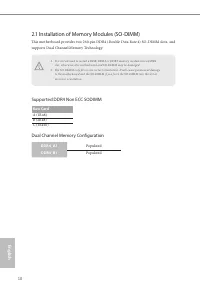
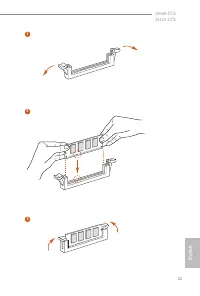
English 10 2.1 Installation of Memory Modules (SO-DIMM) This motherboard provides two 260-pin DDR4 (Double Data Rate 4) SO-DIMM slots, and supports Dual Channel Memory Technology. Supported DDR4 Non ECC SODIMM Raw Card A (1Rx8)B (2Rx8)C (1Rx16) Dual Channel Memory Configuration DDR4_A1 Populated DDR...
Page 14 - There is 1 PCI Express slot on the motherboard.
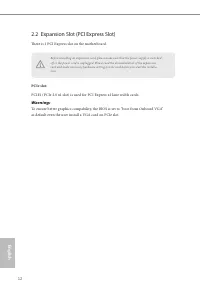
English 12 2.2 Expansion Slot (PCI Express Slot) There is 1 PCI Express slot on the motherboard. PCIe slot: PCIE1 (PCIe 2.0 x1 slot) is used for PCI Express x1 lane width cards. Warning: To ensure better graphics compability, the BIOS is set to "boot from Onboard VGA" as default even the use...
Page 16 - Onboard Headers and Connectors
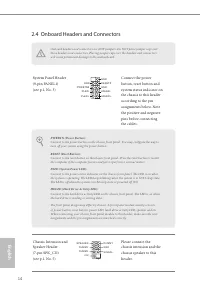
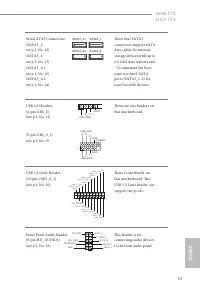
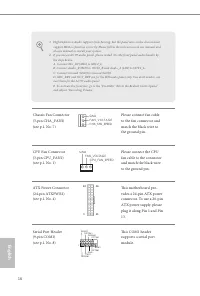
English 14 2.4 Onboard Headers and Connectors System Panel Header(9-pin PANEL1)(see p.1, No. 3) Connect the power button, reset button and system status indicator on the chassis to this header according to the pin assignments below. Note the positive and negative pins before connecting the cables. C...
Page 19 - Installation Guide; Installing the WiFi/BT module; Find the nut location to be used.
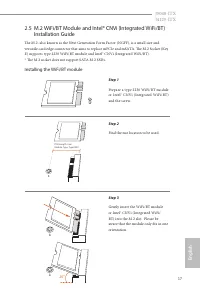
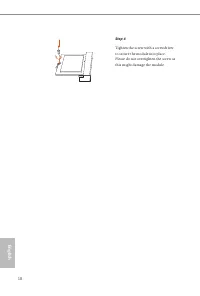
English 17 J5040-ITX J4125-ITX 2.5 M.2 WiFi/BT Module and Intel® CNVi (Integrated WiFi/BT) Installation Guide The M.2, also known as the Next Generation Form Factor (NGFF), is a small size and versatile card edge connector that aims to replace mPCIe and mSATA. The M.2 Socket (Key E) supports type 22...
Page 21 - Deutsch; Einleitung
19 Deutsch J5040-ITX J4125-ITX 1 Einleitung Vielen Dank für den Kauf unseres ASRock J5040-ITX/J4125-ITX, eines zuverlässigen Motherboards, das nach ASRocks strengen Qualitätsrichtlinien gefertigt wurde. Es liefert ausgezeichnete Leistung mit robustem Design, das ASRock Streben nach Qualität und Best...
Page 22 - Technische Daten; Plattform; Feststoffkondensator-Design; Prozessor; * 2 GB DRAM pro Modul werden nicht unterstützt.; Grafikkarte; Unterstützt drei Monitore
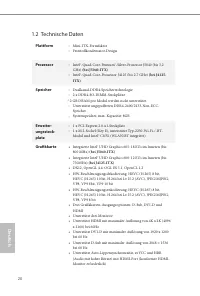
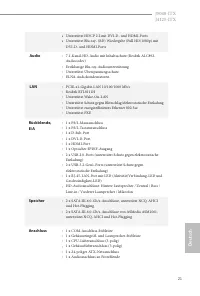
20 Deutsch 1.2 Technische Daten Plattform • Mini-ITX-Formfaktor • Feststoffkondensator-Design Prozessor • Intel®-Quad-Core-Pentium®-Silver-Prozessor J5040 (bis 3,2 GHz) (bei J5040-ITX) • Intel®-Quad-Core-Prouessor J4125 (bis 2,7 GHz) (bei J4125- ITX) Speicher • Dualkanal-DDR4-Speichertechnologie • 2...
Page 24 - Microsoft® Windows® 10, 64 Bit
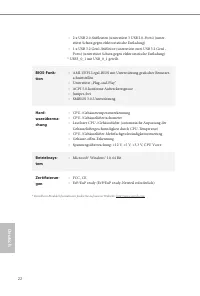
22 Deutsch • 2 x USB 2.0-Stiftleisten (unterstützt 3 USB 2.0-Ports) (unter-stützt Schutz gegen elektrostatische Entladung) • 1 x USB 3.2 Gen1-Stiftleiste (unterstützt zwei USB 3.2 Gen1-Ports) (unterstützt Schutz gegen elektrostatische Entladung) * USB3_0_1 mit USB_0_1 geteilt. BIOS-Funk-tion • AMI-U...
Page 25 - Jumpereinstellung
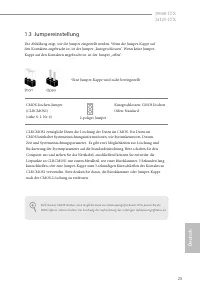
23 Deutsch J5040-ITX J4125-ITX Falls Sie den CMOS löschen, wird möglicherweise ein Gehäuseeingriff erkannt. Bitte passen Sie die BIOS-Option „Status löschen“ zur Löschung der Aufzeichnung des vorherigen Gehäuseeingriffstatus an. 1.3 Jumpereinstellung Die Abbildung zeigt, wie die Jumper eingestellt w...
Page 26 - Integrierte Stiftleisten und Anschlüsse
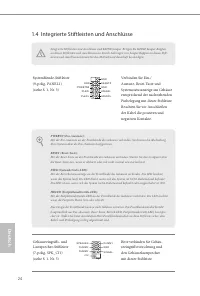
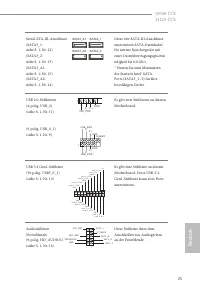
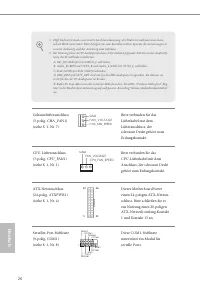
24 Deutsch 1.4 Integrierte Stiftleisten und Anschlüsse Systemblende-Stiftleiste(9-polig, PANEL1)(siehe S. 1, Nr. 3) Verbinden Sie Ein-/Austaste, Reset-Taste und Systemstatusanzeige am Gehäuse entsprechend der nachstehenden Pinbelegung mit dieser Stiftleiste. Beachten Sie vor Anschließen der Kabel di...
Page 29 - Introduction; Contenu de l’emballage; x panneau de protection E/S
27 Fr ançais Français J5040-ITX J4125-ITX 1 Introduction Nous vous remercions d’avoir acheté cette carte mère J5040-ITX/J4125-ITX, une carte mère fiable fabriquée conformément au contrôle de qualité rigoureux et constant appliqué par ASRock. Fidèle à son engagement de qualité et de durabilité, ASRoc...
Page 30 - Plateforme
28 Fr ançais Français 1.2 Spécifications Plateforme • Facteur de forme Mini-ITX • Conception à condensateurs solides Processeur • Processeur Intel® Quad-Core Pentium® Silver J5040 (jusqu'à 3,2 GHz) (sur J5040-ITX) • Processeur Intel® Quad-Core J4125 (jusqu'à 2,7 GHz) (sur J4125-ITX) Mémoire • Techno...
Page 32 - Certifications
30 Fr ançais Français • 2 x embases USB 2.0 (3 ports USB 2.0 pris en charge) (Protec-tion contre les décharges électrostatiques) • 1 x embase USB 3.2 Gen1 (2 ports USB 3.2 Gen1 pris en charge) (Protection contre les décharges électrostatiques) * USB3_0_1 partagé avec USB_0_1. Caractéris-tiques du BI...
Page 34 - Embases et connecteurs de la carte mère
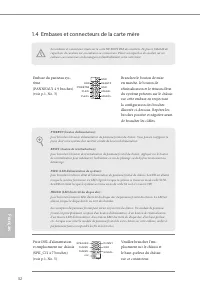
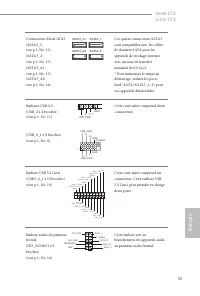
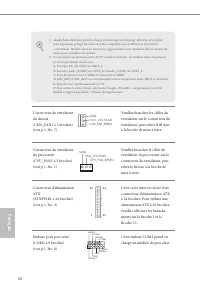
32 Fr ançais Français 1.4 Embases et connecteurs de la carte mère Embase du panneau sys-tème(PANNEAU1 à 9 broches)(voir p.1, No. 3) Branchez le bouton de mise en marche, le bouton de réinitialisation et le témoin d’état du système présents sur le châssis sur cette embase en respectant la configurati...
Page 37 - Introduzione; Contenuto della confezione; x mascherina metallica posteriore I/O
35 Italiano Italiano J5040-ITX J4125-ITX 1 Introduzione Congratulazioni per l’acquisto della scheda madre ASRock J5040-ITX/J4125-ITX, una scheda madre affidabile prodotta secondo i severissimi controlli di qualità ASRock. La scheda madre offre eccellenti prestazioni con un design robusto che si adat...
Page 38 - Piattaforma
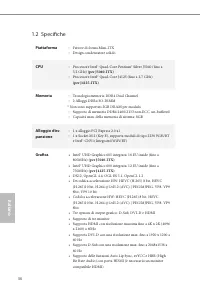
36 Italiano Italiano 1.2 Specifiche Piattaforma • Fattore di forma Mini-ITX • Design condensatore solido CPU • Processore Intel® Quad-Core Pentium® Silver J5040 (fino a 3,2 GHz) (per J5040-ITX) • Processore Intel® Quad-Core J4125 (fino a 2,7 GHz) (per J4125-ITX) Memoria • Tecnologia memoria DDR4 Dua...
Page 40 - SO
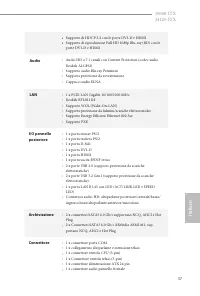
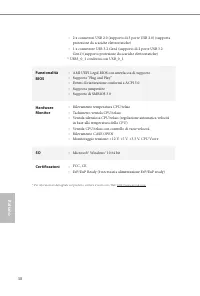
38 Italiano Italiano • 2 x connettori USB 2.0 (supporto di 3 porte USB 2.0) (supporta protezione da scariche elettrostatiche) • 1 x connettore USB 3.2 Gen1 (supporto di 2 porte USB 3.2 Gen1) (supporto protezione da scariche elettrostatiche) * USB3_0_1 condivisa con USB_0_1. Funzionalità BIOS • AMI U...
Page 41 - Impostazione jumper; Jumper a 2 pin
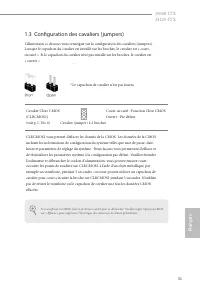
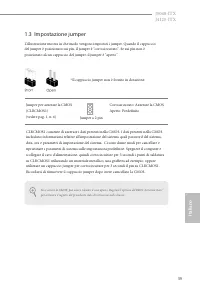
39 Italiano Italiano J5040-ITX J4125-ITX Se si azzera la CMOS, può essere rilevato il case aperto. Regolare l'opzione del BIOS "Azzerare stato" per azzerare il registro del precedente stato di intrusione nello chassis. 1.3 Impostazione jumper L'illustrazione mostra in che modo vengono impost...
Page 42 - Header e connettori su scheda
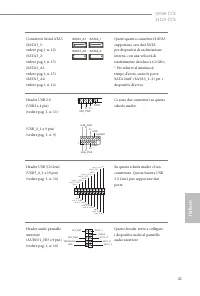
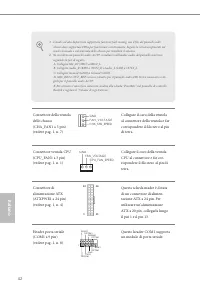
40 Italiano Italiano 1.4 Header e connettori su scheda Header sul pannello del sistema(PANEL1 a 9 pin)(vedere pag. 1, n. 3) Collegare il tasto d'alimentazione, il tasto di ripristino e l'indicatore di stato del sistema del telaio a questa basetta in base all'assegnazione dei pin definita di seguito....
Page 45 - Español; Introducción; Contenido del paquete
43 Español J5040-ITX J4125-ITX 1 Introducción Gracias por comprar la placa base ASRock J5040-ITX/J4125-ITX, una placa base fiable fabricada según el rigurosísimo control de calidad de ASRock. Ofrece un rendimiento excelente con un diseño resistente de acuerdo con el compromiso de calidad y resistenc...
Page 46 - Especificaciones; Plataforma
44 Español 1.2 Especificaciones Plataforma • Factor de forma Mini-ITX • Diseño de condensador sólido CPU • Procesador de cuatro núcleos Intel® Pentium® Silver J5040(hasta 3,2 GHz) (para J5040-ITX) • Procesador de cuatro núcleos Intel® J4125 (hasta 2,7 GHz) (para J4125-ITX) Memoria • Tecnología de me...
Page 49 - Instalación de los puentes; Puente de 2 contactos
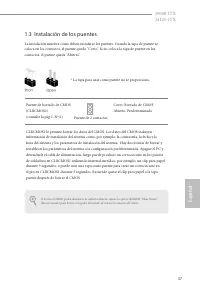
47 Español J5040-ITX J4125-ITX Si borra el CMOS, podrá detectarse la cubierta abierta. Ajuste la opción del BIOS “Clear Status” (Borrar estado) para borrar el registro del estado de intrusión anterior del chasis. 1.3 Instalación de los puentes La instalación muestra cómo deben instalarse los puentes...
Page 50 - Conectores y cabezales incorporados
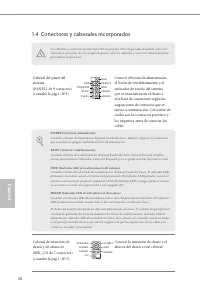
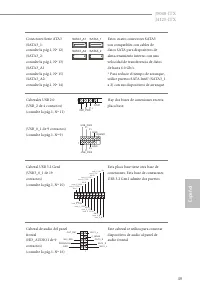
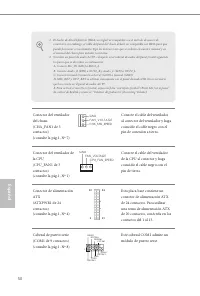
48 Español 1.4 Conectores y cabezales incorporados Cabezal del panel del sistema(PANEL1 de 9 contactos)(consulte la pág.1, Nº3) Conecte el botón de alimentación, el botón de restablecimiento y el indicador de estado del sistema que se encuentran en el chasis a esta base de conexiones según las asign...
Page 53 - x экран панели с портами ввода-вывода
51 Ру сский J5040-ITX J4125-ITX 1. Введение Благодарим вас за приобретение надежной системной платы ASRock J5040-ITX/J4125-ITX, выпускаемой под постоянным жестким контролем качества компании ASRock. Эта материнская плата обеспечивает великолепную производительность и отличается надежной конструкцией...
Page 54 - Технические характеристики; Платформа
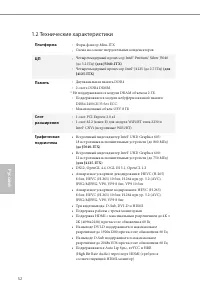
52 Ру сский 1.2 Технические характеристики Платформа • Форм-фактор Mini-ITX • Схема на основе твердотельных конденсаторов ЦП • Четырехъядерный процессор Intel® Pentium® Silver J5040 (до 3,2 ГГц) (для J5040-ITX) • Четырехъядерный процессор Intel® J4125 (до 2,7 ГГц) (для J4125-ITX) Память • Двухканаль...
Page 55 - Звук
53 Ру сский J5040-ITX J4125-ITX • Поддержка функции защиты HDCP 2.2 через порты DVI-D и HDMI • Поддержка воспроизведения в режиме Full HD 1080p Blu-ray (BD) через порты DVI-D и HDMI Звук • 7.1-канальный звук высокой четкости HD Audio с защитой данных (аудиокодек Realtek ALC892) • Поддержка Premium B...
Page 56 - Сертификация
54 Ру сский • 2 x колодки USB 2.0 (3 порта USB 2.0) (с защитой от электростатических разрядов) • 1 x колодка USB 3.2 Gen1 (2 порта USB 3.2 Gen1) (с защитой от электростатических разрядов) * USB3_0_1 используется совместно с USB_0_1. Параметры BIOS • AMI UEFI Legal BIOS с поддержкой графического инте...
Page 57 - Установка перемычек; -контактная перемычка
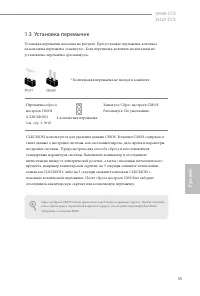
55 Ру сский J5040-ITX J4125-ITX Сброс настроек CMOS может привести к определению вскрытию корпуса. Чтобы обнулить запись предыдущего определения вскрытия корпуса, используйте параметр Clear Status (Обнулить состояние) BIOS. 1.3 Установка перемычек Установка перемычек показана на рисунке. При установ...
Page 58 - Колодки и разъемы, расположенные на материнской
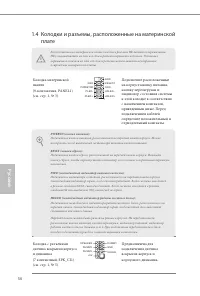
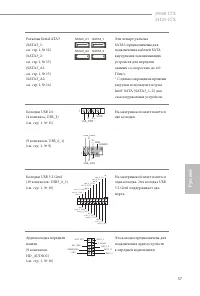
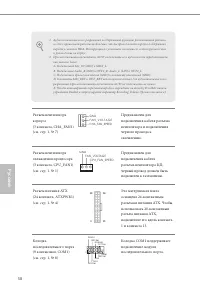
56 Ру сский 1.4 Колодки и разъемы, расположенные на материнской плате Колодка материнской панели(9-контактная, PANEL1)(см. стр. 1, № 3) Подключите расположенные на корпусе кнопку питания, кнопку перезагрузки и индикатор состояния системы к этой колодке в соответствии с назначением контактов, приведе...
Page 61 - Introdução; Conteúdo da embalagem
59 Por tuguês J5040-ITX J4125-ITX 1 Introdução Obrigado por adquirir a placa mãe ASRock J5040-ITX/J4125-ITX, uma confiável placa mãe ASRock produzida sob rigoroso controle de qualidade consistente. Esta placa principal oferece um excelente desempenho com um design robusto em conformidade com o compr...
Page 63 - Áudio
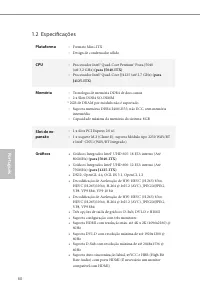
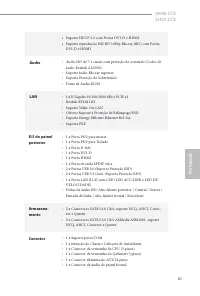
61 Por tuguês J5040-ITX J4125-ITX • Suporta HDCP 2.2 com Portas DVI-D e HDMI • Suporta reprodução Full HD 1080p Blu-ray (BD) com Portas DVI-D e HDMI Áudio • Áudio HD de 7.1 canais com proteção de conteúdo (Codec de áudio Realtek ALC892) • Suporte áudio Blu-ray superior • Suporta Proteção de Sobreten...
Page 65 - Configuração dos jumpers; Jumper de 2 pinos
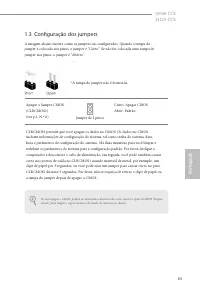
63 Por tuguês J5040-ITX J4125-ITX Se você apagar o CMOS, poderá ser detectada a abertura da caixa. Ajuste a opção do BIOS "Limpar estado" para limpar o registo anterior de estado de intrusão no chassis. 1.3 Configuração dos jumpers A imagem abaixo mostra como os jumpers são configurados. Qua...
Page 66 - Suportes e conectores onboard
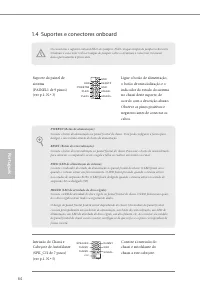
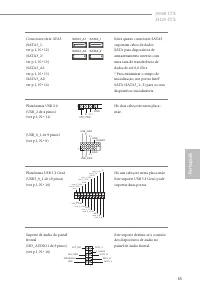
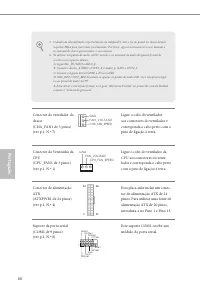
64 Por tuguês 1.4 Suportes e conectores onboard Suporte do painel de sistema(PAINEL1 de 9 pinos)(ver p.1, N.º 3) Ligue o botão de alimentação, o botão de reinicialização e o indicador do estado do sistema no chassi deste suporte, de acordo com a descrição abaixo. Observe os pinos positivos e negativ...
Page 69 - Polsk; Wprowadzenie; Zawartość opakowania; x osłona panelu Wejścia/Wyjścia
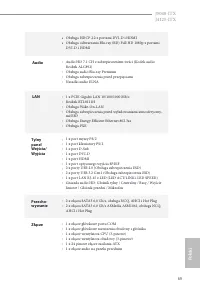
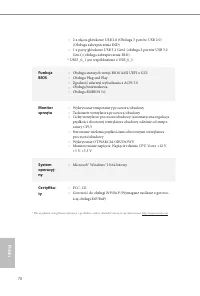
Polsk i 67 J5040-ITX J4125-ITX 1 Wprowadzenie Dziękujemy za zakupienie płyty głównej ASRock J5040-ITX/J4125-ITX, niezawodnej płyty głównej produkowanej z konsekwentnie wykonywaną przez firmę ASRock, rygorystyczną kontrolą jakości. Płyta ta zapewnia doskonałą jakość działania i solidną konstrukcję, s...
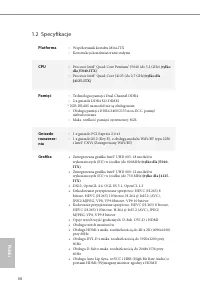
Page 73 - Ustawienia zworek
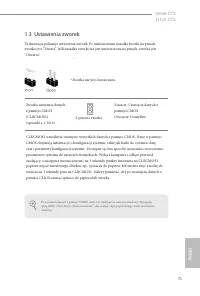
Polsk i 71 J5040-ITX J4125-ITX Po usunięciu danych z pamięci CMOS, może być wykrywane otwarcie obudowy. Wyreguluj opcję BIOS “Clear Status (Stan usuwania)”, aby usunąć zapis poprzedniego stanu naruszenia obudowy. 1.3 Ustawienia zworek Ta ilustracja pokazuje ustawienia zworek. Po umieszczeniu nasadki...
Page 74 - Wbudowane złącza główkowe i inne złącza
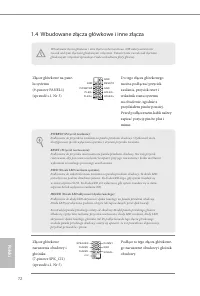
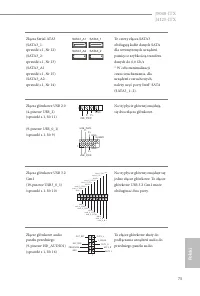
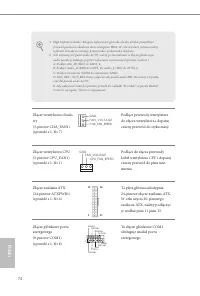
Polski 72 1.4 Wbudowane złącza główkowe i inne złącza Złącze główkowe na pane-lu systemu(9-pinowe PANEL1)(sprawdź s.1, Nr 3) Do tego złącza główkowego można podłączać przycisk zasilania, przycisk reset i wskaźnik stanu systemu na obudowie, zgodnie z przydziałem pinów poniżej. Przed podłączeniem kabl...
Page 77 - 한 국 어; 개요; ASRock; 포장; CD
75 한 국 어 J5040-ITX J4125-ITX 1 개요 ASRock J5040-ITX/J4125-ITX 마더보드를 구입해 주셔서 감사합니다 . 이 마더보 드는 ASRock 의 일관되고 엄격한 품질관리 하에 생산되어 신뢰성이 우수합니 다 . 품질과 내구성에 대한 ASRock 의 기준에 부합하는 우수한 성능과 견고한 설 계를 제공합니다 . 1.1 포장 내용물 • ASRock J5040-ITX/J4125-ITX 마더보드 (Mini-ITX 폼팩터 ) • ASRock J5040-ITX/J4125-ITX 간편 설치 안내서 • ASRock...
Page 78 - 규격; 플랫폼; 메모리
76 한 국 어 1.2 규격 플랫폼 • Mini-ITX 폼 팩터 • 솔리드 콘덴서 구조 CPU • Intel® Quad-Core Pentium® Silver 프로세서 J5040( 최대 3.2 GHz) (J5040-ITX 용 ) • Intel® Quad-Core 프로세서 J4125( 최대 2.7 GHz) (J4125-ITX 용 ) 메모리 • 듀얼 채널 DDR4 메모리 기술 • DDR4 SO-DIMM 슬롯 2 개 * 모듈당 2GB DRAM 은 지원되지 않습니다 . • DDR4 2400/2133 비 ECC, 비버퍼링 메모리 지원 • 시스...
Page 79 - LAN
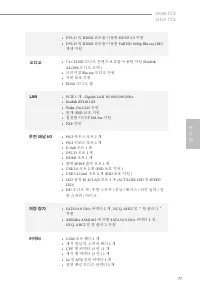
77 한 국 어 J5040-ITX J4125-ITX • DVI-D 및 HDMI 포트를 이용한 HDCP 2.2 지원 • DVI-D 및 HDMI 포트를 이용한 Full HD 1080p Blu-ray (BD) 재생 지원 오디오 • 7.1 CH HD 오디오 콘텐츠 보호를 이용한 지원 (Realtek ALC892 오디오 코덱 ) • 프리미엄 Blu-ray 오디오 지원 • 서비 보호 지원 • ELNA 오디오 캡 LAN • PCIE 1 개 , Gigabit LAN 10/100/1000 Mb/s • Realtek RTL8111H • Wake-On...
Page 80 - 기능; GUI; 하드웨어; 인증
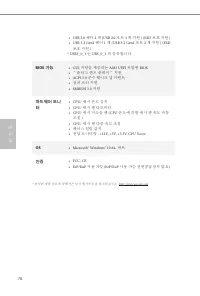
78 한 국 어 • USB 2.0 헤더 2 개 (USB 2.0 포트 3 개 지원 ) (ESD 보호 지원 ) • USB 3.2 Gen1 헤더 1 개 (USB 3.2 Gen1 포트 2 개 지원 ) (ESD 보호 지원 ) * USB3_0_1 는 USB_0_1 과 공유합니다 . BIOS 기능 • GUI 지원을 제공하는 AMI UEFI 적합형 BIOS • “플러그 앤드 플레이” 지원 • ACPI 5.0 준수 웨이크 업 이벤트 • 점퍼 프리 지원 • SMBIOS 3.0 지원 하드웨어 모니 터 • CPU/ 섀시 온도 감지 • CPU/ 섀시 팬 ...
Page 81 - 점퍼; Clear CMOS
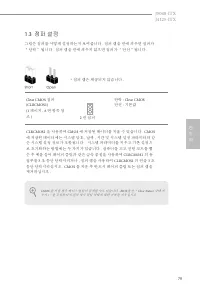
79 한 국 어 J5040-ITX J4125-ITX CMOS 를 지울 경우 케이스 열림이 감지될 수도 있습니다 . BIOS 옵션 “ Clear Status( 상태 지 우기 ) ”를 조절하여 이전의 섀시 침입 상태에 대한 기록을 지우십시오 . 1.3 점퍼 설정 그림은 점퍼를 어떻게 설정하는지 보여줍니다 . 점퍼 캡을 핀에 씌우면 점퍼가 “단락” 됩니다 . 점퍼 캡을 핀에 씌우지 않으면 점퍼가 “단선”됩니다 . Clear CMOS 점퍼 (CLRCMOS1)(1 페이지 , 6 번 항목 참 조 ) 단락 : Clear CMOS 단선 : 기본값...
Page 82 - 온보드
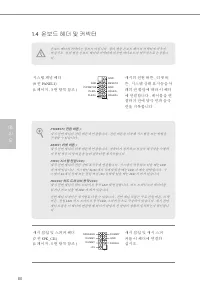
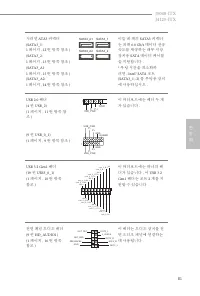
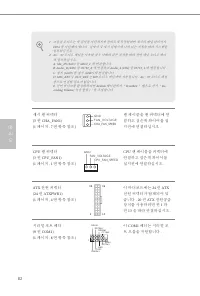
80 한 국 어 1.4 온보드 헤더 및 커넥터 시스템 패널 헤더 (9 핀 PANEL1) (1 페이지 , 3 번 항목 참조 ) 섀시의 전원 버튼 , 리셋 버 튼 , 시스템 상태 표시등을 아 래의 핀 할당에 따라 이 헤더 에 연결합니다 . 케이블을 연 결하기 전에 양극 핀과 음극 핀을 기록합니다 . 섀시 침입 및 스피커 헤더 (7 핀 SPK_CI1) (1 페이지 , 5 번 항목 참조 ) 섀시 침입 및 섀시 스피 커를 이 헤더에 연결하 십시오 . PWRBTN( 전원 버튼 ): 섀시 전면 패널의 전원 버튼에 연결합니다 . 전원 버튼을 이용...
Page 83 - SATA3
81 한 국 어 J5040-ITX J4125-ITX 시리얼 ATA3 커넥터 (SATA3_1: 1 페이지 , 12 번 항목 참조 ) (SATA3_2: 1 페이지 , 13 번 항목 참조 ) (SATA3_A1: 1 페이지 , 15 번 항목 참조 ) (SATA3_A2: 1 페이지 , 14 번 항목 참조 ) 이들 네 개의 SATA3 커넥터 는 최대 6.0 Gb/s 데이터 전송 속도를 제공하는 내부 저장 장치용 SATA 데이터 케이블 을 지원합니다 . * 부팅 시간을 최소화하 려면 , Intel® SATA 포트 (SATA3_1~2) 를 부팅용...
Page 85 - 日本語; はじめに; パッケージの内容
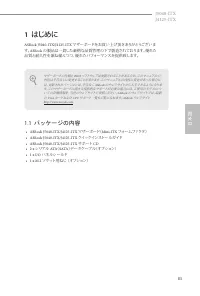
83 日本語 J5040-ITX J4125-ITX 1 はじめに ASRock J5040-ITX/J4125-ITX マザーボードをお買い上げ頂きありがとうございま す。 ASRock の製品は一貫した厳格な品質管理の下で製造されております。優れた 品質と耐久性を兼ね備えつつ、優れたパフォーマンスを提供致します。 1.1 パッケージの内容 • ASRock J5040-ITX/J4125-ITX マザーボード( Mini-ITX フォームファクタ) • ASRock J5040-ITX/J4125-ITX クイックインストールガイド • ASRock J5040-ITX/J4125-ITX...
Page 86 - 仕様; プラット; メモリ; 向け)
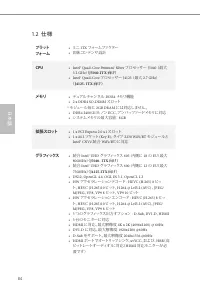
84 日本語 1.2 仕様 プラット フォーム • ミニ ITX フォームファクター • 固体コンデンサ設計 CPU • Intel® Quad-Core Pentium® Silver プロセッサー J5040 (最大 3.2 GHz ) ( J5040-ITX 向け) • Intel® Quad-Core プロセッサー J4125 (最大 2.7 GHz ) ( J4125- ITX 向け) メモリ • デュアルチャンネル DDR4 メモリ機能 • 2 x DDR4 SO-DIMM スロット * モジュール毎に 2GB DRAM には対応しません。 • DDR4 2400/2133 ノン ...
Page 87 - オーディオ
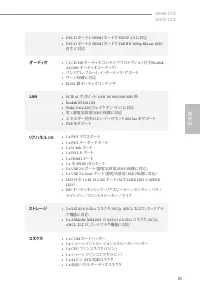
85 日本語 J5040-ITX J4125-ITX • DVI-D ポートと HDMI ポートで HDCP 2.2 に対応 • DVI-D ポートと HDMI ポートで Full HD 1080p Blu-ray (BD) 再生に対応 オーディオ • 7.1 CH HD オーディオ、 コンテンツプロテクション付き ( Realtek ALC892 オーディオコーデック) • プレミアム・ブルーレイ・オーディオ・サポート • サージ保護に対応 • ELNA 製オーディオコンデンサ LAN • PCIE x1 ギガビット LAN 10/100/1000 Mb/ 秒 • Realtek RTL81...
Page 89 - ジャンパー設定; ピンジャンパー
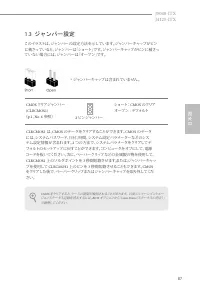
87 日本語 J5040-ITX J4125-ITX CMOS をクリアすると、ケースの開閉が検知されることがあります。 以前のシャーシイントルー ジョンステータス記録を消去するには、 BIOS オプションから「 Clear Status (ステータスの消去)」 で調整してください。 1.3 ジャンパー設定 このイラストは、ジャンパーの設定方法を示しています。ジャンパーキャップがピン に被さっていると、ジャンパーは「ショート」です。ジャンパーキャップがピンに被さっ ていない場合には、ジャンパーは「オープン」です。 CMOS クリアジャンパー (CLRCMOS1) ( p.1 、 No. 6 参...
Page 90 - オンボードのヘッダーとコネクタ
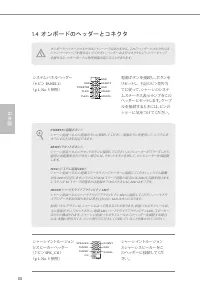
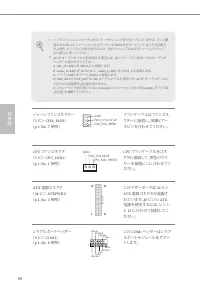
88 日本語 1.4 オンボードのヘッダーとコネクタ システムパネルヘッダー ( 9 ピン PANEL1 ) ( p.1 、 No. 3 参照) 電源ボタンを接続し、ボタンを リセットし、下記のピン割り当 てに従って、シャーシのシステムステータス表示ランプをこの ヘッダーにセットします。ケーブルを接続するときには、ピンの+と−に気をつけてください。 シャーシイントルージョン とスピーカーヘッダー ( 7 ピン SPK_CI1 ) ( p.1 、 No. 5 参照) シャーシイントルージョン とシャーシスピーカーをこ のヘッダーに接続してくだ さい。 PWRBTN (電源ボタン) : シャーシ前...
Page 91 - SATA
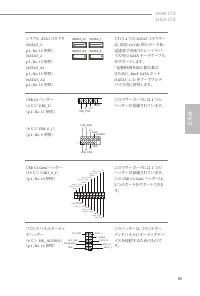
89 日本語 J5040-ITX J4125-ITX シリアル ATA3 コネクタ (SATA3_1: p.1 、 No. 12 参照) (SATA3_2: p.1 、 No. 13 参照) (SATA3_A1: p.1 、 No. 15 参照) (SATA3_A2: p.1 、 No. 14 参照) これら 4 つの SATA3 コネクター は、最高 6.0 Gb/ 秒のデータ転 送速度で内部ストレージデバ イス用の SATA データケーブル をサポートします。 * 起動時間を最小限に抑え るために、 Intel® SATA ポート (SATA3_1~2) をブータブルデ バイス用に使用しま...
Page 95 - 音频
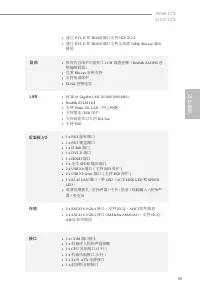
93 J5040-ITX J4125-ITX 简体中文 简体中文 • 通过 DVI-D 和 HDMI 端口支持 HDCP 2.2 • 通过 DVI-D 和 HDMI 端口支持全高清 1080p Blu-ray (BD) 播放 音频 • 具有内容保护功能的 7.1 CH 高清音频( Realtek ALC892 音 频编解码器) • 优质 Blu-ray 音频支持 • 支持电涌保护 • ELNA 音频电容 LAN • PCIE x1 Gigabit LAN 10/100/1000 Mb/s • Realtek RTL8111H • 支持 Wake-On-LAN (网上唤醒) • 支持雷电 /ES...
Page 96 - 硬件监控
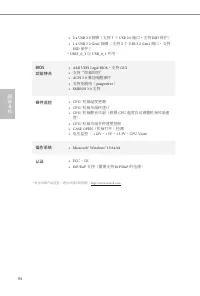
94 简体中文 简体中文 • 2 x USB 2.0 接脚(支持 3 个 USB 2.0 端口,支持 ESD 保护) • 1 x USB 3.2 Gen1 接脚(支持 2 个 USB 3.2 Gen1 端口,支持 ESD 保护) * USB3_0_1 与 USB_0_1 共用。 BIOS 功能特点 • AMI UEFI Legal BIOS ,支持 GUI • 支持“即插即用” • ACPI 5.0 兼容唤醒事件 • 支持免跳线( jumperfree ) • SMBIOS 3.0 支持 硬件监控 • CPU/ 机箱温度感测 • CPU/ 机箱风扇转速计 • CPU/ 机箱静音风扇(根据 CP...
Page 97 - 针跳线
95 J5040-ITX J4125-ITX 简体中文 简体中文 如果您清除 CMOS ,机箱打开会被检测到。请将 BIOS 选项“ Clear Status ”(清除状态)调 整为清除前一个机箱侵入状态的记录。 1.3 跳线设置 此图显示如何设置跳线。将跳线帽装到这些针脚上时,跳线 “短接”。如果这 些针脚上没有装跳线帽,跳线 “开路”。 清除 CMOS 跳线 (CLRCMOS1) (见第 1 页,第 6 个) 短接 : 清除 CMOS 开路 : 默认 CLRCMOS1 允许您清除 CMOS 中的数据。 CMOS 中的数据包括系统设置信 息,如系统密码、日期、时间和系统设置参数。要清除和重置...
Page 98 - 系统面板接脚
96 简体中文 简体中文 1.4 板载接脚和接口 系统面板接脚 (9 针 PANEL1) (见第 1 页, 第 3 个) 按照下面的针脚分配,将机箱上的电源按钮、重置按钮和系统状态指示灯连接到此接脚。在连接线缆前请记下正负针脚。 机箱侵入和扬声器接脚 (7 针 SPK_CI1) (见第 1 页,第 5 个) 请将机箱侵入和机箱扬声器连接到到此接脚。 PWRBTN(电源按钮): 连接到机箱前面板上的电源按钮。您可以配置使用电源按钮关闭系统的方式。 RESET(重置按钮): 连接到机箱前面板上的重置按钮。如果计算机死机,无法执行正常重新启动,按重置按钮重新启动计算机。 PLED(系统电源 LED)...
Page 101 - 电子信息产品污染控制标示; 依据中国发布的「电子信息产品污染控制管理办法」及; 有毒有害物质或元素的名称及含量说明; X O O O O O
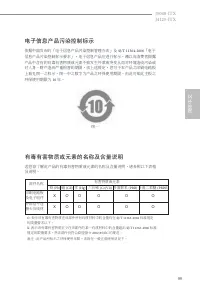
99 J5040-ITX J4125-ITX 简体中文 简体中文 电子信息产品污染控制标示 依据中国发布的「电子信息产品污染控制管理办法」及 SJ/T 11364-2006 「电子 信息产品污染控制标示要求」,电子信息产品应进行标示,藉以向消费者揭露产品中含有的有毒有害物质或元素不致发生外泄或突变从而对环境造成污染或对人身、财产造成严重损害的期限。依上述规定,您可于本产品之印刷电路板上看见图一之标示。图一中之数字为产品之环保使用期限。由此可知此主板之环保使用期限为 10 年。 图一 有毒有害物质或元素的名称及含量说明 若您欲了解此产品的有毒有害物质或元素的名称及含量说明,请参照以下表格及说明。...
Page 102 - 繁體中文; 簡介; 包裝內容
100 繁體中文 1 簡介 感謝您購買華擎 J5040-ITX/J4125-ITX 主機板,本主機板經華擎嚴格品管製作, 是一套值得信賴的可靠產品。本產品採耐用設計所展現的優異效能,完全符合華擎對品質及耐用度的承諾。 1.1 包裝內容 • 華擎 J5040-ITX/J4125-ITX 主機板( Mini-ITX 尺寸) • 華擎 J5040-ITX/J4125-ITX 快速安裝指南 • 華擎 J5040-ITX/J4125-ITX 支援光碟 • 2 x Serial ATA (SATA) 資料纜線(選用) • 1 x I/O 面板外罩 • 1 x 螺絲(適用於 M.2 插座)(選用) 由於主機...
Page 103 - 規格; 平台
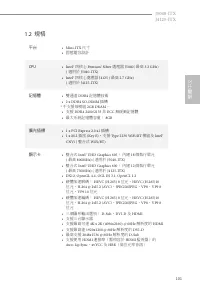
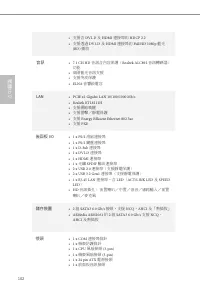
101 繁體中文 J5040-ITX J4125-ITX 1.2 規格 平台 • Mini-ITX 尺寸 • 固態電容設計 CPU • Intel® 四核心 Pentium® Silver 處理器 J5040( 最高 3.2 GHz) ( 適用於 J5040-ITX) • Intel® 四核心處理器 J4125 ( 最高 2.7 GHz) ( 適用於 J4125-ITX) 記憶體 • 雙通道 DDR4 記憶體技術 • 2 x DDR4 SO-DIMM 插槽 * 不支援每模組 2GB DRAM 。 • 支援 DDR4 2400/2133 非 ECC 無緩衝記憶體 • 最大系統記憶體容量: 8GB...
Page 104 - 音訊
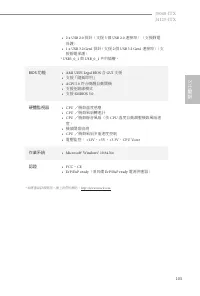
102 繁體中文 • 支援含 DVI-D 及 HDMI 連接埠的 HDCP 2.2 • 支援透過 DVI-D 及 HDMI 連接埠的 Full HD 1080p 藍光 (BD) 播放 音訊 • 7.1 CH HD 音訊含內容保護( Realtek ALC892 音訊轉碼器) 功能 • 高階藍光音訊支援 • 支援突波保護 • ELNA 音響級電容 LAN • PCIE x1 Gigabit LAN 10/100/1000 Mb/s • Realtek RTL8111H • 支援網路喚醒 • 支援雷擊/靜電保護 • 支援 Energy Efficient Ethernet 802.3az • 支援...
Page 106 - 跳線設定; 跳線
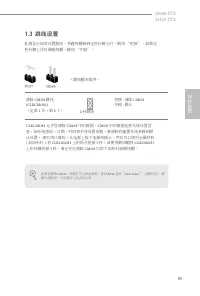
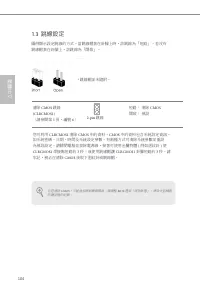
104 繁體中文 若您清除 CMOS ,可能會偵測到機殼開啟。請調整 BIOS 選項「清除狀態」,清除先前機殼 防護狀態的紀錄。 1.3 跳線設定 圖例顯示設定跳線的方式。當跳線帽套在針腳上時,該跳線為「短路」。若沒有跳線帽套在針腳上,該跳線為「開啟」。 清除 CMOS 跳線 (CLRCMOS1) (請參閱第 1 頁,編號 6 ) 短路: 清除 CMOS 開啟: 預設 您可利用 CLRCMOS1 清除 CMOS 中的資料。 CMOS 中的資料包含系統設定資訊, 如系統密碼、日期、時間及系統設定參數。有兩種方式可清除系統參數並重設為預設設定。請關閉電腦並拔除電源線,接著可使用金屬物體 ( 例如迴...
Page 107 - 板載排針及接頭
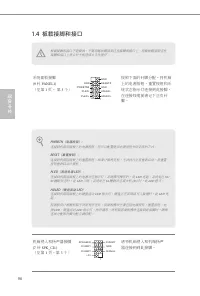
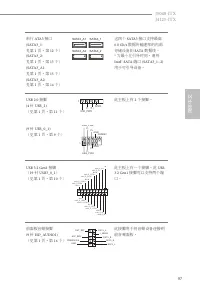
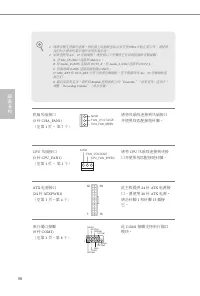
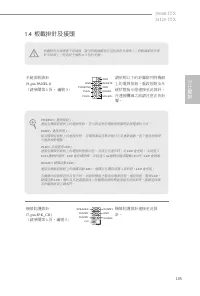
105 繁體中文 J5040-ITX J4125-ITX 1.4 板載排針及接頭 系統面板排針 (9-pin PANEL1) (請參閱第 1 頁, 編號 3 ) 請依照以下的針腳排列將機殼上的電源按鈕、重設按鈕及系統狀態指示燈連接至此排針。在連接纜線之前請注意正負針腳。 機殼防護排針 (7-pin SPK_CI1) (請參閱第 1 頁,編號 5 ) 機殼防護排針連接至此排針。 板載排針及接頭都不是跳線。請勿將跳線帽套在這些排針及接頭上。將跳線帽套在排針及接頭上,將造成主機板永久性的受損。 G N D R E S E T # P W R B T N # P L E D - P L E D + G...
Page 108 - Serial ATA3
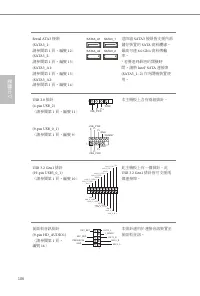
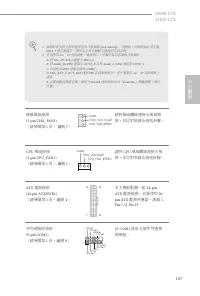
106 繁體中文 Serial ATA3 接頭 (SATA3_1: 請參閱第 1 頁,編號 12 ) (SATA3_2: 請參閱第 1 頁,編號 13 ) (SATA3_A1: 請參閱第 1 頁,編號 15 ) (SATA3_A2: 請參閱第 1 頁,編號 14 ) 這四組 SATA3 接頭皆支援內部 儲存裝置的 SATA 資料纜線, 最高可達 6.0 Gb/s 資料傳輸 率。 * 若要達到最短的開機時 間,請將 Intel® SATA 連接埠 (SATA3_1~2) 作為開機裝置使 用。 USB 2.0 排針 (4-pin USB_2) (請參閱第 1 頁,編號 11 ) (9-pin US...
Page 110 - Spesifikasi
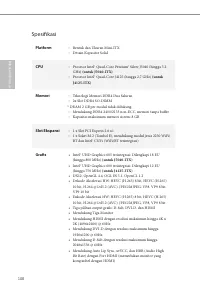
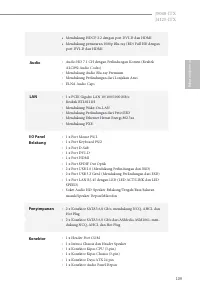
108 Bahasa I ndonesia Spesifikasi Platform • Bentuk dan Ukuran Mini-ITX • Desain Kapasitor Solid CPU • Prosesor Intel® Quad-Core Pentium® Silver J5040 (hingga 3,2 GHz) (untuk J5040-ITX) • Prosesor Intel® Quad-Core J4125 (hingga 2,7 GHz) (untuk J4125-ITX) Memori • Teknologi Memori DDR4 Dua Saluran • ...
Page 112 - Fitur BIOS
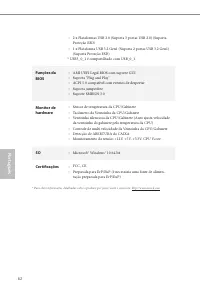
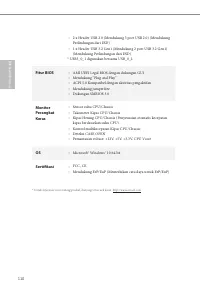
110 Bahasa I ndonesia • 2 x Header USB 2.0 (Mendukung 3 port USB 2.0) (Mendukung Perlindungan dari ESD) • 1 x Header USB 3.2 Gen1 (Mendukung 2 port USB 3.2 Gen1) (Mendukung Perlindungan dari ESD) * USB3_0_1 digunakan bersama USB_0_1. Fitur BIOS • AMI UEFI Legal BIOS dengan dukungan GUI • Mendukung “...
Page 113 - Contact Information; ASRock Incorporation; The Netherlands
Contact Information If you need to contact ASRock or want to know more about ASRock, you’re welcome to visit ASRock’s website at http://www.asrock.com; or you may contact your dealer for further information. For technical questions, please submit a support request form at https://event.asrock.com/ts...
Page 114 - DECLARATION OF CONFORMITY; Responsible Party Name:; Product Name : Motherboard; Supplementary Information:
DECLARATION OF CONFORMITY Per FCC Part 2 Section 2.1077(a) Responsible Party Name: ASRock Incorporation Address: 13848 Magnolia Ave, Chino, CA91710 +1-909-590-8308/+1-909-590-1026 Phone/Fax No: hereby declares that the product Product Name : Motherboard Model Number : Conforms to the following speci...
Page 115 - EU Declaration of Conformity; For the following equipment:; Motherboard
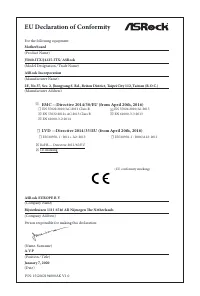
EU Declaration of Conformity For the following equipment: Motherboard (Product Name) J5040-ITX/J4125-ITX/ ASRock (Model Designation / Trade Name) ASRock Incorporation (Manufacturer Name) 2F., No.37, Sec. 2, Jhongyang S. Rd., Beitou District, Taipei City 112, Taiwan (R.O.C.) (Manufacturer Address) AS...





 Asrock H610 User Manual
 Asrock H610M-HDV User Manual
 Asrock H610M-HVS User Manual
 Asrock H610M-ITX/ac User Manual
 Asrock H670M Pro RS User Manual
 Asrock J4125M User Manual
 Asrock X570 User Manual
 Asrock X570 Pro4 User Manual
 Asrock Z590 User Manual
 Asrock Z590 Pro4 User Manual
 Asrock Z690 User Manual
 Asrock Z690 PG User Manual
 Asrock A320 User Manual
 Asrock A520M-HVS User Manual
 Asrock A520M-ITX/ac User Manual