Page 2 - EN; Manual; Pictograms used; Important information
EN Manual EN 3 - EN 35 Pictograms used Important information Tip
Page 3 - YOUR OVEN
EN 3 YOUR OVEN Your oven Introduction 4Control panel 5 Description 6Guide rails 7 Door 7Cooling fan 7 Main functions 7 Keys 9Navigation 10 Initial use What to do first 12 Operation Selecting your function 13 Functions settings mode 13 Progress mode 15 Finish display 15 Changing settings during the p...
Page 4 - Introduction; Read this manual before using the appliance and keep it in a safe
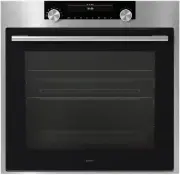
EN 4 Introduction Congratulations on choosing this ASKO oven. This product is designed to offer simple operation and optimum user-friendliness. The oven has a wide range of settings enabling you to select the correct cooking method every time. This manual shows how you can best use this oven. In add...
Page 5 - Control panel; Navigation key left
EN 5 YOUR OVEN Control panel 1. Function knob (in ‘Off’ position) 2. Defrost 3. Programs & Favourites 4. Fast preheat 5. Oven 6. Eco hot air 7. Plate warming 8. Warming 9. Aqua clean 10. Display 11. Selection knob 12. On/off key and stop key (cancel) 13. Light key 14. Timer key 15. Navigation ke...
Page 6 - Description; The following accessories are supplied with your oven:; used for pastries and cakes.; • Oven; mainly used for grilling. A dish or pan with food can
EN 6 YOUR OVEN Description 1. Control panel 2. Oven levels ▷ OT86: 5 levels* ▷ OT84: 4 levels 3. Oven door 4. Door handle The following accessories are supplied with your oven: • Baking tray; used for pastries and cakes. • Oven rack; mainly used for grilling. A dish or pan with food can also be plac...
Page 8 - Main functions; Manual defrost
EN 8 YOUR OVEN Main functions With the function knob you can select the main functions of your oven. Setting Description Off/standby mode Oven Hot airHot air + bottom heatBottom + top heatLarge grillGrillLarge grill + fanUpper heatBottom heatBottom heat + fanPro roasting Fast preheat Eco hot air Pro...
Page 9 - Keys; - Press short: cancel operation or go one step back in
EN 9 Keys In the table below you can find the discription of the different keys. Keys Description of the keys On/off key and stop key: - Press short: cancel operation or go one step back in the menu. - Press long: turn the appliance off or on. Light key: - To turn the cavity light on or off. Egg tim...
Page 10 - Navigation; Within every menu the navigation is as follows:
EN 10 YOUR OVEN Navigation active area stop key confirm key function knob selection knob navigation keys By turning the function knob away from the 0-position, the icon of the chosen main function is lit. The display will show the icon and name of the activated function for about 1,5 seconds. Next y...
Page 11 - INITIAL USE; What to do first; Setting the language; English; Setting the date; The next screen will be displayed.
EN 11 INITIAL USE What to do first • Clean the oven interior and accessories with hot water and washing-up liquid. Do not use aggressive cleaning agents, abrasive sponges and similar. • The oven will emit a strange smell when it is used for the first time; this is normal. You should ensure that ther...
Page 12 - Setting the time; All the start-up settings are set and the appliance will show the; Standby display
EN 12 Setting the time : 00 11 12 13 TIME l HOUR 1. Turn the selection knob and select the hours. 2. Confirm this setting by pressing the right navigation key or by pressing the selection knob. 3. Turn the selection knob and select the minutes. 4. Confirm this setting by pressing the confirm key. Al...
Page 13 - Example; The first sub-function setting is active.; The next sub-function setting becomes active.; OPERATION
EN 13 Selecting your function Select a function appropriate for the meal you are cooking. Consult the table in chapter ‘Functions table’ to see which functions are available. • Go directly to the progress mode by pressing the confirm key (this key is blinking if it is possible to start the program)....
Page 14 - The program will start with the chosen settings the oven will go to
EN 14 5. Confirm the setting by pressing the right navigation key or by pressing the selection knob. The next sub-function setting becomes active. 210 °C OVEN l COOKING TIME 14:30 ▷ The timer icon shows that there is no timer necessary for this function. Press the confirm key to start the program di...
Page 15 - Stop the progress; The finish display will be closed and the standby screen will be
EN 15 Progress mode • Left side on the screen, the temperature is displayed (if the set temperature is not reached, the temperature will switch between cavity temp (grey) and set temp (white)). If the set temp is reached a pop-up will appear ‘set temperature is reached’. • Right side on the screen, ...
Page 16 - Add extra time; The previous process is activated again.; Gratin; Grill settings will be shown.; Save as favourite; The next screen will show 10 positions where the program can be; Changing settings during the progress
EN 16 OPERATION Add extra time 1. Press the right navigation key to select ‘Add extra time’. 2. The time setting becomes active and can be changed directly by rotating the selection knob. 3. Confirm by means of the confirm key. The previous process is activated again. Gratin 1. Press the right navig...
Page 17 - USE; Functions table
EN 17 USE Functions table Consult the table to select the preferred function. Also consult the instructions for preparation on the dish packaging. • Only use glass dishes that can withstand temperatures of 275 °C. Function Description Oven functions Hot Air • Heating by means of hot air from the bac...
Page 19 - Function
EN 19 USE Function Description Top Heat • Heating only by means of the upper heating element. • This mode can be used when you wish to bake/ roast the top part of your dish. • Place the baking tray or oven rack on level 2. • Suggested temperature: 150 °C 2 Bottom Heat • Heating only by means of the ...
Page 21 - Settings menu
EN 21 USE Settings menu The settings menu is only available by pressing the plus key when the appliance is in standby mode. Setting Description General Language Time Date Sound Display Brightness Clock size Night mode Appliance to stand-by mode Cooking Default program intensity Preheat settings Syst...
Page 22 - Plus menu
EN 22 USE • Standby (auto switch off / manually switch off) Changing to manually switch off will increase energy consumption. If the oven is switched off manually (or when an interruption of the power supply occurs) this function will be reset (the display will automatically switch off). Cooking set...
Page 23 - Cooking information
EN 23 USE + Menu Description Icon Delayed start The cooking process will start automatically at the time you set. Only available if a cooking time is set, not available in combination with preheat. Gratin To add the grill function at the end of the progress; gratin time will be added at the end of t...
Page 24 - Activate the fast preheat in the plus menu.; The small preheat icon will be shown next to the current time.; Starting with fast preheat; Delayed start; The display will show the delay start symbol, the cooking time and
EN 24 USE Activate the fast preheat in the plus menu. 1. Press the plus key (in the ‘Function settings mode’). 2. Select ‘Fast preheat’ by pressing the right navigation key. 3. Press the confirm key to activate fast preheat. The small preheat icon will be shown next to the current time. ▷ When prehe...
Page 26 - Go to manual cooking; Automatic programs
EN 26 USE Go to manual cooking • In the manual cooking mode, a standard program from the ‘Programs and favorites’ function can be chosen and edited as in ‘Stage cooking’ mode. • By selecting the manual function in the plus menu, a popup will appear: ‘Switch to oven mode?’. After confirmation the dis...
Page 27 - Egg timer; The egg timer is started.; Child lock; The appliance will go into key lock mode. A pop-up will be shown.
EN 27 USE Egg timer The egg timer can be used independent of the oven function. 1. Press the timer key. 2. Change the time by rotating the selection knob. ▷ The longest possible timer setting is 23:59. 3. Confirm the setting by pressing the confirm key. The egg timer is started. ▷ To cancel the time...
Page 28 - Plate warming
EN 28 USE Plate warming ▷ This function is used when you want to warm tableware (plates, cups) so that the served food stays hotter for longer. ▷ By choosing this function you can determine the warming up temperature and duration. Warming • Keep warm ▷ Use this function to keep already cooked food a...
Page 29 - CLEANING; Cleaning the appliance; Important; Aqua clean; Using aqua clean
EN 29 CLEANING Cleaning the appliance Clean the oven regularly to prevent fat and leftover food from accumulating, especially on the surfaces of the interior and the exterior, the door and the seal. • Activate the key lock (to prevent that the appliance is switched on accidentally). • Clean the exte...
Page 30 - Keep your fingers away from the hinges of the oven door. The hinges; The hinges will be locked in the
EN 30 Removing and cleaning the guide rails Use conventional cleaning products to clean the guide rails. • Remove the screw using a screwdriver. • Remove the guide rails from the holes in the back wall. Removal and installation of the oven door Keep your fingers away from the hinges of the oven door...
Page 31 - Install the oven door; If the door does not open or close correctly, then make sure that the; Removal and installation of the oven door glass
EN 31 Install the oven door 1. Hold the door at an angle of approximately 45° in front of the oven. 2. Insert the hinges into the slots and make sure they are both positioned correctly. 3. Open the door to the fully open position. 4. Lift both hinge latches and move them towards the oven. 5. Gently ...
Page 32 - Replacing the oven light bulb; Use a flat-blade screwdriver to snap and remove the lamp cover
EN 32 Replacing the oven light bulb The lamp in this household appliance is only suitable for illumination of this appliance. The lamp is not suitable for household room illumination. The light bulbs (2x) (halogen G9, 230 V, 25 W) are a consumer items and therefore not covered by warranty. To replac...
Page 33 - General; SOLVING PROBLEMS
EN 33 General If you have problems with your oven, consult the error overview below. Should the problems persist, please contact the Customer Services Department. The food stays raw • Check whether the timer has been set and you have pressed the confirm key. • Is the door closed properly? • Check wh...
Page 35 - Disposal of the appliance and packaging; Declaration of conformity; YOUR OVEN AND THE ENVIRONMENT
EN 35 Disposal of the appliance and packaging This product is made from sustainable materials. However, the appliance must be disposed of responsibly at the end of its useful life. The government can provide you with information about this. The packaging of the appliance can be recycled. The followi...