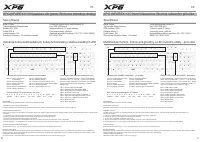
XPG XPG Mage - User Manual
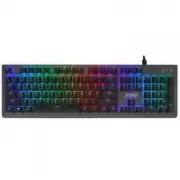
XPG XPG Mage Keyboard – User Manual, read for free online in PDF format. We hope this helps you resolve any issues you may have. If you have further questions, please contact us through the contact form.
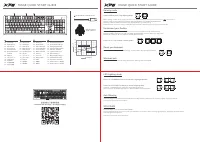
MAGE QUICK START GUIDE
Operating position
Reset position
MECHANICAL
RED SWITCH
KEYBOARD CONNECTION
EN
DE
FR
ES
PT
RU
KR
JP
TR
TH
TC
SC
:
:
:
:
:
:
Profile keys
Profilschlüssel
Clés de profil
Teclas de perfil
Chaves de Perfil
Программируемые
клавиши
프로필�키
プロファイルキー
Profil Tuşları
คีย �โปรไฟล �
自定義快捷鍵
自定义快捷键
:
:
:
:
:
:
EN
DE
FR
ES
PT
RU
KR
JP
TR
TH
TC
SC
Game mode
Spielmodus
Mode de jeu
Modo de Juego
Modo de jogo
Игровой режим
게임�모드
ゲームモード
Oyun modu
โหมดเกม
遊戲模式
游戏模式
:
:
:
:
:
:
:
:
:
:
:
:
EN
DE
FR
ES
PT
RU
KR
JP
TR
TH
TC
SC
Media keys
Medientasten
Clés multimédias
Teclas Multimedia
Chaves de mídia
Медия клавиши
미디어�키
メディアキー
Medya Tuşları
คีย �สื่อ
媒體鍵
媒体键
:
:
:
:
:
:
:
:
:
:
:
:
EN
DE
FR
ES
PT
RU
KR
JP
TR
TH
TC
SC
Detachable USB Type-C
Abnehmbarer USB Typ C
USB Type C détachable
USB Tipo C Desmontable
USB tipo C removível
Съемный USB Type-C
분리형 USB Type-C
取り外し可能なUSBType-C
Çıkarılabilir USB Type-C
USB
Type-C
แบบถอดได �
可拆式 USB Type-C 電源線
可拆式 USB Type-C 电源线
:
:
:
:
:
:
:
:
:
:
:
:
Pro
duct Manual / Manual del pro
ducto
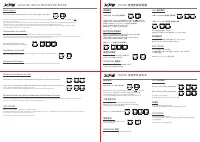
When gaming mode is active, a light indicator on the keyboard represented by the controller icon ( ) will remain lit.
Gaming mode can be used to setup profiles, edit lighting effects, and disable the Windows key.
Selecting a specific profile (PF1 to PF3) will also enable gaming mode directly.
Please note that turning on Gaming mode (FN + F6) will always default to the most recently active profile.
Your XPG Mage keyboard has the capability to store up to 3 profiles in the on-board memory.
Keyboard profiles allow you to re-map your Mage keyboard layout and store Macro key sequences.
Profiles are marked as “PF1”to “PF3” on the first 3 Function keys.
+
Gaming mode
Press FN+F6 to enter or exit Gaming Mode.
Press FN + F1 – F3 to select a specific profile.
Understand your Profiles
Press FN+ESC to remove all profile settings, including Macro keys and lighting effects.
Reset your keyboard
Your Windows key will be disabled by default when Gaming mode is activated.
Windows lock
+
+
Your XPG Mage comes standard with full keyboard “N-Key Rollover.” Meaning it can correctly register any combination of
simultaneous keypresses without error.
Press FN + UP/DOWN arrow key to adjust the lighting brightness.
There are 7 predefined Lighting effects in the following sequence:
Static / Color Cycle / Breathing / Reactive / Rainbow Wave / Ripple/Marquee
Press FN + LEFT/RIGHT arrow key to choose a lighting effect.
LED Lighting mode
Anti-Ghosting
Your XPG Mage is compatible with XPG PRIME.
This free software allows you to customize your keyboard in a number of ways including lighting effects, brightness, keyboard layout,
and creating Macro sequences.
Visit www.xpg.com for more information.
XPG PRIME
+
+
MAGE QUICK START GUIDE
產品說明書 /
产品说明书
"Loading the manual" means you need to wait until the file loads and becomes available for online reading. Some manuals are very large, and the time they take to appear depends on your internet speed.

![XPG XPG [SUMMONER4B-BKCRU]](https://manualsarea.com/img/product/thumbs/48/36/6a/366aadf57ca0e85378683b1e6ca8812a.webp)