Whirlpool MWP301B - Manual
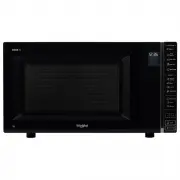
Whirlpool MWP301B Microwave – Manual, read for free online in PDF format. We hope this helps you resolve any issues you may have. If you have further questions, please contact us through the contact form.


Table of Contents:
- Page 2 – INDEX
- Page 3 – PRIOR TO CONNECTING; is properly grounded.; INSTALLATION; AFTER CONNECTING
- Page 4 – SAFETY; IMPORTANT SAFETY INSTRUCTIONS
- Page 5 – TROUBLE SHOOTING GUIDE; the following checks:
- Page 6 – PRECAUTIONS; GENERAL; tributed and the risk of scalding or burns can be avoided.; CAREFUL
- Page 7 – ACCESSORIES AND MAINTENANCE; ACCESSORIES; GLASS TURNTAbLE; TURNTAbLE SUPPORT
- Page 8 – MAINTENANCE & CLEANING
- Page 9 – CONTROL PANEL DESCRIPTION; uio
- Page 10 – DISPLAY DESCRIPTION
- Page 11 – PAUSE OR STOP COOKING; If you don’t want to continue cooking you can:; When the cooking is finished:; START PROTECTION / CHILD LOCK; DOOR
- Page 12 – CLOCK
- Page 13 – JET START
- Page 14 – MICROWAVE
- Page 15 – KEEP WARM
- Page 17 – Pop Corn
- Page 20 – MANUAL DEFROST
- Page 22 – AUTO CLEAN; Before starting the cycle:
- Page 23 – ENVIRONMENTAL HINTS
- Page 24 – Technical Specification
MWP301B
"Loading the manual" means you need to wait until the file loads and becomes available for online reading. Some manuals are very large, and the time they take to appear depends on your internet speed.
Was this manual helpful?
About this manual
- Brand
- Whirlpool
- Model
- MWP301B
- Document type
- Manual
- Category
- Microwave
- Language(s)
- English
- Pages
- 24
- File size
- 3.5 MB
- Format
Other Manuals for Whirlpool MWP301B
Summary
2 EN INDEX INSTALLATION Installation --------------------------------------------------------------------------------------------- 3 SAFETY Important safety instructions ----------------------------------------------------------------------- 4 Trouble shooting guide ---------------------------------...
3 EN Position the microwave oven at a distance from other heating sources. For sufficient ventilation, there must be a space of at least 30 cm above the microwave oven. The microwave oven should not be placed in a cabi- net. This microwave oven is not intended to be pla- ced or used on a working sur...
4 EN SAFETY IMPORTANT SAFETY INSTRUCTIONS Read Carefully And Keep For Future Reference * If material inside / outside the microwave oven ignite or smoke is emitted, keep microwave oven door closed and turn the microwave oven off. Disconnect the po- wer or shut off power at the fuse or circuit breake...
Ask a question
Related manuals
Popular Whirlpool Microwaves



More Whirlpool Microwaves models
 Whirlpool JQ280IX User Manual
 Whirlpool JT479IX User Manual
 Whirlpool MAX 25 Manual
 Whirlpool MWF421BL User Manual
 Whirlpool UMV1160CW User Manual
 Whirlpool VT 265 Manual
 Whirlpool WM2811D User Manual
 Whirlpool WMC10007AB User Manual
 Whirlpool WMC10007AW User Manual
 Whirlpool WMC20005YB User Manual
 Whirlpool WMC20005YD User Manual
 Whirlpool WMC20005YW User Manual