Page 2 - Making connections; How to make a wireless connection to Bluetooth devices; Listening to music; Listening to music via a Bluetooth connection
Wearing the headset Using only one unit of the headset About the touch sensor Power/Charging Charging the headset Available operating time Checking the remaining battery charge Turning on the headset Turning off the headset Making connections How to make a wireless connection to Bluetooth devices Ea...
Page 3 - Listening to ambient sound; Sound quality mode; Making phone calls
Using the noise canceling function Listening to ambient sound Listening to ambient sound during music playback (Ambient Sound Mode) Listening to ambient sound quickly (Quick Attention Mode) Sound quality mode About the sound quality mode Supported codecs About the DSEE HX function Making phone calls...
Page 5 - Help Guide; What you can do with the Bluetooth function
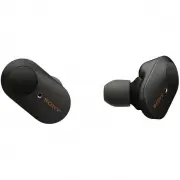
Help Guide Wireless Noise Canceling Stereo Headset WF-1000XM3 What you can do with the Bluetooth function The headset uses BLUETOOTH® wireless technology, allowing you to listen to music or make phone calls wirelessly. Listening to music You can receive audio signals from a smartphone or music playe...
Page 6 - About voice guidance; Note; Using only one unit of the headset
Help Guide Wireless Noise Canceling Stereo Headset WF-1000XM3 About voice guidance In the factory setting, when you wear the headset, you will hear the English voice guidance via the headset.You can change the language of the voice guidance and turn on/off the voice guidance using “Sony | Headphones...
Page 8 - Checking the package contents; The size M earbuds come attached to the headset.
Help Guide Wireless Noise Canceling Stereo Headset WF-1000XM3 Checking the package contents After opening the package, check that all of the items in the list are included. If any items are missing, contact yourdealer.Numbers in ( ) indicate the item amount. Wireless Noise Canceling Stereo HeadsetUS...
Page 9 - Replacing the earbuds; Long hybrid silicone rubber earbuds; SS; Triple-comfort earbuds; Do not pinch the end of the earbud when removing it.
Help Guide Wireless Noise Canceling Stereo Headset WF-1000XM3 Replacing the earbuds For the noise canceling function to be fully effective, select the earbuds that fit your ears the best. Size M long hybrid silicone rubber earbuds come attached to the left and right units of the headset. Select and ...
Page 10 - When you have finished using the headset
Help Guide Wireless Noise Canceling Stereo Headset WF-1000XM3 When you have finished using the headset When you have finished using the headset, be sure to keep the headset in the charging case.Close the lid of the charging case. Note If any water drops are left in the microphone hole of the headset...
Page 11 - Location and function of parts; Headset; The left unit has a tactile dot.
Help Guide Wireless Noise Canceling Stereo Headset WF-1000XM3 Location and function of parts Headset Charging case (left) mark and tactile dot The left unit has a tactile dot. 1. Touch sensor Tap to operate the headset. In the factory setting, in order to prevent the headset from reacting incorrectl...
Page 12 - Related Topic; About the indicator
Related Topic About the indicator Checking the remaining battery charge 4-747-585-11(3) Copyright 2019 Sony Corporation Lid 1. N-Mark 2. Indicator (red) Lights up while charging. 3. USB Type-C port Connect the charging case to a computer or a commercially available USB AC adaptor with the supplied U...
Page 13 - Turning on; Checking the remaining battery charge; Turning off
Help Guide Wireless Noise Canceling Stereo Headset WF-1000XM3 About the indicator You can check various statuses of the headset by the indicator. : Turns on in blue / : Turns on in red / - : Turns off Turning on The headset turns on when it is removed from the charging case. - (flashes twice) In thi...
Page 14 - Other; Updating software; Hint
Connection process completed (flashes quickly for about 5 seconds) Connected - - - - - - - - - - - - (about 5-second intervals) Incoming call The not connected and connected status indications automatically turn off after a period of time has passed. They startflashing again for a period of time whe...
Page 15 - Wearing the headset; Be careful of the following when you change the earbuds.; To remove the earbuds; Twist the headset to slide the earbud deep into your ear.
Help Guide Wireless Noise Canceling Stereo Headset WF-1000XM3 Wearing the headset For the noise canceling function to be fully effective, select the earbuds that fit your ears the best, and wear the headsetcorrectly. Hint Attach the earbuds. Size M long hybrid silicone rubber earbuds come attached t...
Page 16 - When wearing and removing the headset; When the headset is worn
The earbud will be easier to slide deep into your ear if you pull up on the top of the ear lightly while twisting the headset. When wearing and removing the headset In the factory setting, the built-in sensors work when the headset is removed or attached, enabling the headset to pauseor resume music...
Page 17 - When you put on the other unit of the headset; What you can do with “Sony | Headphones Connect” app
Help Guide Wireless Noise Canceling Stereo Headset WF-1000XM3 Using only one unit of the headset You can remove one unit from the charging case and use it by itself. In this case, only the unit that has been removedfrom the charging case will turn on. When you put on the other unit of the headset Th...
Page 19 - About the touch sensor; Some available operations; Left
Help Guide Wireless Noise Canceling Stereo Headset WF-1000XM3 About the touch sensor Tap the touch sensor for various operations, such as music playback, phone calls, or changing the setting of the noisecanceling function. A ︓ Touch sensor To operate the touch sensor, hold the headset between your t...
Page 21 - Charging the headset; About the charging time; Connect the charging case to an AC outlet.
Help Guide Wireless Noise Canceling Stereo Headset WF-1000XM3 Charging the headset The headset contains a built-in lithium-ion rechargeable battery. Use the supplied USB Type-C cable to charge theheadset before use. About the charging time The required time for fully charging the headset and the cha...
Page 22 - Charging the headset when you are outside; Notes on charging the headset when you are outside; System requirements for battery charge using USB; Personal computer with a standard USB port
Charging the headset when you are outside A rechargeable battery is built into the charging case. If you charge the charging case in advance, you can use it tocharge the headset when you go out without a power supply. If the charging case is fully charged, you can charge theheadset about 3 times.The...
Page 24 - Available operating time; Bluetooth connection; Music playback time
Help Guide Wireless Noise Canceling Stereo Headset WF-1000XM3 Available operating time The available operating times of the headset with the battery fully charged are as follows: Bluetooth connection Music playback time About 90 minutes of music playback is possible after 10 minutes charging. Commun...
Page 25 - Supported codecs; Noise canceling function/Ambient Sound Mode; OFF
Hint By using the “Sony | Headphones Connect” app, you can check which codec is used for a connection or switch the DSEE HXfunction. Note Usage hours may be different depending on the settings and conditions of use. Related Topic Supported codecs About the DSEE HX function What you can do with “Sony...
Page 26 - When you are wearing the headset; : Remaining battery charge of the headset
Help Guide Wireless Noise Canceling Stereo Headset WF-1000XM3 Checking the remaining battery charge You can check the remaining battery charge of the rechargeable battery. When you are wearing the headset When you remove the headset from the charging case and put on the headset, voice guidance indic...
Page 28 - Turning on the headset; When the headset is set in the charging case; Remove the headset from the charging case.
Help Guide Wireless Noise Canceling Stereo Headset WF-1000XM3 Turning on the headset When the headset is set in the charging case When the headset is not set in the charging case When the headset is not worn for about 5 minutes after being removed from the charging case, the headset turns offautomat...
Page 29 - Turning off the headset; When the headset is left removed; Set the headset in the charging case.
Help Guide Wireless Noise Canceling Stereo Headset WF-1000XM3 Turning off the headset When the headset is left removed When the headset is not worn for about 5 minutes after being removed from the charging case, the headset turns offautomatically. When the headset is worn again, the headset turns on...
Page 30 - Connecting the headset to a registered (paired) device
Help Guide Wireless Noise Canceling Stereo Headset WF-1000XM3 How to make a wireless connection to Bluetooth devices You can enjoy music and hands-free calling with the headset wirelessly by using your device’s Bluetooth function. Device registration (pairing) To use the Bluetooth function, both of ...
Page 31 - Connecting with the “Sony | Headphones Connect” app; Connecting to a paired Android smartphone
Help Guide Wireless Noise Canceling Stereo Headset WF-1000XM3 Connecting with the “Sony | Headphones Connect” app Launch the “Sony | Headphones Connect” app on your Android™ smartphone/iPhone to connect the headset to asmartphone or iPhone. For more details, refer to the “Sony | Headphones Connect” ...
Page 32 - Pairing and connecting with an Android smartphone; Remove both units of the headset from the charging case.; You will hear voice guidance “Bluetooth pairing” from the left unit.; Unlock the screen of the Android smartphone if it is locked.
Help Guide Wireless Noise Canceling Stereo Headset WF-1000XM3 Pairing and connecting with an Android smartphone The operation to register the device that you wish to connect to is called “pairing”. First, pair a device to use it with theheadset for the first time.Before you start the pairing operati...
Page 33 - Touch the switch to turn on the Bluetooth function.
Hint The above procedure is an example. For more details, refer to the operating instructions supplied with the Android smartphone. To delete all pairing information, see “ Initializing the headset to restore factory settings ”. Note When registering a device (pairing), [WF-1000XM3], [LE_WF-1000XM3]...
Page 37 - NFC-compatible smartphones installed with Android 4.1 or later.
Help Guide Wireless Noise Canceling Stereo Headset WF-1000XM3 One-touch connection (NFC) with an Android smartphone By touching the headset with a smartphone, the headset pairs and makes a Bluetooth connection. Compatible smartphones NFC-compatible smartphones installed with Android 4.1 or later. NF...
Page 41 - Pairing and connecting with an iPhone; Unlock the screen of the iPhone if it is locked.
Help Guide Wireless Noise Canceling Stereo Headset WF-1000XM3 Pairing and connecting with an iPhone The operation to register the device that you wish to connect to is called “pairing”. First, pair a device to use it with theheadset for the first time.Before you start the pairing operation, make sur...
Page 42 - Select the Bluetooth setting on the iPhone.
Hint The above procedure is an example. For more details, refer to the operating instructions supplied with the iPhone. To delete all Bluetooth pairing information, see “ Initializing the headset to restore factory settings ”. Note When registering a device (pairing), [WF-1000XM3], [LE_WF-1000XM3], ...
Page 43 - Connecting to a paired iPhone
When a 9th device is paired.The headset can be paired with up to 8 devices. If a new device is paired after 8 devices are already paired, the registrationinformation of the paired device with the oldest connection date is overwritten with the information for the new device.When the pairing informati...
Page 46 - Disconnecting Bluetooth connection (after use); Unlock the screen of the Bluetooth device if it is locked.; The headset turns off.
Help Guide Wireless Noise Canceling Stereo Headset WF-1000XM3 Disconnecting Bluetooth connection (after use) Hint When you finish playing music, the Bluetooth connection may terminate automatically depending on the Bluetooth device. Related Topic Disconnecting the Android smartphone with one-touch (...
Page 47 - Listening to music from a device via Bluetooth connection; Put the headset with the; Connect the headset to a Bluetooth device.
Help Guide Wireless Noise Canceling Stereo Headset WF-1000XM3 Listening to music from a device via Bluetooth connection If your Bluetooth device supports the following profiles, you can enjoy listening to music and perform basic remotecontrol operation of the Bluetooth device via a Bluetooth connect...
Page 49 - Controlling the audio device (Bluetooth connection)
Help Guide Wireless Noise Canceling Stereo Headset WF-1000XM3 Controlling the audio device (Bluetooth connection) If your Bluetooth device supports the device operating function (compatible protocol: AVRCP), then the followingoperations are available. The available functions may vary depending on th...
Page 52 - What is noise canceling?
Help Guide Wireless Noise Canceling Stereo Headset WF-1000XM3 What is noise canceling? The noise canceling circuit actually senses outside noise with built-in microphones and sends an equal-but-oppositecanceling signal to the headset. Note The noise canceling effect may not be pronounced in a very q...
Page 53 - To turn off the noise canceling function; The Ambient Sound Mode: ON; The noise canceling function is turned on automatically.
Help Guide Wireless Noise Canceling Stereo Headset WF-1000XM3 Using the noise canceling function If you use the noise canceling function, you can enjoy music without being disturbed by ambient noise. To turn off the noise canceling function Tap the touch sensor on the left unit to turn off the noise...
Page 55 - To activate the Ambient Sound Mode; Voice focus; To turn off the Ambient Sound Mode; The noise canceling function: OFF/The Ambient Sound Mode: OFF
Help Guide Wireless Noise Canceling Stereo Headset WF-1000XM3 Listening to ambient sound during music playback (Ambient Sound Mode) You can hear ambient sound through the microphones embedded in the left/right units of the headset while enjoyingmusic. To activate the Ambient Sound Mode Tap the touch...
Page 57 - To activate the Quick Attention Mode; Release your finger from the touch sensor.
Help Guide Wireless Noise Canceling Stereo Headset WF-1000XM3 Listening to ambient sound quickly (Quick Attention Mode) This function turns down music, call sounds, and the ringtone to allow ambient sound to be easily heard. It is usefulwhen you want to listen to train announcements, etc. To activat...
Page 60 - About the DSEE HX function; DSEE HX; AUTO
Help Guide Wireless Noise Canceling Stereo Headset WF-1000XM3 About the DSEE HX function The DSEE HX function upscales the compressed sound source data such as CD or MP3 to quality almost that of High-Resolution Audio quality and reproduces the clear high-range sound that is often lost.The DSEE HX f...
Page 61 - Receiving a call; Ring tone; Connect the headset to a smartphone or mobile phone beforehand.; If no ring tone is heard via the headset
Help Guide Wireless Noise Canceling Stereo Headset WF-1000XM3 Receiving a call You can enjoy a hands-free call with a smartphone or mobile phone that supports the Bluetooth profile HFP (Hands-freeProfile) or HSP (Headset Profile), via a Bluetooth connection. If your smartphone or mobile phone suppor...
Page 62 - Operate the smartphone or mobile phone to adjust the volume.
Hint Some smartphones or mobile phones receive calls with the phone instead of the headset by default. In the case of an HFP orHSP connection, switch the call to the headset by holding your finger to the touch sensor on the left or right unit of the headsetuntil it switches, or by using your smartph...
Page 63 - Making a call
Help Guide Wireless Noise Canceling Stereo Headset WF-1000XM3 Making a call You can enjoy a hands-free call with a smartphone or mobile phone that supports the Bluetooth profile HFP (Hands-freeProfile) or HSP (Headset Profile), via a Bluetooth connection. If your smartphone or mobile phone supports ...
Page 65 - Functions for a phone call; During standby/music playback; Tap the touch sensor twice quickly to finish a call.
Help Guide Wireless Noise Canceling Stereo Headset WF-1000XM3 Functions for a phone call The functions available during a call may vary depending on the profile supported by your smartphone or mobile phone.In addition, even if the profile is the same, the functions may vary depending on the smartpho...
Page 66 - Tap the touch sensor twice quickly to answer a call.; During call
Hold your finger to the touch sensor until the call device is switched between the headset and the smartphone ormobile phone. Supported profile: HSP (Headset Profile) You can use the touch sensor on either the left or right unit to perform the following operations. When you are wearingonly one unit ...
Page 68 - Using the Google Assistant; Compatible smartphones; If your smartphone is an Android smartphone, skip this step.
Help Guide Wireless Noise Canceling Stereo Headset WF-1000XM3 Using the Google Assistant By using the Google Assistant feature that comes with the smartphone, you can speak to the headset’s microphones tooperate the smartphone or perform the search. Compatible smartphones Smartphones installed with ...
Page 70 - Using Amazon Alexa; Open the app store on your mobile device.; Open the Amazon Alexa app.; to set up your headset to the Amazon Alexa app.; Perform the initial settings for Amazon Alexa.
Help Guide Wireless Noise Canceling Stereo Headset WF-1000XM3 Using Amazon Alexa By using the Amazon Alexa app installed in your smartphone, you can speak to the headset’s microphone to operate thesmartphone or perform the search. Compatible smartphones Smartphones installed with Android 5.1 or late...
Page 73 - For details on Amazon Alexa, refer to the following website:
For details on Amazon Alexa and its capability, refer to the following website: https://www.amazon.com/b?node=16067214011 For details on Amazon Alexa, refer to the following website: https://www.amazon.com/gp/help/customer/display.html?nodeId=G7HPV3YLTGLJEJFK Hint When you set up the headset to Amaz...
Page 74 - Using the voice assist function (Google app); The Google app is activated.; Make a request to the Google app through the headset’s microphones.
Help Guide Wireless Noise Canceling Stereo Headset WF-1000XM3 Using the voice assist function (Google app) By using the Google app feature that comes with the Android smartphone, you can speak to the headset’s microphonesto operate the Android smartphone. Note If the touch sensor on either the left ...
Page 77 - Installing “Sony | Headphones Connect” app; After installing the app, launch the “Sony | Headphones Connect” app.
Help Guide Wireless Noise Canceling Stereo Headset WF-1000XM3 Installing “Sony | Headphones Connect” app Related Topic What you can do with “Sony | Headphones Connect” app 4-747-585-11(3) Copyright 2019 Sony Corporation Download the “Sony | Headphones Connect” app from the Google Play store or App S...
Page 78 - Select the desired item.
Help Guide Wireless Noise Canceling Stereo Headset WF-1000XM3 Accessing support information from the “Sony | Headphones Connect” app You can access the latest support information from the “Sony | Headphones Connect” app. 4-747-585-11(3) Copyright 2019 Sony Corporation Select [Help] on the “Sony | He...
Page 79 - Updating the headset software; Transfer the update software from the smartphone to the headset.
Help Guide Wireless Noise Canceling Stereo Headset WF-1000XM3 Updating the headset software Install the latest headset software using the “Sony | Headphones Connect” app to enjoy new functions or to resolve acertain number of issues with the headset. Always use the headset with the latest software i...
Page 80 - Precautions; On Bluetooth communications
Help Guide Wireless Noise Canceling Stereo Headset WF-1000XM3 Precautions On Bluetooth communications Bluetooth wireless technology operates within a range of about 10 m (30 feet). The maximum communicationdistance may vary depending on the presence of obstacles (people, metal objects, walls, etc.) ...
Page 82 - License notice; Notes on the License
Help Guide Wireless Noise Canceling Stereo Headset WF-1000XM3 License notice Notes on the License This product contains software that Sony uses under a licensing agreement with the owner of its copyright. We areobligated to announce the contents of the agreement to customers under requirement by the...
Page 83 - Trademarks
Help Guide Wireless Noise Canceling Stereo Headset WF-1000XM3 Trademarks Windows is a registered trademark or trademark of Microsoft Corporation in the United States and/or other countries.iPhone, iPod touch, macOS, Mac and Siri are trademarks of Apple Inc., registered in the U.S. and other countrie...
Page 84 - Customer support websites; For customers in European countries:
Help Guide Wireless Noise Canceling Stereo Headset WF-1000XM3 Customer support websites For customers in the U.S.A, Canada, and Latin America: https://www.sony.com/am/support For customers in European countries: https://www.sony.eu/support For customers in China: https://service.sony.com.cn For cust...
Page 85 - What can I do to solve a problem?
Help Guide Wireless Noise Canceling Stereo Headset WF-1000XM3 What can I do to solve a problem? If the headset does not function as expected, try the following steps to resolve the issue. Find the symptoms of the issue in this Help Guide, and try any corrective actions listed.Set the headset in the ...
Page 86 - Unable to turn on the headset.
Help Guide Wireless Noise Canceling Stereo Headset WF-1000XM3 Unable to turn on the headset. Make sure the battery is fully charged.You cannot turn on the headset when the headset is placed and being charged in the charging case. Remove theheadset from the charging case to turn on. Related Topic Cha...
Page 87 - Charging cannot be done.
Help Guide Wireless Noise Canceling Stereo Headset WF-1000XM3 Charging cannot be done. Make sure that the headset is set in the charging case securely.Be sure to use the supplied USB Type-C cable.Check that the USB Type-C cable is firmly connected to the charging case and the USB AC adaptor or compu...
Page 88 - Charging time is too long.
Help Guide Wireless Noise Canceling Stereo Headset WF-1000XM3 Charging time is too long. Check that the charging case and the computer are directly connected, not via a USB hub.Check that you are using the supplied USB Type-C cable. Related Topic Charging the headset 4-747-585-11(3) Copyright 2019 S...
Page 91 - No sound
Help Guide Wireless Noise Canceling Stereo Headset WF-1000XM3 No sound Depending on the smartphone app (which requires HFP (Hands-free Profile)/HSP (Headset Profile)), you may hear avoice from the one unit only.Check that the connected Bluetooth device and both the left and right units of the headse...
Page 92 - Low sound level
Help Guide Wireless Noise Canceling Stereo Headset WF-1000XM3 Low sound level When playing music, adjust the volume on the connected device. If you are unable to adjust the volume on theconnected device, install the “Sony | Headphones Connect” smartphone app and adjust the volume in the app.When tal...
Page 94 - Low sound quality
Help Guide Wireless Noise Canceling Stereo Headset WF-1000XM3 Low sound quality Turn down the volume of the connected device if it is too loud.Keep the headset away from microwave ovens, Wi-Fi devices, etc.Bring the headset closer to the Bluetooth device. Remove any obstacles between the headset and...
Page 95 - Sound skips frequently.
Help Guide Wireless Noise Canceling Stereo Headset WF-1000XM3 Sound skips frequently. Set the headset to “Priority on stable connection” mode. For details, see “ About the sound quality mode ”. Remove any obstacles between the antenna of the connecting Bluetooth device and the built-in antenna of th...
Page 96 - The noise canceling effect is not sufficient.
Help Guide Wireless Noise Canceling Stereo Headset WF-1000XM3 The noise canceling effect is not sufficient. Make sure that the noise canceling function is turned on.Change to the earbud that allows you to hear the least ambient sounds for both the left and right unit.Adjust the headset position to f...
Page 97 - Pairing cannot be done.
Help Guide Wireless Noise Canceling Stereo Headset WF-1000XM3 Pairing cannot be done. Bring the headset and the Bluetooth device within 1 m (3 feet) from each other.When pairing for the first time after purchasing, initializing, or repairing the headset, the headset enters pairing modeautomatically ...
Page 99 - Unable to make a Bluetooth connection.
Help Guide Wireless Noise Canceling Stereo Headset WF-1000XM3 Unable to make a Bluetooth connection. Check that the headset is turned on.Check that the Bluetooth device is turned on and the Bluetooth function is on.If the headset automatically connects to the last connected Bluetooth device, you may...
Page 100 - Distorted sound
Help Guide Wireless Noise Canceling Stereo Headset WF-1000XM3 Distorted sound Keep the headset away from a microwave oven, Wi-Fi device, etc. 4-747-585-11(3) Copyright 2019 Sony Corporation 100
Page 102 - The headset does not operate properly.; Resetting the headset
Help Guide Wireless Noise Canceling Stereo Headset WF-1000XM3 The headset does not operate properly. Reset the headset. This operation does not delete pairing information.If the headset does not operate properly even if you reset the headset, initialize the headset.You cannot operate the headset if ...
Page 103 - Cannot hear a person on a call.
Help Guide Wireless Noise Canceling Stereo Headset WF-1000XM3 Cannot hear a person on a call. Check that both the headset and the connected device (i.e., smartphone) are turned on.Turn up the volume of the connected device if it is too low.Check the audio settings of the Bluetooth device to make sur...
Page 104 - Low voice from callers; Turn up the volume of the connected device.
Help Guide Wireless Noise Canceling Stereo Headset WF-1000XM3 Low voice from callers Turn up the volume of the connected device. 4-747-585-11(3) Copyright 2019 Sony Corporation 104
Page 105 - Initializing the headset to restore factory settings
Help Guide Wireless Noise Canceling Stereo Headset WF-1000XM3 Resetting the headset If the headset cannot be turned on or cannot be operated even when it is turned on, reset the headset. Place the headset in the charging case, leave the lid of the charging case open, then hold your finger to the tou...


 Sony MDREX110AP/B User Manual
 Sony MDRRF995RK User Manual
 Sony MDRZX110NC User Manual
 Sony MDRZX310APB User Manual
 Sony PHA3 User Manual
 Sony PlayStation PULSE 3D User Manual
 Sony WF1000XM5/B User Manual
 Sony WH-1000XM4 Black User Manual
 Sony WH-1000XM4 Blue User Manual
 Sony WH-1000XM4 Silver User Manual
 Sony WH-CH510 White User Manual
 Sony WH-CH710N Black User Manual
 Sony WH-CH710N White User Manual
 Sony WH-XB910N Blue User Manual
 Sony WH1000XM3B User Manual
 Sony WH1000XM3S User Manual
 Sony WH1000XM4S User Manual
 Sony WHCH500B User Manual
 Sony XBA-A1AP User Manual
 Sony DR-BTN200 Manual