Sony MDRRF995RK - User Manual
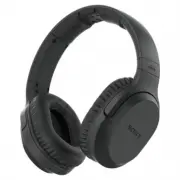
A user manual for Sony’s wireless stereo headphone system–comprising a transmitter (TMR-RF995R) and headphones (MDR-RF995RK)–focuses on setup, operation, and connectivity. The guide covers essential topics like battery management, AC charging, audio connection methods, volume control, and troubleshooting wireless reception issues such as signal loss or distortion. It also highlights safety precautions and basic sound customization features for seamless integration with AV systems.


Wireless Stereo
Headphone System
©2018 Sony Corporation Printed in Vietnam
4-734-847-
11
(1)
MDR-RF995RK
Operating Instructions
WARNING
To reduce the risk of fire or electric shock, do not
expose this apparatus to rain or moisture.
To reduce the risk of fire or electric shock, do not expose
this apparatus to dripping or splashing, and do not place
objects filled with liquids, such as vases, on the apparatus.
Do not expose the batteries (battery pack or batteries
installed) to excessive heat such as sunshine, fire or the
like for a long time.
Do not dismantle, open or shred secondary cells or
batteries.
In the event of a cell leaking, do not allow the liquid to
come in contact with the skin or eyes. If contact has been
made, wash the affected area with copious amounts of
water and seek medical advice.
Secondary cells and batteries need to be charged before
use. Always use the correct charger and refer to the
manufacturer’s instructions or equipment manual for
proper charging instructions.
After extended periods of storage, it may be necessary to
charge and discharge the cells or batteries several times
to obtain maximum performance.
Dispose of properly.
To avoid electrical shock, do not open the cabinet. Refer
servicing to qualified personnel only.
Do not install the appliance in a confined space, such as a
bookcase or built-in cabinet.
The AC Adaptor is not disconnected from the mains as
long as it is connected to the AC outlet, even if the unit
itself has been turned off.
As the main plug of AC power adaptor is used to
disconnect the AC power adaptor from the mains, connect
it to an easily accessible AC outlet. Should you notice an
abnormality in it, disconnect it from the AC outlet
immediately.
Excessive sound pressure from earphones and
headphones can cause hearing loss.
The nameplate of transmitter is located on the bottom
exterior.
The nameplate of the headphones is located on the back
side of the slider.
For the customers in the USA
You are cautioned that any changes or modifications not
expressly approved in this manual could void your
authority to operate this equipment.
If you have any questions about this product, you may
call:
Sony Customer Information Services Center
1-800-222-7669 or http://www.sony.com/
Declaration of Conformity
Trade Name:
SONY
Model No.:
MDR-RF995R
(Headphones Unit)
Responsible Party:
Sony Electronics Inc.
Address:
16535 Via Esprillo, San Diego, CA
92127 USA
Telephone No.:
858-942-2230
This device complies with Part 15 of the FCC Rules.
Operation is subject to the following two conditions: (1)
this device may not cause harmful interference, and (2)
this device must accept any interference received,
including interference that may cause undesired
operation.
Note
This equipment has been tested and found to comply with
the limits for a Class B digital device, pursuant to Part 15 of
the FCC Rules. These limits are designed to provide
reasonable protection against harmful interference in a
residential installation. This equipment generates, uses
and can radiate radio frequency energy and, if not
installed and used in accordance with the instructions,
may cause harmful interference to radio communications.
However, there is no guarantee that interference will not
occur in a particular installation. If this equipment does
cause harmful interference to radio or television reception,
which can be determined by turning the equipment off
and on, the user is encouraged to try to correct the
interference by one or more of the following measures:
– Reorient or relocate the receiving antenna.
– Increase the separation between the equipment and
receiver.
– Connect the equipment into an outlet on a circuit
different from that to which the receiver is connected.
– Consult the dealer or an experienced radio/ TV
technician for help.
For the customers in Canada
This device complies with Industry Canada’s licence-
exempt RSSs. Operation is subject to the following two
conditions:
(1)This device may not cause interference; and
(2)This device must accept any interference, including
interference that may cause undesired operation of the
device.
Disposal of Old Electrical & Electronic
Equipment (Applicable in the European
Union and other European countries with
separate collection systems)
How to use
Connect the AC adaptor.
Charge the headphones.
To AC
outlet
(Red)
(Off)
Complete when indicator
turns off.
Check the CHARGE/
RED indicator lights
up red.
Connect the A/V component, following hookup
or
below.
Using the headphone jack of the A/V component
Stereo mini plug
Headphone jack
(Stereo mini jack)
TV, Digital music player, etc.
L (white)
R (red)
Stereo mini plug
Audio out
(L/R) jacks
Stereo system, Blu-ray Disc player, DVD player, TV*, etc.
* In case of no headphone jack.
Adjust the volume.
After use
Turn off the power of the headphones.
About sending RF signals
The transmitter starts sending RF signals
automatically when it detects an audio signal from
the connected component. Note that;
– Noise may occur depending on the transmitter
position and room conditions. It is recommended
to place the transmitter in a location that
produces the clearest sound.
– If the transmitter is placed on a metallic table,
you may hear noise, or the reception range may
decrease. Do not place on a metallic table.
If no signal or low signal is
input for about 4 minutes
When no signal is input for about 4 minutes, the
transmitter turns off automatically*. The POWER
indicator of the transmitter blinks for 4 minites,
then turns off. The transmitter restarts after
receiving an audio signal again.
The transmitter may also turn off if low signal is
input for about 4 minutes. In this case, raise the
volume of the connected A/V component within
the range where the sound is not distorted, then
lower the volume of the headphones.
* If signal noise is output from the connected A/V
component, the transmitter may not turn off,
even when no audio signal is input.
Start playback of the A/V component.
Wear the headphones.
Before listening
To reduce the risk of hearing damage, first lower the volume.
Tactile dot
Up
Down
Tactile dot
Using the audio out (L/R) jacks of the A/V component
Use a connection cable (not supplied) between the transmitter and the A/V component.
If the sound is distorted by connecting the transmitter to the A/V component’s audio out (L/R) jacks, reconnect the transmitter to the headphone jack.
If the transmitter detects no signal or no sound, check the connection of the connected A/V components, then check the audio setting of the connected A/V components.
Insert the supplied rechargeable battery BP-HP800-11 into the left housing of the headphones.
Observe the correct polarity when installing battery.
Rechargeable nickel-metal hydride
battery BP-HP800-11 (supplied)
Insert the
end first.
Checking the included
items
RF stereo transmitter
TMR-RF995R (1)
AC adaptor (1)
Wireless stereo
headphones MDR-RF995R
(1)
Stereo mini cable (stereo
mini plug), 1.5 m (1)
Rechargeable nickel-metal
hydride battery BP-
HP800-11 (1)
Features
Thank you for purchasing the Sony MDR-RF995RK
Wireless Stereo Headphone System. Before operating the
unit, please read this manual thoroughly and retain it for
future reference.
Some features are:
– Wireless system that allows you to listen to a program
free the restriction of a cable
– Up to 45 meters reception range*
– High fidelity sound reproduction
– New mode “VOICE” for clear hearing of personal voice
range
– Noise reduction system to reproduce a clear sound with
minimum transmission noise
– Comfortable fit
– Smooth and Comfortable Earpads
– Long playback time (maximum 20 hours)
– Easy recharging function with secure charging
mechanism
– Rechargeable Battery
– Automatic tuning on headphones for optimum signal
reception
– 3 transmission channels available
– Volume control function and sound effect function on
the headphones
* Transmission distance varies depending on conditions of
use
(Green)
4
2
3
7
5
6
1
"Loading the manual" means you need to wait until the file loads and becomes available for online reading. Some manuals are very large, and the time they take to appear depends on your internet speed.
Was this manual helpful?
Helpful for 3 of 3 readers
About this manual
- Brand
- Sony
- Model
- MDRRF995RK
- Document type
- User Manual
- Category
- Headphones
- Language(s)
- English
- Pages
- 2
- File size
- 779.4 KB
- Format
Ask a question
Related manuals
More Sony Headphones models
 Sony MDR-EX750NA User Manual
 Sony MDR-IF240RK User Manual
 Sony MDR-Z7 User Manual
 Sony MDR-ZX110NC User Manual
 Sony MDR10RNC User Manual
 Sony MDREX110AP/B User Manual
 Sony MDRZX110NC User Manual
 Sony MDRZX310APB User Manual
 Sony PHA3 User Manual
 Sony PlayStation PULSE 3D User Manual
 Sony WF-1000XM3B User Manual
 Sony WF1000XM5/B User Manual
 Sony WH-1000XM4 Black User Manual
 Sony WH-1000XM4 Blue User Manual
 Sony WH-1000XM4 Silver User Manual
 Sony WH-CH510 White User Manual
 Sony WH-CH710N Black User Manual
 Sony WH-CH710N White User Manual
 Sony WH-XB910N Blue User Manual
 Sony WH1000XM3B User Manual