Page 2 - with separate collection systems)
2 GB Made in Thailand Laser Diode Properties Emission Duration: Continuous Laser Output: Less than 53.3 μW (This output is the value measurement at a distance of 200 mm from the objective lens surface on the Optical Pick-up Block with 7 mm aperture.) The nameplate indicating operating voltage, e...
Page 3 - Table of Contents
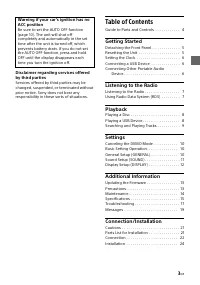
3 GB Disclaimer regarding services offered by third parties Services offered by third parties may be changed, suspended, or terminated without prior notice. Sony does not bear any responsibility in these sorts of situations. Table of Contents Guide to Parts and Controls . . . . . . . . . . . . 4 Get...
Page 4 - Guide to Parts and Controls; Main unit
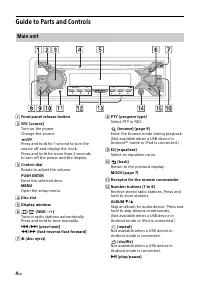
4 GB Guide to Parts and Controls Front panel release button SRC (source) Turn on the power.Change the source. OFF Press and hold for 1 second to turn the source off and display the clock.Press and hold for more than 2 seconds to turn off the power and the display. Control dial Rotate to adjust...
Page 5 - USB port; Detaching the Front Panel; Press and hold OFF; Caution alarm; Resetting the Unit; Press DSPL and; Getting Started
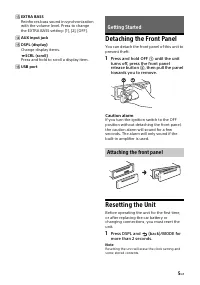
5 GB EXTRA BASS Reinforces bass sound in synchronization with the volume level. Press to change the EXTRA BASS setting: [1], [2], [OFF]. AUX input jack DSPL (display) Change display items. SCRL (scroll) Press and hold to scroll a display item. USB port Detaching the Front Panel You can detac...
Page 6 - Setting the area/region; Setting the Clock; To display the clock; Connecting a USB Device; Turn down the volume on the unit.
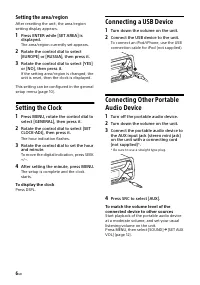
6 GB Setting the area/region After resetting the unit, the area/region setting display appears. 1 Press ENTER while [SET AREA] is displayed. The area/region currently set appears. 2 Rotate the control dial to select [EUROPE] or [RUSSIA], then press it. 3 Rotate the control dial to select [YES] or [N...
Page 7 - To receive emergency announcements; Listening to the Radio
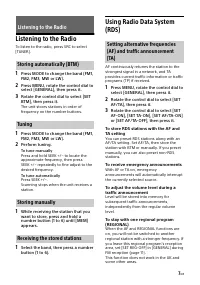
7 GB Listening to the Radio To listen to the radio, press SRC to select [TUNER]. 1 Press MODE to change the band (FM1, FM2, FM3, MW or LW). 2 Press MENU, rotate the control dial to select [GENERAL], then press it. 3 Rotate the control dial to select [SET BTM], then press it. The unit stores stations...
Page 8 - Press PTY during FM reception.; Type of programs; Playing a Disc; Playing a USB Device; Playback
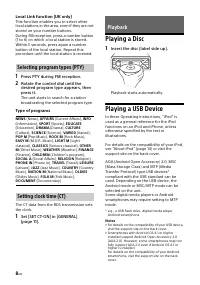
8 GB Local Link function (UK only) This function enables you to select other local stations in the area, even if they are not stored on your number buttons.During FM reception, press a number button (1 to 6) on which a local station is stored. Within 5 seconds, press again a number button of the loc...
Page 9 - Adjust the volume on this unit.; To stop playback; To remove the device; During playback, press; To exit the Quick-BrowZer mode; Press; Repeat play and shuffle play
9 GB • Playback of the following files is not supported. MP3/WMA/FLAC:– copyright-protected files– DRM (Digital Rights Management) files– Multi-channel audio filesMP3/WMA:– lossless compression files Before making a connection, select the USB mode (Android mode or MSC/MTP mode) depending on the USB ...
Page 10 - Canceling the DEMO Mode; Basic Setting Operation; To return to the previous display; Settings
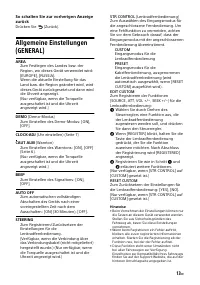
10 GB Canceling the DEMO Mode You can cancel the demonstration display which appears when the source is off and the clock is displayed. 1 Press MENU, rotate the control dial to select [GENERAL], then press it. 2 Rotate the control dial to select [SET DEMO], then press it. 3 Rotate the control dial t...
Page 13 - Updating the Firmware; Precautions; Moisture condensation; Additional Information
13 GB Updating the Firmware To update the firmware, visit the support site on the back cover, then follow the online instructions. Notes • Using a USB device (not supplied) is required for updating the firmware. Store the updater in the USB device, and connect the device to the USB port, then perfor...
Page 14 - Maintenance; Cleaning the connectors; About iPod
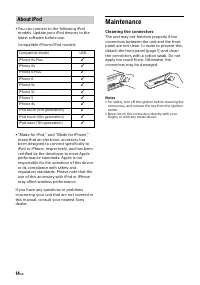
14 GB • You can connect to the following iPod models. Update your iPod devices to the latest software before use. Compatible iPhone/iPod models • “Made for iPod,” and “Made for iPhone,” mean that an electronic accessory has been designed to connect specifically to iPod or iPhone, respectively, and h...
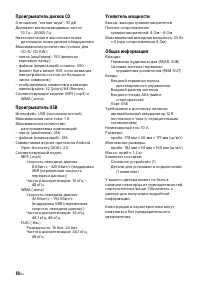
Page 15 - Specifications; Tuner section; FM; CD Player section; USB Player section; Power amplifier section
15 GB Specifications Tuner section FM Tuning range: When [AREA] is set to [EUROPE]:87.5 MHz – 108.0 MHzWhen [AREA] is set to [RUSSIA]:FM1/FM2: 87.5 MHz – 108.0 MHz (at 50 kHz step) FM3: 65 MHz – 74 MHz (at 30 kHz step) Antenna (aerial) terminal: External antenna (aerial) connector Intermediate frequ...
Page 16 - libFLAC; Copyrights
16 GB Inputs: Remote controller input terminalAntenna (aerial) input terminalAUX input jack (stereo mini jack)USB port Power requirements: 12 V DC car battery (negative ground (earth)) Rated current consumption: 10 ADimensions: Approx. 178 mm × 50 mm × 177 mm (7 1 / 8 in × 2 in × 7 in) (w/h/d) Mount...
Page 17 - Troubleshooting; General; No sound or the sound is very low.; Radio reception; Preset tuning is not possible.; RDS
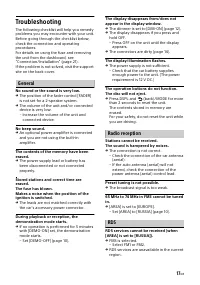
17 GB Troubleshooting The following checklist will help you remedy problems you may encounter with your unit.Before going through the checklist below, check the connection and operating procedures.For details on using the fuse and removing the unit from the dashboard, see “Connection/Installation” (...
Page 19 - Messages; INVALID
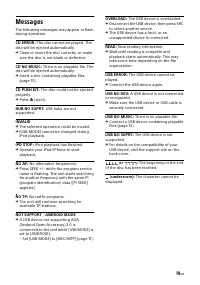
19 GB Messages The following messages may appear or flash during operation. CD ERROR: The disc cannot be played. The disc will be ejected automatically. Clean or insert the disc correctly, or make sure the disc is not blank or defective. CD NO MUSIC: There is no playable file. The disc will be eje...
Page 21 - Cautions; Mounting angle adjustment; Parts List for Installation; Connection/Installation
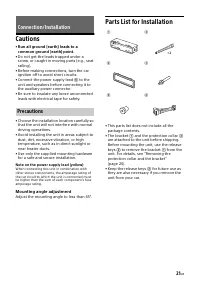
21 GB Cautions • Run all ground (earth) leads to a common ground (earth) point. • Do not get the leads trapped under a screw, or caught in moving parts (e.g., seat railing). • Before making connections, turn the car ignition off to avoid short circuits. • Connect the power supply lead to the unit ...
Page 22 - Connection
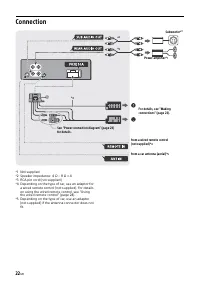
22 GB Connection *1 Not supplied*2 Speaker impedance: 4 Ω – 8 Ω × 4*3 RCA pin cord (not supplied)*4 Depending on the type of car, use an adaptor for a wired remote control (not supplied). For details on using the wired remote control, see “Using the wired remote control” (page 24). *5 Depending on t...
Page 23 - To the car’s speaker connector; Subwoofer Easy Connection; Memory hold connection; Making connections
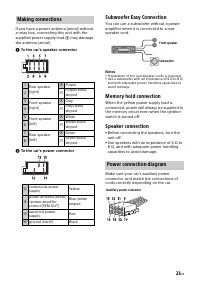
23 GB If you have a power antenna (aerial) without a relay box, connecting this unit with the supplied power supply lead may damage the antenna (aerial). To the car’s speaker connector To the car’s power connector Subwoofer Easy Connection You can use a subwoofer without a power amplifier when...
Page 24 - Installation; Insert both release keys; Using the wired remote control
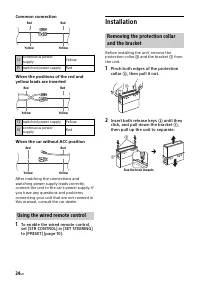
24 GB Common connection When the positions of the red and yellow leads are inverted When the car without ACC position After matching the connections and switching power supply leads correctly, connect the unit to the car’s power supply. If you have any questions and problems connecting your unit tha...
Page 25 - Position the bracket; Resetting the unit; Fuse replacement
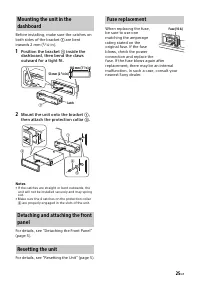
25 GB Before installing, make sure the catches on both sides of the bracket are bent inwards 2 mm ( 3 / 32 in). 1 Position the bracket inside the dashboard, then bend the claws outward for a tight fit. 2 Mount the unit onto the bracket , then attach the protection collar . Notes • If the cat...
Page 28 - Inhalt
4 DE Inhalt Lage und Funktion der Teile und Bedienelemente . . . . . . . . . . . . . . . . . . . 5 Vorbereitungen Abnehmen der Frontplatte . . . . . . . . . . . . . 6Zurücksetzen des Geräts . . . . . . . . . . . . . . . 7Einstellen der Uhr . . . . . . . . . . . . . . . . . . . . . 7Anschließen eines...
Page 29 - Lage und Funktion der Teile und Bedienelemente; Hauptgerät
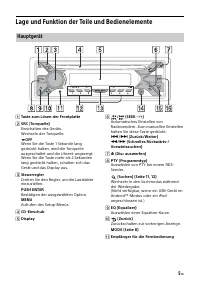
5 DE Lage und Funktion der Teile und Bedienelemente Taste zum Lösen der Frontplatte SRC (Tonquelle) Einschalten des Geräts.Wechseln der Tonquelle. OFF Wenn Sie die Taste 1 Sekunde lang gedrückt halten, wird die Tonquelle ausgeschaltet und die Uhrzeit angezeigt.Wenn Sie die Taste mehr als 2 Sekun...
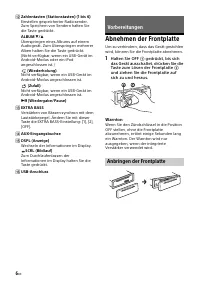
Page 30 - Abnehmen der Frontplatte; Halten Sie OFF; Warnton; Vorbereitungen
6 DE Zahlentasten (Stationstasten) (1 bis 6) Einstellen gespeicherter Radiosender. Zum Speichern von Sendern halten Sie die Taste gedrückt. ALBUM / Überspringen eines Albums auf einem Audiogerät. Zum Überspringen mehrerer Alben halten Sie die Taste gedrückt.(Nicht verfügbar, wenn ein USB-Gerät...
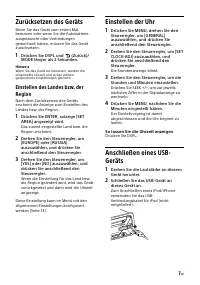
Page 31 - Zurücksetzen des Geräts; Drücken Sie DSPL und; Einstellen der Uhr; So lassen Sie die Uhrzeit anzeigen
7 DE Zurücksetzen des Geräts Bevor Sie das Gerät zum ersten Mal benutzen oder wenn Sie die Autobatterie ausgetauscht oder Verbindungen gewechselt haben, müssen Sie das Gerät zurücksetzen. 1 Drücken Sie DSPL und (Zurück)/ MODE länger als 2 Sekunden. Hinweis Wenn Sie das Gerät zurücksetzen, werden die...
Page 32 - Stellen Sie Sender ein.; Radioempfang
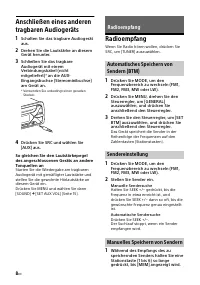
8 DE Anschließen eines anderen tragbaren Audiogeräts 1 Schalten Sie das tragbare Audiogerät aus. 2 Drehen Sie die Lautstärke an diesem Gerät herunter. 3 Schließen Sie das tragbare Audiogerät mit einem Verbindungskabel (nicht mitgeliefert) * an die AUX- Eingangsbuchse (Stereominibuchse) am Gerät an. ...
Page 33 - Einstellen gespeicherter Sender
9 DE 1 Wählen Sie den Frequenzbereich aus und drücken Sie eine Stationstaste (1 bis 6). Das Radiodatensystem (RDS) Mit AF wird der Sender mit den stärksten Signalen in einem Netzwerk ständig neu eingestellt, während mit TA gegebenenfalls aktuelle Verkehrsinformationen bzw. Verkehrsfunksender (TP) em...
Page 34 - Programmtypen; Wiedergeben von Discs; Wiedergabe
10 DE Programmtypen Mit den CT-Daten (Uhrzeitdaten), die von RDS-Sendern ausgestrahlt werden, lässt sich die Uhr einstellen. 1 Stellen Sie [SET CT-ON] unter [GENERAL] ein (Seite 14). Wiedergeben von Discs 1 Legen Sie eine CD mit der beschrifteten Seite nach oben ein. Die Wiedergabe beginnt automatis...
Page 35 - So stoppen Sie die Wiedergabe; Vorsicht beim iPhone; Wiedergabemodus ausgewählt ist.
11 DE Hinweise • Einzelheiten zur Kompatibilität Ihres USB-Geräts finden Sie auf der Support-Website, die auf der hinteren Umschlagseite angegeben ist. • Smartphones, auf denen das Android- Betriebssystem 4.1 oder höher installiert ist, unterstützen Android Open Accessory 2.0 (AOA 2.0). Jedoch unter...
Page 36 - Drücken Sie; Beenden des DEMO-Modus; Drücken Sie; Einstellungen
12 DE So deaktivieren Sie den Quick-BrowZer-Modus Drücken Sie (Suchen). Nicht verfügbar, wenn ein USB-Gerät im Android-Modus oder ein iPod angeschlossen ist. 1 Drücken Sie (Suchen). 2 Drücken Sie SEEK +. 3 Drehen Sie den Steuerregler, um das Element auszuwählen. Die Elemente in der Liste werden in S...
Page 40 - Aktualisieren der Firmware; Sicherheitsmaßnahmen; Feuchtigkeitskondensation; Weitere Informationen
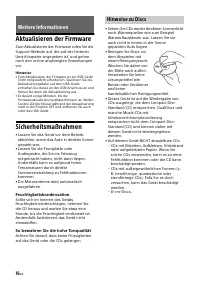
16 DE Aktualisieren der Firmware Zum Aktualisieren der Firmware rufen Sie die Support-Website auf, die auf der hinteren Umschlagseite angegeben ist, und gehen nach den online angezeigten Anweisungen vor. Hinweise • Zum Aktualisieren der Firmware ist ein USB-Gerät (nicht mitgeliefert) erforderlich. S...
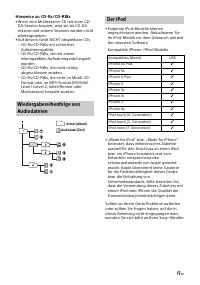
Page 41 - Der iPod
17 DE Hinweise zu CD-Rs/CD-RWs • Wenn eine Multisession-CD mit einer CD- DA-Session beginnt, wird sie als CD-DA erkannt und andere Sessions werden nicht wiedergegeben. • Auf diesem Gerät NICHT abspielbare CDs – CD-Rs/CD-RWs mit schlechter Aufnahmequalität. – CD-Rs/CD-RWs, die mit einem inkompatiblen...
Page 42 - Wartung; Reinigen der Anschlüsse; Technische Daten; Tuner
18 DE Wartung Reinigen der Anschlüsse Das Gerät funktioniert möglicherweise nicht ordnungsgemäß, wenn die Anschlüsse zwischen dem Gerät und der Frontplatte verschmutzt sind. Um dies zu vermeiden, nehmen Sie die Frontplatte ab (Seite 6) und reinigen Sie die Anschlüsse mit einem Wattestäbchen. Drücken...
Page 43 - Endverstärker; Urheberrechte
19 DE Entsprechender Codec: MP3 (.mp3) und WMA (.wma) USB-Player Schnittstelle: USB (Full-Speed)Maximale Stromstärke: 1 AHöchstzahl an erkennbaren Titeln: – Ordner (Alben): 256– Dateien (Titel) pro Ordner: 256Kompatibles Android Open Accessory- Protokoll (AOA): 2.0 Entsprechender Codec: MP3 (.mp3) B...
Page 44 - Störungsbehebung; Allgemeines; Kein Signalton ertönt.
20 DE Bei Redistributionen im Binärformat müssen der oben genannte Urheberrechtsvermerk, diese Liste der Voraussetzungen sowie der folgende Haftungsausschluss in der Dokumentation und/oder in sonstigen mit der Redistribution verbreiteten Materialien enthalten sein. Der Name der Xiph.org Foundati...
Page 45 - Der Programmdienstname blinkt.
21 DE Das Gerät wechselt während der Wiedergabe bzw. des Radioempfangs in den Demo-Modus. Wenn [DEMO-ON] eingestellt ist und 5 Minuten lang keine Funktion ausgeführt wird, wechselt das Gerät in den Demo-Modus.– Stellen Sie [DEMO-OFF] ein (Seite 13). Die Anzeige wird ausgeblendet bzw. erscheint nic...
Page 46 - Die CD lässt sich nicht abspielen.; Tonsprünge treten auf.; Wiedergabe mit einem USB-Gerät
22 DE CD-Wiedergabe Die CD lässt sich nicht abspielen. Die CD ist beschädigt oder verschmutzt. Die CD-R/CD-RW ist nicht als Audio-CD konzipiert (Seite 17). MP3-/WMA-Dateien können nicht wiedergegeben werden. Die Disc ist nicht mit dem MP3-/WMA-Format bzw. der Version kompatibel. Einzelheiten z...
Page 47 - Meldungen
23 DE Meldungen Eine der folgenden Meldungen erscheint oder blinkt möglicherweise während des Betriebs. CD ERROR: Die Disc kann nicht wiedergegeben werden. Die Disc wird automatisch ausgeworfen. Reinigen Sie die Disc, setzen Sie sie korrekt ein und vergewissern Sie sich, dass sie nicht leer oder b...
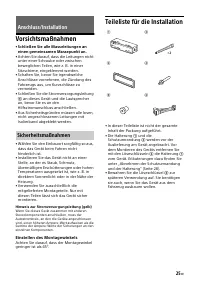
Page 49 - Vorsichtsmaßnahmen; Einstellen des Montagewinkels; Teileliste für die Installation; Anschluss/Installation
25 DE Vorsichtsmaßnahmen • Schließen Sie alle Masseleitungen an einen gemeinsamen Massepunkt an. • Achten Sie darauf, dass die Leitungen nicht unter einer Schraube oder zwischen beweglichen Teilen, wie z. B. in einer Sitzschiene, eingeklemmt werden. • Schalten Sie, bevor Sie irgendwelche Anschlüsse ...
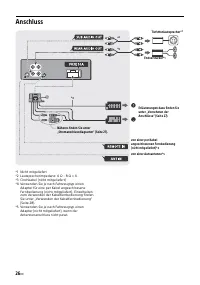
Page 50 - Anschluss
26 DE Anschluss *1 Nicht mitgeliefert*2 Lautsprecherimpedanz: 4 Ω – 8 Ω × 4*3 Cinchkabel (nicht mitgeliefert)*4 Verwenden Sie je nach Fahrzeugtyp einen Adapter für eine per Kabel angeschlossene Fernbedienung (nicht mitgeliefert). Einzelheiten zum Verwenden der Kabelfernbedienung finden Sie unter „Ve...
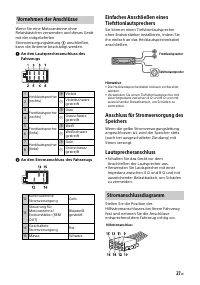
Page 51 - An den Stromanschluss des Fahrzeugs; Lautsprecheranschluss; Vornehmen der Anschlüsse
27 DE Wenn Sie eine Motorantenne ohne Relaiskästchen verwenden und dieses Gerät mit der mitgelieferten Stromversorgungsleitung anschließen, kann die Antenne beschädigt werden. An den Lautsprecheranschluss des Fahrzeugs An den Stromanschluss des Fahrzeugs Einfaches Anschließen eines Tiefsttonla...
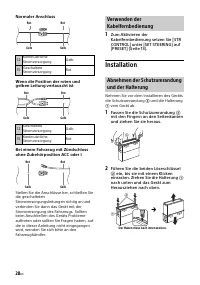
Page 52 - Normaler Anschluss; Fassen Sie die Schutzumrandung
28 DE Normaler Anschluss Wenn die Position der roten und gelben Leitung vertauscht ist Bei einem Fahrzeug mit Zündschloss ohne Zubehörposition ACC oder I Stellen Sie die Anschlüsse her, schließen Sie die geschalteten Stromversorgungsleitungen richtig an und verbinden Sie dann das Gerät mit der Strom...
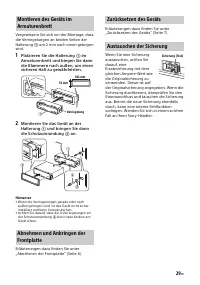
Page 53 - Platzieren Sie die Halterung
29 DE Vergewissern Sie sich vor der Montage, dass die Verriegelungen an beiden Seiten der Halterung um 2 mm nach innen gebogen sind. 1 Platzieren Sie die Halterung im Armaturenbrett und biegen Sie dann die Klammern nach außen, um einen sicheren Halt zu gewährleisten. 2 Montieren Sie das Gerät an...
Page 56 - Table des matières
4 FR Table des matières Emplacement des commandes . . . . . . . . . . 5 Préparation Retrait de la façade avant . . . . . . . . . . . . . . 6Réinitialisation de l’appareil . . . . . . . . . . . . 7Réglage de l’horloge . . . . . . . . . . . . . . . . . . 7Connexion d’un périphérique USB . . . . . . . ...
Page 57 - Emplacement des commandes; Appareil principal
5 FR Emplacement des commandes Touche de déverrouillage de la façade avant SRC (Source) Permet de mettre l’appareil sous tension.Permet aussi de changer de source. OFF Maintenez enfoncé pendant 1 seconde pour désactiver la source et afficher l’horloge.Maintenez enfoncé pendant plus de 2 secondes...
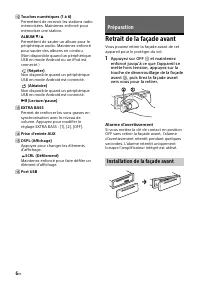
Page 58 - Retrait de la façade avant; Appuyez sur OFF; Alarme d’avertissement; Préparation
6 FR Touches numériques (1 à 6) Permettent de recevoir les stations radio mémorisées. Maintenez enfoncé pour mémoriser une station. ALBUM / Permettent de sauter un album pour le périphérique audio. Maintenez enfoncé pour sauter des albums en continu. (Non disponible quand un périphérique USB e...
Page 59 - Réinitialisation de l’appareil; Appuyez sur DSPL et; Réglage de la zone/région; Réglage de l’horloge; Pour afficher l’horloge; Baissez le volume sur l’appareil.
7 FR Réinitialisation de l’appareil Avant la première mise en service de l’appareil ou après avoir remplacé la batterie du véhicule ou modifié les raccordements, vous devez réinitialiser l’appareil. 1 Appuyez sur DSPL et (Retour)/ MODE pendant plus de 2 secondes. Remarque La réinitialisation de l’ap...
Page 60 - Procédez à la syntonisation.; Utilisation de la radio
8 FR Connexion d’un autre appareil audio portatif 1 Mettez l’appareil audio portatif hors tension. 2 Baissez le volume sur l’appareil. 3 Raccordez l’appareil audio portatif à la prise d’entrée AUX (mini-prise stéréo) de l’appareil à l’aide d’un cordon de raccordement (non fourni) * . * Veillez à uti...
Page 61 - Réception de messages d’urgence; Mémorisation manuelle
9 FR 1 Lorsque vous recevez la station que vous souhaitez mémoriser, appuyez sur une touche numérique (1 à 6) et maintenez-la enfoncée jusqu’à ce que [MEM] apparaisse. 1 Sélectionnez la bande, puis appuyez sur une touche numérique (1 à 6). Utilisation du système RDS (Système de radiocommunication de...
Page 62 - Types d’émissions; Lecture d’un disque; Lecture
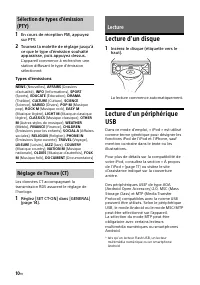
10 FR 1 En cours de réception FM, appuyez sur PTY. 2 Tournez la molette de réglage jusqu’à ce que le type d’émission souhaité apparaisse, puis appuyez dessus. L’appareil commence à rechercher une station diffusant le type d’émission sélectionné. Types d’émissions Les données CT accompagnant la trans...
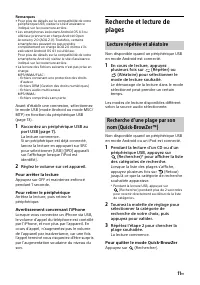
Page 63 - Réglez le volume sur cet appareil.; Pour arrêter la lecture; mode de lecture souhaité.; Pour quitter le mode Quick-BrowZer; Lecture répétée et aléatoire
11 FR Remarques • Pour plus de détails sur la compatibilité de votre périphérique USB, visitez le site d’assistance indiqué sur la couverture arrière. • Les smartphones exécutant Android OS 4.1 ou ultérieur prennent en charge Android Open Accessory 2.0 (AOA 2.0). Toutefois, certains smartphones peuv...
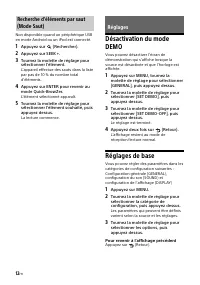
Page 64 - Appuyez deux fois sur; Réglages de base; Pour revenir à l’affichage précédent; Réglages
12 FR Non disponible quand un périphérique USB en mode Android ou un iPod est connecté. 1 Appuyez sur (Rechercher). 2 Appuyez sur SEEK +. 3 Tournez la molette de réglage pour sélectionner l’élément. L’appareil effectue des sauts dans la liste par pas de 10 % du nombre total d’éléments. 4 Appuyez sur...
Page 68 - Mise à jour du firmware; Précautions; Condensation; Informations complémentaires
16 FR Mise à jour du firmware Pour mettre à jour le firmware, consultez le site d’assistance à l’adresse mentionnée au dos du manuel, puis suivez les instructions en ligne. Remarques • La mise à jour du firmware nécessite l’utilisation d’un périphérique USB (non fourni). Stockez le programme de mise...
Page 69 - À propos de l’iPod
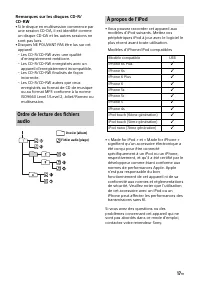
17 FR Remarques sur les disques CD-R/CD-RW • Si le disque en multisession commence par une session CD-DA, il est identifié comme un disque CD-DA et les autres sessions ne sont pas lues. • Disques NE POUVANT PAS être lus sur cet appareil– Les CD-R/CD-RW avec une qualité d’enregistrement médiocre. – L...
Page 70 - Entretien; Nettoyage des connecteurs; Spécifications; Radio; Lecteur CD
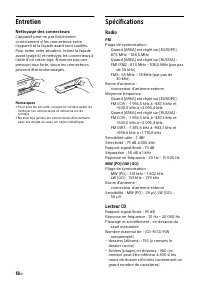
18 FR Entretien Nettoyage des connecteurs L’appareil peut ne pas fonctionner correctement si les connecteurs entre l’appareil et la façade avant sont souillés. Pour éviter cette situation, retirez la façade avant (page 6) et nettoyez les connecteurs à l’aide d’un coton-tige. N’exercez pas une pressi...
Page 72 - Dépannage; Généralités; Absence de son ou son très faible.; Aucun bip n’est émis.
20 FR – Toute redistribution de code source doit être accompagnée de la mention du copyright correspondant, de la liste de conditions et de la clause de non-responsabilité ci-dessous. – Les redistributions en forme binaire doivent reproduire l’avis de droits d’auteur ci-dessus, cette liste de condit...
Page 73 - Réception radio; Impossible de capter une présélection.; Aucun message de radioguidage.; Lecture de CD; La lecture du disque ne démarre pas.
21 FR En cours de lecture ou de réception, le mode de démonstration démarre. Si aucune opération n’est effectuée pendant 5 minutes avec [DEMO-ON] activé, le mode de démonstration démarre.– Réglez [DEMO-OFF] (page 13). L’affichage disparaît de la fenêtre d’affichage ou il ne s’affiche pas. Le rég...
Page 74 - Lecture de périphériques USB; Le son est intermittent.
22 FR Impossible de lire des fichiers MP3/WMA. Le disque n’est pas compatible avec le format MP3/WMA et la version. Pour plus d’informations sur les disques et les formats reconnus, visitez le site d’assistance à l’adresse mentionnée au dos du manuel. Certains fichiers MP3/WMA exigent un délai plu...
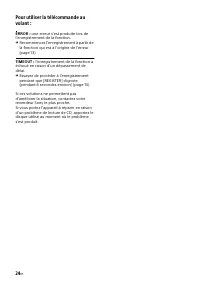
Page 77 - Attention; Réglage de l’angle de fixation; Raccordement/Installation
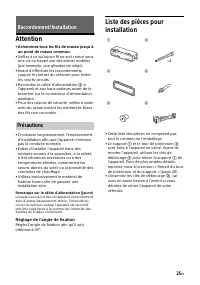
25 FR Attention • Acheminez tous les fils de masse jusqu’à un point de masse commun. • Veillez à ce qu’aucun fil ne soit coincé sous une vis ou happé par des pièces mobiles (par exemple, une glissière de siège). • Avant d’effectuer les raccordements, coupez le contact du véhicule pour éviter les cou...
Page 78 - Raccordement
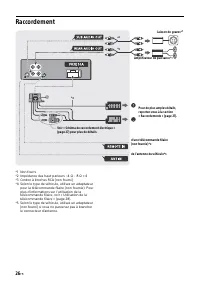
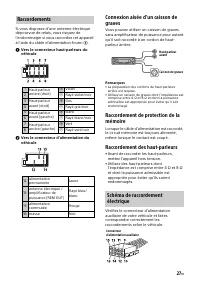
26 FR Raccordement *1 Non fourni*2 Impédance des haut-parleurs : 4 Ω – 8 Ω × 4*3 Cordon à broches RCA (non fourni)*4 Selon le type de véhicule, utilisez un adaptateur pour la télécommande filaire (non fournie). Pour plus d’informations sur l’utilisation de la télécommande filaire, voir « Utilisation...
Page 79 - Raccordement des haut-parleurs; Raccordements
27 FR Si vous disposez d’une antenne électrique dépourvue de relais, vous risquez de l’endommager si vous raccordez cet appareil à l’aide du câble d’alimentation fourni . Vers le connecteur haut-parleurs du véhicule Vers le connecteur d’alimentation du véhicule Connexion aisée d’un caisson de ...
Page 80 - Raccordement ordinaire; Insérez les deux clés de déblocage
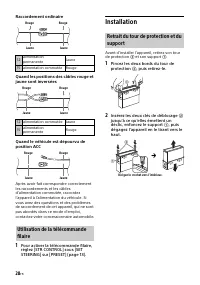
28 FR Raccordement ordinaire Quand les positions des câbles rouge et jaune sont inversées Quand le véhicule est dépourvu de position ACC Après avoir fait correspondre correctement les raccordements et les câbles d’alimentation commutée, raccordez l’appareil à l’alimentation du véhicule. Si vous avez...
Page 81 - Positionnez le support
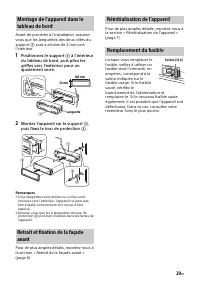
29 FR Avant de procéder à l’installation, assurez-vous que les languettes des deux côtés du support sont inclinées de 2 mm vers l’intérieur. 1 Positionnez le support à l’intérieur du tableau de bord, puis pliez les griffes vers l’extérieur pour un ajustement serré. 2 Montez l’appareil sur le sup...
Page 84 - Indice
4 IT Indice Guida alle parti e ai comandi. . . . . . . . . . . . 5 Operazioni preliminari Rimozione del pannello anteriore . . . . . . . . 6Azzeramento dell’apparecchio . . . . . . . . . . 7Impostazione dell’orologio . . . . . . . . . . . . . 7Collegamento di un dispositivo USB . . . . . . 7Collegam...
Page 85 - Guida alle parti e ai comandi; Unità principale
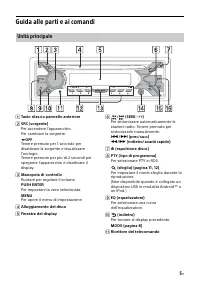
5 IT Guida alle parti e ai comandi Tasto rilascio pannello anteriore SRC (sorgente) Per accendere l’apparecchio.Per cambiare la sorgente. OFF Tenere premuto per 1 secondo per disattivare la sorgente e visualizzare l’orologio.Tenere premuto per più di 2 secondi per spegnere l’apparecchio e disatt...
Page 86 - Porta USB; Segnale di avvertimento; Operazioni preliminari
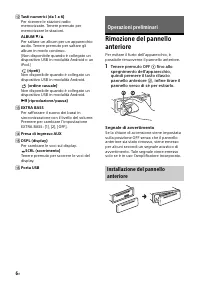
6 IT Tasti numerici (da 1 a 6) Per ricevere le stazioni radio memorizzate. Tenere premuto per memorizzare le stazioni. ALBUM / Per saltare un album per un apparecchio audio. Tenere premuto per saltare gli album in modo continuo. (Non disponibile quando è collegato un dispositivo USB in modalit...
Page 87 - Impostazione dell’area/regione; Impostazione dell’orologio; Per visualizzare l’orologio; Abbassare il volume sull’apparecchio.
7 IT Azzeramento dell’apparecchio Prima di utilizzare l’apparecchio per la prima volta, dopo la sostituzione della batteria dell’auto o dopo avere effettuato modifiche ai collegamenti, è necessario azzerare l’apparecchio stesso. 1 Premere DSPL e (indietro)/MODE per più di 2 secondi. Nota In seguito ...
Page 88 - Eseguire la sintonizzazione.; Ascolto della radio
8 IT Collegamento di un altro dispositivo audio portatile 1 Spegnere il dispositivo audio portatile. 2 Abbassare il volume sull’apparecchio. 3 Collegare il dispositivo audio portatile alla presa di ingresso AUX (minipresa stereo) sull’apparecchio con un cavo di collegamento (non in dotazione) * . * ...
Page 89 - Ricezione dei notiziari di emergenza; Premere PTY durante la ricezione FM.
9 IT 1 Selezionare la banda, quindi premere un tasto numerico (da 1 a 6). Utilizzo del sistema RDS (sistema dati radio) AF sintonizza continuamente la stazione con il segnale più potente, mentre TA fornisce informazioni o trasmette programmi correnti relativi al traffico (TP), se disponibili. 1 Prem...
Page 90 - Tipi di programmi; Riproduzione di un disco; Riproduzione
10 IT Tipi di programmi L’orologio viene regolato mediante i dati CT della trasmissione RDS. 1 Impostare [SET CT-ON] in [GENERAL] (pagina 14). Riproduzione di un disco 1 Inserire il disco (lato con l’etichetta rivolto verso l’alto). Viene avviata la riproduzione automaticamente. Riproduzione di un d...
Page 91 - Per interrompere la riproduzione; Per rimuovere il dispositivo; per visualizzare l’elenco; Per annullare il modo Quick-BrowZer
11 IT Note • Per ulteriori informazioni sulla compatibilità del dispositivo USB in uso, visitare il sito di assistenza riportato sulla retrocopertina. • Gli smartphone con Android 4.1 o versioni successive supportano Android Open Accessory 2.0 (AOA 2.0). Ciononostante, alcuni smartphone potrebbero n...
Page 92 - Premere due volte; Impostazioni
12 IT Non disponibile quando è collegato un dispositivo USB in modalità Android o un iPod. 1 Premere (sfoglia). 2 Premere SEEK +. 3 Ruotare la manopola di controllo per selezionare la voce. L’elenco viene saltato in incrementi pari al 10 % del numero totale di voci. 4 Premere ENTER per tornare al mo...
Page 93 - Per tornare al display precedente
13 IT Per tornare al display precedente Premere (indietro). Impostazione generale (GENERAL) AREA Consente di specificare l’area/la regione in cui utilizzare questo apparecchio: [EUROPE], [RUSSIA].Se viene modificata l’area/la regione impostata, l’apparecchio si azzera e quindi viene visualizzato l’o...
Page 96 - Precauzioni; Formazione di condensa; Informazioni aggiuntive
16 IT Aggiornamento del firmware Per aggiornare il firmware, visitare il sito dedicato all’assistenza riportato sulla retrocopertina e seguire le istruzioni online. Note • È necessario l’utilizzo di un dispositivo USB (non in dotazione) per l’aggiornamento del firmware. Salvare l’aggiornatore nel di...
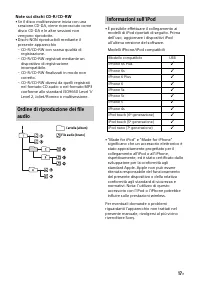
Page 97 - Informazioni sull’iPod
17 IT Note sui dischi CD-R/CD-RW • Se il disco multisessione inizia con una sessione CD-DA, viene riconosciuto come disco CD-DA e le altre sessioni non vengono riprodotte. • Dischi NON riproducibili mediante il presente apparecchio– CD-R/CD-RW con scarsa qualità di registrazione. – CD-R/CD-RW regist...
Page 98 - Manutenzione; Pulizia dei connettori; Caratteristiche tecniche; Sintonizzatore; Lettore CD
18 IT Manutenzione Pulizia dei connettori Se i connettori tra l’apparecchio e il pannello anteriore sono sporchi, l’apparecchio potrebbe non funzionare correttamente. Per evitare questo problema, rimuovere il pannello anteriore (pagina 6), quindi pulire i connettori con un cotton fioc. Non esercitar...
Page 99 - Informazioni su copyright
19 IT Codec corrispondente: MP3 (.mp3) e WMA (.wma) Lettore USB Interfaccia: USB (Full speed)Alimentazione massima: 1 ANumero massimo di brani riconoscibili: – cartelle (album): 256– file (brani) per cartella: 256Protocollo compatibile Android Open Accessory (AOA): 2.0 Codec corrispondenti: MP3 (.mp...
Page 100 - Generali; Non viene emesso alcun segnale acustico.
20 IT – Le ridistribuzioni in forma binaria devono riprodurre la nota sul copyright riportata qui sopra, l’elenco delle condizioni e la dichiarazione di responsabilità limitata che segue nella documentazione e/o nell’altro materiale fornito con la distribuzione. – Il nome della Fondazione Xiph.org e...
Page 101 - Ricezione radiofonica; Riproduzione di CD; Il disco non viene riprodotto.
21 IT Durante la riproduzione o la ricezione, viene attivato il modo di dimostrazione. Se non viene eseguita alcuna operazione per 5 minuti quando è impostata la funzione [DEMO-ON], viene attivato il modo di dimostrazione.– Impostare [DEMO-OFF] (pagina 13). Il display viene disattivato/non viene v...
Page 102 - L’audio viene trasmesso a intermittenza.
22 IT Non è possibile riprodurre file in formato MP3/WMA. Il disco non è compatibile con il formato e la versione MP3/WMA. Per ulteriori informazioni sui dischi e sui formati riproducibili, visitare il sito di assistenza riportato sulla retrocopertina. I file MP3/WMA necessitano di un tempo maggio...
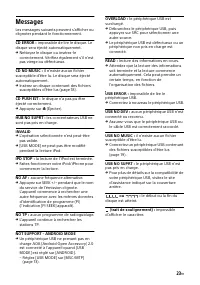
Page 103 - Messaggi
23 IT Messaggi Durante il funzionamento, i seguenti messaggi possono apparire o lampeggiare. CD ERROR: non è possibile riprodurre il disco. Il disco viene espulso automaticamente. Pulire il disco o inserirlo correttamente, accertarsi che il disco non sia vuoto o difettoso. CD NO MUSIC: non è prese...
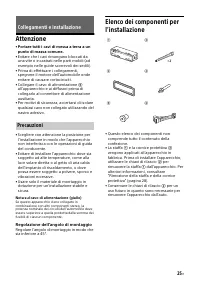
Page 105 - Attenzione; Regolazione dell’angolo di montaggio; Collegamenti e installazione
25 IT Attenzione • Portare tutti i cavi di messa a terra a un punto di massa comune. • Evitare che i cavi rimangano bloccati da una vite o incastrati nelle parti mobili (ad esempio nelle guide scorrevoli dei sedili). • Prima di effettuare i collegamenti, spegnere il motore dell’automobile onde evita...
Page 106 - Connessioni
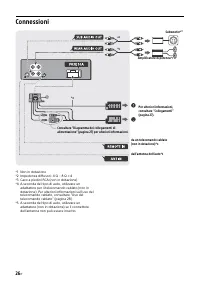
26 IT Connessioni *1 Non in dotazione*2 Impedenza diffusori: 4 Ω – 8 Ω × 4*3 Cavo a piedini RCA (non in dotazione)*4 A seconda del tipo di auto, utilizzare un adattatore per il telecomando cablato (non in dotazione). Per ulteriori informazioni sull’uso del telecomando cablato, consultare “Uso del te...
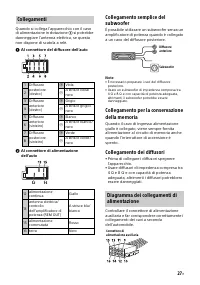
Page 107 - Al connettore del diffusore dell’auto; Collegamento dei diffusori; Collegamenti
27 IT Quando si collega l’apparecchio con il cavo di alimentazione in dotazione si potrebbe danneggiare l’antenna elettrica, se questa non dispone di scatola a relè. Al connettore del diffusore dell’auto Al connettore di alimentazione dell’auto Collegamento semplice del subwoofer È possibile u...
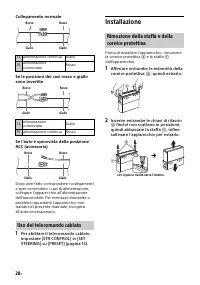
Page 108 - Collegamento normale; Installazione; Inserire entrambe le chiavi di rilascio; Uso del telecomando cablato
28 IT Collegamento normale Se le posizioni dei cavi rosso e giallo sono invertite Se l’auto è sprovvista della posizione ACC (accessoria) Dopo aver fatto corrispondere i collegamenti e aver commutato i cavi di alimentazione, collegare l’apparecchio all’alimentazione dell’automobile. Per eventuali do...
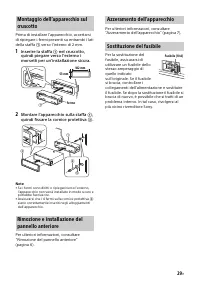
Page 109 - Inserire la staffa; Azzeramento dell’apparecchio
29 IT Prima di installare l’apparecchio, accertarsi di ripiegare i fermi presenti su entrambi i lati della staffa verso l’interno di 2 mm. 1 Inserire la staffa nel cruscotto, quindi piegare verso l’esterno i morsetti per un’installazione sicura. 2 Montare l’apparecchio sulla staffa , quindi fi...
Page 111 - Inhoudsopgave
3 NL Voor meer details in verband met het recycleren van dit product of batterij, kan u contact opnemen met de gemeentelijke instanties, de organisatie belast met de verwijdering van huishoudelijk afval of de winkel waar u het product of batterij hebt gekocht. Disclaimer betreffende diensten aangebo...
Page 112 - Onderdelen en bedieningselementen; Hoofdapparaat
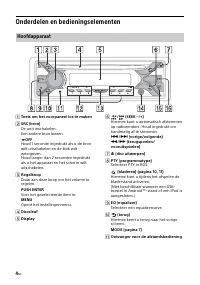
4 NL Onderdelen en bedieningselementen Toets om het voorpaneel los te maken SRC (bron) De unit inschakelen.Een andere bron kiezen. OFF Houd 1 seconde ingedrukt als u de bron wilt uitschakelen en de klok wilt weergeven.Houd langer dan 2 seconden ingedrukt als u het apparaat en het scherm wilt uit...
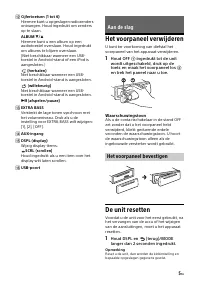
Page 113 - Het voorpaneel verwijderen; Houd OFF; Waarschuwingstoon; De unit resetten; Houd DSPL en; Aan de slag
5 NL Cijfertoetsen (1 tot 6) Hiermee kunt u opgeslagen radiozenders ontvangen. Houd ingedrukt om zenders op te slaan. ALBUM / Hiermee kunt u een album op een audiotoestel overslaan. Houd ingedrukt om albums te blijven overslaan. (Niet beschikbaar wanneer een USB-toestel in Android-stand of een...
Page 114 - De geografische locatie instellen; De klok instellen; De klok weergeven; Verlaag het volume op de unit.
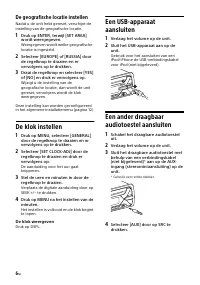
6 NL De geografische locatie instellen Nadat u de unit hebt gereset, verschijnt de instelling van de geografische locatie. 1 Druk op ENTER, terwijl [SET AREA] wordt weergegeven. Weergegeven wordt welke geografische locatie is ingesteld. 2 Selecteer [EUROPE] of [RUSSIA] door de regelknop te draaien e...
Page 115 - Stem af op de gewenste zender.; Luisteren naar de radio
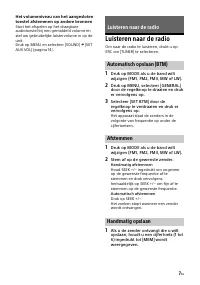
7 NL Het volumeniveau van het aangesloten toestel afstemmen op andere bronnen Start het afspelen op het draagbare audiotoestel bij een gemiddeld volume en stel uw gebruikelijke luistervolume in op de unit.Druk op MENU en selecteer [SOUND] [SET AUX VOL] (pagina 14). Luisteren naar de radio Om naar ...
Page 116 - Noodberichten ontvangen
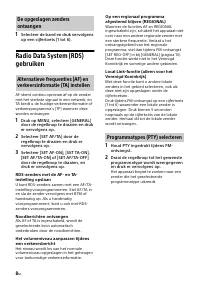
8 NL 1 Selecteer de band en druk vervolgens op een cijfertoets (1 tot 6). Radio Data System (RDS) gebruiken AF stemt continu opnieuw af op de zender met het sterkste signaal in een netwerk, en TA biedt u de huidige verkeersinformatie of verkeersprogramma's (TP) wanneer deze worden ontvangen. 1 Druk ...
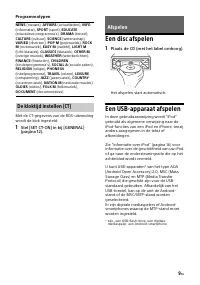
Page 117 - Programmatypen; Een disc afspelen; Een USB-apparaat afspelen; Afspelen
9 NL Programmatypen Met de CT-gegevens van de RDS-uitzending wordt de klok ingesteld. 1 Stel [SET CT-ON] in bij [GENERAL] (pagina 12). Een disc afspelen 1 Plaats de CD (met het label omhoog). Het afspelen start automatisch. Een USB-apparaat afspelen In deze gebruiksaanwijzing wordt "iPod" ge...
Page 118 - Pas het volume op dit apparaat aan.; Het afspelen stoppen; Het toestel verwijderen; Waarschuwing voor iPhone; Tracks zoeken en afspelen; weergavestand te selecteren.
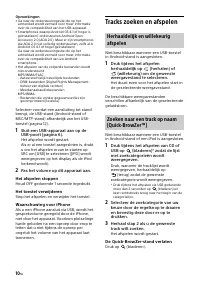
10 NL Opmerkingen • Ga naar de ondersteuningssite die op het achterblad wordt vermeld voor meer informatie over de compatibiliteit van het USB-apparaat. • Smartphones waarop Android OS 4.1 of hoger is geïnstalleerd, ondersteunen Android Open Accessory 2.0 (AOA 2.0). Maar er zijn smartphones die AOA ...
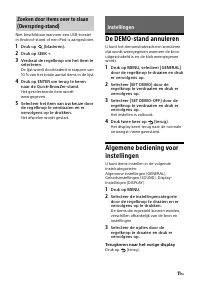
Page 119 - De DEMO-stand annuleren; Druk twee keer op; Terugkeren naar het vorige display; Instellingen
11 NL Niet beschikbaar wanneer een USB-toestel in Android-stand of een iPod is aangesloten. 1 Druk op (bladeren). 2 Druk op SEEK +. 3 Verdraai de regelknop om het item te selecteren. De lijst wordt doorbladerd in stappen van 10 % van het totale aantal items in de lijst. 4 Druk op ENTER om terug te k...
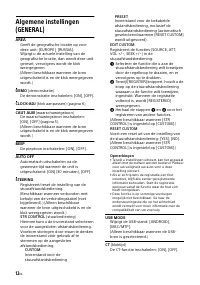
Page 121 - BALANCE
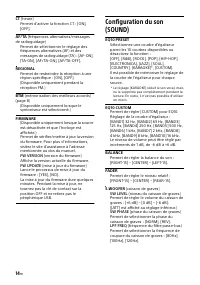
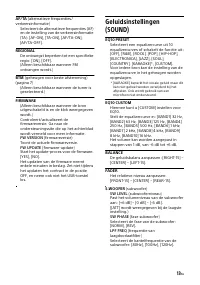
13 NL AF/TA (alternatieve frequenties/ verkeersinformatie) Selecteert de alternatieve frequenties (AF) en de instelling van de verkeersinformatie (TA): [AF-ON], [TA-ON], [AF/TA-ON], [AF/TA-OFF]. REGIONAL De ontvangst beperken tot een specifieke regio: [ON], [OFF].(Alleen beschikbaar wanneer FM ontva...
Page 123 - De firmware updaten; Voorzorgsmaatregelen; Condensvorming; Aanvullende informatie
15 NL De firmware updaten Ga voor het updaten van de firmware naar de ondersteuningssite die op de achterpagina wordt vermeld, en volg daarna de online-instructies. Opmerkingen • Voor het updaten van de firmware is een USB- apparaat (niet bijgeleverd) nodig. Sla het update-programma op het USB-appar...
Page 124 - Onderhoud; Aansluitingen schoonmaken; Informatie over iPod
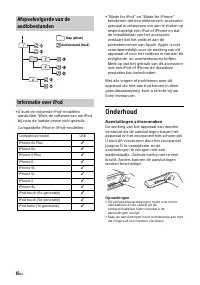
16 NL • U kunt de volgende iPod-modellen aansluiten. Werk de software van uw iPod bij naar de laatste versie vóór gebruik. Compatibele iPhone-/iPod-modellen • "Made for iPod" en "Made for iPhone" betekenen dat een elektronisch accessoire speciaal is ontworpen om aan te sluiten op res...
Page 125 - Technische gegevens; Eindversterker
17 NL Technische gegevens Tuner FM Afstembereik: Wanneer [AREA] is ingesteld op [EUROPE]:87,5 MHz – 108,0 MHzWanneer [AREA] is ingesteld op [RUSSIA]:FM1/FM2: 87,5 MHz – 108,0 MHz (in stappen van 50 kHz) FM3: 65 MHz – 74 MHz (in stappen van 30 kHz) Antenneaansluiting: Aansluiting voor externe antenne...
Page 126 - Auteursrechten
18 NL Montageafmetingen: Ongev. 182 mm × 53 mm × 160 mm (b/h/d) Gewicht: ongev. 1,2 kgInhoud verpakking: Hoofdapparaat (1)Onderdelen voor installatie en aansluitingen (1 set) Het is mogelijk dat niet alle vermelde accessoires verkrijgbaar zijn bij uw Sony-leverancier. Neem contact op met uw Sony-lev...
Page 127 - Problemen oplossen; Algemeen; Geen geluid of heel weinig geluid.; De geheugeninhoud is gewist.
19 NL Problemen oplossen De onderstaande controlelijst kan u helpen bij het oplossen van problemen die zich met het apparaat kunnen voordoen.Voordat u de onderstaande controlelijst doorneemt, moet u eerst de aanwijzingen voor aansluiting en bediening controleren.Meer informatie over het gebruik van ...
Page 128 - Geen verkeersinformatie.; Het geluid verspringt.; USB-apparaat afspelen; Het geluid wordt onderbroken.
20 NL RDS RDS-services kunnen niet worden ontvangen (wanneer [AREA] is ingesteld op [RUSSIA]). FM3 is geselecteerd.– Selecteer FM1 of FM2. RDS-services zijn op de huidige geografische locatie niet beschikbaar. Na enkele seconden wordt de uitzending onderbroken door de functie SEEK. De zender i...
Page 129 - Meldingen
21 NL Bedieningshandelingen zoals het overslaan van een album, het overslaan van items (Overspring-stand), en naar een track zoeken op naam (Quick-BrowZer) uitvoeren is niet mogelijk. Deze bedieningshandelingen uitvoeren is niet mogelijk wanneer een USB-toestel in Android-stand of een iPod is aang...
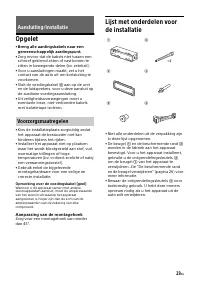
Page 131 - Opgelet; Aanpassing van de montagehoek; Aansluiting/installatie
23 NL Opgelet • Breng alle aardingskabels naar een gemeenschappelijk aardingspunt. • Zorg ervoor dat de kabels niet tussen een schroef geklemd zitten of vast komen te zitten in bewegende delen (bv. zetelrail). • Voor u aansluitingen maakt, zet u het contact van de auto uit om kortsluiting te voorkom...
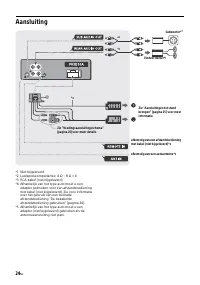
Page 132 - Aansluiting
24 NL Aansluiting *1 Niet bijgeleverd*2 Luidsprekerimpedantie: 4 Ω – 8 Ω × 4*3 RCA-kabel (niet bijgeleverd)*4 Afhankelijk van het type auto moet u een adapter gebruiken voor een afstandsbediening met kabel (niet bijgeleverd). Zie voor informatie over het gebruik van een bedrade afstandsbediening �...
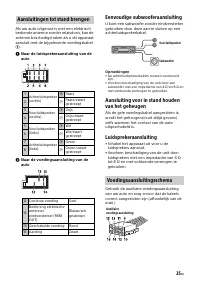
Page 133 - Eenvoudige subwooferaansluiting; Luidsprekeraansluiting; Aansluitingen tot stand brengen
25 NL Als uw auto uitgerust is met een elektrisch bediende antenne zonder relaisdoos, kan de antenne beschadigd raken als u dit apparaat aansluit met de bijgeleverde voedingskabel . Naar de luidsprekeraansluiting van de auto Naar de voedingsaansluiting van de auto Eenvoudige subwooferaansluiti...
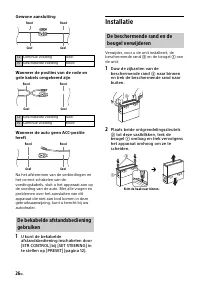
Page 134 - Gewone aansluiting; Installatie; naar binnen
26 NL Gewone aansluiting Wanneer de posities van de rode en gele kabels omgekeerd zijn Wanneer de auto geen ACC-positie heeft Na het afstemmen van de verbindingen en het correct schakelen van de voedingskabels, sluit u het apparaat aan op de voeding van de auto. Met alle vragen en problemen over het...
Page 135 - Plaats de beugel; Het apparaat opnieuw instellen
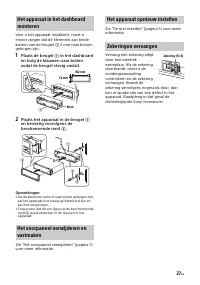
27 NL Voor u het apparaat installeert, moet u ervoor zorgen dat de klemmen aan beide kanten van de beugel 2 mm naar binnen gebogen zijn. 1 Plaats de beugel in het dashboard en buig de klauwen naar buiten zodat de beugel stevig vastzit. 2 Plaats het apparaat in de beugel en bevestig vervolgens ...
Page 137 - Содержание
3 RU Содержание Справочник по деталям и органам управления . . . . . . . . . . . . . . . . . . . . . . 4 Начало работы Снятие передней панели . . . . . . . . . . . . . 5Перезагрузка устройства . . . . . . . . . . . . . 6Установка часов . . . . . . . . . . . . . . . . . . . . . 6Подключение устройств...
Page 138 - Справочник по деталям и органам управления; Основное устройство
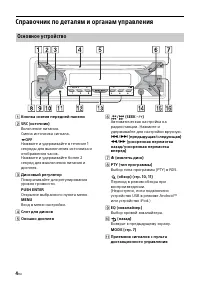
4 RU Справочник по деталям и органам управления Кнопка снятия передней панели SRC (источник) Включение питания.Смена источника сигнала. OFF Нажмите и удерживайте в течение 1 секунды для выключения источника и отображения часов.Нажмите и удерживайте более 2 секунд для выключения питания и дисплея...
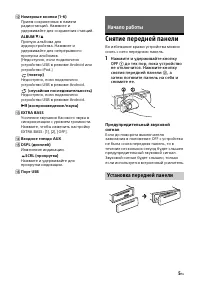
Page 139 - Снятие передней панели; до тех пор, пока устройство; Начало работы
5 RU Номерные кнопки (1–6) Прием сохраненных в памяти радиостанций. Нажмите и удерживайте для сохранения станций. ALBUM / Пропуск альбома для аудиоустройства. Нажмите и удерживайте для непрерывного пропуска альбомов. (Недоступно, если подключено устройство USB в режиме Android или устройство i...
Page 140 - Перезагрузка устройства; Установка страны/региона; Установка часов; Для отображения часов; Уменьшите громкость на аппарате.
6 RU Перезагрузка устройства Перед первым использованием устройства, после замены автомобильного аккумулятора или повторного подсоединения кабелей необходимо перезагрузить устройство. 1 Нажмите и удерживайте кнопки DSPL и (назад)/MODE более 2 секунд. Примечание Перезагрузка устройства приведет к уда...
Page 141 - Прослушивание радио
7 RU Подключение другого переносного аудиоустройства 1 Выключите переносное аудиоустройство. 2 Уменьшите громкость на аппарате. 3 Подключите переносное аудиоустройство ко входному гнезду AUX (мини-стереоразъему) на аппарате при помощи соединительного кабеля (не входит в комплект поставки) * . * Обяз...
Page 142 - Для приема экстренных сообщений; Сохранение вручную
8 RU 1 Во время приема радиостанции, которую необходимо сохранить, нажмите и удерживайте номерную кнопку (1–6), пока не появится индикация [MEM]. 1 Выберите диапазон, затем нажмите номерную кнопку (1–6). Системы радиоданных (RDS) Функция AF выполняет постоянную перенастройку радиостанций, имеющих са...
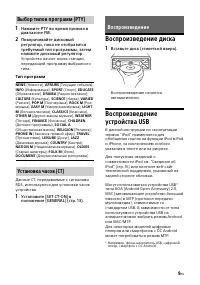
Page 143 - Тип программ; Воспроизведение диска; Воспроизведение
9 RU 1 Нажмите PTY во время приема в диапазоне FM. 2 Поворачивайте дисковый регулятор, пока не отобразится требуемый тип программы, затем нажмите дисковый регулятор. Устройство начнет поиск станции, передающей программу выбранного типа. Тип программ Данные CT, передаваемые с сигналами RDS, использую...
Page 144 - Для остановки воспроизведения
10 RU Примечания • Для получения подробных сведений о совместимости устройства USB посетите веб-сайт поддержки, указанный на задней стороне обложки. • Смартфоны с установленной ОС Android 4.1 или более поздней версии поддерживают Android Open Accessory 2.0 (AOA 2.0). Однако, некоторые смартфоны могу...
Page 145 - Нажмите кнопку; Отмена режима DEMO; Дважды нажмите кнопку; Параметры
11 RU Для выхода из режима Quick-BrowZer Нажмите кнопку (обзор). Недоступно, если подключено устройство USB в режиме Android или устройство iPod. 1 Нажмите кнопку (обзор). 2 Нажмите кнопку SEEK +. 3 Поверните дисковый регулятор, чтобы выбрать элемент. Переход в списке выполняется шагами по 10 % от о...
Page 149 - Меры предосторожности; Конденсация влаги; Дополнительная информация
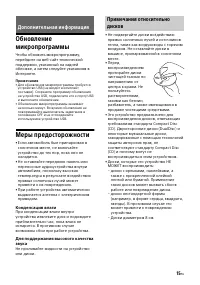
15 RU Обновление микропрограммы Чтобы обновить микропрограмму, перейдите на веб-сайт технической поддержки, указанный на задней обложке, а затем следуйте указаниям в Интернете. Примечания • Для обновления микропрограммы требуется устройство USB (не входит в комплект поставки). Сохраните программу об...
Page 150 - Сведения об iPod
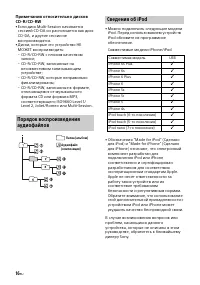
16 RU Примечания относительно дисков CD-R/CD-RW • Если диск Multi-Session начинается сессией CD-DA он распознается как диск CD-DA, и другие сессии не воспроизводятся. • Диски, которые это устройство НЕ МОЖЕТ воспроизводить:– CD-R/CD-RW с плохим качеством записи; – CD-R/CD-RW, записанные на несовмест...
Page 151 - Уход за устройством; Чистка контактов; Тюнер
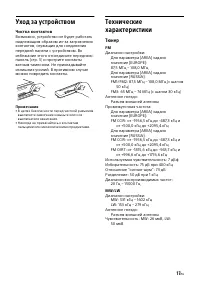
17 RU Уход за устройством Чистка контактов Возможно, устройство не будет работать надлежащим образом из-за загрязнения контактов, служащих для соединения передней панели с устройством. Во избежание этого отсоедините переднюю панель (стр. 5) и протрите контакты ватным тампоном. Не прикладывайте излиш...
Page 153 - Авторские права
19 RU Windows Media является товарным знаком или зарегистрированным товарным знаком корпорации Microsoft Corporation в США и/или других странах. Данное изделие защищено определенными правами интеллектуальной собственности Microsoft Corporation. Использование или распространение подобной технологии, ...
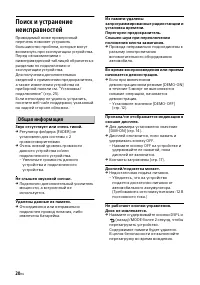
Page 154 - Общая информация; Звук отсутствует или очень тихий.
20 RU Поиск и устранение неисправностей Приводимый ниже проверочный перечень поможет устранить большинство проблем, которые могут возникнуть при эксплуатации устройства.Перед ознакомлением с нижеприведенной таблицей обратитесь к разделам по подключению и эксплуатации устройства.Для получения дополни...
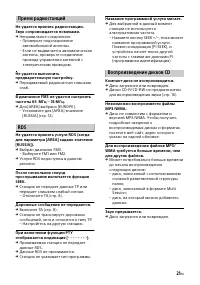
Page 155 - Дорожные сообщения не передаются.; Воспроизведение дисков CD
21 RU Прием радиостанций Не удается принять радиостанции.Звук сопровождается помехами. Неправильное соединение.– Проверьте подсоединение автомобильной антенны. – Если не выдвигается автоматическая антенна, проверьте соединение провода управления антенной с электрическим приводом. Не удается выполн...
Page 156 - Не удается воспроизвести аудиофайл.
22 RU Воспроизведение с устройства USB Невозможно воспроизводить данные с использованием концентратора USB. На данном устройстве невозможно распознавание устройств USB, подключенных через концентратор USB. Устройство USB требует больше времени для воспроизведения. Устройство USB содержит файлы с...
Page 157 - Сообщения
23 RU Сообщения Во время работы устройства могут отображаться или мигать следующие сообщения. CD ERROR: невозможно воспроизвести диск. Диск будет извлечен автоматически. Почистите или правильно вставьте диск, либо убедитесь, что диск не является пустым или поврежденным. CD NO MUSIC: отсутствует фа...
Page 159 - Регулировка угла установки; Установка/подключение
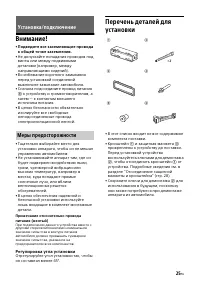
25 RU Внимание! • Подведите все заземляющие провода к общей точке заземления. • Не допускайте попадания проводов под винты или между подвижными деталями (например, между направляющими сидений). • Во избежание короткого замыкания перед установкой соединений выключите зажигание автомобиля. • Сначала п...
Page 160 - Подключение
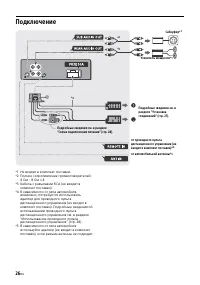
26 RU Подключение *1 Не входит в комплект поставки.*2 Полное сопротивление громкоговорителей: 4 Ом – 8 Ом × 4 *3 Кабель с разъемами RCA (не входит в комплект поставки). *4 В зависимости от типа автомобиля, возможно, потребуется использовать адаптер для проводного пульта дистанционного управления (не...
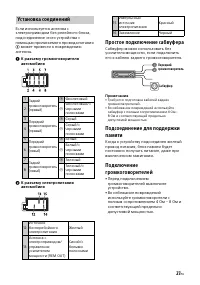
Page 161 - Простое подключение сабвуфера; Установка соединений
27 RU Если используется антенна с электроприводом без релейного блока, подсоединение этого устройства с помощью прилагаемого провода питания может привести к повреждению антенны. К разъему громкоговорителя автомобиля К разъему электропитания автомобиля Простое подключение сабвуфера Сабвуфер мо...
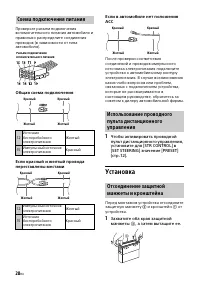
Page 162 - Общая схема подключения; Установка; Схема подключения питания
28 RU Проверьте разъем подключения вспомогательного питания автомобиля и правильно распределите соединения проводов (в зависимости от типа автомобиля). Общая схема подключения Если красный и желтый провода переставлены местами Если в автомобиле нет положения ACC После проверки соответствия соединени...
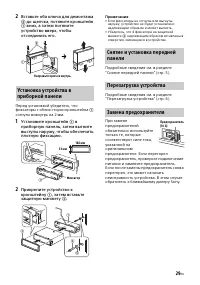
Page 163 - Установите кронштейн
29 RU 2 Вставьте оба ключа для демонтажа до щелчка, потяните кронштейн вниз, а затем потяните устройство вверх, чтобы отсоединить его. Перед установкой убедитесь, что фиксаторы с обеих сторон кронштейна согнуты вовнутрь на 2 мм. 1 Установите кронштейн в приборную панель, затем выгните выступ...
Page 165 - Зміст
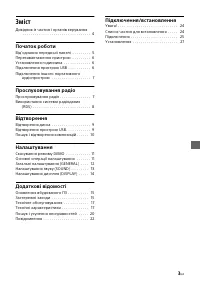
3 UA Зміст Довідник із частин і органів керування . . . . . . . . . . . . . . . . . . . . . . . . . . . . . . . . . 4 Початок роботи Від’єднання передньої панелі . . . . . . . . . 5Перезавантаження пристрою . . . . . . . . . 6Установлення годинника . . . . . . . . . . . . . 6Підключення пристрою USB...
Page 166 - Основний пристрій
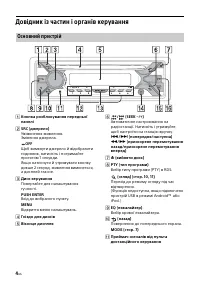
4 UA Довідник із частин і органів керування Кнопка розблокування передньої панелі SRC (джерело) Увімкнення живлення.Змінення джерела. OFF Щоб вимкнути джерело й відобразити годинник, натисніть і потримайте протягом 1 секунди.Якщо натиснути й утримувати кнопку довше 2 секунд, живлення вимкнеться,...
Page 167 - Порт USB; Попереджувальний сигнал; Початок роботи
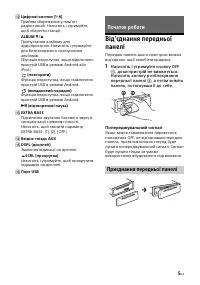
5 UA Цифрові кнопки (1–6) Прийом збережених у пам’яті радіостанцій. Натисніть і утримуйте, щоб зберегти станції. ALBUM / Пропускання альбому для аудіопристрою. Натисніть і утримуйте для безперервного пропускання альбомів. (Функція недоступна, якщо підключено пристрій USB в режимі Android або i...
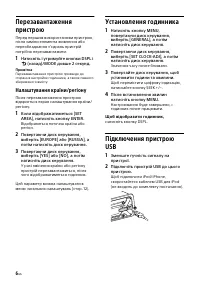
Page 168 - Натисніть і утримуйте кнопки DSPL і; Налаштування країни/регіону; Установлення годинника; Щоб відобразити годинник,
6 UA Перезавантаження пристрою Перед першим використанням пристрою, після заміни елемента живлення або переобладнання з’єднань пристрій потрібно перезавантажити. 1 Натисніть і утримуйте кнопки DSPL і (назад)/MODE довше 2 секунд. Примітка Перезавантаження пристрою призведе до стирання настройок годин...
Page 169 - Прослуховування радіо
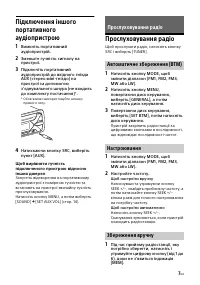
7 UA Підключення іншого портативного аудіопристрою 1 Вимкніть портативний аудіопристрій. 2 Зменште гучність сигналу на пристрої. 3 Підключіть портативний аудіопристрій до вхідного гнізда AUX (стерео міні-гніздо) на пристрої за допомогою з’єднувального шнура (не входить до комплекту постачання) * . *...
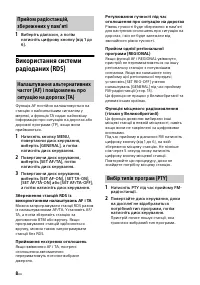
Page 170 - Приймання екстрених оголошень
8 UA 1 Виберіть діапазон, а потім натисніть цифрову кнопку (від 1 до 6). Використання системи радіоданих (RDS) Функція AF постійно налаштовується на станцію з найсильнішим сигналом у мережі, а функція TA надає найновішу інформацію про ситуацію на дорогах або дорожні програми (TP), якщо вони приймают...
Page 171 - Тип програм; Відтворення диска; Відтворення
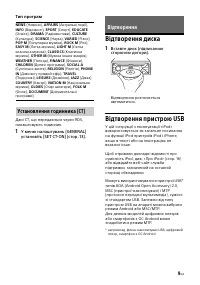
9 UA Тип програм Дані СТ, що передаються через RDS, налаштовують годинник. 1 У меню налаштувань [GENERAL] установіть [SET CT-ON] (стор. 13). Відтворення диска 1 Вставте диск (підписаною стороною догори). Відтворення розпочнеться автоматично. Відтворення пристрою USB У цій інструкції з експлуатації «...
Page 172 - Призупинення відтворення; для; Щоб вийти з режиму Quick-BrowZer
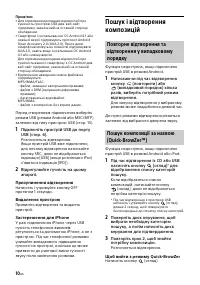
10 UA Примітки • Для отримання докладних відомостей про сумісність пристрою USB див. веб-сайт підтримки, зазначений на останній сторінці обкладинки. • Смартфони з інстальованою ОС Android 4.1 або новішої версії підтримують протокол Android Open Accessory 2.0 (AOA 2.0). Проте деякі смартфони можуть н...
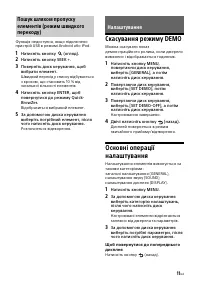
Page 173 - Скасування режиму DEMO; Двічі натисніть кнопку; Налаштування
11 UA Функція недоступна, якщо підключено пристрій USB в режимі Android або iPod. 1 Натисніть кнопку (огляд). 2 Натисніть кнопку SEEK +. 3 Поверніть диск керування, щоб вибрати елемент. Швидкий перехід у списку відбувається з кроком, що становить 10 % від загальної кількості елементів. 4 Натисніть к...
Page 177 - Застережні заходи; Конденсація вологи; Додаткові відомості
15 UA Оновлення вбудованого ПЗ Щоб оновити вбудоване ПЗ, відвідайте веб-сайт підтримки, зазначений на останній сторінці обкладинки, а потім дійте згідно з онлайн-інструкціями. Примітки • Для оновлення вбудованого ПЗ потрібен пристрій USB (не входить до комплекту постачання). Збережіть програму оновл...
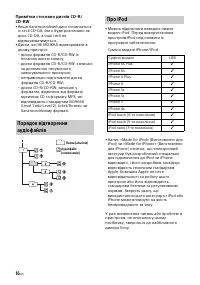
Page 178 - Про iPod
16 UA Примітки стосовно дисків CD-R/CD-RW • Якщо багатосесійний диск починається із сесії CD-DA, його буде розпізнано як диск CD-DA, а інші сесії не відтворюватимуться. • Диски, які НЕ МОЖНА відтворювати в цьому пристрої:– диски форматів CD-R/CD-RW із поганою якістю запису; – диски форматів CD-R/CD-...
Page 179 - Технічне обслуговування; Чищення контактів; Технічні характеристики; Програвач CD
17 UA Технічне обслуговування Чищення контактів Пристрій може працювати неналежним чином у випадку забруднення контактів, що з’єднують пристрій і передню панель. Щоб запобігти цьому, від’єднайте передню панель (стор. 5) і прочистьте контакти ватним тампоном. Не докладайте надмірних зусиль. В іншому ...
Page 181 - Авторські права
19 UA Windows Media є зареєстрованою торгівельною маркою або торгівельною маркою Microsoft Corporation у Сполучених Штатах Америки та/або в інших країнах. Даний виріб захищений певними правами інтелектуальної власності корпорації Microsoft Corporation. Використання або поширення такої технології, ок...
Page 182 - Загальні відомості; Немає звуку або він дуже слабкий.; Відсутній звуковий сигнал.; Радіоприйом
20 UA Пошук і усунення несправностей Наведений нижче контрольний список допоможе вам вирішити проблеми, які можуть виникнути з пристроєм.Перш ніж переглянути наведений нижче контрольний список, перевірте підключення та робочі процедури.Докладніше про використання запобіжника та зняття пристрою з пан...
Page 183 - Назва програмної послуги блимає.; Відтворення CD; Не відтворюється диск.; Відтворення з пристрою USB; Переривчастість звуку.
21 UA Не вдається знайти запрограмовані станції. Трансльований сигнал надто слабкий. У діапазоні FM3 неможливо настроїти частоти 65 МГц – 74 МГц. Для [AREA] вибрано [EUROPE].– Установіть для [AREA] значення [RUSSIA] (стор. 12). RDS Не приймаються послуги RDS (коли для параметра [AREA] встановлен...
Page 184 - Не відтворюється аудіофайл.; Повідомлення
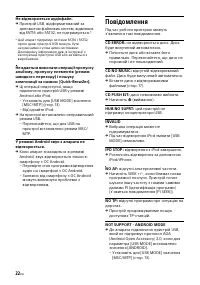
22 UA Не відтворюється аудіофайл. Пристрій USB, відформатований за допомогою файлових систем, відмінних від FAT16 або FAT32, не підтримується.* * Цей апарат підтримує системи FAT16 і FAT32, проте деякі пристрої USB можуть бути несумісними з усіма цими системами. Докладнішу інформацію див. в інстру...
Page 185 - або
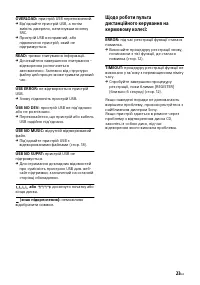
23 UA OVERLOAD: пристрій USB переповнений. Від’єднайте пристрій USB, а потім змініть джерело, натиснувши кнопку SRC. Пристрій USB несправний, або підключено пристрій, який не підтримується. READ: триває зчитування інформації. Дочекайтеся завершення зчитування – відтворення розпочнеться автомат...
Page 186 - Регулювання кута встановлення; Підключення/встановлення
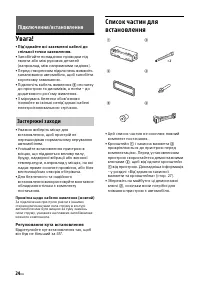
24 UA Увага! • Під’єднайте всі заземлені кабелі до спільної точки заземлення. • Запобігайте попаданню проводки під гвинти або між рухомих деталей (наприклад, між напрямними сидіння). • Перед створенням підключень вимкніть запалювання автомобіля, щоб запобігти короткому замиканню. • Підключіть кабель...
Page 187 - Підключення
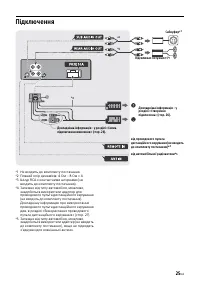
25 UA Підключення *1 Не входить до комплекту постачання.*2 Повний опір динаміків: 4 Ом – 8 Ом × 4.*3 Шнур RCA з контактними штирками (не входить до комплекту постачання). *4 Залежно від типу автомобіля, можливо, знадобиться використати адаптер для проводового пульта дистанційного керування (не входи...
Page 188 - До роз’єму динаміка автомобіля; Просте підключення сабвуфера; Підключення динаміків; Створення підключень
26 UA Якщо антена з електроприводом не має релейної стійки, підключення цього пристрою за допомогою кабелю живлення з комплекту може пошкодити антену. До роз’єму динаміка автомобіля До гнізда живлення автомобіля Просте підключення сабвуфера Сабвуфер можна використовувати без підсилювача потужн...
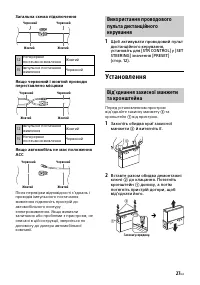
Page 189 - Загальна схема підключення; Установлення; до клацання. Потягніть
27 UA Загальна схема підключення Якщо червоний і жовтий проводи переставлено місцями Якщо автомобіль не має положення АСС Після перевірки відповідності з’єднань і проводів імпульсного постачання живлення підключіть пристрій до автомобільного контуру електроживлення. Якщо виникли запитання або пробле...
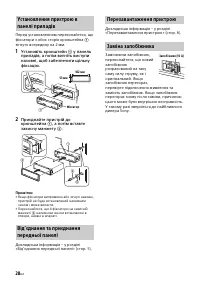
Page 190 - Установіть кронштейн; Перезавантаження пристрою
28 UA Перед установленням переконайтеся, що фіксатори з обох сторін кронштейна зігнуто всередину на 2 мм. 1 Установіть кронштейн у панель приладів, а потім вигніть виступи назовні, щоб забезпечити щільну фіксацію. 2 Приєднайте пристрій до кронштейна , а потім вставте захисну манжету . Приміт...
Page 196 - Printed in Thailand
Register your product online now at:Registrieren Sie Ihr Produkt jetzt bei:Merci d’enregister votre produit en ligne sur :Registra online il tuo prodotto su:Registreer uw product nu online via:Зарегистрируйте ваш продукт на: Зареєструйте свій продукт он-лайн на: http://www.sony.eu/mysony ©2016 Sony ...








 Sony CDX-F5500 Manual
 Sony CDX-F5700 Manual
 Sony CDX-F7700 Manual
 Sony CDX-G1200U Manual
 Sony CDX-GT23 Manual
 Sony CDX-GT25 Manual
 Sony CDX-GT210 Manual
 Sony CDX-GT220 Manual
 Sony CDX-GT240 Manual
 Sony CDX-GT310 Manual
 Sony CDX-GT410U Manual
 Sony CDX-GT420U Manual
 Sony CDX-GT440U Manual
 Sony CDX-GT550UI Manual
 Sony CDX-GT610U Manual