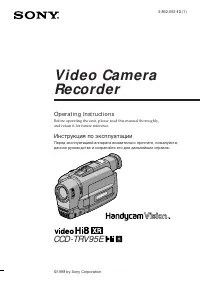
Page 2 - En g l i sh; VisionTM camcorder. With your; W ARNING; or; Русский; ПРЕДУПРЕЖДЕНИЕ
2 En g l i sh We l co m e ! Congratulations on your purchase of this SonyHandycam Vision™ camcorder. With your Handycam Vision you can capture life’s preciousmoments with superior picture and soundquality.Your Handycam Vision is loaded with advancedfeatures, but at the same time it is very easy tous...
Page 3 - Changing the lithium battery in the; Ta b l e o f co n t e n t s
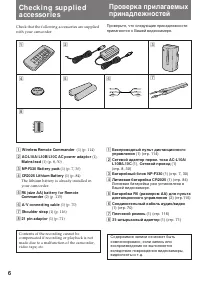
3 Bef ore you begin Using this manual ................................................... 5Checking supplied accessories ............................. 6 Get t ing st art ed Installing and charging the battery pack ............ 7Inserting a cassette ................................................ 12...
Page 4 - Оглавление; Перед началом эксплуатации
4 Оглавление Русский Перед началом эксплуатации Использование данного руководства ........... 5Проверка прилагаемых принадлежностей ... 6 Подготовка к эксплуатации Установка и зарядка батарейного блока ..... 7Вставка кассеты ........................................... 12 Основные операции Запись с п...
Page 5 - • Do not let the camcorder get wet. Keep the; Be f o r e y o u b e g i n; Usi n g t h i s m a n u a l; Экран ЖКД и/или цветной видоискатель; • Не позволяйте видеокамере делаться
5 As you read through this manual, buttons andsettings on the camcorder are shown in capitalletters.e.g. Set the POWER switch to CAMERA.You can hear the beep sound to confirm youroperation. N o t e o n TV co l o u r sy st e m s TV colour systems differ from country tocountry. To view your recordings...
Page 7 - “InfoLITHIUM” is a trademark of Sony; I n st a l l i n g t h e b a t t e r y p a ck; Lift up the viewfinder.; Ge t t i n g st a r t e d; Not e on t he bat t ery pack; Подготовка к эксплуатации; Установка батарейного блока; Поднимитe видоискaтeль вверх.; Примечание к батарейному блоку
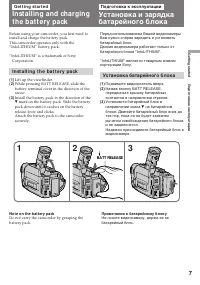
7 G etting s tarted Подготовка к эксплуатации Before using your camcorder, you first need toinstall and charge the battery pack.This camcorder operates only with the“InfoLITHIUM” battery pack. “InfoLITHIUM” is a trademark of Sony Corporation. I n st a l l i n g t h e b a t t e r y p a ck (1) Lift up...
Page 8 - Ch a r g i n g t h e b a t t e r y p a ck; Connect the mains lead to the mains.; normal charge; , which allows you to use the battery; Зарядка батарейного блока; на штекере была; нормальная зарядка; Для; полной зарядки
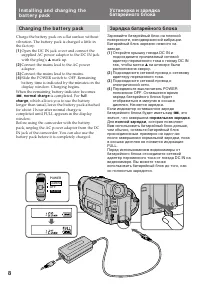
8 POWER OFF PLAYER CAMERA I n st a l l i n g a n d ch a r g i n g t h eb a t t e r y p a ck Ch a r g i n g t h e b a t t e r y p a ck Charge the battery pack on a flat surface withoutvibration. The battery pack is charged a little inthe factory. (1 ) Open the DC IN jack cover and connect thesupplied...
Page 9 - Not es; • “– – – min” appears in the display window; Ch a r g i n g t i m e; Bat t ery pack; Примечания; •Индикация времени оставшегося заряда; Время зарядки; Батарейный блок
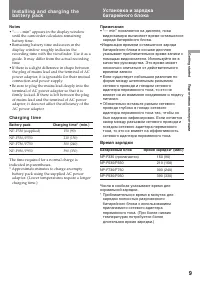
9 G etting s tarted Подготовка к эксплуатации I n st a l l i n g a n d ch a r g i n g t h eb a t t e r y p a ck Not es • “– – – min” appears in the display window until the camcorder calculates remainingbattery time. • Remaining battery time indication in the display window roughly indicates thereco...
Page 10 - Ba t t e r y l i f e; • Remaining battery time is displayed in the; Срок службы заряда батарейного блока; Батарейный Время
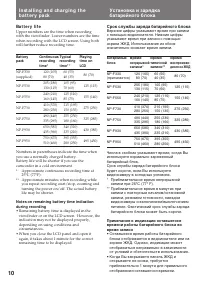
10 Ba t t e r y l i f e Upper numbers are the time when recordingwith the viewfinder. Lower numbers are the timewhen recording with the LCD screen. Using bothwill further reduce recording time. Bat t ery Cont inuous Typical Playing pack recording recording t ime on t ime* t ime* * LCD NP-F330 120 (1...
Page 11 - To r e m o v e t h e b a t t e r y p a ck; BATT RELEASE; Для снятия батарейного блока
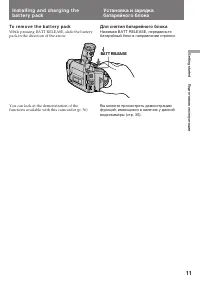
11 G etting s tarted Подготовка к эксплуатации To r e m o v e t h e b a t t e r y p a ck While pressing BATT RELEASE, slide the batterypack in the direction of the arrow. I n st a l l i n g a n d ch a r g i n g t h eb a t t e r y p a ck You can look at the demonstration of thefunctions available wit...
Page 12 - Insert a cassette with the window facing out.; To e j e ct t h e ca sse t t e; and; I n se r t i n g a ca sse t t e; Для выталкивания кассеты; будут мигать и Вы не
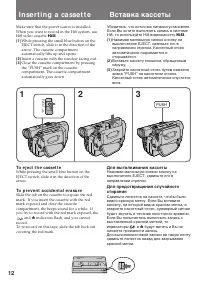
12 Make sure that the power source is installed.When you want to record in the Hi8 system, useHi8 video cassette H . (1 ) While pressing the small blue button on theEJECT switch, slide it in the direction of thearrow. The cassette compartmentautomatically lifts up and opens. (2 ) Insert a cassette w...
Page 13 - Ba si c o p e r a t i o n s; Ca m e r a re co rd i n g; While pressing the small green button on the; Основные операции; Запись с помощью видеокамеры
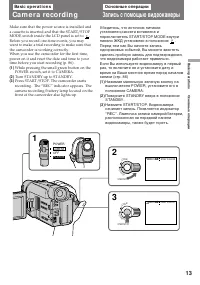
13 B asic operat ions Основные операции 2 3 1 LO CK START/STOP S TA N D B Y LO CK START/STOP S TA N D B Y 40min SP H STBY 0:00:00 POWER OFF PLAYER CAMERA 40min SP H REC 0:00:01 Ba si c o p e r a t i o n s Ca m e r a re co rd i n g Make sure that the power source is installed anda cassette is inserte...
Page 14 - To st o p r e co r d i n g m o m e n t a r i l y [ a ]; Not e; To f o cu s t h e v i e w f i n d e r l e n s; Ca m e r a r e co r d i n g; Not e on t he light ing apert ure
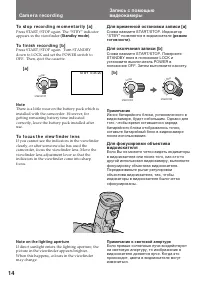
14 LO CK START/STOP S TA N D B Y START/STOP LO CK S TA N D B Y STBY 0:35:20 LO CK START/STOP S TA N D B Y To st o p r e co r d i n g m o m e n t a r i l y [ a ] Press START/STOP again. The “STBY” indicatorappears in the viewfinder (St andby mode) . To f i n i sh r e co r d i n g [ b ] Press START/ST...
Page 15 - Not e on St andby mode; • The tape counter indicates the recording or; Not e on t he beep sound; • Счетчик ленты указывает время записи или
15 B asic operat ions Основные операции Ca m e r a r e co r d i n g Not e on St andby mode If you leave the camcorder in Standby mode for 5minutes while the cassette is inserted, thecamcorder turns off automatically for savingbattery power as well as for preventing thebattery and tape from wearing d...
Page 16 - Not es on digit al zoom; Usi n g t h e zo o m f e a t u r e; Сторона “W”: для широкого угла съемки; Примечания к цифровому трансфокатору; • Правая сторона
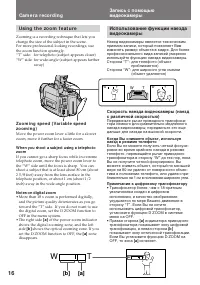
16 T W T W W T T W T W [a] [b] Ca m e r a r e co r d i n g Zo o m i n g sp e e d ( V a r i a b l e sp e e dzo o m i n g ) Move the power zoom lever a little for a slowerzoom, move it further for a faster zoom. W hen you shoot a subject using a t elephot ozoom If you cannot get a sharp focus while in...
Page 17 - : Запись начинается когда Вы; Примечания к режиму START/STOP; • Если Вы выключили индикаторы на экране; Not es on START/ STOP mode; • If you have turned off the indicators on the; Se l e ct i n g t h e STA RT/STOP m o d e; Set START/STOP MODE to the desired
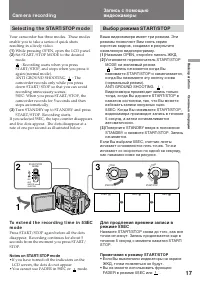
17 B asic operat ions Основные операции STBY REC ••••• ••••• REC • 2 1 3 LO CK START/STOP S TA N D B Y LO CK START/STOP S TA N D B Y 5 SEC ANTIGROUNDSHOOTING START/STOP MODE Ca m e r a r e co r d i n g Запись с помощьювидеокамеры Выбор режима START/STOP Ваша видеокамера имеет три режима. Этирежимы п...
Page 18 - Sh o o t i n g w i t h t h e LCD scr e e n; Ba ck l i g h t i n g t h e LCD scr e e n; Задняя подсветка экрана ЖКД
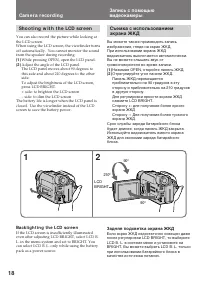
18 Sh o o t i n g w i t h t h e LCD scr e e n You can also record the picture while looking atthe LCD screen.When using the LCD screen, the viewfinder turnsoff automatically. You cannot monitor the soundfrom the speaker during recording. (1 ) While pressing OPEN, open the LCD panel. (2 ) Adjust the ...
Page 19 - Not es on t he LCD panel; To ca n ce l m i r r o r m o d e; Not es on mirror mode; Примечания к панели ЖКД; Для отмены зеркального режима; Примечания к зеркальному режиму; Pr
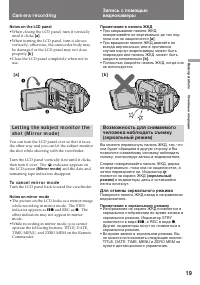
19 B asic operat ions Основные операции Not es on t he LCD panel • When closing the LCD panel, turn it vertically until it clicks [a ] . • When turning the LCD panel, turn it always vertically; otherwise, the camcorder body maybe damaged or the LCD panel may not closeproperly [b ] . • Close the LCD ...
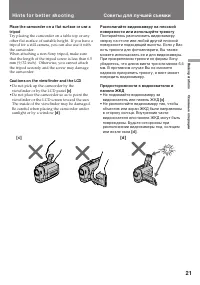
Page 21 - Hi n t s f o r b e t t e r sh o o t i n g; Caut ions on t he view f inder and t he LCD; • Do not pick up the camcorder by the; Советы для лучшей съемки; • Не поднимайте видеокамеру за
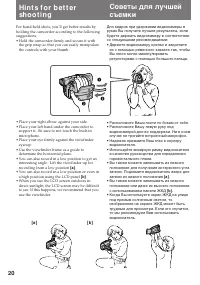
21 B asic operat ions Основные операции Hi n t s f o r b e t t e r sh o o t i n g Place t he camcorder on a f lat surf ace or use at ripod Try placing the camcorder on a table top or anyother flat surface of suitable height. If you have atripod for a still camera, you can also use it withthe camcord...
Page 22 - На мгновение нажмите сторону – (
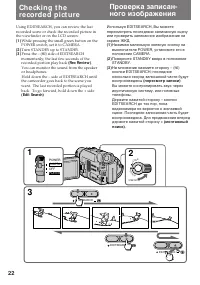
22 Ch e ck i n g t h ere co rd e d p i ct u re Using EDITSEARCH, you can review the lastrecorded scene or check the recorded picture inthe viewfinder or on the LCD screen. (1 ) While pressing the small green button on the POWER switch, set it to CAMERA. (2 ) Turn STANDBY up to STANDBY. (3 ) Press th...
Page 23 - To st o p p l a y b a ck; Ch e ck i n g t h e r e co r d e d p i ct u r e; Для остановки воспроизведения; Отпустите EDITSEARCH.; Снова для начала записи
23 B asic operat ions Основные операции To st o p p l a y b a ck Release EDITSEARCH. To g o b a ck t o t h e l a st r e co r d e d p o i n ta f t e r e d i t se a r ch Press END SEARCH. The last recorded point isplayed back for about 5 seconds (10 seconds inLP mode) and stops. Note that this functio...
Page 24 - Pl a y i n g b a ck a t a p e; Press; To rew ind t he t ape,; press; PLAY
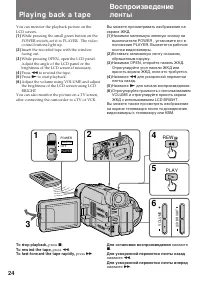
24 Pl a y i n g b a ck a t a p e You can monitor the playback picture on theLCD screen. (1 ) While pressing the small green button on thePOWER switch, set it to PLAYER. The videocontrol buttons light up. (2 ) Insert the recorded tape with the windowfacing out. (3 ) While pressing OPEN, open the LCD ...
Page 25 - W h e n m o n i t o r i n g o n t h e LCD scr e e n; . You can adjust the angle of the LCD screen; Usi n g t h e r e m o t e co m m a n d e r; Not e on DISPLAY but t on; Connect headphones (not supplied) to the; To view t he playback pict ure in t he view f inder; При просмотре на экране ЖКД; Примечание к кнопке DISPLAY.
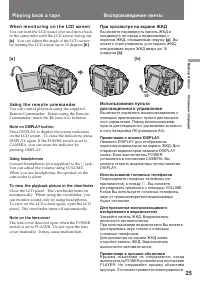
25 B asic operat ions Основные операции 15 ° W h e n m o n i t o r i n g o n t h e LCD scr e e n You can turn the LCD panel over and move backto the camcorder with the LCD screen facing out [a ] . You can adjust the angle of the LCD screen by turning the LCD screen up to 15 degrees [b] . Usi n g t h...
Page 26 - V a r i o u s p l a y b a ck m o d e s; To l o ca t e a sce n e ( p i ct u r e se a r ch )
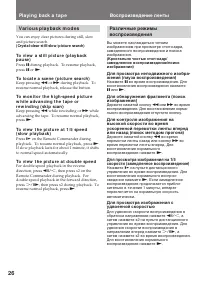
26 V a r i o u s p l a y b a ck m o d e s You can enjoy clear pictures during still, slowand picture search. (Cryst al-clear st ill/ slow / pict ure search) To v i e w a st i l l p i ct u r e ( p l a y b a ckp a u se ) Press P during playback. To resume playback, press P or ( . To l o ca t e a sce n...
Page 27 - To v i e w t h e p i ct u r e f r a m e -b y -f r a m e; Not es on playback; Для покадрового просмотра изображения; Примечания к воспроизведению
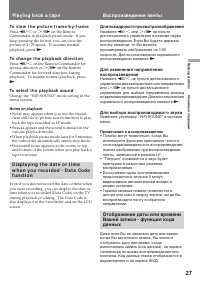
27 B asic operat ions Основные операции To v i e w t h e p i ct u r e f r a m e -b y -f r a m e Press '/< or >/7 on the Remote Commander in playback pause mode. If youkeep pressing the button, you can view thepicture at 1/25 speed. To resume normalplayback, press ( . To ch a n g e t h e p l a ...
Page 29 - END; If you st art recording af t er using END SEARCH; Нажимая OPEN, откройте панель ЖКД
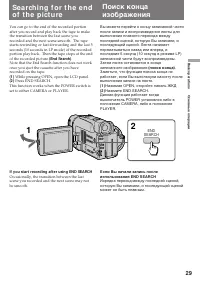
29 B asic operat ions Основные операции 2 1 END SEARCH You can go to the end of the recorded portionafter you record and play back the tape to makethe transition between the last scene yourecorded and the next scene smooth. The tapestarts rewinding or fast-forwarding and the last 5seconds (10 second...
Page 30 - A d v a n ce d o p e r a t i o n s; Not es on pow er sources; •Disconnecting the power source or removing; Usi n g t h e m a i n s; Усовершенствованные операции; Примечания по источникам питания; • Отсоединение источника питания или снятие; Использование электрической сети
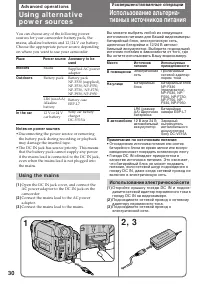
30 A d v a n ce d o p e r a t i o n s Usi n g a l t e r n a t i v ep o w e r so u rce s 2 , 3 1 You can choose any of the following powersources for your camcorder: battery pack, themains, alkaline batteries and 12/24 V car battery.Choose the appropriate power source dependingon where you want to us...
Page 31 - Usi n g a ca r b a t t e r y; To remove t he car bat t ery charger
31 Advanc ed operat ions Усовершенствованные операции W ARNING The mains lead must only be changed at aqualified service shop. PRECAUTION The set is not disconnected from the AC powersource (mains) as long as it is connected to themains, even if the set itself has been turned off. Not e Keep the AC ...
Page 33 - Not es on changing t he mode set t ing; Ch a n g i n g t h e m o d e se t t i n g s; Примечания к изменению установок режимов
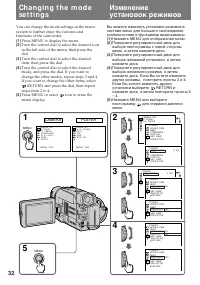
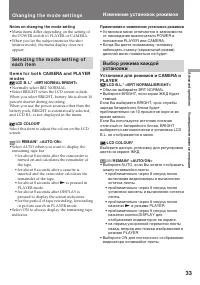
33 Advanc ed operat ions Усовершенствованные операции Not es on changing t he mode set t ing • Menu items differ depending on the setting of the POWER switch to PLAYER or CAMERA. • When you let the subject monitor the shot (mirror mode), the menu display does notappear. Se l e ct i n g t h e m o d e...
Page 35 - I t e m s f o r CA M ERA m o d e o n l y
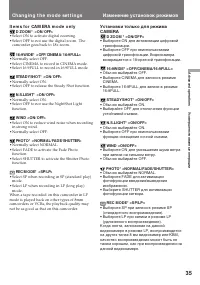
35 Advanc ed operat ions Усовершенствованные операции I t e m s f o r CA M ERA m o d e o n l y D ZOOM * <ON/ OFF> • Select ON to activate digital zooming.• Select OFF to not use the digital zoom. The camcorder goes back to 18x zoom. 16:9W IDE* <OFF/ CINEM A/ 16:9FULL> • Normally select O...
Page 36 - Not es on DEM O M ODE; Изменение установок режимов; Примечания к DEMO MODE
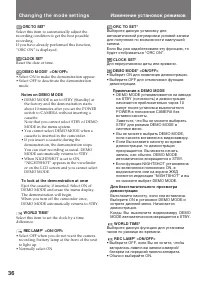
36 Ch a n g i n g t h e m o d e se t t i n g s ORC TO SET* Select this item to automatically adjust therecording condition to get the best possiblerecording.If you have already performed this function,“ORC ON” is displayed. CLOCK SET* Reset the date or time. DEM O M ODE* <ON/ OFF> • Select ON ...
Page 37 - I t e m s f o r PLA Y ER m o d e o n l y; Not e on TBC set t ing; Примечания к установке ТВС
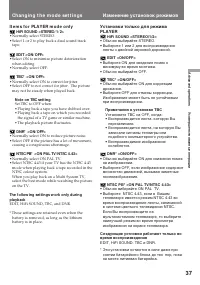
37 Advanc ed operat ions Усовершенствованные операции Ch a n g i n g t h e m o d e se t t i n g s I t e m s f o r PLA Y ER m o d e o n l y HiFi SOUND <STEREO/ 1/ 2> • Normally select STEREO.• Select 1 or 2 to play back a dual sound track tape. EDIT <ON/ OFF> • Select ON to minimize pictu...
Page 38 - A f t e r sh o o t i n g; Нажмите BACK LIGHT. Индикатор; После съемки; • Для объекта, расположенного рядом с; Для выполнения точной регулировки
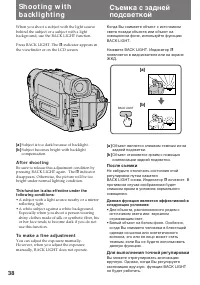
38 [a] [b] BACK LIGHT Sh o o t i n g w i t hb a ck l i g h t i n g When you shoot a subject with the light sourcebehind the subject or a subject with a lightbackground, use the BACK LIGHT function. Press BACK LIGHT. The c indicator appears in the viewfinder or on the LCD screen. [a ] Subject is too ...
Page 39 - Se l e ct i n g t h e f a d e r f u n ct i o n; REC; M ONOTONE; * When D ZOOM in the menu system is set to; FADER; * Когда функция D ZOOM в системе меню
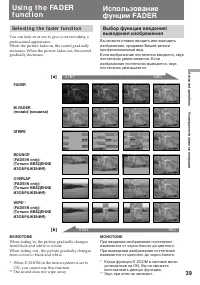
39 Advanc ed operat ions Усовершенствованные операции Se l e ct i n g t h e f a d e r f u n ct i o n You can fade in or out to give your recording aprofessional appearance.When the picture fades in, the sound graduallyincreases. When the picture fades out, the soundgradually decreases. Usi n g t h e...
Page 40 - Usi n g t h e FA D ER f u n ct i o n; Usi n g t h e f a d e r f u n ct i o n; W h e n y o u u se t h e b o u n ce f u n ct i o n; Set D ZOOM to OFF in the menu system.; Not e on t he bounce f unct ion; Использование фунции FADER; Установите D ZOOM на OFF в системе меню.
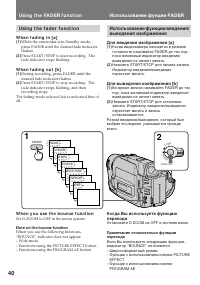
40 Usi n g t h e FA D ER f u n ct i o n 1 FADER M.FADER STRIPE BOUNCE MONOTONE OVERLAP WIPE FADER 2 LO CK START/STOP S TA N D B Y Usi n g t h e f a d e r f u n ct i o n W h e n f a d i n g i n [ a ] (1 ) While the camcorder is in Standby mode,press FADER until the desired fade indicatorflashes. (2 )...
Page 41 - To ca n ce l t h e f a d e r f u n ct i o n; W hen t he dat e, t ime or t it le is displayed; You cannot use the fader function.; Not es on t he f ader f unct ion; • While using the bounce function, you cannot; • Во время использования функции перехода
41 Advanc ed operat ions Усовершенствованные операции To ca n ce l t h e f a d e r f u n ct i o n Before pressing START/STOP, press FADERuntil the indicator disappears. W hen t he dat e, t ime or t it le is displayed The date, time indicator and title do not fade inor fade out. W hen t he START/ STO...
Page 42 - To ca n ce l t h e N i g h t Sh o t f u n ct i o n; Not es on t he Night Shot; Для отмены функции ночной съемки; Передвиньте NIGHTSHOT в положение OFF.; Использование лампы ночной съемки; Примечания к ночной съемке; • Когда Вы оставляете NIGHTSHOT в
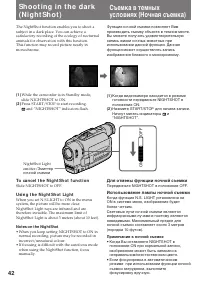
42 OFF ON The NightShot function enables you to shoot asubject in a dark place. You can achieve asatisfactory recording of the ecology of nocturnalanimals for observation with this function.This function may record picture nearly inmonochrome. (1 ) While the camcorder is in Standby mode, slide NIGHT...
Page 43 - FA D E PHOTO; Ph o t o r e co rd i n g; Нажмите PHOTO глубже.
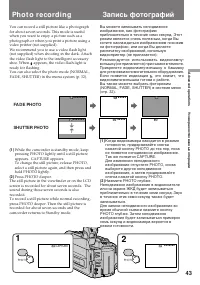
43 Advanc ed operat ions Усовершенствованные операции You can record a still picture like a photographfor about seven seconds. This mode is usefulwhen you want to enjoy a picture such as aphotograph or when you print a picture using avideo printer (not supplied).We recommend you to use a video flash...
Page 44 - Not es on phot o recording; Ph o t o r e co r d i n g; Примечания к записи фотографий
44 Not es on phot o recording • During photo recording, you cannot change the mode or setting of following functions.– Functions using the DIGITAL EFFECT button– Functions using the FADER button– Functions using the PROGRAM AE button– Functions using the PICTURE EFFECT button– Exposure– Wide mode • ...
Page 45 - CINEM A; Se l e ct i n g t h e d e si r e d m o d e; CI N EM A; and a normal TV screen; Выбор желаемого режима; CINEMA; . Вы также можете просмотреть
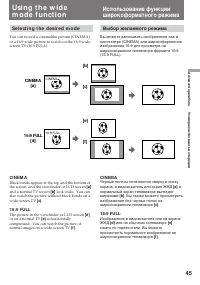
45 Advanc ed operat ions Усовершенствованные операции [b] CINEM A [a] [c] [e] [f ] CINEMA 16:9 FULL 16:9 FULL [d] Se l e ct i n g t h e d e si r e d m o d e You can record a cinemalike picture (CINEMA)or a 16:9 wide picture to watch on the 16:9 wide-screen TV (16:9 FULL). CI N EM A Black bands appea...
Page 46 - To ca n ce l w i d e m o d e; Not es on w ide mode; Usi n g t h e w i d e m o d e f u n ct i o n; Примечания к широкоформатному режиму
46 Usi n g t h e w i d e m o d e f u n ct i o n You can select the wide mode (OFF, CINEMA,16:9FULL) in the menu system (p. 32). To ca n ce l w i d e m o d e Select OFF in the menu system. To w a t ch t h e t a p e r e co r d e d i n w i d em o d e To watch the tape recorded in CINEMA mode,set the sc...
Page 47 - Se l e ct i n g t h e b e st m o d e; Spot light mode; Выбор наилучшего режима
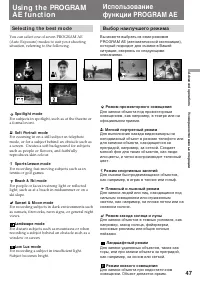
47 Advanc ed operat ions Усовершенствованные операции a A Usi n g t h e PROGRA MA E f u n ct i o n Se l e ct i n g t h e b e st m o d e You can select one of seven PROGRAM AE(Auto Exposure) modes to suit your shootingsituation, referring to the following. Spot light mode For subjects in spotlight, s...
Page 48 - To t u r n o f f p r o g r a m A E; Not es on f ocus set t ing; • In the Spotlight, Sports lesson and Beach & Ski; Not es on PROGRAM AE; • The following functions do not work during; Для выключения PROGRAM AE; Примечания к установке фокусировки
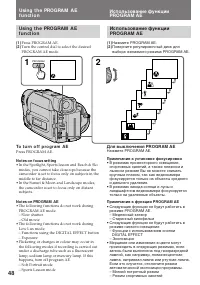
48 1 PROGRAM 2 A a Usi n g t h e PROGRA M A Ef u n ct i o n (1 ) Press PROGRAM AE. (2 ) Turn the control dial to select the desiredPROGRAM AE mode. To t u r n o f f p r o g r a m A E Press PROGRAM AE. Not es on f ocus set t ing • In the Spotlight, Sports lesson and Beach & Ski modes, you cannot ...
Page 49 - To ca n ce l t h e st i l l f u n ct i o n; Press DIGITAL EFFECT.; Not es on t he st ill f unct ion; • You cannot use the following functions while; DIGITAL; Для отмены функции стоп-кадра; Нажмите DIGITAL EFFECT.; Примечания к функции стоп-кадра; • Вы не можете использовать следующие; Наложение неподвижного
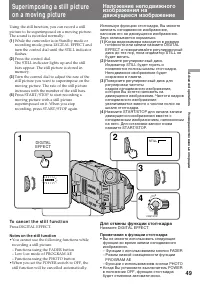
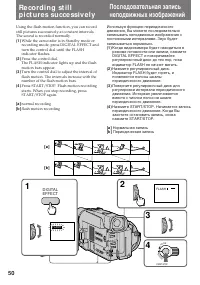
49 Advanc ed operat ions Усовершенствованные операции Superim posing a st ill pict ureon a m oving pict ure Using the still function, you can record a stillpicture to be superimposed on a moving picture.The sound is recorded normally. (1 ) While the camcorder is in Standby mode orrecording mode, pre...
Page 51 - To ca n ce l t h e f l a sh m o t i o n f u n ct i o n; Not es on t he f lash mot ion f unct ion; • You cannot use the following functions during
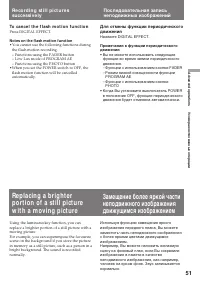
51 Advanc ed operat ions Усовершенствованные операции To ca n ce l t h e f l a sh m o t i o n f u n ct i o n Press DIGITAL EFFECT. Not es on t he f lash mot ion f unct ion • You cannot use the following functions during the flash motion recording.– Functions using the FADER button– Low Lux mode of P...
Page 52 - To ca n ce l t h e l u m i n a n ce k e y f u n ct i o n; Not es on t he luminancekey f unct ion
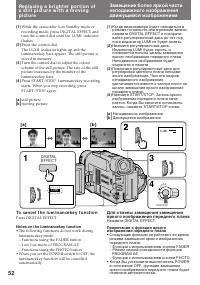
52 (1 ) While the camcorder is in Standby mode or recording mode, press DIGITAL EFFECT andturn the control dial until the LUMI. indicatorflashes. (2 ) Press the control dial.The LUMI. indicator lights up and the luminancekey bars appear. The still picture isstored in memory. (3 ) Turn the control di...
Page 53 - To ca n ce l t h e t r a i l f u n ct i o n; Not es on t he t rail f unct ion
53 Advanc ed operat ions Усовершенствованные операции Using the trail function, you can record thepicture which leaves an incidental image, such asa trail. The sound is recorded normally. You canadjust the vanishing time of the incidental imagewith the control dial. (1 ) While the camcorder is in St...
Page 54 - To ca n ce l t h e sl o w sh u t t e r f u n ct i o n; Not es on t he slow shut t er f unct ion; Usi n g sl o w sh u t t e r; Для отмены функции медленного затвора; Примечания к функции медленного затвора
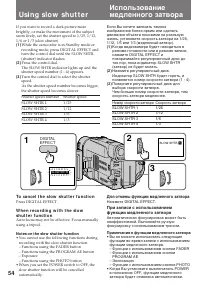
54 If you want to record a dark picture morebrightly, or make the movement of the subjectseem lively, set the shutter speed to 1/25, 1/12,1/6 or 1/3 (slow shutter). (1 ) While the camcorder is in Standby mode or recording mode, press DIGITAL EFFECT andturn the control dial until the SLOW SHTR(shutte...
Page 55 - To ca n ce l t h e o l d m o v i e f u n ct i o n; Not es on t he old movie f unct ion; • The following functions do not work during old
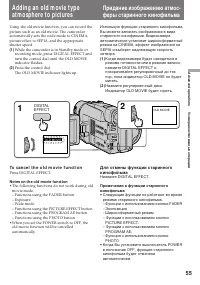
55 Advanc ed operat ions Усовершенствованные операции Adding an old m ovie t ypeat m osphere t o pict ures Using the old movie function, you can record thepicture such as an old movie. The camcorderautomatically sets the wide mode to CINEMA,picture effect to SEPIA, and the appropriateshutter speed. ...
Page 56 - Fo cu si n g m a n u a l l y; W h e n t o u se m a n u a l f o cu s; • Insufficient light; Ручная фокусировка
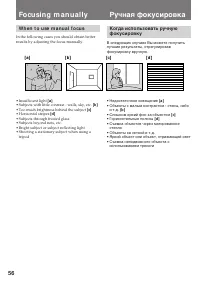
56 [ a ] [ b ] [ c] [ d ] Fo cu si n g m a n u a l l y W h e n t o u se m a n u a l f o cu s In the following cases you should obtain betterresults by adjusting the focus manually. • Insufficient light [a] • Subjects with little contrast - walls, sky, etc. [b ] • Too much brightness behind the subje...
Page 57 - To r e t u r n t o a u t o f o cu s m o d e; Shoot ing in relat ively dark places; To r e co r d a v e r y d i st a n t su b j e ct; Not e on manual f ocusing; появляется в видоискателе; Съемка в относительно темном месте; Для записи очень удаленного объекта; Примечание к ручной фокусировке; Могут появляться следующие индикаторы
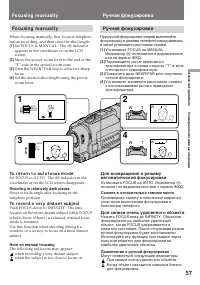
57 Advanc ed operat ions Усовершенствованные операции Fo cu si n g m a n u a l l y When focusing manually, first focus in telephotobefore recording, and then reset the shot length. (1 ) Set FOCUS to MANUAL. The f indicator appears in the viewfinder or on the LCDscreen. (2 ) Move the power zoom lever...
Page 58 - Se l e ct i n g p i ct u r e e f f e ct; The picture is sepia.; Выбор эффекта изображения; SEPIA; Изображение будет в цвете сепия.
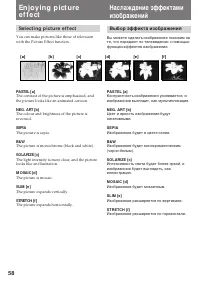
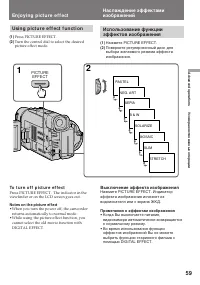
58 [ a ] [ b ] [ c] [ d ] [ e ] [ f ] En j o y i n g p i ct u ree f f e ct Se l e ct i n g p i ct u r e e f f e ct You can make pictures like those of televisionwith the Picture Effect function. PASTEL [a ] The contrast of the picture is emphasized, andthe picture looks like an animated cartoon. NEG...
Page 59 - PICTURE; Usi n g p i ct u r e e f f e ct f u n ct i o n; Press PICTURE EFFECT.; En j o y i n g p i ct u r e e f f e ct; To t u r n o f f p i ct u r e e f f e ct; Not es on t he pict ure ef f ect; • When you turn the power off, the camcorder; Выключение эффекта изображения; Примечания к эффектам изображения; • Когда Вы выключаете питание,
59 Advanc ed operat ions Усовершенствованные операции 1 2 PASTEL NEG. ART SEPIA B & W SOLARIZE MOSAIC SLIM STRETCH PICTURE EFFECT Usi n g p i ct u r e e f f e ct f u n ct i o n (1 ) Press PICTURE EFFECT. (2 ) Turn the control dial to select the desiredpicture effect mode. En j o y i n g p i ct u...
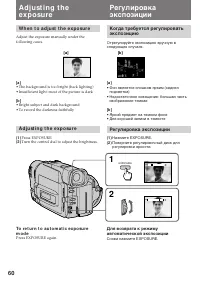
Page 60 - W h e n t o a d j u st t h e e x p o su r e; Turn the control dial to adjust the brightness.; Регулировка экспозиции; Снова нажмите EXPOSURE.
60 1 2 – + – + EXPOSURE [a ] [b ] A d j u st i n g t h ee x p o su r e W h e n t o a d j u st t h e e x p o su r e Adjust the exposure manually under thefollowing cases. [a ] • The background is too bright (back lighting)• Insufficient light: most of the picture is dark [b ] • Bright subject and dar...
Page 61 - Shoot ing w it h t he sun behind you; A d j u st i n g t h e e x p o su r e; находится за объектом.; Съемка в темных условиях
61 Advanc ed operat ions Усовершенствованные операции Shoot ing w it h t he sun behind you If the light source is behind your subject, or in thefollowing situations, the subject will be recordedtoo dark.• The subject is indoors and there is a window behind the subject. • Bright light sources are inc...
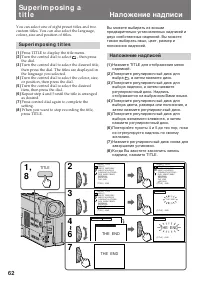
Page 62 - Su p e r i m p o si n g t i t l e s; Наложение надписи; Наложение надписей
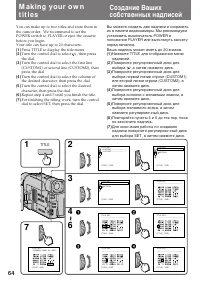
62 1 ,8 2 TITLE PRESET TITLE HELLO!HAPPY BIRTHDAYHAPPY HOLIDAYSCONGRATULATIONS!OUR SWEET BABYWEDDINGVACATIONTHE END [TITLE] : END PRESET TITLE HELLO!HAPPY BIRTHDAYHAPPY HOLIDAYSCONGRATULATIONS!OUR SWEET BABYWEDDINGVACATIONTHE END RETURN [TITLE] : END PRESET TITLE HELLO!HAPPY BIRTHDAYHAPPY HOLIDAYSCO...
Page 63 - To se l e ct t h e l a n g u a g e o f p r e se t t i t l e; Not es on superimposing a t it le; Su p e r i m p o si n g a t i t l e; Для наложения надписи от начала; Примечания к наложению надписи
63 Advanc ed operat ions Усовершенствованные операции To su p e r i m p o se t h e t i t l e f r o mb e g i n n i n g After step 7, press START/STOP to startrecording. To su p e r i m p o se t h e t i t l e w h i l e y o ua r e r e co r d i n g After pressing START/STOP to start recording,start from...
Page 65 - To e d i t a t i t l e y o u h a v e st o r e d; You can not enter over 20 characters title.; To d e l e t e a t i t l e; In step 4, turn the control dial to select [; M a k i n g y o u r o w n t i t l e s; Примечание; Вы не можете ввести больше, чем 20 знаков.; Для отмены надписи
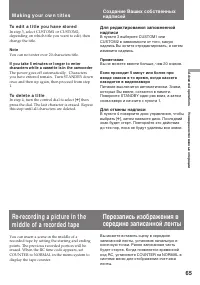
65 Advanc ed operat ions Усовершенствованные операции To e d i t a t i t l e y o u h a v e st o r e d In step 3, select CUSTOM1 or CUSTOM2,depending on which title you want to edit, thenchange the title. Not e You can not enter over 20 characters title. If you t ake 5 minut es or longer t o ent erch...
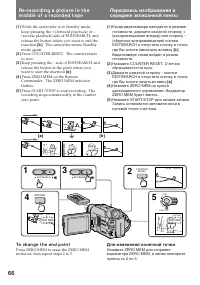
Page 66 - To ch a n g e t h e e n d p o i n t; Для изменения конечной точки
66 Re -r e co r d i n g a p i ct u r e i n t h em i d d l e o f a r e co r d e d t a p e (1 ) While the camcorder is in Standby mode, keep pressing the + (forward playback) or –(reverse playback) side of EDITSEARCH, andrelease the button where you want to end theinsertion [b ] . The camcorder enters...
Page 67 - Not es on re-recording; • The picture and the sound may be distorted at; Примечания к перезаписи; • Изображение и звук могут быть искажены в
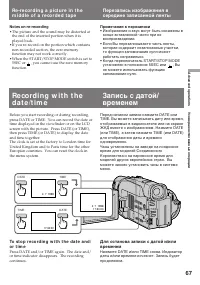
67 Advanc ed operat ions Усовершенствованные операции Re -r e co r d i n g a p i ct u r e i n t h em i d d l e o f a r e co r d e d t a p e Not es on re-recording • The picture and the sound may be distorted at the end of the inserted portion when it isplayed back. • If you re-record on the portion ...
Page 68 - Ea ch t i m e y o u i n se r t t h e ca sse t t e; Not es on t he ORC f unct ion; Выполняйте вышеописанную процедуру.; Примечания к функции ORC; • Когда Вы устанавливаете ORC TO SET,
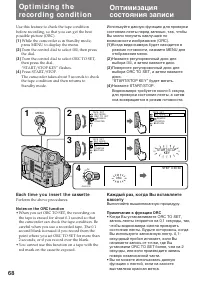
68 1 4 STBY 0:00:00 ORC MENU LO CK START/STOP S TA N D B Y START/STOP KEY 3 TAPE SET REC MODEORC TO SET REMAINCOUNTER 2 TAPE SET REC MODEORC TO SET REMAINCOUNTER RETURN SP TAPE SET REC MODEORC TO SET REMAINCOUNTER RETURN Op t i m i zi n g t h ere co rd i n g co n d i t i o n Use this feature to chec...
Page 69 - Not es on t he St eady Shot f unct ion; • Функция устойчивой съемки не
69 Advanc ed operat ions Усовершенствованные операции Re l e a si n g t h eSTEA D Y SHOT f u n ct i o n When the Steady Shot function is working, thecamcorder compensates for camera-shake. You can release the Steady Shot function whenyou do not need to use it. The indicator appears in the viewfinder...
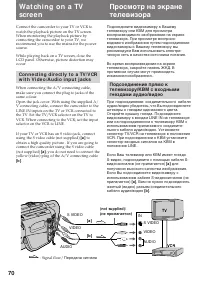
Page 71 - If your TV or VCR is a monaural t ype; W a t ch i n g o n a TV scr e e n; M onit oring t he pict ure f rom a TV or VCR; Просмотр на экране телевизора; TV
71 Advanc ed operat ions Усовершенствованные операции If your TV or VCR is a monaural t ype Connect only the white plug for audio on boththe camcorder and the TV or the VCR. With thisconnection, the sound is monaural even in stereomodel. If your TV/ VCR has a 21-pin connect or(EUROCONNECTOR) Use the...
Page 72 - To ca n ce l t h e d i g i t a l e f f e ct f u n ct i o n; Not es on t he digit al ef f ect f unct ion; • In skip scan, slow or pause mode, noise appears; Нжамите DIGITAL EFFECT.; Примечания к функции цифрового эффекта; • При выполнении поиска методом прогона,
72 En j o y i n g d i g i t a l e f f e ctd u r i n g p l a y b a ck During playback, you can process a scene usingthe digital effect functions; Still, Flash motion,Luminancekey and Trail. For the features of eachfunction, refer to previous pages.You can watch the processed picture on a TV oruse it ...
Page 74 - To sca n t h e b e g i n n i n g o f a l l d a y s; To st op searching or scanning; Поиск границ записанных дат; Для сканирования начала всех дат; Для останова поиска или сканирования
74 3 REW FF 2 DATE SEARCH DATE SCAN DATE 1 POWER OFF PLAYER CAMERA To sca n t h e b e g i n n i n g o f a l l d a y s (1 ) Set the POWER switch to PLAYER. (2 ) Press DATE on the Remote Commander twice. (3 ) Press 0 or ) . Date Scan starts. Se a r ch i n g t h e b o u n d a r i e s o fr e co r d e d ...
Page 75 - Not es on t he t ape count er; Примечания к счетчику ленты
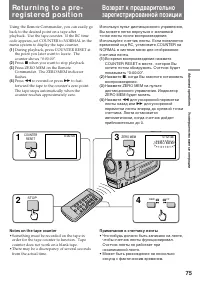
75 Advanc ed operat ions Усовершенствованные операции Re t u r n i n g t o a p re -re g i st e re d p o si t i o n Using the Remote Commander, you can easily goback to the desired point on a tape afterplayback. Use the tape counter. If the RC timecode appears, set COUNTER to NORMAL in themenu system...
Page 76 - M a r k i n g a n i n d e x si g n a l; Not es on ZERO M EM; • When you press ZERO MEM, the counter’s; Примечания к ZERO MEM; • Когда Вы нажимаете ZERO MEM, нулевая; Запись индексного сигнала
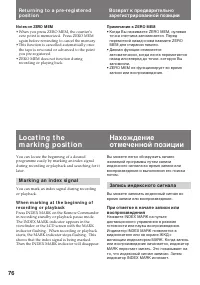
76 You can locate the beginning of a desiredprogramme easily by marking an index signalduring recording or playback and searching for itlater. M a r k i n g a n i n d e x si g n a l You can mark an index signal during recordingor playback. W h e n m a r k i n g a t t h e b e g i n n i n g o fr e co ...
Page 77 - Not es on marking; Lo ca t i n g t h e m a r k i n g p o si t i o n; Примечания к записи индексного сигнала
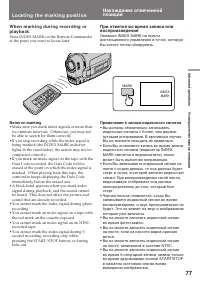
77 Advanc ed operat ions Усовершенствованные операции MARK INDEX MARK W h e n m a r k i n g d u r i n g r e co r d i n g o rp l a y b a ck Press INDEX MARK on the Remote Commanderat the point you want to locate later. Not es on marking • Make sure you mark index signals at more than two-minute inter...
Page 78 - To ca n ce l i n d e x sca n m o d e; Нажмите
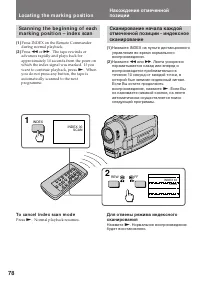
78 INDEX 00 SCAN INDEX 00 SCAN 1 2 INDEX REW FF Sca n n i n g t h e b e g i n n i n g o f e a chm a r k i n g p o si t i o n – i n d e x sca n (1 ) Press INDEX on the Remote Commander during normal playback. (2 ) Press 0 or ) . The tape rewinds or advances rapidly and plays back forapproximately 10 ...
Page 79 - To st o p i n d e x se a r ch m o d e; Not e on t he index number
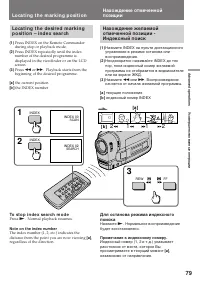
79 Advanc ed operat ions Усовершенствованные операции 1 2 1 2 [ a ] [ b ] 3 INDEX INDEX REW FF INDEX 00 SCAN INDEX 02 SEARCH 1 2 Lo ca t i n g t h e m a r k i n g p o si t i o n Lo ca t i n g t h e d e si r e d m a r k i n gp o si t i o n – i n d e x se a r ch (1 ) Press INDEX on the Remote Commande...
Page 80 - Not es on erasing; Стирание индексного сигнала; Примечания к стиранию индексного сигнала; • Нажмите ERASE более, чем на 2 секунды; Примечание к коду данных
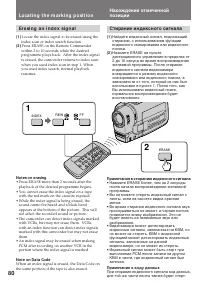
80 INDEX 2 1 ERASE REW FF Lo ca t i n g t h e m a r k i n g p o si t i o n Er a si n g a n i n d e x si g n a l (1 ) Locate the index signal to be erased using the index scan or index search function. (2 ) Press ERASE on the Remote Commander within 2 to 10 seconds while the desiredprogramme plays ba...
Page 81 - To st o p w r i t i n g t h e RC t i m e co d e
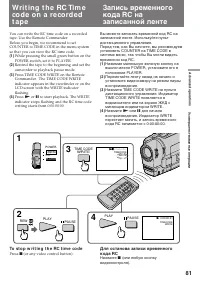
81 Advanc ed operat ions Усовершенствованные операции You can write the RC time code on a recordedtape. Use the Remote Commander.Before you begin, we recommend to setCOUNTER to TIME CODE in the menu systemso that you can view the RC time code. (1 ) While pressing the small green button on thePOWER s...
Page 83 - Be f o r e e d i t i n g; To e d i t m o r e sce n e s; Not e on Fine Synchro Edit; Перед монтажем; Для монтажа других сцен; Примечание к точному синхронному монтажу
83 Advanc ed operat ions Усовершенствованные операции Ed i t i n g o n t o a n o t h e rt a p e You can create your own video programme byediting with any other h 8 mm, H Hi8, j VHS, k S-VHS, VHSC, K S-VHSC or l Betamax VCR that has video/audio inputs. Be f o r e e d i t i n g Connect the camcorde...
Page 84 - A d d i t i o n a l i n f o r m a t i o n; indicator flashes in the; N o t e s o n l i t h i u m b a t t e r y; • Wipe the battery with a dry cloth to assure a; Дополнительная информация; будет мигать в видоискателе приблизи-; Примечания к литиевой батарейке; • Протрите батарейку сухой тканью для
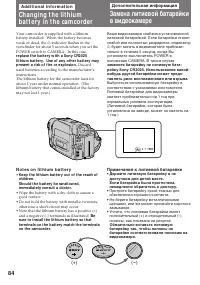
84 4 7 1998 (+) (--) - A d d i t i o n a l i n f o r m a t i o n Changing t he lit hiumbat t er y in t he cam corder Your camcorder is supplied with a lithiumbattery installed. When the battery becomesweak or dead, the I indicator flashes in the viewfinder for about 5 seconds when you set thePOWER s...
Page 85 - Ch a n g i n g t h e l i t h i u m b a t t e r y; Замена литиевой батарейки
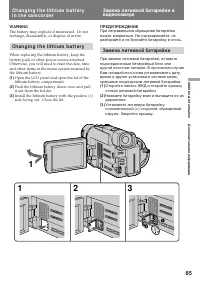
85 Addit ional inf ormat ion Дополнительная информация C R 2 0 25 2 1 C R 2 02 5 1 2 3 1 W ARNING The battery may explode if mistreated. Do notrecharge, disassemble, or dispose of in fire. Ch a n g i n g t h e l i t h i u m b a t t e r y When replacing the lithium battery, keep thebattery pack or ot...
Page 86 - The year changes as f ollow s:; Нажмите MENU для стирания дисплея меню.; Для корректировки установки даты и времени; Повторите вышеописанную процедуру.; Год изменяется следующим образом:
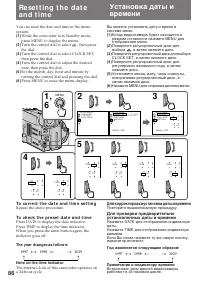
86 To co r r e ct t h e d a t e a n d t i m e se t t i n g Repeat the above procedure. To ch e ck t h e p r e se t d a t e a n d t i m e Press DATE to display the date indicator.Press TIME to display the time indicator.When you press the same button again, theindicator goes off. The year changes as ...
Page 87 - Turn the control dial to select; Not e on W ORLD TIM E; , а затем нажмите диск; Примечание к фукции WORLD TIME
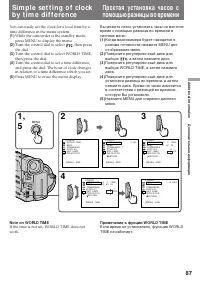
87 Addit ional inf ormat ion Дополнительная информация Si m p l e se t t i n g o f cl o ckb y t i m e d i f f e re n ce You can easily set the clock for a local time by atime difference in the menu system. (1 ) While the camcorder is the standby mode,press MENU to display the menu. (2 ) Turn the con...
Page 88 - Se l e ct i n g ca sse t t e t y p e s; W h a t i s v i d e o Hi 8; Выбор типа кассеты; Что такое видео Hi8
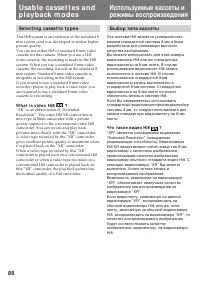
88 Usa b l e ca sse t t e s a n dp l a y b a ck m o d e s Se l e ct i n g ca sse t t e t y p e s This Hi8 system is an extension of the standard 8mm system, and was developed to realize higherpicture quality.You can use either Hi8 or standard 8 mm videocassette for this camera. When you use a Hi8vid...
Page 89 - W h e n y o u p l a y b a ck; N o t e o n A FM Hi Fi st e r e o; • You record the tape on an AFM HiFi monaural; Fo r e i g n 8 m m v i d e o; Playing back an NTSC-recorded t ape; • You cannot play back a tape recorded in NTSC; Примечание к стереозвучанию AFM HiFi; • Вы записали ленту на монофоническом; Иностранные 8-мм видеоленты; • Вы не можете воспроизводить ленты,
89 Addit ional inf ormat ion Дополнительная информация Usa b l e ca sse t t e s a n d p l a y b a ckm o d e s W h e n y o u p l a y b a ck The playback mode (SP/LP) and system (Hi8/standard 8 mm) are selected automaticallyaccording to the format in which the tape hasbeen recorded. The quality of the...
Page 90 - Pr e p a r i n g t h e b a t t e r y p a ck; A l w a y s ca r r y a d d i t i o n a l b a t t e r i e s; indicator may appear and; Подготовка батарейного блока; появляется и начинает
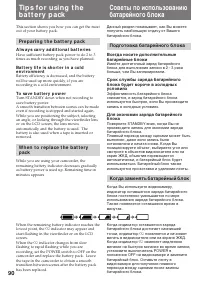
90 Ti p s f o r u si n g t h eb a t t e r y p a ck This section shows you how you can get the mostout of your battery pack. Pr e p a r i n g t h e b a t t e r y p a ck A l w a y s ca r r y a d d i t i o n a l b a t t e r i e s Have sufficient battery pack power to do 2 to 3times as much recording as...
Page 91 - Ca u t i o n; • Do not expose the battery pack to any; Th e l i f e o f t h e b a t t e r y p a ck; Ti p s f o r u si n g t h e b a t t e r y p a ck; Предостережение; • Храните батарейный блок подальше от; Срок службы батарейного блока
91 Addit ional inf ormat ion Дополнительная информация N o t e s o n t h e r e ch a r g e a b l eb a t t e r y p a ck Ca u t i o n Never leave the battery pack in temperaturesabove 60°C (140°F), such as in a car parked in thesun or under direct sunlight. Th e b a t t e r y p a ck h e a t s u p Durin...
Page 92 - W h a t i s “ I n f o LI THI UM ”; How t he bat t ery consumpt ion is displayed; indicator may also flash under; Что такое “InfoLITHIUM”; , видеоаппаратура будет
92 Ti p s f o r u si n g t h e b a t t e r y p a ck N o t e s o n t h e “ I n f o LI THI UM ”b a t t e r y p a ck W h a t i s “ I n f o LI THI UM ” The “InfoLITHIUM” is a lithium ion battery packwhich can exchange data with compatible videoequipment about its battery consumption.When you use this ba...
Page 93 - • After you have used the “InfoLITHIUM”
93 Addit ional inf ormat ion Дополнительная информация Ti p s f o r u si n g t h e b a t t e r y p a ck To obt ain more accurat e remaining bat t eryindicat ion Set the camcorder to recording standby modeand point towards a stationary object. Do notmove the camcorder for 30 seconds or more.• If the ...
Page 94 - M o i st u r e co n d e n sa t i o n; I n si d e t h e ca m co r d e r; indicator flashes. If this; On t h e l e n s; Конденсация влаги; Внутри видеокамеры; будет; На объективе
94 M aint enance inf orm at ionand precaut ions M o i st u r e co n d e n sa t i o n If the camcorder is brought directly from a coldplace to a warm place, moisture may condenseinside the camcorder, on the surface of the tape,or on the lens. In this condition, the tape maystick to the head drum and ...
Page 95 - V i d e o h e a d cl e a n i n g; Pr e ca u t i o n s; Ca m co r d e r o p e r a t i o n; Очистка видеоголовок; Предосторожности; Эксплуатация видеокамеры
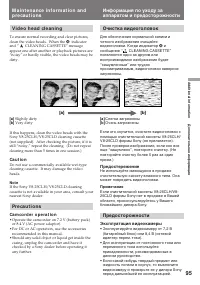
95 Addit ional inf ormat ion Дополнительная информация [a] [b] M a i n t e n a n ce i n f o r m a t i o n a n dp r e ca u t i o n s V i d e o h e a d cl e a n i n g To ensure normal recording and clear pictures,clean the video heads. When the v indicator and “ CLEANING CASSETTE” message appear one a...
Page 97 - A C p o w e r a d a p t o r; If bat t ery leakage occurred; Сетевой адаптер перем. тока; Если случится протечка батареек
97 Addit ional inf ormat ion Дополнительная информация M a i n t e n a n ce i n f o r m a t i o n a n dp r e ca u t i o n s A C p o w e r a d a p t o r • Unplug the unit from the mains when not in use for a long time. To disconnect the mainslead, pull it out by the plug. Never pull themains lead its...
Page 98 - PAL syst em; Brazil; NTSC syst em; Источники питания; Система PAL; Бразилия; Система NTSC
98 Usi n g y o u rca m co rd e r a b ro a d Each country or area has its own electric and TVcolour systems. Before using your camcorderabroad, check the following points. Po w e r so u r ce s You can use your camcorder in any country orarea with the supplied AC power adaptor within100 V to 240 V AC,...
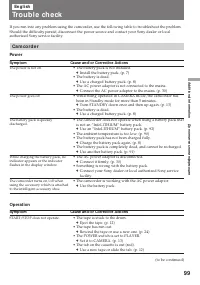
Page 99 - Ca m co r d e r; Pow er; Tro u b l e ch e ck; Operat ion; Sympt om
99 Addit ional inf ormat ion Дополнительная информация The camcorder turns on/off whenusing the accessory which is attachedto the intelligent accessory shoe. If you run into any problem using the camcorder, use the following table to troubleshoot the problem.Should the difficulty persist, disconnect...
Page 100 - Tr o u b l e ch e ck; Pict ure
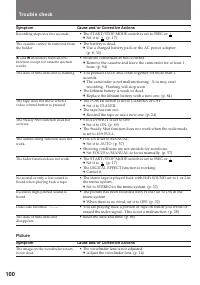
100 Tr o u b l e ch e ck Pict ure Sympt om Cause and/ or Correct ive Act ions • The viewfinder lens is not adjusted. m Adjust the viewfinder lens. (p. 14) Sympt om Cause and/ or Correct ive Act ions • The START/STOP MODE switch is set to 5SEC or . m Set it to . (p. 17) • The battery is dead. m Use a...
Page 101 - Ot hers
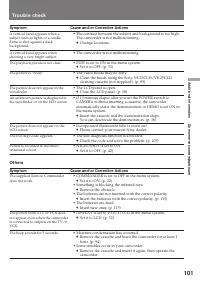
101 Addit ional inf ormat ion Дополнительная информация Ot hers Sympt om Cause and/ or Correct ive Act ions • COMMANDER is set to OFF in the menu system. m Set it to ON. (p. 32) • Something is blocking the infrared rays. m Remove the obstacle. • The batteries are not inserted with the correct polari...
Page 102 - Видеокамера; Проверка неисправностей
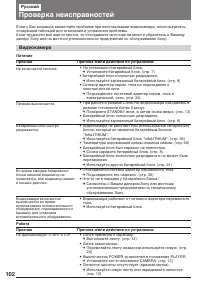
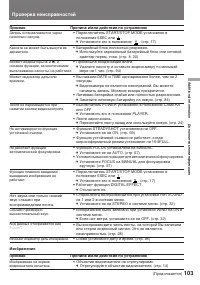
102 Если у Вас возникла какая-либо проблема при использовании видеокамеры, воспользуйтесьследующей таблицей для отыскания и устранения проблемы.Если трудности все еще остаются, то отсоедините источник питания и обратитесь к Вашемудилеру Sony или на местное уполномоченное предприятие по обслуживанию ...
Page 103 - Изображение; Признак
103 Addit ional inf ormat ion Дополнительная информация Признак Причина и/или действия по устранению • Переключатель START/STOP MODE установлен в положение 5SEC или . m Установите его в положение . (стр. 17) • Батарейный блок полностью разряжен. m Используйте заряженный батарейный блок или сетевойад...
Page 104 - Прочее
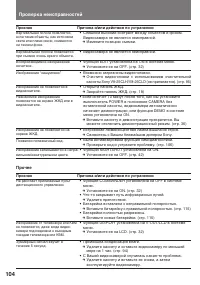
104 Проверка неисправностей Не работает прилагаемый пультдистанционного управления. Появился пятизначный код. Вертикальная полоса появляется,если такие объекты, как источникисвета или пламя свечи, снимаютсяна темном фоне. Изображение не появляется наэкране ЖКД. Незнакомое изображениепоявляется на эк...
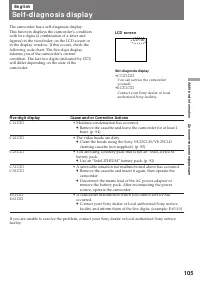
Page 105 - Cause and/ or Correct ive Act ions; • Moisture condensation has occurred.; LCD scr e e n; Se l f -d i a g n o si s d i sp l a y
105 Addit ional inf ormat ion Дополнительная информация Five-digit display Cause and/ or Correct ive Act ions • Moisture condensation has occurred. m Remove the cassette and leave the camcorder for at least 1hour. (p. 94) • The video heads are dirty. m Clean the heads using the Sony V8-25CLH/V8-25CL...
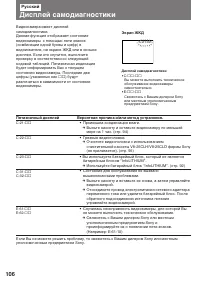
Page 106 - ππ; Экран ЖКД; Дисплей самодиагностики
106 Пятизначный дисплей Вероятная причина и/или метод устранения. • Произошла конденсация влаги. m Выньте кассету и оставьте видеокамеру по меньшеймере на 1 час. (стр. 94) • Грязные видеоголовки. m Очистите видеоголовки с использованиемочистительной кассеты V8-25CLH/V8-25CLD фирмы Sony(не прилагаетс...
Page 107 - Sp e ci f i ca t i o n s
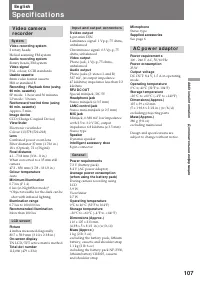
107 Addit ional inf ormat ion Дополнительная информация I n p u t a n d o u t p u t co n n e ct o r s S video out put 4-pin mini DINLuminance signal: 1 Vp-p, 75 ohms,unbalancedChrominance signal: 0.3 Vp-p, 75ohms, unbalanced Video out put Phono jack, 1 Vp-p, 75 ohms,unbalanced Audio out put Phono ja...
Page 108 - Технические характеристики
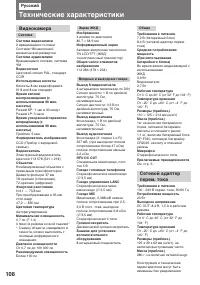
108 Русский Технические характеристики Видеокамера Система Система видеозаписи 2 вращающиеся головкиСистема ЧМ наклонноймеханической развертки Система аудиозаписи Вращающиеся головки, системаЧМ Видеосигнал Цветовой сигнал PAL, стандартCCIR Используемые кассеты Кассеты 8-мм видеоформатаHi 8 или 8-мм ...
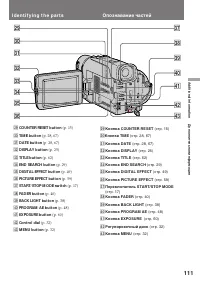
Page 109 - I d e n t i f y i n g t h e p a r t s
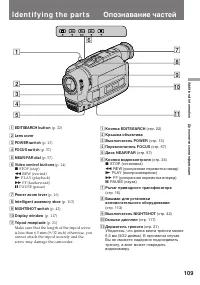
109 Addit ional inf ormat ion Дополнительная информация 6 5 2 1 3 4 9 0 !¡ 7 8 I d e n t i f y i n g t h e p a r t s 1 EDITSEARCH but t on (p. 22) 2 Lens cover 3 POW ER sw it ch (p. 13) 4 FOCUS sw it ch (p. 57) 5 NEAR/ FAR dial (p. 57) 6 Video cont rol but t ons (p. 24) p STOP (stop) 0 REW (rewind) ...
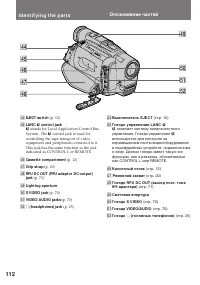
Page 112 - stands for Local Application Control Bus; Опознавание частей
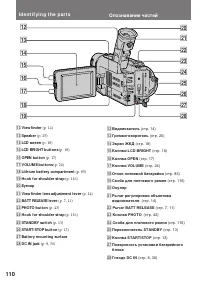
112 %™ %¡ %º $¢ $§ $• $∞ $¶ $ª I d e n t i f y i n g t h e p a r t s $¢ EJECT sw it ch (p. 12) $∞ LANC l cont rol jack l stands for Local Application Control Bus System. The l control jack is used for controlling the tape transport of videoequipment and peripherals connected to it.This jack has the ...
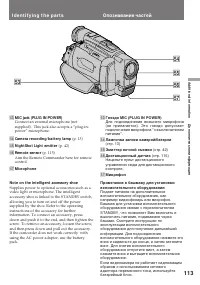
Page 113 - Camera recording/ bat t ery lamp
113 Addit ional inf ormat ion Дополнительная информация %£ %¢ %§ %¶ %∞ I d e n t i f y i n g t h e p a r t s %£ M IC jack (PLUG IN POW ER) Connect an external microphone (notsupplied). This jack also accepts a “plug-in-power” microphone. %¢ Camera recording/ bat t ery lamp (p. 13) %∞ Night Shot Ligh...
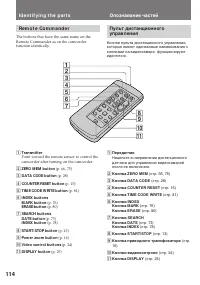
Page 115 - Not es on t he Remot e Commander; • Keep the remote sensor away from strong light; To p r e p a r e t h e Re m o t e Co m m a n d e r; Not e on bat t ery lif e; • Держите дистанционный датчик подальше; Примечание к сроку службы батареек
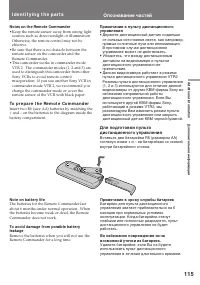
115 Addit ional inf ormat ion Дополнительная информация Not es on t he Remot e Commander • Keep the remote sensor away from strong light sources such as direct sunlight or illumination.Otherwise, the remote control may not beeffective. • Be sure that there is no obstacle between the remote sensor on...
Page 116 - To w a t ch t h e d e m o n st r a t i o n; Для просмотра демонстрации; Для ввода демонстрационного режима; Нажимая вниз; Для выхода из демонстрационного режима; Удерживая
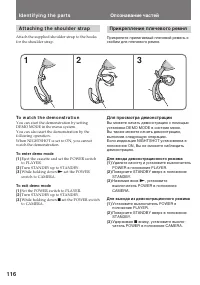
116 A t t a ch i n g t h e sh o u l d e r st r a p Attach the supplied shoulder strap to the hooksfor the shoulder strap. I d e n t i f y i n g t h e p a r t s 1 2 3 To w a t ch t h e d e m o n st r a t i o n You can start the demonstration by settingDEMO MODE in the menu system.You can also start t...
Page 117 - Op e r a t i o n i n d i ca t o r s; V i e w f i n d e r /; D i sp l a y w i n d o w /
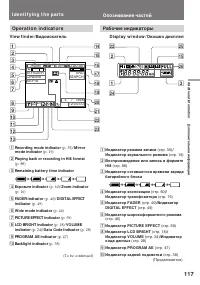
117 Addit ional inf ormat ion Дополнительная информация Op e r a t i o n i n d i ca t o r s I d e n t i f y i n g t h e p a r t s V i e w f i n d e r / Видоискатель 2 @¢ @∞ @™ !∞ 3 @§ 1 40 min SP H STBY 0:00:00 M.FADERCINEMASEPIA END SEARCH 4 7 1998 12:00:00 c „ f T W 2 4567 890!¡!™!£ 3 1 !¢ !§ !• !...
Page 119 - Wa r n i n g i n d i ca t o r s; The flashing is slow.; Лента приближается к концу.; Мигание становится быстрым.; Произошла конденсация влаги.
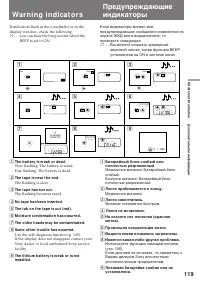
119 Addit ional inf ormat ion Дополнительная информация Wa r n i n g i n d i ca t o r s If indicators flash in the viewfinder or in thedisplay window, check the following: ≥≥ ... : you can hear the beep sound when the BEEP is set to ON. 1 The bat t ery is w eak or dead. Slow flashing: The battery is...
Page 120 - Sony Corporation; I n d e x
Sony Corporation Printed in Japan I n d e x A , B Adjusting viewfinder ................ 14AFM HiFi Sound ................. 37, 89ANTI GROUND SHOOTING ................................................... 17 Auto focus ................................... 57Backlight .......................................