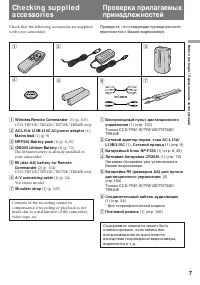
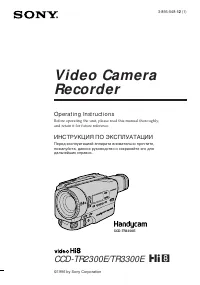
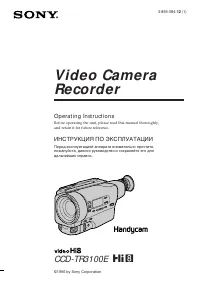
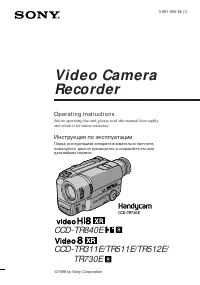
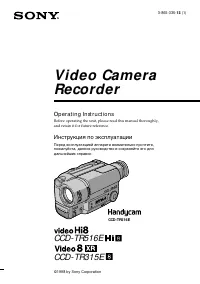
Page 2 - En g l i sh; camcorder. With your Handycam; W ARNING; Русский
2 En g l i sh We l co m e ! Congratulations on your purchase of this SonyHandycam R camcorder. With your Handycam you can capture life’s precious moments withsuperior picture and sound quality.Your Handycam is loaded with advancedfeatures, but at the same time it is very easy touse. You will soon be...
Page 3 - Ta b l e o f co n t e n t s; Recording still pictures successively
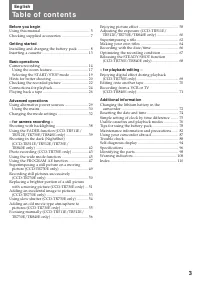
3 Ta b l e o f co n t e n t s En g l i sh Bef ore you begin Using this manual ................................................... 5Checking supplied accessories ............................. 7 Get t ing st art ed Installing and charging the battery pack ............ 8Inserting a cassette ..............
Page 4 - Оглавление; Перед началом эксплуатации
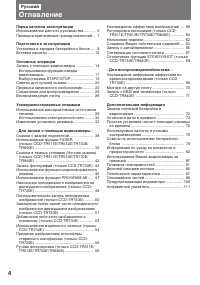
4 Оглавление Русский Перед началом эксплуатации Использование данного руководства ........... 5Проверка прилагаемых принадлежностей ... 7 Подготовка к эксплуатации Установка и зарядка батарейного блока ..... 8Вставка кассеты ........................................... 13 Основные операции Запись с п...
Page 5 - Be f o r e y o u b e g i n; Usi n g t h i s m a n u a l; Ty p e s o f d i f f e r e n ce s
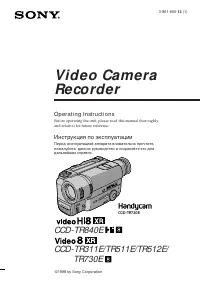
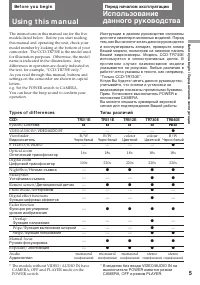
5 Be f o r e y o u b e g i n The instructions in this manual are for the fivemodels listed below. Before you start readingthis manual and operating the unit, check yourmodel number by looking at the bottom of yourcamcorder. The CCD-TR730E is the model usedfor illustration purposes. Otherwise, the mo...
Page 6 - • Do not let the camcorder get wet. Keep the
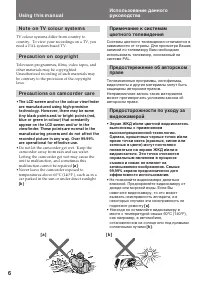
6 Usi n g t h i s m a n u a l [ a ] [ b ] N o t e o n TV co l o u r sy st e m s TV colour systems differ from country tocountry. To view your recordings on a TV, youneed a PAL system-based TV. Pr e ca u t i o n o n co p y r i g h t Television programmes, films, video tapes, andother materials may be...
Page 8 - I n st a l l i n g t h e b a t t e r y p a ck; Install the battery pack in the direction of the; Ge t t i n g st a r t e d; Not e on t he bat t ery pack; BATT RELEASE; Подготовка к эксплуатации; Установка батарейного блока; на батарейном
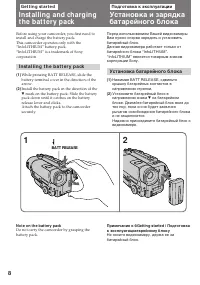
8 Before using your camcorder, you first need toinstall and charge the battery pack.This camcorder operates only with the“InfoLITHIUM” battery pack.“InfoLITHIUM” is a trademark of Sonycorporation. I n st a l l i n g t h e b a t t e r y p a ck (1) While pressing BATT RELEASE, slide thebattery termina...
Page 9 - Ch a r g i n g t h e b a t t e r y p a ck; Connect the mains lead to the mains.; normal charge; Зарядка батарейного блока; на штекере была; нормальная зарядка; , которая позволяет Вам
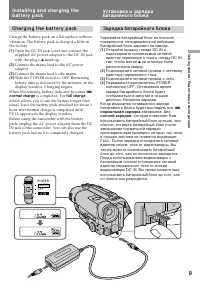
9 G etting s tarted / Подготовка к эксплуатации I n st a l l i n g a n d ch a r g i n g t h eb a t t e r y p a ck Ch a r g i n g t h e b a t t e r y p a ck Charge the battery pack on a flat surface withoutvibration. The battery pack is charged a little inthe factory. (1 ) Open the DC IN jack cover a...
Page 10 - Not es; remaining battery time appears.; Ch a r g i n g t i m e; Bat t ery pack; Ba t t e r y l i f e; Bat t ery; Примечания; • Индикация оставшегося времени заряда; Время зарядки; Срок службы заряда батарейного блока
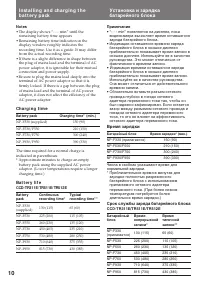
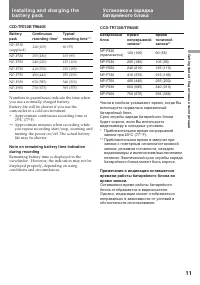
10 Not es • The display shows “- - - min” until the remaining battery time appears. • Remaining battery time indication in the display window roughly indicates therecording time. Use it as a guide. It may differfrom the actual recording time. • If there is a slight difference in shape between the pl...
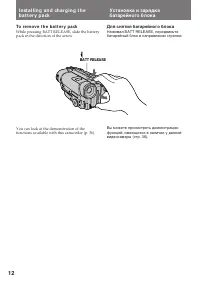
Page 12 - To r e m o v e t h e b a t t e r y p a ck; Для снятия батарейного блока
12 To r e m o v e t h e b a t t e r y p a ck While pressing BATT RELEASE, slide the batterypack in the direction of the arrow. I n st a l l i n g a n d ch a r g i n g t h eb a t t e r y p a ck You can look at the demonstration of thefunctions available with this camcorder (p. 36). BATT RELEASE Для с...
Page 13 - Insert a cassette with the window facing out.; I n se r t i n g a ca sse t t e; Для выталкивания кассеты; будут мигать в; To e j e ct t h e ca sse t t e; and
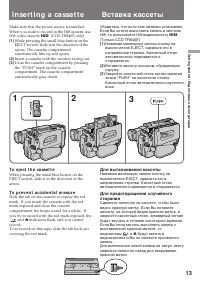
13 G etting s tarted / Подготовка к эксплуатации Make sure that the power source is installed.When you want to record in the Hi8 system, useHi8 video cassette H . (CCD-TR840E only) (1 ) While pressing the small blue button on theEJECT switch, slide it in the direction of thearrow. The cassette compa...
Page 14 - Ba si c o p e r a t i o n s; Ca m e r a re co rd i n g; feature works only once a day.; Основные операции; Данная функция работает один раз в день.
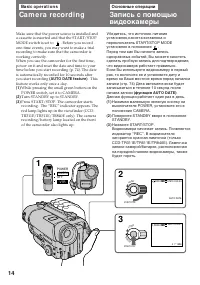
14 2 3 1 LO CK START/STOP S TA N D B Y LO CK START/STOP S TA N D B Y 40min SP H STBY 0:00:00 40min SP H REC 4 7 1998 AUTO DATE 0:00:01 POWER OFF VTR CAMERA Ba si c o p e r a t i o n s Ca m e r a re co rd i n g Make sure that the power source is installed anda cassette is inserted and that the START/...
Page 15 - To st o p r e co r d i n g m o m e n t a r i l y [ a ]; Not e; To f o cu s t h e v i e w f i n d e r l e n s; Ca m e r a r e co r d i n g; Примечание
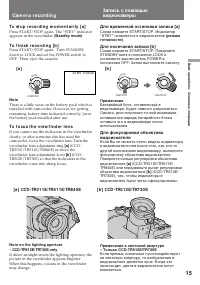
B asic operat ions / Основные операции 15 LO CK START/STOP S TA N D B Y START/STOP LO CK S TA N D B Y STBY 0:35:20 LO CK START/STOP S TA N D B Y To st o p r e co r d i n g m o m e n t a r i l y [ a ] Press START/STOP again. The “STBY” indicatorappears in the viewfinder (St andby mode) . To f i n i s...
Page 16 - Not e on St andby mode; • The tape counter indicates the recording or; Not e on t he beep sound; • Счетчик ленты указывает время записи или
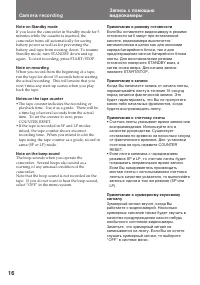
16 Ca m e r a r e co r d i n g Not e on St andby mode If you leave the camcorder in Standby mode for 5minutes while the cassette is inserted, thecamcorder turns off automatically for savingbattery power as well as for preventing thebattery and tape from wearing down. To resumeStandby mode, turn STAN...
Page 17 - Not e on t he AUTO DATE f eat ure; ON again in the menu system.; Usi n g t h e zo o m f e a t u r e; Примечание к функции AUTO DATE; – Вы установили функцию AUTO DATE в
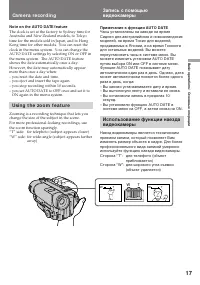
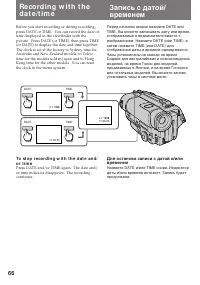
B asic operat ions / Основные операции 17 Not e on t he AUTO DATE f eat ure The clock is set at the factory to Sydney time forAustralia and New Zealand models, to Tokyotime for the models sold in Japan, and to HongKong time for other models. You can reset theclock in the menu system. You can change ...
Page 18 - Not es on digit al zoom; • The right side; Примечания к цифровому трансфокатору; • Правая сторона
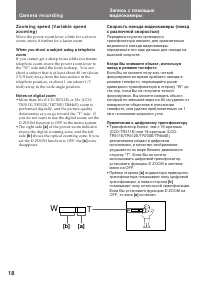
18 T W T W [a] [b] Ca m e r a r e co r d i n g Zo o m i n g sp e e d ( V a r i a b l e sp e e dzo o m i n g ) Move the power zoom lever a little for a slowerzoom, move it further for a faster zoom. W hen you shoot a subject using a t elephot ozoom If you cannot get a sharp focus while in extremetele...
Page 19 - Se l e ct i n g t h e STA RT/STOP m o d e; : Recording starts when you press; Not e on START/ STOP mode; You cannot use FADER in 5SEC or; Выбор режима START/STOP; : Запись начинается когда Вы; Примечание к режиму START/STOP
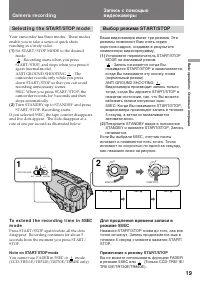
B asic operat ions / Основные операции 19 Se l e ct i n g t h e STA RT/STOP m o d e Your camcorder has three modes. These modesenable you to take a series of quick shotsresulting in a lively video. ( 1 ) Set START/STOP MODE to the desiredmode. : Recording starts when you press START/STOP, and stops ...
Page 21 - Hi n t s f o r b e t t e r sh o o t i n g; Caut ions on t he view f inder; • Do not pick up the camcorder by the; Советы для лучшей съемки; Предосторожности к видоискателю; • Не поднимайте видеокамеру за
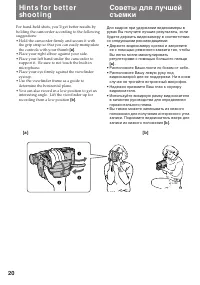
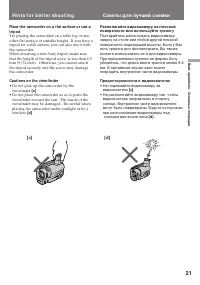
B asic operat ions / Основные операции 21 Hi n t s f o r b e t t e r sh o o t i n g Place t he camcorder on a f lat surf ace or use at ripod Try placing the camcorder on a table top or anyother flat surface of suitable height. If you have atripod for a still camera, you can also use it withthe camco...
Page 22 - Turn STANDBY up to STANDBY.; На мгновение нажмите сторону – (
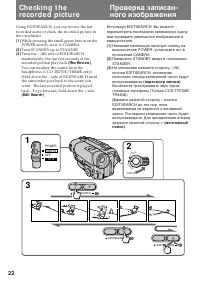
22 Ch e ck i n g t h ere co rd e d p i ct u re Using EDITSEARCH, you can review the lastrecorded scene or check the recorded picture inthe viewfinder. (1 ) While pressing the small green button on thePOWER switch, set it to CAMERA. (2 ) Turn STANDBY up to STANDBY. (3 ) Press the Р( Π) side of EDIT...
Page 23 - To st o p p l a y b a ck; Ch e ck i n g t h e r e co r d e d p i ct u r e; Для остановки воспроизведения; Отпустите EDITSEARCH.; Снова для начала записи
B asic operat ions / Основные операции 23 To st o p p l a y b a ck Release EDITSEARCH. To b e g i n r e -r e co r d i n g Press START/STOP. Re-recording begins fromthe point you released EDITSEARCH. Providedyou do not eject the cassette, the transitionbetween the last scene you recorded and the next...
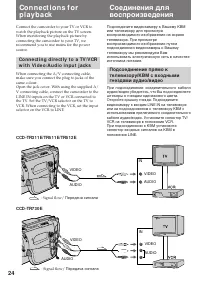
Page 25 - to obtain a high quality picture . If you are; Co n n e ct i o n s f o r p l a y b a ck; для получения высокого
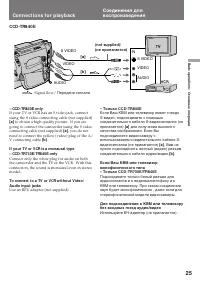
B asic operat ions / Основные операции 25 – CCD-TR840E only If your TV or VCR has an S video jack, connectusing the S video connecting cable (not supplied) [a] to obtain a high quality picture . If you are going to connect the camcorder using the S videoconnecting cable (not supplied) [a ] , you do ...
Page 26 - Pl a y i n g b a ck a t a p e; Press; To rew ind t he t ape,; press; Usi n g t h e r e m o t e co m m a n d e r
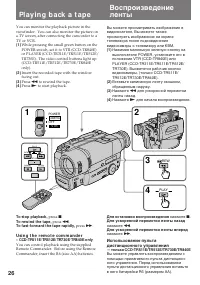
26 Pl a y i n g b a ck a t a p e You can monitor the playback picture in theviewfinder. You can also monitor the picture ona TV screen, after connecting the camcorder to aTV or VCR. (1 ) While pressing the small green button on thePOWER switch, set it to VTR (CCD-TR840E)or PLAYER (CCD-TR311E/TR511E/...
Page 27 - Using headphones; V a r i o u s p l a y b a ck m o d e s; To l o ca t e a sce n e ( p i ct u r e se a r ch ); Воспроизведение ленты; Использование головных телефонов
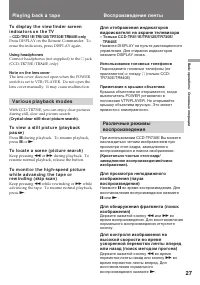
B asic operat ions / Основные операции 27 Pl a y i n g b a ck a t a p e To d i sp l a y t h e v i e w f i n d e r scr e e ni n d i ca t o r s o n t h e TV – CCD-TR511E/ TR512E/ TR730E/ TR840E only Press DISPLAY on the Remote Commander. Toerase the indicators, press DISPLAY again. Using headphones Co...
Page 28 - To se l e ct t h e p l a y b a ck so u n d; Not es on playback; Для выбора воспроизводимого звука; Примечания к воспроизведению
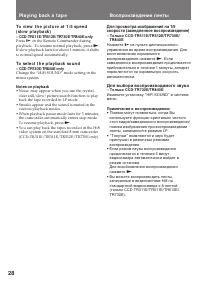
28 Pl a y i n g b a ck a t a p e To v i e w t h e p i ct u r e a t 1 /5 sp e e d( sl o w p l a y b a ck ) – CCD-TR511E/ TR512E/ TR730E/ TR840E only Press & on the Remote Commander during playback. To resume normal playback, press ( . If slow playback lasts for about 1 minute, it shiftsto normal ...
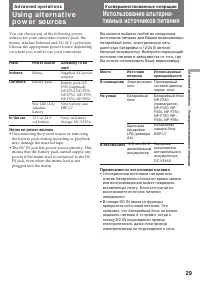
Page 29 - A d v a n ce d o p e r a t i o n s; Place; Not es on pow er sources; • Disconnecting the power source or removing; Усовершенствованные операции; Примечания по источникам питания; • Отсоединение источника питания или
29 Advanc ed operat ions / Усовершенствованные операции A d v a n ce d o p e r a t i o n s Usi n g a l t e r n a t i v ep o w e r so u rce s You can choose any of the following powersources for your camcorder: battery pack, themains, alkaline batteries and 12/24 V car battery.Choose the appropriate ...
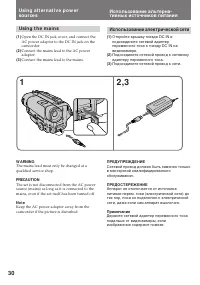
Page 30 - Usi n g t h e m a i n s; Использование электрической сети; Подсоедините сетевой провод к сети.; ПРЕДУПРЕЖДЕНИЕ
30 W ARNING The mains lead must only be changed at aqualified service shop. PRECAUTION The set is not disconnected from the AC powersource (mains) as long as it is connected to themains, even if the set itself has been turned off. Not e Keep the AC power adaptor away from thecamcorder if the picture...
Page 31 - Usi n g a ca r b a t t e r y; To remove t he car bat t ery charger
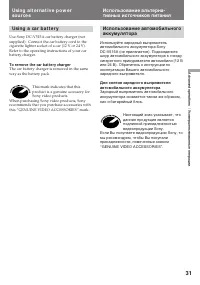
31 Advanc ed operat ions / Усовершенствованные операции Usi n g a ca r b a t t e r y Use Sony DC-V515A car battery charger (notsupplied). Connect the car battery cord to thecigarette lighter socket of a car (12 V or 24 V).Refer to the operating instructions of your carbattery charger. To remove t he...
Page 32 - CAMERA
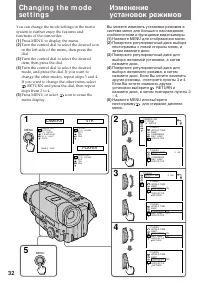
32 Ch a n g i n g t h e m o d ese t t i n g s You can change the mode settings in the menusystem to further enjoy the features andfunctions of the camcorder. (1) Press MENU to display the menu. (2) Turn the control dial to select the desired iconin the left side of the menu, then press thedial. (3) ...
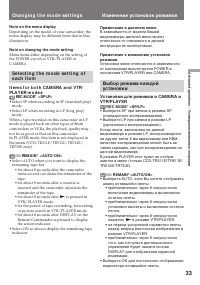
Page 33 - Not e on t he menu display; Ch a n g i n g t h e m o d e se t t i n g s; Примечание к дисплею меню
33 Advanc ed operat ions / Усовершенствованные операции Not e on t he menu display Depending on the model of your camcorder, themenu display may be different from that in thisillustration. Not e on changing t he mode set t ing Menu items differ depending on the setting ofthe POWER switch to VTR/PLAY...
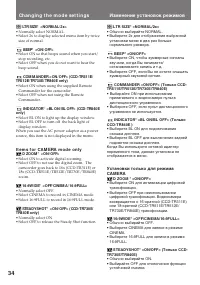
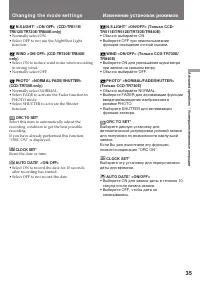
Page 34 - • Select ON so that beeps sound when you start/; I t e m s f o r CA M ERA m o d e o n l y; Изменение установок режимов
34 Ch a n g i n g t h e m o d e se t t i n g s LTR SIZE* <NORM AL/ 2x> • Normally select NORMAL.• Select 2x to display selected menu item by twice size of normal. BEEP* <ON/ OFF> • Select ON so that beeps sound when you start/ stop recording, etc. • Select OFF when you do not want to hea...
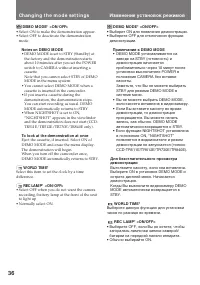
Page 36 - Not es on DEM O M ODE
36 Ch a n g i n g t h e m o d e se t t i n g s DEM O M ODE* <ON/ OFF> • Select ON to make the demonstration appear.• Select OFF to deactivate the demonstration mode. Not es on DEM O M ODE • DEMO MODE is set to STBY (Standby) at the factory and the demonstration startsabout 10 minutes after you...
Page 37 - I t e m s f o r V TR/PLA Y ER m o d e o n l y; Not e on TBC set t ing; Примечания к установке ТВС
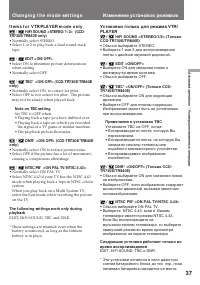
37 Advanc ed operat ions / Усовершенствованные операции Ch a n g i n g t h e m o d e se t t i n g s I t e m s f o r V TR/PLA Y ER m o d e o n l y / HiFi SOUND <STEREO/ 1/ 2> (CCD- TR730E/ TR840E only) • Normally select STEREO.• Select 1 or 2 to play back a dual sound track tape. / EDIT <ON/...
Page 38 - Нажмите BACK LIGHT. Индикатор; После съемки; • Для объекта, расположенного рядом с; Для выполнения точной регулировки
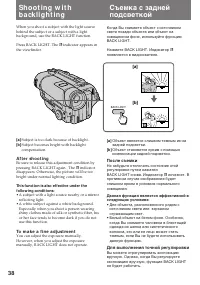
38 Sh o o t i n g w i t hb a ck l i g h t i n g When you shoot a subject with the light sourcebehind the subject or a subject with a lightbackground, use the BACK LIGHT function. Press BACK LIGHT. The c indicator appears in the viewfinder. [a] Subject is too dark because of backlight. [b ] Subject b...
Page 39 - o n l y; Se l e ct i n g t h e f a d e r f u n ct i o n; только
39 Advanc ed operat ions / Усовершенствованные операции – CCD -TR5 1 1 E/TR5 1 2 E/TR7 3 0 E/TR8 4 0 E o n l y Se l e ct i n g t h e f a d e r f u n ct i o n You can fade in or out to give your recording aprofessional appearance.When the picture fades in, the sound graduallyincreases. When the pictu...
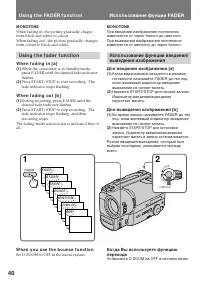
Page 40 - M ONOTONE; Usi n g t h e f a d e r f u n ct i o n; W h e n y o u u se t h e b o u n ce f u n ct i o n; Set D ZOOM to OFF in the menu system.; Использование фунции FADER; MONOTONE; Установите D ZOOM на OFF в системе меню.
40 M ONOTONE When fading in, the picture gradually chagesfrom black and white to colour.When fading out , the picture gradually changesfrom colour to black and white. Usi n g t h e f a d e r f u n ct i o n W h e n f a d i n g i n [ a ] (1) While the camcorder is in Standby mode,press FADER until the...
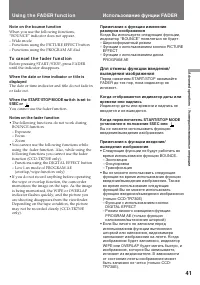
Page 41 - Not e on t he bounce f unct ion; To ca n ce l t h e f a d e r f u n ct i o n; You cannot use the fader function.; Not es on t he f ader f unct ion; • The following functions do not work during; Usi n g t h e FA D ER f u n ct i o n
41 Advanc ed operat ions / Усовершенствованные операции Not e on t he bounce f unct ion When you use the following functions,“BOUNCE” indicator does not appear.– Wide mode– Functions using the PICTURE EFFECT button– Functions using the PROGRAM AE dial To ca n ce l t h e f a d e r f u n ct i o n Befo...
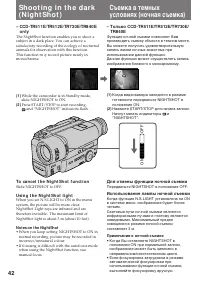
Page 42 - and “NIGHTSHOT” indicators flash.; To ca n ce l t h e N i g h t Sh o t f u n ct i o n; Slide NIGHTSHOT to OFF.; Usi n g t h e N i g h t Sh o t l i g h t; Not es on t he Night Shot; • When you keep setting NIGHTSHOT to ON in; Для отмены функции ночной съемки; Передвиньте NIGHTSHOT в положение OFF.; Использование лампы ночной съемки; Примечания к ночной съемке; • Когда Вы оставляете NIGHTSHOT в
42 – CCD -TR5 1 1 E/TR5 1 2 E/TR7 3 0 E/TR8 4 0 E o n l y The NightShot function enables you to shoot asubject in a dark place. You can achieve asatisfactory recording of the ecology of nocturnalanimals for observation with this function.This function may record picture nearly inmonochrome. (1 ) Whi...
Page 43 - – CCD -TR7 3 0 E o n l y; appears, the video flash light is; Ph o t o re co rd i n g; FA D E PHOTO; Запись фотографий; Нажмите PHOTO глубже.
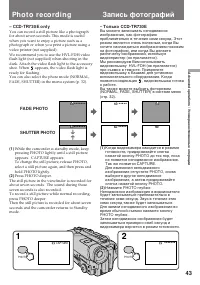
43 Advanc ed operat ions / Усовершенствованные операции ••••• ••••••• – CCD -TR7 3 0 E o n l y You can record a still picture like a photographfor about seven seconds. This mode is usefulwhen you want to enjoy a picture such as aphotograph or when you print a picture using avideo printer (not suppli...
Page 44 - Not es on phot o recording; Ph o t o r e co r d i n g; Примечания к записи фотографий
44 Not es on phot o recording • During photo recording, you cannot change the mode or setting of following functions.– Functions using the DIGITAL EFFECT button– Functions using the FADER button– Functions using the PROGRAM AE dial– Functions using the PICTURE EFFECT button– Exposure– Wide mode • Th...
Page 45 - CINEM A; Se l e ct i n g t h e d e si r e d m o d e; CI N EM A; Выбор желаемого режима; CINEMA
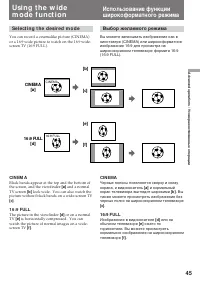
45 Advanc ed operat ions / Усовершенствованные операции [b] CINEM A [a] [c] [e] [f ] CINEMA 16:9 FULL 16:9 FULL [d] Se l e ct i n g t h e d e si r e d m o d e You can record a cinemalike picture (CINEMA)or a 16:9 wide picture to watch on the 16:9 wide-screen TV (16:9 FULL). CI N EM A Black bands app...
Page 46 - To ca n ce l w i d e m o d e; Not es on w ide mode; Usi n g t h e w i d e m o d e f u n ct i o n; Для отмены режима; Примечания к широкоформатному режиму
46 Usi n g t h e w i d e m o d e f u n ct i o n You can select the wide mode (OFF, CINEMA,16:9FULL) in the menu system (p. 32). To ca n ce l w i d e m o d e Select OFF in the menu system. To w a t ch t h e t a p e r e co r d e d i n w i d em o d e To watch the tape recorded in CINEMA mode,set the sc...
Page 47 - Se l e ct i n g t h e b e st m o d e; Spot light mode; Выбор наилучшего режима; Ландшафтный режим
47 Advanc ed operat ions / Усовершенствованные операции Usi n g t h e PROGRA MA E f u n ct i o n Se l e ct i n g t h e b e st m o d e You can select one of seven PROGRAM AE(Auto Exposure) modes to suit your shootingsituation, referring to the following. Spot light mode For subjects in spotlight, suc...
Page 48 - To t u r n o f f p r o g r a m A E; Turn the PROGRAM AE dial to the; Not es on f ocus set t ing; • In the Spotlight, Sports lesson and Beach & Ski; Для выключения PROGRAM AE; Примечания к установке фокусировки
48 Usi n g t h e PROGRA M A Ef u n ct i o n Turn the PROGRAM AE dial to select the desiredPROGRAM AE mode. To t u r n o f f p r o g r a m A E Turn the PROGRAM AE dial to the r position. Not es on f ocus set t ing • In the Spotlight, Sports lesson and Beach & Ski modes, you cannot take close-ups ...
Page 49 - Press DIGITAL EFFECT.; Not es on t he st ill f unct ion; • You cannot use the following functions during; DIGITAL EFFECT; Для отмены функции стоп-кадра; Нажмите DIGITAL EFFECT.; Примечания к функции стоп-кадра; • Вы не можете использовать следующие
49 Advanc ed operat ions / Усовершенствованные операции Su p e r i m p o si n g ast i l l p i ct u re o n am o v i n g p i ct u re – CCD -TR7 3 0 E o n l y Using the still function, you can record a stillpicture to be superimposed on a moving picture.The sound is recorded normally. (1 ) While the ca...
Page 50 - normal recording
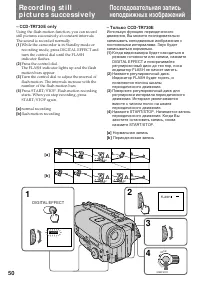
50 Re co rd i n g st i l lp i ct u re s su cce ssi v e l y – CCD -TR7 3 0 E o n l y Using the flash motion function, you can recordstill pictures successively at constant intervals.The sound is recorded normally. (1) While the camcorder is in Standby mode orrecording mode, press DIGITAL EFFECT andtu...
Page 51 - To ca n ce l t h e f l a sh m o t i o n f u n ct i o n; Not es on t he f lash mot ion f unct ion
51 Advanc ed operat ions / Усовершенствованные операции To ca n ce l t h e f l a sh m o t i o n f u n ct i o n Press DIGITAL EFFECT. Not es on t he f lash mot ion f unct ion • You cannot use the following functions during recording with the flash motion function.– Functions using the FADER button– F...
Page 52 - To ca n ce l t h e l u m i n a n ce k e y f u n ct i o n; Not es on t he luminancekey f unct ion
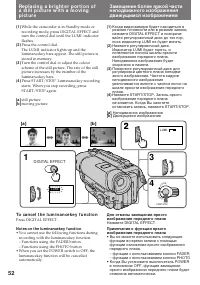
52 (1 ) While the camcorder is in Standby mode orrecording mode, press DIGITAL EFFECT andturn the control dial until the LUMI. indicatorflashes. (2 ) Press the control dial.The LUMI. indicator lights up and theluminancekey bars appear. The still picture isstored in memory. (3 ) Turn the control dial...
Page 53 - Not es on t he t rail f unct ion
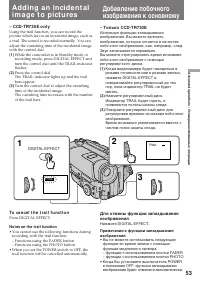
53 Advanc ed operat ions / Усовершенствованные операции – CCD -TR7 3 0 E o n l y Using the trail function, you can record thepicture which leaves an incidental image, such asa trail. The sound is recorded normally. You canadjust the vanishing time of the incidental imagewith the control dial. (1 ) W...
Page 54 - Not es on t he slow shut t er f unct ion; Usi n g sl o w sh u t t e r; Для отмены функции медленного затвора; Примечания к функции медленного затвора
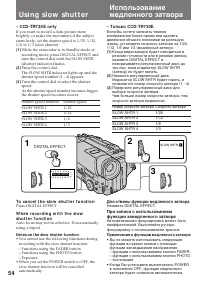
54 – CCD -TR7 3 0 E o n l y If you want to record a dark picture morebrightly, or make the movement of the subjectseem lively, set the shutter speed to 1/25, 1/12,1/6 or 1/3 (slow shutter). (1 ) While the camcorder is in Standby mode orrecording mode, press DIGITAL EFFECT andturn the control dial un...
Page 55 - To ca n ce l t h e o l d m o v i e f u n ct i o n; Not es on t he old movie f unct ion
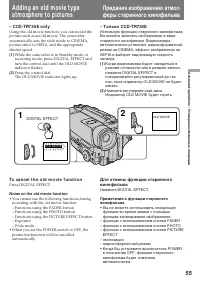
55 Advanc ed operat ions / Усовершенствованные операции Adding an old m ovie t ypeat m osphere t o pict ures – CCD -TR7 3 0 E o n l y Using the old movie function, you can record thepicture such as an old movie. The camcorderautomatically sets the wide mode to CINEMA,picture effect to SEPIA, and the...
Page 56 - Fo cu si n g m a n u a l l y; W h e n t o u se m a n u a l f o cu s; • Insufficient light; Ручная фокусировка
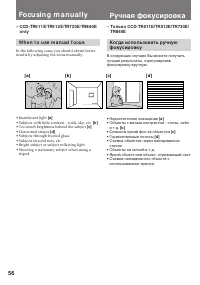
56 Fo cu si n g m a n u a l l y – CCD -TR5 1 1 E/TR5 1 2 E/TR7 3 0 E/TR8 4 0 E o n l y W h e n t o u se m a n u a l f o cu s In the following cases you should obtain betterresults by adjusting the focus manually. • Insufficient light [a ] • Subjects with little contrast - walls, sky, etc. [b ] • Too...
Page 57 - появляется в видоискателе.; Съемка в относительно темном месте; Для записи очень удаленного объекта; Примечание к ручной фокусировке; Могут появляться следующие индикаторы; To r e t u r n t o a u t o f o cu s m o d e; Shoot ing in relat ively dark places; To r e co r d a v e r y d i st a n t su b j e ct; Not e on manual f ocusing
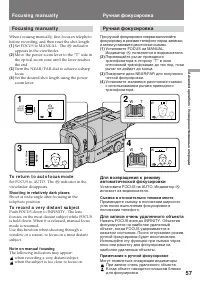
57 Advanc ed operat ions / Усовершенствованные операции Fo cu si n g m a n u a l l y When focusing manually, first focus in telephotobefore recording, and then reset the shot length. (1 ) Set FOCUS to MANUAL. The f indicator appears in the viewfinder. (2 ) Move the power zoom lever to the “T” side i...
Page 58 - Se l e ct i n g p i ct u r e e f f e ct; The picture is sepia.; Выбор эффекта изображения; SEPIA; Изображение будет в цвете сепия.
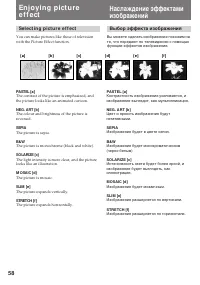
58 [ a ] [ b ] [ c] [ d ] [ e ] [ f ] En j o y i n g p i ct u ree f f e ct Se l e ct i n g p i ct u r e e f f e ct You can make pictures like those of televisionwith the Picture Effect function. PASTEL [a] The contrast of the picture is emphasized, andthe picture looks like an animated cartoon. NEG....
Page 59 - Usi n g p i ct u r e e f f e ct f u n ct i o n; Press PICTURE EFFECT.; En j o y i n g p i ct u r e e f f e ct; To t u r n o f f p i ct u r e e f f e ct; Not es on t he pict ure ef f ect; • When you turn the power off, the camcorder; Выключение эффекта изображения; Примечание к эффектам изображения; • Когда Вы выключаете питание,
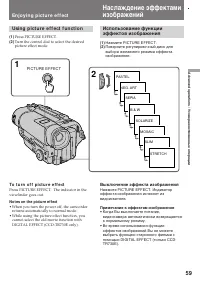
59 Advanc ed operat ions / Усовершенствованные операции Usi n g p i ct u r e e f f e ct f u n ct i o n (1 ) Press PICTURE EFFECT. (2 ) Turn the control dial to select the desiredpicture effect mode. En j o y i n g p i ct u r e e f f e ct To t u r n o f f p i ct u r e e f f e ct Press PICTURE EFFECT....
Page 60 - W h e n t o a d j u st t h e e x p o su r e; Turn the control dial to adjust the brightness.; • Фон является слишком ярким (задняя; Регулировка экспозиции; Снова нажмите EXPOSURE.
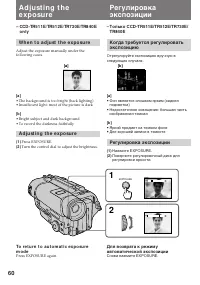
60 [a ] [b ] A d j u st i n g t h ee x p o su re – CCD -TR5 1 1 E/TR5 1 2 E/TR7 3 0 E/TR8 4 0 E o n l y W h e n t o a d j u st t h e e x p o su r e Adjust the exposure manually under thefollowing cases. [a ] • The background is too bright (back lighting)• Insufficient light: most of the picture is d...
Page 61 - Shoot ing w it h t he sun behind you; A d j u st i n g t h e e x p o su r e; находится за объектом.; Съемка в темных условиях
61 Advanc ed operat ions / Усовершенствованные операции Shoot ing w it h t he sun behind you If the light source is behind your subject, or in thefollowing situations, the subject will be recordedtoo dark.• The subject is indoors and there is a window behind the subject. • Bright light sources are i...
Page 62 - Su p e r i m p o si n g t i t l e s; Press TITLE to display the title menu.; Наложение надписи; Наложение надписей
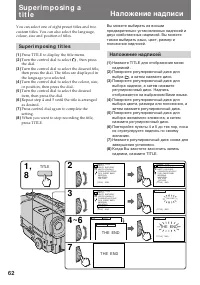
62 Su p e r i m p o si n g at i t l e You can select one of eight preset titles and twocustom titles. You can also select the language,colour, size and position of titles. Su p e r i m p o si n g t i t l e s (1 ) Press TITLE to display the title menu. (2 ) Turn the control dial to select , then pres...
Page 63 - To se l e ct t h e l a n g u a g e o f p r e se t t i t l e; Not es on superimposing a t it le; Su p e r i m p o si n g a t i t l e; Для наложения надписи от начала; Примечания к наложению надписи
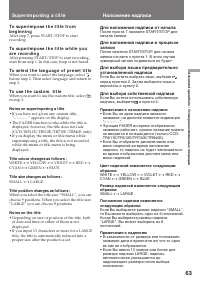
63 Advanc ed operat ions / Усовершенствованные операции To su p e r i m p o se t h e t i t l e f r o mb e g i n n i n g After step 7, press START/STOP to startrecording. To su p e r i m p o se t h e t i t l e w h i l e y o ua r e r e co r d i n g After pressing START/STOP to start recording,start fr...
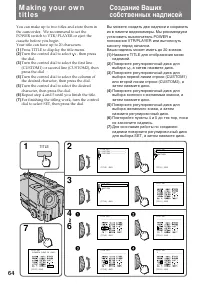
Page 65 - To e d i t a t i t l e y o u h a v e st o r e d; You can not enter over 20 characters title.; To d e l e t e a t i t l e; In step 4, turn the control dial to select [; M a k i n g y o u r o w n t i t l e s; Вы не можете ввести больше, чем 20 знаков.; Для отмены надписи
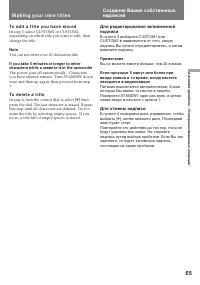
65 Advanc ed operat ions / Усовершенствованные операции To e d i t a t i t l e y o u h a v e st o r e d In step 3, select CUSTOM1 or CUSTOM2,depending on which title you want to edit, thenchange the title. Not e You can not enter over 20 characters title. If you t ake 5 minut es or longer t o ent er...
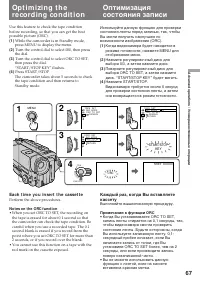
Page 67 - Ea ch t i m e y o u i n se r t t h e ca sse t t e; Not es on t he ORC f unct ion; Выполняйте вышеописанную процедуру.; Примечания к функции ORC; • Когда Вы устанавливаете ORC TO SET,
67 Advanc ed operat ions / Усовершенствованные операции Op t i m i zi n g t h ere co rd i n g co n d i t i o n Use this feature to check the tape conditionbefore recording, so that you can get the bestpossible picture (ORC). (1 ) While the camcorder is in Standby mode, press MENU to display the menu...
Page 68 - Not es on t he St eady Shot f unct ion; • The Steady Shot function will not correct; Примечания к функции устойчивой съемки; • Функция устойчивой съемки не
68 – CCD -TR7 3 0 E/TR8 4 0 E o n l y When the Steady Shot function is working, thecamcorder compensates for camera-shake. You can release the Steady Shot function whenyou do not need to use the Steady Shot function.The indicator lights up when you release the Steady Shot function. Do not use the St...
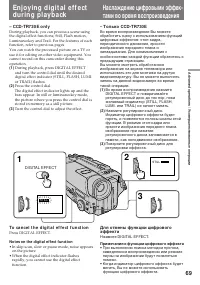
Page 69 - Turn the control dial to adjust the effect.; Примечания к функции цифрового эффекта; • При выполнении поиска методом прогона,; To ca n ce l t h e d i g i t a l e f f e ct f u n ct i o n; Not es on t he digit al ef f ect f unct ion; • In skip scan, slow or pause mode, noise appears
69 Advanc ed operat ions / Усовершенствованные операции En j o y i n g d i g i t a l e f f e ctd u r i n g p l a y b a ck – CCD -TR7 3 0 E o n l y During playback, you can process a scene usingthe digital effect functions; Still, Flash motion,Luminancekey and Trail. For the features of eachfunction,...
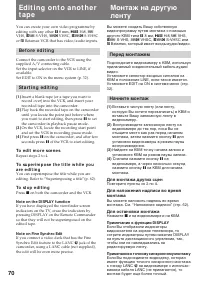
Page 70 - To e d i t m o r e sce n e s; Not e on t he DISPLAY f unct ion; Перед монтажем; Для монтажа других сцен; Примечание к функции DISPLAY
70 Ed i t i n g o n t o a n o t h e rt a p e You can create your own video programme byediting with any other h 8 mm, H Hi8, j VHS, k S-VHS, VHSC, K S-VHSC or l Betamax VCR that has video/audio inputs. Be f o r e e d i t i n g Connect the camcorder to the VCR using thesupplied A/V connecting cable...
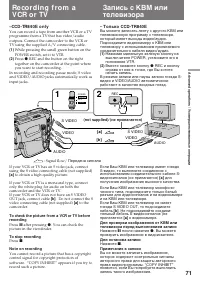
Page 71 - To st op recording; –CCD -TR8 4 0 E o n l y; Для останова записи
71 Advanc ed operat ions / Усовершенствованные операции (not supplied)/ ( не прилагается) If your VCR or TV has an S video jack, connectusing the S video connecting cable (not supplied) [a] to obtain a high quality picture. If your VCR or TV is a monaural type, connectonly the white plug for audio o...
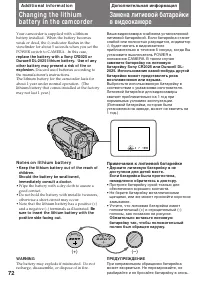
Page 72 - A d d i t i o n a l i n f o r m a t i o n; indicator flashes in the; N o t e s o n l i t h i u m b a t t e r y; • Wipe the battery with a dry cloth to assure a; Дополнительная информация; будет мигать в видоискателе; Примечания к литиевой батарейке; • Протрите батарейку сухой тканью для
72 (+) (--) - A d d i t i o n a l i n f o r m a t i o n Changing t he lit hiumbat t ery in t he cam corder Your camcorder is supplied with a lithiumbattery installed. When the battery becomesweak or dead, the I indicator flashes in the viewfinder for about 5 seconds when you set thePOWER switch to C...
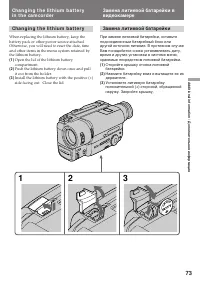
Page 73 - Ch a n g i n g t h e l i t h i u m b a t t e r y
73 Addit ional inf ormat ion / Дополнительная информация Ch a n g i n g t h e l i t h i u m b a t t e r y When replacing the lithium battery, keep thebattery pack or other power source attached.Otherwise, you will need to reset the date, timeand other items in the menu system retained bythe lithium ...
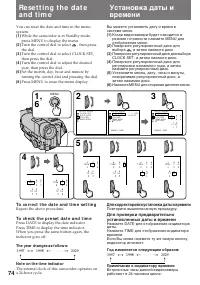
Page 74 - To co r r e ct t h e d a t e a n d t i m e se t t i n g; Repeat the above procedure.; To ch e ck t h e p r e se t d a t e a n d t i m e; The year changes as f ollow s:; Turn the control dial to select; , а затем нажмите диск; Для корректировки установки даты и времени; Повторите вышеописанную процедуру.; Год изменяется следующим образом:
74 To co r r e ct t h e d a t e a n d t i m e se t t i n g Repeat the above procedure. To ch e ck t h e p r e se t d a t e a n d t i m e Press DATE to display the date indicator.Press TIME to display the time indicator.When you press the same button again, theindicator goes off. The year changes as ...
Page 75 - Not e on W ORLD TIM E; Примечание к фукции WORLD TIME
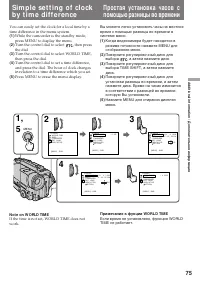
75 Addit ional inf ormat ion / Дополнительная информация Si m p l e se t t i n g o f cl o ckb y t i m e d i f f e re n ce You can easily set the clock for a local time by atime difference in the menu system. (1 ) While the camcorder is the standby mode,press MENU to display the menu. (2 ) Turn the c...
Page 76 - Se l e ct i n g ca sse t t e t y p e s; W h a t i s V i d e o 8; W h e n y o u p l a y b a ck; Что такое видео 8
76 Usa b l e ca sse t t e s a n dp l a y b a ck m o d e s Se l e ct i n g ca sse t t e t y p e s – CCD-TR840E only This Hi8 system is an extension of the standard 8mm system, and was developed to realize higherpicture quality.You can use either Hi8 or standard 8 mm videocassette for this camera. Whe...
Page 77 - N o t e o n A FM Hi Fi st e r e o; • You record the tape on an AFM HiFi monaural; Fo r e i g n 8 m m v i d e o; Playing back an NTSC-recorded t ape; • During playback, a black band appears on the; Иностранные 8-мм видеоленты
77 Addit ional inf ormat ion / Дополнительная информация Usa b l e ca sse t t e s a n d p l a y b a ckm o d e s N o t e o n A FM Hi Fi st e r e o – CCD-TR730E/ TR840E only When you play back a tape, the sound will be inmonaural if:• You record the tape using this camcorder, then play it back on an A...
Page 78 - Pr e p a r i n g t h e b a t t e r y p a ck; A l w a y s ca r r y a d d i t i o n a l b a t t e r i e s; Подготовка батарейного блока; появляется и начинает
78 Ti p s f o r u si n g t h eb a t t e r y p a ck This section shows you how you can get the mostout of your battery pack. Pr e p a r i n g t h e b a t t e r y p a ck A l w a y s ca r r y a d d i t i o n a l b a t t e r i e s Have sufficient battery pack power to do 2 to 3times as much recording as...
Page 79 - Ca u t i o n; • Do not expose the battery pack to any; Th e l i f e o f t h e b a t t e r y p a ck; Ti p s f o r u si n g t h e b a t t e r y p a ck; Предостережение; • Храните батарейный блок подальше от; Срок службы батарейного блока
79 Addit ional inf ormat ion / Дополнительная информация N o t e s o n t h e r e ch a r g e a b l eb a t t e r y p a ck Ca u t i o n Never leave the battery pack in temperaturesabove 60°C (140°F), such as in a car parked in thesun or under direct sunlight. Th e b a t t e r y p a ck h e a t s u p Dur...
Page 80 - W h a t i s “ I n f o LI THI UM ”; indicator may also flash under some condition; Что такое “InfoLITHIUM”; , видеоаппаратура будет
80 Ti p s f o r u si n g t h e b a t t e r y p a ck N o t e s o n t h e “ I n f o LI THI UM ”b a t t e r y p a ck W h a t i s “ I n f o LI THI UM ” The “InfoLITHIUM” is a lithium ion battery packwhich can exchange data with compatible videoequipment about its battery consumption.When you use this ba...
Page 81 - полностью зарядите его (полная зарядка
81 Addit ional inf ormat ion / Дополнительная информация Ti p s f o r u si n g t h e b a t t e r y p a ck To o b t a i n m o r e a ccu r a t e r e m a i n i n gb a t t e r y i n d i ca t i o n Set the camcorder to recording standby modeand point towards a stationary object. Do notmove the camcorder ...
Page 82 - M o i st u r e co n d e n sa t i o n; I n si d e t h e ca m co r d e r; indicator flashes. If this; On t h e l e n s; Конденсация влаги; Внутри видеокамеры; будет; На объективе
82 M aint enance inf orm at ionand precaut ions M o i st u r e co n d e n sa t i o n If the camcorder is brought directly from a coldplace to a warm place, moisture may condenseinside the camcorder, on the surface of the tape,or on the lens. In this condition, the tape maystick to the head drum and ...
Page 83 - V i d e o h e a d cl e a n i n g; indicator; Очистка видеоголовок; сообщение “
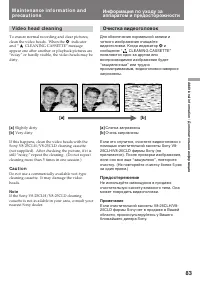
83 Addit ional inf ormat ion / Дополнительная информация [a] [b] M a i n t e n a n ce i n f o r m a t i o n a n dp r e ca u t i o n s V i d e o h e a d cl e a n i n g To ensure normal recording and clear pictures,clean the video heads. When the v indicator and “ CLEANING CASSETTE” message appear one...
Page 84 - To r e a t t a ch t h e e y e cu p; Caut ion; Удаление пыли из видоискателя; Для присоединения окуляра
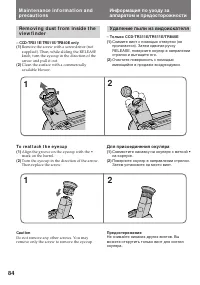
84 M a i n t e n a n ce i n f o r m a t i o n a n dp r e ca u t i o n s Re m o v i n g d u st f r o m i n si d e t h ev i e w f i n d e r – CCD-TR311E/ TR511E/ TR840E only(1 ) Remove the screw with a screwdriver (notsupplied). Then, while sliding the RELEASEknob, turn the eyecup in the direction of ...
Page 85 - Pr e ca u t i o n s; Ca m co r d e r o p e r a t i o n; Предосторожности; Эксплуатация видеокамеры
85 Addit ional inf ormat ion / Дополнительная информация Pr e ca u t i o n s Ca m co r d e r o p e r a t i o n • Operate the camcorder on 7.2 V (battery pack) or 8.4 V (AC power adaptor). • For DC or AC operation, use the accessories recommended in this manual. • Should any solid object or liquid ge...
Page 86 - If bat t ery leakage occurred; Сетевой адаптер перем. тока; Если случится протечка батареек
86 M a i n t e n a n ce i n f o r m a t i o n a n dp r e ca u t i o n s A C p o w e r a d a p t o r • Unplug the unit from the mains when not in use for a long time. To disconnect the mainslead, pull it out by the plug. Never pull themains lead itself. • Do not operate the unit with a damaged cord o...
Page 87 - Po w e r so u r ce s; PAL syst em; Brazil; NTSC syst em; Источники питания; Система PAL; Бразилия; Система NTSC
87 Addit ional inf ormat ion / Дополнительная информация Usi n g y o u rca m co rd e r a b ro a d Each country or area has its own electric and TVcolour systems. Before using your camcorderabroad, check the following points. Po w e r so u r ce s You can use your camcorder in any country orarea with ...
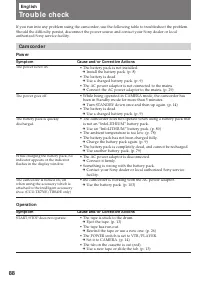
Page 88 - Ca m co r d e r; Pow er; Tro u b l e ch e ck; Operat ion; Sympt om
88 Sympt om Cause and/ or Correct ive Act ions • The battery pack is not installed. m Install the battery pack. (p. 8) • The battery is dead. m Use a charged battery pack. (p. 9) • The AC power adaptor is not connected to the mains. m Connect the AC power adaptor to the mains. (p. 29) • While being ...
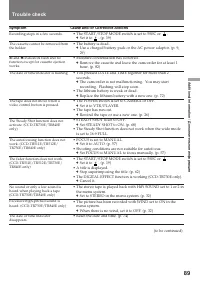
Page 89 - Tr o u b l e ch e ck
89 Addit ional inf ormat ion / Дополнительная информация Sympt om Cause and/ or Correct ive Act ions • The START/STOP MODE switch is set to 5SEC or . m Set it to . (p. 19) • The battery is dead. m Use a charged battery pack or the AC power adaptor. (p. 9,29) • Moisture condensation has occurred. m R...
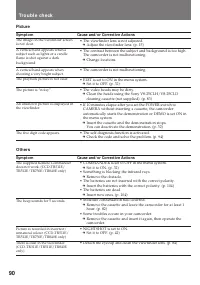
Page 90 - Ot hers; Pict ure
90 Sympt om Cause and/ or Correct ive Act ions • COMMANDER is set to OFF in the menu system. m Set it to ON. (p. 32) • Something is blocking the infrared rays. m Remove the obstacle. • The batteries are not inserted with the correct polarity. m Insert the batteries with the correct polarity. (p. 104...
Page 91 - Видеокамера; Проверка неисправностей
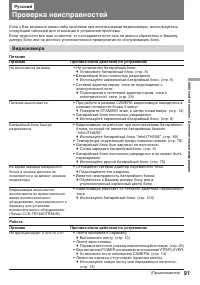
91 Addit ional inf ormat ion / Дополнительная информация Признак Причина и/или действия по устранению • Не установлен батарейный блок. m Установите батарейный блок. (стр. 8) • Батарейный блок полностью разрядился. m Используйте заряженный батарейный блок. (стр. 9) • Сетевой адаптер перем. тока не по...
Page 92 - Изображение; Признак
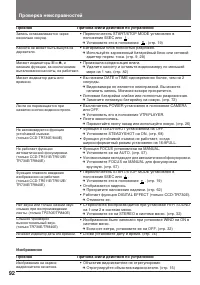
92 Проверка неисправностей Изображение Признак Причина и/или действия по устранению • Переключатель START/STOP MODE установлен в положение 5SEC или . m Установите его в положение . (стр. 19) • Батарейный блок полностью разряжен. m Используйте заряженный батарейный блок или сетевойадаптер перем. тока...
Page 93 - Прочее
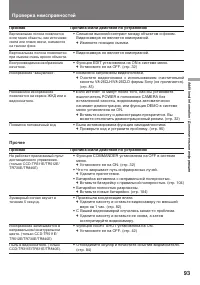
93 Addit ional inf ormat ion / Дополнительная информация Проверка неисправностей Признак Причина и/или действия по устранению • Функция COMMANDER установлена на OFF в системе меню. m Установите ее на ON. (стр. 32) • Что-то закрывает путь инфракрасных лучей. m Удалите препятствие. • Батарейка вставле...
Page 94 - Cause and/ or Correct ive Act ions; ππ; Se l f -d i a g n o si s d i sp l a y; V i e w f i n d e r
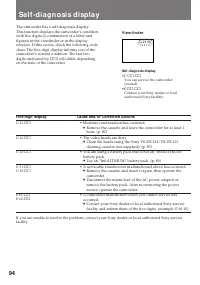
94 Five-digit display Cause and/ or Correct ive Act ions • Moisture condensation has occurred. m Remove the cassette and leave the camcorder for at least 1hour. (p. 82) • The video heads are dirty. m Clean the heads using the Sony V8-25CLH/V8-25CLDcleaning cassette (not supplied). (p. 83) • You are ...
Page 95 - Пятизначный дисплей; Видоискатель
95 Addit ional inf ormat ion / Дополнительная информация Пятизначный дисплей Вероятная причина и/или метод устранения. • Произошла конденсация влаги. m Выньте кассету и оставьте видеокамеру по меньшеймере на 1 час. (стр. 82) • Грязные видеоголовки. m Очистите видеоголовки с использованиемочистительн...
Page 96 - Sp e ci f i ca t i o n s; A C p o w e r a d a p t o r
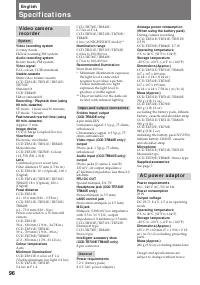
96 En g l i sh Sp e ci f i ca t i o n s CCD-TR730E/TR840E:0.7 lux at F 1.4CCD-TR511E/TR512E/TR730E/TR840E:0 lux ( in NIGHTSHOT mode)** Illuminat ion range CCD-TR311E/TR511E/TR512E:0.4 lux to 100,000 luxCCD-TR730E/TR840E:0.7 lux to 100,000 lux Recommended illuminat ion More than 100 lux* Minimum illu...
Page 97 - Технические характеристики
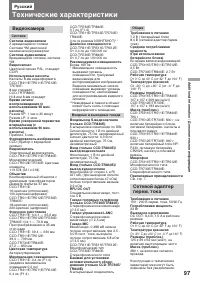
97 Addit ional inf ormat ion / Дополнительная информация Русский Технические характеристики Видеокамера Система Система видеозаписи 2 вращающиеся головкиСистема ЧМ наклонноймеханической развертки Система аудиозаписи Вращающиеся головки, системаЧМ Видеосигнал Цветовой сигнал PAL, стандартCCIR Использ...
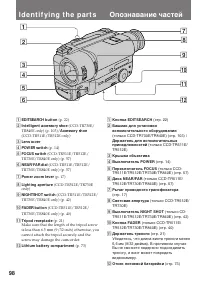
Page 99 - I d e n t i f y i n g t h e p a r t s
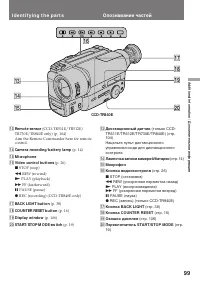
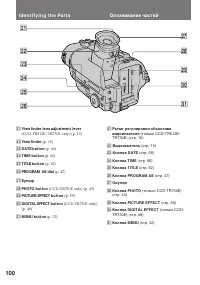
99 Addit ional inf ormat ion / Дополнительная информация I d e n t i f y i n g t h e p a r t s !§ !¢ !£ !∞ !¶ !ª !• @º !£ Remot e sensor (CCD-TR511E/TR512E/ TR730E/TR840E only) (p. 104)Aim the Remote Commander here for remotecontrol. !¢ Camera recording/ bat t ery lamp (p. 14) !∞ M icrophone !§ Vide...
Page 101 - I d e n t i f y i n g t h e Pa r t s
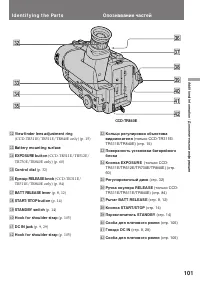
101 Addit ional inf ormat ion / Дополнительная информация I d e n t i f y i n g t h e Pa r t s #™ #§ #¢ #∞ #¶ $º #ª #£ #• $¡ $™ #™ View f inder lens adjust ment ring (CCD-TR311E/TR511E/TR840E only) (p. 15) #£ Bat t ery mount ing surf ace #¢ EXPOSURE but t on (CCD-TR511E/TR512E/ TR730E/TR840E only) (...
Page 102 - stands for Local Application Control Bus; Опознавание частей
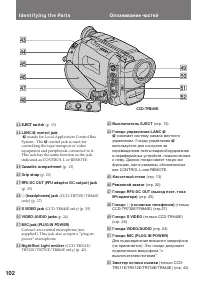
102 I d e n t i f y i n g t h e Pa r t s $¢ $∞ $£ $§ $¶ %º $• %™ $ª %¡ $£ EJECT sw it ch (p. 13) $¢ LANC l cont rol jack l stands for Local Application Control Bus System. The l control jack is used for controlling the tape transport of videoequipment and peripherals connected to it.This jack has th...
Page 103 - Re m o t e Co m m a n d e r; Transmit t er; Передатчик
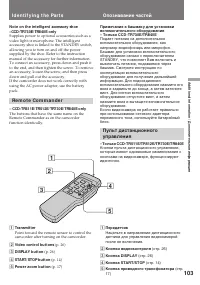
103 Addit ional inf ormat ion / Дополнительная информация 5 1 2 3 4 Not e on t he int elligent accessory shoe–CCD-TR730E/ TR840E only Supplies power to optional accessories such as avideo light or microphone. The intelligentaccessory shoe is linked to the STANDBY switch,allowing you to turn on and o...
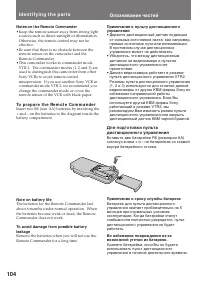
Page 104 - Not es on t he Remot e Commander; • Keep the remote sensor away from strong light; To p r e p a r e t h e Re m o t e Co m m a n d e r; Not e on bat t ery lif e; Примечание к сроку службы батареек; • Держите дистанционный датчик подальше
104 Not es on t he Remot e Commander • Keep the remote sensor away from strong light sources such as direct sunlight or illumination.Otherwise, the remote control may not beeffective. • Be sure that there is no obstacle between the remote sensor on the camcorder and theRemote Commander. • This camco...
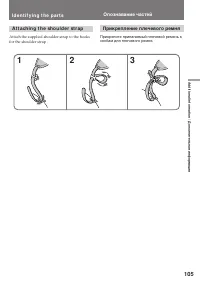
Page 105 - A t t a ch i n g t h e sh o u l d e r st r a p
105 Addit ional inf ormat ion / Дополнительная информация A t t a ch i n g t h e sh o u l d e r st r a p Attach the supplied shoulder strap to the hooksfor the shoulder strap . I d e n t i f y i n g t h e p a r t s 1 2 3 Опознавание частей Прикрепление плечевого ремня Прикрепите прилагаемый плечевой...
Page 106 - V i e w f i n d e r /
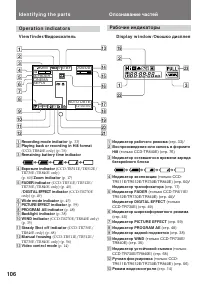
106 Op e r a t i o n i n d i ca t o r s I d e n t i f y i n g t h e p a r t s V i e w f i n d e r / Видоискатель D i sp l a y w i n d o w / Окошко дисплея 1 Recording mode indicat or (p. 33) 2 Playing back or recording in Hi8 f ormat (CCD-TR840E only) (p. 76) 3 Remaining bat t ery t ime indicat or 4...
Page 107 - To w a t ch t h e d e m o n st r a t i o n; Для просмотра демонстрации; Нажимая вниз
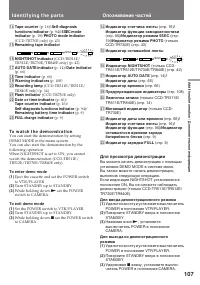
107 Addit ional inf ormat ion / Дополнительная информация !¢ Tape count er (p. 16) / Self -diagnosis f unct ions indicat or (p. 94) / 5SEC mode indicat or (p. 19) / PHOTO mode indicat or (CCD-TR730E only) (p. 43) !∞ Remaining t ape indicat or !§ NIGHTSHOT indicat or (CCD-TR511E/ TR512E/TR730E/TR840E...
Page 108 - Wa r n i n g i n d i ca t o r s; The bat t ery is w eak or dead.; The flashing is slow.; The t ape has run out .; The flashing becomes rapid.; No t ape has been insert ed.; Мигание становится быстрым.
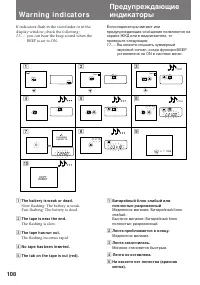
108 Wa r n i n g i n d i ca t o r s If indicators flash in the viewfinder or in thedisplay window, check the following: ≥≥ ... : you can hear the beep sound when the BEEP is set to ON. 1 2 3 4 5 6 7 8 9 4 7 1998 5min 0min CLEANING CASSETTE C:31:10 C:21:00 0 COPY INHIBIT 1 The bat t ery is w eak or d...
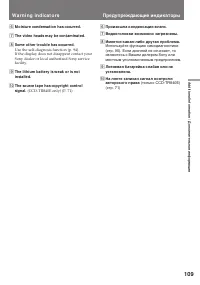
Page 109 - M oist ure condensat ion has occurred.; W a r n i n g i n d i ca t o r s; Произошла конденсация влаги.
109 Addit ional inf ormat ion / Дополнительная информация 6 M oist ure condensat ion has occurred. 7 The video heads may be cont aminat ed. 8 Some ot her t rouble has occurred. Use the self-diagnosis function (p. 94).If the display does not disappear contact yourSony dealer or local authorized Sony ...
Page 110 - I n d e x
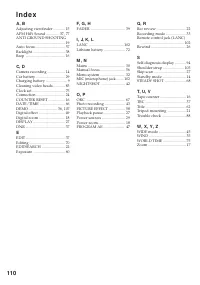
110 I n d e x A , B Adjusting viewfinder ............ 15AFM HiFi Sound .............. 37, 77ANTI GROUND SHOOTING ............................................... 19 Auto focus ............................... 57Backlight ................................. 38Beep ...........................................
Page 111 - Автоматическая; Алфавитный указатель
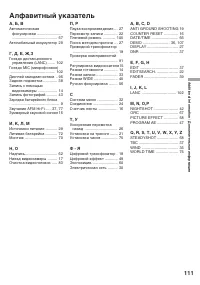
111 Addit ional inf ormat ion / Дополнительная информация А, Б, В Автоматическая фокусировка ....................... .......................................... 57 Автомобильный аккумулятор 29 Г, Д, Е, Ж,З Гнездо дистанционного управления (LANC) ....... 102 Гнездо MIC (микрофонное) .....................
Page 112 - Sony Corporation