Page 2 - Contents
English 2 Contents Contents Safety information 3 Important safety symbols 3 General 4Vacuum cleaner 4 Maintenance 7Wall mount 8 Battery 9 Preparation 11 Accessories 11Parts overview 12 Operation 13 Assembling the wall mount 13 Installing the wall mount 13 Using the wall mount 14 Charging the battery...
Page 3 - and retain it for your reference.; Important safety symbols; Indicates that a danger of death or serious injury exists.; CAUTION
English 3 Safety information • Before operating the appliance, please read this manual thoroughly and retain it for your reference. • Because the following operating instructions cover various models, the characteristics of your vacuum cleaner may differ slightly from those described in this manual...
Page 4 - General; Vacuum cleaner
Safety information English 4 Safety information General For information on Samsung’s environmental commitments and product regulatory obligations, e.g. REACH, visit our sustainability page available via www.samsung.com Failure to meet these requirements could cause damage to the internal parts of th...
Page 7 - Maintenance; • While using or after using the vacuum cleaner, you should lay the
English 7 Safety information Maintenance • While using or after using the vacuum cleaner, you should lay the vacuum cleaner down or place it on the wall mount to store. – The product may fall and an injury and severe product damage occur. In addition, you may not be compensated for the damage. • Do...
Page 8 - • Storing the product in sunlight for long hours may cause parts of; Wall mount; • Do not modify the polarized plug to fit a non-polarized outlet or
Safety information English 8 Safety information Washable Parts Dustbin, Washable Micro Filter, Fine Dust Filter, Metal Mesh Grille Filter, dry cloth Acceptable detergent Neutral Dish washing detergent Prohibited detergent Alkaline Lox, mold cleaner, etc. Acid Paraffin oil, an emulsifier, etc. Indust...
Page 9 - Battery
English 9 Safety information • Do not charge a non-rechargeable battery.• Do not unplug by pulling on the cord. To unplug, grasp the plug, not the cord. • Do not mutilate or incinerate batteries as they will explode at high temperatures. • Do not attempt to open the wall mount. Repairs should be on...
Page 10 - hear a click. This assures that the battery is firmly attached.
Safety information English 10 Safety information • When attaching the battery to the vacuum cleaner, insert it until you hear a click. This assures that the battery is firmly attached. – Otherwise, the battery may fall and could cause product damage or injury. • If you are not going to use the vacuu...
Page 11 - Preparation; Accessories
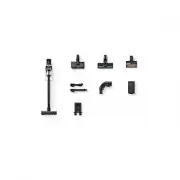
English 11 Preparation Accessories The accessories with the ' * ' mark may differ depending on the models. Pipe Pet Tool+ Combination Tool Extension Crevice Tool Flexible Tool User manual Wall mount (2 screws / 2 screw anchors) Battery charger * Jet Dual Brush * Slim LED Brush * Spray Spinning Swee...
Page 12 - Parts overview
Preparation English 12 Pr epar ation Parts overview 12 14 13 15 16 17 10 11 05 06 09 07 08 01 03 04 02 01 Power ( ) button 02 Suction power control buttons 03 Washable Micro Filter 04 Metal Mesh Grille Filter 05 Display 06 Dustbin release button 07 Fine Dust Filter 08 Dustbin 09 Pipe 10 Handle 11 Ba...
Page 13 - Operation; Assembling the wall mount; Installing the wall mount
English 13 Operation CAUTION Install the wall mount on a hard concrete wall.• If it is installed on a wood or plaster wall, the product may fall. Assembling the wall mount 1 2 To disassemble the wall mount, follow steps in reverse order. Installing the wall mount Wall mount hole Screws 113 cm Screw...
Page 14 - Using the wall mount
Operation English 14 Oper ation Using the wall mount Charging • Make sure the back of the battery is correctly placed onto the wall mount. • Check if the battery level indicator turns on while charging. • The battery level indicator blinks while charging. When charging is complete, the blinking stop...
Page 15 - Storing the accessories
English 15 Oper ation Storing the accessories [When the wall mount is installed to a wall] [When the wall mount is not installed to a wall] • If the wall mount is not installed to a wall, fold the accessory holder as shown in the figure, and then place the wall mount on a flat and even surface (suc...
Page 16 - Charging the battery; Inserting the battery
Operation English 16 Oper ation Charging the battery • When the battery level indicator turns red or the ‘ Low battery ’ message appears on the display, charge the battery. • You cannot use the vacuum cleaner while charging.• Make sure the back of the battery is correctly placed onto the vacuum char...
Page 17 - Charging the additional battery
English 17 Oper ation Charging the additional battery Battery level indicator Charge the additional battery on the battery cradle.• Firmly push the battery onto the battery cradle.• Battery level indicator turns on and changes color to red, orange, and yellow as the battery charges. The battery lev...
Page 18 - Using the buttons and display; Alert messages
Operation English 18 Oper ation Using the buttons and display 8: 89 8; 01 Display - Displays the current mode (‘ MIN , MID , MAX , JET , or WET ’) or the alert message. 02 Power ( ) - Press this button to turn on or off the vacuum cleaner. - When you turn on the power, the vacuum cleaner starts in t...
Page 19 - Using the accessories; Detaching the accessories; Combination Tool
English 19 Oper ation Using the accessories Detaching the accessories • To detach the accessories, press the release button on the back of each accessory. • Before detaching the accessories, operate the vacuum cleaner in the ' MAX ' mode for 10 seconds to prevent any foreign matter remains inside t...
Page 20 - Spray Spinning Sweeper
Operation English 20 Oper ation Spray Spinning Sweeper Reusable wet pad Disposable wet pad Attachable pad Attaching Detaching After use <Front> <Back> Spin disk Velcro Use to clean a wood and linoleum floor with a wet pad.• The Spray Spinning Sweeper does not have a dust suction function...
Page 21 - Cleaning the vacuum cleaner; Dustbin/Washable Micro Filter
English 21 Maintenance Cleaning the vacuum cleaner Dustbin/Washable Micro Filter 1 2 3 4 5 24H 6 7 ᎃ)& (ᎅ 8 9 1 2 ᎃ)& (ᎅ ᎃ)& (ᎅ CAUTION • After cleaning the dustbin and Washable Micro Filter with water, you should dry them completely in the shade for more than 24 hours before use. - Whe...
Page 22 - Fine Dust Filter; Jet Dual Brush
Maintenance English 22 Maint enanc e Fine Dust Filter Make sure to turn off the product before cleaning the filter. 24H • Twist and pull off the Fine Dust Filter, and tap it gently to remove the dust.• Wash the filter with running water once a month to maintain the best performance of the filter.• A...
Page 23 - Slim LED Brush
English 23 Maint enanc e Slim LED Brush 9 : 1 9 : ; 2 3 4 ‘Click’ 5 CAUTION • Do not clean the brush with water. • When foreign matter remains on the brush, remove it with a wet tissue or a dry cloth. NOTE • If the spin brush does not work after cleaning the Slim LED Brush, the overheating preventi...
Page 24 - Slim LED Brush roller wheels; Front roller wheel
Maintenance English 24 Maint enanc e Slim LED Brush roller wheels Front roller wheel Rear roller wheel Use a small screwdriver to disassemble the front and rear roller wheels. NOTE Tools required for disassembly. Flat head screwdriver (3 mm or less in width), Phillips screwdriver, prying tool. CAUTI...
Page 25 - Rear roller wheel
English 25 Maint enanc e Rear roller wheel 1 Release lever 2 3 4 5 ‘Click’ Release lever 6 • Lift the release lever to detach the rear roller wheel.• Detach the rear roller wheel and remove the tangled foreign matter. Then, reassemble the wheel.• Insert the rear roller wheel into its place, and the...
Page 26 - Extension Crevice Tool / Pipe
Maintenance English 26 Maint enanc e Spray Spinning Sweeper NOTE If the spin disk does not work after cleaning the Spray Spinning Sweeper, the overheating prevention device of the motor may have been enabled. Wait 30 minutes or more to cool the motor and operate again. Pet Tool+ 1 2 Cut the tangled ...
Page 27 - Notes and cautions; Installation; Battery usage
English 27 Appendix Notes and cautions Installation CAUTION • Do not install the product near water, in an area with excessive moisture, or near window, etc. • Install the wall mount in a place where there are no objects that could break and cause damage. • If you have a problem with installing the...
Page 30 - foreign matter, spinning speed decreases or the spin disk stops.; • Do not clean the brush of the vacuum cleaner with water. Cleaning it
Appendix English 30 Appendix Maintenance NOTE • If the inner part of the Spray Spinning Sweeper is clogged with large foreign matter, spinning speed decreases or the spin disk stops. CAUTION • Do not clean the brush of the vacuum cleaner with water. Cleaning it with water can cause deformation of pa...
Page 31 - Troubleshooting
English 31 Appendix Troubleshooting Before calling for service, review the problems and solutions below. Note that you will be charged for any service calls in which no defects were found. Problem Solutions The vacuum cleaner does not work. • Check the battery level and charge the battery.• Check w...
Page 33 - Product specification
English 33 Appendix Product specification Charging and cleaning time may differ depending on the brushes and the conditions of use. Model VS20C85**** Series Power consumption (Vacuum cleaner) Based on a handy vacuum cleaner: 580 W Battery specification Li-ion 25.2 V, 2200 mAh, 7 cell Weight (Vacuum...
Page 34 - Memo


 Samsung VS20B75AGR5 User Manual
 Samsung VS20B95943N User Manual
 Samsung VS20B95973B User Manual
 Samsung VS20C954FTB User Manual
 Samsung VS20C9544TB User Manual
 Samsung VS20R9042T2 User Manual
 Samsung VS20R9044T2 User Manual