Page 2 - contents
English - 2 contents SETTING UP YOUR DISHWASHER 6 6 Unpacking your dishwasher 6 Checking parts 7 Control panel 9 Cycle selector 10 Meeting installation requirements USING YOUR DISHWASHER 11 11 Basic guidelines 14 Adjusting the angle of the plate supports 15 Adjusting the height of the upper rack 15 ...
Page 3 - safety information; Throughout this manual, you’ll see Warning; IMPORTANT SAFETY INSTRUCTIONS; What the icons and signs in this user manual mean :; WARNING; SAVE THESE INSTRUCTIONS
English - 3 safety information Throughout this manual, you’ll see Warning and Caution notes. These important safety instructions do not cover all possible situations that might occur.It is your responsibility to use caution when installing, maintaining, and operating your dishwasher. Samsung will no...
Page 5 - BEFORE USING YOUR DISHWASHER
English - 5 To safely operate this appliance, familiarize yourself with its operations and exercise care when using it. Do not put gasoline, solvents, or other flammable materials inside the dishwasher. Do not wash dishes exposed to these materials. Keep your dishwasher detergent out of the reach of ...
Page 6 - setting up your dishwasher; UNPACKING YOUR DISHWASHER
English - 6 setting up your dishwasher Be sure to have your installer follow these instructions closely so that your new dishwasher works properly and that you’re not at risk of injury when washing dishes. UNPACKING YOUR DISHWASHER • Once your new dishwasher has been delivered to you, carefully unpa...
Page 7 - CONTROL PANEL
English - 7 CONTROL PANEL DW80K7050, DW80K5050 Series 1 Light indicator Indicates that the product is operating. 2 Power When you press the Power button, the entire display turns on and off, and then the light of the most recently fi nished cycle lights up. When the selected cycle is complete, the di...
Page 8 - O O X
English - 8 7 Sanitize / (Control Lock) Control Lock allows you to lock the buttons on the control panel so children cannot accidently start the dishwasher by pressing the buttons on the panel. To lock and unlock the buttons on the control panel, hold the Sanitize button down for three (3) seconds w...
Page 9 - CYCLE SELECTOR
English - 9 CYCLE SELECTOR 1 Auto This cycle detects the level of soil and automatically initiates the optimal cycle after a few minutes of operation. 2 Normal Use this cycle for normally soiled dinner dishes. 3 Heavy Use this cycle for heavily soiled dishes and dishes with heavy soil. 4 Delicate Us...
Page 10 - MEETING INSTALLATION REQUIREMENTS; Electrical supply and grounding; GROUNDING INSTRUCTIONS; Water supply; Flooring
English - 10 MEETING INSTALLATION REQUIREMENTS Electrical supply and grounding To prevent the risk of fire, electric shock, or personal injury, all wiring and grounding must be done in accordance with the National Electrical Code ANSI/FNPA, No. 70 Latest Revision and local codes and ordinances. It is...
Page 11 - using your dishwasher; BASIC GUIDELINES
English - 11 using your dishwasher BASIC GUIDELINES 1. Open the door and load your dishes (see page 14 ). - Place dishes into the upper and lower racks, unless you have selected Lower Rack. - Remove any food remains from the dishes before placing them in the FlexLoad™ rack(s). - After placing the di...
Page 12 - Touch controls; A u t o R e l e a s e; A u t o R e l e a s e O n / O ff; Setting Mode
English - 12 Touch controls Touch controls allow you to operate the dishwasher easily. • They are convenient to operate, requiring only a soft touch. • Have a simple and stylish design. • Are easy to clean. If you have children or you want to clean the Control Interface, we recommend activating the ...
Page 13 - Delay start; Do not wash the following items
English - 13 03 using your dishwasher DW7000KM-02025B-02_EN.indd Sec4:13 DW7000KM-02025D-01_EN.indd Sec4:13 2018-05-18 10:47:25 201 -0 -0 10:47:25 Delay start When you select the Delay Start option, your dishwasher will: • Start draining to remove remaining water at once (pre-drain). Your dishwasher...
Page 14 - ADJUSTING THE ANGLE OF THE PLATE SUPPORTS
English - 14 ADJUSTING THE ANGLE OF THE PLATE SUPPORTS You can adjust the angle of the tines in the upper rack to three different positions to match the size and shape of your dishes. To adjust the tines, grasp the handle at the back of the rack and push it left or right. See the illustration below....
Page 16 - LOADING THE LOWER RACK; Loading the large items into the StormWashTM zone
English - 16 LOADING THE LOWER RACK The lower rack has been especially designed for dinner dishes, soup bowls, plates, pots, lids, casserole dishes, and plates. Load large items such as pans and pots into the dishwasher so their open sides face downwards. We recommend loading cups, stemware, and sma...
Page 17 - LOADING THE UPPER RACK; Using the glass support
English - 17 LOADING THE UPPER RACK The upper rack has been designed for small plates, mugs, glasses, and plastic items marked “dishwasher safe”. Load your plates into the dishwasher in two half rows, so that the front of each plate faces the back of the plate in front of it, and the open sides of t...
Page 18 - USING THE CUTLERY RACK
English - 18 USING THE CUTLERY RACK The cutlery rack consists of two compartments. You can place each knife, spoon, or fork separately into the spoon stands in the basket’s covers to prevent chipping and discoloration. You can use the cutlery rack with the cover open. Refer to the illustration to th...
Page 19 - USING THE 3; Loading the cutlery rack
English - 19 USING THE 3 RD (CUTLERY) RACK (FOR APPLICABLE MODELS) Loading the cutlery rack <Place items randomly or regularly.> In addition to the standard cutlery basket in the lower rack, some models come with a cutlery rack.The cutlery rack is best suited for fl atware and cooking or servin...
Page 20 - USING DETERGENT; Filling the detergent dispenser
English - 20 USING DETERGENT All dishwasher cycles require detergent in the detergent compartment. Add the correct amount of detergent for the selected cycle to ensure the best performance. Use dishwasher detergent only. Regular detergent produces too much foam, which may decrease the dishwasher’s p...
Page 21 - Filling the rinse aid reservoir
English - 21 The cover opens automatically to dispense the detergent during the wash. CYCLE AMOUNT OF DETERGENT Main wash dispenser Onto the door for pre-wash Auto, Normal 3/4 oz (20 g) 1/3 oz (10 g) Heavy, Express 60' 1 oz (30 g) 1/2 oz (15 g) Delicate 3/4 oz (20 g) 1/5 oz (5 g) The numbers inside ...
Page 23 - CLEANING THE NOZZLES; Lower nozzle
English - 23 4. Remove any dirt or other remains from the fi lters, and then rinse them under running water. 5. Reassemble the fi lters in the reverse order of the dissasembly, replace the fi lter insert, and rotate clockwise to the close arrow. If the fi lter insert is not closed properly, its performa...
Page 24 - Middle nozzle; Upper nozzle; STORING YOUR DISHWASHER
English - 24 Middle nozzle 1. Pull the upper rack towards the front and remove it. 2. Check whether the nozzle holes are clogged by food particles. 3. If cleaning is needed, remove the nozzle. 4. To remove the nozzle, unfasten and remove the nut, and then remove the nozzle. 5. Clean the nozzle, re-i...
Page 25 - cycles; CYCLE CHART
English - 25 cycles CYCLE CHART DW80K7050 Series Cycle Pre- wash1 Pre- wash2 Pre- wash3 Main wash Rinse1 Rinse2 Rinse3 Last Rinse [Sanitize] Dry Water [gal(ℓ)] Time (min) Auto 4.5-6.5 (16.9-24.7) 128-144 122-140 ˚F (50-60 ˚C) 136-154 ˚F (58-68 ˚C) [163 ˚F (73 ˚C)] Normal ...
Page 27 - troubleshooting; CHECK THESE POINTS IF YOUR DISHWASHER...
English - 27 troubleshooting CHECK THESE POINTS IF YOUR DISHWASHER… PROBLEM POSSIBLE CAUSE SOLUTION Will not start. The door is not closed completely. Check if the door is latched and closed completely. No cycle is selected. Select a proper cycle. The power cable is not connected. Connect the power ...
Page 30 - INFORMATION CODES
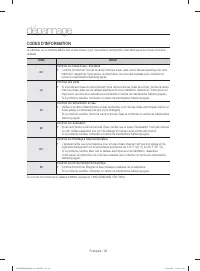
English - 30 INFORMATION CODES The Control Panel displays information codes to help you understand what is occurring with your dishwasher. Code Action OC Over-level water check • Functional check. Close the water supply valve and go to your house circuit breaker panel, set the dishwasher’s circuit b...
Page 31 - appendix; HELPING THE ENVIRONMENT
English - 31 appendix HELPING THE ENVIRONMENT • Your dishwasher is manufactured from recyclable materials. If you decide to dispose of it, please observe local waste disposal regulations. Cut off the power cable so that the appliance cannot be connected to a power source. • Remove the door so that a...
Page 36 - memo
memo DW7000KM-02025B-0 EN.indd Sec10:34 DW7000KM-02025D-01_EN.indd Sec10:34 2016-05-18 10:47:43 2019-05-01 10:47:43
Page 38 - Questions or Comments?
Questions or Comments? COUNTRY CALL OR VISIT US ONLINE AT U.S.A 1-800-SAMSUNG (726-7864) www.samsung.com/us/support CANADA 1-800-SAMSUNG (726-7864) www.samsung.com/ca/support (English) www.samsung.com/ca_fr/support (French) DD81-02025D-0 bit.ly/samsungdishwashers DW7000KM-02025B-01_EN.indd Sec10:36 ...
Page 40 - table des matières
Français - 2 table des matières INSTALLATION DU LAVE-VAISSELLE 6 6 Déballage du lave-vaisselle 6 Contrôle du contenu 7 Tableau de commande 9 Sélecteur de programme 10 Conditions indispensables à l'installation UTILISATION DU LAVE-VAISSELLE 11 11 Instructions de base 14 Réglage de l'inclinaison des p...
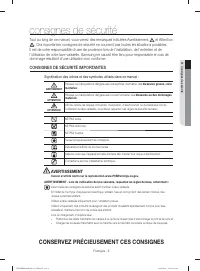
Page 41 - consignes de sécurité; et Attention; CONSIGNES DE SÉCURITÉ IMPORTANTES; Signifi cation des icônes et des symboles utilisés dans ce manuel :; AVERTISSEMENT; CONSERVEZ PRÉCIEUSEMENT CES CONSIGNES
Français - 3 consignes de sécurité Tout au long de ce manuel, vous verrez des remarques intitulées Avertissement et Attention . Ces importantes consignes de sécurité ne couvrent pas toutes les situations possibles. Il est de votre responsabilité d'user de prudence lors de l'installation, de l'entret...
Page 44 - installation du lave-vaisselle; DÉBALLAGE DU LAVE-VAISSELLE
Français - 6 installation du lave-vaisselle Veillez à ce que votre installateur respecte soigneusement ces consignes afi n de garantir le bon fonctionnement de votre lave-vaisselle et d'éviter tout risque de blessures lors de son utilisation. DÉBALLAGE DU LAVE-VAISSELLE • Après la livraison de votre ...
Page 45 - TABLEAU DE COMMANDE
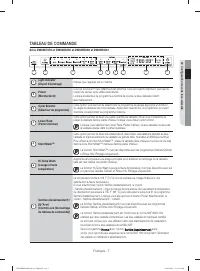
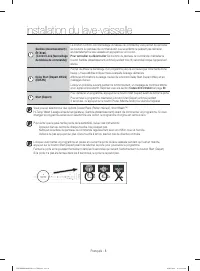
Français - 7 TABLEAU DE COMMANDE Série DW80K7050 et DW80K5050 1 Light indicator (Voyant d'éclairage) Indique que l'appareil est en marche. 2 Power (Marche/Arrêt) Une fois le bouton Power (Marche/Arrêt) actionné, tous les voyants clignotent, puis seul le voyant du dernier cycle utilisé reste allumé.L...
Page 47 - SÉLECTEUR DE PROGRAMME
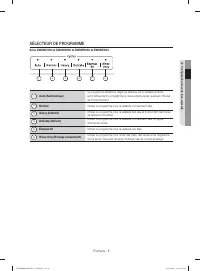
Français - 9 SÉLECTEUR DE PROGRAMME Série DW80K7050 et DW80K5050 et DW80R5060 et DW80R5061 1 Auto (Automatique) Ce programme détecte le degré de salissure de la vaisselle et lance automatiquement le programme le mieux adapté après quelques minutes de fonctionnement. 2 Normal Utilisez ce programme po...
Page 48 - CONDITIONS INDISPENSABLES À L'INSTALLATION; Mise à la terre et alimentation électrique; Sol
Français - 10 CONDITIONS INDISPENSABLES À L'INSTALLATION Mise à la terre et alimentation électrique Afi n d'éviter tout risque d'incendie, de choc électrique ou de blessure, le câblage et la mise à la terre doivent être conformes au National Electrical Code (Code national sur les installations électr...
Page 49 - utilisation du lave-vaisselle; INSTRUCTIONS DE BASE
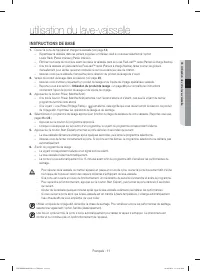
Français - 11 utilisation du lave-vaisselle INSTRUCTIONS DE BASE 1. Ouvrez la porte de l'appareil et chargez la vaisselle (voir page 14 ). - Répartissez la vaisselle dans les paniers supérieur et inférieur, sauf si vous avez sélectionné l'option Lower Rack (Panier inférieur) (Panier inférieur). - É...
Page 50 - Commandes tactiles; L e re g l a g e A u t o R e l e a s e TM
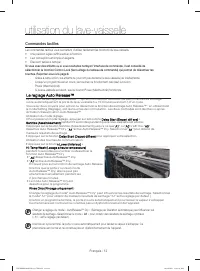
Français - 12 Commandes tactiles Les commandes tactiles vous permettent d’utiliser facilement les fonctions du lave-vaisselle. • Une pression légère suffi t à activer la fonction. • Leur conception est simple et élégante. • Elles sont faciles à nettoyer. Si vous avez des enfants ou si vous souhaitez ...
Page 51 - Départ différé; Les éléments suivants ne sont pas résistants au lave-vaisselle :; Mode réglage
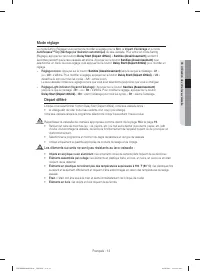
Français - 13 Départ différé Lorsque vous sélectionnez l'option Delay Start (Départ différé), votre lave-vaisselle lance : • la vidange afi n de vider toute l'eau restante d'un coup (pré-vidange). Votre lave-vaisselle lancera le programme sélectionné lorsqu'il aura atteint l'heure voulue. Répartissez...
Page 52 - RÉGLAGE DE L'INCLINAISON DES PORTE-ASSIETTES
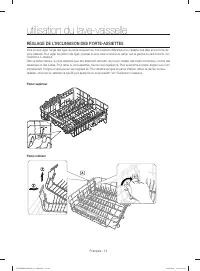
Français - 14 RÉGLAGE DE L'INCLINAISON DES PORTE-ASSIETTES Vous pouvez régler l'angle des tiges du panier supérieur sur trois positions différentes pour l'adapter à la taille et à la forme de votre vaisselle. Pour régler la position des tiges, poussez le levier situé à l'arrière du panier vers la ga...
Page 54 - CHARGEMENT DU PANIER INFÉRIEUR; Chargement d’éléments volumineux dans la zone StormWashTM
Français - 16 CHARGEMENT DU PANIER INFÉRIEUR Il a été spécialement conçu pour accueillir la vaisselle de table, les bols, les assiettes, les casseroles, les couvercles et les plats. Chargez les objets volumineux (poêles, casseroles) face intérieure tournée vers le bas. Il est conseillé de charger le...
Page 55 - CHARGEMENT DU PANIER SUPÉRIEUR; Utilisation du porte-verres
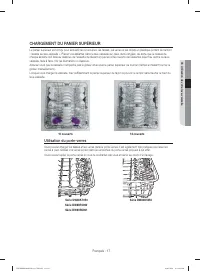
Français - 17 CHARGEMENT DU PANIER SUPÉRIEUR Le panier supérieur est conçu pour accueillir les soucoupes, les tasses, les verres et les objets en plastique portant la mention « lavable au lave-vaisselle ». Placez vos assiettes dans le lave-vaisselle sur deux demi-rangées, de sorte que le dessus de c...
Page 56 - UTILISATION DU PANIER À COUVERTS
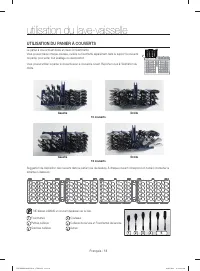
Français - 18 UTILISATION DU PANIER À COUVERTS Le panier à couverts est divisé en deux compartiments. Vous pouvez placer chaque couteau, cuillère ou fourchette séparément dans le support à couverts du panier pour éviter tout écaillage ou décoloration. Vous pouvez utiliser le panier à couverts avec l...
Page 57 - UTILISATION DU 3; Chargement du panier à couverts
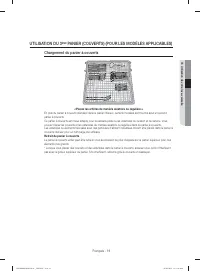
Français - 19 UTILISATION DU 3 ÈME PANIER (COUVERTS) (POUR LES MODÈLES APPLICABLES) Chargement du panier à couverts <Placez les articles de manière aléatoire ou régulière.> En plus du panier à couverts standard dans le panier inférieur, certains modèles sont fournis avec un second panier à co...
Page 58 - UTILISATION DU PRODUIT DE LAVAGE; Remplissage du réservoir de produit de lavage
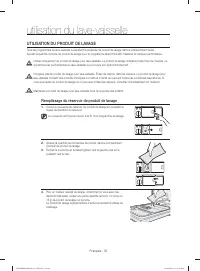
Français - 20 UTILISATION DU PRODUIT DE LAVAGE Tous les programmes du lave-vaisselle nécessitent la présence de produit de lavage dans le compartiment dédié. Ajoutez la quantité correcte de produit de lavage pour le programme sélectionné afi n d'assurer la meilleure performance. Utilisez uniquement d...
Page 59 - Remplissage du réservoir de produit de rinçage
Français - 21 Le couvercle s'ouvrira automatiquement pour déverser le produit dans la machine au cours du lavage. CYCLE (PROGRAMME) QUANTITÉ DE PRODUIT DE LAVAGE Réservoir de lavage principal Dans la porte pour le prélavage Auto (Automatique), Normal 3/4 oz (20 g) 1/3 oz (10 g) Heavy (Intensif), Exp...
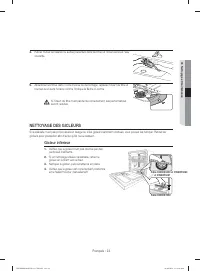
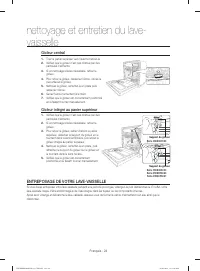
Page 61 - NETTOYAGE DES GICLEURS; Gicleur inférieur
Français - 23 4. Retirez toutes les saletés ou autres présentes dans les fi ltres et rincez-les sous l'eau courante. 5. Assemblez les fi ltres dans l'ordre inverse du démontage, replacez l'insert du fi ltre et tournez-le en sens horaire comme l'indique la fl èche ci-contre. Si l'insert du fi ltre n'est p...
Page 62 - ENTREPOSAGE DE VOTRE LAVE-VAISSELLE
Français - 24 Gicleur central 1. Tirez le panier supérieur vers l'avant et retirez-le. 2. Vérifi ez que le gicleur n'est pas obstrué par des particules d'aliments. 3. Si un nettoyage s'avère nécessaire, retirez le gicleur. 4. Pour retirer le gicleur, desserrez l'écrou, retirez-le puis enlevez le gicl...
Page 63 - programmes; TABLEAU DES PROGRAMMES
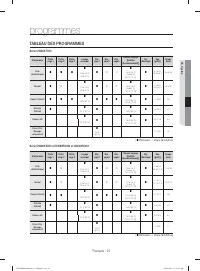
Français - 25 programmes TABLEAU DES PROGRAMMES Série DW80K7050 Programme Préla- vage 1 Préla- vage 2 Préla- vage 3 Lavage principal Rin- çage1 Rin- çage2 Rin- çage3 Dernier rinçage [Sanitize (Assainissement)] Dry (Séchage) Eau [gal(ℓ)] Temps (min) Auto (Automatique) 4,5 à 6,5 (16,...
Page 65 - dépannage
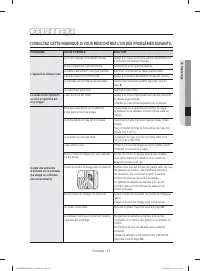
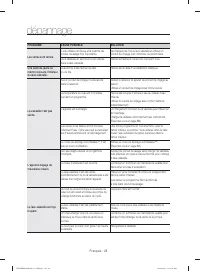
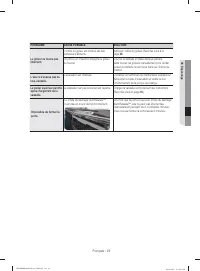
Français - 27 dépannage CONSULTEZ CETTE RUBRIQUE SI VOUS RENCONTREZ L'UN DES PROBLÈMES SUIVANTS. PROBLÈME CAUSE POSSIBLE SOLUTION L'appareil ne démarre pas. La porte n'est pas correctement fermée. Vérifi ez si le loquet de la porte est bien enclenché et si la porte est correctement fermée. Aucun prog...
Page 69 - annexe; PROTECTION DE L'ENVIRONNEMENT
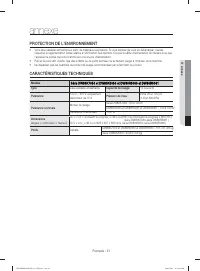
Français - 31 annexe PROTECTION DE L'ENVIRONNEMENT • Votre lave-vaisselle est fabriqué à partir de matériaux recyclables. Si vous décidez de vous en débarrasser, veuillez respecter la réglementation locale relative à l'élimination des déchets. Coupez le câble d'alimentation de manière à ce que l'app...
Page 74 - notes
notes DW7000KM-02025D-01_CFR.indd Sec10 :34 DW7000KM-02025D-01_CFR.indd Sec10 :34 2018-07-20 2:37:28 201 -0 - 2:37:28 9 5 01
Page 76 - Des questions ou des commentaires ?
Des questions ou des commentaires ? PAYS N° de téléphone SITE INTERNET U.S.A 1-800-SAMSUNG (726-7864) www.samsung.com/us/support CANADA 1-800-SAMSUNG (726-7864) www.samsung.com/ca/support (English) www.samsung.com/ca_fr/support (French) DD81-02025 -0 bit.ly/samsungdishwashers DW7000KM-02025 -01_CFR....
Page 77 - Lavavajillas; manual del usuario; imagine
Lavavajillas manual del usuario imagine las posibilidades Gracias por adquirir este producto Samsung. Serie DW80K7050Serie DW80K5050 DW7000KM-02025A-01_MES.indd 1 DW7000KM-02025D-01_MES.indd 1 2016-05-18 10:59:20 2019-05-01 10:59:20 Serie Serie DW80R5060 DW80R5061
Page 78 - contenido
Español - 2 contenido CONFIGURACIÓN DE SU LAVAVAJILLAS 6 6 Desempaque de la lavavajillas 6 Verifi cación de las piezas 7 Panel de control 9 Selector de ciclos 10 Cumplimiento de los requisitos de instalación USO DE LA LAVAVAJILLAS 11 11 Pautas básicas 14 Ajuste del ángulo de los soportes para platos ...
Page 79 - información sobre seguridad; A lo largo de este manual, encontrará notas de Advertencia; INSTRUCCIONES DE SEGURIDAD IMPORTANTES; Signifi cado de los íconos y señales de este manual del usuario:; ADVERTENCIA; CONSERVE ESTAS INSTRUCCIONES
Español - 3 información sobre seguridad A lo largo de este manual, encontrará notas de Advertencia y Precaución . Estas importantes instrucciones de seguridad no abarcan todas las situaciones posibles que podrían ocurrir.Es su responsabilidad actuar con precaución cuando instale, realice el mantenim...
Page 81 - ANTES DE USAR LA LAVAVAJILLAS
Español - 5 No vierta gasolina, solventes ni otros materiales infl amables dentro de la lavavajillas. No lave vajilla que haya sido expuesta a estos materiales. Mantenga el detergente de la lavavajillas fuera del alcance de los niños. El detergente causa un efecto adverso en los órganos del cuerpo hu...
Page 82 - confi guración de su lavavajillas; DESEMPAQUE DE LA LAVAVAJILLAS
Español - 6 confi guración de su lavavajillas Asegúrese de que su instalador siga estas instrucciones minuciosamente para que su nueva lavavajillas funcione adecuadamente y no existan riesgos de sufrir lesiones al lavar los platos. DESEMPAQUE DE LA LAVAVAJILLAS • Cuando haya recibido la lavavajillas,...
Page 83 - PANEL DE CONTROL
Español - 7 PANEL DE CONTROL Series DW80K7050, DW80K5050, DW80R5060, DW80R5061 1 Light indicator (Indicador luminoso) Indica que el producto está en funcionamiento. 2 Power (Encendido) Cuando se presiona el botón Power (Encendido), se enciende y apaga toda la pantalla y luego se enciende la luz del ...
Page 85 - SELECTOR DE CICLOS
Español - 9 SELECTOR DE CICLOS Series DW80K7050, DW80K5050 1 Auto Este ciclo detecta el nivel de suciedad e inicia automáticamente el ciclo óptimo luego de algunos minutos de funcionamiento. 2 Normal Utilice este ciclo para la vajilla con suciedad normal. 3 Heavy (Muy sucio) Utilice este ciclo para ...
Page 86 - CUMPLIMIENTO DE LOS REQUISITOS DE INSTALACIÓN; Suministro eléctrico y conexión a tierra; INSTRUCCIONES DE CONEXIÓN A TIERRA; Suministro de agua; Piso
Español - 10 CUMPLIMIENTO DE LOS REQUISITOS DE INSTALACIÓN Suministro eléctrico y conexión a tierra Para evitar el riesgo de incendio, descarga eléctrica o lesiones físicas, todo el cableado y la conexión a tierra deben realizarse de conformidad con la versión más reciente del Código Eléctrico Nacio...
Page 87 - uso de la lavavajillas; PAUTAS BÁSICAS
Español - 11 uso de la lavavajillas PAUTAS BÁSICAS 1. Abra la puerta y cargue la vajilla (consulte la página 14 ). - Coloque la vajilla en los estantes superior e inferior, a menos que seleccione Lower Rack (Estante inferior). - Retire los restos de comida de la vajilla antes de colocarla en los est...
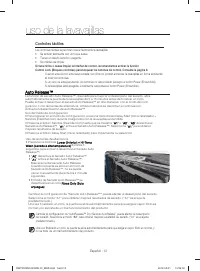
Page 88 - Controles táctiles; A u t o R e l e a s e TM
Español - 12 Controles táctiles Los controles táctiles le permiten operar fácilmente la lavavajillas. • Se activan fácilmente con un toque suave. • Tienen un diseño sencillo y elegante. • Son fáciles de limpiar. Si tiene niños o desea limpiar la Interfaz de control, recomendamos activar la función C...
Page 89 - Inicio retardado; No deben lavarse los siguientes artículos; Modo de confi guración
Español - 13 Inicio retardado Al seleccionar la opción de su lavavajillasDelay Start (Inicio retardado): • Comienza a vaciarse el agua restante inmediatamente (vaciado previo). La lavavajillas efectuará el ciclo seleccionado luego de que se cumpla el tiempo establecido para iniciar el programa. Cuan...
Page 90 - AJUSTE DEL ÁNGULO DE LOS SOPORTES PARA PLATOS
Español - 14 AJUSTE DEL ÁNGULO DE LOS SOPORTES PARA PLATOS Puede ajustar el ángulo de los dientes del estante superior en tres posiciones distintas para que coincida con el tamaño y la forma de la vajilla. Para ajustar los dientes, sujete la manija de la parte posterior del estante y empuje hacia la...
Page 92 - CARGA DEL ESTANTE INFERIOR; Carga de objetos grandes en la zona StormWashTM (Lavado potente)
Español - 16 CARGA DEL ESTANTE INFERIOR Se ha diseñado el estante inferior específi camente para la vajilla para comida, recipientes para sopa, platos, ollas, tapas y fuentes de horno. Cargue los objetos grandes como recipientes y ollas en la lavavajillas de manera que sus lados abiertos miren hacia ...
Page 93 - CARGA DEL ESTANTE SUPERIOR; Uso del soporte para copas
Español - 17 CARGA DEL ESTANTE SUPERIOR Se ha diseñado el estante superior para platos pequeños, jarras, vasos y objetos de plástico que tengan el rótulo "apto para lavavajillas". Cargue los platos en la lavavajillas en dos medias hileras, de manera que la cara de cada plato mire la parte tr...
Page 94 - USO DEL ESTANTE PARA CUBIERTOS
Español - 18 USO DEL ESTANTE PARA CUBIERTOS El estante para cubiertos consiste en dos compartimientos. Puede colocar independientemente cada cuchillo, cuchara o tenedor en el soporte para cucharas en la cubierta de la canasta para evitar roturas o decoloración. El estante para cubiertos puede utiliz...
Page 95 - USO DEL 3; Carga del estante para cubiertos
Español - 19 USO DEL 3 ER ESTANTE (CUBIERTOS) (PARA MODELOS APLICABLES) Carga del estante para cubiertos <Ubique los artículos en forma aleatoria u ordenada.> Además de la canasta para cubiertos estándar del estante superior, algunos modelos tienen un estante para cubiertos.El estante para cub...
Page 96 - USO DEL DETERGENTE; Llenado del dosifi cador de detergente
Español - 20 USO DEL DETERGENTE Todos los ciclos de la lavavajillas requieren detergente en el compartimiento correspondiente. Agregue la cantidad adecuada de detergente para el ciclo seleccionado para asegurar el mejor desempeño. Use solamente detergente para lavavajillas. Los detergentes normales ...
Page 97 - Llenado del depósito de producto de enjuague
Español - 21 La cubierta se abre automáticamente para dosifi car el detergente durante el lavado. CICLO CANTIDAD DE DETERGENTE Dosifi cador para el lavado principal En la puerta para el prelavado Auto, Normal 3/4 oz (20 g) 1/3 oz (10 g) Heavy (Muy sucio), Express 60' (Rápido 60') 1 oz (30 g) 1/2 oz (1...
Page 99 - LIMPIEZA DE LAS BOQUILLAS; Boquilla inferior
Español - 23 4. Elimine el polvo y cualquier otro residuo de los fi ltros y enjuague estos con agua de la llave. 5. Vuelva a ensamblar los fi ltros en el orden inverso al desensamble, reemplace el cartucho del fi ltro y rote en el sentido de las agujas del reloj hasta la fl echa. Si el cartucho del fi lt...
Page 100 - Boquilla intermedia; Boquilla superior; CÓMO GUARDAR LA LAVAVAJILLAS
Español - 24 Boquilla intermedia 1. Jale el estante superior hacia el frente y retírelo. 2. Verifi que que los orifi cios de la boquilla no estén obstruidos con partículas de comida. 3. Si hace falta limpiar la boquilla, retírela. 4. Para hacerlo, afl oje y retire la tuerca y luego quite la boquilla. 5...
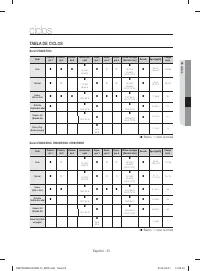
Page 101 - ciclos; TABLA DE CICLOS
Español - 25 ciclos TABLA DE CICLOS Serie DW80K7050 Ciclo Prelava- do 1 Prelava- do 2 Prelava- do 3 Lavado prin- cipal Enjua- gue 1 Enjua- gue 2 Enjua- gue 3 Último enjuague [Desinfección] Secado Agua [gal(ℓ)] Tiempo (min) Auto 4.5-6.5 (16.9-24.7) 128-144 122-140 ˚F (50-60 ˚C) 136-...
Page 103 - solución de problemas; CONTROLE ESTOS PUNTOS SI SU LAVAVAJILLAS...
Español - 27 solución de problemas CONTROLE ESTOS PUNTOS SI SU LAVAVAJILLAS… PROBLEMA CAUSA POSIBLE SOLUCIÓN No enciende. La puerta no está completamente cerrada. Verifi que que la puerta esté trabada y completamente cerrada. No se ha seleccionado ningún ciclo. Seleccione un ciclo adecuado. El cable ...
Page 106 - CÓDIGOS DE INFORMACIÓN
Español - 30 CÓDIGOS DE INFORMACIÓN El panel de control muestra códigos de información para ayudarle a comprender mejor qué ocurre con la lavavajillas. Código Acción OC Control de nivel alto de agua • Control funcional. Cierre la válvula de suministro de agua, vaya al panel del disyuntor de su casa,...
Page 107 - apéndice; AYUDA AL MEDIO AMBIENTE
Español - 31 apéndice AYUDA AL MEDIO AMBIENTE • Esta lavavajillas se fabrica con materiales reciclables. Si decide deshacerse de ella, siga la normativa local relacionada con la eliminación de desechos. Corte el cable de alimentación para que el aparato no pueda conectarse a una fuente de alimentaci...
Page 112 - notas
notas DW7000KM-02025A-01_MES.indd Sec10:34 DW7000KM-02025D-01_MES.indd Sec10:34 2016-05-18 10:59:43 2019-05-01 10:59:43
Page 114 - ¿Tiene alguna pregunta o algún comentario?
¿Tiene alguna pregunta o algún comentario? PAÍS LLAME AL O VISÍTENOS EN LÍNEA EN U.S.A 1-800-SAMSUNG (726-7864) www.samsung.com/us/support CANADA 1-800-SAMSUNG (726-7864) www.samsung.com/ca/support (English) www.samsung.com/ca_fr/support (French) DD81-02025 -0 bit.ly/samsungdishwashers DW7000KM-0202...