Ryobi ELL1501 - User Manual
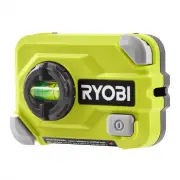
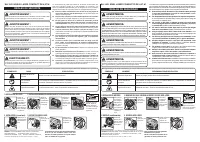
This safety and installation manual covers the Ryobi ELL1501 15-foot compact laser level, emphasizing critical precautions like handling laser radiation safely and guiding users through battery setup and wall mounting procedures. The document highlights hazard symbols and structured steps to ensure proper assembly while addressing both technical operation and user safety requirements.

WARNING:
To reduce the risk of injury, the user must read
and understand the operator’s manual before
using this product.
WARNING:
U s e o f c o n t r o l s o r a d j u s t m e n t s o r
performance of procedures other than those
specified herein may result in hazardous
radiation exposure.
WARNING:
The use of an optical instrument with this
product will increase eye hazard.
WARNING:
Never position your hand or fingers behind
corner pins. When corner pins are depressed,
the pins protrude out the back and may cause
personal injury.
The laser guide radiation used in this laser level
is Class IIIa with < 5mW and 630-660 nm wave-
lengths. These lasers do not normally present an
optical hazard although staring at the beam may
cause flash blindness.
Avoid
direct eye exposure when using the
laser and do not project the laser beam
directly into the eyes of others.
Serious eye
injury could result.
Do not remove or deface any product labels.
Removing product labels increases the risk of
exposure to laser radiation.
Do not place the laser level in a position that
may cause anyone to stare into the laser
ELL1501
15 FT. COMPACT LASER LEVEL
The following signal words and meanings are intended to explain the levels of risk associated with the product.
SYMBOL
NAME
EXPLANATION
Safety Alert
Indicates a potential personal injury hazard.
Read Operator’s
Manual
To reduce the risk of injury, user must read and understand operator’s manual before using this product.
Laser Exposure
Laser radiation - avoid direct eye exposure.
1. INSTALLING BATTERIES
2. MOUNTING THE LASER LEVEL TO WALL AND USING THE LASER LEVEL
Remove battery
cover.Two AAA
batteries are
pre-installed.
Remove pull tab
to activate the
batteries. Replace
cover.
Remove laser
level from
surface.
Press top
corner pin
to create
pivot point.
Press bottom
corner pin to
mount.
Wall pin detent
in storage position.
999000155
11-4-22 (REV:01)
beam intentionally or unintentionally.
Serious
eye injury could result.
Do not operate the laser level around
children or allow children to operate the
tool.
Serious eye injury could result.
Always turn the laser level off when not in
use.
Leaving the tool on increases the risk of
someone inadvertently staring into the laser
beam.
D o n o t o p e r a t e t h e l a s e r l e v e l i n
combustible areas such as in the presence
of flammable liquids, gasses or dust.
SAFETY RULES
Always ensure the laser beam is aimed at a
surface without reflective properties.
Shiny
reflective materials are not suitable for laser
use.
Do not disassemble the laser level.
There are
no user serviceable parts inside.
Handle the laser level with care.
Treat it as
you would any other optical device such as a
camera or binoculars.
Avoid exposing the laser level to shock,
continuous vibration or extreme hot or cold
temperatures.
Damage to the tool and/or
serious injury to the user could result.
Do not mix old and new batteries.
D o n o t m i x a l k a l i n e , s t a n d a r d o r
rechargeable batteries.
Save these instructions.
Refer to them
frequently and use them to instruct others who
may use this laser level. If you loan someone
this laser level, loan them these instructions
also.
TTI CONSUMER POWER TOOLS, INC.
P.O. Box 1288, Anderson, SC 29622 • Phone 1-800-525-2579
États-Unis, Téléphone 1-800-525-2579 • USA, Teléfono 1-800-525-2579
www.ryobitools.com
2. MOUNTING (
continued)
3. REMOVING THE LASER LEVEL
This product has a Three-year Limited Warranty.
For warranty details, go to www.ryobitools.com.
Set level for
vertical or
horizontal use.
WAVE LENGTH: 630 - 660 NM
MAX. POWER OUTPUT < 5MW
CLASS IIIa LASER PRODUCT
Complies with CFR 21 parts 1040.10 and 1040.11 RYLD
Turn level on.
Adjust position
as needed to
center bubble in
appropriate vial.
"Loading the manual" means you need to wait until the file loads and becomes available for online reading. Some manuals are very large, and the time they take to appear depends on your internet speed.
Was this manual helpful?
About this manual
- Brand
- Ryobi
- Model
- ELL1501
- Document type
- User Manual
- Category
- Laser Level
- Language(s)
- English, Spanish, French, Russian
- Pages
- 2
- File size
- 9 MB
- Format
Ask a question
Related manuals
More Ryobi Laser Levels models


Other Ryobi appliances
 Ryobi 4-in-1 RLM53175S 5133002555 User Manual
 Ryobi 105r User Manual
 Ryobi 105r, 132r, 137r Manual
 Ryobi 150r Manual
 Ryobi 180r, 190r User Manual
 Ryobi 225L, 225LD, 227L, 227LD, 232L, 240L Manual
 Ryobi 227 L, 227 LD, 232 L, 240 L Manual
 Ryobi 280r Manual
 Ryobi 330B, 340BV Manual
 Ryobi 410r User Manual
 Ryobi 454 Manual
 Ryobi 500W User Manual
 Ryobi 700R User Manual
 Ryobi 704r Manual
 Ryobi 705r Manual
 Ryobi 720R User Manual
 Ryobi 725R User Manual
 Ryobi 767R User Manual