Philips TAZ5000/10 - Quick Guide
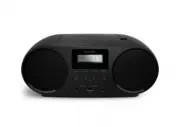
This user manual covers Philips boombox models like the TAZ5000, focusing on their core functionalities: audio playback via CDs, Bluetooth streaming, FM radio tuning, and external device connectivity. The guide also addresses power management–including battery use and sleep timers–and highlights essential care instructions for safe operation. Safety warnings and setup procedures ensure proper handling of the device’s controls and accessories.


Table of Contents:
- Page 1 – Product Identification and Support Information
- Page 2 – Unboxing and Initial Setup
- Page 3 – Powering the Device
- Page 4 – Device Power On Procedure
- Page 5 – Sleep Timer Functionality
- Page 6 – Device Controls and Functions
- Page 7 – CD Media Loading
- Page 8 – Bluetooth Device Connection
- Page 9 – AURACAST Audio Streaming
- Page 10 – FM Radio Controls
- Page 11 – Favorite Station Management
- Page 12 – External Audio Device Connection
- Page 13 – USB Flash Drive Connection
- Page 14 – Headphone Connection
- Page 15 – Product Care and Handling Guidelines
- Page 16 – Entertainment Application Download
- Page 17 – Copyright and Regulatory Information
5000
Series
TAZ5000
CD Soundmachine
"Loading the manual" means you need to wait until the file loads and becomes available for online reading. Some manuals are very large, and the time they take to appear depends on your internet speed.
Was this manual helpful?
About this manual
- Brand
- Philips
- Model
- TAZ5000/10
- Document type
- Quick Guide
- Language(s)
- English
- Pages
- 17
- File size
- 6.2 MB
- Format
Other Manuals for Philips TAZ5000/10
Summary
Identification of the Philips CD Soundmachine TAZ5000, display of product image, and access to support resources.
Procedure for unboxing the boombox, connecting power cables, and identifying included accessories and safety information.
Methods for powering the device using AC wall connection or battery installation with specified cells.
Ask a question
Related manuals
Popular Philips Other


More Philips Other models
 Philips TAX2208/37 User Manual
 Philips TAX4207/10 Quick Guide
 Philips TAX4509/37 User Manual
 Philips TAX5206/10 User Manual
 Philips TAX5708/37 User Manual
 Philips TAX7207/10 Quick Guide
 Philips TAZ6000/10 Quick Guide
 Philips TC Manual
 Philips TCW097 Manual
- Philips TL Manual
 Philips TL-D Manual
 Philips TL-E Manual