Philips TAPB405 - User Manual
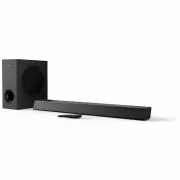
Philips TAPB405 Home Theater – User Manual, read for free online in PDF format. We hope this helps you resolve any issues you may have. If you have further questions, please contact us through the contact form.


Table of Contents:
- Page 2 – Contents
- Page 3 – Important; Help and support
- Page 4 – Care for your product
- Page 5 – Compliance; Your SoundBar; Main unit
- Page 7 – Remote control
- Page 8 – Connectors; Connect; Placement
- Page 11 – MP3 player
- Page 12 – TV play; Play audio through Bluetooth
- Page 14 – AirPlay 2
- Page 15 – Apply factory settings; Wall mount
- Page 16 – Amplifier; Audio; Remote control batteries
- Page 17 – Troubleshooting; Sound; Bluetooth
User manual
Smart soundbar
PB405
Register your product and get support at
www.philips.com/welcome
"Loading the manual" means you need to wait until the file loads and becomes available for online reading. Some manuals are very large, and the time they take to appear depends on your internet speed.
Was this manual helpful?
About this manual
- Brand
- Philips
- Model
- TAPB405
- Document type
- User Manual
- Category
- Home Theater
- Language(s)
- English
- Pages
- 18
- File size
- 2.2 MB
- Format
Summary
EN 1 Contents 1 Important 2 Help and support 2 Important safety instructions 2 Care for your product 3 Care of the environment 3 Compliance 4 2 Your SoundBar 4 Main unit 4 Remote control 6 Connectors 7 3 Connect 7 Placement 7 Connect the SoundBar and Subwoofer 8 Pair the Subwoofer manually 8 Connect...
EN 2 1 Important Read and understand all instructions before you use your product. If damage is caused by failure to follow instructions, the warranty does not apply. Help and support For extensive online support, visitwww.philips.com/support to: • download the user manual and the quick start guide ...
EN 3 hazardouswaste/perchlorate. • The product/remote control may contain a coin/button type battery, which can be swallowed. Keep the battery out of reach of children at all times! If swallowed, the battery can cause serious injury or death. Severe internal bums can occur within two hours of ingest...
Ask a question
Related manuals
More Philips Home Theaters models
Other Philips appliances
 Philips 1 Manual
 Philips 2 Manual
 Philips 2 Series Manual
 Philips 2.44E+03 Manual
 Philips 3 Manual
- Philips 4 Manual
 Philips 4CM6088 Manual
 Philips 5.1 Manual
- Philips 6 Manual
 Philips 7FF1CWO Manual
- Philips 7FF1M4 Manual
 Philips 8P6054C Manual
 Philips 9P5031C1, 9P5531C1, 9P6031C1, 9P5034C1, 9P5534C1, 9P6034C1 Manual
 Philips 10 Manual
- Philips 13 Manual
 Philips 13MT1532, 13MT1533 Manual
 Philips 13PR12W99 Manual
- Philips 14 Manual
 Philips 14GR1221 Manual