Page 2 - Table of contents; Notes
2 EN Table of contents 1 Your Philips remote control 3 2 Button functions 4 2.1 General functions 4 2.2 Dedicated DVR functions 6 2.3 Dedicated DVD functions 6 2.4 Dedicated SAT functions 6 3 Getting started 7 3.1 Battery installation 7 3.2 Code setup 7 3.3 Programming combo devices 8 3.4 Copy Volum...
Page 3 - Your Philips remote control
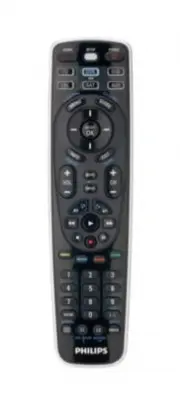
3 EN Your Philips r emote contr ol English 1 Your Philips remote control Congratulations on your purchase of this Philips universal remote control. Philips universal remote controls enable you to combine more than one remote control into one or replace a broken or lost remote control. We focused on ...
Page 4 - General functions
4 EN 2 Button functions 2.1 General functions Zone 1 LEARN SETUP POWER LEARN Used to setup learning functions. SETUP (Red light Indicator) ....... – Used for setting up the remote control. – Lights up when any button is pressed. POWER ( y ) ........................ Turns devices On / Off. Zone 2 VCR...
Page 6 - Note; Dedicated DVR functions -; CLEAR; • SUBTITLE; REPEAT; Dedicated DVD functions
6 EN Note For some devices of certain brands, the POWER ( y ) button only turns the device Off. In order to turn the device On, press any of the digit buttons. 2.2 Dedicated DVR functions - labeled in blue (Tivo* code is 0738 / Replay* code is 0938) When you select DVR mode by pressing the DVR butto...
Page 7 - Getting; Battery installation
7 EN English 3 Getting started 3.1 Battery installation • Insert 2 AA type Alkaline batteries, noting the + and – configuration in the battery compartment. 3.2 Code setup The SETUP button is used to setup the remote control. Refer to ‘Code Tables’ (on separate sheet) to find the code(s) for your dev...
Page 8 - Programming combo devices; Copy Volume / Mute buttons from
8 EN 6 Repeat steps 1 to 4 for other devices you wish to set up the remote control for. Write your codes down here for easy reference later. Device Code TV DVR SAT Notes • After a valid code entry, the red light indicator turns off. For an invalid code, the red light indicator flashes first, then tu...
Page 9 - devices to any single device; Using the remote control; Controlling devices requiring separate; Controlling combo devices
9 EN You can change which Volume / Mute buttons are used for a device (e.g. use the Volume buttons of the amplifier to control the volume of the DVD player). 3.4.1 Setting Volume / Mute control for all devices to any single device You can set all devices to use the Volume / Mute buttons of a single ...
Page 10 - Keep updated for future; Learning commands
10 EN Example of DVD . 1 Set up the remote control for a device (in this example DVD) as described in chapter 3.2.1 ‘Code search by brand’. 2 Select DVD by pressing the DVD mode button for more than 1 second . • The remote control sends out the ‘Select DVD’ command. 3 Press and immediately release t...
Page 11 - a mode; commands under all modes; Tips on learning
11 EN English 5.2 Clearing commands5.2.1 Clearing all learned commands under a mode Clearing learned commands can be useful if, for example, you replace your CD player with another brand or model. If you had learned a feature from your old CD player’s original remote control on to this remote contro...
Page 12 - Troubleshooting
12 EN • Do not move or change the distance between the two remote controls until you have learned all the required buttons for the selected mode. • When learning, do not release the button being learned until the red light indicator has flashed off for half a second. • Avoid learning your original r...
Page 13 - Limited; THERE ARE NO OTHER EXPRESS WARRANTIES.; Caution; Notice for Canada / Remarque pour le Canada
13 EN English Limited Lif etime W ar ranty 7 Limited Lifetime Warranty The manufacturer warrants that this product shall be free from defects in material, workmanship and assembly, under normal use, in accordance with the specifications and warnings, for as long as you own this product. This warrant...
Page 14 - Table des matières; Remarques
14 Table des matières 1 Votre télécommande Philips 15 2 Fonctions des touches 16 2.1 Fonctions générales 16 2.2 Fonctions dédiées DVR 18 2.3 Fonctions dédiées DVD 18 2.4 Fonctions dédiées SAT 18 3 Mise en route 19 3.1 Insertion des piles 19 3.2 Con fi guration par code 19 3.3 Programmation d'apparei...
Page 15 - Votre télécommande Philips
15 1 Votre télécommande Philips Félicitations pour l'achat de la télécommande universelle Philips. Les télécommandes universelles Philips vous permettent de regrouper les fonctions de plusieurs télécommandes en une seule, ou de remplacer une télécommande cassée ou perdue. Nous nous sommes efforcés d...
Page 16 - Fonctions des touches; Fonctions générales
16 FR 2 Fonctions des touches 2.1 Fonctions générales Zone 1 LEARN SETUP POWER LEARN .................................. Permet de con fi gurer les fonctions par apprentissage. SETUP (voyant rouge) .................... - Permet de con fi gurer la télécommande. - S'allume lorsque vous appuyez sur une ...
Page 18 - Remarque; Fonctions dédiées DVR -; Fonctions dédiées DVD
18 FR Remarque Sur les appareils de certaines marques, la touche POWER ( y ) ne fait qu'éteindre l'appareil. Pour allumer l'appareil, appuyez sur n'importe quelle touche numérique. 2.2 Fonctions dédiées DVR - en bleu (code Tivo* : 0738 / code Replay* : 0938) Lorsque vous sélectionnez le mode DVR en ...
Page 19 - Mise en route; Insertion des piles
19 FR Français 3 Mise en route 3.1 Insertion des piles • Insérez 2 piles AA alcalines en respectant les polarités indiquées dans le compartiment à piles. 3.2 Configuration par code La touche SETUP permet de configurer la télécommande. Recherchez les codes de vos appareils dans le tableau des codes (...
Page 20 - autre appareil
20 FR 6 Répétez les étapes 1 à 4 pour les autres appareils que vous souhaitez contrôler à l'aide de la télécommande. Notez les codes ici pour vous y référer ultérieurement. Appareil Code Téléviseur DVR SAT Remarques • Lorsque vous entrez un code correct, le voyant rouge s'éteint. Lorsque le code est...
Page 21 - Transfert sur un unique appareil du; Utilisation de la; Commande d'appareils nécessitant des
21 FR Français Vous pouvez changer les touches volume/silence utilisées pour un appareil (par exemple, utiliser les touche volume de l'amplificateur pour contrôler le volume du lecteur de DVD). 3.4.1 Transfert sur un unique appareil du contrôle du volume/silence de tous les appareils Vous pouvez rég...
Page 22 - Mise à jour avec de futurs; Apprentissage de commandes
22 FR Les fonctions équivalentes sont disponibles sur votre télécommande Philips via les touches de mode d'appareil et la touche SETUP. Exemple avec un lecteur de DVD . 1 Configurez la télécommande pour un appareil (lecteur de DVD dans cet exemple) comme indiqué au chapitre 3.2.1 'Recherche de code ...
Page 24 - Dépannage
24 FR • Placez les télécommandes à environ 2,5 cm l'une de l'autre. Pour cela, vous devrez peut-être rehausser l'une des télécommandes. • Ne modifiez pas la distance entre les deux télécommandes avant d'avoir copié toutes les fonctions requises pour le mode sélectionné. • Pendant la copie, ne relâch...
Page 25 - AUCUNE AUTRE GARANTIE EXPRESSE N'EST; Attention
25 FR Français 7 Garantie à vie limitée Le fabricant garantit que ce produit est exempt de défauts de matériau, de fabrication et d'assemblage, dans des conditions normales d'utilisation, conformément aux caractéristiques techniques et avertissements, pour toute la période où ce produit est en votre...
Page 26 - Contenido; Notas
26 Contenido 1 Su mando a distancia de Philips 27 2 Funciones de los botones 28 2.1 Funciones generales 28 2.2 Funciones especí fi cas de DVR 30 2.3 Funciones especí fi cas de DVD 30 2.4 Funciones especí fi cas de SAT 30 3 Introducción 31 3.1 Cómo colocar las pilas 31 3.2 Con fi guración de códigos ...
Page 28 - Funciones de los botones; Funciones generales
28 2 Funciones de los botones 2.1 Funciones generales Zona 1 LEARN SETUP POWER LEARN Se utiliza para con fi gurar las funciones de aprendizaje. SETUP (indicador de luz roja) .... – Se utiliza para con fi gurar el mando a distancia. – Se enciende cuando se pulsa cualquier botón. POWER ( y ) ............
Page 30 - Nota; Funciones específicas de DVR; Funciones específicas de DVD
30 Nota Para algunos dispositivos de ciertas marcas, el botón POWER ( y ) sólo apaga el dispositivo. Para poder encender el dispositivo, pulse cualquiera de los botones numéricos. 2.2 Funciones específicas de DVR ( marcadas en azul) (el código de TiVo* es 0738 y el código de Replay* es 0938) Al sele...
Page 31 - Introducción; Cómo colocar las pilas
31 ES 3 Introducción 3.1 Cómo colocar las pilas • Inserte 2 pilas alcalinas del tipo AA , teniendo en cuenta la configuración de los polos + y – del compartimento de las pilas. 3.2 Configuración de códigos El botón SETUP se usa para configurar el mando a distancia. Consulte las tablas de códigos (en...
Page 32 - Programación de dispositivos; Copia de los botones de volumen/
32 ES 6 Repita los pasos del 1 al 4 para configurar el mando a distancia para otros dispositivos. Anote los códigos aquí para una sencilla referencia posterior. Dispositivo Código TV DVR SAT Notas • Cada vez que se introduce un código válido, el indicador de luz roja se apaga. Si el código no es vál...
Page 33 - Uso del mando a distancia
33 ES Español para un dispositivo (por ejemplo, los botones de volumen del amplificador para controlar el volumen del reproductor de DVD). 3.4.1 Configuración del control de volumen/ silencio de todos los dispositivos en un único dispositivo Puede configurar todos los dispositivos para que utilicen ...
Page 34 - Actualizaciones para futuros; Aprendizaje de comandos
34 ES Ejemplo de DVD . 1 Configure el mando a distancia para un dispositivo (en este caso, un DVD) tal como se describe en el capítulo 3.2.1 'Búsqueda de códigos por marca' . 2 Seleccione DVD pulsando el botón de modo DVD durante más de un segundo . • El mando a distancia envía el comando 'Seleccion...
Page 36 - Solución de problemas; El mando a distancia no controla su producto.
36 ES • Durante el aprendizaje, no suelte el botón que se está aprendiendo hasta que el indicador de luz roja parpadee durante medio segundo. • Evite el aprendizaje de los botones de volumen y silencio del mando a distancia original a menos que esté seguro de que éstos controlan el mismo dispositivo...
Page 37 - NO EXISTE NINGUNA OTRA GARANTÍA EXPRESA.; Precaución; Aviso para Canadá / Remarque pour le Canada
37 ES Si tiene más dudas acerca de la configuración, el funcionamiento, las funciones avanzadas, las piezas de recambio, la garantía, etc. del SRT5106/27, visite www.philips.com/support . Para obtener ayuda con la configuración, llame al: 919-573-7854. 7 Garantía de duración limitada El fabricante l...


 Philips SRT8215/10 User Manual
 Philips SRU160NC/05 User Manual
 Philips SRU2040 Manual
 Philips SRU3003 Manual
 Philips SRU3003/27 Manual
 Philips SRU5040/55 Manual
 Philips SRU6008/10 User Manual
 Philips SRU8112 Manual
 Philips STE1020/40 User Manual
 Philips STE1030/20 User Manual
 Philips STE1040/20 User Manual
 Philips STE3150/20 User Manual