Page 5 - Ελληνικα
GC9040,GC9020 EnGlish 6 Dansk 15 DEutsCh Ελληνικα Español suomi 5 Français 60 italiano 69 nEDErlanDs 78 norsk 87 portuGuês 95 svEnska 10 türkçE 11
Page 6 - qualified persons in order to avoid a hazard.; Caution; level and horizontal surface.; EnGlish
6 introduction Congratulations on your purchase and welcome to Philips! To fully benefit from the suppor t that Philips offers, register your product at www.philips. com/welcome. important Read this user manual carefully before you use the appliance and save it for future reference. Danger Never imm...
Page 7 - Mains cord; Using the iron; Ergonomic board height
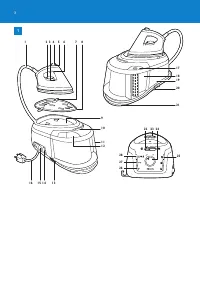
General description (Fig. 1) 1 Supply hose 2 Temperature dial 3 Temperature dial indicator 4 Steam boost button (GC9040 only) 5 Temperature light 6 Steam trigger 7 Flap 8 Heat-resistant iron resting mat 9 Platform 10 Water tank release lever 11 Detachable water tank 12 Filling opening 13 Supply hose...
Page 8 - ironing; Note: The ‘water tank empty’ light flashes if the water tank is empty.
2 Ergonomic iron design The upward sloping handle ensures a comfor table position of the wrist. 3 Ergonomic iron resting mat The iron resting mat allows you to place your iron horizontally on the ironing board. ironing 1 Place the steam generator on a stable and level surface, i.e. on the hard part ...
Page 9 - Auto Calc Clean function
6 To iron with steam, set the temperature dial to 2 or higher. 7 Put the plug in an earthed wall socket. Set the on/off knob to ‘on’. The steam light flashes to indicate that the steam generator is heating up. After 2 minutes the appliance is ready for use. You hear two beeps, the steam light stops ...
Page 10 - Manual Calc Clean process; Hovewer, you can also perform the Calc Clean process manually for
1 When the Auto Calc Clean process takes place, the Auto Calc Clean light flashes and you hear short beeps. Wait approximately 2 minutes for the appliance to complete the process. During this process, the appliance occasionally produces pumping and clicking sounds. When the Auto Calc Clean process i...
Page 11 - Auto Calc Clean light flashes.; storage; Press the cord rewind button to store the cord.
Put the mains plug in an earthed wall socket. To start the Calc Clean process manually, keep the middle steam selection button pressed while switching on the appliance at the same time. Release the steam selection button only when the blue Auto Calc Clean light flashes. Follow steps 1- of the Auto C...
Page 12 - With one hand, you can now easily carry the whole appliance by the; Troubleshooting; Problem
Slide the carry lock slide to the right to lock the iron onto the steam generator. 5 With one hand, you can now easily carry the whole appliance by the handle of the iron. Troubleshooting This chapter summarises the most common problems you could encounter with the appliance. If you are unable to so...
Page 14 - Environment
Problem Possible cause and solution The appliance beeps continuously. The water tank has gone empty during the Auto Calc Clean process. Fill the water tank. The Calc Clean tank light flashes. The Auto Calc Clean process is completed. Empty the Calc Clean tank. Do not unplug the appliance when you do...
Page 15 - Dansk
15 introduktion Tillykke med dit køb og velkommen til Philips! For at få fuldt udbytte af den støtte, Philips tilbyder, skal du registrere dit produkt på www.philips. com/welcome. vigtigt Læs denne brugsvejledning omhyggeligt igennem, inden apparatet tages i brug, og gem den til eventuelt senere bru...
Page 16 - Varmebestandig afsætningsmåtte; Sådan bruges strygejernet; Ergonomisk str ygebrætshøjde
Generel beskrivelse (fig. 1) 1 Dampslange 2 Temperatur vælger 3 Indikator for temperatur valg 4 Dampskudsknap (kun GC9040) 5 Temperaturindikator med lys 6 Dampudløser 7 Flap 8 Varmebestandig afsætningsmåtte 9 Platform 10 Udløser til vandtank 11 Aftagelig vandtank 12 Påfyldningsåbning 13 Opbevaringsr...
Page 17 - Strygning; af strygebrættet eller et bord.
2 Ergonomisk designet str ygejern Det skrå håndgreb sikrer, at håndleddet befinder sig i en behagelig stilling 3 Ergonomisk afsætningsmåtte Afsætningsmåtten giver dig mulighed for at sætte dit str ygejern i vandret position på str ygebrættet. Strygning 1 Placér damptanken på et stabilt, jævnt underl...
Page 18 - Auto Calc Clean-funktion
6 Når du stryger med damp, skal du indstille temperaturen til mindst 2 . 7 Sæt stikket i en stikkontakt med jordforbindelse. Sæt tænd-/sluk-knappen på “on” (tændt). Dampindikatoren blinker for at vise, at dampgeneratoren er ved at varme op. Efter 2 minutter er apparatet klar t til brug. Der lyder to...
Page 19 - Manuel Calc Clean-proces
1 Når Auto Calc Clean-processen kører, blinker Auto Calc Clean-lyset, og du hører korte bip. Vent ca. 2 minutter, til apparatet har udfør t processen. Under denne proces høres der til tider pumpe- og kliklyde. Når Auto Calc Clean-processen er udført, slukker Auto Calc Clean- lyset. Lyset på Calc Cle...
Page 20 - opbevaring; Tr yk på knappen til ledningsoprul.
Sæt netstikket i en stikkontakt med jordforbindelse. For at starte Calc Clean-processen manuelt skal du holde den midterste knap til valg af damp nede og samtidig tænde apparatet. Slip først knappen til valg af damp, når den blå Auto Calc Clean- indikator blinker. Følg trin 1- i Auto Calc Clean-proc...
Page 21 - Fejlfinding
Skub skydelåsen til transport til højre for at låse strygejernet fast på dampgeneratoren. 5 Med den ene hånd kan du nu nemt transportere hele apparatet i håndtaget på strygejernet. Fejlfinding Dette kapitel opsummerer de mest almindelige problemer, du kan støde på ved brug af apparatet Kan du ikke l...
Page 23 - Miljøhensyn
Problem Mulig årsag og løsning Lyset på Calc Clean- tanken blinker. Auto Calc Clean-processen er færdig. Tøm Calc Clean-tanken. Tag ikke stikket ud af kontakten, når du gør dette. Ledningen ruller ikke helt op, når jeg tr ykker på knappen til ledningsoprul. Ledningen sidder fast i ledningsoprulnings...
Page 24 - DEutsCh
Einführung Herzlichen Glückwunsch zu Ihrem Kauf und willkommen bei Philips! Um den Suppor t von Philips optimal nutzen zu können, registrieren Sie Ihr Produkt bitte unter www.philips.com/welcome. Wichtig Lesen Sie diese Bedienungsanleitung vor dem Gebrauch des Geräts aufmerksam durch, und bewahren S...
Page 26 - Bügeln; Abstellfläche des Bügelbretts oder einen Tisch.
2 Intelligentes, ergonomisches Design Der aufwär ts geneigte Griff gewährleistet eine besonders komfor table Haltung des Handgelenks. 3 Ergonomische Bügeleisenmatte Sie können Ihr Bügeleisen horizontal auf der Bügeleisenmatte auf dem Bügelbrett abstellen. Bügeln 1 Stellen Sie die Dampfeinheit auf ei...
Page 28 - Manuelles Entkalken; Füllen Sie den Wasserbehälter bis zur Markierung MAX.
1 Während des automatischen Calc-Clean-Vorgangs blinkt die Anzeige “Auto Calc Clean”, und Sie hören kurze Tonsignale. War ten Sie etwa 2 Minuten, bis das Gerät den Vorgang abgeschlossen hat. Während des Entkalkens macht das Gerät manchmal Pump- und Klickgeräusche. Wenn der Vorgang abgeschlossen ist,...
Page 29 - Aufbewahrung; Wickeln Sie den Verbindungsschlauch um den Boden der
Stecken Sie den Netzstecker in eine geerdete Steckdose. Um den Calc-Clean-Vorgang manuell zu starten, halten Sie die mittlere Dampftaste gedrückt, und schalten Sie gleichzeitig das Gerät ein. Lassen Sie die Dampftaste erst los, wenn die Calc-Clean-Anzeige blau blinkt. Befolgen Sie dann die Schritte ...
Page 30 - Fehlerbehebung; an das Philips Ser vice Center in Ihrem Land.
Schieben Sie den Hebel für die Transportverriegelung nach rechts, um das Bügeleisen auf der Dampfeinheit zu fixieren. 5 Auf diese Weise können Sie das gesamte Gerät mit einer Hand am Griff des Bügeleisens tragen. Fehlerbehebung In diesem Kapitel sind die häufigsten Probleme aufgeführ t, die beim Geb...
Page 32 - Umweltschutz
Problem Mögliche Ursache und Lösungsvorschlag Ich kann das Bügeleisen nicht aufrecht hinstellen. Um es besonders ergonomisch zu gestalten, wurde das Bügeleisen so konzipier t, dass es sich nur waagerecht abstellen lässt. Stellen Sie das Gerät waagerecht auf die hitzebeständige Bügeleisenmatte. Sie k...
Page 35 - Σιδέρωμα; Δείτε το κεφάλαιο ‘Λειτουργία αυτόματου καθαρισμού αλάτων’.
2 Εργονομικός σχεδιασμός σίδερου Η επικλινής λαβή εξασφαλίζει μια άνετη κλίση για τον καρπό σας. 3 Εργονομικό κάλυμμα εναπόθεσης σίδερου Το κάλυμμα εναπόθεσης σίδερου σάς επιτρέπει να τοποθετείτε το σίδερο οριζόντια επάνω στη σιδερώστρα. Σιδέρωμα 1 Τοποθετήστε τη γεννήτρια ατμού σε σταθερή και επίπε...
Page 36 - λειτουργία αυτόματου καθαρισμού αλάτων
6 Για να σιδερώσετε με ατμό, ρυθμίστε το διακόπτη ρύθμισης θερμοκρασίας στο 2 ή υψηλότερα. 7 Συνδέστε το φις σε πρίζα με γείωση. Ρυθμίστε το διακόπτη on/off στη θέση ‘on’. Η λυχνία ατμού αναβοσβήνει υποδεικνύοντας ότι η γεννήτρια ατμού θερμαίνεται. Μετά από 2 λεπτά η συσκευή είναι έτοιμη για χρήση. ...
Page 37 - Διαδικασία μη αυτόματου καθαρισμού αλάτων
1 Όταν πραγματοποιείται η διαδικασία αυτόματου καθαρισμού αλάτων, η λυχνία αυτόματου καθαρισμού αλάτων αναβοσβήνει και ακούτε σύντομα ηχητικά σήματα. Περιμένετε περίπου 2 λεπτά έτσι ώστε η συσκευή να ολοκληρώσει τη διαδικασία. Κατά τη διάρκεια αυτής της διαδικασίας, η συσκευή παράγει κατά διαστήματα...
Page 38 - Σημείωση: Η διαδικασία μη αυτόματου καθαρισμού αλάτων μπορεί να; αποθήκευση; Πιέστε το κουμπί περιτύλιξης καλωδίου για να αποθηκεύσετε το
1 Γεμίστε τη δεξαμενή νερού μέχρι το μέγιστο επίπεδο. Συνδέστε το φις σε πρίζα με γείωση. Για να ξεκινήσετε τη διαδικασία μη αυτόματου καθαρισμού αλάτων, κρατήστε πατημένο το μεσαίο κουμπί επιλογής ατμού ενώ ταυτόχρονα ενεργοποιείτε τη συσκευή. Αφήστε το κουμπί επιλογής ατμού μόνο όταν η μπλε λυχνία...
Page 39 - να αποθηκεύσετε τη συσκευή αμέσως μετά τη χρήση.; Οδηγός ανεύρεσης/επίλυσης προβλημάτων; Πρόβλημα
Τοποθετήστε το αντιθερμικό κάλυμμα εναπόθεσης σίδερου πάνω στη γεννήτρια ατμού και, στη συνέχεια, τοποθετήστε το σίδερο πάνω στο κάλυμμα. Σημείωση: Δεν χρειάζεται να περιμένετε να κρυώσει η συσκευή. Μπορείτε να αποθηκεύσετε τη συσκευή αμέσως μετά τη χρήση. Θέστε το διακόπτη κλειδώματος μεταφοράς στα...
Page 42 - Περιβάλλον
Περιβάλλον Στο τέλος της ζωής της συσκευής μην την πετάξετε μαζί με τα συνηθισμένα απορρίμματα του σπιτιού σας, αλλά παραδώστε τη σε ένα επίσημο σημείο συλλογής για ανακύκλωση. Με αυτόν τον τρόπο, θα βοηθήσετε στην προστασία του περιβάλλοντος. Εγγύηση & σέρβις Εάν χρειάζεστε πληροφορίες ή εάν αν...
Page 43 - Español
introducción Enhorabuena por la compra de este producto y bienvenido a Philips. Para sacar el mayor par tido de la asistencia que Philips le ofrece, registre su producto en www.philips.com/welcome. importante Antes de usar el aparato, lea atentamente este manual de usuario y consér velo por si neces...
Page 44 - Uso de la plancha
Descripción general (fig. 1) 1 Manguera 2 Control de temperatura 3 Indicador del control de temperatura 4 Botón de super vapor (sólo modelo GC9040) 5 Piloto de temperatura 6 Botón de vapor 7 Solapa 8 Alfombrilla resistente al calor para dejar la plancha 9 Plataforma 10 Palanca para liberar el depósi...
Page 45 - Planchado; ejemplo, sobre una tabla de planchar o sobre una mesa.
2 Diseño ergonómico de la plancha La empuñadura inclinada garantiza una posición cómoda de la muñeca. 3 Alfombrilla ergonómica para dejar la plancha La alfombrilla para dejar la plancha le permite poner la plancha en posición horizontal sobre la tabla. Planchado 1 Coloque el generador de vapor en un...
Page 46 - Función automática Calc Clean; utilizado de 6 a 8 veces.
6 Para planchar con vapor, coloque el control de temperatura en la posición 2 o superior. 7 Conecte el aparato a un enchufe con toma de tierra. Coloque el interruptor de encendido/apagado en la posición de encendido (“ON”). El piloto de vapor parpadea para indicar que el generador de vapor se está c...
Page 47 - Proceso Calc Clean manual; Calc Clean de forma manual para lograr una limpieza adicional.
1 Cuando el proceso automático Calc Clean se lleva a cabo, el piloto de función automática Calc Clean parpadea y se oyen breves pitidos. Espere unos 2 minutos hasta que el aparato complete el proceso. Durante el mismo, el aparato produce de vez en cuando sonidos de bombeo y se oyen unos clics. Cuand...
Page 48 - continúa calentándose para su uso.; almacenamiento; Pulse el botón de recogida del cable para guardar el cable de
Conecte el aparato a un enchufe con toma de tierra. Para iniciar el proceso Calc Clean de forma manual, mantenga pulsado el botón de selección de vapor del centro a la vez que enciende el aparato. Suelte el botón de selección de vapor únicamente cuando el piloto azul del proceso automático Calc Clea...
Page 49 - Guía de resolución de problemas; Problema
Deslice el botón de bloqueo hacia la derecha para fijar la plancha al generador de vapor. 5 Ahora podrá transportar fácilmente el aparato asiendo la plancha por su empuñadura. Guía de resolución de problemas En este capítulo se resumen los problemas más frecuentes que pueden surgir. Si no puede reso...
Page 51 - medio ambiente
Problema Posible causa y solución No puedo colocar la plancha sobre su base de apoyo. Para que el aparato sea más ergonómico, se ha diseñado de forma que la plancha sólo se pueda poner en posición horizontal. Coloque la plancha en posición horizontal sobre la alfombrilla resistente al calor. Puede d...
Page 52 - Älä upota höyr ysilitysrautaa tai höyr ylaitetta veteen.; tärkeää; ei ole kokemusta tai tietoa laitteen käytöstä, muuten kuin heidän; Varoitus; Tarkista vir tajohdon ja liittimen kunto säännöllisesti.; suomi
5 Johdanto Onnittelut ostoksestasi ja ter vetuloa Philips-tuotteiden käyttäjäksi! Hyödynnä Philipsin tuki ja rekisteröi tuotteesi osoitteessa www.philips. com/welcome. tärkeää Lue tämä käyttöopas huolellisesti ennen käyttöä ja säilytä se vastaisen varalle. vaara Älä upota höyr ysilitysrautaa tai höy...
Page 54 - Ergonominen silityslaudan alusta; silittäminen; Kaada vesisäiliöön vettä MAX-merkkiin asti.
3 Ergonominen silityslaudan alusta Silityslaudan alustan ansiosta voit asettaa silitysraudan vaakasuoraan silityslaudalle. silittäminen 1 Aseta höyrylaite tukevalle ja tasaiselle alustalle, eli silityslaudalle tai pöydälle. Kaada vesisäiliöön vettä MAX-merkkiin asti. Huomautus: Vesisäiliö tyhjä -mer...
Page 55 - Automaattinen kalkinpoistotoiminto; merkkivalo vilkkuu ja laitteesta kuuluu lyhyitä merkkiääniä.
7 Työnnä pistoke maadoitettuun pistorasiaan. Aseta vir takytkin asentoon ON. Höyr yvalon vilkkuminen osoittaa, että höyr ylaite kuumenee. Laite on käyttövalmis 2 minuutin kuluttua. Laitteesta kuuluu kaksi äänimerkkiä, höyr yvalo lakkaa vilkkumasta ja jää palamaan. Höyr ysilitysraudasta tulee höyr yä...
Page 56 - Manuaalinen kalkinpoisto
Irrota vesisäiliö. Paina kalkinpoistosäiliön tyhjennyspainiketta ja tyhjennä säiliö pesualtaaseen. Täytä vesisäiliö ja kiinnitä se uudelleen höyrylaitteeseen. Automaattinen kalkinpoisto on nyt valmis, ja voit aloittaa silittämisen, kun höyr yvalo palaa jatkuvasti. Huomautus: Jos et tyhjennä kalkinpo...
Page 57 - Säilytys; Kelaa vir tajohto takaisin painamalla kelauspainiketta.; Vianmääritys; Philipsin maakohtaiseen asiakaspalveluun.
Säilytys 1 Katkaise laitteesta virta (1) ja irrota pistoke pistorasiasta (). Kelaa vir tajohto takaisin painamalla kelauspainiketta. Tyhjennä kalkinpoistosäiliö, jos se on täynnä. Kierrä höyryletku höyrylaitteen pohjan ympärille. Huomautus: Varmista, että höyryletku on kunnolla säilytysurassa ja pid...
Page 59 - Ympäristöasiaa; ympäristölle aiheutuvia haittavaikutuksia.
Ongelma Mahdollinen syy ja ratkaisu Laitteesta kuuluu ajoittaan voimakasta pumppaavaa ja napsahtavaa ääntä. Tätä tapahtuu automaattisen kalkinpoiston aikana. Vettä pumpataan vesisäiliöstä höyr ylaitteeseen, ja se poistetaan höyr ynpoistosäiliöön. Odota muutama minuutti, kunnes automaattinen kalkinpo...
Page 60 - Français
60 introduction Félicitations pour votre achat et bienvenue dans l’univers Philips ! Pour profiter pleinement de l’assistance Philips, enregistrez votre produit sur le site à l’adresse suivante : www.philips.com/welcome. important Lisez attentivement ce mode d’emploi avant d’utiliser l’appareil et c...
Page 62 - Repassage; la partie solide d’une planche à repasser ou sur une table.
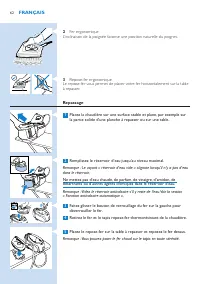
2 Fer ergonomique L’inclinaison de la poignée favorise une position naturelle du poignet. 3 Repose-fer ergonomique Le repose-fer vous permet de placer votre fer horizontalement sur la table à repasser. Repassage 1 Placez la chaudière sur une surface stable et plane, par exemple sur la partie solide ...
Page 63 - Fonction anticalcaire automatique; automatique pour les éliminer.
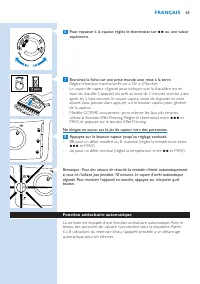
6 Pour repasser à la vapeur, réglez le thermostat sur 2 ou une valeur supérieure. 7 Branchez la fiche sur une prise murale avec mise à la terre. Réglez le bouton marche/arrêt sur « On » (Marche). Le voyant de vapeur clignote pour indiquer que la chaudière est en train de chauffer. L’appareil est prê...
Page 64 - Détartrage manuel; Le système Auto Calc-Clean permet au calcaire de ne pas s’accumuler.
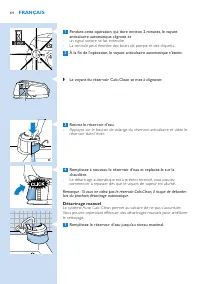
1 Pendant cette opération, qui dure environ minutes, le voyant anticalcaire automatique clignote et un signal sonore se fait entendre. La centrale peut émettre des bruits de pompe et des cliquetis. À la fin de l’opération, le voyant anticalcaire automatique s’éteint. Le voyant du réservoir Calc-Clea...
Page 65 - rangement; Rangez le cordon d’alimentation en appuyant sur le bouton
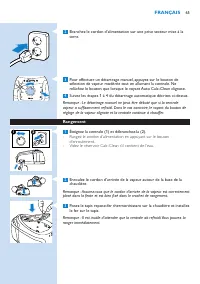
Branchez le cordon d’alimentation sur une prise secteur mise à la terre. Pour effectuer un détartrage manuel, appuyez sur le bouton de sélection de vapeur modérée tout en allumant la centrale. Ne relâchez le bouton que lorsque le voyant Auto Calc-Clean clignote. Suivez les étapes 1 à du détartrage a...
Page 66 - Dépannage; Cette rubrique présente les problèmes les plus courants que vous
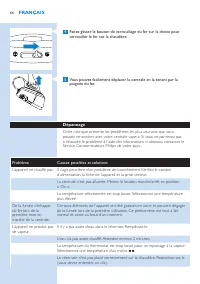
Faites glisser le bouton de verrouillage du fer sur la droite pour verrouiller le fer sur la chaudière. 5 Vous pouvez facilement déplacer la centrale en la tenant par la poignée du fer. Dépannage Cette rubrique présente les problèmes les plus courants que vous pouvez rencontrer avec votre centrale v...
Page 68 - Environnement
Problème Causes possibles et solutions La centrale émet des bips. Le réser voir d’eau s’est vidé pendant le détar trage automatique. Remplissez- le à nouveau. Le voyant du réser voir Calc-Clean se met à clignoter. Le détar trage automatique est terminé. Videz le réser voir Calc-Clean, sans débranche...
Page 69 - italiano
69 Introduzione Congratulazioni per l’acquisto e benvenuti in Philips! Per trarre il massimo vantaggio dall’assistenza Philips, registrate il vostro prodotto su www.philips. com/welcome. importante Prima di utilizzare l’apparecchio, leggete attentamente il presente manuale e conser vatelo per eventu...
Page 70 - Utilizzo del ferro; Altezza dell’asse ergonomica
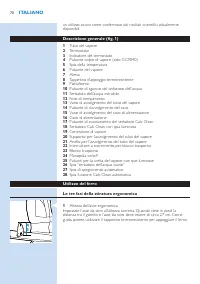
un utilizzo sicuro come confermato dai risultati scientifici attualmente disponibili. Descrizione generale (fig. 1) 1 Tubo del vapore 2 Termostato 3 Indicatore del termostato 4 Pulsante colpo di vapore (solo GC9040) 5 Spia della temperatura 6 Pulsante del vapore 7 Aletta 8 Tappetino d’appoggio termo...
Page 71 - stiratura; Appoggiate il generatore di vapore su una superficie stabile e
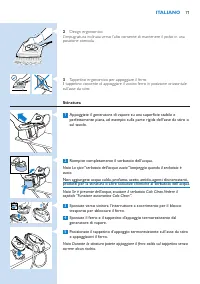
2 Design ergonomico L’impugnatura inclinata verso l’alto consente di mantenere il polso in una posizione comoda. 3 Tappetino ergonomico per appoggiare il ferro Il tappetino consente di appoggiare il vostro ferro in posizione orizzontale sull’asse da stiro. stiratura 1 Appoggiate il generatore di vap...
Page 72 - Funzione automatica Calc Clean
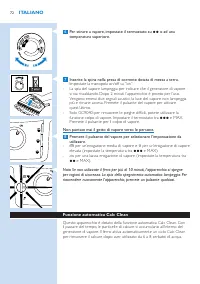
6 Per stirare a vapore, impostate il termostato su 2 o ad una temperatura superiore. 7 Inserite la spina nella presa di corrente dotata di messa a terra. Impostate la manopola on/off su “on”. La spia del vapore lampeggia per indicare che il generatore di vapore si sta riscaldando. Dopo 2 minuti l’ap...
Page 73 - Processo Calc Clean manuale; per una pulizia aggiuntiva del ferro.
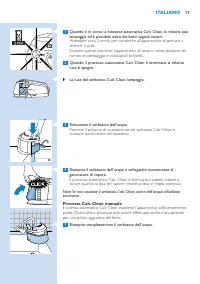
1 Quando è in corso la funzione automatica Calc Clean, la relativa spia lampeggia ed è possibile udire dei brevi segnali sonori. Attendete circa 2 minuti per consentire all’apparecchio di por tare a termine il ciclo. Durante questo processo l’apparecchio, di tanto in tanto, produce dei rumori di pom...
Page 74 - Come riporre l’apparecchio; Premete il pulsante di riavvolgimento per avvolgere il cavo.
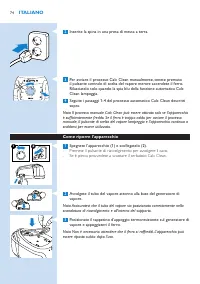
Inserite la spina in una presa di messa a terra. Per avviare il processo Calc Clean manualmente, tenete premuto il pulsante centrale di scelta del vapore mentre accendete il ferro. Rilasciatelo solo quando la spia blu della funzione automatica Calc Clean lampeggia. Seguite i passaggi 1- del processo...
Page 75 - Risoluzione dei guasti; Clienti Philips del vostro paese.
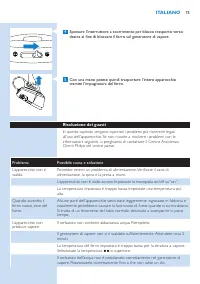
Spostare l’interruttore a scorrimento per blocco trasporto verso destra al fine di bloccare il ferro sul generatore di vapore. 5 Con una mano potete quindi trasportare l’intero apparecchio tramite l’impugnatura del ferro. Risoluzione dei guasti In questo capitolo vengono ripor tati i problemi più ri...
Page 77 - tutela dell’ambiente; Philips all’indirizzo
Problema Possibile causa e soluzione Non posso appoggiare il ferro in posizione ver ticale. Al fine di rendere l’apparecchio più ergonomico, quest’ultimo può essere posizionato solo orizzontalmente. Posizionate il ferro sul tappetino d’appoggio termoresistente in posizione orizzontale. Il tappetino ...
Page 78 - nEDErlanDs
78 inleiding Gefeliciteerd met uw aankoop en welkom bij Philips! Als u volledig wilt profiteren van de ondersteuning die Philips biedt, registreer uw product dan op www.philips.com/welcome. Belangrijk Lees deze gebruiksaanwijzing zorgvuldig door voordat u het apparaat gaat gebruiken. Bewaar de gebru...
Page 80 - Strijken; Plaats de stoomgenerator op een stabiele en vlakke ondergrond
2 Ergonomisch ontwerp van het strijkijzer Het schuin naar boven lopende handvat zorgt voor een comfor tabele houding van de pols. 3 Ergonomische strijkijzermat Met de strijkijzermat kunt u het strijkijzer horizontaal op de strijkplank plaatsen. Strijken 1 Plaats de stoomgenerator op een stabiele en ...
Page 83 - apparaat door met opwarmen voor gebruik.; opbergen; Druk op de snoeropwindknop om het snoer op te bergen.
Steek de stekker in een geaard stopcontact. Om het Calc-Clean-proces handmatig te starten, houdt u de middelste stoomstandkeuzeknop ingedrukt terwijl u het apparaat inschakelt. Laat de knop voor de stoomstand pas los als het blauwe lampje van de automatische Calc-Clean-functie knippert. Volg de stap...
Page 84 - Problemen oplossen; Probleem
Schuif de draagvergrendelingsknop naar rechts om het strijkijzer op de stoomgenerator te vergrendelen. 5 U kunt het hele apparaat nu eenvoudig met één hand dragen aan het handvat van het strijkijzer. Problemen oplossen Dit hoofdstuk behandelt in het kor t de problemen die u kunt tegenkomen tijdens h...
Page 86 - milieu
Probleem Mogelijke oorzaak en oplossing Ik kan het strijkijzer niet op zijn achterkant zetten. Om het apparaat ergonomischer te maken, is het zodanig ontworpen dat het strijkijzer alleen horizontaal kan worden neergezet. Plaats het strijkijzer horizontaal op de hittebestendige strijkijzermat. U kunt...
Page 87 - jevn og vannrett overflate.; norsk
87 innledning Gratulerer med kjøpet og velkommen til Philips! Du får best mulig nytte av støtten som Philips tilbyr, hvis du registrerer produktet ditt på www.philips. com/welcome. viktig Les denne bruker veiledningen nøye før du bruker apparatet, og ta vare på den for senere referanse. Fare Senk al...
Page 88 - Varmebestandig hvilematte for str ykejernet; Bruke strykejernet; Ergonomisk høyde på str ykebrettet
Generell beskrivelse (fig. 1) 1 Slange 2 Temperaturbr yter 3 Indikator for temperaturbr yter 4 Dampstøtknapp (kun GC9040) 5 Temperaturlampe 6 Dampbr yter 7 Klaff 8 Varmebestandig hvilematte for str ykejernet 9 Plattform 10 Utløserhendel for vannbeholder 11 Avtakbar vannbeholder 12 Påfyllingsåpning 1...
Page 89 - Ergonomisk hvilematte for str ykejernet; Stryke; Sett dampgeneratoren på en stabil og jevn overflate, dvs. på den
3 Ergonomisk hvilematte for str ykejernet Med hvilematten til str ykejernet kan du plassere str ykejernet vannrett på str ykebrettet. Stryke 1 Sett dampgeneratoren på en stabil og jevn overflate, dvs. på den harde delen av strykebrettet eller på et bord. Fyll vannbeholderen til maksimumsnivået. Merk...
Page 90 - Trykk på en hvilken som helst knapp for å slå på apparatet igjen.; Automatisk kalkrensfunksjon
7 Sett støpselet i en jordet stikkontakt. Sett av/på-br yteren til på. Damplampen blinker for å vise at dampgeneratoren varmes opp. Etter to minutter er apparatet klar t til bruk. Du hører to pip, damplampen slutter å blinke og lyser kontinuerlig. Tr ykk på dampbr yteren for å få damp. Kun GC9040-mo...
Page 91 - Manuell kalkrensprosess; også utføre kalkrensfunksjonen manuelt for ekstra rengjøring.
Ta ut vannbeholderen. Tr ykk ned knappen for tømming av kalkrensbeholderen og hell innholdet i kalkrensbeholderen ut i vasken. Fyll opp igjen beholderen og sett beholderen tilbake på plass i dampgeneratoren. Den automatiske kalkrensprosessen er nå fullfør t, og du kan begynne å str yke når lampen fo...
Page 92 - oppbevaring; Tøm kalkrensbeholderen hvis den er fylt opp.; Feilsøking
oppbevaring 1 Slå av apparatet (1) og koble det fra (). Tr ykk på knappen for innrulling av ledning for å oppbevare ledningen. Tøm kalkrensbeholderen hvis den er fylt opp. Snurr slangen rundt bunnen på dampgeneratoren. Merk: Kontroller at slangen sitter riktig i oppbevaringssporet og er inni brakett...
Page 94 - Miljø
Problem Mulig årsak og løsning Det lekker vann fra dampgeneratoren. Kalkrensbeholderen rant over under kalkrensprosessen. Tøm alltid kalkrensbeholderen etter kalkrensprosessen. Dette hindrer kalkrensbeholderen i å renne over neste gang den automatiske kalkrensprosessen utføres. Apparatet lager av og...
Page 95 - portuGuês
95 introdução Parabéns pela sua compra e bem-vindo à Philips! Para tirar todo o par tido da assistência fornecida pela Philips, registe o seu produto em www.philips. com/welcome. importante Leia cuidadosamente este manual do utilizador antes de utilizar o aparelho e guarde-o para consultas futuras. ...
Page 97 - Passar a ferro; Coloque o vaporizador sobre uma superfície estável e plana, isto é,
2 Design ergonómico do ferro O punho com inclinação para cima assegura uma posição confor tável do pulso. 3 Capa ergonómica A capa permite-lhe colocar o ferro na horizontal sobre a tábua de engomar. Passar a ferro 1 Coloque o vaporizador sobre uma superfície estável e plana, isto é, sobre a parte rí...
Page 98 - Função Calc-Clean automática; Este aparelho encontra-se equipado com uma função Calc-Clean
6 Para engomar com vapor, regule a temperatura para 2 ou superior. 7 Ligue a ficha a uma tomada com terra. Regule o botão ligar/desligar para a posição “on” (ligado). A luz de vapor fica intermitente para indicar que o gerador de vapor está a aquecer. Após 2 minutos, o aparelho está pronto a usar. S...
Page 99 - Processo Calc-Clean automático; limpo. Contudo, poderá obter uma limpeza adicional executando
1 Quando o processo Calc-Clean automático é executado, a luz de Calc-Clean automática acende-se intermitente e ouvirá sinais sonoros. Aguarde cerca de 2 minutos para que o processo seja concluído. Durante este processo, o aparelho produz ocasionalmente ruídos e estalidos. Quando o processo Calc-Clea...
Page 100 - Armazenamento; Prima o botão de recolha do fio para recolher o fio de alimentação.
Ligue a ficha a uma tomada com terra. Para iniciar o processo Calc-Clean manualmente, mantenha premido o botão de vapor médio, ligando simultaneamente o vapor. Liberte o botão de selecção do vapor apenas quando a luz azul da Calc-Clean automática se acender intermitente. Siga os passos 1 a acima des...
Page 101 - Resolução de problemas; Este capítulo resume alguns dos problemas mais comuns que pode
Deslize o botão de fixação para a direita de modo a fixar o ferro ao vaporizador. 5 Pode agora carregar todo o aparelho com uma só mão, segurando-o pela pega. Resolução de problemas Este capítulo resume alguns dos problemas mais comuns que pode encontrar no aparelho. Se não conseguir resolver o prob...
Page 103 - meio ambiente
Problema Causa possível e solução Não consigo colocar o ferro na posição de descanso. Para tornar o ferro mais ergonómico, o aparelho foi concebido para que o ferro possa ser posicionado apenas na horizontal. Coloque o ferro horizontalmente sobre a capa resistente ao calor. Pode deixar a capa na par...
Page 104 - Sänk aldrig ned str ykjärnet eller ånggeneratorn i vatten.; varning; med den lokala nätspänningen innan du ansluter apparaten.; svEnska
10 introduktion Grattis till inköpet och välkommen till Philips! För att dra maximal nytta av den suppor t som Philips erbjuder kan du registrera din produkt på www. philips.com/welcome. viktigt Läs användarhandboken noggrant innan du använder apparaten och spara den för framtida bruk. Fara Sänk ald...
Page 106 - Ergonomiskt str ykjärnsunderlägg; Stryka; Obs! Lampan för tom vattentank blinkar om vattentanken är tom.
3 Ergonomiskt str ykjärnsunderlägg Tack vare str ykjärnsunderlägget kan du placera str ykjärnet horisontellt på str ykbrädan. Stryka 1 Placera ånggeneratorn på en stabil och jämn yta, t.ex. på den hårda delen av strykbrädan eller på ett bord. Fyll vatten i behållaren till MAX-markeringen. Obs! Lampa...
Page 107 - Automatisk avkalkningsfunktion; och åtta behållare vatten har använts.
7 Sätt in stickkontakten i ett jordat vägguttag. Slå på strömbr ytaren. Ånglampan blinkar vilket visar att ånggeneratorn värms upp. Efter två minuter är apparaten klar att använda. Du hör två pipljud och ånglampan slutar blinka och lyser med fast sken. Tr yck på ånggeneratorn för ånga. Endast typ GC...
Page 108 - manuell avkalkning; apparaten ytterligare.
Ta bort vattentanken. Tr yck på knappen för tömning av avkalkningstanken och töm avkalkningstanken i vasken. Fyll vattentanken igen och sätt tillbaka den på ånggeneratorn. Den automatiska avkalkningen är nu slutförd och du kan börja str yka när ånglampan lyser med fast sken. Obs! Om du inte tömmer a...
Page 109 - Förvaring; Töm avkalkningstanken om den är fylld.; Felsökning; kan uppstå med apparaten. Om du inte kan lösa problemet med hjälp av
Förvaring 1 Slå av apparaten (1) och dra ur nätsladden (). Rulla in nätsladden genom att tr ycka på knappen för sladdupprullning. Töm avkalkningstanken om den är fylld. Linda tillförselslangen runt ånggeneratorns nederdel. Obs! Se till att tillförselslangen är ordentligt fäst i förvaringsskåran och ...
Page 111 - Miljön
Problem Möjlig orsak och lösning Vatten läcker ut ur ånggeneratorn. Avkalkningstanken har svämmat över under den automatiska avkalkningen. Töm alltid avkalkningstanken efter avkalkningen. Det förhindrar att avkalkningstanken svämmar över vid nästa avkalkning. Apparaten avger tillfälligt ett starkt p...
Page 112 - Besleme hor tumu; türkçE
11 Giriş Ürünümüzü satın aldığınız için teşekkür ederiz; Philips’e hoş geldiniz! Philips’in sunduğu destekten tam faydalanmak için lütfen ürününüzü şu adresten kaydedin: www.philips.com/welcome. Önemli Cihazı kullanmadan önce bu kullanım kılavuzunu okuyun ve gelecekte de başvurmak üzere saklayın. Te...
Page 113 - Ütünün kullanımı
6 Buhar tetiği 7 Kapak 8 Isıya dayanıklı ütü altlığı 9 Platform 10 Su haznesi çıkarma kolu 11 Sökülebilir su deposu 12 Doldurma ağzı 13 Besleme hor tumu saklama bölmesi 14 Kordon sarma düğmesi 15 Elektrik kordonu için saklama bölmesi 16 Elektrik kablosu 17 Kireç Temizleme haznesi boşaltma düğmesi 18...
Page 114 - Ütüleme; ya da başka bir masanın sert kısmı.
Ütüleme 1 Buhar üreticiyi düz, sabit bir zemine yerleştirin, örneğin ütü masasının ya da başka bir masanın sert kısmı. Su haznesini maksimum seviyede doldurunuz. Dikkat: Su haznesi boşaldığında ‘su haznesi boş’ ışığı yanar. Su haznesine sıcak su, parfüm, sirke, kola, kireç çözücü maddeler, ütülemeye...
Page 115 - Otomatik Kireç Temizleme fonksiyonu
7 Fişi topraklı duvar prizine takın. Açma/kapama düğmesini “açık” konumuna getirin. Buhar ışığı, buhar üreticinin ısınmakta olduğunu göstermek için yanıp söner. 2 dakika sonra cihaz kullanıma hazır hale gelir. İki uyarı sesi duyulur, buhar ışığı yanıp sönmeyi durdurup, sürekli yanmaya başlar. Buhar ...
Page 116 - Kireç Temizleme işlemini elle yapma; temizlik için Kireç Temizleme işlemini elle de yapabilirsiniz.
Su haznesini çıkarın. Kireç Temizleme haznesi boşaltma düğmesine basın ve Kireç Temizleme haznesini lavaboya boşaltın. Su haznesini doldurun ve buhar üreticiye takın. Otomatik Kireç Temizleme işlemi bittiğinde ütü yapmak için buhar ışığı sürekli yanana kadar bekleyin. Dikkat: Kireç Temizleme haznesi...
Page 117 - saklama; Kordonu sarmak için kordon sarma düğmesine basın.; sorun giderme; Philips Müşteri Hizmetleri Merkeziyle iletişim kurun.
saklama 1 Cihazı kapatarak (1) fişini prizden çekin (2). Kordonu sarmak için kordon sarma düğmesine basın. Kireç Temizleme haznesini dolduğunda boşaltın. Besleme hortumunu buhar üreticinin tabanı etrafına sarın. Dikkat: Besleme hortumunun saklama yivine ve braketin içine düzgün şekilde oturduğundan ...
Page 119 - çevre
Sorun Olası nedenler ve çözümler Buhar üreticiden su sızıyor. Kireç Temizleme haznesi Otomatik Kireç Temizleme işlemi sırasında taşmıştır. Kireş Temizleme haznesini Kireç Temizleme işleminden sonra mutlaka boşaltın. Böylece bir sonraki otomatik Kireç Temizleme işlemi sırasında Kireç Temizleme haznes...