Philips DVP2880 - Manual
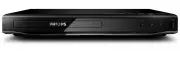
Philips DVP2880 Player – Manual, read for free online in PDF format. We hope this helps you resolve any issues you may have. If you have further questions, please contact us through the contact form.
1

2

3

4

5

6

7

8

9

10

11

12

13

14

15

16

17

18

19

20

Table of Contents:
- Page 2 – Hookup and play
- Page 4 – VIDEO OUT + AUDIO OUT
- Page 5 – SOURCE
- Page 7 – Contents; Specifications
- Page 8 – Basic play control
- Page 9 – Video options; Play a musical slideshow; Control photo play; Repeat play; Skip play
- Page 10 – Play DivX videos; Use Philips EasyLink
- Page 11 – Change settings
- Page 13 – Software update
- Page 14 – Specifications
- Page 15 – Troubleshooting
- Page 16 – Safety
- Page 17 – Care for your product; Care of the environment; Compliance
- Page 18 – Trademarks
- Page 19 – Language Code
Loading the manual
Register your product and get support at
www.philips.com/welcome
Always there to help you
User manual
DVP2880
Question?
Contact
Philips
"Loading the manual" means you need to wait until the file loads and becomes available for online reading. Some manuals are very large, and the time they take to appear depends on your internet speed.
Was this manual helpful?
About this manual
- Brand
- Philips
- Model
- DVP2880
- Document type
- Manual
- Category
- Player
- Language(s)
- English
- Pages
- 20
- File size
- 1.2 MB
- Format
Other Manuals for Philips DVP2880
Summary
Page 2 - Hookup and play
2 1 Hookup and play EN Before you connect this DVD player, read and understand all accompanying instructions.
Page 4 - VIDEO OUT + AUDIO OUT
4 2 L R VIDEO OUT VIDE UT VIDEO OUT + AUDIO OUT SCART HDMI HDMI
Page 5 - SOURCE
Ask a question
Related manuals
More Philips Players models




Other Philips appliances
 Philips 1 Manual
 Philips 2 Manual
 Philips 2 Series Manual
 Philips 2.44E+03 Manual
 Philips 3 Manual
- Philips 4 Manual
 Philips 4CM6088 Manual
 Philips 5.1 Manual
- Philips 6 Manual
 Philips 7FF1CWO Manual
- Philips 7FF1M4 Manual
 Philips 8P6054C Manual
 Philips 9P5031C1, 9P5531C1, 9P6031C1, 9P5034C1, 9P5534C1, 9P6034C1 Manual
 Philips 10 Manual