Philips AE1530/00 - User Manual
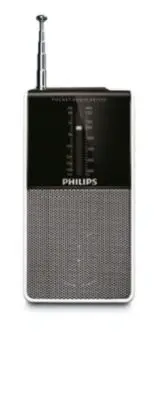
Philips AE1530/00 – User Manual, read for free online in PDF format. We hope this helps you resolve any issues you may have. If you have further questions, please contact us through the contact form.

Meet Philips at the Internet
http://www.philips.com
Printed in China
AE1530_UM_96_V1.0
AE1530
P O C K E T R A D I O A E 1 5 3 0
.
L
O
V
G
NI
N
U
TO
F
F
FM
MW
A pleine puissance, I’écoute prolongée du baladeur
peut endommager I’oreille de I’utilisateur
Continuous use at full output might damage the ears
1
2
3
4
5
6
2 x 1.5V AAA/R03/UM4
1
English
Congratulations on your purchase and welcome to
Philips!
To fully benefit from the support that Philips offers,
register your product at www.philips.com/welcome.
Controls (see
1
)
1
Telescopic antenna
– improves FM reception.
2
p
– 3.5 mm stereo headphone socket.
3
TUNING
– in FM/MW mode, fine tunes a station.
4
Band selector
– selects the waveband: FM or MW.
5
OFF
VOL
– switches on/off the set.
– adjusts the sound level.
6
Battery compartment
POWER SUPPLY
Batteries (not included)
Open the batter y door and inser t two alkaline batteries, type
AAA, R03 or UM4, as indicated in the batter y compar tment.
• Incorrect use of batteries can cause electrolyte leakage and will corrode
the compar tment or cause the batteries to burst.
• Do not mix batter y types: e.g. alkaline with carbon zinc. Only use batter-
ies of the same type for the set.
• When inser ting new batteries, do not tr y to mix old batteries with the
new ones.
• Remove the batteries if the set is not to be used for a long time.
Batteries contain chemical substances, so they should be disposed of
properly.
Batteries contain chemical substances, so they should be disposed of
properly.
This set complies with the radio interference requirements of the
European Union.
General information
Antennas
• For FM, extend, incline and turn the telescopic antenna for best reception.
Reduce its length if the signal is too strong.
• For MW, the set uses a built-in antenna. Direct this antenna for best
reception by turning the whole set.
Connecting headphones
• You can connect headphones to the headphone socket.
➜
The loud
speakers will then be switched off.
RADIO RECEPTION
1
Turn the
OFF
VOL
control to switch on the set.
2
Set the band selector to
FM
or
MW
.
3
Select your station using the
TUNING
control.
4
Adjust the sound with the
OFF
VOL
control.
5
To switch off the radio, turn the
OFF
VOL
control to
OFF
.
SAFETY & MAINTENANCE
• Do not expose the set, batteries to humidity, rain, sand or excessive heat
caused by heating equipment or direct sunlight.
• The apparatus shall not be exposed to dripping or splashing.
• Do not cover the ventilation openings with items such as newspapers,
table-cloths, cur tains, etc.
• No objects filled with liquids, such as vases, shall be placed on the appa-
ratus.
• No naked flame sources, such as lighted candles, should be placed on the
apparatus.
• The mechanical par ts of the set contain selflubricating bearings and must
not be oiled or lubricated.
• To clean the set, use a dr y cloth. Do not use any cleaning agents contain-
ing alcohol, ammonia, benzene or abrasives as these may harm the hous-
ing.
• Excessive sound pressure from earphones and headphones can cause
hearing loss.
• Batter y shall not be exposed to excessive heat such as sunshine, fire or
the like.
Troubleshooting
If a fault occurs, first check the points listed below before taking the set
for repair.
If you are unable to remedy a problem by following these hints, consult
your dealer or service centre.
WARNING:
Do not open the set as there is a risk of electric shock. Under no
circumstances should you try to repair the set yourself, as this will invalidate
the guarantee.
Problem
– Possible cause
• Remedy
No sound /power
– Volume not adjusted
• Adjust the VOLUME.
– Batteries dead/ incorrectly inser ted
• Inser t (fresh) batteries correctly
– Headphones connected to the set
• Disconnect headphones.
Poor radio reception
– Weak radio signal
• For FM, extend, incline and turn the telescopic antenna for best reception.
Reduce its length if the signal is too strong.
• For MW, the set uses a built-in antenna. Direct this antenna for best
reception by turning the whole set.
AE1530
Pocket Radio
Register your product and get support at
www.philips.com/welcome
User Manual
AE1530_96.indd 1
AE1530_96.indd 1
2010-1-8 11:18:09
2010-1-8 11:18:09
"Loading the manual" means you need to wait until the file loads and becomes available for online reading. Some manuals are very large, and the time they take to appear depends on your internet speed.
Was this manual helpful?
About this manual
- Brand
- Philips
- Model
- AE1530/00
- Document type
- User Manual
- Language(s)
- English
- Pages
- 1
- File size
- 170.2 KB
- Format
Other Manuals for Philips AE1530/00
Ask a question
Related manuals
Popular Philips Other


More Philips Other models
 Philips ADD4902WH/10 User Manual
 Philips ADD5980M/31 User Manual
 Philips ADD5980M/58 User Manual
 Philips ADD6926WH/37 User Manual
 Philips ADD6928DG/37 User Manual
 Philips AE1530 Manual
 Philips AE1850 Manual
 Philips AE2150 Manual
 Philips AE2160 Manual
 Philips AE2330 Manual
 Philips AE2380 Manual
 Philips AE2480 Manual