Panasonic NN-SN736W - Manual
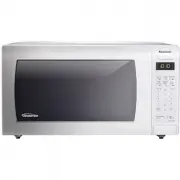
A user manual for a standard microwave oven covers its primary controls, operational features, and essential maintenance practices. The document highlights key components like the door, vents, function pads, and beep sound system, along with basic cooking guidance through recipes such as a sensor cook chart and a detailed omelet preparation. It also includes thorough cleaning instructions for exterior surfaces, interiors (including cavity floor and control panel), and accessories, emphasizing safety by stressing proper drying to avoid damage. While it references specific model parts and accessories, the focus remains on general microwave operation, care, and fundamental usage principles.


Table of Contents:
- Page 1 – Microwave Oven Controls and Part Identification
- Page 2 – Cooking Recipes and Preparation Instructions
- Page 3 – Microwave Oven Cleaning and Parts Inventory
7
Location of Controls
1
External Air Vent
2
Internal Air Vent
3 Door Safety Lock System
4
Exhaust Air Vent
5 Control Panel
6 Identification Plate
7 Glass Tray
8 Roller Ring
9 Heat/Vapor Barrier Film
(do not remove)
10 Waveguide Cover
(do not remove)
11 Door Release Button
12 Warning
label
13 Menu
label
14 Power Supply Cord
15 Power Supply Plug
16 Display
Window
17 Popcorn Pad (See page 11)
18 Sensor Reheat Pad
(See page 13)
19 Sensor Cook Pad (See page 13)
20 Inverter Turbo Defrost Pad
(See page 12)
21 Power level Pad (See page 8)
22 Keep Warm Pad (See page 11)
23 Quick 30 Pad (See page 11)
24 Number
Pads
25 More Pad (See page 11, 13)
26 Less Pad (See page 11, 13)
27 Cooking Timer Pad
(See page 9-10)
28 Clock Set Pad (See page 8)
29 Stop/Reset
Pad
Before cooking: One tap clears
all your instructions. During
cooking: one tap temporarily
stops the cooking process.
Another tap cancels all your
instructions, and time of day
or colon appears in the display
window.
30 Start
Pad
After cooking program setting,
one tap allows oven to begin
functioning. If door is opened or
Stop/Reset
Pad is pressed once
during oven operation,
Start
Pad must be pressed again to
restart oven.
Beep Sound:
When a pad is pressed correctly, a
beep will be heard. If a pad is pressed
and no beep is heard, the unit did
not or cannot accept the instruction.
When operating, the oven will beep
twice between programmed stages.
At the end of any complete program,
the oven will beep 5 times.
NOTE:
If no operation after cooking
program setting, 6 minutes later, the
oven will automatically cancel the
cooking program. The display will
return to clock or colon display.
NOTE:
The illustration is for reference only.
16
17
18
21
23
24
27
29
20
19
25
26
22
28
30
The control panels of
NN-SN936B/SN936W/SN946B/SN946W/SN736B/
SN736W
have same key layout.
1
6
13
4
2
12
10
14
9
3
5
11
7
8
15
F0003BR00AP_print.indd 7
F0003BR00AP_print.indd 7
2016/2/4 13:28:29
2016/2/4 13:28:29
"Loading the manual" means you need to wait until the file loads and becomes available for online reading. Some manuals are very large, and the time they take to appear depends on your internet speed.
Was this manual helpful?
About this manual
- Brand
- Panasonic
- Model
- NN-SN736W
- Document type
- Manual
- Category
- Microwave
- Language(s)
- English
- Pages
- 3
- File size
- 142.7 KB
- Format
Other Manuals for Panasonic NN-SN736W
Summary
Location of controls, diagram of the appliance and control panel, numbered parts descriptions, beep sound system explanation, and operational notes for control pads.
Sensor cook chart with recipes, serving weights, microwave cooking instructions, and a detailed recipe for omelets including ingredients and preparation steps.
Detailed cleaning instructions for exterior parts, door, cavity floor, control panel, glass tray, and roller ring, diagrams labeling these components, and a warning regarding maintenance to prevent damage, along with a list of available accessories.
Ask a question
Related manuals
Popular Panasonic Microwaves





More Panasonic Microwaves models
 Panasonic NN-SF574SQPQ User Manual
 Panasonic NN-SM332W User Manual
 Panasonic NN-SN66KB User Manual
 Panasonic NN-SN96JS User Manual
 Panasonic NN-SN686SR User Manual
 Panasonic NN-SN736B Manual
 Panasonic NN-SN966SR User Manual
 Panasonic NN-ST25JWQPQ User Manual
 Panasonic NN-ST64JWQPQ User Manual
 Panasonic NN-ST67JSQPQ User Manual
 Panasonic NN-ST253W User Manual
 Panasonic NN-ST340W Manual