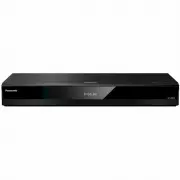
Page 2 - Precautions; WARNING
- 2 - Unit To reduce the risk of fire, electric shock or product damage, ≥ Do not expose this unit to rain, moisture, dripping or splashing. ≥ Do not place objects filled with liquids, such as vases, on this unit. ≥ Use the recommended accessories. ≥ Do not remove covers. ≥ Do not repair this unit b...
Page 4 - Table of contents; Getting started; ) When you use a Panasonic TV that is; Voice Control; For details, refer to
- 4 - Table of contents Precautions . . . . . . . . . . . . . . . . . 2 Getting started Accessories . . . . . . . . . . . . . . . . . 5Unit and media care . . . . . . . . . . . 5Playable media. . . . . . . . . . . . . . . 6Control reference guide . . . . . . . . 8Connecting to a TV . . . . . . . . ....
Page 5 - Accessories; Insert the batteries to the terminal so that it (; Unit and media care; Do not attach labels or stickers to discs.; Remote control; DO
Getting started - 5 - Getting sta rted Accessories Check the supplied accessories before using this unit. ≥ Product numbers are provided in these operating instructions correct as of April 2018. These may be subject to change. ≥ Do not use AC mains lead with other equipment. ∫ Using the remote contr...
Page 6 - Playable media; Device; Video; BD
Getting started - 6 - Playable media Device Media markings Device types Contents format Ultra HD Blu-ray* 1 * 2 Video BD-Video Video BD-RE BD-RE DL Video, JPEG, MPO BD-R BD-R DL Video, MKV, JPEG, MPO DVD-Video Video DVD-R Video, AVCHD, MKV, JPEG, MPO, AAC, AIFF, ALAC, DSD (DFF, DSF), FLAC, MP3, WAV,...
Page 7 - ALL
Getting started - 7 - ∫ Types of discs that cannot be played by this unit Any other disc that is not specifically supported or previously described. ∫ Region management information ∫ Finalize Any DVD-R/RW/R DL, +R/+RW/+R DL and CD-R/RW that are recorded by a recorder need to be finalized by the reco...
Page 8 - Control reference guide
Getting started - 8 - Control reference guide ∫ Remote control When other Panasonic devices respond to the remote control of the unit, change the remote control code. ( > 35) 1 2 3 6 7 8 10 9 45 17 18 16 20 19 14 13 15 12 11 1 Turn the unit on and off 2 TV operation buttonsYou can operate the Pan...
Page 9 - Front; CAUTION
Getting started - 9 - ∫ Front 1 Disc tray 2 Display 3 USB port ( DC 5 V 500 mA) This port supports USB 2.0 High Speed. 4 Remote control signal sensorDistance: Within approx. 7 mAngle: Approx. 20 e up and down, 30 e left and right 5 Open or close the disc tray 6 Standby/on switch ( Í /I ) ( > 17) ...
Page 10 - Connecting to a TV; This unit consumes a small amount of AC power (; Enjoying 4K output; Enjoying video and audio with a 4K-compatible TV; Set the following items in the setup menu (; HDMI cable
Getting started - 10 - Connecting to a TV 4K images can be played back when this unit is connected to 4K compatible TV. ≥ Before making any connections, please disconnect all the units from AC power. (Connect the AC mains lead after making all connections.) ≥ Use the High Speed HDMI cables. Non-HDMI...
Page 11 - Connecting to an amplifier/receiver; Enjoying video with a 4K-compatible TV and audio with an amplifier; Setting
Getting started - 11 - Connecting to an amplifier/receiver Enjoying video with a 4K-compatible TV and audio with an amplifier You can enjoy richer sound by using the HDMI AUDIO OUT terminal.(Audio is output in high resolution.) Setting Set the following items in the setup menu ( > 29): ≥ Set “HDM...
Page 13 - Connecting an amplifier to a 4K-compatible TV
Getting started - 13 - 3D or 4K images can be played back when this unit is connected to a 3D or 4K compatible TV. ≥ This connection only supports up to 5.1ch. ≥ To connect a TV and amplifier with an HDMI cable, connecting terminals on both the TV and amplifier must be ARC-compatible. ( > 11, “Ab...
Page 16 - Connecting to the network; Wireless LAN connection
Getting started - 16 - Connecting to the network The following services can be used when this unit is connected to broadband. For details about connection method, refer to the instructions supplied with the connected equipment. ≥ See page 3 for the precautions of wireless LAN connection. ≥ Use categ...
Page 17 - Setup screen appears.; Settings; Easy Settings; When connected to a 4K (50p or; Easy Network Setting; Link button
Getting started - 17 - After connecting your new player for the first time and pressing [ Í ], the basic settings screen will appear. PreparationTurn on the TV and select the appropriate video input. 1 Press [ Í ]. Setup screen appears. 2 Follow the on-screen instructions to continue with the settin...
Page 18 - Search for wireless network:; – Stealth SSID will not be displayed when; Firmware updates
Getting started - 18 - ≥ Refer to the operating instructions of the hub or router. ≥ Do not use this unit to connect to any wireless network for which you do not have usage rights. Using these networks may be regarded as illegal access. ≥ If you have trouble getting online on your PC after performin...
Page 19 - HOME menu; ] to select the item if; Playback; Playback starts depending on the media.; The stopping point is memorized.; Operations during playback; Stop
- 19 - Playback Playba ck HOME menu Major functions of this unit can be operated from the HOME menu. Preparation Turn on the TV and select the appropriate video input. 1 Press [ Í ] to turn on the unit. 2 Press [OK] or [ 2 , 1 ] to select the item. ≥ Press [OK] or [ 3 , 4 ] to select the item if nec...
Page 20 - Press; Skip
- 20 - Playback Slow motionWhile paused, press [SEARCH 6 ] or [SEARCH 5 ]. ≥ BD-Video and AVCHD: [SEARCH 5 ] only. ≥ MKV, MP4 and MPEG2: Not effective. The speed increases up to 5 steps. ≥ Music, MP3, etc.: The speed is fixed to a single step. ≥ Press [ 1 PLAY] to revert to normal playback speed. Wh...
Page 21 - Preparation; Connect this unit to a 3D compatible TV. (; Deleting data on the USB device; Enjoying Ultra HD Blu-ray
- 21 - Playback ≥ During music playback, the elapsed time, file name and other relevant information are displayed on the unit’s display. You can enjoy the playback of Ultra HD Blu-ray discs with this unit. Preparation ≥ For 4K/HDR viewing, connect to a device and terminals that support HDCP2.2* 1 , ...
Page 22 - The following items can be set.; Enjoying Network; Slideshow; Change the display interval.
- 22 - Playback Play a slideshow of photos and adjust various settings during the playback. 1 Insert the media. 2 Select “View Photos”. 3 Select an item and press the green button. The following items can be set. ≥ Still pictures displayed as “ ” cannot be displayed as thumbnail with this unit. ≥ Yo...
Page 23 - Home Network feature; -compatible smartphone or similar; Operate the Mirroring compatible device.; by pressing the yellow; Using Mirroring; Playing back contents on the
- 23 - Playback Home Network feature Before using the following features, be sure to configure the connected equipment on your Home Network. Mirroring is a function which displays a smartphone or tablet’s screen on a TV via this unit.Enjoy the content shown on a Miracast ® -compatible smartphone or ...
Page 24 - on the Renderer; Possible applications:; Using the Digital Media
- 24 - Playback You can use a smartphone or tablet as the Digital Media Controller (DMC) to playback contents from Network Contents server* 1 on the Renderer (this unit). Possible applications: 1 Press [HOME]. 2 Select “Home Network” and press [OK]. 3 Select “Media Renderer” and press [OK]. 4 Select...
Page 25 - VIERA Link; menu or Setup menu; Only when TV supports “VIERA Link”
- 25 - Playback VIERA Link * Only when connecting via an HDMI VIDEO OUT terminal on this unit. When the following operations are performed, the input channel of the TV will be automatically switched and the screen of this unit will be displayed.If this unit is on and the TV is off, the TV automatica...
Page 26 - Option menu
- 26 - Playback Option menu A variety of playback operations and settings can be performed from this menu.Available options differ depending on the playing contents and the condition of the unit. 1 Press [OPTION]. e.g., Ultra HD Blu-ray ≥ When playing music, select “Playback Settings” and press [OK]...
Page 28 - Sound Settings
- 28 - Playback ∫ Sound Effects *1, *2 Select the sound effect.(Upsampling up to 192 kHz/32 bit is possible.) ≥ Night Surround :Enjoy a movie with powerful sound even when the volume is kept low at night. The audio is set in such a way that it can be heard easily. ≥ Remaster : This feature gives you...
Page 29 - Setup menu; Select “Player Settings”.; HDMI
- 29 - Reference Reference Setup menu Change the unit’s settings if necessary. The settings remain intact even if you switch the unit to standby. 1 Press [HOME]. 2 Select “Setup”. 3 Select “Player Settings”. 4 Select an item and change the settings. To exit the screen Press [HOME]. ∫ Video Format Th...
Page 30 - – A disc that supports HDR10+ is played back.
- 30 - Reference ∫ HDR10+ Setting You can set enable/disable of the HDR10+ function.By changing this setting to “On”, you can use the HDR10+ function under the following conditions:– A device (TV, etc.) that supports HDR10+ is connected ( > 10). – A disc that supports HDR10+ is played back. ≥ The...
Page 31 - Select the audio signal to output.; “On”; Picture
- 31 - Reference ∫ Still Mode Select the type of picture shown when you pause playback. ∫ Seamless Play This enables smooth playback of the gaps between pieces of content such as programmes. ≥ The expected effect may not be achieved depending on the content. ≥ If you select “Off”, playback will be a...
Page 32 - Language
- 32 - Reference ∫ HDMI Output Settings of Music Playback Minimise the audio noise during music playback by automatically switching the video output to 1080i. ∫ Settings for High Clarity Sound Set a terminal that will stop processing audio signals or whether or not to turn on/off the unit’s display ...
Page 33 - Select the LAN connection method.; Network
- 33 - Reference ∫ Easy Network Setting ( > 17) ∫ Network Settings Perform network-related settings individually.Press [OK] to show the following settings: h LAN Connection Mode Select the LAN connection method. ≥ When not using wireless LAN (when turning it off), select “Wired”. h Wireless Setti...
Page 34 - Set a ratings level to limit DVD-Video play.; Ratings
- 34 - Reference Networked Standby Even when “Quick Start” is set to “Off”, by using a remote device (smartphone or tablet), you can wake the unit from the off state and start certain Internet content services. ≥ To activate operation from the remote device, select “On”. But power consumption in sta...
Page 35 - Changes the brightness of the unit’s display.
- 35 - Reference ∫ Front Panel Display Changes the brightness of the unit’s display. ≥ If “Automatic” is selected, the display is set to bright and only dimmed during playback. ≥ This setting does not work when “Front Panel Display” in “Settings for High Clarity Sound” is set to “Off”. ( > 32) (E...
Page 36 - Troubleshooting guide; Unit does not respond to remote; To return to the factory default.; Reset the unit as follows:; The remote control doesn’t work properly.; ” is displayed on the unit’s; This unit is turned off automatically.; General operation
- 36 - Reference Troubleshooting guide Before requesting service, please perform the following checks.If the problem remains unresolved, consult your dealer for instructions. The following do not indicate a problem with this unit: – Regular disc rotating sounds.– Image disturbance during search.– Im...
Page 37 - The TV screen turns black.
- 37 - Reference You have forgotten your ratings password.You want to cancel the ratings level. h The ratings level returns to the factory defaults. 1 While the unit is onPress and hold [OK], the yellow button and the blue button on the remote control at the same time for more than 5 seconds.– “00 R...
Page 38 - – Set “HDCP Output Setting” to “HDCP1.4; Adjust the aspect setting on the TV.
- 38 - Reference Video is not output. h Video is not output when the “High Clarity Sound” is set to “On (Video Off)”. ( > 28) h Video from the HDMI AUDIO OUT terminal is not output when the “HDMI(AUDIO) Output Mode” is set to “Audio Only”. ( > 29) Video is not output in 4K or high-definition. ...
Page 39 - Audio
- 39 - Reference Cannot hear the desired audio. h Check the connections and the “Digital Audio Output” settings. ( > 11, 31) h When the unit is connected to an amplifier/receiver with the 2ch AUDIO OUT/7.1ch AUDIO OUT terminals, set “Analogue Audio Output”. ( > 32) h To output audio from a dev...
Page 40 - Disc cannot be played.; On the “Wireless Settings” screen (; Cannot play this file.; You tried to play a non-compatible video.; This operation cannot be performed now.
- 40 - Reference Disc cannot be played. h The disc is dirty. ( > 5) h The disc is not finalized. ( > 7) h Depending on the Ultra HD Blu-ray disc, it may not be possible to perform playback unless this unit is connected to the Internet. Still pictures (JPEG) do not play back normally. h The ima...
Page 41 - The unit fails to operate properly. Press [; Messages on the unit’s
- 41 - Reference F99 h The unit fails to operate properly. Press [ Í /I] on the main unit for 3 seconds to switch the unit to standby, then switch back on. NET h While connecting to a network. NO PLAY h There is a viewing restriction on a BD-Video or DVD-Video. ( > 34) h A DVD-Video disc with an ...
Page 42 - Specifications; General; File format
- 42 - Reference Specifications ≥ Specifications are subject to change without notice. General Signal system PAL/NTSC Operating temperature range i 5 o C to i 35 o C Operating humidity range 10 % to 80 % RH (no condensation) AUDIO OUT (Pin jack) Analogue Audio output (2 ch to 7.1 ch selectable): 1 p...
Page 43 - Analogue AUDIO OUT; Audio information
- 43 - Reference *1 TS only *2 PS only ≥ With certain recording states and folder structures, the play order may differ or playback may not be possible. ≥ A combined total of up to 10,000 files and folders can be displayed as playable data in each folder regardless of their format. (Even when the pi...
Page 44 - Supported format for
- 44 - Reference When this unit works as a Network Contents client, following contents are playable. ≥ File formats that are not supported by your Network Contents server* cannot be played. * DLNA compatible server, etc. Video Photo Audio ≥ Depending on the server, the contents other than stated abo...
Page 45 - Licenses
- 45 - Reference Licenses “AVCHD”, “AVCHD 3D”, “AVCHD Progressive” and “AVCHD 3D/ Progressive” are trademarks of Panasonic Corporation and Sony Corporation. Java is a registered trademark of Oracle and/or its affiliates. Dolby, Dolby Audio, Dolby Vision, and the double-D symbol are trademarks of Dol...
Page 47 - Panasonic Warranty; Australia website; SHOULD BE RETAINED BY THE CUSTOMER AT ALL TIMES; Panasonic Australia Pty. Limited
Reference [For_Australia] Panasonic Warranty If you require assistance regarding warranty condions or any other enquiries, please visit the Panasonic Australia website www.panasonic.com.au or contact by phone on 132 600 If phoning in, please ensure you have your operang instrucons available. THIS WA...
Page 48 - Panasonic Corporation; © Panasonic Corporation 2018
Panasonic Corporation Web Site: http://www.panasonic.com p © Panasonic Corporation 2018 TQBS0253-4 F0518MH4079 VQT3B63F0617HA0 (Inside of product) DP-UB820-GN-TQBS0253-4_eng.book 47 ページ 2019年6月28日 金曜日 午後12時7分