Page 2 - USER GUIDE; NOTEBOOK
Page 3 - Content
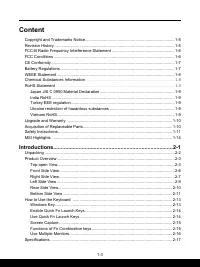
1-2 1-3 Content Copyright and Trademarks Notice ................................................................................ 1-5Revision History ........................................................................................................... 1-5FCC-B Radio Frequency Interference State...
Page 8 - WEEE Statement; Chemical Substances Information
1-8 1-9 WEEE Statement European Union: Under the European Union ("EU") Directive on Waste Electrical and Electronic Equipment, Directive 2002/96/ EC, which takes effect on August 13, 2005, products of "electrical and electronic equipment" cannot be discarded as municipal waste anymor...
Page 9 - Japan JIS C 0950 Material Declaration; Turkey EEE regulation; Ukraine restriction of hazardous substances
1-8 1-9 RoHS Statement Japan JIS C 0950 Material Declaration A Japanese regulatory requirement, defined by specification JIS C 0950, mandates that manufacturers provide material declarations for certain categories of electronic products offered for sale after July 1, 2006.https://csr.msi.com/global/...
Page 10 - Upgrade and Warranty; Acquisition of Replaceable Parts
1-10 1-11 Upgrade and Warranty Please note that certain components, such as memory modules, HDD, SSD, ODD, and Bluetooth/WiFi combo card, etc., preinstalled in the product may be upgradable or replaceable by user’s request depending on the models users purchased. For any further information on the p...
Page 11 - Safety Instructions
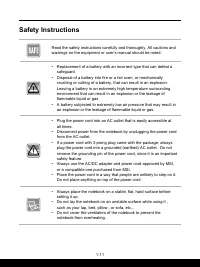
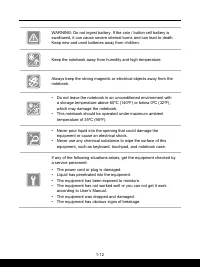
1-10 1-11 Safety Instructions Read the safety instructions carefully and thoroughly. All cautions and warnings on the equipment or user’s manual should be noted. • Replacement of a battery with an incorrect type that can defeat a safeguard . • Disposal of a battery into fire or a hot oven, or mechan...
Page 14 - MSI Highlights
1-14 1-15 MSI Highlights Explore more exclusive features of MSI notebooks for all series, please visit: http://www.msi.com and https://www.youtube.com/user/MSIFeatures and configurations may vary by models. It is recommended to consult with local retailers for detailed information. Enhance Your Crea...
Page 17 - Introductions
Page 18 - Unpacking
2-2 2-3 Introductions Congratulations on becoming the owner of this notebook, the finely designed notebook. You will have a delightful and professional experience in using this exquisite notebook. We are proud to tell users that this notebook is thoroughly tested and certified by our reputation for ...
Page 19 - Product Overview
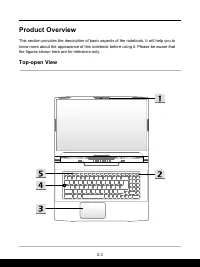
2-2 2-3 Product Overview This section provides the description of basic aspects of the notebook. It will help you to know more about the appearance of this notebook before using it. Please be aware that the figures shown here are for reference only. Top-open View
Page 22 - Front Side View
Page 23 - Right Side View
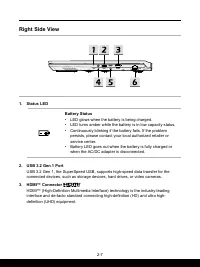
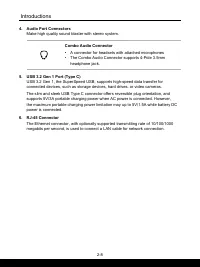
2-6 2-7 Right Side View 1. Status LED Battery Status • LED glows when the battery is being charged. • LED turns amber while the battery is in low capacity status. • Continuously blinking if the battery fails. If the problem persists, please contact your local authorized retailer or service center. •...
Page 25 - Left Side View
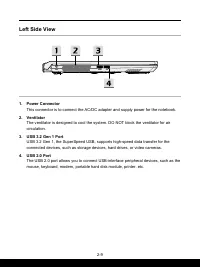
2-8 2-9 Left Side View 1. Power Connector This connector is to connect the AC/DC adapter and supply power for the notebook. 2. Ventilator The ventilator is designed to cool the system. DO NOT block the ventilator for air circulation. 3. USB 3.2 Gen 1 Port USB 3.2 Gen 1, the SuperSpeed USB, supports ...
Page 26 - Rear Side View
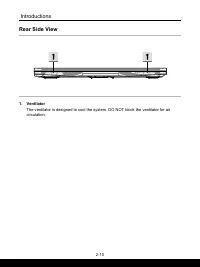
2-10 2-11 Introductions Rear Side View 1. Ventilator The ventilator is designed to cool the system. DO NOT block the ventilator for air circulation.
Page 27 - Bottom Side View
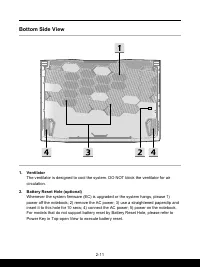
2-10 2-11 Bottom Side View 1. Ventilator The ventilator is designed to cool the system. DO NOT block the ventilator for air circulation. 2. Battery Reset Hole (optional) Whenever the system firmware (EC) is upgraded or the system hangs, please 1) power off the notebook; 2) remove the AC power; 3) us...
Page 29 - How to Use the Keyboard; Windows Key
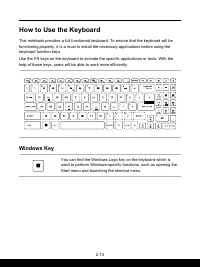
2-12 2-13 How to Use the Keyboard This notebook provides a full functioned keyboard. To ensure that the keyboard will be functioning properly, it is a must to install the necessary applications before using the keyboard function keys. Use the FN keys on the keyboard to activate the specific applicat...
Page 30 - Enable Quick Fn Launch Keys
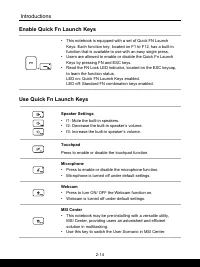
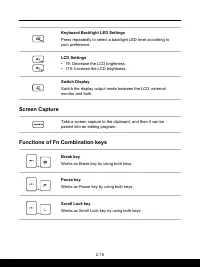
2-14 2-15 Introductions Enable Quick Fn Launch Keys + • This notebook is equipped with a set of Quick FN Launch Keys. Each function key, located on F1 to F12, has a built-in function that is available to use with an easy single press. • Users are allowed to enable or disable the Quick Fn Launch Keys...
Page 32 - Use Multiple Monitors
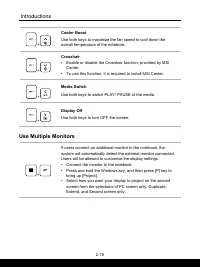
2-16 2-17 Introductions + Cooler Boost Use both keys to maximize the fan speed to cool down the overall temperature of the notebook. + Crosshair • Enable or disable the Crosshair function, provided by MSI Center. • To use this function, it is required to install MSI Center. + Media Switch Use both k...
Page 33 - Specifications
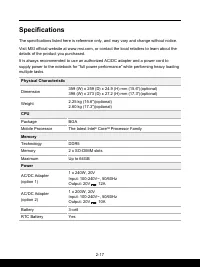
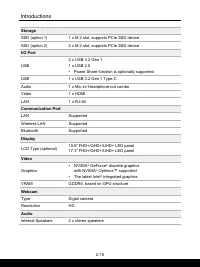
2-16 2-17 Specifications The specifications listed here is reference only, and may vary and change without notice. Visit MSI official website at www.msi.com, or contact the local retailers to learn about the details of the product you purchased.It is always recommended to use an authorized AC/DC ada...
Page 35 - How to Get Started
Page 36 - Begin to Use the Notebook
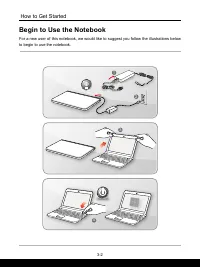
3-2 3-3 How to Get Started Begin to Use the Notebook For a new user of this notebook, we would like to suggest you follow the illustrations below to begin to use the notebook. 1 3 4 2
Page 37 - How to Use the Notebook Comfortably
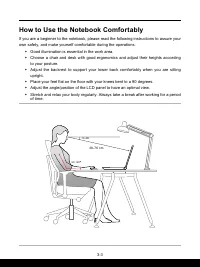
3-2 3-3 How to Use the Notebook Comfortably If you are a beginner to the notebook, please read the following instructions to assure your own safety, and make yourself comfortable during the operations. ▶ Good illumination is essential in the work area. ▶ Choose a chair and desk with good ergonomics ...
Page 38 - How to Manage Power Supply; Battery
3-4 3-5 How to Get Started How to Manage Power Supply This section provides users basic safety precautions to take when using an AC/DC adapter and battery power properly. AC/DC Adapter Ensure that your notebook is connected to an AC power source via the AC adapter before turning it on for the first ...
Page 40 - How to Set Up a Power Plan in Windows OS; Choose or Customize a Power Plan
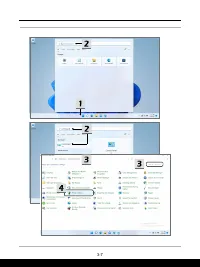
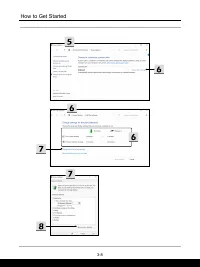
3-6 3-7 How to Get Started How to Set Up a Power Plan in Windows OS * For selected models with Windows 11 operating system installed.A power plan is a collection of hardware and system settings that manages how your computer uses and conserves power. Power plans can save energy, maximize system perf...
Page 43 - Create Your Own Power Plan
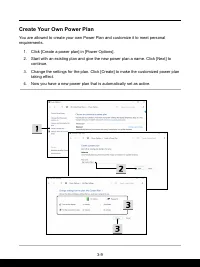
3-8 3-9 Create Your Own Power Plan You are allowed to create your own Power Plan and customize it to meet personal requirements. 1. Click [Create a power plan] in [Power Options].2. Start with an existing plan and give the new power plan a name. Click [Next] to continue. 3. Change the settings for t...
Page 44 - Create an Account's Password
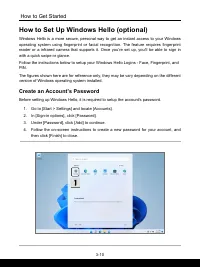
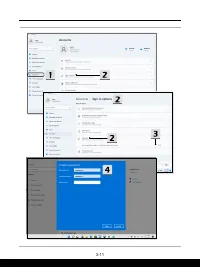
3-10 3-11 How to Get Started How to Set Up Windows Hello (optional) Windows Hello is a more secure, personal way to get an instant access to your Windows operating system using fingerprint or facial recognition. The feature requires fingerprint reader or a infrared camera that supports it. Once you’...
Page 46 - Setting up Windows Hello PIN
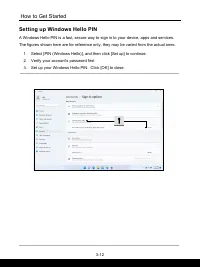
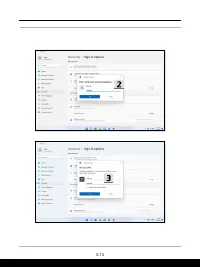
3-12 3-13 How to Get Started Setting up Windows Hello PIN A Windows Hello PIN is a fast, secure way to sign in to your device, apps and services.The figures shown here are for reference only, they may be varied from the actual ones. 1. Select [PIN (Windows Hello)], and then click [Set up] to continu...
Page 48 - Setting up Windows Hello Face
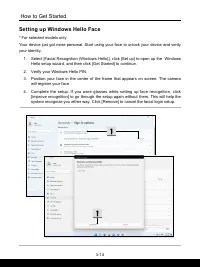
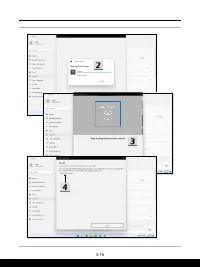
3-14 3-15 How to Get Started Setting up Windows Hello Face * For selected models onlyYour device just got more personal. Start using your face to unlock your device and verity your identity. 1. Select [Facial Recognition (Windows Hello)], click [Set up] to open up the Windows Hello setup wizard, and...
Page 50 - How to Use the Touchpad
3-16 3-17 How to Get Started How to Use the Touchpad The touchpad integrated in your notebook is a pointing device that is compatible with standard mouse, allowing you to control the notebook by pointing the location of the cursor on the screen . ▶ Configure the TouchpadYou can customize the pointin...
Page 51 - About HDD and SSD
3-16 3-17 ▶ Point and ClickWhen you have moved and placed the cursor over an icon, a menu item or a command that you want to execute, simply tap slightly on the touchpad or press the left button to select. This procedure, called as point and click is the basics of operating your notebook. Unlike the...
Page 52 - How to Connect the Internet in Windows OS; Wireless LAN
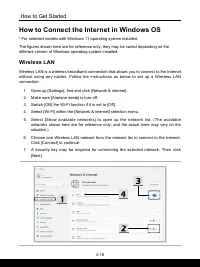
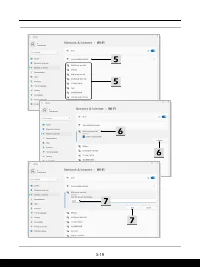
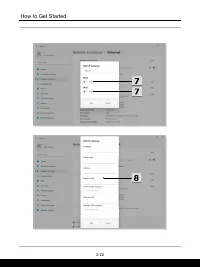
3-18 3-19 How to Get Started How to Connect the Internet in Windows OS * For selected models with Windows 11 operating system installed.The figures shown here are for reference only, they may be varied depending on the different version of Windows operating system installed. Wireless LAN Wireless LA...
Page 54 - Wired LAN
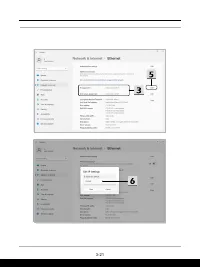
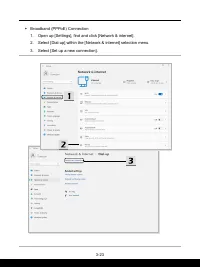
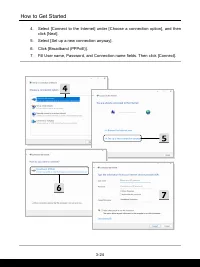
3-20 3-21 How to Get Started Wired LAN Use cables to connect to the Internet. Before setting up the connection of Dynamic IP/ PPPoE or Broadband (PPPoE) or Static IP, contact your Internet Service Provider (ISP) or network administrator for assistance of setting up Internet connection. ▶ Dynamic IP/...
Page 59 - Activating Bluetooth Connection
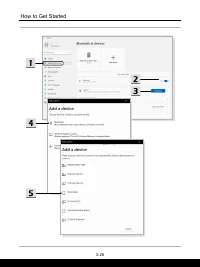
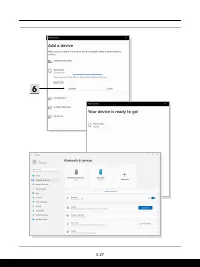
3-24 3-25 How to Set Up Bluetooth Connection in Windows OS * For selected models with Windows 11 operating system installed.Bluetooth pairing is a process in which two Bluetooth devices communicate with each other through an established connection.The figures shown here are for reference only, they ...
Page 62 - How to Connect External Devices
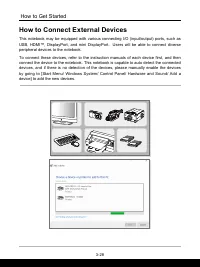
3-28 3-29 How to Get Started How to Connect External Devices This notebook may be equipped with various connecting I/O (input/output) ports, such as USB, HDMI™ , DisplayPort, and mini DisplayPort. Users will be able to connect diverse peripheral devices to the notebook.To connect these devices, refe...
Page 63 - How to Use USB Power Share Function (optional)
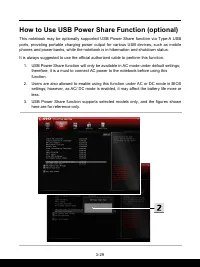
3-28 3-29 How to Use USB Power Share Function (optional) This notebook may be optionally supported USB Power Share function via Type-A USB ports, providing portable charging power output for various USB devices, such as mobile phones and power banks, while the notebook is in hibernation and shutdown...
Page 65 - Video: How to Use F3 Recovery on MSI notebook
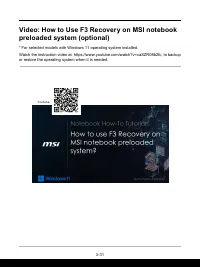
3-30 3-31 Video: How to Use F3 Recovery on MSI notebook preloaded system (optional) * For selected models with Windows 11 operating system installed.Watch the instruction video at : https://www.youtube.com/watch?v=caSZR08b2fc, to backup or restore the operating system when it is needed. YouTube
Page 66 - Video: How to Use Backup and System Restore
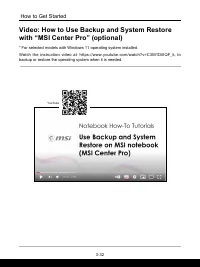
3-32 3-33 How to Get Started Video: How to Use Backup and System Restore with “MSI Center Pro” (optional) * For selected models with Windows 11 operating system installed.Watch the instruction video at : https://www.youtube.com/watch?v=C3M1Di0QF_k, to backup or restore the operating system when it i...