Page 2 - Contents; Warning and Safety instructions; Settings mode
Contents 2 Warning and Safety instructions ............................................................................... 5 Caring for the environment ......................................................................................... 14 Installation .............................................
Page 3 - Push2open
Contents 3 Accessories .................................................................................................................... 58 Accessories supplied ..................................................................................................... 58 Optional accessories .............
Page 5 - Risk of injury and damage due to the refrigeration appliance; Correct application
Warning and Safety instructions 5 This refrigeration appliance complies with current safetyrequirements. Inappropriate use can, however, lead to personalinjury and material damage. Please read the operating and installation instructions carefullybefore using the refrigeration appliance for the first...
Page 6 - Safety with children
Warning and Safety instructions 6 It must only be used as a domestic appliance to store deep frozen food, freeze fresh food and to make ice.Any other usage is not supported by the manufacturer and could bedangerous. This refrigeration appliance is not suitable for storing and keeping cool medici...
Page 7 - Technical safety; The coolant circuit has been checked for leaks. The refrigeration
Warning and Safety instructions 7 Technical safety The coolant circuit has been checked for leaks. The refrigeration appliance complies with statutory safety requirements and theappropriate EU directives. Warning: fire hazard/flammable materials. This symbol is on the compressor and indicates fl...
Page 10 - Correct use
Warning and Safety instructions 10 Correct use This refrigeration appliance is designed for use within specific ambient temperatures (climate range). Do not use in ambienttemperatures for which it is not designed. The climate range is statedon the data plate in the interior cabinet of the refriger...
Page 11 - Accessories and spare parts
Warning and Safety instructions 11 Observe the manufacturer's “use-by” dates and storage instructions given on food to avoid the risk of food poisoning. Storagetimes will depend on several factors, including the freshness andquality of the food, as well as the temperature at which it is stored. Ac...
Page 12 - Disposal of your old appliance; Symbol on the compressor (depending on model)
Warning and Safety instructions 12 Disposal of your old appliance Children playing could become trapped in the appliance and could suffocate. - Remove the appliance doors.- Remove the drawers.- Leave the adjustable shelves in the refrigeration appliance so children cannot climb inside. - If your o...
Page 13 - The oil in the compressor can be fatal if swallowed or if it
Warning and Safety instructions 13 The oil in the compressor can be fatal if swallowed or if it penetrates the airways.
Page 14 - Caring for the environment; Disposing of your old appliance
Caring for the environment 14 Disposing of the packagingmaterial The packaging material is used forhandling and protects the appliancefrom transport damage. The packagingmaterial used is selected from materialswhich are environmentally friendly fordisposal and can generally be recycled.Recycling the...
Page 15 - Installation; Location; Climate range
Installation *INSTALLATION* 15 Location This appliance should be installed in adry, well-ventilated room.When deciding where to install yourrefrigeration appliance, please bear inmind that it will use more energy ifinstalled near to a heater, a cooker orother appliance that gives off heat.Direct sun...
Page 16 - Risk of damage due to high; Installation notes; Risk of damage and injury due to; Adjoining cabinets/units
Installation *INSTALLATION* 16 Risk of damage due to high humidity.In environments with high humidity,condensation can build up onexternal refrigeration appliancepanels, which can cause corrosion.Install the refrigeration appliance in adry and/or air-conditioned room withsufficient ventilation.Aft...
Page 17 - Ventilation; Risk of fire and damage due to; Door hinging; Risk of damage and injury when
Installation *INSTALLATION* 17 Load-bearing capacity of the nichefloor To ensure the safe installation of therefrigeration appliance and to guaranteeits correct functioning, the floor of theniche where the appliance is to beinstalled must be smooth and even.It must be made from strong, rigidmaterial...
Page 18 - at
Installation *INSTALLATION* 18 Side-by-side This appliance can be installed side-by-side with another refrigerationappliance. The following overview willshow you which side-by-sideinstallation options you have with yourrefrigeration appliance. Depending on the installationsituation, you will need th...
Page 20 - Building-in dimensions
Installation *INSTALLATION* 20 Building-in dimensions A B C A B C F 2412/2413 Vi 2134–2164 mm 458 mm 610 mm + furniturefront (19–38 mm) F 2802 Vi,F 2812/2813 Vi 2134–2164 mm 762 mm 610 mm + furniturefront (19–38 mm) F 2902 Vi,F 2912 Vi 2134–2164 mm 915 mm 610 mm + furniturefront (19–38 mm)
Page 22 - Dimensions with appliance door open (opening angle 115°)
Installation *INSTALLATION* 22 Dimensions with appliance door open (opening angle 115°) 10 mm D A B C A B* C* D (with a furniturefront of 19 mm) F 2412/2413 Vi 525 mm Furniturefront(19–38 mm) Door handle 237 mm F 2802 Vi, F 2812/2813 Vi 829 mm Furniturefront(19–38 mm) Door handle 363 mm F 2902 Vi, F...
Page 24 - Dimensions of the furniture front
Installation *INSTALLATION* 24 Dimensions of the furniture front A B C A B C F 2412/2413 Vi 451 mm 2029 mm ≥ 102–132 mm F 2802 Vi, F 2812/2813 Vi 756 mm 2029 mm ≥ 102–132 mm F 2902 Vi, F 2912 Vi 908 mm 2029 mm ≥ 102–132 mm
Page 25 - Installing the appliance; must be; depending on materials; Other
Installation *INSTALLATION* 25 Installing the appliance Before starting ... It is essential to read these operatingand installation instructions carefullybefore starting to install therefrigeration appliance.The refrigeration appliance should beinstalled by a suitably qualifiedinstaller in accordanc...
Page 26 - Weight of the furniture front; If the furniture front is too heavy,; Aligning the building-in niche
Installation *INSTALLATION* 26 Weight of the furniture front Before fitting a furniture front, ensurethat the weight of the furniture frontdoes not exceed the maximumpermitted weight: Refrigerationappliance Max. weight ofthe furniturefront F 2412/2413 Vi 59 kg F 2802 Vi,F 2812/2813 Vi 28 kg F 2902 V...
Page 27 - Checking the installation niche; - The side walls of the installation niche
Installation *INSTALLATION* 27 Checking the installation niche Check the installation dimensions(see “Installation – Installationdimensions”). Check the position of the electricalconnection. The length of theelectrical connection cable is 3 m. The electrical socket must not beconcealed behind th...
Page 28 - Before installation; Risk of damage due to; not; remove the installation aids
Installation *INSTALLATION* 28 Before installation Before installation, remove anyaccessories from the back of theappliance. Risk of damage due to insufficient ventilation.If the refrigeration appliance is notsufficiently ventilated, this may causemould to form and, in the long term,lead to dama...
Page 29 - Unscrew the fixing brackets; Preparing the building-in niche
Installation *INSTALLATION* 29 2 Unscrew the fixing brackets . With the help of several people asrequired, carefully lift the refrigerationappliance from the pallet, startingwith the back of the appliance. Risk of damaging the floor from the load.Moving the refrigeration appliancecan cause ...
Page 30 - Use 2 anti-tip brackets
Installation *INSTALLATION* 30 Use 2 anti-tip brackets for each individual refrigeration appliance or 4anti-tip brackets for each (side-by-side) combination of 2 appliances. Position the anti-tip brackets on the left and right of the building-inniche. Depending on the subsequentadjustment ...
Page 33 - Remove the edge protection; Aligning the refrigeration appliance; The installation aids
Installation *INSTALLATION* 33 If the refrigeration appliance cannotbe pushed into the niche (becausethe floor is uneven, for example),unscrew the rear adjustable feetslightly (see “Installation – Aligningthe refrigeration appliance”) and slidethe refrigeration appliance into theniche. Remove th...
Page 34 - Risk of damage due to incorrect
Installation *INSTALLATION* 34 Furniture front thickness of 38 mm The adjustable feet at the front andback of the appliance can all beadjusted from the front of theappliance. Risk of damage due to incorrect feet adjustment.You may damage the adjustable feetif you use a cordless screwdriver.Always ...
Page 35 - Proceed carefully when adjusting
Installation *INSTALLATION* 35 Adjust the rear feet with a ratchet(attachment: socket, 8 mm) or aTX 20 screwdriver . Adjust the front feet with a ratchet(attachment: socket, 8 mm) or aTX 20 screwdriver . Tip: Proceed carefully when adjusting the feet, alternating between the leftand right ...
Page 36 - only until
Installation *INSTALLATION* 36 Place a spirit level across theinstallation aids on the appliance door to check the refrigerationappliance’s alignment. Unscrew the adjustable feet and on both sides at least until themarking on the plinth has reached thespecified distance of 32 mm on thes...
Page 38 - Preparing to install the furniture fronts
Installation *INSTALLATION* 38 Preparing to install the furniture fronts Open the appliance door as far as itwill go. Unscrew the installation aids from the appliance door. Unscrew the angle trims from both sides of the appliance door and placethe trims and screws to one side –they will ...
Page 40 - Secure the mounting frame
Installation *INSTALLATION* 40 Secure the mounting frame to the top of the furniture front, using 6 to10 screws depending on the size. The mounting frame has severaldifferent types of holes to take accountof a variety of furniture fronts.When securing the frame, alwaysscrew into the strongest p...
Page 42 - Mounting the fixing bracket
Installation *INSTALLATION* 42 Align the depth of the furniture frontvia the gaps in the angle trims . Align the height and sides of thefurniture front using the threadedbolts . Close the appliance door and checkthe distance between the door andadjacent furniture fronts again. Place th...
Page 43 - Slide the fixing bracket
Installation *INSTALLATION* 43 The fixing bracket is used to secure thefurniture front to the bottom of theappliance door. Do not mount the fixing bracket untilthe refrigeration appliance (or side-by-side combination, if applicable) hasbeen installed and the furniture fronthas been aligned. Open t...
Page 44 - Securing the covers
Installation *INSTALLATION* 44 Fit the cover over the fixing bracket . Click the cover onto the fixing bracket. Securing the covers Before the cover can be installed in the gap above the refrigerationappliance, it must be assembled asfollows: Insert the two parts of the cover int...
Page 45 - Place the assembled cover
Installation *INSTALLATION* 45 Place the assembled cover into the gap above the refrigeration applianceso it clicks into place. While doing so,slide both parts of the cover togetheras required. Installing the cover in a side-by-sidecombination Insert the pin (from the side-by-sideinstallation...
Page 47 - Mains water connection; Risk of injury and appliance
Installation *INSTALLATION* 47 Mains water connection Information about the mains waterconnection Risk of injury and appliance damage if appliance is not connectedproperly.Failing to connect the applianceproperly can result in personal injuryand/or material damage.The appliance may only beconnecte...
Page 48 - is ready for
Installation *INSTALLATION* 48 The stainless steel hose must only bereplaced by an original Miele sparepart. The food-grade, stainless steelhose is available to order from theMiele webshop, from the MieleCustomer Service Department orfrom your local Miele dealer. A stopcock must be provided betweent...
Page 49 - Electrical connection; Risk of fire from overheating.
Installation *INSTALLATION* 49 Electrical connection The refrigeration appliance must only beconnected to an earthed socket usingthe mains connection cable supplied.The socket must be easily accessibleafter the refrigeration appliance hasbeen installed. If the socket is not easilyaccessible, ensure ...
Page 50 - Connecting the appliance
Installation *INSTALLATION* 50 Connecting the appliance Insert the plug connector into thesocket at the back of the refrigerationappliance. Make sure that the plug connector hasclicked into position correctly. Insert the plug of the refrigerationappliance into the socket. The refrigeration appli...
Page 51 - Saving energy; In a ventilated room.
Saving energy 51 Normal energyconsumption Increased energyconsumption Installation /Maintenance In a ventilated room. In an enclosed, unventilatedroom. Protected from directsunlight. In direct sunlight. Not near to a heat source(radiator, oven). Near to a heat source(radiator, oven). Where the ideal...
Page 52 - Use; Store food well packaged.
Saving energy 52 Normal energyconsumption Increased energyconsumption Use Drawers and shelvesarranged as they were whenthe appliance was delivered. Only open the door whennecessary and for as short atime as possible. Store foodin an organised way. Frequent opening of doorsfor long periods will cause...
Page 53 - Guide to the appliance
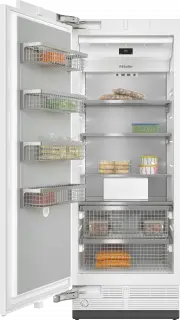
Guide to the appliance 53 F 2412 Vi, F 2413 Vi a Display b On/Off switch c Shelves in the appliance door d Interior lighting e Shelves f Ice cube maker g Ice cube container h Freezer baskets i Automatic door opening (Push2open/Pull2open) j Water filter
Page 55 - Main screen; Sensor control
Guide to the appliance 55 Main screen °C -18 1 2 3 4 5 a SuperFreeze display(only visible when the SuperFreeze function has been switched on) b Temperature display (target temperature) c Sensor control for setting the temperature d Display for Miele@home connection status (only visible ...
Page 56 - Symbol
Guide to the appliance 56 Settings mode In Settings mode, you can select the following appliance functions and alter theirsettings to some extent: Symbol Function Language Set Display brightness Adjust (darker to brighter) Colour scheme Set (dark or bright) / Buzzer tones Adjust the volum...
Page 57 - Symbols in Settings mode; Scroll in Settings mode or select a setting
Guide to the appliance 57 Symbols in Settings mode / Scroll in Settings mode or select a setting / Change a setting (e.g. display brightness) OK Confirm a setting Exit the menu level
Page 58 - Accessories; Accessories supplied; Appliance plug; Optional accessories; Multi-purpose microfibre cloth
Accessories 58 Accessories supplied Appliance plug Water filter (IntensiveClear meshfilter) The IntensiveClear mesh filter, which isalready installed in the refrigerationappliance, filters supply water formaking ice cubes. The IntensiveClear mesh filter doesnot need to be replaced, just cleaned(see ...
Page 60 - Initial commissioning; Before using for the first time; Packaging material
Initial commissioning 60 Before using for the first time Allow the refrigeration appliance tostand for approx. 1 hour beforeconnecting it to the power supply. This will prevent potential functionalproblems with the refrigerationappliance. Packaging material Remove all packaging material fromthe in...
Page 61 - Availability of the WiFi connection
Initial commissioning 61 Miele@home Your refrigeration appliance isequipped with an integrated WiFimodule.Networking is deactivated at thefactory. To use this feature, you will need: - A WiFi network- The Miele app- A Miele user account You can create a user account via the Miele app. The Miele app ...
Page 62 - selected; coloured; OK
Initial commissioning 62 Operating the refrigerationappliance The touch display can be scratchedby pointed or sharp objects, e.g.pens.Only touch the display with yourfingers. If your fingers are cold, the touchdisplay may not react. °C -18 The sensor controls underneath thetemperature disp...
Page 63 - Performing initial commissioning
Initial commissioning 63 Performing initial commissioning Open the appliance door. Switch the refrigeration appliance onby pressing the On/Off switch. The On/Off switch is located belowthe display. The refrigeration appliance will start tocool and the interior lighting will comeon when the appli...
Page 64 - Switching on and off
Switching on and off 64 Switching the refrigerationappliance on Open the appliance door. Switch the refrigeration appliance onby pressing the On/Off switch. The refrigeration appliance will start tocool and the interior lighting will comeon when the appliance door is opened. Miele will appear on...
Page 65 - Switch the refrigeration appliance off.
Switching on and off 65 Switching off for longer periodsof time If the refrigeration appliance is not goingto be used for a longer period of time: Switch the refrigeration appliance off. Switch off at the wall and withdrawthe plug from the socket, ordisconnect the fuse. Risk of damage due to f...
Page 66 - Selecting additional settings; Switching
Selecting additional settings 66 In Settings mode , you can select different refrigeration appliance settingsand alter their settings to some extent,allowing you to adjust the appliance tosuit your requirements.Only the functions in Settings mode that require further explanation aredescribed be...
Page 67 - Performing a Self test
Selecting additional settings 67 Health risk caused by decomposing food.The usability and quality of food maydeteriorate if the temperatureremains above -18 °C for an extendedperiod.Only ever switch on the Eco mode function for a limited period.When switching to the Eco mode function, check that t...
Page 68 - Switching on the; Switching on Push2open
Selecting additional settings 68 Switching on the Door assistant You can choose between the two doorassistants: Push2open and Pull2open . The default door assistant is Push2open . The Push2open door assistant is suitable for furniture fronts without handles. Theappliance door opens automatically...
Page 69 - Switching on Pull2open
Selecting additional settings 69 – Adjusting the duration of theAutoClose function You can also adjust the duration for howlong the appliance door will remain openuntil it closes automatically. In Settings mode , use the and sensor controls to select Door assistant and select OK to conf...
Page 70 - Setting up Miele@home
Selecting additional settings 70 Switching off the Doorassistant In Settings mode , use the and sensor controls to select Door assistant and select OK to confirm your selection. Use the and sensor controls to select Mode and select OK to confirm your selection. Use the a...
Page 71 - Activating Miele@home; Checking the WiFi connection status; Setting up Miele@home again; Resetting the network configuration
Selecting additional settings 71 Activating Miele@home If you have already activatedMiele@home and then disconnectedthe connection, you will need toreactivate the connection. In Settings mode , use the and sensor controls to select Miele@home and select OK to confirm your selection. U...
Page 72 - Switching off the Demo mode; without the cooling
Selecting additional settings 72 Switching off the Demo mode Demo mode allows the refrigerationappliance to be presented in theshowroom without the cooling system being switched on . This setting is not needed for domestic use. If Demo mode has been switched onas a default setting, will show o...
Page 73 - Resetting the settings to their default settings
Selecting additional settings 73 Resetting the settings to their default settings You can reset the refrigeration appliance‘s settings to their default settings. Reset the refrigeration appliance’s settings to the default settings when disposingof your refrigeration appliance, selling it or putti...
Page 74 - Function
Selecting additional settings 74 Function Default setting Language English Display brightness Middle value (4 of 7 segments) Colour scheme Dark / Buzzer tones Middle value (4 of 7 segments) / Keypad tone Middle value (4 of 7 segments) °C / °F Temperature unit °Celsius / Keypad lock Switc...
Page 75 - Switching Sabbath mode
Selecting additional settings 75 Switching Sabbath mode on or off The refrigeration appliance has a Sabbath mode to support the observance of religious customs. When Sabbath mode is switched on, you cannot make any settings on yourrefrigeration appliance. Ensure that the appliance door isproperl...
Page 76 - Switching the
Selecting additional settings 76 Switching on, switching off orresetting the Water filterdisplay Depending on the quantity of ice cubesproduced, the Water filter display will remind you approx. every 6 months thatthe IntensiveClear mesh filter has to becleaned. Clean the water filter appears on t...
Page 77 - Resetting the
Selecting additional settings 77 Resetting the Water filter display After you have cleaned the water filter,you must reset the Water filter display so that it will be displayed automaticallyagain after 6 months.If you do not reset the display, itappears again and again. In Settings mode , u...
Page 78 - The correct temperature; Setting the temperature; required
The correct temperature 78 It is very important to set the correcttemperature to ensure the shelf life offood. Reducing the temperature reducesthe growth rate of microorganisms.Food does not spoil as quickly.To freeze fresh food, a temperature of -18 °C is required. This will prolong the shelf life ...
Page 79 - Temperature range
The correct temperature 79 Temperature range The temperature can be adjusted from-14 °C to -24 °C. The ambient temperature in the roomand the installation location canaffect the time it takes for theappliance to reach the lowesttemperature.If the ambient temperature is toohigh, the appliance may not...
Page 80 - Using Super freeze; SuperFreeze function
Using Super freeze 80 SuperFreeze function For best results, switch the SuperFreezefunction on before putting fresh foodinto the freezer.This helps food to freeze quickly andretain its nutrients, vitamins, flavoursand appearance. Exceptions: - When you place food that is already frozen in the free...
Page 81 - Temperature and door alarm; Temperature alarm
Temperature and door alarm 81 The appliance has been fitted with awarning system which ensures that thetemperature in the freezer cannot riseunnoticed and to avoid energy beingwasted if the door is left open. Temperature alarm The Freezer temperature too high. Max. temperature °C message will appear...
Page 82 - Door alarm; will also; Switching the door alarm off early; Touch the
Temperature and door alarm 82 Switching the temperature alarm offearly Before you switch the temperaturealarm off, you must determine thecause and rectify it. If the alarm disturbs you, it can beturned off early. Touch the OK sensor. The alarm will stop and the message willdisappear from the disp...
Page 83 - Adjusting the interior fittings; Make sure that the shelf is straight.
Adjusting the interior fittings 83 Removing or moving the doorshelves Only move or remove the doorshelves when they are empty. Hold the shelf on the frame with bothhands and lift it slightly so that it canbe lifted with the catches on bothsides over the guide. Remove the shelf or place it in the...
Page 84 - Removing the freezer baskets; Raise the snap fastening
Adjusting the interior fittings 84 Removing the shelf above theice maker Use both hands to grip the front ofthe shelf from below and press it onboth sides until you feel resistance . When pulling out and inserting theshelf, make sure that the side wallsare not damaged. Carefully pull the shel...
Page 85 - Tilt the ice cube container
Adjusting the interior fittings 85 Remove the pegs from theholders (2.). Pull the dividing panel upwards toremove it. To reinsert the dividing panel, placethe holders in an upright position andposition the dividing panel into theholders so that you hear it click intoplace. Insert the pegs in...
Page 86 - Freezing and storing food; Maximum freezing capacity; food is being stored in the shop.
Freezing and storing food 86 Maximum freezing capacity To ensure that fresh food placed in thefreezer freezes through to the core asquickly as possible, the maximumfreezing capacity must not be exceeded.The maximum freezing capacity forfreezing within a 24-hour period is givenon the data plate: “Fre...
Page 87 - Home freezing
Freezing and storing food 87 Home freezing Only freeze fresh food which is in agood condition. Hints on home freezing - The following types of food are suitable for freezing: Fresh meat, poultry, game, fish,vegetables, herbs, fresh fruit, dairyproducts, cakes, leftovers, egg yolks,egg whites and a r...
Page 88 - Storage time for frozen food; Food group; Ice cream; Defrosting frozen goods; - In a microwave oven
Freezing and storing food 88 This helps create a cold reserve in foodwhich is already stored in the freezer. Placing frozen food in thefreezer Food to be frozen can be placedanywhere in the freezer zone. Preferablyfreeze food in the upper freezer basket,as this is the best location for quick andgent...
Page 89 - - In an oven using “Fan heat” or the; Meat and poultry; should be defrosted at room; Most vegetables; can be cooked while; Cooling drinks quickly; not left in
Freezing and storing food 89 - In an oven using “Fan heat” or the “Defrost” setting - At room temperature- In the refrigerator zone (the cold given off by the frozen food helps to keepthe other food cold) - In a steam oven Flat pieces of partially thawed meat orfish can be placed directly into a hot...
Page 90 - Making ice cubes; Switching on the ice maker; The lower the
Making ice cubes 90 For the automatic ice cube maker tooperate, it must be connected to amains water supply (see “Mains waterconnection”). Risk to health due to contaminated water.Consuming polluted water can leadto illnesses.The first 3 batches of ice cubes madeafter the ice cube maker is started...
Page 92 - Automatic defrosting
Automatic defrosting 92 The appliance is equipped with a“NoFrost” system. The refrigerationappliance defrosts automatically.The moisture generated in the appliancecollects on the condenser and isautomatically defrosted and dissipatedfrom time to time.This automatic defrosting systemenables the freez...
Page 93 - Cleaning and care; Risk of damage due to moisture; Cleaning agents; do not use; ammonia, acids or chlorides
Cleaning and care 93 Do not let water get into theelectronic unit or the lighting. Risk of damage due to moisture ingress.The steam from a steam cleaner candamage plastic and and electricalcomponents.Do not use a steam cleaner to cleanthe refrigeration appliance. The data plate located inside thei...
Page 94 - Interior cabinet and accessories; Aluminium frames; Cleaning the door seal; Risk of damage as a result of
Cleaning and care 94 Before cleaning the refrigerationappliance Switch the refrigeration appliance offby pressing the On/Off switch. Take any food out of the applianceand store it in a cool place. Take out all other removable parts forcleaning (see “Adjusting the interiorfittings”). Interior c...
Page 95 - Cleaning the ventilation gaps; will appear in the
Cleaning and care 95 The door seal should be cleanedregularly with clean water, and thenwiped dry with a soft cloth. Cleaning the ventilation gaps A build-up of dust will increase theenergy consumption of the appliance. The ventilation gaps should becleaned on a regular basis with abrush or vacu...
Page 96 - Risk of damage caused by water; ” in “Selecting additional
Cleaning and care 96 Rinse the filter under runninglukewarm water. Turn the filter overunder the running water to clean it onall sides. 4. Reinsert the filter into the back of thefilter cartridge 4.). 5 . Slide the filter cartridge as far as it willgo into the filter opening 5.), makingsure th...
Page 97 - After cleaning; Switch the SuperFreeze
Cleaning and care 97 After cleaning Replace all shelves and accessories inthe refrigeration appliance. Switch the refrigeration applianceback on. Switch the SuperFreeze function on for a while so that the freezer zonecan cool down quickly. Once the freezer zone has reachedthe required tem...
Page 98 - Water filter; appears on the
Water filter 98 The refrigeration appliance is suppliedwith a water filter (IntensiveClear meshfilter) that filters mains water for makingice cubes. The IntensiveClear mesh filter filterssuspended particles from the mainswater – not bacteria or microbes. The water filter does not need to bereplaced....
Page 101 - Problem solving guide; Problem; The refrigeration appliance has not been switched on.
Problem solving guide 101 Many malfunctions and faults that can occur in daily operation can be easilyremedied. You can save time and money in many cases, as you do not need to callthe Miele Customer Service Department.Information to help you rectify faults yourself can be found at www.miele.com/ser...
Page 104 - is
Problem solving guide 104 Problem Cause and remedy The appliance door can-not be opened when Sabbath mode is switched on. The Push2open door assistant is switched on at the same time as Sabbath mode . When Sabbath mode is switched on, the door assistant is deactivated. Pull the appliance do...
Page 105 - Display warnings
Problem solving guide 105 Display warnings Message Cause and remedy The warning sounds andthe message Freezer tem- perature too high. Max.temperature °C appears on the display. The temperature in the refrigeration appliance hasrisen significantly.This could be due to, for example: – The appliance do...
Page 106 - Problems with the ice cube maker
Problem solving guide 106 Message Cause and remedy F Please call Miele Service appears on the displayand an alarm sounds. There is a fault. Make a note of the error message if necessary. Call the Miele Customer Service Department. To turn the alarm off, touch the symbol. The error message w...
Page 109 - The interior lighting is not working.
Problem solving guide 109 The interior lighting is not working. Problem Cause and remedy The interior lighting isnot working. The refrigeration appliance has not been switched on. Switch the refrigeration appliance on. The Sabbath mode function is switched on: the temperature display is dark and ...
Page 110 - Noises; What is causing them?; Bottles or containers are touching. Separate them.
Noises 110 Normalnoises What is causing them? Brrrrr ... A humming noise is made by the compressor. This noise can getlouder for brief periods when the compressor switches on. Blubb, blubb ... A gurgling noise can be heard when the refrigerant circulatesthrough the pipes. Click ... Clicking sounds o...
Page 111 - Service; Contact in the event of a fault; Contact en cas d'anomalies; Warranty
Service 111 Information to help you rectify faultsyourself and about Miele spare partscan be found at www.miele.com/service. Contact in the event of a fault In the event of a fault which you cannotremedy yourself, please contact yourMiele dealer or Miele Customer Service. You can book a Miele Custom...
Page 112 - EU Conformity declaration
EU Conformity declaration 112 Miele hereby declares that this freezercomplies with Directive 2014/53/EU. The complete text of the EU declarationof conformity is available from one ofthe following internet addresses: - Products, Download from www.miele.ie - For service, information, operating instruc...
Page 113 - UK Conformity declaration; manuals and enter the name of the product or the serial number; This; Statement of Compliance; confirms this Miele product fully complies with the; Paul Wright
UK Conformity declaration 113 Miele hereby declares that this freezer complies with UK Radio EquipmentRegulations 2017, as amended. The complete text of the UK declaration of conformity is available from one of thefollowing internet addresses: - Products, Download from www.miele.co.uk- For service, ...
Page 114 - Copyrights and Licences
Copyrights and Licences 114 Miele uses their own and third party software which is not subject to any so-calledOpen Source Licence for the operation and control of the appliance. This software/these software components are protected by copyright. The copyright powers ofMiele and third parties have t...
Page 115 - United Kingdom
United Kingdom Miele Co. Ltd., Fairacres, Marcham Road, Abingdon, Oxon, OX14 1TWTel: 0330 160 6600, Internet: www.miele.co.uk, E-mail: [email protected] Australia Miele Australia Pty. Ltd.ACN 005 635 398ABN 96 005 635 398Level 4, 141 Camberwell RoadHawthorn East, VIC 3123Tel: 1300 464 353E-mail: [em...


 Miele WWD380 WCS PWash&Steam&9kg User Manual
 Miele W 1614 Manual
 Miele G 5266 SCVi SFP Active Plus User Manual
 Miele Classic C1 Turbo Team PowerLine - SBAN0 User Manual
![Miele PDR 307 [EL]](https://manualsarea.com/img/product/thumbs/48/ba/fd/bafde84806e8abc8b420f34eaf8fcd6e.webp) Miele PDR 307 [EL] User Manual
Miele PDR 307 [EL] User Manual Miele F 1911 Vi Manual
![Miele PDR 908 [EL MAR 3N AC 400V 50-60Hz]](https://manualsarea.com/img/product/thumbs/48/05/b7/05b705998b251f92b271e908423e1ecb.webp) Miele PDR 908 [EL MAR 3N AC 400V 50-60Hz] Installation Manual
Miele PDR 908 [EL MAR 3N AC 400V 50-60Hz] Installation Manual Miele K 9757 iD Manual