LG GE24NU40 - User Manual
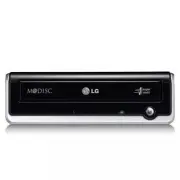
This external DVD writer is designed as a standalone device for reading and writing optical discs, primarily targeting home or office use where built-in DVD drives are unavailable. The manual covers essential topics like hardware installation–including USB and power connections–and safety precautions, such as electrostatic handling and childproofing. It also outlines system requirements (compatible computers, software compatibility) and physical specifications, including data transfer capabilities and environmental conditions for operation. Firmware updates and support resources are referenced alongside a summary of included accessories.


Table of Contents:
- Page 1 – External DVD Writer Installation and Hardware Setup
- Page 2 – Drive Control Location and Cable Removal
- Page 3 – Quick Set-up Guide for External DVD Writer
- Page 4 – Safety Instructions and Compliance
• Please pay attention to handling Electrostatic
Sensitive Devices, you may use anti-static
products such as wrist straps, heel straps, mats
to protect your body from electrostatic.
• Make sure you have a personal computer with
an open USB port before connecting the drive
to your computer.
• Power for all device should be turn off before
attaching the cables.
Connect the drive to the computer as shown in
figure.
Connect the USB converter cable to the
External DVD Writer.
Connect the other end of the USB
converter cable to your computer.
Connect the AC adapter plug to the
power connector at the rear of the drive.
Attach the AC adapter to the AC wall
outlet.
Make sure the power switch is turned on.
When the computer is ready, confirm that
the drive is detected. And then, insert the
supplied software CD into the External
DVD Writer and install the software.
• Please do not connect the AC adapter and
USB 2.0 converter cable by any means other
than specified above.
• “Use only power supplies listed in the user
instructions” or “For applicable power
supplies see user instructions”.
Adapter information
- Model name: WA-36A12S
- Manufacturer: Asian Power devices Inc.
- Rating: 36 W (3.0 A, 12 V)
• The appliance is not intended for use by
young children or infirm persons without
supervision.
• Young Children should be supervised to
ensure that they do not play with appliance.
• If the appliance is supplied from a cord
extension set or an electrical portable outlet
device, the cord extension set on electrical
portable outlet device must be positioned so
that it is not subject to splashing or ingress of
moisture.
Installation
To AC wall outlet.
USB converter cable
NOTES
Connecting to computer
Hardware Installation
NOTES
"Loading the manual" means you need to wait until the file loads and becomes available for online reading. Some manuals are very large, and the time they take to appear depends on your internet speed.
Was this manual helpful?
About this manual
- Brand
- LG
- Model
- GE24NU40
- Document type
- User Manual
- Category
- Drive
- Language(s)
- English
- Pages
- 4
- File size
- 199.8 KB
- Format
Summary
Instructions for installing the external DVD writer, covering hardware setup, connection steps for USB converter and AC adapter, safety notes regarding electrostatic-sensitive devices, and power supply requirements.
Location and function of drive controls on front and rear panels, along with instructions for safely removing the USB converter cable.
Details regarding product features, system environment requirements, physical specifications, data transfer rates, operating conditions, software setup, and included package items for the LG External DVD Writer model GE24NU40.
Ask a question
Related manuals
Popular LG Drives


More LG Drives models
 LG BP40NS20 User Manual
 LG BP50NB40 User Manual
 LG BT30N User Manual
 LG CH08LS10 User Manual
 LG CH10LS20 User Manual
 LG CP40NG10 User Manual
 LG GH20NS10 User Manual
 LG GH20NS15 User Manual
 LG GH22LP20 User Manual
 LG GH22LS50 User Manual
- LG GH22NP20 User Manual
 LG GH22NS30 User Manual
 LG GH22NS40 User Manual
- LG GH22NS50 User Manual
 LG GH24NS50 User Manual
 LG GH24NS90 User Manual
 LG GH24NS95 User Manual