LG AP70NS50 - User Manual
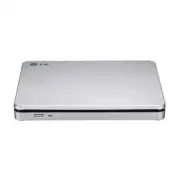
A user manual for the LG Slim Portable DVD Writer covers its core functionality as a compact multimedia device designed for recording and playback. The guide highlights essential topics like installation, connectivity (including USB and TV output), disc compatibility, power requirements, and environmental specifications to ensure reliable operation. Safety warnings emphasize proper handling of electrostatic-sensitive components and laser safety protocols.


Table of Contents:
- Page 1 – USB Drive Installation and Software Handling
- Page 2 – Drive Controls and Media Output
- Page 3 – Quick Set-up Guide for LG Slim Portable DVD Writer
- Page 4 – Safety Instructions and Compliance Statements
• Please pay attention to handling Electrostatic
Sensitive Devices, you may use anti-static
products such as wrist straps, heel straps, mats
to protect your body from electrostatic.
• Make sure you have a personal computer with
one or two open USB ports before connecting
the drive to your computer.
When the computer is ready, confirm that the
drive is detected. And then, insert the supplied
software CD into the drive and install the
software.
• Please do not connect the USB cables by any means other than specified above.
Using the wrong type of cable with this drive can cause it to malfunction.
• The appliance is not intended for use by young children or infirm persons without supervision.
Young Children should be supervised to ensure that they do not play with appliance.
• If the appliance is supplied from a cord extension set or an electrical portable outlet device, the cord
extension set on electrical portable outlet device must be positioned so that it is not subject to splashing
or ingress of moisture.
Installation
NOTES
Hardware Installation
NOTES
The drive supports both Windows and Mac®. To use it properly, please follow directions below.
How to Eject Disc from the drive
• When using with Mac
- Click the eject button located on Mac OS menu or toolbar.
• When using with Windows
- Press the eject button in the front of the product.
*
Software CD (for Windows only)
- The Software CD includes DVD software for usage for Windows.
1
2
Connect the drive to the computer as shown in
figure.
1
Connect the USB 2.0 cable (mini plug) to
the drive.
2
Connect the other end of the USB 2.0
cable to your computer.
The drive may get its power from the PC
USB power. All systems may not meet
USB power requirements and full
performance may not be achieved.
In this case, connect to the USB 2.0
Y type cable (not supplied.).
Connection to computer or A/V Device
"Loading the manual" means you need to wait until the file loads and becomes available for online reading. Some manuals are very large, and the time they take to appear depends on your internet speed.
Was this manual helpful?
About this manual
- Brand
- LG
- Model
- AP70NS50
- Document type
- User Manual
- Category
- Drive
- Language(s)
- English
- Pages
- 4
- File size
- 290.9 KB
- Format
Summary
Instructions for installing and connecting a USB drive, precautions for handling electrostatic-sensitive devices, connection steps with diagrams, software installation via CD, and disc ejection procedures on Mac and Windows systems.
Location and function of drive controls including the front eject button, activity indicator, disc slot, rear USB connector, and methods for using TV connectivity to display media from the drive.
Features, system environment requirements, supported disc types, data transfer rates, power specifications, operating environment details, software installation instructions, package contents, and setup cautions for the portable DVD writer.
Ask a question
Related manuals
Popular LG Drives


More LG Drives models
 LG WH10LS30 User Manual
 LG WH14NS40 User Manual
 LG WH16NS40 User Manual
 LG WH16NS48 User Manual
 LG WH16NS60 User Manual
 LG WP50NB40 User Manual
 LG BE06LU10 User Manual
 LG BE12LU38 User Manual
 LG BE14NU40 User Manual
 LG BE16NU50 User Manual
 LG BH08LS20 User Manual
 LG BH10LS30 User Manual
 LG BH12LS35 User Manual
 LG BH12LS38 User Manual
 LG BH14NS40 User Manual
 LG BH16NS40 User Manual
 LG BP06LU10 User Manual
 LG BP40NB30 User Manual