Page 2 - Safety Precautions
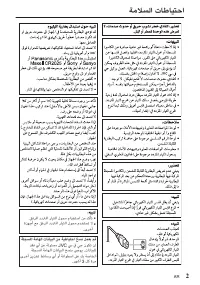
Safety Precautions When the equipment is installed in a cabinet or on a shelf, make sure that it has sufficient space on all sides to allow for ventilation (10 cm or more on both sides, on top and at the rear).Do not block the ventilation holes.(If the ventilation holes are blocked by a newspaper, o...
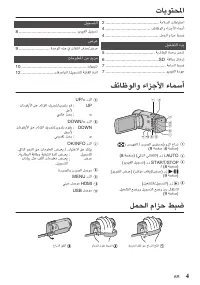
Page 4 - Contents; Getting Started; Names of Parts and Functions
Contents Safety Precautions ................................. 2Names of Parts and Functions ............... 4Grip Belt Adjustment .............................. 4 Getting Started Charging the Battery Pack ..................... 5Inserting an SD Card .............................. 6Clock Setting ........
Page 5 - Charging the Battery Pack; To detach the battery pack; Attach the battery pack.; CAUTION
Charging the Battery Pack (Base) To detach the battery pack Charging finished: Goes out Charging in progress: Blinks Charging Lamp Plug in the power. To AC Outlet (110 V to 240 V) AC Adapter Cover Connect the DC connector. Mark Align the top of the battery with the mark on this unit, and slide in un...
Page 6 - Inserting an SD Card; To remove the SD card
Inserting an SD Card Insert a commercially available SD card before recording. Turn off the power of this unit before inserting or removing an SD card. (Base) Label Insert an SD card. Open the cover. Close the LCD monitor. When the LCD monitor is closed, the unit turns off. o To remove the SD card P...
Page 7 - Clock Setting; Open the LCD monitor.; Set the date and time.; the region where you live and press; To return to the previous screen; Video Quality; To change the setting
Clock Setting To select/move cursor towards up/left or down/right, press the button UP/< or DOWN/>. 1 Open the LCD monitor. . 0 The unit turns on. When the LCD monitor is closed, the unit turns off. 2 Select [YES] and press OK when [SET DATE/TIME!] is displayed. . NO YES SET DATE/TIME! 3 Set t...
Page 8 - Video Recording; Indications during video recording
Video Recording You can record without worrying about the setting details by using the Intelligent Auto mode. Settings such as exposure and focus will be adjusted automatically to suit the shooting conditions. * In case of specific shooting scenes such as person etc., its icon is displayed on the sc...
Page 9 - Playing Back/Deleting Files on this Unit; To delete selected files from the; press OK to confirm deletion.; Usable operation buttons/levers during playback
Playing Back/Deleting Files on this Unit Select and play back the recorded videos from an index screen (thumbnail display). Turn up the volume Turn down the volume Volume adjustment Select the desired video and press d / e . Select the playback mode. To return to the index screen, slide along the (z...
Page 10 - Cautions
Cautions Troubleshooting Recording Medium • Be sure to follow the guidelines below to prevent corruption or damage to your recorded data. • Do not bend or drop the recording medium, or subject it to strong pressure, jolts or vibrations. • Do not splash the recording medium with water. • Do not use, ...
Page 12 - Recordable Time/Specifications; AG
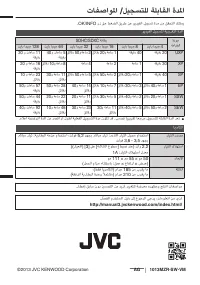
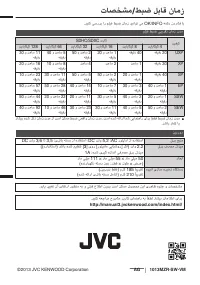
Recordable Time/Specifications You can check the video recording time by pressing the OK/INFO button. Approximate Video Recording Time Quality SDHC/SDXC Card 4 GB 8 GB 16 GB 32 GB 64 GB 128 GB UXP 20 m 40 m 1 h 20 m 2 h 50 m 5 h 40 m 11 h 30 m XP 30 m 1 h 2 h 4 h 8 h 10 m 16 h 20 m SP 40 m 1 h 20 m ...
Page 13 - 基本用户使用指南; 摄像机; JVC
基本用户使用指南 摄像机 GZ-E110 D 㞹⭺旅ṷ . 䒶㸑乀 )y!3* RBN2433.112 ❻㚭䒩ㆸἀ䒩㊈⋘ 澐⋴㚭㇌ℍ澑 BW 䒶亇 VTC 䒶亇! 澐B ✌!.!彸ỡ C ✌澑 䒶㯡 CO.WH21: ḥ㳂䒶徃惎◩! BD.W21N 岮ᷱ㔱䘅 BW 䒶亇㕷澔學季 KWD 乐撁Ⓡ㆗㚁归䘅 KWD 㚎∢ᶮ⽄ɝ 尊敬的顾客感谢您购买此 JVC 产品。 使用之前,请阅读 p. 2 和 p. 10 上的安全注意事项和注意事项以确 保安全使用本产品。 LYT2677-001A-M CS 详细用户使用指南 如需有关如何操作本产品的更多信息,请访问以下网站的 “ 详细用户使用指南 ” 。 o...
Page 14 - 安全注意事项; 㙵ト撃䒶㯡᷌嫧⏋
安全注意事项 㙵㋣撃䒶㯡᷌嫧⏋ 㚭㚻㇁䒩䘅䒶㯡⤃㜝⢅䎇ᶎ⻔澔↚㚊⺖峸㿬㿿㆗⊗⫧䅄䁨䘅⋲旪ɝ學⊀彜埍ℎ䒶ɜↇ奤ɜ∡䁮↱!211İ!Ṧᶋ㆗ᶣ⃦㿬ᶮ䂛䁨ɝ㙵㋣䒶㯡㕷澔學 ἀ 䒩!Qbobtpojdɜ TbozpɜTpoz!㆗!Nbyfmm!DS3136!✌䒶㯡ɝ䒶㯡㙵㋣撚孰澔㚊⍰偾⺖峸䆇䀹⍋㿬㿿ɝ 䒩⬍䘅䒶㯡⸕⍋㕷⢅䎇ɝᶦ䤂⮐⫪䌪⺅ɝ學⊀ↇ奤䒶㯡澔ᷠᶎ⍰ᶣ⃦㿬ᶮɝ ⮇㚭㚻⬊塆⚩㧲㝝㆗㜷⫑ᶋ㕷澔ᶻḇ䧻㮕㳂徛澔ἀ㚻◩♜⏩䓚ↇ䘅敵昚澐ᶥἨɜᶋ恩⍋⎏曣⎅21!dn!Ṧᶋ澑ɝ學⊀➶⟟徐㮕⫕ɝ澐⤃㜝徐㮕⫕堬㈦丹㆗ⶄ䫊➶⟟澔⮇⻲㓤䁮ɝ澑學⮇㚭㚻彝䤼㖏㿬澔⤃䀺䅄䘅嚢䁜䫊ɝ⢅䎇呅䒶㯡㕷澔⸕ↇ侄嗒䌰⠄敯栙ɝ學...
Page 16 - 目录; 入门; 零部件名称和功能
目录 安全注意事项 .................................. 2 零部件名称和功能 ........................... 4 握带调整 ......................................... 4 入门 电池充电 ......................................... 5 插入 SD 卡 ...................................... 6 时钟设定 ......................................... 7 视频质量 .............
Page 17 - 电池充电; 小心
电池充电 澐⸖恩澑 ⋹ᶌ䒶㯡 䒶⬍㆑澢䄅㿮 䒶彜埍ᶮ澢敫䁂 䒶㊈䢻㿰 ㍓⃦䒶㸑ɝ 兴ḥ㳂䒶㸑㍓⸨ 澐221!W兴351!W澑 ḥ㳂䒶徃惎◩ ⢗䙗 彟㌦䙵㳂䒶㌦⍤ɝ 嬱⍸ ㈋䒶㯡䘅柷恩ᶏ㚭㚻ᶋ䘅 㞈嬱⭺滑澔ⷷ㹒⃦䒶㯡澔 䙵兴䒶㯡␕ᶁ⡱⋢彜ɝ 岮ᷱ㕷䒶㯡㰢㚊䒶ɝ ⬊塆䒶㯡ɝ ⤃㜝䒶㿰⽬徠敫䁂㆗敫䁂 ᶥ㪢澔學⍃斆ᶌ曣䘅Ħ㱩ゐ Ḍ柺ħɝ 小心 请务必使用 JVC 电池。 0 如果使用 JVC 电池以外的任何其他电池, 则无法保证安全和性能。 0 充电时间:约 2 小时 50 分钟 (使用附带的电池) * 充电时间是在 25 ℃的条件下使用本机时的时间。如果电池在 10°C 到 35°C 室 ...
Page 18 - 插入; SD; 取出
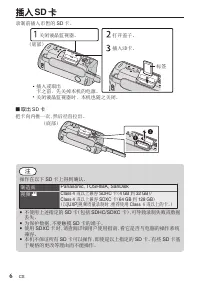
插入 SD 卡 录制前插入市售的 SD 卡。 ㍓⃦㆗⍗ⅻ ⋢᷌⇎澔㌊㚭㚻䘅䒶㸑ɝ 澐⸖恩澑 㞈䫿 ㍓⃦TE⋢ɝ ㇔⺁䙗⫑ɝ 敮㴳㗷䙒奇◩ɝ 敮㴳㗷䙒奇◩㕷澔㚭㚻ᷠ昐᷌敮ɝ o 取出 SD 卡 把卡向内推一次, 然后径直拉出。 澐⸖恩澑 注 操作在以下 SD 卡上得到确认。 制造商 Panasonic, TOSHIBA, SanDisk 视频 A Class 4 或以上兼容 SDHC 卡( 4 GB 到 32 GB ) / Class 4 或以上兼容 SDXC 卡( 64 GB 到 128 GB ) (以 [UXP] 视频质量录制时,推荐使用 Class 6或以上的卡。) 0 不使用上...
Page 19 - 时钟设定; OK; OK; GMT; 视频质量; XP; UXP
时钟设定 要向上 / 向左或向下 / 向右选择 / 移动光 标, 请按 UP/< 或 DOWN/> 键。 1 打开液晶监视器。 0 打开本机。 关闭液晶监视器时, 本机 也随之关闭。 2 显示 [ 请设定日期 / 时间! ] 时, 选 择 [ 是 ] 并按 OK 。 ⎧ 㖰 !! !! !! 學嬿⬛㕦㚠 0 㕷敵澉 3 设定日期和时间。 2014 24 12 10 00 㕷敵 㕦㚠 㕷搠嬿仯 0 按 UP/< 或 DOWN/> 调整设置值, 并按 OK 确认。 光标移动到下一个 项目。 0 重复这一步骤, 输入日、 月、 年、 小时 和分钟。 4 按 UP/< 或...
Page 20 - 视频录制; 视频录制过程中的指示
视频录制 使用智能自动模式, 您在录制时不必考虑设置细节。 曝光和聚焦等设置将按拍摄 条件自动调整。 * 在特定拍摄场景下, 如人物等, 其图标会在画面上显示。 录制重要场景之前,建议进行试录。 澐彝嵞㉎㏅澑 澐⸀奓㉎㏅澑 ⍙䂧 ℎ㊊⋴⍰῝㫣ɝ ⺁⥌⻖↷ɝ 㭐㪢㊊ᶌ澔㦢⺐⚩㗻偾八∩␍㇌ ∩᷌敵⍙⊗ɝ ⤃㜝㦢⺐㖰 H ㇌∩澔↚㊊ S 撯 ↈ㋣㦢⺐ɝ 㝦䚌⻖↷㦢⺐㖰ᶎ㖰 P 㗻偾八∩ɝ ㇔⺁擝⢵ 䙗ɝ o 视频录制过程中的指示 0:00:00 [000:22] 䒶㯡㖿䢻 ⻖↷⨓Ổ ⻖↷彜埍ᶮ ⻖↷⼆㚻 ⇪Ớ⻖↷㕷敵 奇栒岩慐 ⚻㗰嬢㓱◩ ♿⁐䦴⬛◩ 㗻偾八∩ 注 0 附带电池的预计录制时间约为 4...
Page 21 - 撯 ̔̀㫣澐㘃 ̔̀澑㐮㒿ɝ
在本机上播放 / 删除文件 从索引画面 (缩略图显示) 选择和播放录好的视频。 宄橙杴慐 宄ỏ杴慐 杴慐宄㓵 徊㉪㇁暁奇栒ⷷ㊊濃 d 0 e 濅ɝ 徊㉪㐮㒿㦢⺐ɝ ㊊! d 0 e 撯῝㫣澐㘃῝澑㐮㒿ɝ 夂⎒ᶋ0⎒ⵧ㆗⎒ᶌ0⎒⍴徊㉪0䥼∩㞈澔學㊊VQ0=㆗EPXO0?撯ɝ ⤃夂录♟䲣⺖䒼曣澔⚩㘃῝㚠敵㱀 ! u 澐⍙䂧澑㛇㹒∩ɝ 0 再按 L , 返回录制模式。 o 从索引画面删除选定文件 A 按 MENU ,选择 [ 删除 ] 并按 OK 。 B 选择 [ 文件选择 ] 并按 OK 。 C 按 UP/< 或 DOWN/> ,选择文件并按 OK 。 0 R 出现。 D 按 MEN...
Page 22 - 注意事项; 嬱⻖⨓Ổ; z怀⋲旪
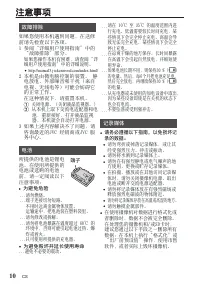
注意事项 嬱⻖⨓Ổ 學∢⽆忶⼫Ṧᶌ㊈⋘澔Ṧ㋠⛐嬱⻖䘅㓱㋯ɝ 學⊀⺰㈙㆗㌊厾嬱⻖⨓Ổ澔㆗嬪乐⍘⺻䁉⌌∜ɜℳⅼ㆗㊰∩ɝ學⊀⮇㮵㲓↱嬱⻖⨓Ổᶋɝ學⊀⚩㚊⺻䁉曚䒶㆗䒶㮕◫⡱䘅⚱㔺ἀ䒩ɜ㙵㋣㆗岯⫙嬱⻖⨓Ổɝ⚩㉎㏅ɜ㐮㒿㆗⚩ṗ孀敯嬱⻖⨓Ổ㕷澔學⊀敮㏅⁐㚻䒶㸑ɜ⍗ⅻ䒶㯡㆗㔮⺁ḥ㳂䒶㸑徃惎◩ɝ學⊀⮇嬱⻖⨓Ổ㒿⚩㚊⺻䁉䡂⚻㆗態㒿⺻䁉䒶䡂㱣䘅䇪Ổ旅归ɝ學⊀⮇嬱⻖⨓Ổ⫙㒿⚩橙㶪㆗橙㸀䘅⚱㔺ɝ學⊀奧㏹慒⯟恩ṷɝ 䒶㯡 㓆昝㌓日 ㇁㍑Ἔ䘅䒶㯡㖰撃䒶㯡ɝ⚩ἀ䒩㇁㍑Ἔ䘅䒶㯡㆗徊岮䘅䒶㯡⇎澔學ᶁ⬛斆孼Ṧᶌ㱩ゐḌ柺澢 䩰⫑ ᶻ怀⋲旪 /// 學⊀䅄䁨ɝ䩰⫑彟㌦ↈ⊀䝮嵰ɝ!ᶎ䒩㕷彝䤼慒⯟䇪Ổ㒿仯ɝ!彑弔徕ᶮ澔㈋䒶㯡塆⚩...
Page 23 - ʐ㚻; z孂⬊⃩澔學⊀; 㴳㗷䙒奇◩; z斳㫣㴳㗷䙒奇◩チ⛐澔學⊀
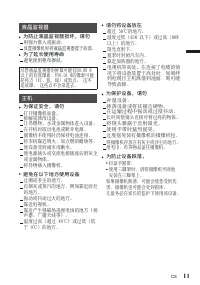
學⊀⮇嬿⢈㒿⚩ 崆彈!61İ䘅⚱㔺ɝ㸀⸧彈ỏ澐46&!Ṧᶌ澑㆗彈橙澐91&!Ṧᶋ澑䘅⚱㔺ɝ!斴䙵⮅ᶌɝ⢐⫤㕷⮂敮㯾廧℆ɝ曡归∡䁮◩䘅⚱㔺ɝ䒶奇㚻䫊橙⢅ɝ⚩彟㌦ḇ䒶亇䘅うℶᶌ⮇嬿⢈㒿仯ḏ橙⢅㕷澔⤃㜝之↱䒶亇ᶕᶼ㚻嵍厾↱⚱曣澔↚⍰偾⭽兵㓆昝ɝ ᶻ㈥嬿⢈澔學⊀ ⺅㸀嬿⢈ɝ㏕厾嬿⢈㆗⮇㐟ⅼ䟭䇪ɝ⚩彑弔彈䦌ᶮ㊰∩㆗彈⸧㈗∩ɝ攀㕷敵ἀ擝⢵䙵㌦⭺䛁彈ḯ䘅䇪Ổɝ⮇擝⢵㘵暳ḏ䙵⮅斴ɝἀ䒩㇌㕷䊜䁉㏈㗄ɝ彈⸧㏈㗄塆㚊㏅⁐㚻䘅㏅⁐㚻⊆ɝ⮇㏅⁐㚻⫙㒿⚩㚊㿱⮙㆗㰚⮙䘅⚱㔺ɝ䒩㭜⵿ɜⶄ䫊䇪⑂䙗Ố㏅⁐㚻ɝ! ᶻ斳㫣嬿⢈嵍厾澔 䲨㇌㍢ɝἀ䒩ᶊ傛㜷㕷澔學⮇㏅⁐㚻䇣♻⚱⬊塆⚩ᶊ傛㜷ᶋɝ ⤃㜝㏅⁐㚻嵍厾...
Page 24 - 大约视频录制时间
可录制时间 / 规格 您可以按 OK/INFO 键, 检查视频录制时间。 大约视频录制时间 画质 SDHC/SDXC 卡 4 GB 8 GB 16 GB 32 GB 64 GB 128 GB UXP 20 分钟 40 分钟 1 小时 20 分钟 2 小时 50 分钟 5 小时 40 分钟 11 小时 30 分钟 XP 30 分钟 1 小时 2 小时 4 小时 8 小时 10 分钟 16 小时 20 分钟 SP 40 分钟 1 小时 20 分钟 2 小时 50 分钟 5 小时 50 分钟 11 小时 30 分钟 23 小时 10 分钟 EP 1 小时 40 分钟 3 小时 30 分钟 7 小时 ...
Page 25 - Краткое руководство пользователя; ВИДЕОКАМЕРА; Подробное руководство пользователя
Краткое руководство пользователя ВИДЕОКАМЕРА GZ-E110 D Проверка комплектующих . Шнур питания (x 2) QAM1322-001 Краткое руководство пользователя (данное руководство) Аудио/видео кабель USB-кабель (Тип A - Тип Mini B) Аккумуляторный блок BN-VG109 Адаптер переменного тока AC-V10M При покупке нового каб...
Page 26 - Техника безопасности
Техника безопасности BHИMAHИE: ДЛЯ ПPEДOTВPAЩEHИЯ OПACHOCTИ BOCПЛAMEHEHИЯ ИЛИ ЭЛEKTPИЧECKOГO УДAPA HE ПOДBEPГAЙTE ДAHHЫЙ AППAPAT BOЗДEЙCTBИЮ ДOЖДЯ ИЛИ BЛAГИ. ПРИМЕЧАНИЯ: • Табличка с техническими данными и мерыпредосторожности расположены на нижнейи/или задней стороне основного устройства.Пластинка ...
Page 28 - Содержание; Приступая к работе; Дополнительная информация; Названия частей и функций
Содержание Техника безопасности ......................... 2Названия частей и функций ................ 4Регулировка ручного ремня ................ 4 Приступая к работе Зарядка аккумуляторного блока ........ 5Установка SD-карты ............................ 6Настройка часов ...............................
Page 29 - Зарядка аккумуляторного блока; ПРЕДУПРЕЖДЕНИЕ
Зарядка аккумуляторного блока Если индикатор зарядки мерцает быстро или двойным мерцанием, обратитесь к п. „Внимание“ ниже. (Низ камеры) Отсоединение аккумуляторного блока Зарядка завершена: гаснет Идет зарядка: мигает Индикатор зарядки Подключите шнур питания к сети. К сетевой розетке (от 110 В до ...
Page 30 - Извлечение SD карты; ПРИМЕЧАНИЕ
Установка SD-карты До начала съемки вставьте серийно производимую SD-карту. Устанавливайте и извлекайте SD-карту только когда аппарат выключен. (Низ камеры) Наклейка Вставьте SD-карту. Откройте крышку. Закройте ЖК-монитор. При закрытии ЖК-монитора аппарат автоматически выключается. o Извлечение SD к...
Page 31 - Настройка часов; Установите дату и время.; чтобы выбрать место, где вы; Возврат к предыдущему экрану; Качество видео; Изменение настройки
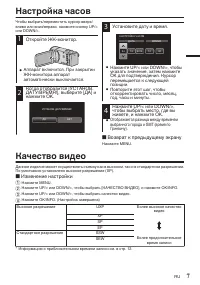
Настройка часов Чтобы выбрать/переместить курсор вверх/ влево или вниз/вправо, нажмите кнопку UP/< или DOWN/>. 1 Откройте ЖК-монитор. . 0 Аппарат включится. При закрытии ЖК-монитора аппарат автоматически выключается. 2 Когда отобразится [УСТАНОВ. ДАТУ/ВРЕМЯ!], выберите [ДА] и нажмите OK. . НЕТ...
Page 32 - Видеосъемка; Обозначения во время видеозаписи
Видеосъемка Вы можете производить съемку, не устанавливая настройки, используя интеллектуальный автоматический режим. Такие настройки, как экспозиция и фокус будут автоматически отрегулированы в соответствии с условиями съемки. * В случае особых условий съемки, например съемки человека и т.д., соотв...
Page 33 - Воспроизведение/удаление файлов на аппарате; Чтобы удалить выбранные; Нажмите MENU, выберите; Действующие кнопки операций/рычажки во время воспроизведения
Воспроизведение/удаление файлов на аппарате Выберите и начните воспроизведение записанных видеофайлов с экрана указателя (отображаются эскизы). Увеличение громкости Уменьшение громкости Регулировка громкости Выберите желаемое видео и нажмите [ d / e ]. Выберите режим воспроизведения. Во время паузы ...
Page 34 - Внимание
Внимание Носитель записи • Во избежание повреждения носителя записи следуйте рекомендациям, указанным ниже. • Не сгибайте и не роняйте носитель записи, не подвергайте его сдавливанию, толчкам или вибрации.Не допускайте попадания воды на носитель записи.Не используйте, не заменяйте и не хранитеносите...
Page 37 - Guide de l’utilisateur; CAMÉSCOPE; Manuel d’utilisation
Guide de l’utilisateur CAMÉSCOPE GZ-E110 D Vérifier les accessoires . Cordon d’ alimentation (x 2) QAM1322-001 Guide de l’ utilisateur (ce manuel) Câble AV Câble USB (Type A - Mini Type B) Batterie BN-VG109 Adaptateur secteur AC-V10M Veuillez consulter votre revendeur JVC ou le centre de service JVC...
Page 38 - Précautions de sécurité
Précautions de sécurité AVERTISSEMENT : POUR ÉVITER LES RISQUES D’INCENDIE OU D’ÉLECTROCUTION, NE PAS EXPOSER L’APPAREIL À LA PLUIE NI À L’HUMIDITÉ. REMARQUES : • La plaque d’identification et l’avertissement desécurité se trouvent sous l’appareil et/ou au dos.La plaque de numéro de série se trouve ...
Page 40 - Contenu; Démarrer; Noms des pièces et des fonctions
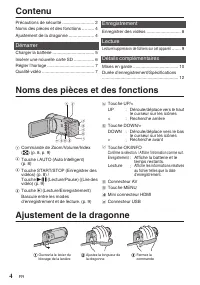
Contenu Précautions de sécurité .......................... 2Noms des pièces et des fonctions ......... 4Ajustement de la dragonne .................... 4 Démarrer Charger la batterie ................................. 5Insérer une nouvelle carte SD ................ 6Régler l’horloge .....................
Page 41 - Charger la batterie; ATTENTION
Charger la batterie Si le témoin de charge clignote rapidement ou deux fois, reportez-vous à la “Mise en garde” ci-dessous. (Basique) Pour retirer la batterie Chargement terminé : S’éteint Chargement en cours : Clignote Voyant de chargement Branchez le courant. À la prise de l’adaptateur secteur (11...
Page 42 - Insérer une nouvelle carte SD; Pour retirer la carte SD; REMARQUE
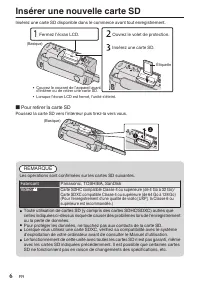
Insérer une nouvelle carte SD Insérez une carte SD disponible dans le commerce avant tout enregistrement. Coupez le courant de l’appareil avant d’insérer ou de retirer une carte SD. (Basique) Étiquette Insérez une carte SD. Ouvrez le volet de protection. Fermez l’écran LCD. Lorsque l’écran LCD est f...
Page 43 - Régler l’horloge; Pour revenir à l’écran précédent; Qualité vidéo; Pour modifier le réglage
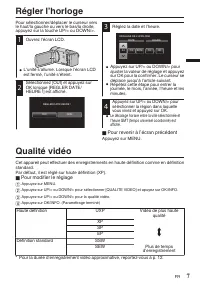
Régler l’horloge Pour sélectionner/déplacer le curseur vers le haut/la gauche ou vers le bas/la droite, appuyez sur la touche UP/< ou DOWN/>. 1 Ouvrez l’écran LCD. . 0 L’unité s’allume. Lorsque l’écran LCD est fermé, l’unité s’éteint. 2 Sélectionnez [OUI] et appuyez sur OK lorsque [REGLER DATE...
Page 44 - Enregistrer des vidéos
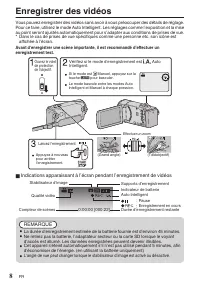
Enregistrer des vidéos Vous pouvez enregistrer des vidéos sans avoir à vous préoccuper des détails de réglage. Pour ce faire, utilisez le mode Auto Intelligent. Les réglages comme l’exposition et la mise au point seront ajustés automatiquement pour s’adapter aux conditions de prises de vue. * Dans l...
Page 45 - Lecture/suppression de fichiers sur cet appareil; pendant
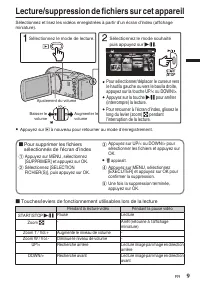
Lecture/suppression de fichiers sur cet appareil Sélectionnez et lisez les vidéos enregistrées à partir d’un écran d’index (affichage miniature). Augmenter le volume Baisser le volume Ajustement du volume Sélectionnez le mode souhaité puis appuyez sur d / e . Sélectionnez le mode de lecture. Pour re...
Page 46 - Mises en garde
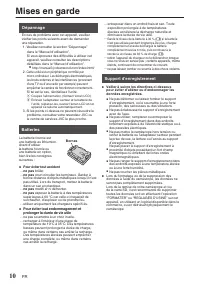
Mises en garde Support d’enregistrement • Veiller à suivre les directives ci-dessous pour éviter d’altérer ou d’endommager les données enregistrées. • Ne pas déformer ou laisser tomber le support d’enregistrement, ou le soumettre à une fortepression, des secousses ou des vibrations.Ne pas éclabousse...
Page 48 - Durée d’enregistrement/Spécifications
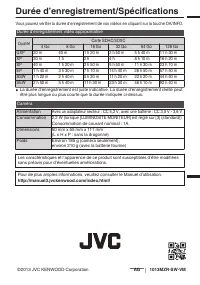
Durée d’enregistrement/Spécifications Vous pouvez vérifier la durée d’enregistrement de vos vidéos en cliquant sur la touche OK/INFO. Durée d’enregistrement vidéo approximative Qualité Carte SDHC/SDXC 4 Go 8 Go 16 Go 32 Go 64 Go 128 Go UXP 20 m 40 m 1 h 20 m 2 h 50 m 5 h 40 m 11 h 30 m XP 30 m 1 h 2...
Page 50 - وأ شامق ةعطق وأ ،ةفشنمب ويديفلا ايرماك ةيطغتب مق
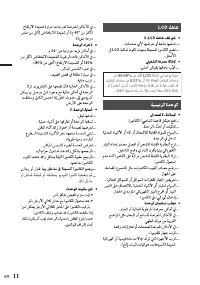
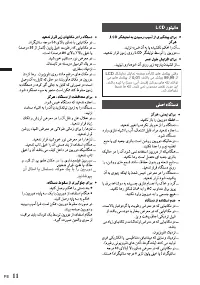
ﻦﻣ 99.99% ﻦﻣ ﺮﺜﻛﺃ LCD ﺔﺷﺎﺷ ﻲﻓ ﺪﺟﻮﻳ ﺎﻤﻨﻴﺑ ﻞﺴﻜﺒﻟﺍ ﺕﺍﺪﺣﻭ ﻦﻣ 0.01% ﻥﺃ ﺎﻟﺇ ،ﺔﻟﺎﻌﻔﻟﺍ ﻞﺴﻜﺒﻟﺍ ﺕﺍﺪﺣﻭ ﻭﺃ (ﺮﻀﺧﺃ ،ﻕﺭﺯﺃ ،ﺮﻤﺣﺃ) ﺔﻌﻃﺎﺳ ﻁﺎﻘﻧ ﻦﻋ ﺓﺭﺎﺒﻋ ﻥﻮﻜﺗ ﺪﻗ .ﻁﺎﻘﻨﻟﺍ ﻞﻴﺠﺴﺗ ﻢﺘﻳ ﻦﻟ .ًﺎﻠﻠﺧ ﺲﻴﻟ ﺍﺬﻫﻭ .ﺔﻨﻛﺍﺩ ﻁﺎﻘﻧ ﻭﺃ ﺵﺎﻤﻗ ﺔﻌﻄﻗ ﻭﺃ ،ﺔﻔﺸﻨﻤﺑ ﻮﻳﺪﻴﻔﻟﺍ ﺍﲑﻣﺎﻛ ﺔﻴﻄﻐﺘﺑ ﻢﻗ .ﻚﻟﺫ ﱃﺇ ﺎﻣ AR 11
Page 51 - تاهيبنت; اهحلاصإو تلاكشلما فاشتكا
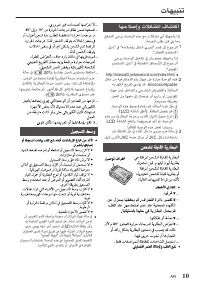
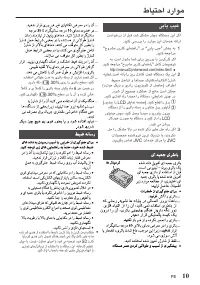
تاهيبنت ﺔﻟﺎﺣ ﰲ ( X ) 30% ﺔﻳﺭﺎﻄﺑ ﻦﺤﺷ ﻯﻮﺘﺴﻤﺑ ﻆﻔﺘﺣﺍ .ﺖﻗﻮﻟﺍ ﻦﻣ ﺓﺪﺘﻤﻣ ﺓﱰﻔﻟ ﺔﻳﺭﺎﻄﺒﻟﺍ ﺔﻣﺰﺣ ﻡﺍﺪﺨﺘﺳﺍ ﻡﺪﻋ ﻞﻣﺎﻜﻟﺎﺑ ﺔﻳﺭﺎﻄﺒﻟﺍ ﺔﻣﺰﺣ ﻦﺤﺷ ﺐﺠﻳ ،ﻚﻟﺫ ﱃﺇ ﺔﻓﺎﺿﻹﺎﺑ ﺎﻬﻨﻳﺰﺨﺗ ﺔﻌﺑﺎﺘﻣ ﻢﺛ ،ﺮﻬﺷﺃ 6 ﻞﻛ ﻞﻣﺎﻜﻟﺎﺑ ﺎﻬﻨﺤﺷ ﻍﺍﺮﻓﺇﻭ .( X ) 30% ﺔﻳﺭﺎﻄﺒﻟﺍ ﻯﻮﺘﺴﻣ ﺪﻨﻋ ﺎﻬﺣﻼﺻﺇﻭ ﺕﻼﻜﺸﳌﺍ ﻑﺎﺸﺘﻛﺍ ﻖﻘﺤﺘﻟﺍ ﻰﺟﺮﻳ ،ﺓﺪﺣﻮﻟﺍ هﺬﻫ ﻊﻣ ﺕﻼﻜﺸﻣ ﻱﺃ ﻚﺘﻬﺟﺍﻭ ﺍﺫﺇ .ﺔﻣﺪﺨﻟﺍ ﺐ...
Page 52 - لوطب كيرحتلاب مق سرهفلا ةشاش لىإ ةدوعلل
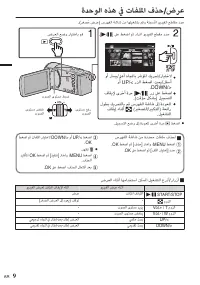
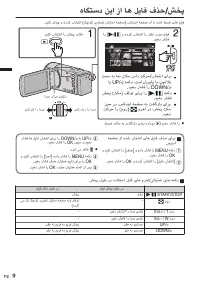
ضرع / فذح تافلملا يف هذه ةدحولا ددح عطاقم ويديفلا ةلجسُملا مقو اهليغشتب نم ةشاش سرهفلا ) ضرع رغصُم .( ﻯﻮﺘﺴﻣ ﻊﻓﺭ ﺕﻮﺼﻟﺍ ﻯﻮﺘﺴﻣ ﺾﻔﺧ ﺕﻮﺼﻟﺍ ﺕﻮﺼﻟﺍ ﻯﻮﺘﺴﻣ ﻂﺒﺿ .[ d / e ] ﲆﻋ ﻂﻐﺿﺍ ﻢﺛ ﺩﺍﺮﳌﺍ ﻮﻳﺪﻴﻔﻟﺍ ﻊﻄﻘﻣ ﺩﺪﺣ .ﺽﺮﻌﻟﺍ ﻊﺿﻭ ﺭﺎﻴﺘﺧﺎﺑ ﻢﻗ ﻭﺃ ﺭﺎﺴﻳ/ﲆﻋﺃ هﺎﺠﺗﺎﺑ ﴍﺆﳌﺍ ﻚﻳﺮﺤﺗ/ﺭﺎﻴﺘﺧﻻ ﻭﺃ UP/< ﺭﺰﻟﺍ ﻂﻐﺿﺍ ،ينﻤﻳ/ﻞﻔﺳﺃ .DOWN/> ﻝﻮﻄ...
Page 53 - تارشؤملا
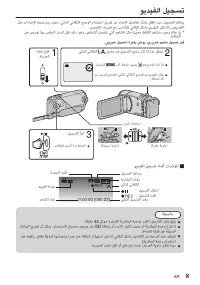
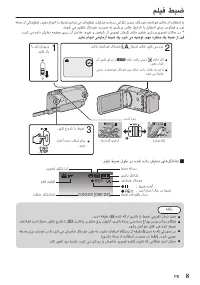
ليجست ويديفلا كنكمي ليجستلا نود قلقلا نأشب ليصافت دادعإلا نع قيرط مادختسا عضولا يئاقلتلا يكذلا . فوس متي طبض تادادعإلا لثم ضيرعتلا زيكرتلاو يرؤبلا لكشب يئاقلت بسانتتل عم فورظ ريوصتلا . * يف ةلاح دوجو دهاشم طاقتلا ةنَّيعم لثم دهاشملا يتلا نمضتت صاخشأ ريغو ،كلذ نإف زمرلا صاخلا اهب ضَرعت ىلع ةشاشلا . ل...
Page 54 - ةدوج
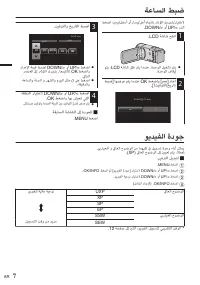
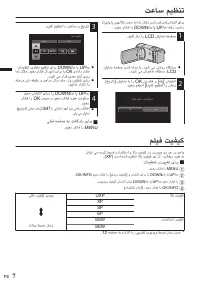
طبض ةعاسلا رايتخال / كيرحت رشؤملا هاجتاب ىلعأ / راسي وأ لفسأ / ،نيمي طغضا رزلا UP/< وأ DOWN/> . 1 حتفا ةشاش LCD . . 0 متي ليغشت ةدحولا . امدنع متي قلغ ةشاش LCD ، متي فاقيإ ةدحولا . 2 رتخا ] معن [ طغضاو OK امدنع متي اهضرع ] طبض خيرات / تيقوتلا .[! . ﻻ ﻢﻌﻧ ﺖﻴﻗﻮﺘﻟﺍ/ﺦﻳﺭﺎﺗ ﻂﺒﺿ 3 طبضا خيراتلا تيقوتل...
Page 55 - جارخإل
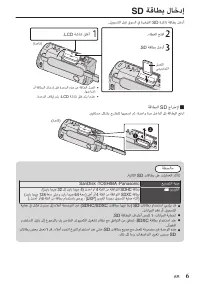
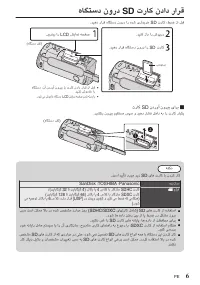
لاخدإ ةقاطب SD لخدأ ةقاطب ةركاذ SD ةرفوتملا يف قوسلا لبق ليجستلا . ﻭﺃ ﺔﻗﺎﻄﺒﻟﺍ ﻝﺎﺧﺩﺇ ﻞﺒﻗ ﺓﺪﺣﻮﻟﺍ هﺬﻫ ﻦﻋ ﺔﻗﺎﻄﻟﺍ ﻞﺼﻓﺍ .ﺎﻬﺟﺍﺮﺧﺇ (ﺓﺪﻋﺎﻗ) ﻖﺼﻠﳌﺍ ﻲﺤﻴﺿﻮﺘﻟﺍ .SD ﺔﻗﺎﻄﺑ ﻞﺧﺩﺃ .ﺀﺎﻄﻐﻟﺍ ﺢﺘﻓﺍ .LCD ﺔﺷﺎﺷ ﻖﻠﻏﺃ .ﺓﺪﺣﻮﻟﺍ ﻑﺎﻘﻳﺇ ﻢﺘﻳ ،LCD ﺔﺷﺎﺷ ﻖﻠﻏ ﻢﺘﻳ ﺎﻣﺪﻨﻋ o جارخإل SD ةقاطبلا عفدا ةقاطبلا ىلإ لخادلا ةرم ،ةدحاو مث اهبحسا جراخ...
Page 56 - ةيراطبلا ةدحو جارخلإ; هيبنت
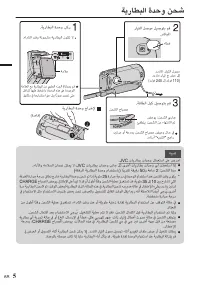
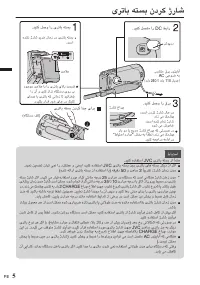
نحش ةدحو ةيراطبلا (ﺓﺪﻋﺎﻗ) ﺔﻳﺭﺎﻄﺒﻟﺍ ﺓﺪﺣﻭ ﺝﺍﺮﺧﻹ ﺊﻔﻄﻨﻳ :ﻦﺤﺸﻟﺍ ﻦﻣ ﺀﺎﻬﺘﻧﻻﺍ ﻢﺗ ﺾﻣﻮﻳ :ﻦﺤﺸﻟﺍ ﻱﺭﺎﺟ ﻦﺤﺸﻟﺍ ﺡﺎﺒﺼﻣ .ﺔﻗﺎﻄﻟﺍ ﻞﺒﻛ ﻞﻴﺻﻮﺘﺑ ﻢﻗ ﺩﺩﱰﻣ ﺭﺎﻴﺗ ﺝ ﺮﺨﻣ ﱃﺇ (ﺖﻟﻮﻓ 240 ﱃﺇ ﺖﻟﻮﻓ 110) ﺩﺩﱰﳌﺍ ﺭﺎﻴﺘﻟﺍ ﻝﻮﺤﻣ ﺀﺎﻄﻏ ﺭﺎﻴﺘﻟﺍ ﻞﺻﻮﻣ ﻞﻴﺻﻮﺘﺑ ﻢﻗ .ﴍﺎﺒﳌﺍ ﺔﻣﻼﻋ ﺔﻣﻼﻌﻟﺍ ﻊﻣ ﺔﻳﺭﺎﻄﺒﻟﺍ ﻦﻣ ﻱﻮﻠﻌﻟﺍ ﺀﺰﺠﻟﺍ ﺓﺍﺫﺎﺤﻤﺑ ﻢﻗ ﻞﺧﺍﺪﻠﻟ ﺎﻬﻴﻠﻋ ﻂﻐﺿﺍﻭ ،ﺓﺪﺣﻮﻟﺍ هﺬﻫ ...
Page 59 - .قفرلما ددترلما رايتلا لوحم مادختسا نم دكأت; ةلجسلما ةماهلا تانايبلا نم ةيطايتحا خسن لمعب مق; دقف يأ نع ةلوئسم JVC سي في يج نوكت نل
تاطايتحا ةمالسلا .ﻖﻓﺮﳌﺍ ﺩﺩﱰﳌﺍ ﺭﺎﻴﺘﻟﺍ ﻝﻮﺤﻣ ﻡﺍﺪﺨﺘﺳﺍ ﻦﻣ ﺪﻛﺄﺗ ﺓﺰﻬﺟﺃ ﻊﻣ ﻖﻓﺮﳌﺍ ﺩﺩﱰﳌﺍ ﺭﺎﻴﺘﻟﺍ ﻝﻮﺤﻣ ﻡﺪﺨﺘﺴﺗ ﻻ .ﻯﺮﺧﺃ ﺔﻠﺠﺴﳌﺍ ﺔﻣﺎﻬﻟﺍ ﺕﺎﻧﺎﻴﺒﻟﺍ ﻦﻣ ﺔﻴﻃﺎﻴﺘﺣﺍ ﺦﺴﻧ ﻞﻤﻌﺑ ﻢﻗ ﺪﻘﻓ ﻱﺃ ﻦﻋ ﺔﻟﻮﺌﺴﻣ JVC ﳼ ﰲ ﻲﺟ ﻥﻮﻜﺗ ﻦﻟ ﺔﻠﺠﺴﳌﺍ ﺔﻣﺎﻬﻟﺍ ﺕﺎﻧﺎﻴﺒﻟﺍ ﺦﺴﻨﺑ ﴅﻮﻳ .ﺕﺎﻧﺎﻴﺒﻠﻟ ﻯﺮﺧﺃ ﻦﻳﺰﺨﺗ ﻂﺋﺎﺳﻭ ﻱﺃ ﻭﺃ ﺔﻧﺍﻮﻄﺳﺍ ﲆﻋ ﻚﺑ ﺔﺻﺎﺨﻟﺍ .ﺮﻬﺷﺃ 3 ﻞﻛ ﺓﺮﻣ 2 AR
Page 60 - اريماكلا; asia
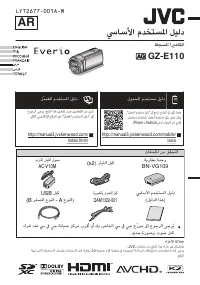
ليلد مدختسملا يساسألا اريماكلا ةلجسملا GZ-E110 D . ﺕﺎﻘﺤﻠﳌﺍ ﻦﻣ ﻖﻘﺤﺘﻟﺍ ﺩﺩﱰﳌﺍ ﺭﺎﻴﺘﻟﺍ ﻝﻮﺤﻣ AC-V10M (x2) ﺭﺎﻴﺘﻟﺍ ﻞﺒﻛ ﺔﻳﺭﺎﻄﺑ ﺓﺪﺣﻭ BN-VG109 USB ﻞﺒﻛ (B ﺮﻐﺼﳌﺍ ﻉﻮﻨﻟﺍ - A ﻉﻮﻨﻟﺍ) ﺓﺭﻮﺼﻟﺍﻭ ﺕﻮﺼﻟﺍ ﻞﺒﻛ QAM1322-001 ﳼﺎﺳﻷﺍ ﻡﺪﺨﺘﺴﳌﺍ ﻞﻴﻟﺩ (ﻞﻴﻟﺪﻟﺍ ﺍﺬﻫ) ﺀﺍﴍ ﺪﻨﻋ ﳼ ﰲ ﻲﺟ ﺔﻧﺎﻴﺻ ﺰﻛﺮﻣ ﺏﺮﻗﺃ ﻭﺃ ﻚﺑ ﺹﺎﺨﻟﺍ ﳼ ﰲ ﻲﺟ ﻉ ّﺯﻮﻣ ﱃﺇ ﻉﻮﺟﺮﻟﺍ ﻰﺟﺮُﻳ...
Page 62 - نآ لاثما ای لامتسد ،هلوح کی اب ار نیبرود
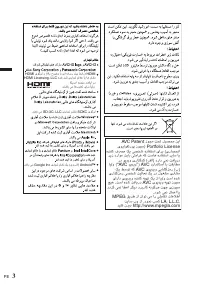
LCD ﺮﮕﺸﯾﺎﻤﻧ ﺶﯾﺎﻤﻧ ﻪﺤﻔﺻ ﺪﻣﺁﺭﺎﮐ یﺎﻫ ﻞﺴﮑﯿﭘ ﯽﺘﻗﻭ ﯽﻣ یﺎﻫ ﻞﺴﮑﯿﭘ ﺯﺍ 0,01 ،ﺪﻨﺷﺎﺑ ﯽﻣ ﺮﺘﺸﯿﺑ 99,99 ﺯﺍ .ﺪﻨﺷﺎﺑ هﺮﯿﺗ ﺎﯾ (ﺰﺒﺳ ،ﯽﺑﺁ ،ﺰﻣﺮﻗ) ﻦﺷﻭﺭ یﺎﻫ ﻪﮑﻟ ﺪﻨﻧﺍﻮﺗ ﻂﺒﺿ ﺎﻫ ﻪﮑﻟ .ﺩﻮﺷ ﯽﻤﻧ ﺏﻮﺴﺤﻣ ﺺﻘﻧ ﺩﺭﻮﻣ ﻦﯾﺍ .ﺪﺷ ﺪﻨﻫﺍﻮﺨﻧ ﻥﺁ ﻝﺎﺜﻣﺍ ﺎﯾ ﻝﺎﻤﺘﺳﺩ ،ﻪﻟﻮﺣ ﮏﯾ ﺎﺑ ﺍﺭ ﻦﯿﺑﺭﻭﺩ .ﺪﯿﻧﺎﺷﻮﭙﺑ PE 11
Page 63 - یبای بیع
دراوم طایتحا هﺩﺎﻔﺘﺳﺍ ﯽﻧﻻﻮﻃ ﺕﺪﻣ ﻪﺑ یﺮﺗﺎﺑ ﻪﺘﺴﺑ ﺯﺍ ﺪﻳﺭﺍﺪﻧ ﺪﺼﻗ ﺮﮔﺍ .ﺪﻳﺭﺍﺩ ﻪﮕﻧ ( X ) 30% یﻭﺭ ﺍﺭ یﺮﺗﺎﺑ ﺢﻄﺳ ،ﺪﻴﻨﮐ ًﻼﻣﺎﮐ ﻭ ﺮﭘ ًﻼﻣﺎﮐ ﺍﺭ یﺮﺗﺎﺑ ﻪﺘﺴﺑ ﺭﺎﺒﮑﻳ هﺎﻣ 6 ﺮﻫ ،ﻦﻤﺿ ﺭﺩ .ﺪﻴﻨﮐ یﺭﺍﺪﻬﮕﻧ ( X ) 30% ﺢﻄﺳ ﺭﺩ ﺍﺭ ﻥﺁ ﻭ هﺩﺮﮐ ﯽﻟﺎﺧ ﯽﺑﺎﯾ ﺐﯿﻋ ﺖﺳﺍﻮﺧﺭﺩ ﺯﺍ ﻞﺒﻗ ،ﺪﺷ ﻞﮑﺸﻣ ﺭﺎﭼﺩ هﺎﮕﺘﺳﺩ ﻦﯾﺍ ﺮﮔﺍ .ﺪﯿﻨﮐ ﯽﺳﺭﺮﺑ ﺍﺭ ﺩﺭﺍﻮﻣ ﻦﯾﺍ ﺕﺎﻣﺪﺧ ﻪﺋﺍﺭﺍ ...
Page 64 - تمس هب امن ناکم نداد تکرح/باختنا یارب
شخپ / فذح لياف اه زا نیا هاگتسد مليف یاه طبض هدش ار زا هحفص سکدنیا ) هحفص شیامن ریواصت کچوک ( باختنا هدرک و شخپ دینک . ﺪﯿﻨﮐ ﺩﺎﯾﺯ ﺍﺭ ﺍﺪﺻ ﺪﯿﻨﮐ ﻢﮐ ﺍﺭ ﺍﺪﺻ ﺍﺪﺻ ﻥﺍﺰﯿﻣ ﻢﯿﻈﻨﺗ ﺍﺭ [ d / e ] ﻭ هﺩﺮﮐ ﺏﺎﺨﺘﻧﺍ ﺍﺭ ﺮﻈﻧ ﺩﺭﻮﻣ ﻢﻠﻴﻓ .ﺪﯿﻫﺩ ﺭﺎﺸﻓ .ﺪﯿﻨﮐ ﺏﺎﺨﺘﻧﺍ ﺍﺭ ﺶﺨﭘ ﺖﻟﺎﺣ ﺖﻤﺳ ﻪﺑ ﺎﻤﻧ ﻥﺎﮑﻣ ﻥﺩﺍﺩ ﺖﮐﺮﺣ/ﺏﺎﺨﺘﻧﺍ یﺍﺮﺑ ﺎﯾ UP/< ﻪﻤﮐﺩ...
Page 68 - یرتاب هتسب ندرک ادج یارب; طايتحا
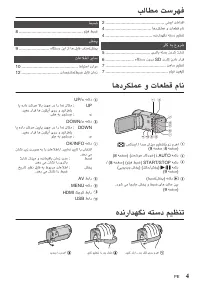
ژراش ندرک هتسب یرتاب (هﺎﮕﺘﺳﺩ ﻒﮐ) یﺮﺗﺎﺑ ﻪﺘﺴﺑ ﻥﺩﺮﮐ ﺍﺪﺟ یﺍﺮﺑ :ﺖﺳﺍ هﺪﺷ ﻡﺎﻤﺗ ژﺭﺎﺷ ﺩﻮﺷ ﯽﻣ ﺵﻮﻣﺎﺧ :ﺖﺳﺍ ﻥﺩﺮﮐ ژﺭﺎﺷ ﻝﺎﺣ ﺭﺩ ﺪﻧﺯ ﯽﻣ ﮏﻤﺸﭼ ژﺭﺎﺷ ﻍﺍﺮﭼ .ﺪﯿﻨﮐ ﻞﺻﻭ ﺍﺭ ﻕﺮﺑ AC ﯽﺟﻭﺮﺧ ﻪﺑ (ﺖﻟﻭ 240 ﺎﺗ ﺖﻟﻭ 110 ﻥﺎﯾﺮﺟ) ﺏﻭﺎﻨﺘﻣ ﻕﺮﺑ ﺭﻮﺘﭘﺍﺩﺁ ﺵﻮﭘﺭﺩ .ﺪﯿﻨﮐ ﻞﺼﺘﻣ ﺍﺭ DC ﻂﺑﺍﺭ ﺖﻣﻼﻋ ﺩﻮﺟﻮﻣ ﺖﻣﻼﻋ ﺎﺑ ﺍﺭ یﺮﺗﺎﺑ یﻻﺎﺑ ﺖﻤﺴﻗ ﺍﺭ ﻥﺁ ﻭ ﺪﯿﻨﮐ ﺯﺍﺮﺗ هﺎﮕﺘﺳﺩ ...
Page 71 - دینک هیهت نابیتشپ هخسن کی ،مهم و هدش طبض یاه هداد زا
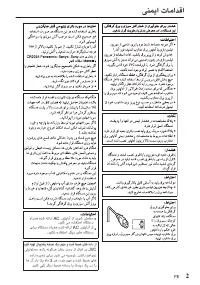
تامادقا ینمیا هﺍﺮﻤﻫ هﺪﺷ ﻪﺋﺍﺭﺍ AC ﺭﻮﺘﭘﺍﺩﺁ ﺯﺍ ﺪﯾﻮﺷ ﻦﺌﻤﻄﻣ .ﺪﯿﻨﮐ ﯽﻣ هﺩﺎﻔﺘﺳﺍ هﺎﮕﺘﺳﺩ یﺍﺮﺑ هﺎﮕﺘﺳﺩ هﺍﺮﻤﻫ هﺪﺷ ﻪﺋﺍﺭﺍ AC ﺭﻮﺘﭘﺍﺩﺁ ﺯﺍ .ﺪﯿﻨﮑﻧ هﺩﺎﻔﺘﺳﺍ ﺮﮕﯾﺩ یﺎﻫ هﺎﮕﺘﺳﺩ ﺪﯿﻨﮐ ﻪﯿﻬﺗ ﻥﺎﺒﯿﺘﺸﭘ ﻪﺨﺴﻧ ﮏﯾ ،ﻢﻬﻣ ﻭ هﺪﺷ ﻂﺒﺿ یﺎﻫ هﺩﺍﺩ ﺯﺍ ﯽﺘﯿﻟﻮﺌﺴﻣ ،هﺩﺍﺩ ﻪﻧﻮﮔﺮﻫ ﻦﺘﻓﺭ ﺖﺳﺩ ﺯﺍ ﻝﺎﺒﻗ ﺭﺩ JVC هﺩﺍﺩ هﺮﯿﺧﺫ یﺍﺮﺑ ﺩﻮﺷ ﯽﻣ ﻪﯿﺻﻮﺗ .ﺖﺷﺍﺩ ﺪﻫﺍﻮﺨﻧ ﺎﻫ ﻥﺁ ﺭ...
Page 72 - نيبرود
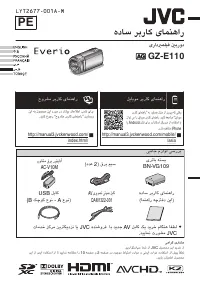
یامنهار ربراک هداس نيبرود یرادربمليف GZ-E110 D . ﯽﺒﻧﺎﺟ ﻡﺯﺍﻮﻟ ﯽﺳﺭﺮﺑ ﺏﻭﺎﻨﺘﻣ ﻕﺮﺑ ﺭﻮﺘﭘﺍﺩﺁ AC-V10M (ﺩﺪﻋ 2) ﻕﺮﺑ ﻢﯿﺳ یﺮﺗﺎﺑ ﻪﺘﺴﺑ BN-VG109 USB ﻞﺑﺎﮐ (B ﮏﭼﻮﮐ ﻉﻮﻧ - A ﻉﻮﻧ) هﺩﺎﺳ ﺮﺑﺭﺎﮐ یﺎﻤﻨﻫﺍﺭ (ﺎﻤﻨﻫﺍﺭ ﻪﭼﱰﻓﺩ ﻦﯾﺍ) ﺕﺎﻣﺪﺧ ﺰﮐﺮﻣ ﻦﻳﱰﮑﻳﺩﺰﻧ ﺎﻳ JVC هﺪﻨﺷﻭﺮﻓ ﺎﺑ ﺪﯾﺪﺟ AV ﻞﺑﺎﮐ ﮏﯾ ﺪﯾﺮﺧ ﻡﺎﮕﻨﻫ ﺎﻔﻄﻟ .ﺪﯿﯾﺎﻤﻧ ﺕﺭﻮﺸﻣ JVC AV یﺮﯾﻮﺼﺗ ﯽﺗﻮﺻ...
Page 73 - Temel Kullanım Kılavuzu; VİDEO KAYDEDİCİ; Ayrıntılı Kullanım Kılavuzu
Temel Kullanım Kılavuzu VİDEO KAYDEDİCİ GZ-E110 D Aksesuarların Tamlığının Kontrol Edilmesi . (x 2) QAM1322-001 Temel Kullanım Kılavuzu (bu kitapçık) AV Kablosu USB Kablosu (Tip A - Mini Tip B) Pil Takımı BN-VG109 AC Adaptörü AC-V10M Yeni bir AV kablosu satın alırken lütfen JVC satıcınıza veya en ya...
Page 74 - Güvenlik Önlemleri
Güvenlik Önlemleri Pil bloğu, pil takılı kamera ve pil takılı uzaktan kumanda doğrudan güneş ışığı, ateş veya bunlara benzer aşırı ısı ortamlarına maruz bırakılmamalıdır. UYARI: Elektrik fişi kullanıma hazır olmalıdır. • Video kaydedicinin normal olmayanşekilde çalışması durumunda elektrik fişinihem...
Page 76 - İçindekiler; Başlarken; Parçaların Adları ve İşlevler
İçindekiler Güvenlik Önlemleri ................................. 2Parçaların Adları ve İşlevler .................... 4Tutuş Kayışı Ayarlaması ......................... 4 Başlarken Pil Takımının Şarj Edilmesi ..................... 5Bir SD Kartın Takılması .......................... 6Saat Ayarı .........
Page 77 - Pil Takımının Şarj Edilmesi; UYARI
Pil Takımının Şarj Edilmesi Şarj lambası hızlı bir şekilde ya da iki kere yanıp sönüyorsa, aşağıdaki “Uyarı„ bölümüne bakın. (Taban) Pil takımını çıkarmak için Şarj işlemi tamamlandı: Söner Şarj işlemi devam ediyor: Yanıp söner Şarj Lambası Güç kaynağını prize takın. AC Çıkışa (110 V ila 240 V) AC A...
Page 78 - Bir SD Kartın Takılması; SD kartı çıkarmak için
Bir SD Kartın Takılması Kayıt işleminden önce ticari olarak mevcut bir SD kart takın. Kartı takmadan ya da çıkartmadan önce bu birimin güç kaynağını kapatın. (Taban) Etiket Bir SD kart takın. Kapağı açın. LCD monitörü kapatın. LCD monitörü kapatıldığında, birim kapanır. o SD kartı çıkarmak için Kart...
Page 79 - Saat Ayarı; seçip OK seçeneğine basın.; Tarih ve saati ayarlayın.; Yaşadığınız bölgeyi seçmek için; Önceki ekrana geri dönmek için; Video Kalitesi; Ayarı değiştirmek için
Saat Ayarı İmleci yukarıya/sola ya da aşağıya/sağa seçmek/taşımak için, UP/< ya da DOWN/> düğmesine basın. 1 LCD monitörü açın. . 0 Birim açılır. LCD monitörü kapatıldığında, birim kapanır. 2 [TARİH/SAAT AYARLAYIN!] görüntülendiğinde [EVET] öğesini seçip OK seçeneğine basın. . HAYIR EVET TARİH...
Page 80 - Video Kayıt; Video kaydı esnasındaki göstergeler
Video Kayıt Akıllı Otomatik modunu kullanarak ayar ayrıntıları ile uğraşmadan kayıt yapabilirsiniz. Pozlama ve odak gibi ayarlar çekim koşullarına uydurmak üzere otomatik olarak ayarlanacaktır. * Kişi vb. gibi belirli çekim sahneleri durumunda, onun ikonu ekranda görüntülenir. Önemli bir sahneyi kay...
Page 81 - düğmesi; silmeyi onaylamak için OK öğesine
Bu Birim üzerindeki Dosyaların Yeniden Oynatılması/Silinmesi Bir dizin ekranından kaydedilen videoları seçip yeniden oynatın (simgeleşmiş resimli gösterim). . Ses düzeyini yükseltin Ses düzeyini düşürün Ses düzeyi ayarlaması İstediğiniz videoyu seçip [ d / e ] öğesine basın. Yeniden oynatma modunu s...
Page 82 - Uyarılar
Uyarılar Kayıt Ortamı • Kaydettiğiniz verilerin bozulmasını veya zarar görmesini önlemek için aşağıdaki yönergelere mutlaka uyun. • Kayıt ortamını bükmeyin veya düşürmeyin ya da aşırı güce, darbelere veya titreşimlere maruz bırakmayın.Kayıt ortamına su sıçratmayın.Güçlü statik elektrik veya elektrik...
Page 84 - Kaydedilebilir Süre/Teknik Özellikler
Kaydedilebilir Süre/Teknik Özellikler Video kayıt süresini, OK/INFO düğmesine basarak kontrol edebilirsiniz. Yaklaşık Video Kayıt Süresi Kalite SDHC/SDXC Kart 4 GB 8 GB 16 GB 32 GB 64 GB 128 GB UXP 20 d 40 d 1 s 20 d 2 s 50 d 5 s 40 d 11 s 30 d XP 30 d 1 s 2 s 4 s 8 s 10 d 16 s 20 d SP 40 d 1 s 20 d...