Jabra PRO 9450 Duo - User Manual
Jabra PRO 9450 Duo – User Manual, read for free online in PDF format. We hope this helps you resolve any issues you may have. If you have further questions, please contact us through the contact form.
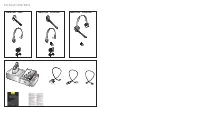
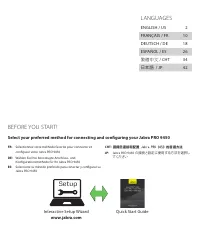


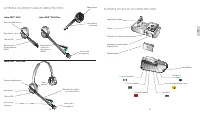
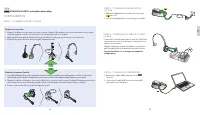
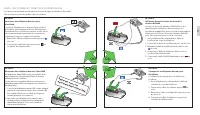
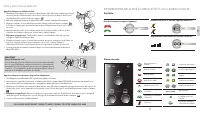
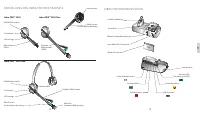


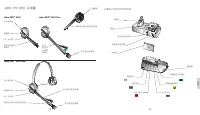

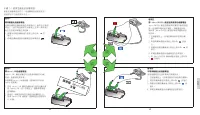
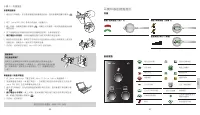


Table of Contents:
- Page 2 – PACKAGE CONTENTS
- Page 3 – LANGUAGES; 繁體中文; Setup; Interactive Setup Wizard
- Page 4 – US
- Page 5 – SETUP; STEP 1: ASSEMBLE THE HEADSET; Attaching the headband; Attaching the earhook; STEP 2: CONNECT TO POWER; Keep the headset docked during; STEP 4: CONNECT TO PC; or
- Page 6 – Refer t; set lifter
- Page 7 – Desk phone sound; YOU HAVE NOW SUCCESSFULLY CONNECTED YOUR JABRA PRO 9450; HEADSET AND BASE KEYPAD INFORMATION; Headset
- Page 9 – CONFIGURATION; Fixation du serre-tête; Fixation du contour d’oreille; ÉTAPE 2 : CONNEXION À L’ALIMENTATION; Laissez l’oreillette sur son support pendant la; ÉTAPE 4 : CONNEXION À L’ORDINATEUR; ou
- Page 10 – ÉTAPE 5 : SÉLECTIONNEZ ET CONNECTEZ À UN TÉLÉPHONE FIXE; Repor
- Page 11 – ÉTAPE 6 : EFFECTUER UN APPEL TEST; Appel test depuis un téléphone fixe; VOUS AVEZ MAINTENANT CORRECTEMENT CONNECTÉ VOTRE JABRA PRO 9450; INFORMATIONS RELATIVES À L’OREILLET TE ET AU CLAVIER DU SOCLE; Oreillette
- Page 13 – KONFIGURATION; Überkopfbügel befestigen; Ohrbügel befestigen; Das Headset
- Page 14 – SCHRIT T 5: AUSWÄHLEN UND ANSCHLIESSEN AN EIN TISCHTELEFON; Rufannahme; Siehe die J; oder
- Page 17 – CONFIGURACIÓN; PASO 1: SELECCIONE Y PREPARE EL AURICULAR; Montaje de la diadema para la cabeza; Montaje del gancho para la oreja; PASO 2: CONEXIÓN A LA RED ELÉCTRICA; Mantenga el; PASO 4: CONEXIÓN A UN PC; o bien
- Page 18 – PASO 5: SELECCIONAR Y CONECTAR A UN TELÉFONO DE ESCRITORIO
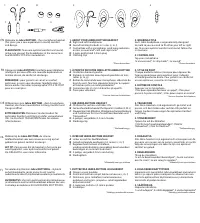
- Page 19 – INFORMACIÓN SOBRE EL AURICULAR Y EL TECLADO DE LA BASE; Auricular
- Page 20 – CHT
- Page 21 – 请转至; 安裝; 步驟 1:準備耳機; 組合頭帶; 組合耳勾; 步驟 2:連接電源; 步驟 3:把耳機放在基座上; 設定期間,請保持耳機放在基座上。; 步驟 4:連接電腦
- Page 22 – 請參閱 Jabra LINK
- Page 23 – 耳機和基座鍵盤資訊; 耳機
- Page 24 – JP
- Page 25 – セットアップ; ステップ 1: ヘッドセットの組み立て; ヘッドセットの取り付け; イヤーフックの取り付け; ステップ 2: 電源への接続; セットアップ中はヘッドセット; ステップ 4: PC への接続
- Page 26 – Jabra LINK; または
- Page 27 – デスクホンのサウンド; ヘッドセットとベースキーパッドの情報; ヘッドセット; 音量の上げ下げ(スライド); ベースキーパッド
EUROPE
Belgique/Belgium + 49 (0)8031 2651 72
Czech Republic
+ 420 800 522 722
Denmark
+ 45 45 75 99 92
Deutschland
+ 49 (0)8031 2651 72
España
+ 34 916 398 064
France
+ 33 (0) 130 589 075
Italia
+ 39 02 5832 8253
Luxemborg
+ 49 (0)8031 2651 72
Nederland
+ 49 (0)8031 2651 72
Norge
+ 47 32 22 74 70
Poland
+ 48 12 254 40 15
Russia
8-10-8002-7701012
South Africa
+ 27(0)11 844 9912
Suomi
+ 358 204 85 6040
Sverige
+ 46 (0)8 693 09 00
Turkey
+ 90 212 454 60 00 (1181)
United Kingdom + 44 (0)1784 220 172
Österreich
+ 49 (0)8031 2651 72
MIDDLE EAST/AFRICA
E-mail Support: [email protected]
ASIA
Australia
1-800-636-086
Bangladesh
China
400-120-1282
Hong Kong
800-969-546
India
000-800-852-1185
Indonesia
001-803-852-7664
Japan
+81 (0) 3 -3242-8572
Korea
02-2275-1300 (distributor)
Malaysia
1800-812-160
New Zealand
0800-770-114
Pakistan
Philippines ETPI
1800-765-7022
Philippines PLDT 1800-1855-0144
Singapore
800-8523-794
Sri Lanka
Taiwan
0080-185-6659
Thailand
001-800-852-6446
Vietnam
USA & CANADA
Canada
1- 866-697-8757
USA
1- 866-697-8757
81-03555 C
Jabra PRO™ 9450
Jabra PRO™ 9450 Flex
Jabra PRO™ 9450 Duo
www.jabra.com
Quick Start Guide
© 2012 GN Netcom A/S. All rights reserved. Jabra
®
is a registered trademark of GN Netcom A/S. All
other trademarks included herein are the property of their respective owners. The Bluetooth
®
word
mark and logos are owned by the Bluetooth SIG, Inc. and any use of such marks by GN Netcom A/S is
under license. (Design and specifications subject to change without notice).
PATENTS AND DESIGN REGISTRATION PENDING INTERNATIONAL
REGISTER YOUR JABRA AT JABRA.COM/REGISTER – FOR NEWS, SUPPORT AND COMPETITIONS
www.jabra.com
MADE IN CHINA
TYPE: 9400HS/BS
CUSTOMER SUPPORT
"Loading the manual" means you need to wait until the file loads and becomes available for online reading. Some manuals are very large, and the time they take to appear depends on your internet speed.
Was this manual helpful?
Helpful for 3 of 3 readers
About this manual
- Brand
- Jabra
- Model
- PRO 9450 Duo
- Document type
- User Manual
- Language(s)
- German, English, Spanish, French
- Pages
- 27
- File size
- 27 MB
- Format
Summary
PACKAGE CONTENTS Jabra PRO™ 9450 Flex Jabra PRO™ 9450 Duo Jabra PRO™ 9450
LANGUAGES ENGLISH / US 2 FRANÇAIS / FR 10 DEUTSCH / DE 18 ESPAÑOL / ES 26 繁體中文 / CHT 34 日本語 / JP 42 BEFORE YOU START! Select your preferred method for connecting and configuring your Jabra PRO 9450 FR: Sélectionnez votre méthode favorite pour connecter et configurer votre Jabra PRO 9450 DE: Wählen S...
3 2 US JABRA PRO 9450 BASE Headset Cradle Keypad Microphone Volume Control Clear Dial Tone Switch Front Panel Speaker Telephone Port Handset Port AUX Port USB Port Power Adapter Port Busy-light Indicator Port JABRA PRO 9450 HEADSET Speaker Noice-cancelling Microphone Multi-function button Touch pane...
Ask a question
Related manuals
Popular Jabra Other




More Jabra Other models
 Jabra PRO 925 User Manual
 Jabra PRO 930 User Manual
 Jabra PRO 930 MS User Manual
 Jabra PRO 935 User Manual
 Jabra PRO 9400 User Manual
 Jabra Pro 9450 User Manual
 Jabra PRO 9450 Flex User Manual
 Jabra PRO 9460 User Manual
- Jabra Pro 9460 Duo User Manual
 Jabra REVO User Manual
 Jabra REVO Wireless User Manual
 Jabra Rhythm User Manual