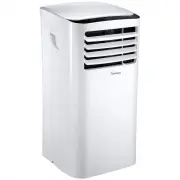
Page 2 - To avoid permanent damage to unit:; of 24 hours before powering on the first time.; Para evitar daños permanentes a la unidad:; Asegúrese de que está en la posición vertical durante
ii ENGLISH ESPAÑOL FR ANÇAIS WARNING: To avoid permanent damage to unit: Ensure it is in the upright position for a MINIMUM of 6 hours and a RECOMMENDED time of 24 hours before powering on the first time. ADVERTENCIA: Para evitar daños permanentes a la unidad: Asegúrese de que está en la posición ve...
Page 3 - TABLE OF CONTENTS
iii ENGLISH ESP AÑOL FR ANÇAIS TABLE OF CONTENTS Introduction .............................................................................................................................. 6Operating Conditions ............................................................................................
Page 4 - WARNING; READ THESE NOTICES CAREFULLY—THEY ARE IMPORTANT!
4 ENGLISH ESPAÑOL FR ANÇAIS WARNING Plug in power plug completely. Do not start or stop the unit by inserting or pulling out the power plug. Do not damage power cord or replace with a non-original power cord. • Otherwise, it may cause electric shock or fire due to potential short circuit. • It...
Page 6 - INTRODUCTION; SAFETY NOTICE; OPERATING CONDITIONS
6 ENGLISH ESPAÑOL FR ANÇAIS INTRODUCTION Thank you for purchasing this quality Impecca portable air conditioner unit. To ensure the longest life and high- est energy efficiency of your unit, please carefully follow these operating instructions. Keep these instructions in a safe place and consult the...
Page 7 - GETTING TO KNOW YOUR AIR CONDITIONER; FRONT VIEW REAR VIEW
7 ENGLISH ES PAÑOL FR ANÇAI S • This air conditioner is equipped with casters that roll on smooth, flat surfaces. • Do not tilt or turn over the air conditioner. If there’s problem, please disconnect the power supply immedi- ately and contact your local dealer or technical support. • Avoid exposing ...
Page 8 - WHAT’S IN THE BOX; INSTALLATION ACCESSORY KIT ITEMS
8 ENGLISH ESPAÑOL FR ANÇAIS WHAT’S IN THE BOX Please verify your box for the following items. Note that some models may not include all items. 1. Air Conditioning Unit 2. Remote controller (may differ from photo) 3. User’s Guide 4. Installation kit (see details below) INSTALLATION ACCESSORY KIT ITEM...
Page 9 - INSTALLATION INSTRUCTIONS; LOCATION
9 ENGLISH ESP AÑOL FR ANÇAIS INSTALLATION INSTRUCTIONS Carefully review all of these instructions BEFORE proceeding to install and operate your air conditioner unit. Fail- ure to do so may cause damage, injury, or bodily harm including permanent disability and/or death. LOCATION • The air conditione...
Page 10 - WATER DRAINAGE; COOLING MODE; WINDOW SLIDER KIT INSTALLATION
10 ENGLISH ESPAÑOL FR ANÇAIS WATER DRAINAGE Certain functions of your air conditioning unit create condensation and the unit may need to evacuate accumulated water. Please carefully follow these instructions according to your operating and usage conditions. COOLING MODE During cooling mode, the unit...
Page 11 - INSTALLATION IN A DOUBLE-HUNG SASH WINDOW:
11 ENGLISH ESP AÑOL FR ANÇAIS INSTALLATION IN A DOUBLE-HUNG SASH WINDOW: 1. Cut one adhesive foam seal to the proper length and attach it to the window stool. (Figure J) 2. Attach the window filler panel kit to the window stool. Adjust the length of the window slider kit according to the width of wi...
Page 12 - OPERATING INSTRUCTIONS; CONTROL PANEL AND REMOTE CONTROLLER OVERVIEW; ) TEMPERATURE DOWN BUTTON
12 ENGLISH ES PAÑOL FR ANÇAIS OPERATING INSTRUCTIONS CONTROL PANEL AND REMOTE CONTROLLER OVERVIEW The following diagram and legend shows the functions of both the unit’s control panel and the remote controller. Some functions are only available on select models. 1) ON/OFF BUTTON Machine will start a...
Page 14 - CONTROL PANEL AND REMOTE CONTROLLER DISPLAYS; REMOTE CONTROLLER DISPLAY; C D; UNIT DISPLAY
14 ENGLISH ESPAÑOL FR ANÇAIS CONTROL PANEL AND REMOTE CONTROLLER DISPLAYS 1. Current operating mode COOL, FAN, DRY. When operating in AUTO mode, none of the three indicators will be lit. 2. Power indicator light. 3. Timer indicator light - showing that a timer program was set from the remote control...
Page 15 - FUNCTIONS IN DETAIL; DEHUMIDIFIER MODE OPERATION:
15 ENGLISH ESP AÑOL FR ANÇAIS FUNCTIONS IN DETAIL Instructions are for both the remote controller and the unit control panel itself. When using the remote con- troller, it is possible and even recommended to select the operating mode before you press ON/OFF to start the unit. On the unit’s control p...
Page 17 - ADDITIONAL UNIT FEATURES; HANDLING THE REMOTE CONTROLLER; REPLACING THE BATTERIES
17 ENGLISH ESP AÑOL FR ANÇAIS ADDITIONAL UNIT FEATURES Auto Restart • If the unit shuts off unexpectedly due to a power outage, it will restart with the previous function setting automatically when the power resumes. • If you need full timer functionally you can hook up a properly-rated heavy duty t...
Page 18 - ADDITIONAL REMOTE CONTROLLER INFORMATION; BASIC UNIT ERROR CODES; ELECTRICAL INFORMATION
18 ENGLISH ESPAÑOL FR ANÇAIS CAUTION ADDITIONAL REMOTE CONTROLLER INFORMATION • Do not mix old and new batteries or batteries of a different type (e.g. alkaline and zinc). • Do not leave the batteries in the remote controller if it is not going to be used for 2–3 months. • Dispose of the old batteri...
Page 19 - IMPORTANT
19 ENGLISH ESP AÑOL FR ANÇAIS CARE & MAINTENANCE IMPORTANT 1) Be sure to unplug the unit before cleaning or servicing. 2) Do not use gasoline, thinner or other chemicals to clean the unit. 3) Do not wash the unit directly under a tap or using a hose. It may cause electrical danger. 4) If the pow...
Page 20 - TROUBLESHOOTING TIPS
20 ENGLISH ESPAÑOL FR ANÇAIS TROUBLESHOOTING TIPS Problem Possible Causes Remedies Unit does not start when pressing on/off button P1 appears in the display window Drain the water in the bottom tray Room temperature is lower than the set temperature (cool mode) Reset the temperature Room not cool en...
Page 21 - COSTUMER SUPPORT
21 ENGLISH ESP AÑOL FR ANÇAIS COSTUMER SUPPORT Before contacting customer support, please see the troubleshooting guide above. Upon unpacking your air conditioner, please be sure to write down the model and serial number of your unit. This will be needed should your unit require servicing in the fut...