Page 2 - Table of contents
Table of contents Before you start Utilization of the product Important safeguardsInstallation Wall mountingStand installation Connection Connection Outdoor antenna connectionOther connections Operation Control elements Front panel Back panel Remote controller Changing the battery General operations...
Page 3 - Utilization of the product
2 3 Table of contents Before you start If you want to dispose of this product, do not mix it with general household waste. There is a separate collection system for used electronic products in accordance with legislation that requires proper treatment, recovery and recycling. Please contact your loc...
Page 4 - Before you start; All images provided herein are schematic
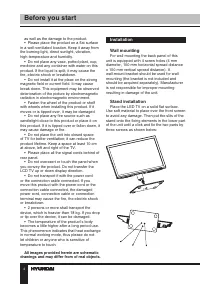
4 Installation Wall mounting For wall mounting the back panel of this unit is equipped with 4 screw holes (4 mm diameter, 100 mm horizontal spread distance x 100 mm vertical spread distance). A wall-mount bracket should be used for wall mounting (the bracket is not included and should be acquired se...
Page 5 - Connection
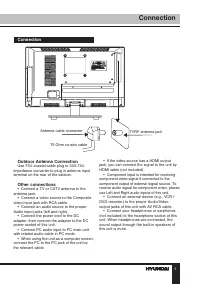
55 Connection Connection Outdoor Antenna Connection Use 75 Ω coaxial cable plug or 300-75 Ω impedance converter to plug in antenna input terminal on the rear of the cabinet. Other connections • Connect a TV or CATV antenna to the antenna jack. • Connect a video source to the Composite video input ja...
Page 6 - Operation; Control elements
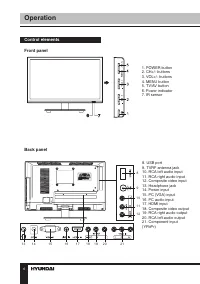
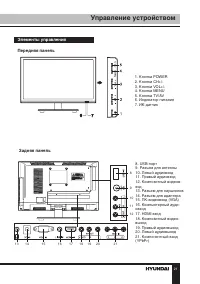
6 Operation Control elements Front panel 1. POWER button2. CH+/- buttons3. VOL+/- buttons4. MENU button5. TV/AV button6. Power indicator7. IR sensor 8. USB port9. TVRF antenna jack10. RCA left audio input11. RCA right audio input12. Composite video input13. Headphone jack14. Power input15. PC (VGA) ...
Page 7 - Changing the battery
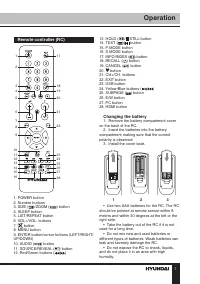
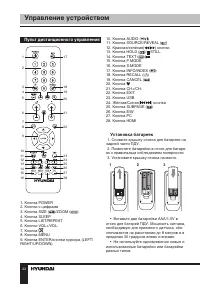
7 Operation Remote controller (RC) 1. POWER button2. Number buttons3. SIZE ( )/ZOOM ( ) button 4. SLEEP button5. LIST/REPEAT button6. VOL+/VOL- buttons7. button 8. MENU button9. ENTER button/cursor buttons (LEFT/RIGHT/UP/DOWN)10. AUDIO ( ) button 11. SOURCE/REVEAL ( ) button 12. Red/Green buttons ( ...
Page 9 - TV manual tuning; Picture setting; Picture Mode
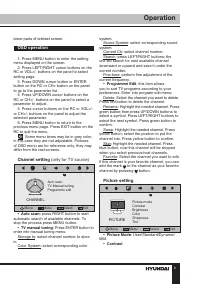
lower parts of teletext screen. OSD operation 1. Press MENU button to enter the setting menu displayed on the screen. 2. Press LEFT/RIGHT cursor buttons on the RC or VOL+/- buttons on the panel to select setting page. 3. Press DOWN cursor button or ENTER button on the RC or CH+ button on the panel t...
Page 10 - Sound setting
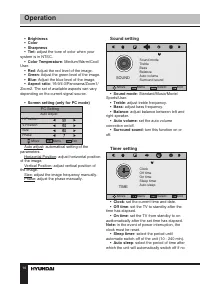
Operation 10 • Brightness • Color • Sharpness • Tint : adjust the tone of color when your system is in NTSC. • Color Temperature : Medium/Warm/Cool/ User. • Red : Adjust the red level of the image. • Green : Adjust the green level of the image. • Blue : Adjust the blue level of the image. • Aspect r...
Page 11 - Option setting; OSD Language; USB operation
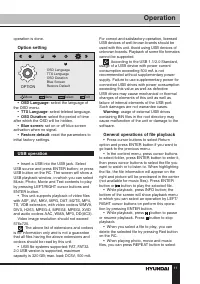
Operation 11 operation is done. Option setting OPTION OSD LanguageTTX LanguageOSD DurationBlue ScreenRestore Default Move Menu Select Exit • OSD Language : select the language of the OSD menu. • TTX Language : select teletext language. • OSD Duration : select the period of time after which the OSD w...
Page 13 - General Information; Troubleshooting; Symptom; Causes of interference
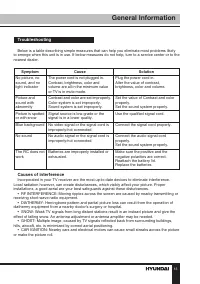
13 General Information Troubleshooting Below is a table describing simple measures that can help you eliminate most problems likely to emerge when this unit is in use. If below measures do not help, turn to a service center or to the nearest dealer. Symptom Cause Solution No picture, no sound, and n...
Page 16 - Уважаемый покупатель!; Содержание
16 Содержание Уважаемый покупатель! Благодарим Вас за покупку нашего изделия. Чтобы понять, как правильно и безо- пасно пользоваться приобретенным устройством, рекомендуется тщательно изучить настоящее руководство перед подключением и эксплуатацией изделия. Сохраняйте руководство для использования в...
Page 17 - Перед началом эксплуатации; Утилизация изделия
17 Перед началом эксплуатации Если вы желаете утилизировать данное изделие, не выбрасывайте его вместе с обычным бытовым мусором. Существует отдельная система сбора использованных электронных изделий в соответствии с законодательством, которая предполагает соответствующее обращение, возврат и перера...
Page 19 - Установка; Установка на подставку
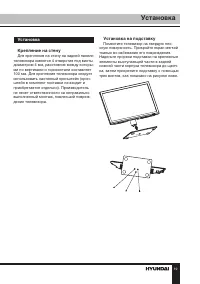
19 Установка Установка Крепление на стену Для крепления на стену на задней панели телевизора имеются 4 отверстия под винты диаметром 4 мм, расстояние между которы-ми по вертикали и горизонтали составляет 100 мм. Для крепления телевизора следует использовать настенный кронштейн (крон-штейн в комплект...
Page 20 - Подключение
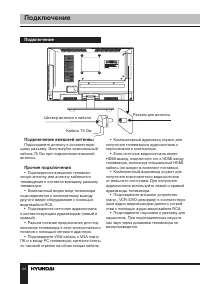
20 21 Подключение Управление устройством Подключение Подключение внешней антенны Подсоедините антенну к соответствую- щему разъему. Используйте коаксиальный кабель 75 Ом при подключении внешней антенны. Прочие подключения • Подсоедините внешнюю телевизи- онную антенну или антенну кабельного телевиде...
Page 21 - Элементы управления
20 21 Подключение Управление устройством Элементы управления Передняя панель 8. USB-порт9. Разъем для антенны10. Левый аудиовход11. Правый аудиовход 12. Композитный видеов-ход13. Разъем для наушников14. Разъем для адаптера 15. ПК-видеовход (VGA)16. Компьютерный ауди-овход17. HDMI вход18. Композитный...
Page 22 - Управление устройством; Пульт дистанционного управления
22 Управление устройством Пульт дистанционного управления 1. Кнопка POWER2. Кнопки с цифрами3. Кнопка SIZE ( )/ZOOM ( ) 4. Кнопка SLEEP 5. Кнопка LIST/REPEAT6. Кнопки VOL+/VOL- 7. Кнопка 8. Кнопка MENU9. Кнопка ENTER/кнопки курсора (LEFT/RIGHT/UP/DOWN) 1 2 3 10. Кнопка AUDIO ( ) 11. Кнопка SOURCE/RE...
Page 23 - Общие операции
23 Управление устройством Общие операции • Подключите круглый разъём адаптера в разъём питания на панели ТВ (положение разъёма указано в разделе «Элементы управления»). Подключите вилку адап-тера питания в разъём сети питания, при этом индикатор питания должен светиться красным цветом – устройство н...
Page 24 - Экранное меню; Редактор программ
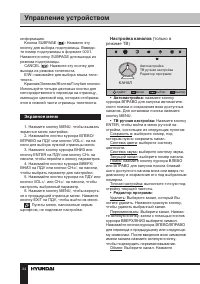
24 Управление устройством информацию. Кнопка SUBPAGE ( ): Нажмите эту кнопку для выбора подстраницы. Ввведи-те номер подстраницы в формате 0001. Нажмите кнопку SUBPAGE для выхода из режима подстраницы. CANCEL ( ): Нажмите эту кнопку для выхода из режима телетекста. E/W: нажимайте для выбора языка те...
Page 25 - Настройка изображения
25 Управление устройством желтую кнопку; с помощью кнопок курсора выберите позицию, на которую Вы хотите переместить выбраннный канал. Нажмите желтую кнопку для перемещения канала. Пропуск: Выберите канал. Нажмите голубую кнопку; теперь этот канал будет пропускаться при выборе перелистывании каналов...
Page 26 - Настройка таймера
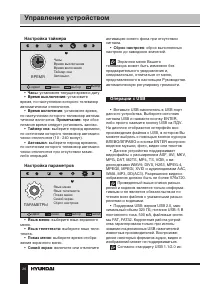
26 27 Управление устройством Управление устройством Настройка таймера ВРЕМЯ ЧасыВремя выключенияВремя включенияТаймер снаАвтовыкл. сдвиг меню выбор выход • Часы : установите текущее время и дату. • Время выключения: установите время, по наступлении которого телевизор автоматически отключится. • Врем...
Page 27 - Воспроизведение файлов
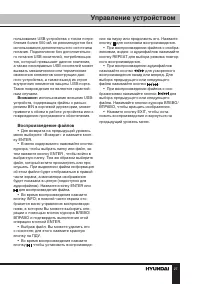
26 27 Управление устройством Управление устройством пользование USB-устройства с током потре-бления более 500 мА не рекомендуется без использования дополнительного источника питания. Подключение без дополнительно-го питания USB-носителей, потребляющих ток, который превышает данное значение, а также ...
Page 28 - Общая информация; Руководство по устранению; Неисправность; Подсоедините шнур питания.; Источники помех
28 Общая информация Руководство по устранению неисправностей Ниже приводится таблица, в которой описаны простые меры, способные помочь Вам устранить большую часть проблем, могущих возникнуть при использовании данного устройства. Если нижеуказанные меры не помогли, обратитесь в сервисный центр или к ...
Page 29 - Комплект поставки
29 Общая информация Появление на экране «елочки» или частичное исчезновение изображения может быть свя- зано с работой медицинского оборудования в близлежащей больнице или клинике. • «СНЕГ» НА ЭКРАНЕВ зоне приема слабых сигналов отдаленных телевизионных станций изображение ста- новится нестабильным,...
Page 30 - Технические характеристики
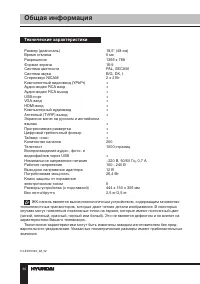
30 Общая информация Технические характеристики Размер (диагональ) 18,5” (48 см) Время отклика 5 мс Разрешение 1366 x 768 Формат экрана 16:9 Система цветности PAL, SECAM Система звука B/G, DK, I Стереозвук NICAM 2 x 2 Вт Компонентный видеовход (YPbPr) + Аудио-видео RCA вход + Аудио-видео RCA выход + ...