Page 2 - Contents
i Contents English .................................................................................1 Русский ...............................................................................7 Français.............................................................................. 25 Español ..............
Page 3 - English; Getting to know your Band; Activating the Band
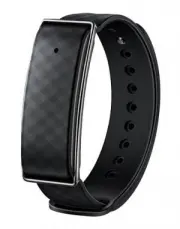
English 1 Getting to know your Band LED indicator Charging cradle Check that the box contents are complete. The box should contain 1 Band, 1 charging cradle, and 1 user guide. Activating the Band To activate your Band, charge it by connecting the charging cradle to a phone charger or USB port. The L...
Page 4 - Download ing the Color Band A1 app; Color Band A1; Connecting to your Band; Pair
2 Fully charge the battery before using the Band for the first time. The LED indicator will turn blue once charging is complete. You do not need to turn your Band on and off. It will turn off automatically when the battery level drops below 1%. To view the remaining battery level, touch in the Color...
Page 5 - Notifications for incoming calls/messages; and configure the alert; Smart alarm; . Configure the alarm settings and touch
3 Notifications for incoming calls/messages 1. Touch > > Incoming call/Incoming message . 2. Switch on Enable notifications and configure the alert period. 3. When the Band is paired with your phone and the Color Band A1 app is running in the background, the Band will vibrate and the LED indic...
Page 6 - Share; Measuring UV rad iation; UV monitoring version
4 Viewing exercise and sleep data The Band records your exercise and sleep data in real time. To view your exercise and sleep data, touch , swipe down on the screen to sync your data, and then swipe left or right to view the data. Sharing exercise data 1. Touch , and then touch the large exercise ci...
Page 7 - Point the Band at the sun and touch; Test; Locating your Band; In the Color Band A1 app, touch; Find band; Your Band will vibrate and the LED indicator will blink blue.; Updating the Band software; Updating the Color Band A1 app; and follow the onscreen instructions.
5 2. Point the Band at the sun and touch Test . The UV radiation will be displayed on the screen after a few seconds. 3. To view more detailed statistics, touch the UV radiation circle. Locating your Band In the Color Band A1 app, touch > > Find band . Your Band will vibrate and the LED indica...
Page 8 - Restoring factory settings; Water resistant; Please do not use when diving or scuba diving.
6 Restoring factory settings 1. Touch > > Restoring factory settings . 2. Touch OK . The Band will automatically restart. Note: When the Band's battery level is lower than 10%, the vibration function for all features will be auto-disabled. Water resistant Wear your Color Band A1 when washing h...
Page 9 - Знакомство с умным браслетом
Русский 7 Знакомство с умным браслетом Проверьте содержимое комлекта поставки устройства. Комлект поставки должен содержать 1 умный браслет, 1 зарядное устройство и 1 руководство пользователя. Активация умного браслета Чтобы активировать умный браслет, зарядите его, подключив зарядное устройство к а...
Page 10 - Загрузка приложения Color Band A1
Русский 8 Перед первым использованием устройства полностью зарядите его батарею. Когда батарея полностью заряжена, LED - индикатор начинает гореть синим. Включение и выключение умного браслета не требуется. Умный браслет выключается автоматически, когда уровень заряда батареи достигает 1%. Чтобы пос...
Page 11 - Уведомления о вызовах и сообщениях; Входящий вызов/Новое; Умный будильник; Умный будильник (Smart
Русский 9 Уведомления о вызовах и сообщениях 1. Нажмите > > Входящий вызов/Новое сообщение (Incoming call/Incoming message) . 2. Включите функцию Уведомления (Enable notifications) и настройте период уведомлений. 3. Когда умный браслет сопряжен с телефоном, а приложение Color Band A1 работает ...
Page 12 - Просмотр данных физических нагрузок
Русский 10 Чтобы удалить будильник, перейдите в настройки будильника и нажмите Удалить (Remove) . Просмотр данных физических нагрузок и сна Умный браслет записывает статистику физических нагрузок и сна. Чтобы посмотреть данные физических нагрузок и сна, нажмите , проведите вниз по экрану для синхрон...
Page 13 - Измерение УФ; Версия мониторинга; Поиск умного браслета
Русский 11 Измерение УФ - излучения Нажмите > > Версия мониторинга УФ - излучения (UV monitoring version) и убедитесь, что Ваше устройство поддерживает эту функцию. 1. Откройте приложение Color Band A1. Проведите влево, чтобы перейти на экран измерения УФ - излучения. 2. Наведите устройство на...
Page 14 - Обновление приложения Color Band A1; Сброс настроек (Restoring
Русский 12 1. Убедитесь, что умный браслет сопряжен с телефоном, телефон подключен к сети Интернет по сети Wi - Fi или моб. сети передачи данных. 2. Нажмите > и следуйте инструкциям на экране. Обновление приложения Color Band A1 1. Убедитесь, что телефон подключен к сети Интернет по сети Wi - Fi ...
Page 15 - Водостойкость
Русский 13 Когда уровень заряда батареи умного браслета ниже 10 %, вибросигнал будет автоматически отключен для всех функций. Водостойкость Вы можете не снимать Color Band A1 во время мытья рук, под дождем, в душе или когда моете машину. Снимайте устройство, когда ныряете или занимаетесь дайвингом.
Page 16 - Вкладыш к краткому руководству пользователя
Русский 14 Вкладыш к краткому руководству пользователя 1. Изготовитель, адрес Administration Building, Huawei Technologies Company Limited, Bantian, Longgang District, Shenzhen, 518129, Китай Тел.: +86 - 755 - 28780808 2. Наименование и местонахождение уполномоченного лица (импортер — если партия) О...
Page 26 - EAC
Русский 24 20. Месяц и год изготовления и (или) информация о месте нанесения и способе определения года изготовления Дата изготовления устройства указана в серийном номере на коробке. Для получения более подробной информации посетите веб - сайт http://consumer.huawei.com/ru/support/ 21. Знак соответ...
Page 27 - Français; Faire connaissance avec votre bracelet
Français 25 Faire connaissance avec votre bracelet Vérifiez que le contenu du paquet est complet. Celui-ci doit contenir 1 bracelet, 1 station de recharge et 1 guide de l'utilisateur. Activation du bracelet Pour activer votre bracelet, chargez-le en connectant la station de recharge à un chargeur de...
Page 28 - Connexion de votre bracelet
Français 26 Chargez complètement la batterie du bracelet avant toute première utilisation. Le voyant DEL passe au bleu une fois le chargement de la batterie terminé. Votre bracelet n'a pas besoin d'être mis sous ou hors tension. Celui-ci s'éteint automatiquement lorsque le niveau de la batterie pass...
Page 29 - Associer; Lorsque votre bracelet et votre téléphone sont associés et que
Français 27 2. Dans l'application Color Band A1, touchez l'icône > Associer (« Pair »), recherchez l'appareil Color Band A1 et touchez-le pour établir la connexion. Notifications pour les appels/messages entrants 1. Touchez > > Appel entrant/Message entrant (« Incoming call/Incoming message...
Page 30 - Alarme intelligente
Français 28 Alarme intelligente 1. Touchez > > Alarme intelligente (« Smart alarm »). 2. Touchez Ajouter une alarme (« Add alarm »). Configurez les paramètres de l'alarme et touchez Enregistrer (« Save »). 3. Le bracelet vibrera à l'heure à laquelle l'alarme a été programmée. Pour supprimer un...
Page 31 - Partager; Mesure des rayonnements UV; Version de surveillance des rayons
Français 29 Partage des données relatives à l'activité physique 1. Touchez d'abord , puis le cercle étendu des activités. 2. Touchez Partager (« Share ») pour accéder à l'onglet correspondant. 3. Sélectionnez un mode de partage et suivez les instructions à l'écran. Mesure des rayonnements UV Touchez...
Page 32 - Localisation de votre bracelet; Localiser mon bracelet; Mise à jour du logiciel du bracelet
Français 30 3. Pour obtenir des statistiques supplémentaires, touchez le cercle des rayonnements UV. Localisation de votre bracelet Dans l'application Color Band A1, touchez > > Localiser mon bracelet (« Find band »). Votre bracelet vibre et le voyant DEL clignote en bleu. Mise à jour du logic...
Page 33 - Restauration des paramètres d'usine; Restaurer les paramètres d'usine; . Le bracelet redémarre automatiquement.; Étanchéité; Vous pouvez porter votre Color Band A1 lorsque vous
Français 31 2. Touchez > , puis suivez les instructions affichées à l'écran. Restauration des paramètres d'usine 1. Touchez > > Restaurer les paramètres d'usine (« Restoring factory settings »). 2. Touchez OK . Le bracelet redémarre automatiquement. Remarque : Lorsque le niveau de la batter...
Page 35 - Español; Información sobre la pulsera
Español 33 Información sobre la pulsera Verifique que el contenido de la caja esté completo. La caja debe incluir 1 pulsera, 1 base de carga y 1 guía del usuario. Activation du bracelet Para activar la pulsera, debe conectar la base de carga a un cargador de teléfono o a un puerto USB. El indicador ...
Page 36 - Descarga de la aplicación Color Band A1; En la pantalla de la aplicación Color Band A1, pulse; Enlazar; establecer la conexión.
Español 34 Cargue la batería por completo antes de usar la pulsera por primera vez. El indicador LED se pondrá de color azul una vez que se complete la carga. No necesita encender y apagar la pulsera. Se apagará automáticamente cuando el nivel de carga esté por debajo del 1 %. Para consultar el nive...
Page 38 - Compartir
Español 36 Visualización de datos de actividad física y sueño La pulsera registra los datos de actividad física y sueño en tiempo real. Para visualizar los datos de actividad física y sueño, pulse , deslice el dedo hacia abajo en la pantalla para sincronizar los datos y, a continuación, deslice el d...
Page 39 - Med ición de la rad iación UV; Versión de monitorización de radiación; Localización de la pulsera; Buscar
Español 37 Med ición de la rad iación UV Pulse > > Versión de monitorización de radiación UV (UV monitoring version) y asegúrese de seleccionar el tipo de pulsera correcto. 1. Abra la aplicación Color Band A1. Deslice el dedo hacia la izquierda para acceder a la pantalla del sensor UV. 2. Apun...
Page 40 - Restablecer ajustes de fábrica
Español 38 Actualización del software de la pulsera 1. Asegúrese de que el teléfono esté enlazado con la pulsera y conectado a Internet mediante datos móviles o Wi-Fi. 2. Pulse > y siga las instrucciones que aparecen en pantalla. Actualización de la aplicación Color Band A1 1. Asegúrese de que el...
Page 41 - Resistente al agua
Español 39 Nota: Cuando la batería de la pulsera sea inferior al 10 %, la vibración se deshabilitará automáticamente para todas las funciones. Resistente al agua Puede usar la Color Band A1 mientras se lava las manos, cuando llueve, cuando toma una ducha o mientras lava el automóvil . No se la ponga...
Page 42 - Português; Introdução à sua Banda
Português 40 Introdução à sua Banda Verifique se o conteúdo da caixa está completo. A caixa deve conter 1 Banda, 1 base de carregamento e 1 manual do utilizador. Ativar a Banda Para ativar a Banda, carregue-a ligando a base de carregamento a um carregador de telefone ou a uma porta USB. O indicador ...
Page 43 - Transferir a aplicação Color Band A1; Estabelecer ligação à Banda
Português 41 Carregue completamente a bateria antes de utilizar a Banda pela primeira vez. O indicador LED mudará para azul quando o carregamento estiver concluído. Não necessita de ligar e desligar a Banda. Esta desligar-se-á automaticamente quando o nível da bateria for inferior a 1%. Para ver o n...
Page 44 - Chamada recebida/Mensagem; e configure
Português 42 2. No ecrã da aplicação Color Band A1, toque em > Emparelhar (Pair) , procure Honor Band A1 e toque na aplicação para estabelecer ligação. Notificações para chamadas/mensagens recebidas 1. Toque em > > Chamada recebida/Mensagem recebida ( Incoming call/Incaming message ) . 2. L...
Page 45 - Alarme inteligente; Smart; Ver dados de exercício e descanso
Português 43 Alarme inteligente 1. Toque em > > Alarme inteligente ( Smart alarm ) . 2. Toque em Adicionar alarme ( Add alarm ) . Configure as definições do alarme e toque em Guardar ( Save ) . 3. A Banda irá vibrar na hora de alarme programada. Para eliminar um alarme, aceda ao ecrã das defin...
Page 46 - Partilhar dados de exercício; e, em seguida, toque no círculo de exercício; para aceder ao separador de; Medir a radiação UV; Toque em; Versão da monitorização de UV; e certifique-se de que seleciona o tipo
Português 44 Partilhar dados de exercício 1. Toque em e, em seguida, toque no círculo de exercício grande. 2. Toque em Partilhar ( Share ) para aceder ao separador de partilha. 3. Selecione um método de partilha e siga as instruções apresentadas no ecrã. Medir a radiação UV Toque em > > Versão...
Page 47 - Localizar a Banda; Na aplicação Color Band A1, toque em; . A Banda irá vibrar e o indicador; Atualizar o software da Banda; e siga as instruções apresentadas
Português 45 2. Aponte a Banda para o sol e toque em Testar ( Test ) . A radiação UV será apresentada no ecrã ao fim de alguns segundos. 3. Para ver estatísticas mais detalhadas, toque no círculo de radiação UV. Localizar a Banda Na aplicação Color Band A1, toque em > > Localizar banda ( Find ...
Page 48 - Atualizar a aplicação Color Band A1; Restaurar as definições de fábrica; Restaurar definições de fábrica; . A Banda irá reiniciar automaticamente.
Português 46 Atualizar a aplicação Color Band A1 1. Certifique-se de que o telefone está ligado à Internet via dados móveis ou Wi-Fi. 2. Toque em > e siga as instruções apresentadas no ecrã. Restaurar as definições de fábrica 1. Toque em > > Restaurar definições de fábrica ( Restoring facto...
Page 49 - Resistente à água; Não a utilize para mergulhar nem para fazer mergulho.
Português 47 Resistente à água Use a Color Band A1 enquanto lava as mãos, à chuva, no duche ou ao lavar o carro. Não a utilize para mergulhar nem para fazer mergulho.