Page 2 - TP70AWKNR Smart Portable Dehumidifer with WiFi Connectivity; as they can interfere with connectivity.; SEARCH “HONEYWELL AIR COMFORT”; SMART PORTABLE DEHUMIDIFIER
1 For Models: TP30AWKN / TP30AWKNR / TP50AWKN / TP50AWKNR / TP70AWKN / TP70AWKNR Smart Portable Dehumidifer with WiFi Connectivity The Smart Portable Dehumidifier has added features to allow you to operate the dehumidifier remotely using a smart device, and to use voice commands through an Amazon Ec...
Page 5 - WARNING
4 SYMBOL NOTE EXPLANATION WARNING This symbol shows that this appliance uses a flammable refrigerant. If the refrigerant is leaked and exposed to an external ignition source, there is a risk of fire. CAUTION This symbol shows that the operation manual should be read carefully. CAUTION This symbol sh...
Page 6 - Additional warnings for appliances with R32 refrigerant gas.
5 EN R32 SAFETY Read the instructions carefully before using the appliance.R32 refrigerant gas complies with UL60335-2-40 / UL60335-1.This appliance contains a certain number of grams (see rating label at the back of the unit) of R32 refrigerant gas. The maximum refrigerant charge amount is not grea...
Page 7 - Transportation, marking and storage for units.
6 EN This marking indicates that this product should not be disposed with other household waste throughout the US. To prevent possible harm to the environment or human health from uncontrolled waste disposal, recycle it responsibly to promote the sustainable reuse of material resources. To return yo...
Page 10 - UNPACKAGING THE DEHUMIDIFIER; DO NOT REMOVE THIS FOAM FLOAT.
9 EN UNPACKAGING THE DEHUMIDIFIER There is a Foam Float inside the water tank that senses the waterlevel to automatically stop dehumidification when the watertank is full. Make sure the Foam Float is positioned correctlyinside the water tank by ensuring it lies level with the top edge of the water t...
Page 11 - PARTS DESCRIPTION; WITH BUILT-IN DRAIN PUMP
10 PARTS DESCRIPTION 11 10 7 8 1 2 3 9 6 16 15 12 13 17 18 19 20 5 4 1) Control Panel 10) Dehumidified Air Exhaust Vent 2) Handle 11) Washable Dust Filter 3) LED Display 12) Direct Drain Outlet 4) Splash Guard 13) Direct Drain Cap 5) Water Tank Handle 14) Mounting Holes for Cord Winders 6) Foam Floa...
Page 12 - INSTALL THE CORD WINDER
11 Once you have removed the cord winder accessories from the water tank - follow the steps below. EN INSTALL THE CORD WINDER EN Step 2: Rotate 45-degrees clock-wise. Step 1: Line up the cord winder pieces to the mounting holes. Step 3: Once you hear “click”, then you know the cord winder is ready f...
Page 14 - FUNCTION BUTTONS; CO
13 HUMIDITY CONTROL SETTING When the unit is switched ON, the Display Screen shows the current humidity percentage. Press or to select your preferred humidity level. The humidity is adjusted in increments of 5%by pressing or . The adjustable Rel ative Humidit y (RH) range is bet ween 30% RH to90% RH...
Page 16 - AUTO DRAIN PUMP MODE*; TP70AWKNR WITH WI-FI SMART FEATURES
15 AUTO DRAIN PUMP MODE* The Auto Drain Pump function helps to remove condensation vertically and horizontally. Press the to activate the Pump function, the indicator light will be illuminated. Press button to activate the pump function. When water Pump starts, LED displays “PU” for 5 seconds on eve...
Page 18 - Continuous Water Drainage – Using a Continuous Water Drain Tube
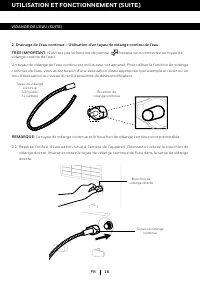
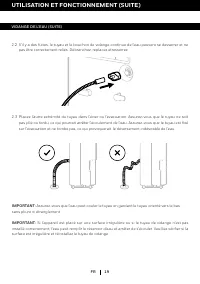
17 DRAINING THE WATER (CONTINUED) USE & OPERATION (CONTINUED) EN Locate the drain outlet at the back of the unit. Unscrew and remove the Direct Drain Cap.Insert and screw the Continuous Water Drain Tube into the Direct Drain Outlet. 2.1 A continuous water drain tube is included with this unit. T...
Page 20 - Continuous Water Drainage – Using the Auto Drain Pump option
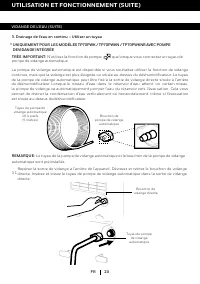
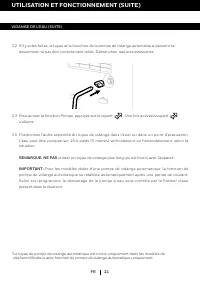
19 DRAINING THE WATER (CONTINUED) USE & OPERATION (CONTINUED) EN The Auto Drain Pump is available if you want to use the continuous drain function, but the drain is further away, or located above the dehumidifier. The Auto Drain Pump Tube can be attached to the Direct Drain Outlet located on the...
Page 23 - TROUBLESHOOTING GUIDE; PROBLEM
22 EN TROUBLESHOOTING GUIDE The following troubleshooting guide addresses the most common problems. If problems persist, call customer service. PROBLEM POSSIBLE CAUSE SOLUTION Dehumidifier does not start No electricity. Check for power. The power cord is not properly plugged in. Remove and reconnect...
Page 26 - ERROR CODE GUIDE; CODE
25 ERROR CODE GUIDE EN CODE POSSIBLE CAUSE POSSIBLE SOLUTIONS P1 Water tank not installed or positioned correctly This only appears for model TP70PWK / TP70PWKN / TP70PWKNR with Built-in Drain Pump. Position the water tank correctly into the unit. Unit will not operate until the water tank is secure...
Page 27 - REGULATION STATEMENT; FCC INTERFERENCE STATEMENT
26 Electrical products should be properly disposed of. Please recycle where facilities exist. Check with your local authority or retailer for recycling. REGULATION STATEMENT This device complies with part 15 of the FCC Rules. Operation is subject to following two conditions: (1) this device may not ...
Page 28 - Echo pour contrôler l’unité.; DÉSHUMIDIFICATEUR PORTATIF INTELLIGENT
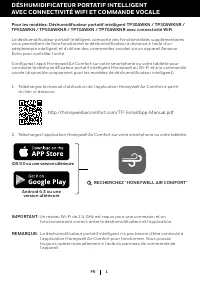
1 iOS 9.0 ou une version ultérieure Android 4.3 ou une version ultérieure RECHERCHEZ “HONEYWELL AIR COMFORT” Pour les modèles: Déshumidificateur portatif intelligent TP30AWKN / TP30AWKNR / TP50AWKN / TP50AWKNR / TP70AWKN / TP70AWKNR avec connectivité WiFi . Le déshumidificateur portatif intelligent ...
Page 29 - toujours être suivies :
2 MERCI RÈGLES DE SÉCURITÉ Merci d'avoir acheté un déshumidificateur portatif Honeywell. Ce manuel d'utilisation est destiné à vous fournir des informations importantes nécessaires pour mettre en place, exploiter, entretenir et dépanner ce produit. ATTENTION -- LIRE ET CONSERVER CES INSTRUCTIONS AVA...
Page 31 - SYMBOLE; REMARQUE; EXPLICATION; ATTENTION
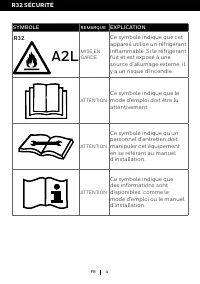
4 FR SYMBOLE REMARQUE EXPLICATION MISE EN GARDE Ce symbole indique que cet appareil utilise un réfrigérant inflammable. Si le réfrigérant fuit et est exposé à une source d'allumage externe, il y a un risque d'incendie. ATTENTION Ce symbole indique que le mode d'emploi doit être lu attentivement. ATTE...
Page 32 - La quantité maximale de charge de réfrigérant n'est pas; Avertissements supplémentaires pour les appareils avec gaz
5 FR R32 SÉCURITÉ Lisez attentivement les instructions avant d'utiliser l'appareil.Le gaz réfr igérant R32 est conforme aux UL60335-2-40 / UL60335-1.Cet appareil contient un certain nombre de grammes (voirl'étiquette signalétique à l'arrière de l'appareil) de gaz réfrigérant R32. La quantité maximal...
Page 33 - Conformité aux règles de transport.
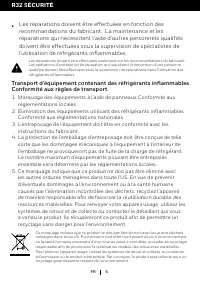
6 FR Ce marquage indique que ce produit ne doit pas être éliminé avec les autres déchets ménagers dans toute US. Pour prévenir tout effet nocif potentiel pour l'environnement ou la santé humaine provenant d'une mise au rebut incontrôlée, procéder au recyclage responsable afin de promouvoir la réutil...
Page 34 - COMMENT UN DÉSHUMIDIFICATEUR FONCTIONNE
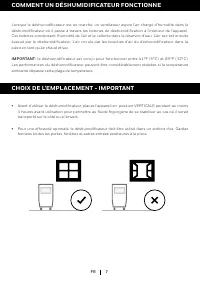
7 COMMENT UN DÉSHUMIDIFICATEUR FONCTIONNE Lorsque le déshumidificateur est en marche, un ventilateur aspire l'air chargé d'humidité dans le déshumidificateur où il passe à travers les bobines de déshumidification à l'intérieur de l'appareil. Ces bobines condensent l'humidité de l'air et le collecte ...
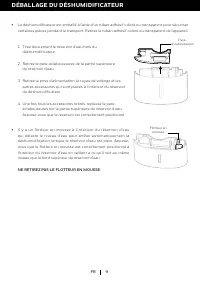
Page 36 - DÉBALLAGE DU DÉSHUMIDIFICATEUR; NE RETIREZ PAS LE FLOTTEUR EN MOUSSE.
9 FR DÉBALLAGE DU DÉSHUMIDIFICATEUR Il y a un flotteur en mousse à l'intérieur du réser voir d'eau qui détecte le niveau d'eau pour arrêter automatiquement la déshumidification lorsque le réservoir d'eau est plein. Assurez- vous que le flotteur en mousse est correctement positionné à l'intérieur du ré...
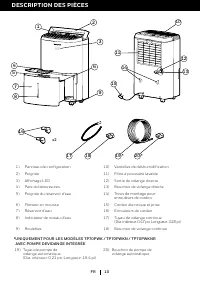
Page 37 - DESCRIPTION DES PIÈCES; Trous de montage pour
10 DESCRIPTION DES PIÈCES 11 10 7 8 1 2 3 9 6 16 15 12 13 17 18 19 20 5 4 1) Panneau de configuration 10) Vantelles de déshumidification 2) Poignée 11) Filtre à poussière lavable 3) Affichage LED 12) Sortie de vidange directe 4) Pare-éclaboussures 13) Bouchon de vidange directe 5) Poignée du réservo...
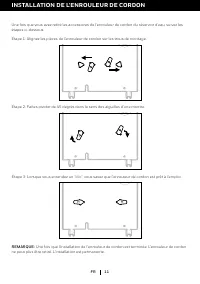
Page 38 - INSTALLATION DE L'ENROULEUR DE CORDON
11 Une fois que vous avez retiré les accessoires de l'enrouleur de cordon du réservoir d'eau, suivez les étapes ci-dessous. FR INSTALLATION DE L'ENROULEUR DE CORDON Étape 2: Faites pivoter de 45 degrés dans le sens des aiguilles d'une montre. Étape 1: Alignez les pièces de l'enrouleur de cordon sur ...
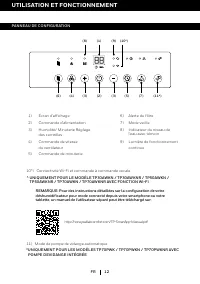
Page 39 - UTILISATION ET FONCTIONNEMENT; PANNEAU DE CONFIGURATION
12 FR UTILISATION ET FONCTIONNEMENT 1) Écran d'affichage 6) Alerte du filtre 2) Commande d'alimentation 7) Mode veiille 3) Humidité/ Minuterie Réglagedes contrôles 8) Indicateur du niveau del’eau avec témoin 4) Commande de vitessedu ventilateur 9) Lumière de fonctionnement continue 5) Commande de mi...
Page 41 - Mise en marche automatique:
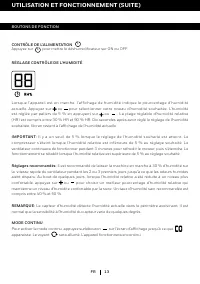
14 MINUTERIE DE CONTRÔLE Le déshumidificateur peut être réglé pour commuter automatiquement sur ON ou OFF après un laps de temps déterminé (30 minutes à 24 heure). La sélection des heures de la minuterie est affichée sur l'écran d'affichage Minuterie/ Température. REMARQUE: Avant de régler la minute...
Page 50 - GUIDE DE DÉPANNAGE; PROBLÈME
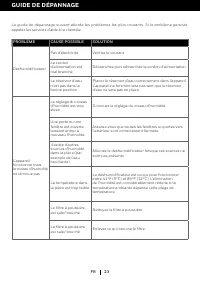
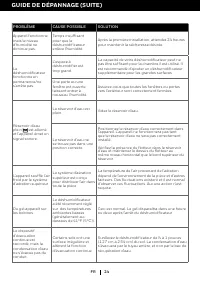
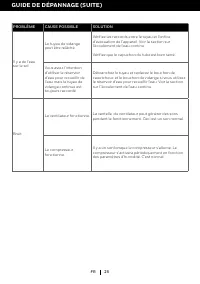
23 FR GUIDE DE DÉPANNAGE Le guide de dépannage suivant aborde les problèmes les plus courants. Si le problème persiste, appelez les services d'aide à la clientèle. PROBLÈME CAUSE POSSIBLE SOLUTION Déshumidificateur Pas d'électricité. Vérifiez le courant. Le cordon d'alimentation est mal branché. Déb...
Page 53 - GUIDE SUR LES CODES D'ERREUR
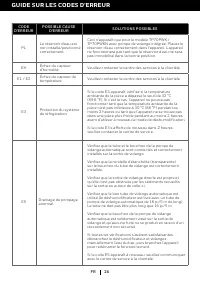
26 GUIDE SUR LES CODES D'ERREUR FR CODE D'ERREUR POSSIBLE CAUSE D'ERREUR SOLUTIONS POSSIBLES P1 Le réservoir d’eau est non installé/positionné correctement. Ceci n'apparaît que pour le modèle TP70PWK / TP70PWKN avec pompe de vidange intégrée. Placez le réservoir d'eau correctement dans l'appareil. L...
Page 54 - PRINCIPE DE RÉGLEMENTATION; DÉCLARATION DE LA FCC
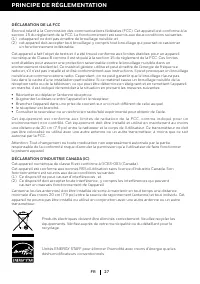
27 PRINCIPE DE RÉGLEMENTATION FR Énoncé relatif à la Commission des communications fédérales (FCC). Cet appareil est conforme à la section 15 du règlement de la FCC. Le fonctionnement est soumis aux deux conditions suivantes: (1) cetappareil ne doit pas émettre de brouillage nuisible, et (2) cet app...
Page 55 - solo para modelos con Deshumidificador Inteligente); DESHUMIDIFICADOR PORTÁTIL INTELIGENTE
1 iOS 9.0 o posterior Android 4.3 o posterior BUSCAR “HONEYWELL AIR COMFORT” ES Para modelos: Deshumidificador portátil inteligente TP30AWKN / TP30AWKNR / TP50AWKN / TP50AWKNR / TP70AWKN / TP70AWKNR con conectividad WiFi El Deshumidificador Portátil Inteligente ha incorporado nuevas características ...
Page 58 - ATENCIÓN
4 ES SÍMBOLO NOTA SIGNIFICADO ADVERTENCIA Este símbolo indica que el aparato utiliza un refrigerante inflamable. Peligro de incendio si se produce una fuga del refrigerante y queda expuesto a una fuente externa de ignición. ATENCIÓN Este símbolo indica que el manual de instrucciones debe leerse con ...
Page 59 - Advertencias adicionales para unidades con refrigerante de
5 ES Leer cuidadosamente las instrucciones antes de usar la unidad.El gas refrigerante R32 cumple con las directivas ambientales UL60335-2-40 / UL60335-1.Este aparato contiene una cierta cantidad de gramos (consultar la etiqueta en la parte posterior de la unidad) de gas refrigerante R32 . La cantid...
Page 60 - debe cumplir con las normativas de transporte.; • Las reparaciones deben realizarse siguiendo las
6 ES Esta marca indica que este producto no debería desecharse con otro artículo del hogar como residuos. Para evitar posibles daños al medio ambiente o la salud humana derivados de la eliminación no controlada de residuos, reciclelo de manera responsable para promover la reutilización sostenible de...
Page 62 - SELECCIONANDO UNA UBICACIÓN - IMPORTANTE
8 Coloque el deshumidificador en un área donde l a temperatura no descienda por debajode 41°F (5°C). Coloque el deshumidificador alejado al menos 17,7 pulgadas (45 cm) de cualquier otro objeto (cortinas o muebles, por ejemplo) que puedan obstruir el flujo de aire del frente o por las ventilas de air...
Page 63 - DESEMPACANDO EL DESHUMIDIFICADOR; NO QUITE ESTE FLOTADOR DE ESPUMA DE POLIURETANO.
9 ES DESEMPACANDO EL DESHUMIDIFICADOR Dentro del tanque de agua hay un Flotador de Espuma, que registra el nivel del agua para detener la deshumidificación automáticamente cuando el tanque de agua esté lleno. Revise que el Flotador de Espuma está colocado correctamente dentro del tanque de agua aseg...
Page 64 - DESCRIPCIÓN DE PARTES; *ESTO ES SOLO PARA LOS MODELOS TP70PWK / TP70PWKN / TP70PWKNR
10 DESCRIPCIÓN DE PARTES 11 10 7 8 1 2 3 9 6 16 15 12 13 17 18 19 20 5 4 1) Panel de Control 10) Ventila de Aire 2) Manija 11) Filtro de Polvo Lavable 3) Pantalla LED 12) Salida de Drenado Directo 4) Protector Contra Salpicaduras 13) Tapa del Drenado Directo 5) Manija del Tanque de Agua 14) Agujeros...
Page 65 - INSTALACIÍON DEL ENROLLADOR DE CABLE
11 Una vez que haya sacado los accesorios del enrollador del cable del tanque de agua - contínue con los pasos siguientes: ES INSTALACIÍON DEL ENROLLADOR DE CABLE Paso 1: Gire 45 grados en dirección a las manecillas del reloj. Paso 1: Alínee las piezas del enrollador de cable con los agujeros de mon...
Page 66 - USO Y OPERACIÓN; PANEL DE CONTROL
12 ES USO Y OPERACIÓN 1) Pantalla LED 6) Alerta del Filtro 2) Control de Encendido 7) Modo Nocturno 3) Control de Humedad/Temporizador Ajustes 8) Indicador del Nivel deAgua con Luz 4) Control de Velocidad de Ventilador 9) Luz de Operación Contínua 5) Control de Temporizador PANEL DE CONTROL (6) (4) ...
Page 67 - MODO CONTÍNUO; BOTONES DE FUNCIÓN
13 CONTROL DE PROGRAMACIÓN DE HUMEDAD Cuando la unidad es ENCENDIDA, el Display muestra el porcentaje de humedad actual. Presione ó para seleccionar su nivel preferido de humedad. La humedad es ajustable en incrementos de 5% presionando ó . El rango de humedad ajustable (RH) es entre el 30% RH y el ...
Page 70 - MODO BOMBA DE DRENADO AUTOMÁTICO*; *ES SOLO PARA LOS MODELO TP70PWK / TP70PWKN / TP70PWKNR CON BOMBA DE
16 MODO BOMBA DE DRENADO AUTOMÁTICO* La fu n c i ó n d e B o m b a d e D r e n a d o A u t o m á t i c o a y u d a a qu i t a r l a c o n d e n s a c i ó n v e r t i c a l y horizontalmente. Presione el para activar la función de Bomba, la luz del indicador se iluminará. Presione el botón para activ...
Page 77 - GUÍA DE SOLUCIÓN DE PROBLEMAS; PROBLEMA
23 ES GUÍA DE SOLUCIÓN DE PROBLEMAS La siguiente guía de solución de problemas comprende los problemas más comunes. Si los problemas persisten, llame al servicio de atención a clientes. PROBLEMA POSIBLE CAUSA SOLUCIÓN El deshumidificador no enciende No hay electricidad. Revise que haya energía eléct...
Page 78 - GUÍA DE SOLUCIÓN DE PROBLEMAS (CONTINUACIÓN)
24 GUÍA DE SOLUCIÓN DE PROBLEMAS (CONTINUACIÓN) ES PROBLEMA POSIBLE CAUSA SOLUCIÓN La unidad está trabajando pero el nivel de humedad no disminuye Tiempo insuficiente para que el deshumidificador quite la humedad. Después de la instalación inicial, deje pasar 24 horas para mantener la sequedad desea...
Page 80 - GUÍA DE CÓDIGO DE ERROR; CÓDIGO
26 GUÍA DE CÓDIGO DE ERROR ES CÓDIGO POSIBLE CAUSA POSIBLES SOLUCIONES P1 El tanque de agua no está instalado/ posicionado correctamente. Esto aparece únicamente para el modelo TP70PWK / TP70PWKN con Bomba de Drenado interna. Coloque el tanque de agua correctamente dentro de la unidad. La unidad no ...
Page 81 - DECLARACIÓN DE REGULACIÓN; DECLARACIÓN DE LA FCC
27 DECLARACIÓN DE REGULACIÓN ES Este dispositivo cumple con la parte 15 de las reglas de la FCC. La utilización del dispositivo está sujeta a dos condiciones: (1) Este dispositivo no provoca ninguna interferencia perjudicial, y (2) Este dispositivo aceptará cualquier interferencia que reciba, incluy...