Gardner Bender DM6410 - User Manual
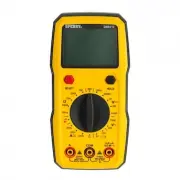
Gardner Bender DM6410 Multimeter – User Manual, read for free online in PDF format. We hope this helps you resolve any issues you may have. If you have further questions, please contact us through the contact form.


1
OPERATING INSTRUCTIONS
8 Function Digital Autoranging Multimeter
DM6410
Rotary Switch
OFF
Power off
+
Battery Measurement
A
A
400A
400A
DC Voltage Measurement
A
A
400A
400A
A
A
400A
400A
AC/DC Current
A
A
400A
400A
AC Voltage Measurement
Continuity / Diode Measurement
A
A
400A
400A
Resistance Measurement
A
A
400A
400A
Read this owners manual thoroughly before use and save.
IMPORTANT: RECEIVING INSTRUCTIONS
Visually inspect all components for shipping damage. If you find damage, notify the carrier at once.
Shipping damage is NOT covered by warranty. The carrier is responsible for all repair or replacement costs resulting from damage in shipment.
1
2
3
7
6
5
4
Figure 1
Figure 2
1
2
12
3
4
5
6
7
8
9
10
11
1.0 DISPLAY FUNCTIONS & SYMBOLS
1.1 FUNCTIONS (Figure 1)
1. Display: 2000 Count LCD screen
2. SELECT Button: Press to switch between AC current and DC current
measurement functions and continuity and diode measurement functions.
3. HOLD Button: Press to enter or exit the Data Hold mode.
4. 10A Terminal: Red test lead input jack for 10A current measurements.
5. COM Terminal: Black test lead input jack common to all measurements.
6. INPUT Terminal: Red test lead input jack for all measurements
expect 10A current measurements.
7. Rotary Switch: Turn to power the meter on and off and select the desired
measurement function. To save battery power, turn to the
“OFF”
position when
the meter is not in use. See
“ROTARY SWITCH”
section for function descriptions.
1.1 METER FUNCTIONS
Meter type:
Auto
Display Count:
2000
Battery:
Requires 2 AAA batteries
Input impedance:
10 Meg Ohm
AC Volt Ranges:
200V, 600V, best accuracy (0.8%+5)
DC Volt Ranges:
200mV, 2000mV, 20V, 200V and 600V,
best accuracy (0.5%+5)
AC Amps:
200uA, 20mA, 200mA, 10A, best accuracy (1.0%+3)
DC Amps:
200uA, 20mA, 200mA, 10A, best accuracy (0.8%+3)
Resistance Ranges:
200ohm, 2000ohm, 20kohm, 200kohm,
2M ohm, best accuracy (0.8+3)
Over Range Indication: Displayed value > 1999 or the input
measurement range, displays OL
Polarity Indication:
“-” is displayed for negative polarity
Agency Approvals:
ETL, CE (IEC/EN61010:, CAT III 600V, Pollution Degree 2)
Operating Temperature: 32°F–104°F (0°C–40°C)
Relative Humidity:
< 95%
Storage Temperature:
-4°F–140°F (-10°- 50°C)
IP Degree:
IP20
Dimension:
156mm x 78mm x 28mm
Weight:
Around 172g (without batteries)
Altitude:
Maximum 2000m
Warranty Info:
Limited lifetime warranty
1.2 DISPLAY SYMBOLS (Figure 2)
1. (M)(k)
:
Resistance Measurement
2. (u)(m)A:
Current Measurement
3. (m)V:
Voltage Measurement
4.
A
A
400A
400A
:
Diode measurement
5.
:
Continuity Measurement
6.
:
The battery is low and must be replaced
7. :
The measuring voltage exceeds 30V AC/DC
8. AC:
AC
9.
1.8.8.8
Autorange
MAX MIN
AC
DC
:
Negative sign
10. DC:
DC
11.
1.8.8.8
Autorange
MAX MIN
AC
DC
:
Data Hold is enabled
12.
Test lead input icons
"Loading the manual" means you need to wait until the file loads and becomes available for online reading. Some manuals are very large, and the time they take to appear depends on your internet speed.


