Page 2 - Content
Content Operation Notices Precautions............................................................................................................ 1Parts name ............................................................................................................ 6 Screen Operation Guide Buttons ...
Page 3 - Explanation of Symbols; DANGER; N OTIC E; Exception Clauses; property loss is caused by the following reasons.; Damage to product due to improper use or misuse of the product.
Explanation of Symbols Indicates a hazardous situation that, if not avoided, willresult in death or serious injury. Indicates a hazardous situation that, if not avoided, could result in death or serious injury. Indicates a hazardous situation that, if not avoided, mayresult in minor or moderate inju...
Page 4 - Precautions; WARNING; Operation and Maintenance
Precautions WARNING 1 Operation and Maintenance This appliance can be used by children aged from 8 years and above and persons with reduced physical, sensory or mental capabilities or lack of experience and knowledge if they have been given supervision or instruction concerning use of the appliance ...
Page 6 - Attachment
Do install the circuit break. If not, it may cause malfunction. of at least 3mm in all poles should be connected in fixed wiring. magnet buckle and heating buckle function, it can protectthe circuit-short and overload. power supply circuit and circuit break. Precautions WARNING note the following ta...
Page 8 - The indoor unit should be installed close to the wall.; Working temperature range; Maximum cooling
Caution: This equipment is not intended for use during construction. The use of equipment during construction could result in premature failure of the components and/or system and is in violation of our standard warranty guidelines and may result in the suspension or termination of the warranty. Ens...
Page 9 - Parts name; Outdoor Unit; Indoor Unit
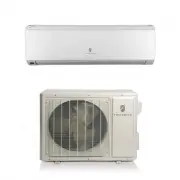
6 Parts name Outdoor Unit air inlet Connection wire air outlet (Display content or position may be different from above graphics, please refer to actual products) Indoor Unit air inlet panel aux.button horizontal louver air outlet NOTICE: Actual product may be different from above graphics, please r...
Page 10 - indicator; Display; drying
indicator Display content or position may be different from above graphics, please refer to actual products. Display heating indicator temp.indicator coolingindicator powerindicator receiverwindow drying display Parts name
Page 11 - Dry button
Introduction for buttons on remote controller Buttons on remote controller 5 6 Swing button Sleep button 1 2 4 7 8 11 12 9 On/Off button ▲/ button 3 Fan button Dry button Surge button Light button 10 Temp button button Timer button Mode button ▲ Send signal Surge mode 46 heating functionSet temperat...
Page 12 - Introduction for buttons on remote controller; button; Fan button
Introduction for buttons on remote controller ● ● ● In DRY mode fan speed is set only to low speed, for maximum dehumidification. 4 ▲ / button ▲ ▲ Press / button to increase/decrease set temperature. In AUTO mode, set temperature is not adjustable. When setting Timer On or Timer Off, press "▲�...
Page 13 - Surge; Timer
8 Surge button Under COOL or HEAT mode, press this button to activate / deactivate the Surge function. Note: Not applicable for this unit. Note: ● Outdoor temperature display is not available for some models. At that time, indoor unit receives " " signal, while it displays indoor set tempera...
Page 14 - Light; turn on the display's light and press this button again to turn; Function introduction for combination buttons; About switch between F° and C°; switch between; Replacement of batteries in remote controller; Combination of
Introduction for buttons on remote controller 1. signal sender battery reinstall 2. Replace two 7# (AAA 1.5V) dry batteries, and remove 3. Reinstall the cover of battery box. Cover of battery box 1 12 Light button Press this button to turn on the display's light and press this button again to turn o...
Page 16 - Clean and maintenance; Open panel
Clean and maintenance 1 2 3 4 Open panel !$%<=$>?@$J K J$Q!?<?$!% $ J @> X>!$K %% $ JQ$ZJ $[J$X>!$\]^?$!! J %$?K>% $Z=$%$!? _=!?@ K panel cover tightlZ. $! $Q <$[?$!%$`$?Z?!=$ ?$!J$K WARNING % $>$<Q$?!$%_$J! X$? K
Page 18 - Malfunction analysis
Malfunction analysis >$%! $| J_J$| } ? =$!@ J%% %J$ J=| _X!J<!%? | X!J$J!$ <<$ !$Z !%$J _$! | X$X$X$%? J$ _ %$<$?$ J?$?| $J$X$%? K ! %< [!X$ X$ !_! K J@%$JJ !$!?$ K J@%$JJ !$!?$ ? ? =$!@%J$K $ J$X$_K ! >$$?Q$ZK ? $?!$!$ J J$< $%< J! $ $<$!$!X< Z JX _X| $?!J$ ! J...
Page 20 - Error Code; Error code
WARNING If any of the below errors occur, please turn off air conditioner and contact a certified Technician. Do not repair product yourself. Please contact a certified HVAC company. If the air conditioner operates under abnormal conditions, it may cause There’s abnormal sound during operation. Circ...
Page 21 - Installation dimension diagram
Installation dimension diagram At least Space to the cei lin g Above 12in Space to the wall Above Air inlet side Air outlet side Above in Space to the obstruction Above Space to the wall Drainage pipe Above At least 118in Space to the obstruction At least 5.9in Space to the wall At least 5.9in At l...
Page 22 - To ensure safety, please be mindful of the following precautions.; Warning; Safety precautions for installing and relocating the unit
To ensure safety, please be mindful of the following precautions. Warning When installing or relocating the unit, be sure to keep the refrigerant circuit free from air or substances other than the specified refrigerant. Any presence of air or other foreign substance in the refrigerant circuit will c...
Page 23 - Basic requirement
"! ! 2/ 7! ! 8% #% ! +! -/ 0 #%! ! 9 # ! ! :#. /%! ! :;<% / #% =*> +! 6%*$ 0 . /!>%% / ! ! $//7 ! ! (// #%! Tools for installation Note: Selection of installation location Basic requirement $ #% ! $ / ! Indoor unit Outdoor unit 1 Level 4 Drill 7 3 10 Vacuum pump 13 :# 2 Screw driver 5 P...
Page 24 - Requirements for electric connection; Safety precaution
Requirements for electric connection Safety precaution Grounding requirement ! &###%! ! 2 #;%! +! &##%% ! 8 #/ %! ! >% % !"/0 # %! ! 2 %% ! A#7,#, +! ,% #(5
Page 25 - Installation of indoor unit; Step one: choosing installation location; Open a piping hole with the diameter of
Installation of indoor unit Step one: choosing installation location Step two: install wall-mounting frame "! ! 3%%#% /0 %#! ! - %#!'2. B3:C 4 %C#) +! :.#% .#% %! 1. Choose the position of piping hole according to the direction of outlet pipe. The position of piping hole should be a little lower...
Page 26 - The pipe can be led out in the; Step four: outlet pipe; Indoor
+ ! "%%! ! 4%/! +! D#; /# %! 2. 6# % %%/ :8C ! cut offthe hole left right 1. The pipe can be led out in the direction of right, rear right, left orrear left. left rear left right rear right Step four: outlet pipe Installation of indoor unit Note: - #% %! $ "?6 % #!'C /*0 ) union nut pipe joi...
Page 27 - then wrap it with tape.; Step six: install drain hose; drain hose; screw; Step seven: connect wire of indoor unit
4. Wrap the indoor pipe and joint of con- nection pipe with insulating pipe, and then wrap it with tape. Step six: install drain hose Installation of indoor unit torque wrench open-end wrench indoor pipe pipe union nut Hex nut diameter Tightening torque (N.m) 30~404
...
Page 28 - between indoor unit and outdoor unit go through the conduit.
Installation of indoor unit 3. power connectionwire cable-cross hole 2. 2 ## % %/ ! 3 2 N(1) Outdoor unit connection green green) red black (yellow- (brown) white (blue) 4. Put wiring cover back and then tighten the screw.5. Close the panel.6. Install the Conduit assy.1) Fix the conduit assy on the ...
Page 29 - Step eight: bind up pipe; be bound separately at the end.; Step nine: hang the indoor unit; indoor
Installation of indoor unit Step eight: bind up pipe 1. 6/ # D?% ! indoor unit gaspipe indoor and outdoor power cord liquid pipe drain hose band 2. 8#. # ! 3. Bind them evenly.4. The liquid pipe and gas pipe should be bound separately at the end. 8 // !4 %! drain hose band connection pipe indoor pow...
Page 30 - Installation of outdoor unit; WHSRQH0RXQWLQJRIWKHRXWGRRUXQLW; at least 3cm above the floor
! 40 /! ! D%/%/ / #%! +! /E /% ## #%! ! 8#%/ %! Installation of outdoor unit 6WHSRQH0RXQWLQJRIWKHRXWGRRUXQLW 1. C//%! 2. 6%# ! 1. Place the outdoor unit on the support.Fix the foot holes of outdoor unitwith bolts. 2. 2. Connect the drain hose into the drain vent. foot holes foot holes chassis outdoo...
Page 31 - Step four: connect indoor and outdoor pipes; Pretighten the union nut with; Hex nut diameter Tightening torque; The screws are packed with the terminal board.
Installation of outdoor unit Step four: connect indoor and outdoor pipes 1. Remove the screw cap of valve and aim the pipe joint at the bellmouth of pipe. 2. Pretighten the union nut with hand. 3. Tighten the union nut with torque wrench by referring to the sheetbelow. gas pipe liquid pipe liquidval...
Page 33 - Use vacuum pump
+ Vacuum pumping Leakage detection 1. Remove the valve caps on the liquid valve and gasvalve and the nut of refri- gerant charging vent.2. Connect the charging hose @,% to the refri- gerant charging of gas valve and then connect the other charging hose to the vacuum pump.3. Open the @,% com- pletely...
Page 34 - Items to be checked
+ Check after installation Test operation Items to be checked Possible malfunction The unit may drop, shake or emit noise. Have you done the refrigerant leakage test? (heating) capacity. It may cause condensation and water dripping. Is water drained well? It may cause condensation and water dripping...
Page 35 - Configuration of connection pipe
MaxK length of connection pipe Unit: + 1. Standard length of connection pipe ● ! 4. :%/#.%*! ● :*/.++ % %%! ● The calculation method of additional refrigerant charging amount (on the basis of liquid pipe): ● Basing on the length of standard pipe, add refrigerant according to the :%%G.%. ! 2.Min. len...
Page 36 - Outdoor unit charge
++ :%> : Configuration of connection pipe Outdoor unit charge Cooling and heating(_) ! ! !+ !+ ! !+ Gas pipe Diameter of connection pipe Liquid pipe _ _ 1/4'' 1/4'' or 3/8'' 1/2'' 5/8'' 3/4'' 7/8'' 3/8'' or 1/2'' 5/8'' or 3/4'' 3/4'' or 7/8'' 1/1'' or 11/4''
Page 37 - Pipe expanding method; union pipe; Outer diameter
+ Pipe expanding method Note: Improper pipe expanding is the main cause of refrigerant leakage. Please expandthe pipe according to the following steps: A: Cut the pipe the distance of indoor unit and outdoor unit. }X$$` $ $> X $?$r. pipe pipe cutter leaning uneven burr B: Remove the burrs $<Q$...
Page 38 - Displaying Part; LCD Display of Wired Controller
1 Displaying Part Fig1.1.1 Outline of wired controller 1.1 LCD Display of Wired Controller Fig.1.1.2 LCD display + If the product you bought is equipped with wired controller, pleaserefer to the following introductions of wired controller. Wired Controller(Optional)
Page 39 - Instruction to LCD Display
1.2 Instruction to LCD Display Table 1.1 No. Symbols Description 1 Swing function 2 Air exchange function (this function is yet unavailable for this unit). 3 Sleep function (Only sleep 1). 4 Each kind of running mode of indoor unit (auto mode) 5 Cooling mode 6 Dry mode 7 Fan mode 8 Heating mode 9 De...
Page 40 - Buttons; Layout of Buttons
2 Buttons 2.1 Layout of Buttons 2.2 Functions of Buttons Table 2.1 No. Name Function 1 Enter/Cancel Function selection and cancellation. 2 ▲ ķ Running temperature setting of the indoor unit, range:16~30 o C. ĸ Timer setting, range:0.5-24 hr. 6 ▼ 3 Fan Setting of the high/middle/low/auto fan speed. 4...
Page 41 - Operation Instructions; Temperature Setting
3 Operation Instructions 3.1 On/Off Press On/Off to turn on the unit and turn it off by another press. Note: The state shown in Fig.3.1.1 indicates the “Off” state of the unit after power on. The state shown in Fig.3.1.2 indicates the “On” state of the unit after power on. Fig.3.1.1 “Off” State Fig....
Page 49 - Installation and Dismantlement; Connection of the Signal Line of the Wired Controller
3.11 Other Functions a. Lock Upon startup of the unit without malfunction or under the “Off” state of the unit, press ▲ and ▼ at the same time for 5s till the wired controller enters the Lock function. In this case, LCD displays . After that, repress these two buttons at the same time for 5s to quit...
Page 51 - Dismantlement of the Wired Controller; Errors Display
and connection lines between the indoor and outdoor unit, with a minimum interval of 20cm, otherwise the communication of the unit will probably work abnormally. ĸ I f t h e a i r c o n d i t i o n i n g u n i t i s i n s t a l l e d w h e r e i s v u l n e r a b l e t o e l e c t r o m a g n e t i ...