Fisher & Paykel DD60DCW7 - Manual
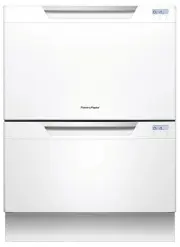
Fisher & Paykel DD60DCW7 Dishwasher – Manual, read for free online in PDF format. We hope this helps you resolve any issues you may have. If you have further questions, please contact us through the contact form.


Your model
Wash program controls
Operating instructions - Starting a wash
Note: each drawer in
double models has its
own controls and can
run independently of
the other drawer.
Discard scraps
Scrape large food particles off
(e.g. bones, fruit stones) and
remove any foreign objects
(e.g. toothpicks, strings, paper).
Start wash or set Delay start
Close the drawer and press
.
Select wash
Power the dishwasher on
then select wash program
.
1
4
5
6
2
3
Load dishes carefully
To help with wash performance,
arrange dishes so they are
evenly spaced and not nesting.
Check spray arm(s)
Ensure there are no items
blocking the spray arm(s) from
rotating.
DD60DCW7
DD60DCX7
DD60DCM7
DD24DC(T)B7
DD24DC(H)(T)X7
DD24DC(T)W7
DD60SC(T)W7
DD60SC(T)X7
DD60SCTM7
DD24SC(T)B7
DD24SC(H)(T)X7
DD24SC(T)W7
Main controls and display
Power on/off
Press
to turn the dishwasher on
or off.
Opening the drawer will automatically
turn the dishwasher on for 30 seconds.
Cancel wash/Cancel Delay start
Press
to cancel a wash that has
already started or to cancel the Delay
start setting.
If there is any water in the drawer,
it will automatically drain before the
dishwasher turns off.
Start/Pause
Press
to start, pause, or resume a
wash.
After pausing a wash, wait for 3 beeps
before opening the drawer. Forcing it
open in mid-cycle may cause damage
or injury.
Set Delay start
1
Press and hold
until
appears on the display, then
release. You are now in Delay start
mode.
2
Press
briefly again, repeating
until the display shows the number
of hours you want to delay the
start of a wash by (1 to 12 hours).
You have now set Delay start. The
wash will start once the delay time
is over, provided the drawer is closed.
Keylock
Keylock disables all the buttons
– helpful when cleaning the
dishwasher.
To activate, press and hold
until
you hear
one beep
(3 seconds). The
display will show
.
To cancel, press and hold
until
its symbol disappears from the display.
Childlock
Childlock locks the drawer and
disables all the buttons, preventing
unauthorized use by children.
To activate, press and hold
until
you hear
two beeps
(5 seconds). The
display will show
.
To cancel, press and hold
until its
symbol disappears from the display.
a
b
d
c
Stage of wash program
(see ‘During and after
the wash’)
Time remaining
Delay start mode
Keylock or Childlock is activated
Fault symbols (if these appear, see section
‘If there is a fault’ in your ‘User guide’)
Keep this document handy for easy reference.
For detailed information on the features of your dishwasher, see your ‘User guide’.
Before using your dishwasher, make sure you read the full ‘User guide’, with special attention to the ‘Safety and warnings’ section.
For contact information or if you require service, assistance or replacement parts, see the end of this document or your ‘Service & warranty’ booklet.
NZ AU US CA
QUICK START GUIDE
DishDrawer
TM
dishwasher (Classic)
Add detergent and check rinse
aid
Fill the detergent dispenser (
a
) with
powdered detergent and close the
dispenser door.
Important!
Do not place liquid detergent or tablets in
the detergent dispenser.
If the indicator on its plug (
c
) glows
bright red, refill the rinse aid
dispenser (
b
) with liquid rinse aid.
Make sure you then refit the rinse
aid plug back into its original
position.
If using a tablet, place it in the
cutlery basket (
d
) or at the bottom
of the drawer.
ECO selector
and indicator
Press if you’d
like the program
to use less energy.
The indicator will
glow red when an
Eco program has
been selected.
Wash
program
selector
Press to
scroll
through the
wash
programs.
RINSE
Prevents
odors
and soils
drying on
dishes.
Wash program indicators
These show which program is selected.
continued over
STANDARD PROGRAMS - designed to
clean and dry
your dishes
ECO PROGRAMS - designed to
clean
your dishes energy-efficiently
HEAVY
Heavily soiled
pots, pans and
dishes.
HEAVY ECO
Heavily soiled
everyday
dishes.
FAST
Lightly soiled
dishes.
FAST ECO
Lightly soiled,
non-greasy
dishes.
DELICATE
Lightly soiled
and heat
sensitive
crockery.
DELICATE
ECO
Lightly soiled,
non-greasy
and heat
sensitive
crockery.
NORMAL
Dishes that are
quite heavily
soiled or food
soils that have
been left to dry
overnight
NORMAL
ECO
Normal soiled
dishes for
optimum
water and
energy usage.
The Energy
Guide is based
on this cycle.
"Loading the manual" means you need to wait until the file loads and becomes available for online reading. Some manuals are very large, and the time they take to appear depends on your internet speed.