Fanimation TW206D - User Manual
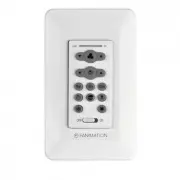
A user manual for ceiling fans and wall-mounted control units like the TW206D, this guide covers essential setup procedures, including wiring diagrams and dip switch configurations to integrate with ceiling fans or light systems. The document also addresses electrical safety requirements, compatibility warnings (such as dimmer conflicts), and remote control functions–including speed adjustments, timers, airflow reversal, and mode-specific features like air freshening or emergency shut-off. Safety precautions for electrical connections and blade operation are emphasized throughout.


Table of Contents:
- Page 1 – Wiring and Setup for DC Wall Control
- Page 2 – Remote Control Functions and Safety
- Page 3 – Wall-Mounted Control Wiring Specifications
- Page 4 – Remote Control Programming and Features
How to Wire and Operate Your Wall Control
TW206D DC Wall Control
DESCRIPTION:
Variable speed DC ceiling fan control with light dimmer switch and canopy receiver.
ELECTRICAL SPECS:
120V, 60Hz Ceiling Fan
FAN MODELS USED:
most DC Fanimation fans - see catalog or visit our website, fanimation.com for
more information
SPECIFICATION and INSTRUCTION SHEET
NOTE:
If fan or supply wires are different colors than
indicated, have this unit installed by a qualified electrician.
1.
2.
Dip Switch Set Up
(Figure 2)
WARNING
To avoid possible electrical shock, be sure electricity is
Figure 2
Figure 1
BLACK
BLACK
AC IN L
BLACK
TO
MOTOR L
BLACK
NOTE:
The remote unit has 32 different code
combinations. To prevent possible interference from or
to other remote units, simply change the combination
code in the remote and receiver.
NOTE: Factory setting is all up. Do not use this position.
LEARN key is for the ceiling fan speed learning key.
Press it to learn the speed of new fan blade.
(Only for some fan model #)
• To set the code on receiver unit, slide dip switches to
the same positions as set on the remote.
• To set the remote code with a small screwdriver or
ball point pen (neither included), slide dip switches
firmly up or down to same as receiver unit.
L
BLACK & WHITE
BLACK & WHITE
BLUE
BLUE
ANTENNA
WI-FI
GROUND
GROUND
YELLOW & GREEN
YELLOW & GREEN
YELLOW/
GREEN
YELLOW
GRAY
RED
YELLOW
GRAY
RED
Dip Switch
Dip Switch
IMPORTANT:
Using a full range dimmer switch
(not included) to control fan speed will damage the fan.
To reduce the risk of fire or electrical shock, do not use a
full range dimmer switch to control fan speed.
• Restore electrical power.
AC120V 60HZ
WHITE (AC IN L)
Connect wires using connectors as shown in Figure 1.
"Loading the manual" means you need to wait until the file loads and becomes available for online reading. Some manuals are very large, and the time they take to appear depends on your internet speed.
Was this manual helpful?
About this manual
- Brand
- Fanimation
- Model
- TW206D
- Document type
- User Manual
- Category
- Remote Control
- Language(s)
- English, Spanish
- Pages
- 4
- File size
- 1.7 MB
- Format
Summary
Instructions and diagrams for wiring the TW206D DC Wall Control unit, including dip switch configuration for connecting with a ceiling fan, along with safety warnings and code settings.
Details on remote control operations for fan speed, light settings, sleep timer, home away mode, fresh air simulation, safe exit, reverse airflow, and electrical connection safety warnings.
Electrical specifications, wiring diagrams, and setup guidance for the Fanimation TW206D wall-mounted control unit, including compatibility notes with dimmers and dip switch configuration.


