Page 2 - Special symbols
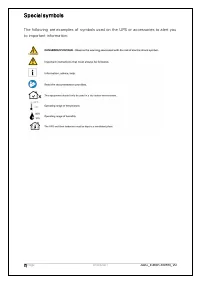
2 | Page 01/03/2021 AUG_Eato n-3SMini_V0 Special symbols The following are examples of symbols used on the UPS or accessories to alert you to important information:
Page 3 - Table of contents
3 | Page 01/03/2021 AUG_Eato n-3SMini_V0 1. Table of contents 1. Table of contents ...................................................................................................... 3 2. Introduction ...................................................................................................
Page 4 - Introduction
4 | Page 01/03/2021 AUG_Eato n-3SMini_V0 2. Introduction Thank you for selecting an Eaton product to protect your equipment. The Eaton 3SMini range has been designed with the utmost care. We recommend that you take the time to read this advanced user guide and documentations provided to take full ad...
Page 5 - Presentation; Attached DC output cord
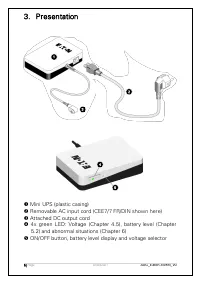
5 | Page 01/03/2021 AUG_Eato n-3SMini_V0 3. Presentation Mini UPS (plastic casing) Removable AC input cord (CEE7/7 FR/DIN shown here) Attached DC output cord 4x green LED: Voltage (Chapter 4.5), battery level (Chapter 5.2) and abnormal situations (Chapter 6) ON/OFF button, battery level di...
Page 6 - Installation; Package contents
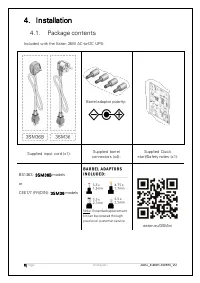
6 | Page 01/03/2021 AUG_Eato n-3SMini_V0 4. Installation 4.1. Package contents Included with the Eaton 36W AC-to-DC UPS: Barrel adaptor polarity: Supplied input cord (x1): Supplied barrel connectors (x4): Supplied Quick start/Safety notes (x1): BS1363: 3SM36B models or CEE7/7 (FR/DIN): 3SM36 models ...
Page 7 - Safety
7 | Page 01/03/2021 AUG_Eato n-3SMini_V0 4.2. Safety For product installation or additional information refer to the Quick Start and Advanced User Guide. For customer support please contact your local after sales services. DANGER: Dangerous voltage levels are present within the UPS. Do not attempt t...
Page 8 - Power supply cord / socket
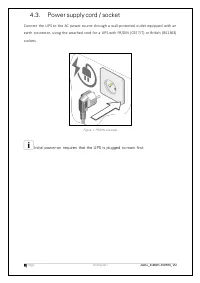
8 | Page 01/03/2021 AUG_Eato n-3SMini_V0 4.3. Power supply cord / socket Connect the UPS to the AC power source through a wall-protected outlet equipped with an earth connector, using the attached cord for a UPS with FR/DIN (CEE 7/7) or British (BS1363) sockets. Figure 1 FR/DIN example Initial power...
Page 9 - Start UPS
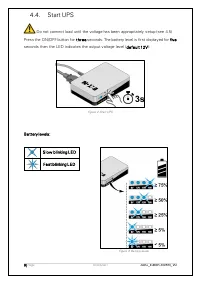
9 | Page 01/03/2021 AUG_Eato n-3SMini_V0 4.4. Start UPS Do not connect load until the voltage has been appropriately setup (see 4.5) Press the ON/OFF button for t hr ee seconds. The battery level is first displayed for five seconds then the LED indicates the output voltage level (def ault 12V): Figu...
Page 10 - Voltage setup
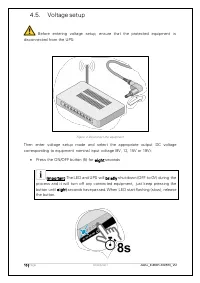
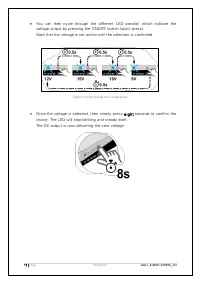
10 | Page 01/03/2021 AUG_Eato n-3SMini_V0 4.5. Voltage setup Before entering voltage setup, ensure that the protected equipment is disconnected from the UPS: Figure 4 Disconnect the equipment Then enter voltage setup mode and select the appropriate output DC voltage corresponding to equipment nomina...
Page 12 - Connect the equipment
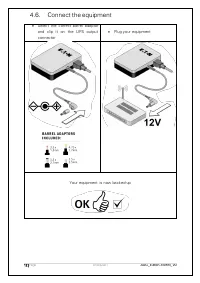
12 | Page 01/03/2021 AUG_Eato n-3SMini_V0 4.6. Connect the equipment • Select the correct barrel adaptor and clip it on the UPS output connector • Plug your equipment Your equipment is now backed-up
Page 13 - Other functions; Display battery level
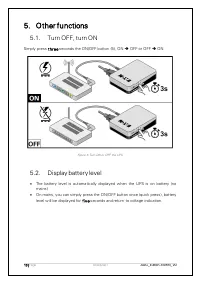
13 | Page 01/03/2021 AUG_Eato n-3SMini_V0 5. Other functions 5.1. Turn OFF, turn ON Simply press t hr ee seconds the ON/OFF button (5), ON ➔ OFF or OFF ➔ ON Figure 6 Turn ON or OFF the UPS 5.2. Display battery level • The battery level is automatically displayed when the UPS is on battery (no mains)...
Page 14 - Troubleshooting; LED blinking code
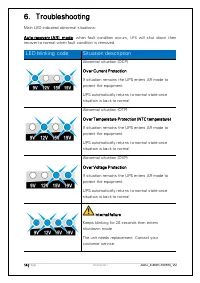
14 | Page 01/03/2021 AUG_Eato n-3SMini_V0 6. Troubleshooting Main LED-indicated abnormal situations: A ut o-recovery (A R ) mode: when fault condition occurs, UPS will shut down then recover to normal when fault condition is removed. LED blinking code Situation description Abnormal situation (OCP) O...
Page 15 - Problem
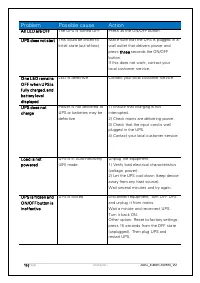
15 | Page 01/03/2021 AUG_Eato n-3SMini_V0 Problem Possible cause Action A ll LED a re O FF The UPS is turned OFF Press 3s the ON/OFF button. U PS does not start This could be linked to initial state (out-of-box) Make sure that the UPS is plugged in a wall outlet that delivers power and press t hr ee...
Page 16 - Technical specifications
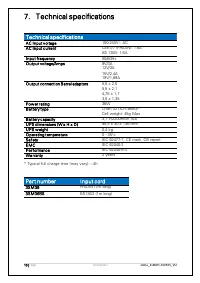
16 | Page 01/03/2021 AUG_Eato n-3SMini_V0 7. Technical specifications T e chnic al specificat ions Technical specifications A C Input v oltage 100-240V~ AC A C Input c urrent CEE7/7 (FR/DIN): 1.6A BS 1363: 1.6A Input f requency 50/60Hz O ut put voltage/Amps 9V/3A 12V/3A 15V/2,4A 19V/1,89A O ut put c...
Page 17 - Equipment care; Service and support
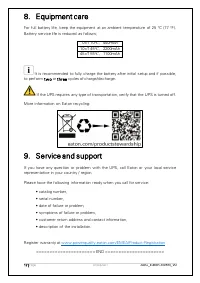
17 | Page 01/03/2021 AUG_Eato n-3SMini_V0 8. Equipment care For full battery life, keep the equipment at an ambient temperature of 25 °C (77 °F). Battery service life is reduced as follows; 0<T≤10 ℃ , 440mAh 10<T≤45 ℃ , 2200mAh 45<T≤55 ℃ , 1100mAh It is recommended to fully charge the batte...