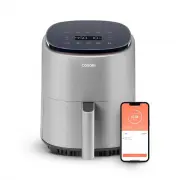
Page 2 - On behalf of all of us at Cosori,; CONTACT OUR CHEFS; explore; our recipe gallery; join; the Cosori Cooks Community on Facebook; enjoy; weekly, featured recipes
2 (We hope you love your new smart air fryer as much as we do) Our helpful, in-house chefs are ready to assist you with any questions you might have! On behalf of all of us at Cosori, CONTACT OUR CHEFS Email: [email protected] Toll-Free: (888) 402-1684 Mon–Fri, 9:00 am—5:00 pm PST/PDT explore our re...
Page 4 - IMPORTANT SAFEGUARDS; Key Safety Points; READ AND SAVE THESE
4 IMPORTANT SAFEGUARDS Follow basic safety precautions when using your smart air fryer. Read all instructions. Key Safety Points General Safety • Do not touch hot surfaces. Use handle. • Use caution when turning the basket over after cooking, as the hot crisper plate may fall out and create a safety...
Page 5 - While Air Frying
5 While Air Frying • Use on a flat, stable, heat-resistant surface away from heat sources or liquids. • An air fryer works with hot air only . Never fill the basket with oil or fat. • CAUTION : To avoid risk of electric shock, cook only in the removable basket. • To avoid risk of fire or electric sh...
Page 6 - Extension Cords
6 • Keep the air fryer and its cord out of reach of children. • Your air fryer should only be used with 120V, 60Hz electrical systems. Do not plug into another type of outlet. Extension Cords Electromagnetic Fields (EMF) Note: Items marked with the following symbol may reach high temperatures and sh...
Page 7 - SAVE THESE
7 CAUTION: Hot surface. DO NOT fill with oil. This is not a deep fryer. SAVE THESE INSTRUCTIONS CAUTION: The hot crisper plate may fall out when turning the basket over. Note: Firmly insert the crisper plate into the basket to reduce the chance of it falling out.
Page 8 - Remote Control
8 1. To download the VeSync app, scan the QR code or search “VeSync” in the Apple App Store ® or Google Play Store. VeSync App Setup VeSync App Features Note: • You can change the name and icon at any time by going to the smart air fryer screen and tapping . • You can use the VeSync app to connect y...
Page 9 - Air Fryer Diagram
9 GETTING TO KNOW YOUR SMART AIR FRYER Air Fryer Diagram Your Cosori Smart Air Fryer uses rapid 360° air circulation technology to cook with little to no oil, for quick, crispy, delicious food with up to 85% fewer calories than deep fryers. With a nonstick basket and an easy-to-use, safe design, the...
Page 10 - Display Diagram; Control Panel
10 Note: When you press a button to use a function or program, it will turn white to show that it’s active. Note: • To save or reset presets, see Cooking Functions (see page 13). • Press and hold for 5 seconds to configure your air fryer. See the VeSync in-app instructions for more information. Note...
Page 11 - BEFORE FIRST USE; Setting Up
11 BEFORE FIRST USE 1. Remove all packaging from the air fryer, including any temporary stickers and the protective cover fitted over the power plug. 2. Place the air fryer on a stable, level, heat-resistant surface. Keep away from areas that can be damaged by steam (such as walls or cupboards). 1. ...
Page 12 - Silicone Stoppers; USING YOUR SMART AIR FRYER; Air Frying
12 Figure 1.2 • The crisper plate contains 4 silicone stoppers made of safe, FDA-approved material [ Figure 1.2 ]. These stoppers keep the crisper plate fitted to the bottom of the basket, preventing the crisper plate from directly touching the basket, and in rare cases, damaging the nonstick coatin...
Page 13 - Cooking Functions
13 Cooking Functions 1. Press the function’s button to select the function. The air fryer will automatically change to the function’s default settings. a. Choose a function and adjust the time and temperature. b. Press and hold the cooking function icon for 3 seconds. a. Press and hold for 5 seconds...
Page 15 - How to Shake
15 Note: Do not use this method if there is a risk of hot liquids splashing. Shaking Food How to Shake What to Shake • Small foods that are stacked will usually need shaking, such as fries or nuggets. • Without shaking, foods may not be crispy or evenly cooked. • You can flip other foods, such as st...
Page 16 - Cooking Guide; Overfilling; French Fries
16 Cooking Guide Overfilling Using Oil Food Tips • Adding a small amount of oil to your food will make it crispier. Use no more than 2 US tbsp / 30 mL of oil. • Oil sprays are excellent for applying small amounts of oil evenly to all food items. • You can air fry any frozen foods or goods that can b...
Page 17 - More Functions; Pausing
17 More Functions Pausing Switching Temperature Units Automatically Resume Cooking Automatic Shutoff Overheat Protection • Press and hold Temp and at the same time for 3 seconds. • The temperature unit will change from Fahrenheit to Celsius. • Repeat to switch back to Fahrenheit. • Press to pause co...
Page 18 - ACCESSORIES
18 CARE & MAINTENANCE ACCESSORIES Note: • Always clean the air fryer basket and crisper plate after every use. • Lining the basket with foil (except the crisper plate) may make cleanup easier. 1. Turn off and unplug the air fryer. Allow it to cool completely before cleaning. Pull out the basket ...
Page 19 - TROUBLESHOOTING
19 Problem Possible Solution The air fryer will not turn on. Make sure the air fryer is plugged in. Push the basket securely into the air fryer. Food is not completely cooked. Place smaller batches of food into the basket. If the basket is overstuffed, then food will be undercooked. Increase cooking...
Page 20 - FEDERAL COMMUNICATION
20 This device complies with Part 15 of the FCC Rules. Operation is subject to the following two conditions: 1. This device may not cause harmful interference, and 2. This device must accept any interference received, including interference that may cause undesired operation. NOTE: This equipment ha...
Page 21 - WARRANTY INFORMATION
21 WARRANTY INFORMATION Product Name 4.0-Quart Smart Air Fryer Model CAF-LI401S For your own reference, we strongly recommend that you record your order ID and date of purchase. Date of Purchase Order ID TERMS & POLICY Arovast Corporation (“Arovast”) warrants this product to the original purchas...
Page 22 - CUSTOMER SUPPORT; Support Hours
22 CUSTOMER SUPPORT If you have any questions or concerns about your new product, please contact our helpful Customer Support Team. *Please have your invoice and order ID ready before contacting Customer Support. Arovast Corporation 1202 N. Miller St., Suite AAnaheim, CA 92806 Email: [email protecte...
Page 23 - SHOW US WHAT YOU’RE MAKING
We hope this has been helpful to you. We can’t wait to see your beautiful results, and we think you’ll want to share glam shots! Our community awaits your uploads—just pick your platform of choice below. Snap, tag, and hashtag away, Cosori chef! @Cosori Scan the QR code to get the app. @CosoriCooks ...
Page 24 - Questions or Concerns?
Questions or Concerns? Mon–Fri, 9:00 am–5:00 pm PST/PDT [email protected] | (888) 402-1684 DL041422AC_ M1_0122CAF-LI401S